GitLab Pricing in 2026: What Teams Pay

Oct 12, 202614 min read
GitLab’s current pricing structure forces a binary choice between zero-cost experimentation and a steep per-user commitment for basic operational scale, a challenge often mirrored when teams integrate Activepieces to bridge workflow gaps between development and production environments.
While the entry point is accessible for solo hobbyists, the transition to team-based development triggers a significant financial step-function. This occurs regardless of which specific features you actually utilize.
The following table outlines the current 2024 tier specifications. Resource ceilings and user caps drive upgrades, forcing you to forecast growth to avoid mid-cycle plan changes.
Gitlab pricing plans and feature limits
| Tier | Price (Per User/Mo) | CI/CD Minutes | Max Users | Key Features |
|---|---|---|---|---|
| Free | $0 | 400 mins | 5 users | Basic CI/CD |
| Premium | $29 | 10,000 mins | Unlimited | Advanced CI/CD, Code Reviews |
| Ultimate | $99 | 50,000 mins | Unlimited | Vulnerability Management, Compliance |
Small groups find the Free tier to be a cul-de-sac. The Premium and Ultimate tiers capture margin from growing organizations that require increased compute overhead for automated pipelines.
The Free tier for individual contributors
The Free tier is a restricted environment where the primary constraint is the hard cap on the number of collaborators allowed in a private namespace.
Because this tier limits a group to five users, you're forced to migrate to a paid plan the moment you hire a sixth employee, even if your technical requirements haven't changed.
Deployment models and user limits
The five-user restriction is a specific commercial lever applied only to the GitLab SaaS (GitLab.com) offering. This limitation serves as a gate to push small cloud-hosted teams into the paid Premium tier as soon as they achieve any organizational momentum.
If you choose to host the software on your own infrastructure, the self-managed Core version allows for unlimited users at no cost.
This creates a hidden operational tax where you must choose between paying for seat licenses or bearing the internal engineering overhead of maintaining your own server.
Tier rebranding and feature parity
GitLab recently renamed the self-managed Core tier to GitLab Free. While this version removes the user cap found on the SaaS Free plan, it does not grant access to the advanced capabilities found in higher tiers.
Self-hosting only unlocks the basic feature set for a larger group. If your team requires merge request approvals or protected branches, you must still pay for a Premium subscription even when running the software on your own hardware.
400 monthly CI/CD minutes means if you're running a standard suite of tests on every commit, you'll likely exhaust your compute quota mid-month, leaving your team unable to automate deployments for the remainder of the billing period, which forces developers to wait until the next cycle to push updates.
This halts all automated deployments unless you purchase additional credits or upgrade your subscription.
Premium for scaling development teams
Premium is the baseline for professional engineering organizations, removing the user ceiling to allow for departmental growth.
Tracker notes that by increasing the monthly CI/CD allowance to 10,000 minutes, GitLab provides enough compute for active development cycles, ensuring that high-frequency testing no longer triggers a service lockout.
$29 per user per month is the cost of this transition, so organizations must re-evaluate their total headcount expenses before committing to the upgrade. You must weigh the benefit of increased automation against the impact on your operational budget.
This tier introduces features like protected branches and merge request approvals. These are necessary for maintaining code quality in environments where multiple developers contribute to the same repository.
A flat 1 credit per flow run is how Activepieces decouples operational logic from the per-step compute costs that drive GitLab upgrades.
Because every flow run consumes exactly one credit regardless of its complexity, builders can break work into the granular, reliable steps good automation requires without being taxed for the precision of the build.
GitLab Ultimate plan pricing and features
Ultimate targets organizations that must satisfy external auditors or manage large-scale security risks across hundreds of repositories.
The jump to $99 per user per month is justified by the inclusion of vulnerability management and compliance dashboards, which means security teams can centralize their oversight without needing additional third-party software.
A centralized view of security flaws discovered during the build process is provided by these tools. This reduces the time you spend manually auditing code for regulatory requirements.
By bundling 50,000 CI/CD minutes, this tier supports the heavy compute demands of advanced static and dynamic analysis tools.
For a team of 100 developers, this represents a significant annual investment. It may include a vast array of portfolio management tools that smaller, agile teams find redundant to their existing stack.
If you are running this arithmetic for your own team, see what the same workload costs on Activepieces.
Hidden costs beyond the GitLab seat price
GitLab’s sticker price masks a scaling architecture where resource caps and sudden tier jumps act as a progressive tax on developer velocity.
According to Tracker, while the base seat cost is the most visible line item, the June 2023 price hike from $19 to $29 per user per month established GitLab Premium as one of the most expensive foundational tools in a modern engineering department's budget, forcing managers to justify the recurring overhead against other operational needs.
GitLab’s sticker price masks a scaling architecture where resource caps and sudden tier jumps act as a progressive tax on developer velocity.
This was a 52% increase, which means the sudden spike in subscription fees significantly outpaced standard annual inflation adjustments for IT spending.
The following data illustrates the monthly commitment for a 100-seat organization across common SaaS platforms:
| Platform | Monthly Commitment (100 Seats) |
|---|---|
| GitLab Premium | $2,900 |
| Salesforce Starter (CRM platform) | $2,500 |
| HubSpot Starter (Marketing suite) | $1,500 |
| Asana Starter (Project management) | $1,099 |
| Notion Plus (Knowledge base) | $800 |
| Slack Pro (Communication) | $725 |
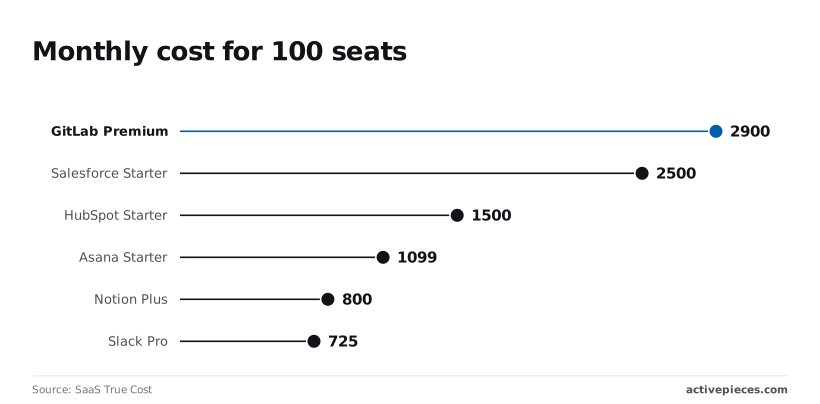
At $2,900, GitLab costs more than a 100-person team's CRM and internal chat combined. This forces you to justify a high premium for all-in-one features that often overlap with existing tools.
GitLab CI/CD minutes pricing and overage costs
Automated testing becomes a metered utility that punishes frequent deployments under GitLab’s restrictive compute quotas. On the Free tier, the 400-minute CI/CD cap allows a small team only a few hours of build time per month.
You must often wait for local builds or manually throttle your pipelines to avoid hitting the ceiling. Compared to competitors, GitLab’s base pricing starts significantly higher:
- Azure DevOps (Microsoft's CI/CD and repo service): $6 per seat [Releaseteam]
- GitHub Team (Microsoft's primary developer platform): $4 per seat [Releaseteam]
- Bitbucket (Atlassian's Git solution): $3.65 per seat [Releaseteam]
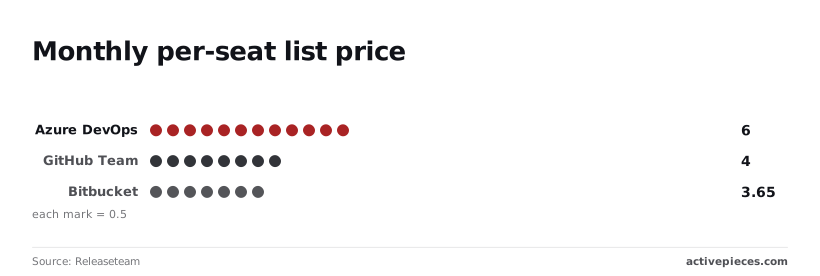
Nearly five times as much as Azure DevOps per seat is what GitLab Premium costs. You're paying a massive upfront premium before you even purchase the additional compute minutes required for complex agentic workflows using tools like Gemini 3.8 Flash or GPT-6 Astra.
Storage overages and namespace limits
Namespace-level storage limits create a success tax where the growth of a project's history directly triggers higher monthly fees.
GitLab enforces a 10GB limit per project on the Free tier, which means if you're working with large binaries or extensive container registries, you're forced to upgrade to Premium not for better features, but simply to keep your code accessible.
GitLab Premium to Ultimate upgrade costs
The transition from Premium to Ultimate is a binary cliff. It forces you to pay for enterprise security features you may not yet need just to unlock basic administrative controls.
The price jumps from $29 to $99 per user per month to access advanced vulnerability management or compliance dashboards.
This $70-per-seat increase means a 100-person team must find an extra $84,000 in their annual budget just to gain visibility into their security posture. This is a cost that often exceeds the value of the security features themselves.
Compare gitlab total cost with competitors
GitLab’s licensing structure often results in a higher total cost of ownership because it tethers essential scaling limits to its most expensive per-user tiers.
While competitors offer modular add-ons for specific resource needs, GitLab requires a full seat upgrade to unlock higher compute thresholds, effectively charging for a suite of management tools just to access more execution time.
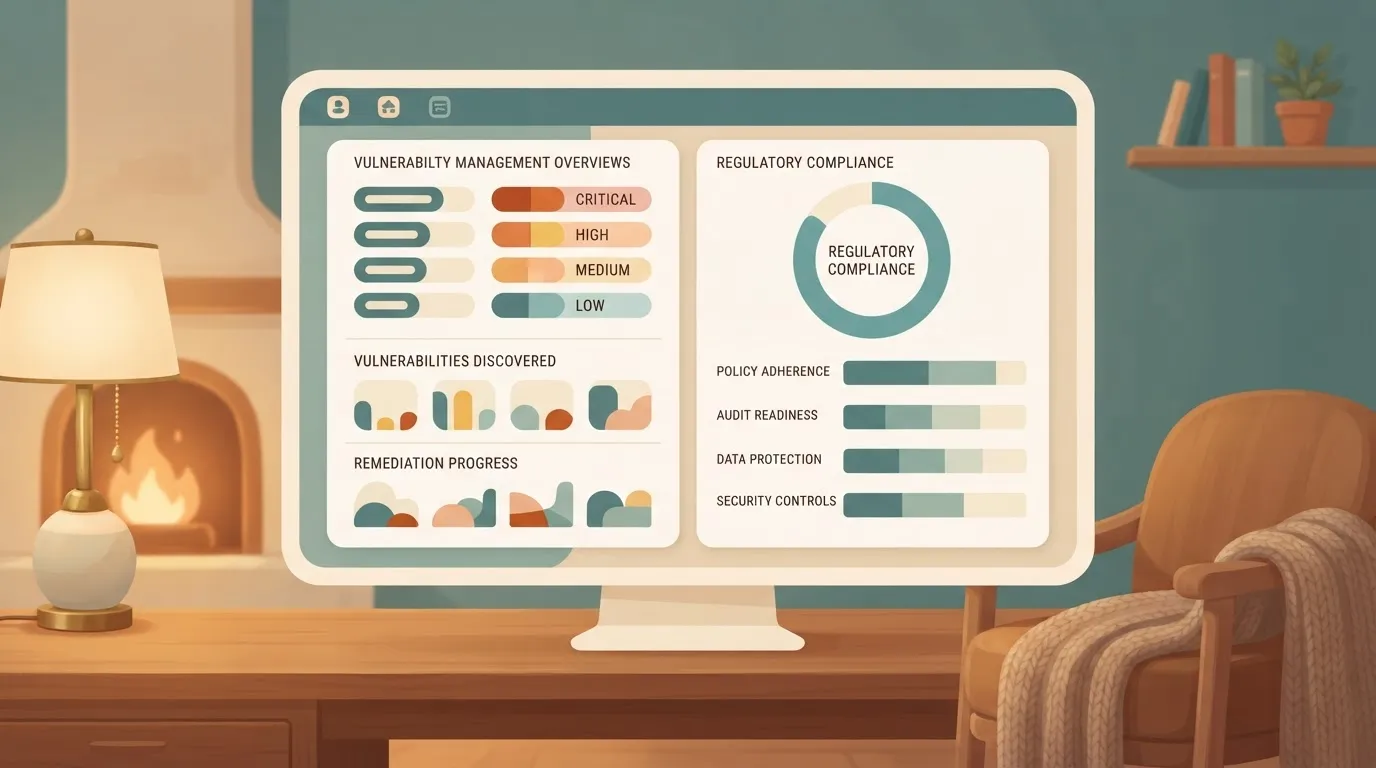
The following table compares the entry-point for professional teams across the three primary Git hosting services. It shows the disparity in base commitments and resource allocations.
| Metric | GitLab Premium | GitHub Pro | Bitbucket Cloud Standard |
|---|---|---|---|
| Base Seat Price | $29 | $4 | $3 |
| Included CI/CD Minutes | 10,000 | 3,000 | 2,500 |
| Storage Overage Cost | $5 per 10GB | $0.25 per GB | $10 per 100GB |
When you integrate advanced reasoning and coding models like GPT-6 Astra or Gemini 3.8 Flash into your pipelines, this price gap is most visible. These agentic workflows require significant CI/CD overhead.
Before they can even begin purchasing the additional compute minutes necessary for long-horizon tasks, a team on GitLab must pay a $29-per-seat entry fee, so scaling up capacity becomes an immediate financial barrier for growing projects.
In contrast, a GitHub user starts at a much lower base. This allows you to allocate more of your budget toward actual compute rather than seat licenses.
Security features further widen this fiscal divide:
GitLab restricts its most comprehensive security scanners to the Ultimate tier. This includes container scanning and fuzz testing.
This costs $99 per user per month, which prices out smaller teams from essential vulnerability management, leaving their infrastructure exposed to security risks they cannot afford to mitigate.
This forces a binary choice. You must operate without integrated security insights or pay a 240% markup on every developer seat regardless of how many users actually interact with the security dashboard. This leaves you to choose between financial efficiency and comprehensive risk mitigation.

GitHub and Bitbucket allow for more granular control. Your monthly spend scales with your actual infrastructure consumption rather than your headcount.
Worth checking against a plan that does not meter every step: one credit covers a whole run on Activepieces.
Reducing GitLab monthly spend with Activepieces automation
Activepieces reduces your GitLab monthly spend by offloading non-build automation tasks to external infrastructure, utilizing an MIT-licensed core to manage 739+ integrations without inflating your seat count. This prevents these workflows from consuming expensive CI/CD runner minutes.
Offloading event-driven tasks
When you trigger a GitLab pipeline for a simple logic gate, such as notifying a Slack channel or updating a Jira ticket, you pay a premium for a full virtual machine to initialize, execute a shell script, and shut down.
By routing these event-driven tasks through Activepieces, you bypass the per-minute billing of GitLab’s proprietary runners, a strategy used by organizations like MoneyGram and Moneypenny to maintain production uptime without scaling seat costs.
Dedicated execution environments
This architectural shift moves the execution logic to a dedicated environment where costs are tied to execution counts rather than the wall-clock time of a container spin-up.
The efficiency gain is most visible in security and compliance workflows where tokens must be rotated or permissions revoked immediately upon an infrastructure change.
Example GitLab automation execution trace
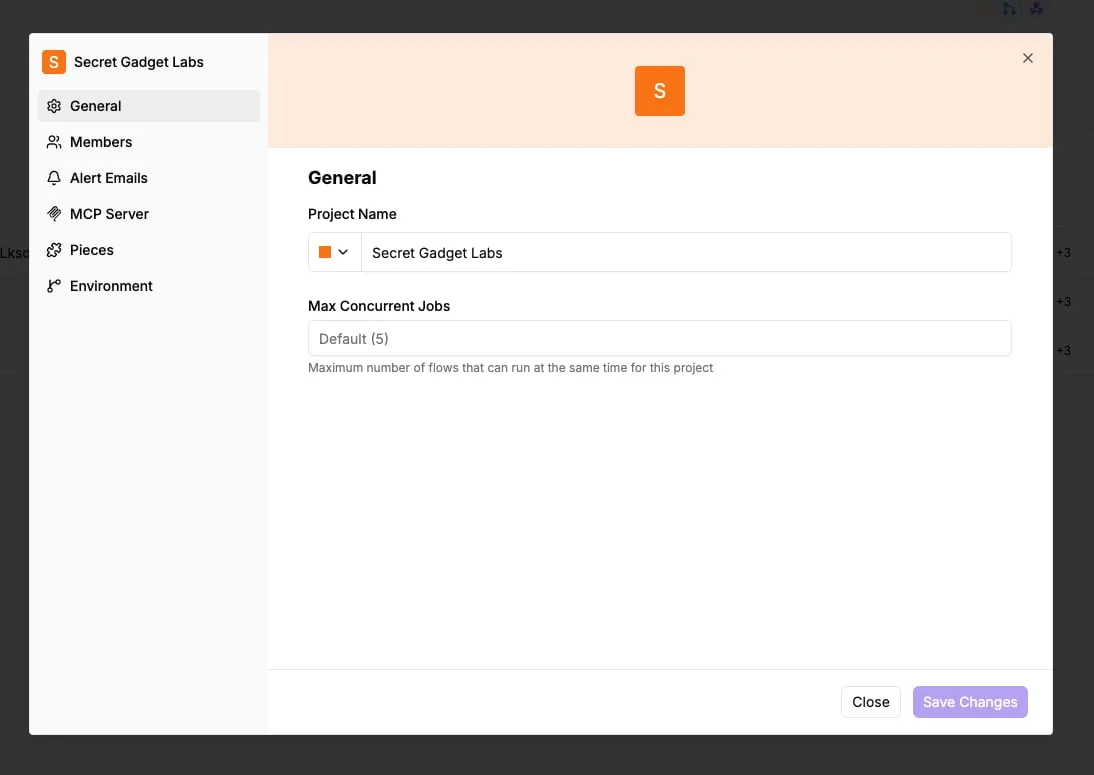
The following execution trace demonstrates a completed flow where a GitLab "Instance Stopped" event triggers a specific security protocol.
The Run Details panel confirms that the "Revoke Token" step executed in 1271ms, successfully communicating with an external API to invalidate credentials without ever touching the GitLab runner queue.
Automating GitLab admin tasks efficiently
High-frequency administrative tasks can be handled with millisecond precision outside of the primary CI/CD pipeline, as this specific run establishes. To achieve this level of efficiency at scale, you use frontier-class models to generate the underlying logic for these automations.
AI models for GitLab workflow automation
- Gemini 3.8 Flash generates complex JSON structures for custom HTTP requests during long-horizon agentic coding.
- GPT-6 Astra maps GitLab webhook payloads to disparate third-party API endpoints using complex reasoning.
- Claude Sonnet 5.5 debugs failed automation steps in real-time.
By delegating the generation and execution of these glue scripts to Activepieces, you reclaim your GitLab runner capacity for compiled builds and heavy testing suites, while keeping sensitive logic secure via air-gapped deployments that include SSO, SCIM, and custom RBAC.
SSO, SCIM, custom RBAC, audit logs, and secret manager integration run in the air-gapped build exactly as they do in the managed cloud, ensuring regulated organizations maintain full control without sacrificing enterprise governance.
Monday morning GitLab cost optimization checklist
Managing GitLab costs requires a systematic review of seat allocations and runner consumption. This prevents the growth tax from compounding across billing cycles.
Failing to prune inactive accounts means you're paying for licenses that provide zero utility, because GitLab bills based on the maximum number of users assigned to a namespace.
You often find yourself pushed into the $99-per-user Ultimate tier simply to access advanced security features. This makes the cost of a single dormant account significant enough to justify a weekly audit.
The following process allows you to reclaim budget by aligning actual usage with the current billing tier:
- Export 'Billable Users' list from the Admin Area.
- Filter for 'Last Login' greater than 90 days to identify accounts that haven't accessed the platform in a full quarter.
- Deactivate dormant seats to immediately lower the billable user count for the next cycle.
- Identify high-minute pipelines by reviewing the Usage Quotas dashboard to find jobs that are exhausting the shared runner allowance.
- Move non-critical jobs to self-hosted runners to bypass the per-minute surcharges associated with GitLab-hosted infrastructure.
Frequently asked questions about GitLab billing?
GitLab’s pricing structure is a rigid gate rather than a flexible utility. It requires you to navigate specific eligibility criteria and strict technical boundaries to manage your total cost of ownership.
Does GitLab offer a discount for open source projects?
Qualified open source projects may access the highest feature tier through a dedicated program, provided they meet specific non-commercial and licensing requirements.
This program is the only mechanism for public-interest developers to bypass the standard per-user fee. Projects failing to meet the strict Open Source Definition must pay full commercial rates even if they generate zero revenue.
Can i mix Premium and Ultimate seats in one namespace?
GitLab enforces a single-tier policy per namespace. This prevents you from assigning advanced security features only to the developers who need them.
You can't mix licenses within a single top-level group. If you want the vulnerability management tools found in the Ultimate tier for a small security team, you must upgrade every single developer in your organization to that higher price point.

This effectively subsidizes a handful of power users with a broad upgrade tax.
What happens if i exceed my monthly CI/CD minute limit?
When a namespace exhausts its monthly allotment of compute credits, all shared runner pipelines immediately fail until the next billing cycle or the manual purchase of additional credits.
This hard stop creates a production bottleneck where you can't verify code or deploy fixes. It forces you to buy add-on packs that don't roll over.
Is there a discount for annual GitLab billing?
Annual commitments are required for GitLab's paid tiers. This standardizes the cost but removes the ability to scale seat counts down during the year.
An annual contract provides a predictable line item for a budget, but it locks you into a fixed minimum spend. You continue to pay for the seats of departed employees or contractors until the next renewal period.
Related reading
References
Running the numbers
See what the same workload costs here.
Free forever plan, and every paid plan self-hosts at no extra cost.
See pricing Talk to sales