
Webflow Pricing 2026: Plans, Seats, and Real Costs
Webflow pricing structures vary significantly based on your specific traffic levels and required CMS features for your digital projects.

Covers automation pricing models: cost-per-run math, where per-task billing breaks at scale, and pricing tiers that hide true costs.
ContributorSeptember 28, 202612 min read
This article was researched and fact-checked by an advanced research system.
Webflow has evolved from a simple site builder into a robust development platform, offering a range of plans tailored to freelancers, growing agencies, and large-scale enterprises.
While the visual canvas remains the core draw, the true cost of a project often extends beyond the monthly subscription to include premium templates, custom domain hosting, and the necessary automation tools, such as Activepieces, which help bridge the gap between static content and dynamic user experiences.
Navigating these tiers requires a clear understanding of your traffic needs and CMS requirements to avoid overpaying for unused features.
As we look toward 2026, the platform's pricing structure reflects a shift toward scalability, ensuring that as your digital presence expands, your infrastructure can seamlessly adapt without requiring a complete migration.
Webflow pricing refers to a tiered subscription model that balances fixed hosting fees against variable costs for workspace seats, CMS item limits, and bandwidth requirements.
TITLE: Webflow Pricing Plans and True Costs for 2026: A Complete Guide
TITLE: Webflow Pricing Plans and True Costs for 2026: A Complete Guide
THE ARTICLE:
Webflow pricing plans and monthly costs for 2026
When you look at Webflow’s 2026 pricing, you are looking at a dual-subscription model where users must pay for both a Site plan to host content and a Workspace plan to manage the team.
Because of this decoupled structure, a single "Business" site actually costs a minimum of $69 per month once a single designer seat is included, creating a high floor for professional operations.
Webflow site plans for hosting and CMS pricing
Site plans function as your hosting and database license, scaling primarily on traffic volume and the number of items in your Content Management System (CMS). Under the 2026 billing structure, these infrastructure costs are separated from the people working on the site.
Between $14 and $60 per month is what you will pay for individual site hosting, while Workspace plans for team collaboration add another $19 to $49 per seat, which means your total monthly overhead scales significantly as your organization grows.
If you choose a DIY build, The Hoop Studio estimates your initial investment between 500 and 5,000 dollars. Even a "free" tool requires significant capital for templates and learning time.
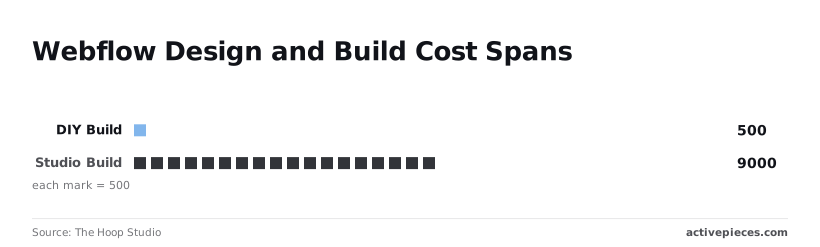
Outsourcing to a Studio build pushes costs to a range of 9,000 to 50,000 dollars, meaning the platform is no longer a budget alternative to custom development.
The $23/mo CMS plan limits you to 2,000 items, so a blog with heavy tagging quickly hits a ceiling.
10,000 items is the limit for the $60/mo Business plan, so you must carefully monitor your database growth to avoid hitting a hard ceiling. This is where high-performance sites usually land to accommodate growth, effectively capping your scaling potential at that specific threshold.

These base hosting rates reflect pure infrastructure before team management fees are applied.
The standalone Business hosting tier costs $39 when billed annually or $49 on a month-to-month cycle, but operational add-ons quickly elevate these figures, so your final monthly invoice will almost certainly exceed the advertised starting price.
When you couple the month-to-month hosting rate with a standard workspace seat, the combined monthly invoice reaches the $69 threshold.
Additional form routing and security features account for the remaining variance up to the $60 standalone estimate, which means you should budget for the higher end of the range if your project requires robust protection.
Workspace plans for team collaboration
Workspace plans are the "seat tax" required for anyone who needs to edit the site’s structure or design. While a Starter workspace is free, it limits you to two unhosted sites, so you cannot stage multiple client projects simultaneously without upgrading.
Small marketing teams will find the Core plan at $19/mo per seat is the minimum requirement to avoid sharing login credentials, as it allows up to three users.
Trustradius notes that for larger teams, the Growth plan at $49/mo per seat is the only tier with advanced permissions.
You cannot restrict a junior designer from deleting the global CSS without paying a premium.
To safeguard layouts without adding expensive seats, Activepieces executes multi-step data validation workflows under a flat rate of 1 credit per flow run, no matter how many steps the process requires.
You cannot restrict a junior designer from deleting the global CSS without paying a premium.
This ensures that breaking down complex Webflow updates into smaller, safer operational steps does not increase costs, bypassing the step-based penalties of Zapier's per-task billing and Make's per-module billing.
E-commerce plans for digital storefronts
E-commerce plans bundle CMS hosting with transaction processing, but they carry a 2% transaction fee on the $29/mo Standard tier.
This means a store doing $10,000 in monthly sales pays an extra $200 in fees to Webflow, making it more expensive than dedicated platforms.
The $74/mo Plus plan removes this transaction fee, so it becomes the mathematical break-even point once a store clears $2,250 in monthly volume.
Once you reach the $212/mo Advanced tier, you gain a limit of 15,000 items.
On the Advanced tier, this is the only way to host a complex inventory without moving to an Enterprise contract, forcing a significant jump in overhead costs once you exceed that capacity.
If you are running this arithmetic for your own team, see what the same workload costs on Activepieces.
Hidden costs of scaling a Webflow project
The transition from a solo project to a team-driven production environment reveals a pricing structure where every operational efficiency carries a specific surcharge.
While the base plan covers the hosting, the functional cost of managing that site increases as soon as you introduce collaborative workflows or global audiences.
The cost of adding team members and editors
Because Webflow separates site hosting from Workspace access, you pay twice to let a colleague touch the code.
A Workspace seat acts as a license for a specific user to enter the Designer interface, so a team of three developers requires three separate monthly fees regardless of how many sites they manage.
Because Webflow separates site hosting from Workspace access, you pay twice to let a colleague touch the code.
Beyond the core build team, adding "Client Users" or "Content Editors" allows non-technical staff to update text and images through a restricted interface. This prevents a marketing manager from accidentally breaking the layout.
Webflow caps these roles by plan tier, so a growing content team eventually forces an upgrade to a higher hosting bracket simply to grant more people login credentials.
Webflow localization add-on costs for multi-language sites
Managing a global presence requires the Localization add-on, which transforms a single site into a collection of subdirectories for different regions.
Each locale added to the site represents a new layer of data to sync, so a site translated into five languages effectively quintuples the management surface area.
Exceeding the specific limits on "Localized Items" (the translated versions of your CMS entries) prevents you from publishing new content in secondary languages until you move to a more expensive tier.

Because these locales share the same underlying CMS structure, a change to a schema in the primary language propagates across all versions. This often requires manual verification in every sub-directory to ensure the layout hasn't broken.
Bandwidth overage and high-traffic penalties
Monthly traffic is metered by bandwidth consumption, which acts as a tax on high-resolution assets and viral growth.
The following table illustrates how Webflow tiers align their data limits with the scale of the business. The jump from a marketing site to a high-traffic portal is defined by the volume of content you can store.
| Plan Tier | Monthly Cost (Annual) | Monthly Cost (Month-to-Month) | CMS Item Limit | CMS Collection Limit |
|---|---|---|---|---|
| Starter | Free | Free | 50 | 20 |
| Basic | $14 | $18 | 0 | 0 |
| CMS | $23 | $29 | 2,000 | 20 |
| Business | $39 | $49 | 10,000 | 40 |
When a site consistently hits its bandwidth ceiling, the only native path forward is an Enterprise agreement, which removes these hard caps in exchange for a negotiated contract.
A sudden spike in visitors or a heavy use of unoptimized video can otherwise result in additional charges or site throttling.
Webflow versus the leading website platform alternatives
Negotiating an Enterprise contract to bypass native constraints forces a direct financial comparison with alternative platforms that handle large-scale catalogs without requiring a sales call.
For a two-thousand-item catalog, a threshold that Webflow hits at its mid-tier CMS plan, competitors like WordPress or Shopify offer vastly different scaling economics.
WordPress as a Webflow alternative for B2B teams
WordPress remains the primary alternative for teams that want to avoid the "per-item" tax on their database.
Because the software is self-hosted, you do not pay for the number of blog posts or products you create, but you instead pay in technical debt and security maintenance.
The total cost of ownership for a large WordPress site often equals Webflow when you factor in premium plugin subscriptions and managed hosting fees.
However, the lack of hard limits on database size makes it the preferred choice for massive content archives that would trigger a Webflow Enterprise quote.
Specialized commerce and catalog management
Shopify provides a more predictable cost structure for high-volume retailers because it does not charge for individual product pages.
While Webflow limits you to 15,000 items on its most expensive standard plan, Shopify allows for virtually unlimited products, making it the superior choice for large inventories.
The trade-off is design control, as Shopify requires specialized Liquid coding to achieve the same visual precision that Webflow offers through its drag-and-drop Designer. For businesses that prioritize brand aesthetics over catalog size, the Webflow premium is often seen as a justified design tax.
Automating Webflow CMS updates with Activepieces
Activepieces is an open source, MIT-licensed AI automation platform with 735+ integrations, self-hostable in your own infrastructure or available as a managed cloud, that synchronizes external databases with the Webflow CMS to bypass the per-seat costs of manual content entry.
By treating the CMS as a destination rather than a primary data entry interface, a firm avoids the fiscal trap of adding "Editor" roles for every team member who needs to update a product price or a blog post.

MoneyGram and Moneypenny run Activepieces in production to manage complex automation environments where uptime is critical.
Connecting your data sources to Webflow
Establishing a pipeline requires a dedicated workflow automation tool to act as the translator between your business logic and the Webflow API, which is the programmatic interface used to modify site content.
Activepieces connects these external sources to Webflow’s collection fields using 735 integrations, roughly 60% of which are community-contributed, meaning a significant portion of the ecosystem relies on third-party maintenance rather than official support.
These sources include a Google Sheet containing inventory or a PostgreSQL database housing customer reviews. This direct mapping means a marketing manager never has to touch the Webflow Designer to change a live value.
The following chart illustrates how Webflow’s pricing trajectory compares to other market options as feature sets expand for mid-market operations.
While the baseline cost for Webflow remains competitive for static hosting, the delta between tiers grows as businesses add the seats and API limits required for manual scaling.
Automating Webflow CMS triggers for content updates
Efficiency is gained by replacing human oversight with event-driven triggers that execute whenever your source data changes.
Activepieces runs these automated triggers for companies like Alan and FundingSocieties, supporting compliance requirements with enterprise features such as SSO, SCIM, and audit logs.
- The workflow detects a "New Entry" trigger in the source application.
- An intermediary step uses a reasoning model like Gemini 3.8 Flash to format the text or generate SEO metadata so the content is ready for public viewing.
- The "Update Item" action sends the cleaned data to Webflow, making the changes live instantly.
Scaling Webflow CMS content with automated validation
Scaling a site to handle thousands of items requires an automated verification layer to prevent broken links or empty fields from reaching the production environment.
By utilizing Claude Sonnet 5 within an Activepieces flow, you can programmatically audit incoming data for quality before it hits the CMS. This functions as a high-speed gatekeeper for site integrity.
Moving the "intelligence" of the site out of the expensive Webflow Enterprise tier and into a flexible, pay-as-you-go automation environment is a strategic architectural choice.
Logic steps check for missing images or invalid pricing before the API call is made. A single update in the source can simultaneously refresh Webflow, a mobile app backend, and a mailing list.

When the automation breaks, failed updates are routed to a Slack channel so the technical team only intervenes when necessary.
Frequently asked questions about Webflow billing
Webflow divides its billing into separate charges for hosting individual sites and managing team access, forcing teams to pay twice for the same project. Understanding where these lines are drawn prevents unexpected credit card charges when your site scales.
Can i use webflow for free?
The Starter plan allows you to build and publish a site on a webflow.io subdomain without a credit card. However, you cannot connect a custom domain or access CMS features without moving to a paid Site plan.
Related reading
References
Running the numbers
See what the same workload costs here.
Free forever plan, and every paid plan self-hosts at no extra cost.
See pricing Talk to sales