FlutterFlow Pricing 2026: What Every Plan Costs

Nov 4, 202615 min read
According to LowCode Agency, FlutterFlow pricing is a per-seat subscription: $0 Free, $39 a month Basic, $80 a month Growth for the first seat, so your software costs rise with every new hire, much like they do with other builders and Activepieces alternatives you might weigh up.
The monthly bill therefore grows directly with team size. The plan you need depends on whether you must export code or deploy, not on how big the app is.
The plans, prices and gates
Price the gate you'll hit. The table below, from FlutterFlow's plan comparison page (checked 2026-11-04), shows what each tier costs and what makes you leave it, because everything below that gate's a plan you'll outgrow on launch day.
| Plan | Monthly | Annual | Inclusions | Limit forcing upgrade |
|---|---|---|---|---|
| Free | $0 | $0 | Visual builder and testing | No code export or deployment |
| Basic | $39 | $351 | Code export and store deployment | Needs more seats or team collaboration |
| Growth | $80 first seat | $720 | Team seats | Added seats billed extra |
Prices and plan limits checked against docs.flutterflow.io on November 4, 2026.
At $55 for the second Growth seat, a three-person client team costs far more than the headline suggests, meaning you cannot use the headline price to estimate team costs. Bill seats to the client who needs them.

Without export or deployment, a client can approve a prototype but can't put it in a store. Free lets you build and test, not ship, so it is a quoting tool, not a delivery plan.
FlutterFlow Monthly Versus Annual Billing Prices
Commit annually and Basic drops from $468 to $351 and Growth from $960 to $720, a saving of 25% on both, which locks you into a year-long contract.
If you quoted a fixed-price engagement at the old rates, it is now unprofitable.
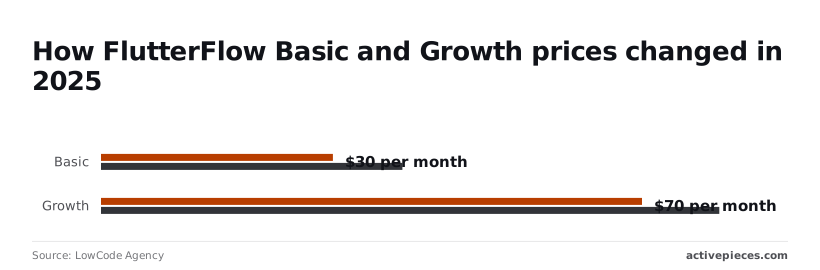
FlutterFlow raised prices in 2025, according to LowCode Agency: Basic went from $30 to $39 and Growth from $70 to $80.
A retainer priced on the old numbers now loses $9 or $10 per seat each month, so contractors must renegotiate or operate at a loss.
Even now the subscription is the smallest line. The backend and the automation behind it sit on separate bills, which is where the next section starts.
A solo founder's real first-year FlutterFlow bill
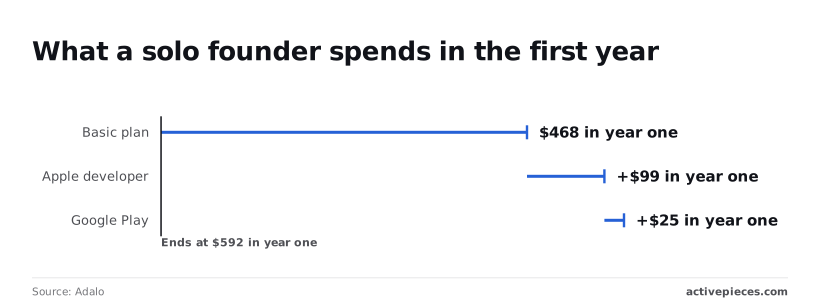
$592 in year one is what a solo founder shipping one iOS and Android app to about 2,000 monthly users pays for the plan and store accounts alone.
That's before the backend and AI bills that sit beside it, so $592 is the cost to reach users, before the cost to serve them.
A solo founder's FlutterFlow cost line items
$468 over the year is the Basic plan, per Adalo's comparison. That's $39 a month and the one line that never moves, meaning the founder's monthly commitment to Adalo is locked at $39.
Add $99 for Apple's developer account, and a one-time $25 for Google Play. Together that's the $592, or about $49.33 a month, so budget that as the floor, not the bill.
The table spreads the yearly fees monthly and shows what a three-person agency pays on the same app.
| Monthly line | Solo founder | Three-person agency |
|---|---|---|
| FlutterFlow Basic | $39 | $117 (three seats) |
| Apple developer ($99/yr) | $8.25 | $8.25 |
| Google Play ($25 once, year one spread) | $2.08 | $2.08 |
| Firebase backend | Billed on usage | Billed on usage |
| One AI or email service | Billed on usage | Billed on usage |
| Fixed lines subtotal | $49.33 | $127.33 |
If a founder prices only the subscription, they underquote the run, because the two usage-billed rows are the ones that grow with your 2,000 users.
FlutterFlow Costs for a Three-Person Agency
Of all the fixed lines, only seats multiply: three people on Basic turn $39 into $117, which lifts the fixed subtotal to $127.33 a month.
If the agency publishes under its own developer accounts, those two lines look cheap on paper while covering every client app, because the store accounts stay single.
Spread that cost across clients, or the one who pays on time quietly funds the rest.
Pass the backend and AI services through as separate invoice lines rather than burying them in a retainer.
If you are running this arithmetic for your own team, see what the same workload costs on Activepieces.
FlutterFlow Usage Limits That Force an Upgrade
Because a client cannot ship an app without them, code download and store deployment bite first, and everything else on the plan is negotiable.
Unlike the backend and AI lines you just itemized, these limits are fixed by the tier, so you can quote them to the client before the build starts.
It sets each limit against the tier that lifts it: code download, store deployment, collaborators, project count, AI requests and API access.
On day one most of those walls are already visible, so the upgrade can be priced into the quote instead of arriving as a surprise.
Code export and deployment gates
On the free tier, a client sees a working app but never owns one. Downloading the code and publishing to the app stores sit on paid tiers, so the first invoice should already carry the plan that unlocks them.
If you build on a lower tier and promise delivery later, you're absorbing the upgrade yourself, and the client never sees the cost.
Seats and collaboration limits
The moment a designer or a second developer joins, collaborator counts on the lower tiers start to matter. Every extra seat adds to the account's monthly cost, not just one person's.
Put the seat in the client's name or bill the difference, otherwise an agency account quietly subsidizes the client who needs three people on one project.
Watch project count too, because a cap on active projects means one client's build can crowd out another's.
FlutterFlow AI Request and Generation Quotas
On the free tier the AI request allowance starts as a one-time trial, and above it the allowance becomes monthly. A team that prompts heavily during the first weeks will exhaust it early, so the quota decides when you upgrade, not whether.
Treat any usage beyond the allowance as a pass-through line, as above. API access is gated the same way, so check it before promising integrations.
Hidden Costs Outside the FlutterFlow Subscription
Beyond the plan, integrations cost money. The backend, the store accounts, the paid APIs behind each connection and the upkeep of exported code all sit off the pricing page, and each lands on someone's invoice.
FlutterFlow Backend and Database Bills at Scale
While FlutterFlow builds the interface, the data lives elsewhere, commonly in Firebase, Google's hosted database and login service.
It is the paid third-party APIs that add the pressure. Maps, payments, messaging and AI calls bill per request, so a client's usage can climb while your flat fee stays put. Meter those calls per client, or a shared account quietly subsidizes the heaviest user.

App store and developer account fees
On top of the plan, Apple and Google each charge for a developer account, and neither fee appears in FlutterFlow's pricing. Apple's is recurring, so a lapsed renewal can pull a live app from the store. Whoever holds the account owns the listing.
If the agency registers it under its own name, the client can't leave without a transfer, and you carry the fee. Put the account in the client's name and invoice the fee as a pass-through, so it never becomes a line you absorb.

The cost of maintaining exported code
Though code export is a plan gate, it's also a commitment. Once you export, the Flutter project is yours to maintain: framework upgrades, dependency breakage and store policy changes arrive whether or not anyone budgeted for them.
If you edit the exported code, the changes may not flow back into the visual builder, so a team that exports splits its work between two places.
Price a maintenance retainer for any exported app, and treat the export itself as the start of that retainer, not a one-time handoff.
Worth checking against a plan that does not meter every step: one credit covers a whole run on Activepieces.
FlutterFlow Against Its Closest Alternatives on Price
Price and limits side by side
Of these four, FlutterFlow is the one that hands you source code, so it's the only one where the retainer you priced for an export can outlast the subscription.
To see which tools bill you for growth, read the table for what each entry price is charged against and where the meter starts. I've left dollar figures out because they change, and the billing basis tells you more about who ends up paying.
| Tool | Entry paid price | Free-tier limits | Native mobile output | Code export | Usage metric that triggers extra charges |
|---|---|---|---|---|---|
| FlutterFlow | Monthly, per editor seat | Build and test only; no code download or store deployment | Yes, iOS and Android from Flutter | Yes, on paid plans | None on the platform; usage lands on your backend |
| Bubble | Monthly, per app plan | Development only, with Bubble branding | Web-first; mobile is a wrapper around the web app | No | Workload on the server |
| Adalo | Monthly, per app plan | Capped app size, no store publishing | Yes, iOS and Android | No | Records and app capacity |
| Softr | Monthly, per workspace plan | Capped users and records | Web app, installable as a PWA | No | Users and records |
On FlutterFlow, the meter sits outside the subscription.
Bubble, Adalo and Softr put the meter inside the plan, so a client who grows moves up a tier on the same invoice. A shared agency account on any of the three hides that growth until one client's usage forces the upgrade for everyone.
Which FlutterFlow Alternative Fits Which Project
Choose FlutterFlow when the client needs a store-published app and the right to leave, and choose Softr when the project is an internal portal on data the client already holds.
Bubble suits a web product that'll stay on Bubble. Adalo suits a simple native app where export isn't a requirement.
When the team already writes Dart and the app'll live for years, plain Flutter becomes cheaper. Then you're paying a seat fee to avoid work your developers would do anyway.
When the team already writes Dart and the app'll live for years, plain Flutter becomes cheaper.
Automating FlutterFlow Backends with Activepieces
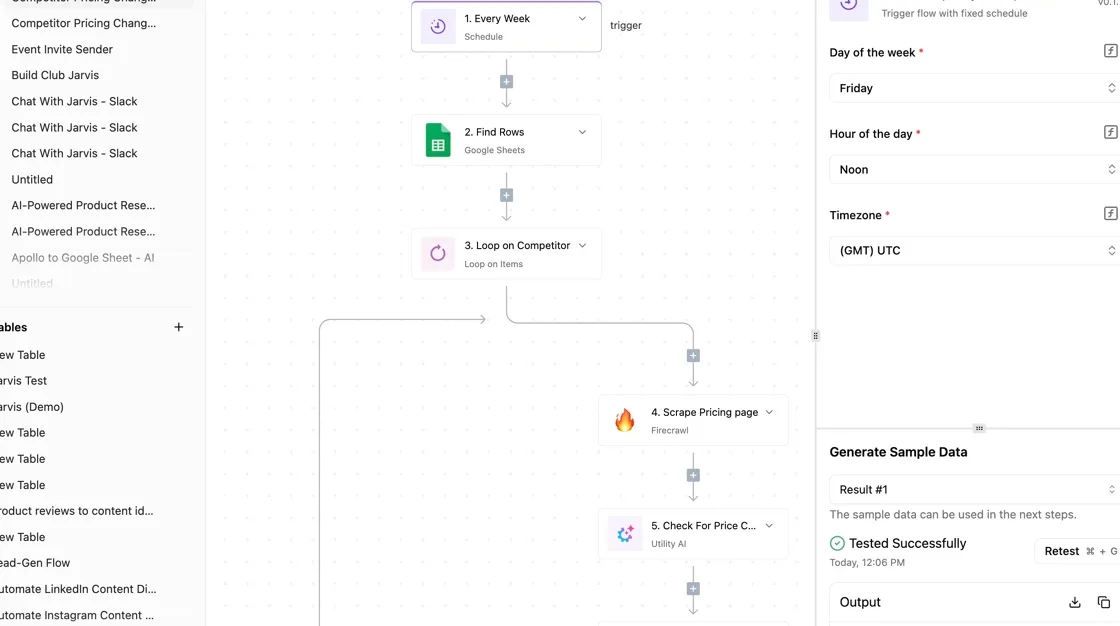
Because a FlutterFlow app can call a webhook, emails, CRM sync and AI steps can run outside the app, and that's a modest fit rather than a cure.
It moves work off the seat you're already paying for and onto a line you can meter and put on a client's invoice.
Where app logic should live
If the user must wait for it, it belongs in the app or a function you write. If it can happen a few seconds later, it belongs in a flow.
The table below shows what each route costs to set up and how it bills, so you can see which one gives you a number to hand a client.
| Option | Setup effort | Billing unit | Monthly cost |
|---|---|---|---|
| Cloud Functions | Code, deploy and maintain it yourself | Invocations and compute time | Varies with volume |
| Supabase functions | Code and deploy it yourself | Invocations | Varies with plan and volume |
| Activepieces Plus | Visual flow builder | Credits (10,000 included) | $20 |
| Zapier | Visual builder | Tasks (750 included) | $19.99 |
| Make Core | Visual builder | Credits (10,000 included) | $9 |
With the coded options there's no flat fee to invoice against, so one busy client's traffic quietly lands on your shared project.
The three automation tools cap the bucket, so you see the overrun before the client does. Zapier's 750 tasks run out A chatty sync is where you hit the ceiling first.
Trigger workflows from app events
Create a flow that starts with a webhook trigger, then add an API call in FlutterFlow that posts to the flow's URL with the fields the flow needs.
Keep the payload small and let the flow fetch the rest. Give each client their own flow, so usage stays attributable.
On cost, the Activepieces pricing page lists 1 credit per flow run, whatever the number of steps, with Plus at $20 a month for 10,000 credits.
A ten-step sync therefore costs the same as the two-step shortcut it replaced, whereas Zapier's pricing page bills per task and Make's bills per module, so every step counts.
You can split the email, the CRM write and the AI call into small flows without the invoice noticing, and the whole thing stays optional, an add-on to your FlutterFlow plan and no replacement for it.
That leaves the backend, where the real spend sits.
Choosing a FlutterFlow Plan This Week
Choose the FlutterFlow plan by the single gate you must pass, and buy the lowest tier that clears it. The backend is where the spend sits, so put your attention on its limits. Work through this order on Monday:
- List what you ship: store app, web app, or both, whether anyone needs the source code, and how many people edit.
- Find the one gate that applies, either code export or deployment.
- Start on the lowest tier that passes that gate.
- Set billing alerts on the backend and any paid services.
- Recheck the pricing page before you pay annually.
Because the decision usually is short, each step below is short too.
Write the answer on one line per client project. If a client's contract says they own the code, export is your gate. If they only need a live app, deployment is.
Skipping this is how a shared account ends up on a higher tier because one project needed it, with every other client riding along unbilled.
Read the current plan table and stop at the first tier that clears your gate. Seats come second: count only people who edit, not people who review screenshots.
If one project needs the gate and the rest don't, bill that project for the tier difference rather than spreading it invisibly across the retainer.
Set alerts and recheck before annual billing
Set alerts on the backend account before launch, since usage there grows with users while your FlutterFlow bill stays flat. Alert at a level you'd be willing to explain on an invoice.
Before committing to an annual payment, reopen the pricing page, because tier limits and prices change and a yearly prepayment locks in whatever you misread.
With the plan settled, the remaining question is what the whole bill looks like once everything is added up.
Frequently asked questions
Is FlutterFlow free to use? Yes for building and testing, but the free tier stops short of the two gates that matter: exporting code and deploying a finished app.
You can prototype for a client at no cost, so price the first invoice as if the paid plan already exists.
Can I cancel or downgrade FlutterFlow at any time?
Yes, it's a subscription, and you can move to a lower plan or leave. The catch is what you lose on the way down: if the plan you drop to doesn't include code export or deployment, those stop working.
Export a copy of the code before downgrading, and confirm the client's app isn't still being served through a plan you're about to shrink.
Do I own the code FlutterFlow generates?
On a plan that includes code export, you can take the generated code and run it without FlutterFlow. Once you edit that copy by hand, it no longer syncs cleanly with the visual project, so decide early which one is the source of truth.
Whoever holds the account holds the project, so put it in the client's name or write the handover into the contract.
Does FlutterFlow charge per app user?
No, the subscription is priced per builder seat and plan, not per person who installs your app. Users still cost you money, but the charge lands on the backend: database reads, storage, authentication and any paid services behind the screens.
When an app is a hit, the FlutterFlow line stays flat and the others grow, so quote the client a usage-based run cost rather than a fixed one.
Is there a discount for students or education? FlutterFlow has offered education-oriented access, but eligibility and terms change, so check its pricing page before relying on it.
For an agency, assume no discount applies. A student rate attached to one person's account won't cover a client project, and putting client work on it is the kind of quiet cross-subsidy that causes trouble later.
Related reading
References
Running the numbers
See what the same workload costs here.
Free forever plan, and every paid plan self-hosts at no extra cost.
See pricing Talk to sales