Best AI Agent Builders for Sales Teams, Ranked

Oct 17, 202613 min read
The best sales agent builder is the one that can act in your CRM and inbox, pause for a rep's approval before sending (a pattern workflow tools like Activepieces have made familiar), and stay affordable at your run volume.
An AI agent builder for sales teams is software that lets you set up an AI to read context and decide what to do. It then acts in your CRM (the system of record for accounts and deals), email and calendar.
Pick by the constraint that binds you:
- If customer data must stay in your own environment, choose an open source or self-hostable builder, such as one with an MIT-licensed core, or n8n.
- If speed of setup across many apps matters most, Zapier is the broad option.
- If every outbound message needs a human sign-off, Relay.app is built around that step.
- Lindy suits individuals who want a ready-made assistant.
- If your reps already live in one CRM, that vendor's own agents carry the least integration risk, at the price of lock-in.
The table ranks six builders on the three tests that decide this:
- where the agent can act
- whether a human approves
- what the bill does as runs grow
Best sales agent builders, ranked
| Builder | Vendor-page price | Strength | Limit | Best for |
|---|---|---|---|---|
| Activepieces | MIT-licensed core, free to self-host; cloud free plan with 1,000 credits a month and unlimited flows, paid plans from $20 a month | Self-hosting keeps data in your environment | Fewer prebuilt app connections than Zapier | Teams that control where CRM data sits |
| Zapier | Tiered plans metered by tasks | Widest app coverage | Hosted only, and cost grows with every step run | Fast setup across many tools |
| n8n | Free self-hosted edition; cloud plans metered by executions | Fine control over branching logic | Needs a technical owner | Ops teams with an engineer |
| Relay.app | Free tier and paid plans on its pricing page | Approval steps built into workflows | Narrower integrations | Approval-first outreach |
| Lindy | Subscription with usage credits | Ready-made email and calendar assistants | Credit use is harder to forecast at volume | Individual reps and small teams |
| HubSpot Breeze / Salesforce Agentforce | Bundled into each CRM vendor's plans and usage terms | Native access to CRM records | Useful mainly inside that one CRM | Teams already committed to that CRM |
__
Checked 2026-10-17.
None of the price column comes from reviews or resellers; every entry reflects what each vendor's own pricing page said on 2026-10-17.
Everything below works on Activepieces' free plan. Start without code or a credit card.
Four criteria that decide a sales agent platform
Rank a sales agent platform on four criteria:
- the apps it can act in
- approval before anything is sent
- where it runs and where your data sits
- what it costs at 1,000 and 10,000 runs
Which apps the agent can act in
Count actions, not logos. A connector that can only read a contact record can't log a call or move a deal.
One open source builder's published integration listing shows the spread: 45 actions for HubSpot, 30 for Pipedrive and 27 for Salesforce.

11 actions is what the same listing shows for Gmail, so inbox coverage is thinner than CRM coverage. Confirm that drafting, labeling and reply handling are among those 11 before relying on them.
Human approval before it acts
The risk is an agent that emails a prospect or overwrites a CRM field with no one having looked. Require a step that pauses the run, shows the rep the exact message or field change, and continues only on an explicit yes.

Check whether the pause survives hours or days, and whether the approver is recorded. Without that record, you can't reconstruct who authorized a send.
Because every connection routes prospect names, emails and deal notes through someone's servers, ask whether you can run the platform on your own infrastructure, which region the hosted version stores data in, and whether your records are used to train anything.
Sales AI agent builder pricing at scale
Price the same job at 1,000 and at 10,000 runs a month, so you're comparing monthly bills, not per-run rates. Platforms bill per run, per step or per credit, and a job with six steps can cost six times what the headline suggests.

Check whether the jump between volumes is linear or crosses into a higher tier.
Six sales AI agent builders, ranked and reviewed
Because it meets all four tests, Activepieces ranks first.
It acts in your CRM and inbox through 741 integrations, can pause for rep approval, and can be self-hosted under an MIT-licensed core, and every plan, including the free one, allows unlimited flows, so you won't outgrow the free tier based on how many automations you build.
Connect integrations as agent tools
A builder with an MIT-licensed core can put all 741 of its integrations to work as agent tools the moment each one is connected.
The HubSpot or Gmail action that runs as a step in your flow is the same action registered as a tool on the project's MCP server, so Claude, ChatGPT, Cursor or an agent you built yourself can call it.

The mechanism is visible in packages/integrations in the open source repo and in the Integrations Framework and MCP Server documentation.
Its approval step lets a flow stop until a rep signs off, so an email draft doesn't become a sent email unreviewed.
If you self-host, prospect data can stay inside your own infrastructure, which shrinks the number of outside parties holding it.
The weakness is that its connector catalog is smaller than Zapier's, so a niche sales tool may need a custom integration, and someone has to maintain it. Self-hosting also moves patching and uptime onto your team.
Best for teams that want control over data and cost, and can spare some engineering time.
You can try the top-ranked builder free through its cloud sign-up; the free plan is $0 with no card, and includes 1,000 credits a month, unlimited flows and up to 5 users.
2. Zapier Agents
Zapier Agents extends the Its app catalog includes integrations for CRMs and inboxes.
Check cost at higher run volume on Zapier's own pricing page; the platform is hosted-only and metered on usage. Best for small teams that value breadth and speed over cost control.
3. n8n
n8n is a workflow tool with AI agent nodes that can be self-hosted under its source-available license. It has deep flexibility and strong control over where data sits.
Approval gates and error handling mostly have to be built yourself, by someone comfortable with technical configuration. Best for teams with an engineer who wants fine-grained control.
Relevance AI is built around agents and teams of agents, and it's strong at research and lead-qualification tasks.
Verify its CRM and inbox connector depth with a real test job, not the demo. Best for teams whose main job is prospect research.
Lindy's quickly built assistants for email, scheduling and follow-up, and it's easy to start with. The weakness is narrower control over self-hosting and over exactly where approvals sit. Best for individual reps or very small teams who want an inbox assistant without a build project.

6. HubSpot Breeze and Salesforce Agentforce
HubSpot's Breeze agents and Salesforce's Agentforce sit inside the CRM itself. Their strength is depth: they see your records natively, and the permissions you already set apply to them.
The cost is lock-in. Every agent you build only works within that vendor's ecosystem, so switching CRMs later means rebuilding. Best for teams already committed to one of these CRMs who accept that dependency.
The cost is lock-in. Every agent you build only works within that vendor's ecosystem, so switching CRMs later means rebuilding.
Easier to see it running than to read about it: set it up free, no card.
Build a lead-qualification agent with Activepieces
For this job, Activepieces fits because its AI agent step sits among the same 741 integrations that touch your CRM and inbox. A human approval step can hold the flow before anything is sent.
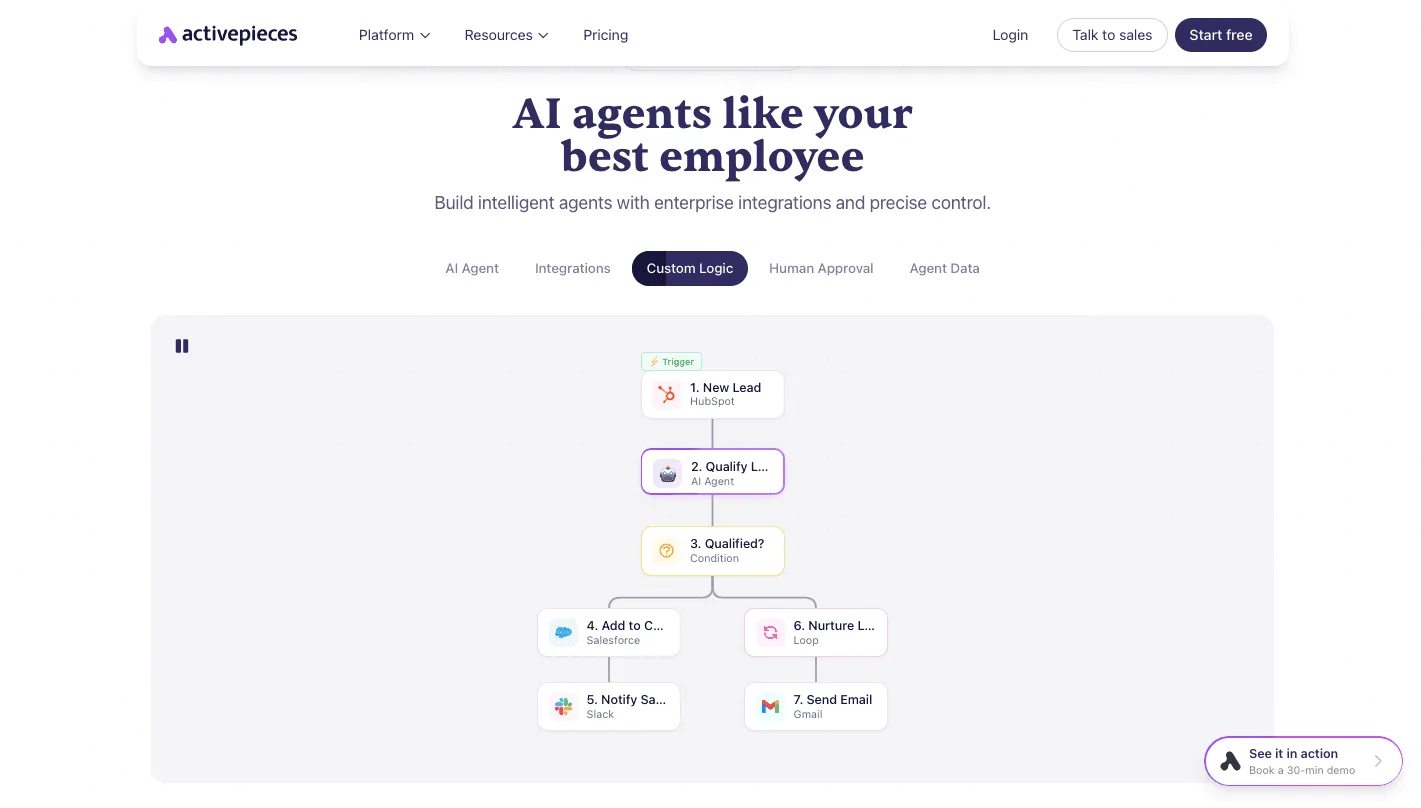
Its own example workflow runs from a HubSpot new-lead trigger through an AI qualification step and a condition, then to Salesforce, Slack and a Gmail send.
An unreviewed send is the largest liability in the flow, so the build below keeps that shape but puts a rep's approval in front of the email. The integrations catalogue shows which CRM and mail connectors you can swap in.
Send new CRM leads to Google Sheets
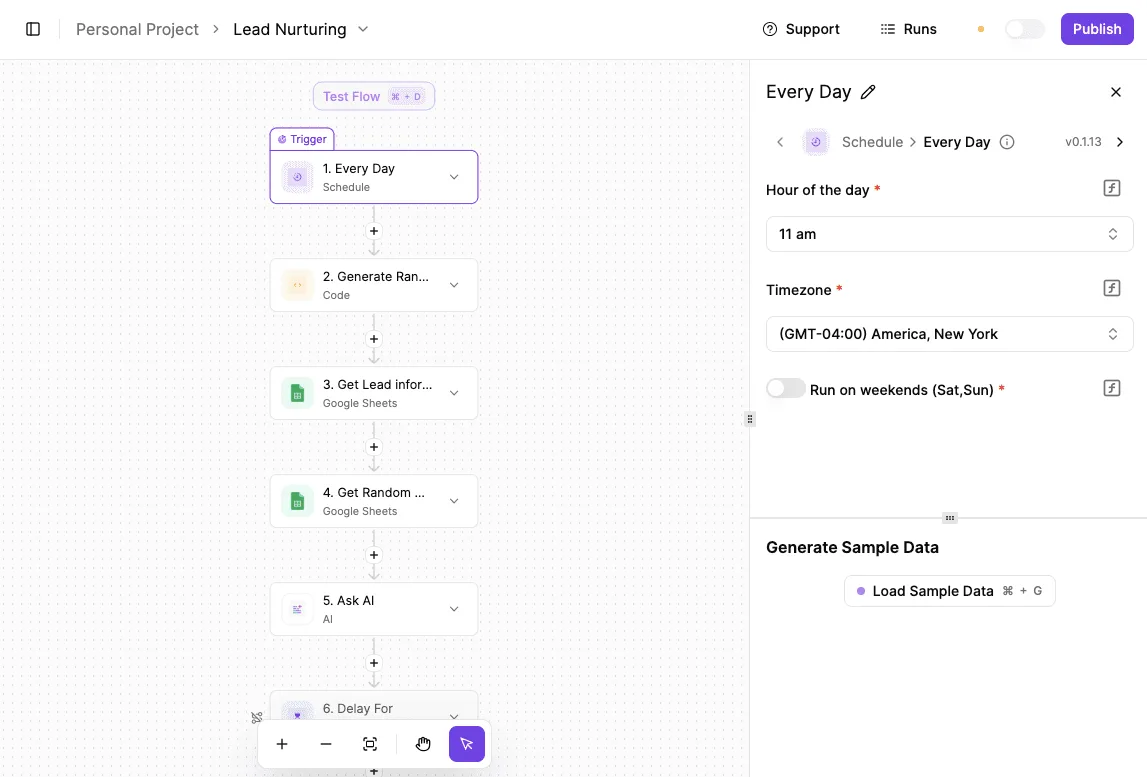
Start with the new-lead trigger for your CRM, then add a Google Sheets step that inserts a row with name, email, company and lead source. Write to a sheet before connecting the agent, because the sheet is your record of what entered the flow.
Stage 2: add the AI agent step and scoring prompt
After the sheet row, add the AI agent step and pass in only the fields from Stage 1. The prompt should ask for four outputs: a score, a one-sentence reason, a qualified yes or no, and a draft reply.
Give it no send tool. The agent drafts, and it can't act in the inbox on its own, so a bad score costs you a wrong draft and not a sent email.
Stage 3: require rep approval before sending
On the qualified output, add a condition, and on the yes branch insert the human approval step. It pauses the run and notifies the rep, who sees the lead, the score, the reason and the draft.
Place the Gmail send after the approval, on the approved branch only. On the declined branch, end the run. Every send now has a named person behind it, which is the control an auditor will ask to see.
Stage 4: write the result back to the CRM
Finish with a CRM update step that records the score, the reason and the rep's decision on the lead.
Test with two leads, one approved and one declined, and check that the CRM and the sheet agree with what the mailbox shows.
Grant the narrowest permissions each one allows, because each connection you add here is another account the flow can read or write. You can try this build free at https://cloud.activepieces.com/sign-up.
Testing your sales agent builder
Pick the builder by running one identical lead-follow-up job on two shortlisted tools and scoring both on the same sheet.
- Pick one lead-follow-up job. A new inbound lead arrives, the agent reads the record in your customer relationship management system (the CRM), drafts a reply, and logs the activity. Keep it narrow. A broad job hides which tool failed and why.
- Write pass criteria before you build. State in advance what counts as success: the agent reads the correct record, writes only to the fields you permit, drafts nothing that contradicts the record, and sends nothing without sign-off.
- Build it on tool A. Connect it to a test inbox and a sandbox copy of the CRM, not live data. Every connection you grant is a standing liability, so record which permissions the tool asked for and whether you could narrow them.
- Build the same job on tool B. Use the same lead, the same records and the same criteria.
- Score both on the sheet. Give each tool a column and each of these a row: whether it acted in your CRM and inbox, whether it paused for a rep's approval before sending, where it runs and who can see the data, and how many manual fixes the run needed. Note where the approval step sits. An approval that can be skipped by configuration is a control that depends on whoever configures it.
- Project cost at your real monthly run count. Take the number of leads your team actually handles in a month, multiply by the pricing unit each vendor charges, and include any per-step or per-seat charges. A tool that looks cheap per run can become the expensive one at your volume.
If your whole job lives inside one CRM, and the CRM vendor's own agent passes the approval and cost rows, choose it. You lose some flexibility, but you avoid an extra connection to govern.
If the job spans the CRM, the inbox and other tools, choose the general builder that passed.
Frequently asked questions
Once a builder has passed the shared test, four questions are still open, and each answer below turns on who can see and change your customer data.
Do I need a CRM-native agent like Agentforce or Breeze?
Choose Agentforce (Salesforce's agent layer) or Breeze (HubSpot's) only if nearly all of the agent's work happens inside that one CRM. They read your records and permissions without a separate connection, which leaves you fewer credentials to hold and audit.
Reach is the cost: once the job touches the inbox, a spreadsheet or a billing tool, you're back to adding connections, and you are tied to one vendor's pricing and roadmap.
If the job crosses systems, the general builder that passed your test is the safer default.
Can an AI agent send sales emails without a rep approving them?
Technically yes, but for outbound email to prospects you shouldn't allow it. Once sent, a message can't be recalled, so an error in a name, a claim or a discount reaches the customer and is attributed to your company.
Require a pause where the rep sees the exact draft and the record it relies on, then approves, edits or rejects it.
Test this directly: if a tool can only notify a rep after sending, or approval is a setting that can be switched off without a trace, treat it as not meeting the requirement.
Is a free AI agent builder enough for a small sales team?
To run your test job and judge the tool, a free tier is enough, though usually not to run it in production.
Free plans tend to restrict run volume, connections or approval and access controls, which are the features that matter once real prospects are involved.
Remember also that the builder's price is only one cost: the language model the agent calls is usually billed separately, so it grows with every run. Price your actual volume, including a few retries, before treating any tier as sufficient.
How often do these prices and limits change?
Often enough that you should treat any published price as a snapshot, not a commitment. Vendors revise tiers, run allowances and model charges without much notice, and a plan that fit your volume at purchase may not at renewal.
Confirm current terms on the vendor's own pricing page before you commit, and record the date you checked.
Prefer contracts or plans that let you leave without penalty, and keep your test job documented so you can rerun it on a competitor when the numbers move.