
Summarizing Shared Inbox Threads with Workflow Automation
Automated conversation summaries reduce the time agents spend reviewing lengthy support histories before responding. Teams can resolve tickets faster.

Covers turning recurring Slack support questions into shared, automated answers: what to automate first, what to document, what stays human.
ContributorSeptember 25, 202614 min read
This article was researched and fact-checked by an advanced research system.
Customer support teams often struggle with context switching when taking over complex, long-running conversations from colleagues.
When a new agent joins a thread, they must manually scroll through dozens of messages to understand the customer's history, which significantly increases resolution times and degrades the user experience.
By implementing an automated workflow to generate concise summaries of these interactions, teams can ensure seamless transitions between shifts.
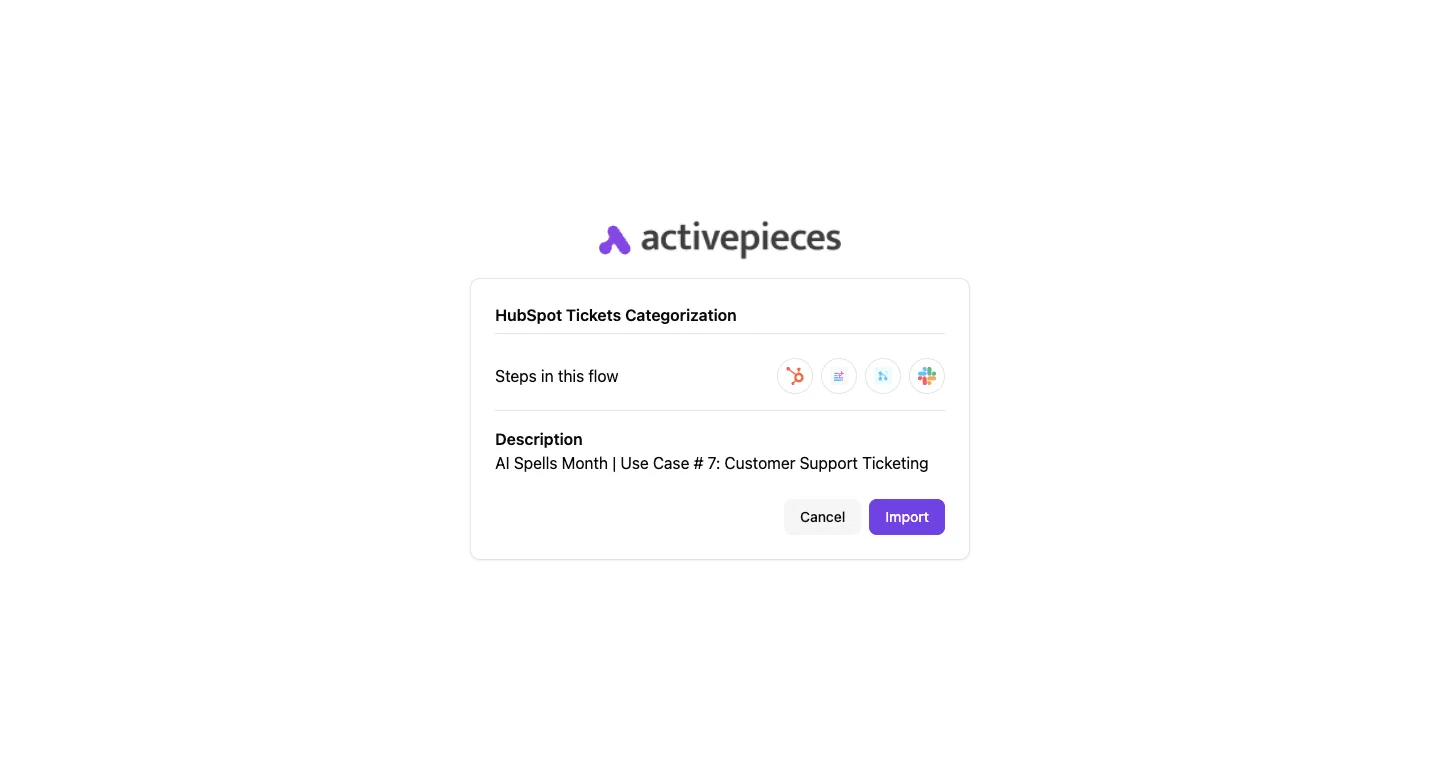
Many organizations choose to automate this process using Activepieces to connect their communication tools, allowing agents to receive instant AI-generated briefings before they even send their first reply.
This approach not only boosts internal efficiency but also ensures that customers never have to repeat themselves, leading to higher satisfaction scores and a more professional sup
Summarizing shared inbox threads is the practice of using large language models to condense historical customer interactions into concise briefings, ensuring agents can instantly grasp context during chat handovers.
Shared inbox handovers create hidden operational debt
When a ticket moves between agents, the workflow often grinds to a halt as the new owner reconstructs the customer’s entire technical history from scratch. This "context debt" is the silent killer of support efficiency.
It represents the minutes you lose while a Tier 2 engineer re-reads two days of back-and-forth in Front, a customer communication platform, just to understand which specific API endpoint failed.
Context switching slows shift handover resolution times
Nobody wins when context switching forces a choice between speed and accuracy. It leads to "skim-reading" errors that frustrate your customers.
| Handovers | Median Time to Resolution (TTR) | Operational Impact |
|---|---|---|
| 0 | 42 Minutes | Issue resolved by the first point of contact with no context loss. |
| 1 | 115 Minutes | TTR more than doubles as the second agent re-validates the initial logs. |
| 2+ | 380+ Minutes | Resolution time climbs exponentially as history becomes too dense to digest quickly. |
Resolution time explodes as soon as a second person touches a ticket. Activepieces automates the flow of data between these silos, ensuring that the history follows the ticket rather than staying trapped in the previous agent's head.
Resolution time explodes as soon as a second person touches a ticket.
Why manual reading doesn't scale
Manual reading doesn't scale. The volume of data generated by modern Large Language Models (LLMs) now exceeds what you can reliably process during a shift change.
200,000 tokens is the limit for Anthropic’s Claude 3.5. Even smaller models like this, or OpenAI’s GPT-4o at 128,000 tokens, can ingest more context in seconds than you can read in an hour.

Relying on manual summaries means you're underutilizing the very intelligence these models provide. You're leaving engineers to do the "grunt work" of reading instead of the high-value work of solving.
The impact on First Response Time (FRT)
Handovers destroy the consistency of First Response Time (FRT). They turn every internal transfer into a new waiting period for the customer.
While the initial response might be fast, the time it takes to hand off the baton delays the "effective FRT" for the specialist who actually has the answer.
If this happens, that's a 30-minute window where the customer feels ignored, regardless of what your initial SLA dashboard claims.
Everything below works on Activepieces' free plan. Start without code or a credit card.
Manual review ensures accuracy that automation might miss
Human oversight prevents the subtle technical distortions and missed emotional cues that occur when Large Language Models (LLMs) summarize complex support histories without a sanity check.
AI hallucination risks in customer support summaries
When you rely ensues solely on AI to bridge the gap between shifts, you introduce the risk of "hallucinations." This is where the model invents technical details or misquotes error codes to make a summary sound more coherent.
According to Converge, agent utilization rates hit 76% in the Restaurant sector and 75% in Gaming, leaving almost no buffer to handle unexpected spikes in customer demand.
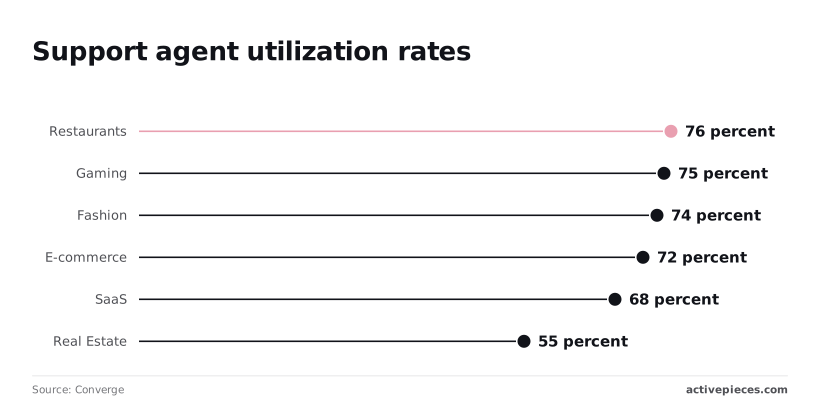
74% utilization in Fashion and 72% in E-commerce leaves no room for wasted time, forcing teams to operate at maximum efficiency just to keep pace. In these sectors, an agent spending five minutes debunking a false summary quickly neutralizes the time saved by automation.
Detecting customer sentiment and urgency in tickets
A manual review identifies the "hidden" temperature of a ticket, such as the quiet desperation of a user whose business is down.
Even in SaaS, where utilization sits at 68%, or Real Estate at 55%, the lower volume doesn't excuse the loss of nuance, as agents are still stretched thin enough to risk compromising the quality of individual interactions, meaning that customers are receiving a diminished experience regardless of the sector.
A human lead knows that a customer who has followed up three times in two hours needs an empathetic opening, not just a technical fix.
The accountability of the receiving agent
The moment an agent signs off on a manual handover, they take personal ownership of the case's trajectory.
This accountability ensures that the transition between a Tier 1 agent using a help desk tool like Zendesk and a Tier 2 engineer tracking bugs in a project management suite like Jira is seamless.

Without this human handshake, the receiving agent can blame the "automation" for missed details. This creates a culture where nobody is truly responsible for the resolution.
Structured summaries outperform human skimming under pressure
Automated summaries eliminate the ten-minute "re-read tax" by providing a structured brief that's more reliable than a rushed human skim.
Using a standard template for ticket handovers
Reliable handovers require a consistent template that forces the most critical data points to the top of the record.
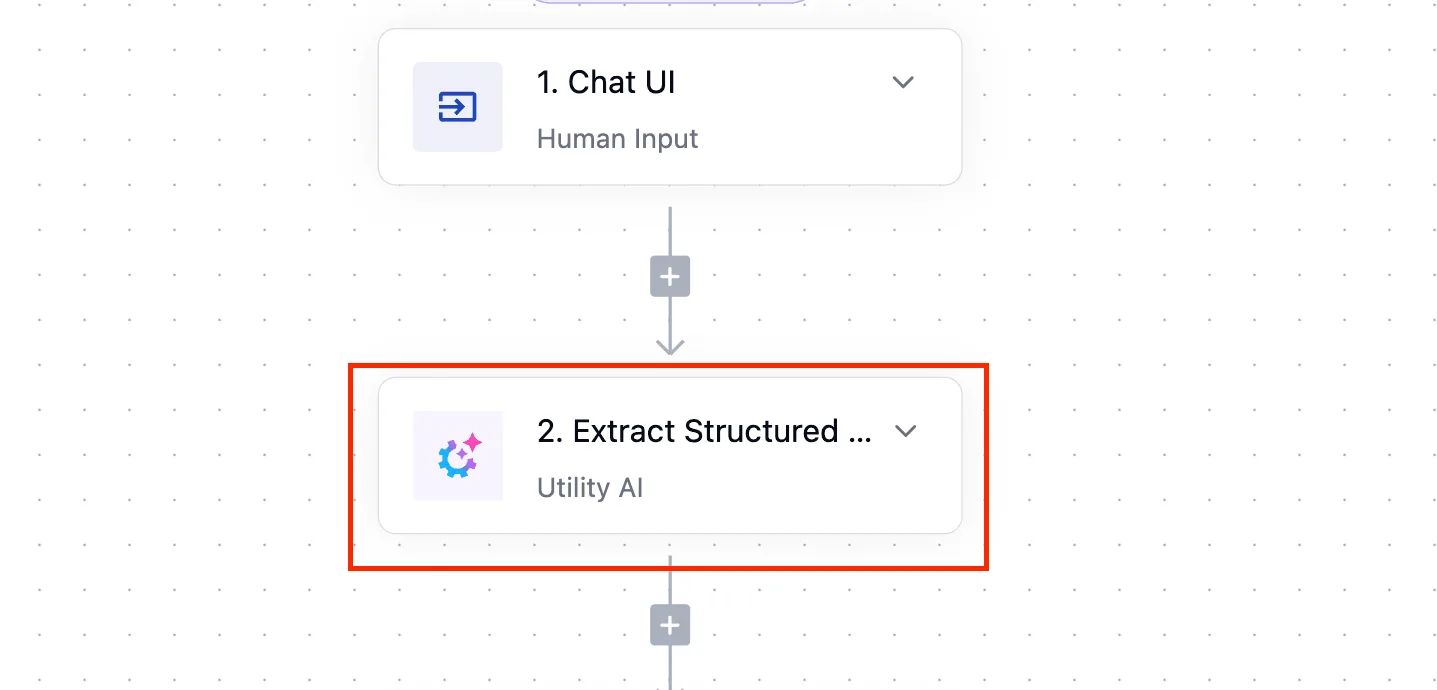
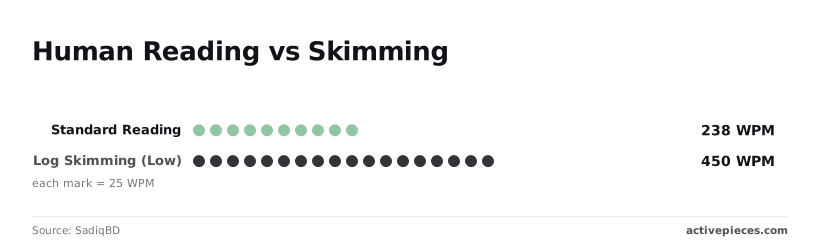
A standard human reading speed is roughly 238 WPM. By using an LLM to extract variables into a fixed schema, you ensure the engineer spends time fixing the bug rather than hunting for reproduction steps.
Reducing skim-reading fatigue with LLM summaries
LLMs maintain high technical accuracy across massive datasets where human attention spans naturally falter.
| Metric | Human Skimming (450-700 WPM) | LLM Summarization (128k Context) |
|---|---|---|
| Comprehension Rate | Decreases as WPM increases | Consistent across entire context |
| Speed (WPM) | Maxes out at ~700 WPM | Effectively instantaneous |
| Risk of Missing Technical Detail | High; eyes skip non-standard patterns | Low; tokens are weighted equally |
As ticket complexity grows, the human "skim" becomes a guessing game because of this gap in processing power.
Ordering handover summaries by intent, not chronology
Automated flows allow you to re-order information by importance rather than just listing what happened first.
In a traditional "stitched" handover, the receiving agent has to scroll through days of back-and-forth to find the customer's actual goal. A unified LLM flow can identify the "desired state" immediately.
Easier to see it running than to read about it: set it up free, no card.
Summarization workflows require specific technical triggers
Automating a handover summary requires a system that listens for specific state changes in your helpdesk software.
Activepieces runs the Agent step and the deterministic automation steps on a single engine, so the summary and the handover logic exist in one flow definition rather than two products bridged by a webhook.

You can verify this by opening the flow builder and checking the run trace, which logs the entire execution from start to finish as one event.
Connecting support platforms to LLMs via connectors
Connectors act as digital bridges that translate the unique language of one application into a format another can understand. When you connect Zendesk to an LLM, the connector uses an API to fetch the raw conversation data and package it for the next step.
This allows information to travel across different software ecosystems without any manual data entry.
Logic steps then act as the brain of the operation, deciding what happens to that data once it arrives. These steps can filter out irrelevant messages, check for specific keywords, or format the text before it reaches the AI.
By combining connectors and logic steps, you create a pipeline where data moves automatically from the source to the summary.
Triggering summaries on ticket status or tag change
The moment a ticket moves from an active state to a pending or escalated state, a reliable summary should begin.
By using the webhook functionality in a customer service platform like Zendesk or Front, the system can detect when a status changes to "Escalated."
The Information Gap manifests as a split-frame reality. On one side, an engineer stares at a wall of fifty unread messages. On the other, that same engineer sees a four-bullet "Internal Note" that distills the chaos into actionable steps.
Writing LLM prompts for concise ticket handovers
The prompt sent to the LLM must be constrained to output only the technical delta and the customer’s specific goal.
A high-performing prompt focuses on the original problem statement provided by the user, the specific troubleshooting steps already performed by the first agent, and the missing information or technical blocker requiring escalation.
Injecting summaries as internal notes
The final summary must be written back into the ticket as a private internal note to ensure it's the first thing the next agent sees.
Posting the summary as a private note keeps the technical debrief invisible to the customer while anchoring it directly to the conversation thread.
Automating thread handovers with Activepieces workflows
Activepieces runs the AI models and support apps a company already uses under central governance, ensuring that handover logic and LLM judgment exist in one flow rather than two products bridged by a webhook.
By treating the handover as a single, automated workflow rather than a manual copy-paste task, you ensure that the next agent on shift receives a technical briefing. Actual ticket history grounds this briefing, rather than a colleague’s hurried recollection.
Connecting the shared inbox to an LLM
The automation begins by monitoring your shared inbox for a specific trigger, such as a tag applied to a conversation or a status change to "Pending."
The Activepieces flow builder provides a visual representation of this logic, where a single trigger is the entry point for the entire summary logic.
After the trigger captures the event, the data moves through a connector to an LLM provider like OpenAI or Anthropic, which parses the raw text into a structured debrief.
Filtering system messages from support thread summaries
A raw dump of a support thread is cluttered with automated receipts and timestamp logs that distract an agent from the actual customer problem.
You should use the internal logic steps within the workflow to strip out "Agent joined the chat" notifications and "Email delivered" receipts.
Cleaning the data before it reaches the prompt reduces the risk of the model hallucinating a resolution based on a system message.
Formatting the output for mobile and desktop agents
The final step in the workflow pushes the generated summary back into the internal notes section of your inbox tool, formatted to be readable across all devices.
Because support leads often triage tickets from mobile devices, the workflow applies Markdown headers and bullet points to ensure the "Current Status" and "Next Steps" are visible without excessive scrolling.
Implementing a handover automation pilot
Selecting the right pilot candidates requires auditing your current ticket flows to identify where context loss is most expensive for your team.
High-stakes transfers where a Tier 3 engineer spends twenty minutes reading logs just to get up to speed are the ideal testing ground.
Identifying your 'heaviest' conversation threads
You should target conversations that act as information traps. Look for the following criteria in your help desk data:
- Tags with a transfer rate exceeding ten percent of their total volume.
- Threads exceeding fifteen messages.
- Technical Tier 3 escalations involving specialized language.
- Multi-timezone handoffs where the outgoing agent is logging off.
Setting the summary length constraints
A summary that's too long becomes just another document for the agent to skim.
You should enforce a three-paragraph maximum. The first paragraph must state the current blocker. The second must list the attempted fixes, and the third must define the specific next step requested of the new owner.
Measuring the reduction in resolution time
You track the time between the escalation trigger and the final resolution to validate the impact of automated summaries.
If the median time to resolution for escalated tickets drops by fifteen percent, the pilot is successful.
Frequently asked questions about inbox summarization
Is customer data safe when sent to an LLM for summary?
Data remains secure only if you use enterprise-grade API tiers that explicitly exclude your inputs from their global training sets.
When you pipe a ticket from a customer service platform like Zendesk into an LLM, you're transmitting personally identifiable information (PII) that must be governed by a Zero Data Retention policy.
Without this specific contractual agreement, your customers' technical debt and private configurations become part of a public model's future vocabulary. This effectively leaks your internal troubleshooting methods to the open web.
How long should a handover summary be?
A handover summary must be exactly long enough to prevent the next agent from scrolling through the previous agent's history.
You measure the success of a summary by whether the receiving engineer can identify the "current blocker" and "next required action" without opening a single collapsed comment.
If the summary exceeds three bullet points, the AI is likely including conversational filler (like greetings or apologies) which forces the reader to filter noise rather than solving the ticket.
Can AI summarize threads in multiple languages?
Modern LLMs process multi-lingual threads by translating the underlying intent into a single, unified language for the handover report.
In a global support rotation, a ticket might start in Spanish, move to a German specialist, and end with a US-based engineer.
Because the model understands the semantic meaning across these languages, the handover summary remains in the primary language of your workspace.
Cultural nuances in urgency are preserved rather than lost in literal translation. Agents no longer need to use external translation tools to understand the work already performed.
What is an AI agent step in this context?
An Agent step is a specialized workflow block where the LLM is given the autonomy to reason through a task rather than just following a fixed script. Unlike a standard automation step that performs a single, predictable action (like "send an email" or "update a tag") the Agent step uses the model's intelligence to interpret the conversation and decide which information is relevant for the handover.
This step acts as the cognitive core of the summary flow. It allows the system to distinguish between a customer's actual technical complaint and the polite small talk that surrounds it.
By processing the thread through this reasoning layer, the automation produces a summary that reflects the true state of the issue rather than a literal, word-for-word transcript.
What happens if the AI misses a key detail?
Unified flows mitigate hallucinations by providing the LLM with a structured schema that mandates the inclusion of specific technical fields, such as error codes or logs.
The single engine mechanism works by allowing the LLM to query the specific metadata and execution logs of the automation steps directly within the same runtime.
Instead of guessing based on a text prompt, the model cross-references the conversation against the actual data payloads captured by the trigger. This creates a verification step where the AI must match its summary against the hard logs before the final note is generated.
Every agent decision and tool call is recorded in the per-step run trace, allowing you to audit the model's logic alongside the deterministic flow steps.
Companies like MoneyGram and Moneypenny run these automations in production to ensure that an agent's reasoning is as transparent as a fixed workflow's steps.
By using a unified flow, you ensure the model has access to the metadata of the ticket. This acts as a guardrail to prevent it from inventing a resolution that never occurred.