Zendesk Native AI vs AI Agents for Support (2026)

Sep 15, 202613 min read
Customer support teams often face a choice between relying on Zendesk’s native automation tools or implementing more flexible, chat-built AI workflows.
While native triggers and macros offer a stable foundation for ticket routing, they can sometimes feel rigid when handling complex, multi-step logic across various third-party platforms.
By contrast, modern teams are increasingly utilizing external automation logic, such as the workflows built using Activepieces to bridge data gaps, to create more dynamic interactions that respond to customer intent in real-time.
These AI-driven workflows allow for a higher degree of personalization, ensuring that automated responses feel less like a script and more like a helpful conversation. Ultimately, the decision depends on whether a team prioritizes the simplicity of a single-platform ecosystem or the sophisticated c
Zendesk native automations vs chat-built workflows explained
The time-based logic of Zendesk native tools
Zendesk native automations function as a rigid, time-driven scanning engine that acts on tickets only when specific hourly conditions are met.
Unlike triggers, which fire immediately upon a ticket update, these automations run in cycles to check for criteria like Hours since pending is greater than 24.
When a ticket misses the start of the last scan, a customer might wait nearly an extra hour for a follow-up. This architecture limits your support operations to a linear timeline where the system restricts actions to internal ticket properties.

Reliability through native guardrails
Zendesk native tools excel at high-volume, low-complexity maintenance tasks where reliability is more important than flexibility. Because these rules live inside the core database, they execute with zero latency and never fail due to external API outages or network timeouts.
A support manager can trust that a native trigger will fire every time a ticket is created, regardless of whether a third-party service is down.
This makes the native environment the ideal choice for critical compliance tasks, such as ensuring every ticket receives a privacy disclaimer or routing sensitive data to specific restricted groups.
The precision of native ticket hygiene
Native automations are the gold standard for maintaining a clean and organized help desk. They handle the repetitive heavy lifting of status changes, such as automatically closing tickets that have been solved for more than four days.
By keeping these basic housekeeping rules within the native environment, you ensure that ticket metrics remain accurate without the risk of external sync errors. This stability allows teams to rely on their reporting dashboards for staffing and performance reviews without questioning the underlying data integrity.
Data security in Zendesk's closed ecosystem
Zendesk provides a controlled environment where every automation is governed by the platform's internal security protocols. This prevents the accidental exposure of customer data to external servers during simple routing or tagging operations.
For organizations with strict data residency requirements, keeping logic native ensures that ticket information never leaves the approved region. This built-in compliance is a significant advantage for healthcare or financial services teams that must avoid the complexities of third-party data processing agreements.
Zendesk native automation performance under load
Native workflows are optimized for the Zendesk infrastructure, meaning they do not suffer from the performance degradation that can occur when external webhooks are throttled. The system manages its own resource allocation to ensure that a sudden spike in tickets doesn't crash your automation logic.
This predictability allows administrators to forecast system behavior during peak seasons like Black Friday. While external tools might struggle with API rate limits, native triggers continue to process tickets at the speed of the database, providing a stable foundation for the entire support team.
How LLMs translate chat intent into API calls
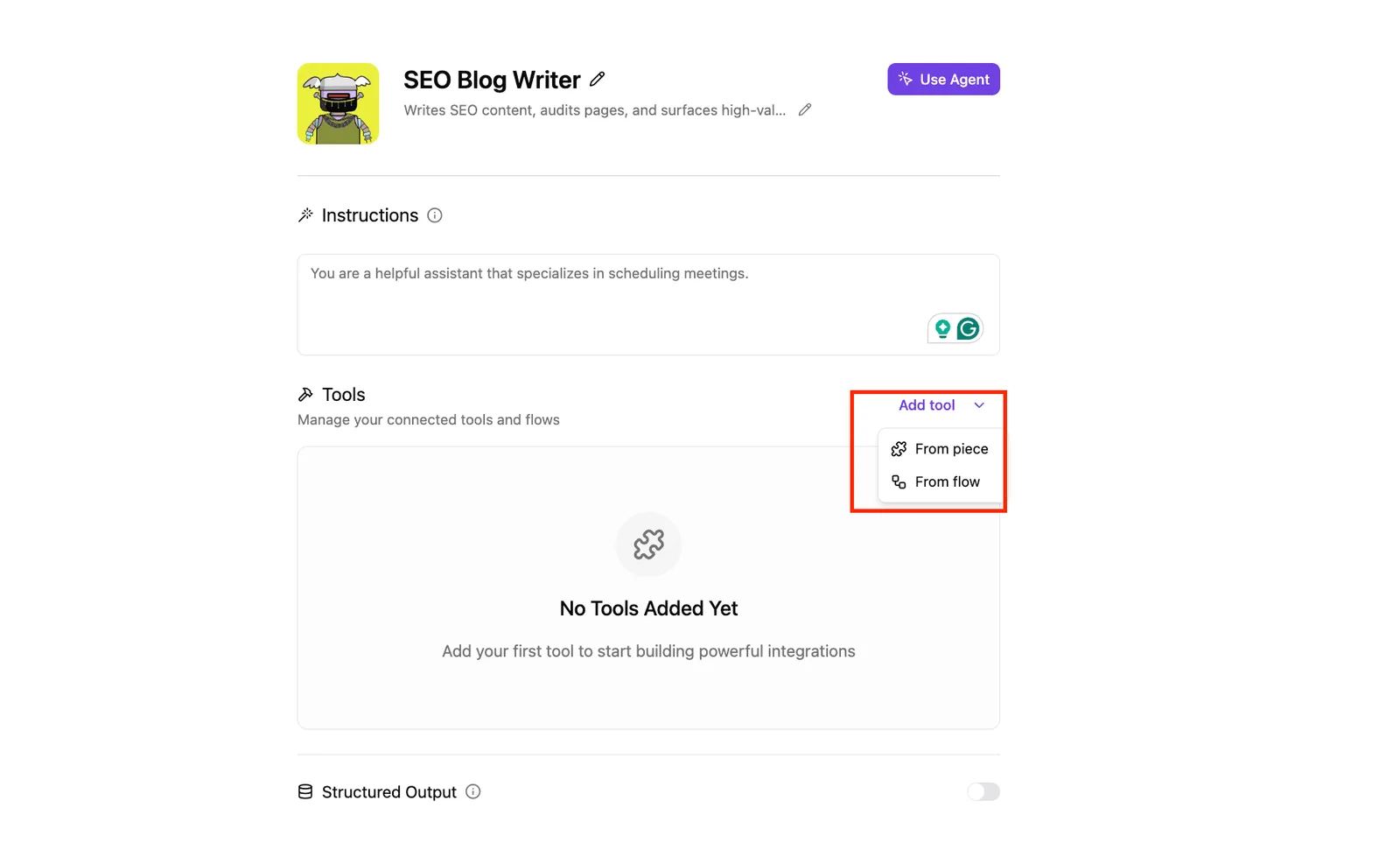
Modern AI-driven workflows replace rigid menus with Large Language Models (LLMs) that interpret natural language instructions to execute precise technical actions. When you describe a process in a chat interface, the LLM maps that intent to specific API endpoints.
| Action | Technical Method | Business Outcome |
|---|---|---|
| Slack notification | POST request | Create a notification |
| Fetch user data | GET request | Retrieve data from a database |
| Update ticket | API call | Execute precise technical actions |
Activepieces resolves the visibility gap of chat-built logic by running judgment and rules on a single engine. By placing an Agent step alongside deterministic automation steps in the same flow, you avoid the fragmentation of bridging two products with a webhook.
You can open the flow builder to verify this unified execution, where a single run trace logs the entire process from the initial trigger to the final agent decision, rather than relying on two systems bridged by a callback.
The fundamental trade-off: Guardrails vs. Versatility
Choosing between these two approaches requires balancing the safety of restricted, native environments against the expansive capabilities of open-ended AI workflows.
While the native route ensures that a workflow can't accidentally delete a customer record, it prevents the automation from ever leaving the Zendesk interface.
Deep integration across every tool in your company’s arsenal is the primary benefit of the chat-built route. This tension defines the modern support stack. You're either staying within the box for reliability, or breaking the box for scale.

The fastest way to settle a shortlist is to try one. Activepieces is free to try, no credit card.
Technical constraints of the Zendesk native environment
Zendesk’s native automation engine functions as a closed loop that prioritizes stability over deep logic. It forces a hard ceiling on how many business rules a single instance can process.
** You're either staying within the box for reliability, or breaking the box for scale.
Zendesk trigger and condition limits explained
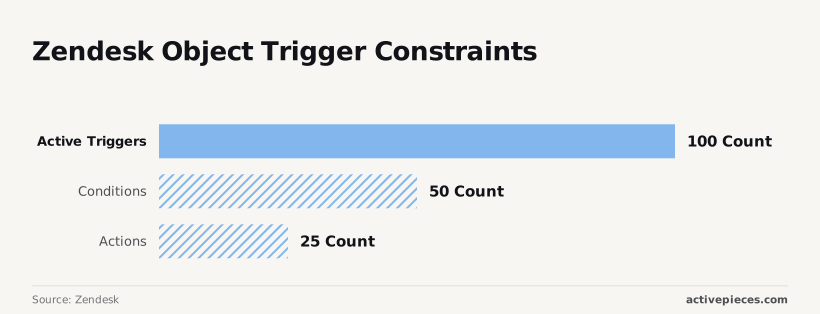
Strict numerical caps are imposed by Zendesk on the volume and depth of automation rules to ensure system performance doesn't degrade during high ticket volumes.
- 100 active triggers per object: If you're managing multiple brands, you'll eventually be forced to consolidate disparate workflows into messy, catch-all rules.
- 500 total triggers across the account: You can't keep a library of seasonal workflows ready for quick activation without deleting older logic.
- 50 conditions per individual trigger: You can't build a single "super-trigger" that checks for dozens of specific customer attributes simultaneously.
- 25 actions per single trigger: This prevents a single event from updating a large set of custom fields and notifying multiple external channels at once.
Zendesk's 165-hour automation time window
Automations in Zendesk are time-based rather than event-based. They can only act on tickets that have been updated within the last 165 hours.
This seven-day window means that any ticket sitting idle for longer than a week becomes invisible to the automation engine. It effectively kills automated follow-ups for long-tail technical issues.
Limitations of native Zendesk automation at scale
The "native" label suggests a seamless experience, but these constraints turn the Zendesk admin panel into a game of resource management.
When your support operation scales, the 50-condition limit often forces you to split one logical flow across four or five separate triggers. Troubleshooting a single failed notification requires tracing a breadcrumb trail through multiple disconnected rules.
The "native" label suggests a seamless experience, but these constraints turn the Zendesk admin panel into a game of resource management.
The rise of chat-built workflows for complex support
Conditional branching beyond Zendesk trigger logic
Non-linear logic can be built through chat-driven automation interfaces that Zendesk’s native "all" or "any" trigger conditions can't express.
A single workflow can route a ticket to a Tier 2 engineer if the customer is on a "Premier" plan and the sentiment is "Frustrated," while simultaneously sending a Slack alert to the Account Manager if the contract value exceeds a specific threshold.
Integrating external data via chat-driven API calls
Natural language prompts enable you to pull live data from external databases into a ticket without manually configuring JSON payloads.
- Query a CRM like Gainsight: Append a churn-risk flag to the ticket sidebar.
- Pull from an e-commerce platform like Shopify: Retrieve the last five transactions so the agent doesn't have to switch tabs.
- Ping a monitoring tool like PagerDuty: Check for active outages to prevent unnecessary troubleshooting.

Cutting technical debt in Zendesk trigger setup
Building workflows through conversation replaces the repetitive task of clicking through nested dropdown menus.
In a native setup, changing a single tag across ten triggers requires ten manual updates.
One descriptive command in a chat-built interface allows you to update the underlying logic in one place. This centralized approach ensures that the "why" behind a workflow is documented in the prompt itself.
Reading a table only gets you so far. Build the same workflow in Activepieces and compare it yourself.
Security and governance in chat-built support systems
Security risks are introduced by chat-based automation builders by allowing non-technical staff to bypass standard code review cycles.
API credential exposure in conversational builders
Conversational builders often encourage you to paste API keys directly into a chat window to authenticate a new workflow for tools like Jira or Shopify.
Once entered, these keys are stored in the chat history or prompt metadata. A single compromised staff account grants an attacker the ability to impersonate your support team across every connected service.
AI agent access control and security risks
A team member might lack the technical background to distinguish between a restricted Scoped Token and a Global Admin Key, inadvertently granting a simple notification bot the power to delete entire databases.
The 'black box' problem of AI-generated logic
AI-generated logic creates "shadow infrastructure" where specific conditions governing a ticket escalation are hidden behind a natural language description.
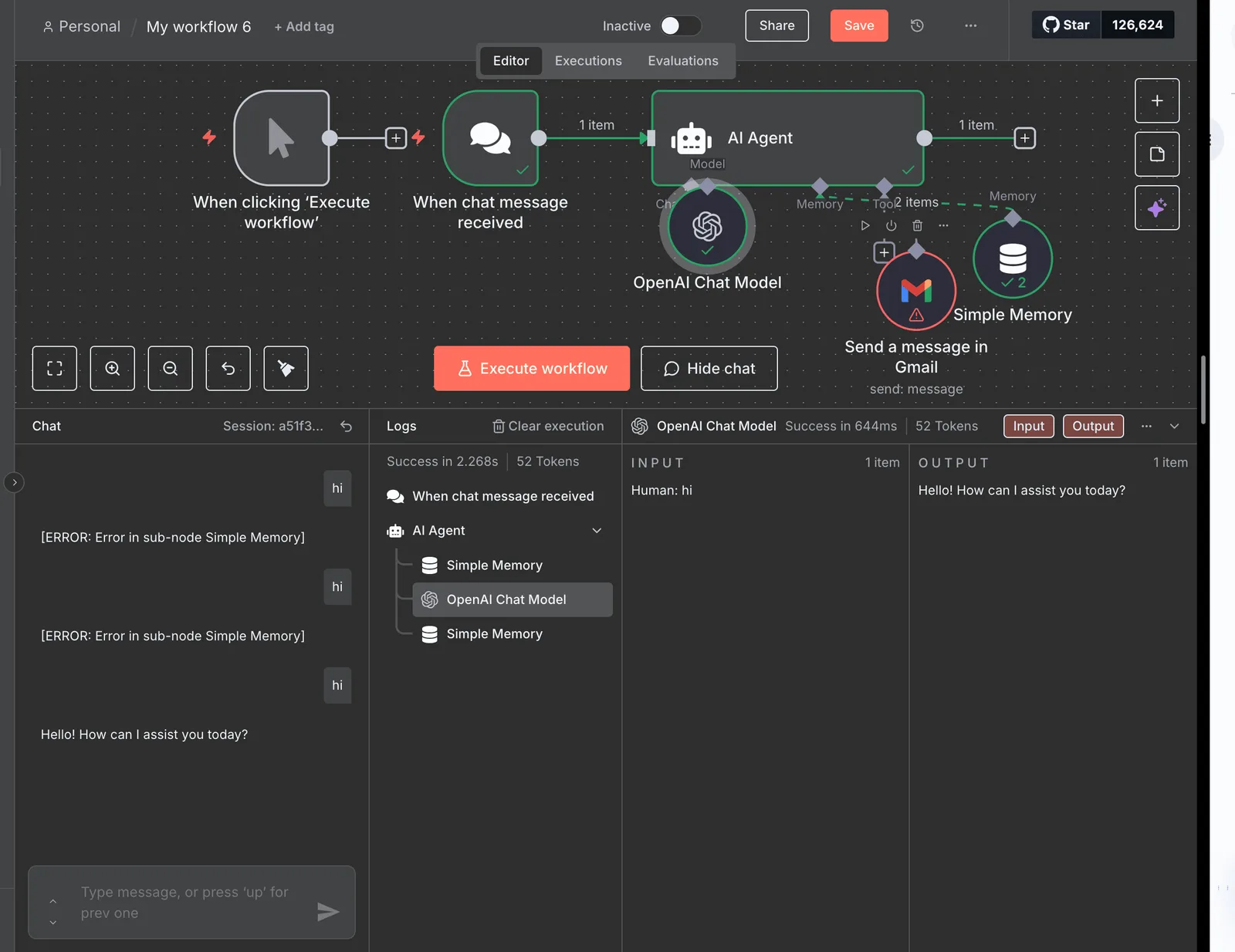
Activepieces eliminates this opacity by tracing every agent tool call, the data it acted on, and the sequence of its decisions step-by-step alongside the deterministic flow steps.
By checking the Run Details and Debugging UI, teams can access a per-step agent decision trace that ensures AI actions are reviewed with the same rigor as fixed workflow steps.
Standardizing responses across a global support team
Fragmented automation makes it impossible to enforce a single source of truth. Individual agents can spin up their own chat-built shortcuts that deviate from approved language.
Logic drift
This results in a "logic drift" where the customer experience depends on which unmanaged automation picked up the ticket. This creates inconsistent records that complicate legal discovery and financial reporting.
Scaling Zendesk workflows with Activepieces and AI agents
Activepieces centralizes disparate support workflows into a single visual canvas where AI agents can be audited before they touch a production ticket.
Using chat to generate Activepieces steps for Zendesk
The platform allows you to build complex logic by describing the desired outcome in plain language. The AI then converts this into functional steps within the workflow builder.
MoneyGram and FundingSocieties run Activepieces in production to manage complex automation environments where visibility is critical. The platform's MIT-licensed core provides the foundation for these teams to scale AI agents without losing the ability to audit the underlying logic.
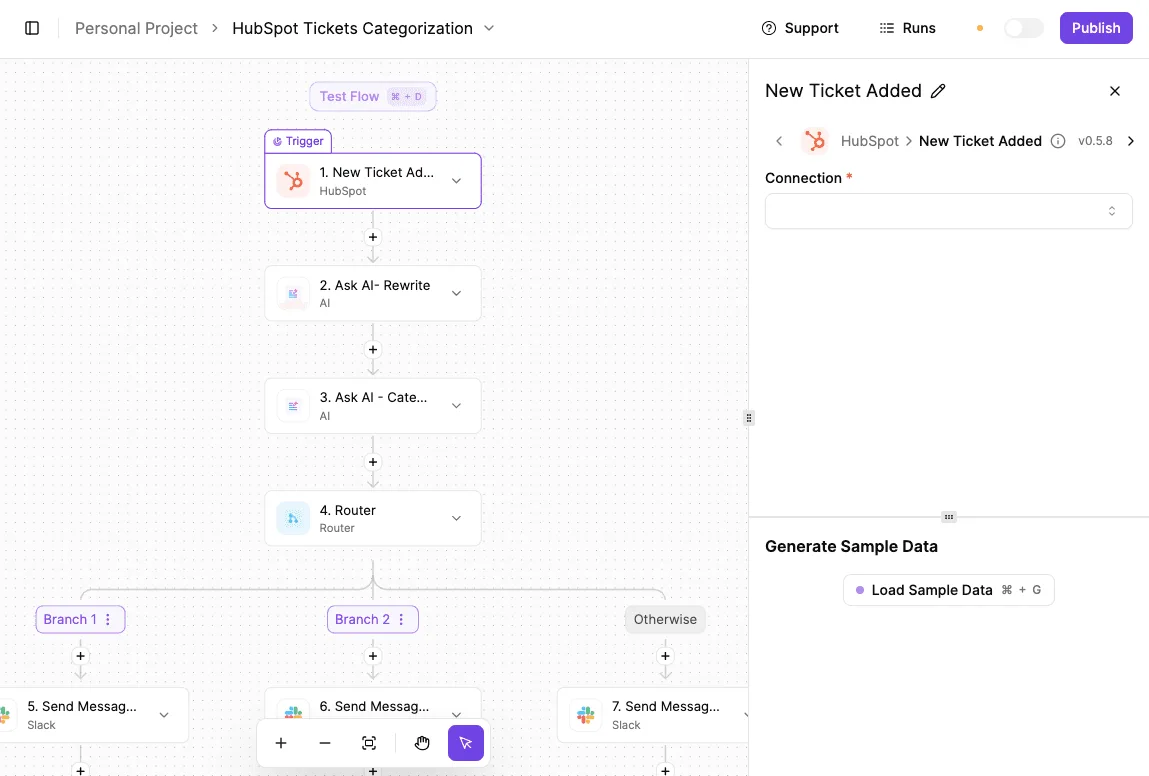
In the screenshot below, a "HubSpot Tickets Categorization" flow illustrates how a single trigger can branch into specialized AI processing steps and Slack notifications based on the ticket's intent.
Centralizing logs for every AI-triggered ticket update
Activepieces records every execution of a workflow in a centralized log, providing a forensic trail for every modification made to a Zendesk ticket.
Unlike native Zendesk triggers that only show that a "Web Service" updated a field, these logs show the exact JSON payload sent to an LLM and the raw response received. You no longer have to guess which opaque middleware failed.
Ensuring human-in-the-loop oversight for automated replies
The platform provides a dedicated "Approval" step that pauses a workflow until a human agent reviews the AI-generated content.
By inserting this gate before a "Zendesk: Update Ticket" action, the system treats the AI as a drafter rather than an autonomous agent. In regulated industries, this is the only way to deploy generative AI without risking a compliance violation.
By unifying deterministic logic and AI agents within a single visual canvas, Activepieces eliminates the fragmentation of monitoring two separate systems bridged by callbacks.
Activepieces is the better fit for organizations that prioritize end-to-end visibility, as it logs every action in a single execution trace rather than stitching products together with webhooks.
Implementation plan for modernizing support desk logic
Auditing your current Zendesk trigger library
Auditing your trigger library requires mapping every active Zendesk automation to its specific business outcome. Start by exporting your trigger list and filtering for those that contain "Notify Target" actions.
Identifying these orphans prevents the "Shadow Logic Trap" where hidden, unmonitored scripts silently fail. When a single change to a ticket field breaks three downstream processes without firing an error in the main console, the visibility gap becomes a liability.
Finding high-friction support tasks for AI automation
High-friction tasks require a human to toggle between the Zendesk ticket interface and a third-party system like Jira or Stripe. These context switches increase the "mental tax" on your agents.
To prioritize these, look for workflows where the process requires data retrieval from a system that lacks a native Zendesk sidebar app. Other candidates include repetitive status updates and tasks involving the translation of technical logs.
Setting up a sandbox for chat-generated workflows
A dedicated sandbox environment is the only safe way to test LLM-generated logic. You must mirror your production Zendesk tags and custom fields into this environment so the AI trains against your actual data schema.
This separation ensures that if an automated prompt hallucinates a solution, the error is caught in a log file instead of an inbox.
Frequently asked questions about Zendesk automation strategy?
Can chat-built tools replace Zendesk triggers entirely?
Zendesk triggers remain necessary for instantaneous, ticket-level updates that must occur the millisecond a user hits submit.
This includes assigning a priority based on the requester's email domain. While external automation platforms handle cross-system logic effectively, they rely on the Zendesk API, which introduces a polling interval or webhook delay.
Do AI-built automations increase Zendesk API usage costs?
External platforms consume API calls every time they fetch ticket data or post a comment. This can push an account toward its rate limit if the workflows aren't filtered at the source.
Because Zendesk enforces these limits based on the subscription tier, an inefficiently designed loop can exhaust the daily quota.
How do I stop chat-built automations from looping?
Preventing infinite loops requires a specific "exclusion tag" in Zendesk, such as automation_processed, which the external workflow applies as its final action.
By configuring the initial Zendesk trigger to only fire if that specific tag is absent, you ensure the automation ignores its own updates.
Is it safer to use Zendesk’s Advanced AI add-on instead?
The Zendesk Advanced AI add-on provides native sentiment analysis and intent detection within the existing firewall.
This eliminates the security risk of sending PII to third-party LLM providers. However, this safety comes with a rigid functional scope. The native AI can't autonomously query an external PostgreSQL database to verify a custom loyalty status.
Related reading
References
Still comparing
The fastest way to settle it is to build something.
Open source under MIT, so you can self-host the same thing later.
Start free Talk to sales