
How Much Does HubSpot Cost? 2026 Pricing Guide

Sep 30, 202614 min read
Navigating HubSpot's pricing structure in 2026 requires a keen eye for detail, as the platform has evolved into a complex ecosystem of specialized hubs and tiered subscriptions.
While the initial entry point may seem accessible, businesses must account for the scaling costs of contact limits, additional seats, and the technical overhead of connecting various third-party tools.
Many organizations now rely on external automation platforms, such as Activepieces which helps bridge data gaps between services, to ensure their marketing and sales workflows remain synchronized without inflating their monthly HubSpot bill.
Understanding these nuances is essential for any company looking to maximize their return on investment while avoiding the common pitfalls of unexpected overage fees and underutilized premium features.
HubSpot pricing refers to the tiered subscription model for a suite of CRM, marketing, and sales tools that scales based on feature sets, user seat counts, and the volume of marketable contacts stored in the database.
HubSpot Pricing Tiers and Core Product Structure
HubSpot scales its costs alongside your business by segmenting functionality into specialized Hubs and tiers. The price increases as your database and team size grow. This modularity allows for a low-cost entry, but each new business requirement triggers a higher recurring overhead.
HubSpot free and starter tier pricing
When a small team needs an entry point, they usually look to the Marketing Hub Free tier. It costs $0/mo so that businesses can centralize their database without upfront financial risk.
This tier is limited to 2 users, so your team will be forced to upgrade as soon as you hire a third person.
At $7/mo/seat, HubSpot’s analysis puts the Marketing Hub Starter plan within reach of most startups. This introduces a per-user cost that forces managers to audit exactly who needs edit access.
Every additional team member added to the platform directly impacts the monthly budget. At this level, the platform remains affordable for basic email automation but lacks the sophisticated routing and custom objects required for complex operations.
HubSpot professional and enterprise bundle pricing
The business transitions from a simple toolset to a comprehensive ecosystem when moving to the Professional and Enterprise tiers. These tiers are often sold as "Customer Platform" bundles to consolidate the cost of multiple Hubs.
Advanced governance features like field-level permissions are only offered at the Enterprise tier. A company needing to hide sensitive salary data from general sales staff must pay the highest premium regardless of their total headcount.
Per-seat pricing rations automation by turning every new employee into a line item. Activepieces meters by consumption instead of headcount, so adding a person to the platform costs nothing until they actually run a flow.
Alan and Funding Societies run production automation on Activepieces, and the credit-based, unlimited-flow structure that makes headcount irrelevant to cost is published on the Activepieces pricing page.
HubSpot hub versus customer platform pricing
The architectural relationship between individual Hubs and the central database determines how quickly a budget bloats.
The foundation consists of the Free Tools, providing the shared database and basic CRM functionality. The core is the Customer Platform.
This acts as the unified administrative layer for managing global settings and shared assets. The spokes are the five individual Hubs (Marketing, Sales, Service, CMS, and Operations), which each add specific tools to the central record.

Every time a new department requires "Pro" features within their specific spoke, the price increases. A company might start with only the Sales Hub but find their total bill doubling the moment the marketing team requires automated lead scoring.
If you are running this arithmetic for your own team, see what the same workload costs on Activepieces.
The exponential cost of scaling HubSpot
HubSpot’s pricing structure lowers the barrier to entry while capturing revenue as a company’s operational complexity increases.
This transition occurs because the platform locks essential automation and reporting features behind higher tiers that carry much larger base costs.
Current Monthly and Annual Pricing Table
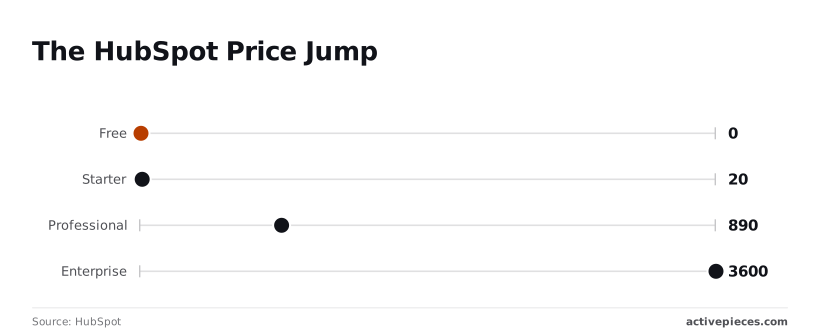
The "HubSpot Price Jump" illustrates that moving from basic lead capture to full-scale enterprise automation isn't a linear progression. It's a series of steep financial hurdles.
Marketing hub cost breakdown
The Marketing Hub serves as the primary example of how costs escalate when moving from basic email tools to enterprise-grade orchestration.
| Tier | Base Monthly (Billed Annually) | Base Monthly (Billed Monthly) | Included Contacts |
|---|---|---|---|
| Starter | $7 /mo | $20 /mo | 1,000 |
| Professional | $800 /mo | $890 /mo | 2,000 |
| Enterprise | $3,600 /mo | Not Available | 10,000 |
Prices and plan limits checked against hubspot.com on September 30, 2026.
These base prices do not include additional seats or contact blocks, which are the primary drivers of budget expansion. A company moving from Starter to Professional sees their base software cost increase by over 4,000% to unlock features like A/B testing and social media management.
For growing teams, the leap to Professional is often the most jarring. Once a team commits to this tier, the cost floor for every subsequent feature expansion rises significantly.
Seat Limits and Additional User Costs
Growing headcount is transformed from a sign of success into a direct budgetary liability by seat-based pricing. While HubSpot offers "View-Only" permissions for visibility, any staff member requiring the ability to edit records, manage pipelines, or execute sequences requires a paid seat.
Growing headcount is transformed from a sign of success into a direct budgetary liability by seat-based pricing.
Core seats are bundled into the base subscription. Expansion seats are purchased individually once the bundle is exhausted. Cross-hub requirements mean if a user needs advanced functionality across both Sales and Service hubs, they may require a seat for each.
This effectively doubles the cost of that specific employee's software access.
Marketing Contact Tiers and Overage Fees
A premium is charged for any contact targeted with automated emails or ads, even while teams can store an unlimited number of "non-marketing" records for free.
The moment a user marks a contact as a "Marketing Contact," it immediately counts against the tier limit. If the total number of marketing contacts exceeds the current tier, HubSpot automatically bills for the next block.
Once a tier is upgraded, the cost remains at that higher level until the next renewal period. This remains true even if the database is subsequently cleaned.
Hidden Costs Beyond the HubSpot Sticker Price
The total cost of ownership for HubSpot extends far beyond the monthly subscription. The platform enforces non-negotiable setup fees and per-user scaling costs.
While a "Starter" plan begins at a modest $20 per month according to HubSpot, moving to the "Professional" tier jumps to $890, and "Enterprise" reaches $3,600, creating a massive financial gap between entry-level and advanced features, which means scaling operations requires a disproportionate commitment of capital.
A growing team faces a 4,400% price increase just to unlock advanced automation and reporting, effectively penalizing companies for their own success, so businesses must carefully weigh the utility of these tools against the steep cost of adoption.
The Hidden Cost Stack includes mandatory onboarding ($3,000–$7,000), additional core seats ($45–$75/mo), API limit increases (1M additional requests), and third-party integration fees.
HubSpot's mandatory onboarding fee costs
Because HubSpot mandates a one-time onboarding fee for all Professional and Enterprise customers, you can't self-implement the software even if you have internal experts.
This fee typically ranges from $3,000 to $7,000, which is a significant upfront capital barrier before a single lead is processed.
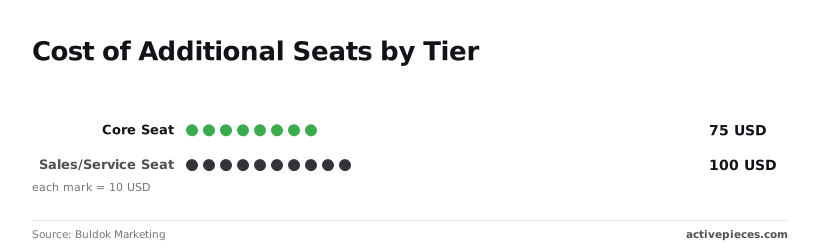
Beyond the initial setup, you must account for "Core Seats" at $75 each and "Sales or Service Seats" at $100 each per month, according to Buldok Marketing, meaning that headcount growth directly inflates your recurring operational expenses.
Every new hire adds a fixed $900 to $1,200 to your annual overhead, making the cost of expanding your team a predictable but heavy drag on long-term profitability, which means your scaling strategy must account for these compounding expenses.

The Cost of API and Technical Limits
Data synchronization becomes a primary budget driver as your tech stack expands. HubSpot caps the volume of data shared between tools.
According to HubSpot Developers, the "Free/Starter" tier is limited to 250,000 requests per day, placing a strict ceiling on the volume of automated data processing a small business can perform.

650,000 requests per day are allowed on the Professional Tier, providing significantly more headroom. The Enterprise Tier allows 1,000,000 requests per day, supporting larger data ecosystems.
The Capacity Pack adds 2,000,000 additional requests. This adds a recurring monthly fee just to keep existing integrations running.
Price Hikes During Contract Renewal
Renewal periods often introduce "sticker shock" because introductory discounts, sometimes as high as 90% for startups, typically expire after the first year.
If your contact list has grown or you have integrated advanced reasoning models like Claude Opus 5.5 for knowledge work or Gemini 3.8 Flash for agentic workflows, you lose all leverage to negotiate lower rates.
This creates a locked-in environment where the cost to migrate your data exceeds the cost of the price hike.
Worth checking against a plan that does not meter every step: one credit covers a whole run on Activepieces.
HubSpot Alternatives Compared on Value and Scale
Selecting the right CRM requires balancing immediate usability against the long-term financial burden of scaling features and records.
| CRM Vendor | Ease of Setup | Automation Depth | Total Cost of Ownership |
|---|---|---|---|
| HubSpot | High | High | Scaling |
| Salesforce | Low | High | Scaling |
| Pipedrive | High | Medium | Flat |
| Zoho | Medium | High | Flat |
HubSpot vs. Salesforce for Enterprise Power
Salesforce is the primary alternative for organizations that require deep customization and network isolation. While HubSpot is easier for a marketing team to launch, Salesforce provides a more granular permissions architecture.
Salesforce ensures that sensitive data remains restricted across global divisions. The trade-off is a significantly longer implementation period.
HubSpot vs. Pipedrive for Small Sales Teams
Pipedrive is a streamlined alternative for teams that prioritize sales velocity. Because Pipedrive charges per user without the "marketing contact" multipliers found in HubSpot, a firm can grow its database without triggering a sudden, five-figure price hike.
HubSpot vs. Zoho for All-in-One Affordability
Zoho has the most direct functional parity to HubSpot’s "all-in-one" suite but does so with a flat pricing structure. While the user interface is less intuitive, the platform includes advanced automation features in its mid-range plans.
HubSpot reserves these for its Enterprise tier. For a growing company, this means accessing sophisticated lead scoring without the exponential cost increases.
Reducing HubSpot Costs with External Automation
Moving complex logic to an external automation layer allows teams to scale operations without triggering the per-thousand-task surcharges found in HubSpot’s Operations Hub.
Working around HubSpot workflow limits
Teams can bypass the restrictive limits of HubSpot’s internal workflow engine by using a decoupled automation platform to handle data formatting and multi-step logic.
When logic stays inside HubSpot, every "format data" step or custom code snippet consumes professional-tier credits. Moving these triggers to an external builder ensures that complex routing happens in a cost-controlled environment.
A stripped self-hosted build is how most vendors monetise control, but Activepieces provides the same SSO, SCIM, and custom RBAC in its air-gapped build as it does in the managed cloud. Regulated and public-sector organisations run this air-gapped edition in production today.
The enterprise feature list (including audit logs and release management) is identical across the self-hosted docs and the SOC 2 Type II managed cloud.
This setup ensures that data flows into the CRM only after it has been cleaned and enriched, reducing the number of "Marketing Contacts" you are billed for.
Avoiding HubSpot's Data Sync connector costs
High-volume data synchronization often requires HubSpot’s "Data Sync" feature. This gates bidirectional updates for custom objects behind expensive Enterprise subscriptions.
Instead of paying for these native connectors, you can use API-based webhooks to push updates to a central warehouse.
Custom Object Sync uses external triggers to update non-standard records. This avoids the Enterprise-tier requirement for custom object automation.
Lead Enrichment routes new sign-ups through Gemini 3.8 Flash to categorize company size before they hit HubSpot. You never pay to store junk leads as "Marketing Contacts." Cross-Platform Reporting exports raw event data to a visualization tool rather than paying for HubSpot’s premium reporting add-ons.
The Monday Morning HubSpot Audit Checklist
Maintaining a lean HubSpot portal requires a weekly operational cadence to ensure that automated workflows or team expansion don't trigger silent price hikes.
Weekly hygiene and financial controls
To prevent this, teams must treat CRM hygiene as a financial control. The following checklist provides a framework for identifying and removing the specific bloat that pushes accounts into higher billing brackets.
- Identify 'Non-Marketing' contacts to offload.
- Audit seat permissions for unused 'Pro' seats.
- Review API call volume for spikes to detect inefficient integrations.
- Check for duplicate records consuming billable contact allotment.
- Analyze workflow automation logs to delete "zombie" processes.
What Activepieces does about this
Activepieces decouples your automation logic from HubSpot’s seat-based and tier-locked ecosystem, allowing you to scale operations without the exponential cost curve.
While HubSpot charges a premium for every user who needs to edit a workflow, Activepieces allows you to build and manage complex business logic in an environment where headcount does not dictate the price.
This architectural shift ensures that as your team grows, your software overhead remains linear rather than jumping by 4,000% to unlock basic orchestration features, meaning you avoid the sudden financial shocks associated with platform upgrades.
By moving data processing and multi-step workflows to Activepieces, you bypass the restrictive "Operations Hub" task limits and custom object automation gates. Companies like Alan and Funding Societies use this credit-based structure to run production-grade automation without worrying about per-seat surcharges.

Because Activepieces is Open Ecosystem (MIT Licensed), you maintain full ownership of your logic, preventing the "locked-in" scenario where the cost of migrating your data exceeds the cost of a HubSpot price hike.
For organizations with strict security requirements, Activepieces offers an air-gapped Enterprise edition that provides SSO, SCIM, and custom RBAC, features HubSpot typically reserves for its most expensive tiers. This allows you to maintain enterprise-grade governance and audit logs while keeping your CRM database lean.
By filtering and enriching leads through external models like Gemini before they reach HubSpot, you ensure that only high-value records are marked as "Marketing Contacts," directly protecting your budget from accidental overage fees.
Frequently Asked Questions about HubSpot Pricing
Does HubSpot offer a monthly payment option?
While monthly billing is available for individual Starter products, moving to Professional or Enterprise tiers generally requires an annual commitment.
Selecting a monthly plan for lower-level tools removes the long-term price protection of a contract. Your operational costs could increase if the vendor adjusts their standard rates during the year.
How does the HubSpot for Startups discount work?
The HubSpot for Startups program provides significant tiered discounts to companies that are members of approved venture capital firms, accelerators, or incubators.
The discount percentage decreases every twelve months. This creates a "pricing cliff" where a startup’s software budget may double or triple in a single year even if their usage remains constant.
Can i mix and match different Hub tiers?
HubSpot allows you to subscribe to different tiers for different departments, such as using Operations Hub Professional alongside Service Hub Starter. This flexibility prevents you from paying for advanced automation in departments that only need basic ticketing.
Certain cross-functional features are restricted to the lowest common denominator. For example, your reporting capabilities will be limited by the tier of the specific Hub where that data originates.
What happens if i exceed my marketing contact limit?
Exceeding your marketing contact limit triggers an automatic, permanent upgrade to the next volume tier. Because these upgrades aren't reversible within the current contract term, a single accidental import can inflate your overhead for the remainder of the year.
To manage this, administrators must use the "Marketing Contact" property. They manually designate which records should be billable before the system performs its monthly audit.
Related reading
References
Running the numbers
See what the same workload costs here.
Free forever plan, and every paid plan self-hosts at no extra cost.
See pricing Talk to sales