
Apollo API: Docs, Rate Limits and Credits (2026 Guide)

Nov 1, 202614 min read
The Apollo API is a REST API for searching people and companies, enriching contacts and managing records, authenticated by an API key.
Authentication is the easy part: you create a key, send it with each request, and it works, whether you call it from your own code or from a workflow tool like Activepieces.
Apollo API overview and capabilities
What the API covers: search, enrichment, contacts, sequences
Before you check what it costs, match your project to one of the four jobs the API does:
- Search people and companies
- Enrich a contact or company
- Create and update contact records
- Manage sequences and tasks
Watch search and enrichment for credit use; record and sequence calls mostly depend on whether your plan exposes them.
What the API does not do
It doesn't remove the limits of your plan. A call that works in the web app can still be refused through the API if your plan doesn't include that endpoint, so a working login proves nothing about API access.

Nor is it a bulk export of Apollo's database: every record you pull is bounded by your credits and your rate limit.
You don't hire for this, you describe it: tell the built-in chat in Activepieces the search-then-enrich process and it publishes the finished flow, the same one a builder would have wired by hand, with a run trace for every execution.
MoneyGram, Moneypenny, Alan and FundingSocieties run Activepieces in production.
When a limit or quota is quoted later, it is taken from Apollo's own documentation as it read on 1 November 2026, with a link to the page. Apollo can change these, so confirm against your account's own settings before you rely on a figure.
This takes minutes, not a project: automate it in Activepieces free.
Getting access: plans, API keys and OAuth apps
Which plan includes API access
Open Integrations then API in your own account: that page, not the price list, tells you whether your plan can create a key. Prices are per seat per month.
According to Valley's 2026 pricing explainer, Basic is $65 billed monthly or $49 billed annually and Professional is $99 or $79. It puts Organization at $149 or $119.
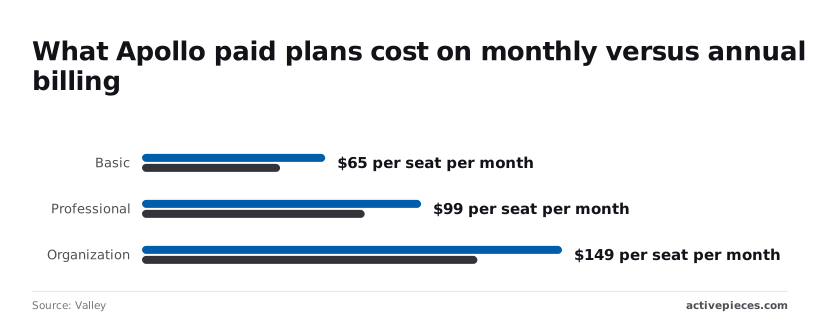
Annual billing saves $16 to $30 per seat each month, so a team of five on Organization saves $150 a month by committing for the year.
Creating and scoping an API key
- Open Apollo settings.
- Go to Integrations, then API.
- Create a key and give it a name that states its purpose and system, such as "enrichment-job-prod".
- Choose the endpoint scopes it needs, or choose a master key.
- Copy the key, store it in a secrets manager, and record who holds it.
If a master key leaks, your whole account is exposed, because it can call every endpoint. An endpoint-scoped key limits that damage to the endpoints you ticked. Use a master key only for short-lived exploration, and scope anything that runs unattended.

When OAuth is the right choice
Use an OAuth app when your software acts on behalf of other people's Apollo accounts, for example a product your customers connect to their own workspaces. Each customer then grants access themselves and can revoke it without you rotating anything.
For a script that runs against your own account, a scoped key is simpler and has one clear owner. Choose by asking whose data the call touches, then write that owner down.
Apollo endpoints by purpose and cost
Apollo's enrichment endpoints use credits, and some search endpoints may too, and write endpoints such as sequences are the ones most likely to demand a master key.
To see which endpoints spend credits and which need a master key, read the table, which groups them by purpose. Treat "Check docs" as an instruction, because those cells vary by endpoint and plan.
| Endpoint group | Purpose | Uses credits | Master key needed | Plan limits |
|---|---|---|---|---|
| People search | Find people by filter | No | Check docs | Per-minute cap set by plan |
| Org search | Find companies by filter | No | Check docs | Per-minute cap set by plan |
| People enrichment | Reveal one person's details | Yes | No | Per-minute cap set by plan |
| Bulk enrichment | Enrich several people per call | Yes | No | Per-minute cap set by plan |
| Org enrichment | Fill in company details | Yes | No | Per-minute cap set by plan |
| Contacts create/update | Write records to your account | No | Check docs | Per-minute cap set by plan |
| Sequences | Add contacts to outreach | No | Yes | Plan-gated |
| Tasks | Create follow-up work | No | Check docs | Per-minute cap set by plan |
An email reveal costs 1 credit and a phone reveal costs 8. Full enrichment can reach 9 credits per person, so a 1,000-person run can consume 9,000 credits.
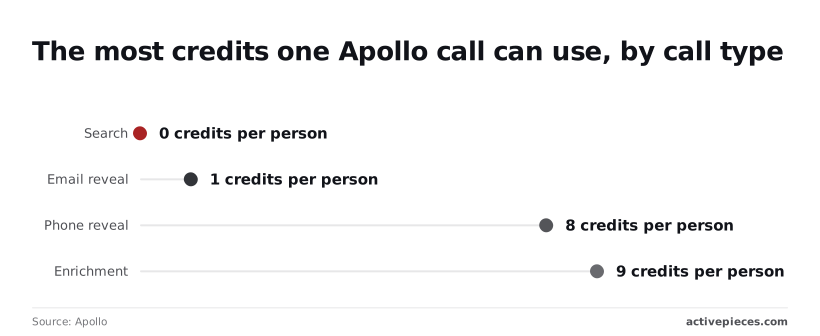
Cap batch counts in code, because bulk enrichment accepts up to 10 people per call and a single worst-case call can therefore spend 90 credits.
Minimal working API request
The smallest request worth making is one people search with your key in the X-Api-Key header, which costs no credits on paid plans. The order matters:
- Put the key in the
X-Api-Keyheader. - Send one people-search curl call.
- Read the
peoplearray. - Read the pagination fields.
- Enrich one person, last.
Keep the key in an environment variable, never in the command history of a shared machine.
Start with search, because it returns candidate records without revealing contact details.
curl -X POST "https://api.apollo.io/api/v1/mixed_people/api_search?person_titles[]=head%20of%20operations&per_page=5" \
 -H "X-Api-Key: $APOLLO_API_KEY" \
 -H "Content-Type: application/json"
Keep per_page small. A bad filter then returns a few wrong rows instead of a page of them.
Apollo API response fields and pagination
Look in the people array first, because that is where the records sit. An empty array with a successful status means your filters matched nobody, not that the key failed.
Then read the pagination fields, which report the current page and the total pages and entries. Those tell you how many calls a full pull would take, and so how much of your per-minute allowance it would use.
Only now enrich a single person from the array. One record tells you what a full run would cost before you commit to it.
You can follow the rest of this with the builder open. Start free, no card.
Rate limits and credit costs by plan
The per-minute cap decides how fast you can repeat a job: 50 requests per minute on Free and 200 on Basic, Professional and Organization, according to Apollo's rate-limit reference.
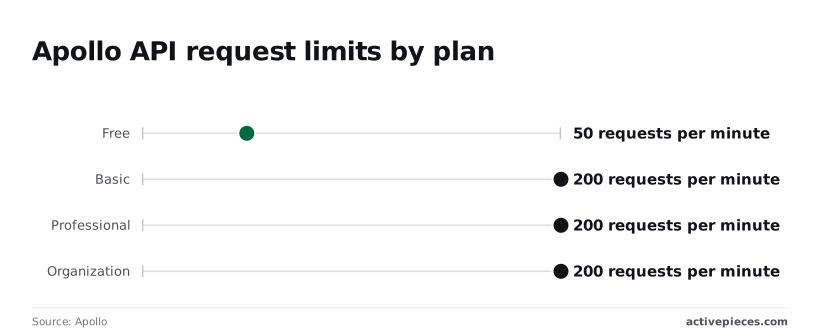
Documented limits by tier
From Free to Basic the limit jumps, and then it stays flat. Paying for Professional or Organization doesn't buy more requests per minute than Basic does.
At 50 requests per minute on Free, a loop of 1,000 calls takes at least 20 minutes. At 200, the same loop takes at least 5. If a job is too slow on Basic, upgrading won't fix it.
Batching, queuing or spreading the work out will.
If a job is too slow on Basic, upgrading won't fix it.
Don't hard-code figures from a forum post: hourly, daily and per-endpoint limits also exist in Apollo's documentation, but I haven't confirmed their values here. Read them from your own account.
How credits are charged per call
Credits are a separate meter from request limits, so passing the per-minute check doesn't stop a call drawing down credits. Enrichment is the step that consumes them.
Credit costs depend on the endpoint you call, and the main per-unit figures are below. Treat any cost you can't find in Apollo's own documentation or your billing page as unpublished.
Run one record, note the balance before and after, and multiply.
Check Apollo API usage and limits
Establish who owns the key before anything else, because Apollo's usage-stats endpoint reports the limits attached to the key you call it with.
You are reading the limits of that user's account and plan, not your team in general. If a contractor created the key, the key leaves with them when their access is removed.

API errors and troubleshooting
Five responses account for most Apollo errors. Each one points at a specific cause: the key, the key's permission scope, the request parameters, the call rate, or the data itself.
Start from the status code you received and work across the table below.
| Response | What Apollo says it means | Usual cause | Fix |
|---|---|---|---|
| 401 | The request is not authenticated | Key missing, mistyped, or sent in the wrong header | Check the header carrying the key |
| 403 | The request is authenticated but not permitted | A non-master key calling an endpoint that requires a master key, or an endpoint the plan doesn't include | Use a master key, or confirm the plan covers the endpoint |
| 422 | The request was understood but the parameters are invalid | Missing, misspelled or wrongly typed fields | Fix the parameters |
| 429 | Too many requests | Calls exceeding the account's per-minute or other limits | Back off and honor the limit headers |
| Empty enrichment | The call succeeded but matched nothing | Too little identifying input, or no record exists | Supply stronger identifiers and treat empty as a normal outcome |
401 and 403: key and permission problems
When a 401 comes back, Apollo doesn't accept who you are. Check the header first: confirm the key is present, copied whole, and sent where the docs say to send it.
A 403 means Apollo knows who you are and refuses the action. The usual cause is a key without master scope calling an endpoint that requires one, or a plan that doesn't include the endpoint.
Create or request a master key from the account owner, and confirm the plan before rewriting code.
When a 422 comes back, the request reached Apollo and was rejected on content. Compare your payload with the endpoint's documented fields, looking for misspelled names, wrong types, and required values left out.
429: rate limit exceeded
When a 429 comes back, you have exceeded a limit on your account's plan. Stop sending, wait, then retry with exponential backoff: lengthen the pause after each consecutive failure, and add a little randomness so parallel workers don't retry in step.
Read the rate-limit headers in the response and honor them in preference to a guessed delay, since they report your account's actual limits.
Empty enrichment results that still cost credits
Empty is not an error to retry, even though an enrichment call can return successfully with no data. Whether a given empty result consumed credits is something to verify against your account's usage records, not assume.
Repeating the same thin input will only repeat the empty result and may repeat the charge. Send stronger identifiers, such as a full name with a company domain, and log empty outcomes so you can see how many credits they account for.
Call Apollo endpoints without code using Activepieces
From a workflow, you can run the same Apollo calls with Activepieces, which allows unlimited flows on every plan, including free, using the Apollo integration where it has an action and its HTTP integration for everything else.

The same API key and the same credit and rate limits sit behind both.
What the Apollo connector covers
Activepieces has a large library of 746 integrations, roughly 60% of them community-contributed, and each one is available to the AI as a tool. The Apollo integration appears there alongside general-purpose ones such as Webhook, Gmail, Google Sheets and HTTP.
The library is also where you check the Apollo integration's action list. That list is the boundary: any call it names you can make without code, and any call it doesn't name goes through HTTP.
Before connecting, decide who owns the connection. Create the key under a shared team account rather than one person's login, so a departure doesn't break every flow that depends on it.
Using the HTTP step for other endpoints
For any Apollo endpoint you can reach, the HTTP integration sends the request. Paste the endpoint address from Apollo's docs and pass the key in the header the docs specify.
Store the key in the connection or a secret field, not in the step's visible body.
This route reaches only what your plan allows, so a plan-gated endpoint returns the same refusal here as it does in code.
Handling rate limits in a workflow
To keep runs from firing together, use a schedule trigger, which spreads them across the day, and a delay step between batches to stay under your per-minute allowance.
Where the step offers a retry option, apply it to rate-limit responses only. A retry on an empty match spends another credit for the same answer.
Write code instead when you need more control. That means batching large lists, paging through results with precision, backing off on a measured schedule, or keeping the logic under version control and tests.
Frequently asked questions
Is the Apollo API free to use?
A key doesn't mean free usage, because access depends on your plan and credits are spent per call. Check the API pricing page in Apollo's docs for what your plan includes, then confirm the same in your account's API settings.
A call that fails on the free plan is a plan limit, not a bug, because access to specific endpoints there is plan-gated.
Assume every call runs against real account data, since the Apollo docs don't describe a separate sandbox.
Create a key under a named owner, test with a handful of records, and keep that key away from production jobs. If a test call enriches a record, it can consume credits like any other.
Can I use the Apollo API to export all my contacts?
Treat the API as a paged search, not a bulk export. The search endpoints return results in pages, and the docs state the paging limits per endpoint, so read those pages before planning a full pull.
For a one-off complete export, the app's own export feature is the lower-risk route. Expect that an enrichment call can come back empty when Apollo has no match; that's a result, not an error, so handle it in code instead of retrying.
Do API calls use the same credits as the web app?
Not every call consumes credits in the same way, though they are drawn from the same account balance. Whether a search call costs credits is stated on each endpoint's page in the docs, so check it before looping over a list.
To see what you've spent, read the usage statistics endpoint in the API reference, or the usage view in your account settings. Do this before a batch run, not after.
Related reading
Build it
Set this up in minutes.
No code required. Connect your accounts, and Activepieces runs it from there.
Start free Talk to sales