
Anthropic API Pricing 2026: Cost Per Million Tokens

Oct 24, 202617 min read
You pay per million tokens on Anthropic's API, with one rate for what you send and a different, higher-tier-dependent rate for what the model writes back.
It's pay-as-you-go, and there's no monthly plan inside it, which suits anyone wiring calls into a workflow tool like Activepieces where usage rises and falls.
The second term is the one that surprises people. Each run costs input tokens times the input rate, plus output tokens times the output rate.
Review Anthropic API pricing by model
How to read the Anthropic API pricing table
Checked against Anthropic's model pages on 23 October 2026, the table lists all four current models. It ranks them by price position and job, not by dollar figure.
Rates and context windows change, so read the exact numbers from Anthropic's pricing page on the day you budget, not from a copy.
| Model | Price position | Best-fit job | Checked |
|---|---|---|---|
| Haiku 5.5 | Entry tier | Fast, high-volume, latency-sensitive tasks | 2026-10-23 |
| Sonnet 5.5 | Middle tier | Best combination of speed and intelligence | 2026-10-23 |
| Opus 5.5 | Upper tier | Long-running agentic coding and knowledge work | 2026-10-23 |
| Fable 5.1 | Top reasoning tier | Demanding reasoning and long-horizon agentic work | 2026-10-23 |
Prices and plan limits checked against docs.claude.com and claude.com and openai.com and gemini.google on October 23, 2026.
Moving up a tier multiplies both terms of your per-run formula, so a model chosen out of caution is paid for on every call. Price position is what matters here.
Which model is cheapest for which job
For classification, extraction, routing and other short, repetitive calls where speed matters more than depth, Haiku 5.5 is the cheapest model. Sonnet 5.5 is the next stop when Haiku fails your test cases.

On long agentic runs or hard reasoning, a cheaper model would loop, retry or get the answer wrong, and only there do Opus 5.5 and Fable 5.1 earn their rates.
Write ten to twenty real examples of the task, run them on Haiku first, and move up only when it fails. A failed output costs you the call plus the retry, so "cheapest" means cheapest model that passes, not lowest rate.
Chatting is what a subscription is for; the API meters every token your code sends. The API and Claude.ai subscriptions are separate products with separate bills.
Whichever tool calls it, such as Activepieces, the per-token arithmetic is the same, so a subscription tells you nothing about what an automated workload will cost.
If you are running this arithmetic for your own team, see what the same workload costs on Activepieces.
Why output tokens and long prompts increase costs
Your bill follows how much the model writes and how much you send, not the headline rate, because output tokens cost five times input on every current Claude model. That's the per-token arithmetic, and it rewards doing the sum per request.
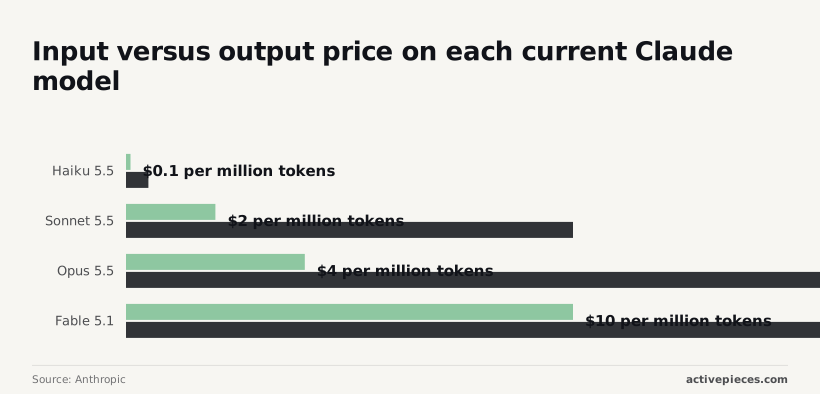
The input-to-output price ratio
- Haiku 5.5 costs $0.10 in and $0.50 out per million tokens, making output the primary cost lever
- Sonnet 5.5 is $2 and $10
- Opus 5.5 is $4 and $20
- Fable 5.1 is $10 and $50

Because the ratio never changes, a model that writes a lot costs five times more per token than one that mostly reads.
At $2 in and $10 out per million tokens, the chart prices two Sonnet workloads, so output fees dominate the pricing structure.
Because the ratio never changes, a model that writes a lot costs five times more per token than one that mostly reads.
Chat (500 in, 800 out) costs $9.00 per 1,000 requests, and extraction (4,000 in, 200 out) costs $10.00, meaning low output tokens offset extraction's higher input volume.
At Sonnet 5.5's listed $2 and $10, chat costs $9.00 and extraction $10.00.
Eight times the input, and still only about 11% more cost. That is the extraction job against the chat job, because chat spends $12 of its $13.50 on output, while extraction spends $12 of its $15 on input.
Estimate output length before you estimate anything else.
Extended thinking billed as output
When a request reasons for several thousand tokens before a 200-token answer, it's priced as if it wrote all of them, because thinking tokens are billed at the output rate.
On Opus 5.5 at $20 per million, that reasoning is the largest line on the invoice. Your visible answer is the smallest, so your bill centers on unseen computations rather than final output.
Cap the thinking budget per request, and enable it only on tasks where a cheaper model without it fails your test.
Long prompt costs in Claude API pricing
Because you resend the same context on every call, long prompts cost more than their token count suggests. A 4,000-token system prompt on Fable 5.1 adds $0.04 per request at $10 per million input tokens.

Across 1,000 requests, that's $40 for text that never changes. Check the pricing page for any premium on prompts above a given length before you design around a large window.
Some tokens you didn't write still land on your bill: tool definitions go into the input, and each tool result you return is billed as input on the next turn.
An agent that makes five tool calls pays for its growing context five times. Count those turns in your per-request estimate, and the cheapest model that passes your task gets cheaper still.
Reduce costs with batch, caching and rate limits
Stacking batch and caching takes Opus input from $4 to $0.10 per million tokens, a 97.5% cut, so the list price is a ceiling that a well-built workload rarely pays.
In the table below, three levers sit side by side. Read it for who each one punishes, because each discount comes with a condition.
| Lever | Discount size | Latency trade-off | Cache lifetime | Who gets stuck |
|---|---|---|---|---|
| Batch API | 50% off | Results within 24 hours | Not applicable | Anyone whose user is waiting on the answer |
| Prompt caching, write | 1.25x input (a premium) | None | 5 minutes by default | Prompts that never repeat, who pay extra for nothing |
| Prompt caching, read | 0.05x input | Faster on long prompts | Refreshed on each hit | Traffic too sparse to hit inside the window |
| Usage tiers | No discount | Rate limits, not delay | Not applicable | New accounts against low monthly caps |
Each lever has a catch, and the sections below cover them in turn.
At $4 per million input tokens, batch halves the list price to $2, so you can process twice the volume for the same cost. That suits nightly classification or evaluation runs, where nobody waits.
It's useless for a chat window, since a result can take up to 24 hours, which means synchronous conversation won't work.
Prompt caching write and read costs
At $0.20 per million tokens, a cache read costs a twentieth of the list price. Writing to the cache costs 1.25x input, so a prompt must be reused at least once inside its five minutes to break even.
Combine reads with batch and input falls to $0.10, which means developers can process large volumes affordably. That holds only when the same long prefix, such as a system prompt or a reference document, appears in every request. That makes document-heavy batch workflows economically viable.
Usage tiers, rate limits and spend caps
Under the tier table, monthly spend is capped at $100 on Tier 1, $500 on Tier 2, $1,000 on Tier 3 and $5,000 on Tier 4, so exceeding your tier's cap requires upgrading. You can't scale beyond your tier's monthly ceiling.

At $800 a month, a workload can't run on a fresh account, however good the discounts are. Price the workload, then check which tier it needs and how long you wait to reach it.
Activepieces takes your own Anthropic key on the Plus plan, which is $20 a month flat, so the tier ceiling above is the one on your account and the tokens are billed to you at Anthropic's rates.
Its pricing page lists bring-your-own-AI-keys from Plus upward, with 10,000 credits a month included and $0.007 a credit beyond that, so any usage exceeding the monthly allotment costs only $0.007 per additional credit.

With your own key every AI step costs 1 credit, against 2, 10 or 20 credits when the platform supplies a fast, smart or frontier model. MoneyGram, Moneypenny, Alan and FundingSocieties run it in production.
Worth checking against a plan that does not meter every step: one credit covers a whole run on Activepieces.
Review three sample workload costs per month
No two workloads land the same distance below their list-price estimate. The distance depends on how much of the input repeats and how long you can wait for the answer.
Picture two bars per workload: one at plain list price, one with caching or batch applied. The lesson is that the bars shrink by different amounts.
I've left dollar labels off the bars because these are estimates built on your token counts, not Anthropic's. Check the rates against the pricing page before you rely on them.
The arithmetic behind each pair of bars follows.
Support bot API cost at 20,000 tickets
Start with one ticket: input tokens times the input rate, plus output tokens times the output rate. Multiply by 20,000.
On every ticket the input includes the same system prompt and policy text, so that prefix is billed 20,000 times at full price.
Prompt caching exists for exactly this, and it lowers the cost of the repeated block while the unique ticket text stays at the normal rate.
With a customer waiting on each reply, batch is out. A fast, cheap tier such as Claude Haiku 5.5 is the first model to test.
Document extraction API cost at 100,000 pages
Since the page goes in and a short structured record comes out, the cost per page is mostly input. That makes the output rate matter less here than in the other two workloads.
Nobody is waiting on a page, so batch processing is the lever: the same 100,000 pages run asynchronously at a discounted rate. The saving is large because the whole job qualifies.
The price is waiting for results, so confirm your deadline tolerates that delay. Test Haiku 5.5 first and move up only if accuracy fails.
Coding assistant API cost for ten developers
Here the unit is a developer-month, not a ticket. Each request resends a large block of repository context, and the answers are long, so output tokens carry real weight.
With interactive use, batch is off the table, though caching helps with the resent context. Rate-limit tiers also matter, because ten people working at once can hit a ceiling that a smaller team wouldn't.
Price Claude Sonnet 5.5 against Opus 5.5 on your own tasks, then multiply the winner by your actual request volume.
Compare Claude API prices with OpenAI and Google
Multiplying by volume only works if you compare like with like, and across Claude, OpenAI and Google the tiers line up by job more than by price.
I have no confirmed per-token figures to put in front of you, so this section maps the tiers and leaves the dollar columns to each vendor's own pricing page.
Flagship, mid-tier and budget tiers side by side
Here is which model each vendor positions for each tier. The entries are as listed on their model pages on 2026-10-23. Take from it which three models to price against each other first, not which is cheapest.
| Tier | Anthropic | OpenAI | |
|---|---|---|---|
| Flagship | Claude Fable 5.1, for demanding reasoning and long-horizon agentic work | GPT-6 Astra, for complex reasoning and coding | Gemini 4 Argon, the flagship reasoning model |
| Mid-tier | Claude Sonnet 5.5, the best combination of speed and intelligence | GPT-6.1 Sol, which balances intelligence and cost | Gemini 3.8 Flash, the most intelligent Flash model |
| Budget | Claude Haiku 5.5, for fast, high-volume work | GPT-6 Luna, for cost-sensitive, high-volume tasks | Gemini 3.5 Flash-Lite, the most cost-effective 3.5 model |
Pull the input price, output price and context window for these nine models from each vendor's pricing page, as Anthropic documents its lineup in its model overview. Then price your own workload against all nine rather than trusting the headline rate.
Batch and caching discounts across API vendors
Two kinds of discount appear at all three vendors: a cheaper rate for work that can wait, and a cheaper rate for repeated prompt prefixes. The discount that matters is the one your workload can use.
For a nightly classification job, batch pricing helps. A support bot that resends the same long instructions on every request benefits from caching. A product that needs an immediate answer to unique input gets neither, and pays the list rate.
Check the terms before you count on a saving. Caching rules differ on how long a cached prefix lives and whether you pay extra to write it.
Batch rules differ on turnaround time. A discount with a long wait or a short cache lifetime may not fit how your traffic arrives.
When price per token misleads
If the model needs two attempts, or writes twice as much to reach the same answer, a cheaper token buys you nothing. Output tokens are usually priced above input tokens, so a verbose model costs more than its input rate suggests.
Compare the cost of a task that passes your test. Run the same fifty real tasks through the budget and mid-tier model from each vendor, count the passes, and divide spend by passes. That figure, not the rate card, is what you'll pay at scale.
Cut your Claude bill with model routing and Activepieces
Nothing changes the bill you pay at scale until you change what each request costs, and five dull steps do that before any tooling does.
Do these in order, because each one makes the next one measurable.
- Set a spend limit in the Anthropic console. This caps the damage from a runaway loop or a leaked key, so a bug costs you an afternoon instead of a month's budget.
- Log input and output tokens for every request. The API response reports usage, so write it to a table with the model name and the job it served. Without this you're guessing which workflow produces the bill, and output tokens usually cost more than input tokens.
- Cache the system prompt. If every request opens with the same long instructions, caching lets you pay the discounted rate on that repeated prefix instead of the full rate every time.
- Move offline jobs to batch. Anything nobody is waiting on, such as nightly classification or backfills, can run through the batch interface at a lower rate in exchange for slower turnaround.
- Add the routing flow below, once the log shows which requests are easy.
Last in that sequence is a routing flow, and the one below shows where each request goes and what happens when the cheap path fails. Read it as the decision you would otherwise make by hand on every call.
Route Claude API requests with conditional branches
Activepieces calls the Anthropic API through its HTTP step or a connector, and its MIT-licensed core keeps your routing rules in one flow whose run trace records which branch each request took.

It doesn't change Anthropic's prices. It changes which model each request reaches, and that's the lever you control.
Start the flow with a trigger, such as a form, a webhook or a new support ticket. A first step classifies the task: short extraction, tagging and simple replies go to Claude Haiku 5.5, while drafting or multi-step reasoning goes to Claude Sonnet 5.5.
Then a check step tests the answer against something you can verify, such as valid JSON, a required field or a length limit.
If it fails, the flow retries once on the stronger model, so you pay the higher rate only on the requests that earned it.
Three guards keep the flow honest:
- An approval step pauses expensive or customer-facing actions until a person confirms, which stops a bad output from becoming a sent email.
- A retry counter ends the loop after a fixed number of attempts, so a failing check can't keep spending tokens indefinitely.
- A token-logging step writes each run's usage to your table, which lets you check whether the cheap path is passing its tests.
If Haiku passes your checks on most of your volume, the routing has paid for itself. If it doesn't, the log tells you so before the invoice does.
Frequently asked questions
Is there a free tier for the Anthropic API?
No standing free tier that you can budget around. Treat API access as pay-as-you-go from the first real request, and check your console for any starter credit on a new account before assuming it exists.
If a prototype needs to run for free indefinitely, it won't on this API, so price it as a paid workload from day one.
Does a Claude Pro or Max subscription include API credits?
No. The subscriptions cover the Claude apps, and API usage is billed separately through a console account. That means a flat monthly plan tells you nothing about what a script making API calls will cost.
Keep the two on separate ledgers, and if you build something on the API, cost it by tokens, not by the subscription you already pay for.
Why was my Anthropic API request rate limited?
You hit a ceiling on requests, input tokens or output tokens within a time window, and the limit that tripped depends on your account's usage tier. The error response tells you which limit it was, and the response headers show what remains.
Fix it by spreading requests out, retrying with a growing delay, or trimming prompts that are larger than they need to be.
If you hit the same ceiling every day, the tier is a cost of your workload, so price the move up a tier alongside the tokens.
Do Anthropic API prices differ on AWS Bedrock or Google Vertex AI?
They can, so don't copy the Anthropic page into a spreadsheet for a cloud-marketplace deployment.
The same Claude models are sold through Amazon's Bedrock and Google's Vertex AI. Each provider publishes its own price sheet, and features such as regional endpoints, discounts and provisioned capacity are priced on their terms.
Read the provider's own page for the model and region you will actually call, and run your cost-per-run figure against that.
How do I estimate tokens before I send a prompt?
Use the API's token-counting feature, which reports the input size of a prompt without generating a reply. After a real call, the usage fields in the response give exact input and output counts.
Counting first gives you the input side of the bill. The output side you still have to estimate from a sample of real runs, and since output is the pricier side, that sample is the number to get right.
Related reading
References
Running the numbers
See what the same workload costs here.
Free forever plan, and every paid plan self-hosts at no extra cost.
See pricing Talk to sales