
Snowflake Pricing Explained for 2026 Data Teams

Oct 22, 202614 min read
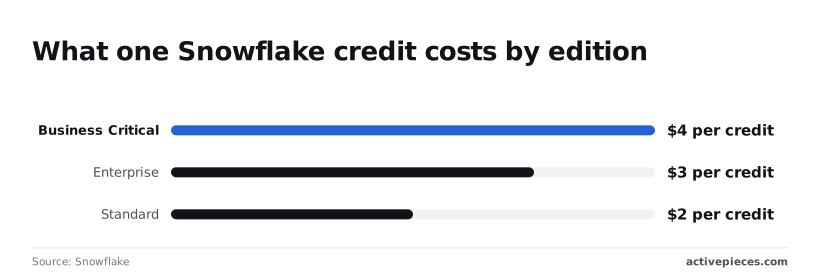
According to Snowflake, a credit costs $2, $3 or $4 on AWS US East, so your per-credit cost depends on which edition you purchase, a figure worth tracking whether you log it by hand or pipe it into a spreadsheet with a tool like Activepieces.
Which of the three you pay depends on edition, as of 22 October 2026.
Snowflake pricing is a metered, usage-based charge:
- you pay for the seconds your warehouses run
- you pay for the data you keep
- you pay for the data you move out
How credits, storage and data transfer are billed
Snowflake's pricing page lists:
- Standard at $2 per credit
- Enterprise at $3
- Business Critical at $4
Moving up one edition therefore raises every query's compute cost by 50% and then 33%, whether or not you use the extra features.
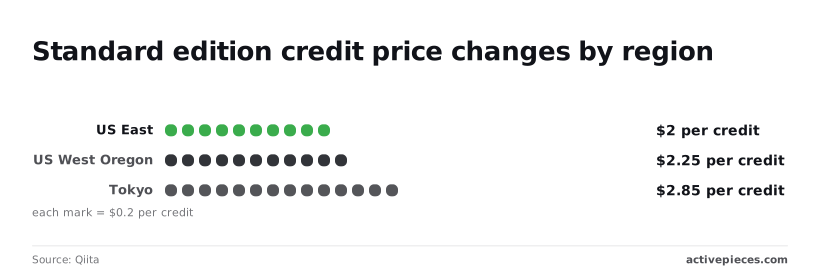
According to a Qiita comparison, Standard costs:
- $2 per credit in US East
- $2.25 in US West (Oregon)
- $2.85 in Tokyo
12.5% above US East is the Oregon rate. The Tokyo rate is 42.5% above the US East rate, so the same workload in Tokyo costs about 1.4 times as much before you've chosen an edition.
Snowflake edition pricing compared in one table
| Edition | Price per credit (AWS US East) | Time Travel maximum | Headline inclusions |
|---|---|---|---|
| Standard | $2.00 | 1 day | Core warehouse and data platform features |
| Enterprise | $3.00 | 90 days | Multi-cluster warehouses and extended recovery |
| Business Critical | $4.00 | 90 days | Enterprise features plus stronger security and compliance controls |
Prices and plan limits checked against snowflake.com on October 22, 2026.
If the mistake happened on Sunday and you find it on Tuesday morning, Standard's one-day window means it is unrecoverable. Enterprise and Business Critical both allow 90 days, so the $4 tier is not buying you longer recovery, only the security tier above it.

Snowflake on-demand versus capacity contract pricing
With on-demand billing, you are charged list price in arrears with no commitment. A capacity contract commits you to a prepaid spend in exchange for a lower effective rate.
If your estimate was wrong, the commitment becomes a liability, because unused credits are still paid for. You don't hire for the monthly check that compares metered credits against the commitment; you describe it.
Tell Activepieces' built-in chat what to compare and it publishes a live flow in your account, the same artifact a builder would have assembled by hand, under the platform's usual RBAC, audit logs and run traces.
Open any run and the trace shows exactly what it queried and what it reported, readable without a data-engineering background. MoneyGram, Moneypenny, Alan and FundingSocieties run Activepieces in production.
What Snowflake costs at three realistic usage levels
To get the monthly cost at any usage level, multiply credits per hour by hours run and by your credit rate, then add storage at $23 per TB, which means you need visibility into all three cost drivers before forecasting works.
The levels therefore differ mostly in hours and edition rather than in the rate.
Credits per hour by warehouse size
Credits per hour is set by the size of the warehouse, and it doubles at every step up.

| Warehouse size | Credits per hour |
|---|---|
| X-Small | 1 |
| Small | 2 |
| Medium | 4 |
| Large | 8 |
| X-Large | 16 |
| 2X-Large | 32 |
Storage is the other term in the formula: $23 per TB per month, the on-demand figure on Snowflake's pricing page. The examples below use these two inputs and nothing else.
Small team: occasional dashboards
With one small warehouse and a few hours of queries a day, a small team on the entry edition has a bill that's mostly compute. Compute follows the hours the warehouse's awake.
Take a Small warehouse (2 credits per hour) running 5 hours a day for 20 days, or 100 hours, on Standard at $2 per credit, with 1 TB stored.
Compute is 2 × 100 × $2 = $400, storage is $23, and the month comes to $423.
If auto-suspend is set sensibly, the idle evenings and weekends cost nothing. If it's left long, a warehouse that nobody is querying still burns credits, and the bill drifts above what the dashboards justify.
Mid-size team: daily BI and transformations
Here two things stack up: a warehouse that serves analysts during the day and a scheduled transformation job that runs on a larger one. Hours per month are no longer a guess, because the schedule fixes them.
On Enterprise at $3 per credit, a Medium warehouse (4 credits per hour) serving analysts for 200 hours costs 4 × 200 × $3 = $2,400.
A Large (8 credits per hour) running the nightly job for 60 hours costs 8 × 60 × $3 = $1,440. Add 10 TB of storage at $230 and the month is $4,070.
Doubling a warehouse's size doubles its credits per hour, so a transformation job that finishes in half the time can cost the same, or less, on the bigger machine.
Snowflake costs for heavy always-on workloads
When pipelines run around the clock, hours per month stops being a variable and becomes close to the full calendar. The credit rate then multiplies a very large base, so a small difference in edition or region becomes the largest line on the invoice.
A Large warehouse running all 730 hours of a month uses 8 × 730 = 5,840 credits. On Enterprise that is $17,520 of compute, and with 50 TB stored ($1,150) the month is $18,670.
The same workload on Business Critical is $23,360 plus storage, or $24,510, so the edition alone moves the bill by $5,840.
If you are running this arithmetic for your own team, see what the same workload costs on Activepieces.
Understand hidden Snowflake costs and limits
Leave warehouse hours running and they turn into money in compute. Akave's breakdown of an enterprise bill puts it at 75% of spend, so most of the savings sit in warehouse behavior.

Idle time at 18% and data transfer at 7% add a quarter on top, which no credit-rate negotiation touches, so even negotiated discounts only partly reduce these costs.
Warehouse idle time and the 60-second minimum
Every time a warehouse resumes, Snowflake bills a minimum of 60 seconds, so a 5-second operation pays as much as a 60-second one. A dashboard that pings a suspended warehouse every 20 seconds therefore pays for three times the work it does.

In the other direction, auto-suspend settings matter too: a warehouse left at a 30-minute timeout bills for 30 minutes of nothing after each query, so extended idle windows accumulate charges between actual tasks.
Serverless and background Snowflake service costs
You can be strict about auto-suspend and still pay for automatic clustering, materialized view maintenance, search optimization or Snowpipe. They run on Snowflake-managed compute, billed in credits with no warehouse involved.
Cloud services, the layer that handles metadata and query planning, incurs no charge on a given day as long as its credits are at or below 10% of your daily warehouse credits.
A workload of thousands of tiny metadata-heavy queries can therefore be billed for the overage.
Storage retention and data egress
18% of spend goes to storage, and most of it is retention you didn't choose deliberately, meaning roughly one dollar in five of your spend goes to data you didn't actively choose to retain.
Time Travel keeps changed data for at least a day and up to 90 days on Enterprise edition, and permanent tables carry a further 7-day fail-safe period.
Rewrite a table daily and it stores several copies of itself, so set long retention only on tables that need recovery.
Transfer, at 7%, is billed when data leaves your cloud region or provider, such as in cross-region replication or unloading to a bucket elsewhere, making multi-region deployments substantially more expensive than remaining within a single region.
Snowflake features that require a higher edition
If you need multi-cluster warehouses, materialized views or the 90-day Time Travel window, you need Enterprise edition or above.
The trap runs both ways: staying on Standard means a concurrency spike queues instead of scaling out, while moving up raises the per-credit rate on every workload, including those that never use these capabilities.
Snowflake versus BigQuery, Redshift and Databricks on price
Which of the four is cheaper depends on whether your workload is spiky or steady, because each bills a different unit (running time, data scanned, node hours or compute units).
| Pricing model | Storage billing | Idle-time charging | Spiky or steady fit | |
|---|---|---|---|---|
| Snowflake | Credits consumed while a virtual warehouse runs | Separate, by data stored | Bills until the warehouse suspends, so auto-suspend settings matter | Either, if suspension is tuned; a forgotten warehouse makes steady billing out of spiky use |
| BigQuery | Per data scanned (on-demand) or reserved slot capacity | Separate, with active and long-term rates | On-demand has none; reserved slots bill while provisioned | On-demand suits spiky, light use; reserved capacity suits steady, heavy use |
| Redshift | Node hours on provisioned clusters, or compute units on Serverless | Separate managed storage on current node types and Serverless | Provisioned clusters bill while running; Serverless pauses when idle | Provisioned suits steady load; Serverless suits intermittent load |
| Databricks | Platform units consumed by compute, plus the cloud provider's charge for the machines | Data sits in your own cloud storage, billed by that provider | Clusters bill until terminated, on both the platform and cloud sides | Steady pipelines and jobs fit well; interactive use needs termination discipline |
Check the current figure on each vendor's own pricing page before you put it in an estimate.
Read the idle column first. Snowflake and Databricks both keep charging for compute you've left running, and Databricks adds the cloud provider's machine charge on top.
BigQuery's on-demand model sidesteps idle compute entirely, but it charges for every byte a careless query scans. Redshift splits the difference depending on whether you chose provisioned or Serverless.
Which model wins depends on the workload
Without a workload attached, none of these wins. The same platform can be the cheapest for one team and the dearest for another.
Turn your own query pattern into hours of compute and bytes of storage next, because that is what an estimate needs.
The same platform can be the cheapest for one team and the dearest for another.
Worth checking against a plan that does not meter every step: one credit covers a whole run on Activepieces.
Fix Snowflake cost surprises with Activepieces
Once your query pattern is written down as hours and bytes, Activepieces, whose core is MIT-licensed and which ships 744 integrations, can check your estimate against what Snowflake actually metered, on a schedule, and tell a person when the two drift apart.
It's not a warehouse and not a Snowflake alternative. It does one job: watching the bill.
Scheduled usage checks and budget alerts
The failure it addresses is quiet. A warehouse is left running, a job loops, and nobody sees the credit total until the invoice. Snowflake already records the evidence in its account usage views, including warehouse metering history. Nothing reads those views for you.
An Activepieces flow can. It runs on a schedule, queries the metering view, adds up credits against the budget you set, and sends a message to chat or email when the total passes your threshold.

The free plan on Activepieces Cloud is $0 with 1,000 credits a month, so trying it costs nothing.
That message arrives while the overrun's still a few hours old, not after the month closes.
Use Snowflake resource monitors for hard limits
An alert is a request for someone to act. A resource monitor is Snowflake enforcing a limit. Monitors can notify at a set share of a credit quota and suspend warehouses when it's reached.
The Activepieces flow can't do that, and it shouldn't replace them. Use the monitor as the wall and the flow as the early warning that says you're approaching it. Flows are unlimited on every plan, so running one per warehouse adds no cost.

Steps to control Snowflake costs this week
Start with the controls that stop spending and finish with the reporting, in the order below. The flow is only useful once the limits it reports against exist.
- Set resource monitors with credit quotas on every warehouse, with a notify threshold below the suspend threshold so someone hears before the warehouse stops.
- Shorten auto-suspend, so an idle warehouse stops billing soon after its last query instead of sitting awake overnight.
- Right-size warehouses. Move down any warehouse whose queries finish comfortably, and check whether the saved credits cost you unacceptable runtime.
- Build the scheduled Activepieces flow: query the usage views, compare the total to the budget from your estimate, and alert the person who can change the setting.
Frequently asked questions
Does Snowflake have a free trial?
Yes, new Snowflake accounts get a trial with free credits. The credit amount and length have changed over time, so read the current signup page before you plan around them.
Because a trial runs under trial terms, it tells you how the product behaves but not what your steady-state bill will be. Edition and region choices made during signup can carry into the account you keep.
Is Snowflake cheaper on-demand or with a capacity contract?
In exchange for a commitment to spend, a capacity contract usually gives a lower rate per credit, while on-demand is pay-as-you-go at the higher rate. Capacity's cheaper only if you use what you committed to.
At the end of the term, unused capacity can lapse, so an overestimated workload turns the discount into a loss. If your usage's still unmeasured, start on-demand and commit once you have real consumption history.
Can Snowflake costs be capped automatically?
Partly. Resource monitors can notify you or suspend warehouses when credit use crosses a threshold you set. They govern warehouse compute, not storage or data transfer, so a monitor can be quiet while those lines keep growing.
Auto-suspend settings and statement timeouts cover the other common leaks: a warehouse nobody stopped, and a query that never ends. Treat monitors as a guardrail on one cost line, not a ceiling on the invoice.
Why is my Snowflake bill higher than my estimate?
Usually because the estimate multiplied a list price by a guess at usage, and the guess was wrong in a place the price page doesn't show.
The usual culprits are warehouses that stay running between queries and a larger warehouse size than the workload needed.
Storage that kept growing, data moved between regions or clouds, and serverless services that bill separately from your warehouses add the rest. Open the account's usage views and see which category moved before you change anything else.
Does Snowflake charge for queries that fail?
It can. Warehouse compute is billed for the time the warehouse runs, not per successful result, so a query that fails after it starts executing has already used that time.
A query rejected before it needs a warehouse, such as a syntax error caught at compilation, generally doesn't consume warehouse compute.
Repeated failures from a retry loop therefore cost real credits, and a failing job's worth fixing for the bill as well as for the data.
Related reading
Running the numbers
See what the same workload costs here.
Free forever plan, and every paid plan self-hosts at no extra cost.
See pricing Talk to sales