
YouTube API Quota Exceeded? How to Fix and Avoid It

Oct 22, 202613 min read
Nobody bills you per call. The YouTube Data API v3 is Google's free REST interface for searching, reading and managing YouTube content, whether you call it from your own code or from a workflow tool like Activepieces.
Each project gets a daily quota of units, and that's the real constraint.
YouTube Data API free access and quota
Which YouTube API fits which job
The name covers several separate products. These four are the easiest to confuse.
- The Data API v3 searches videos, channels and playlists, reads their public details, and manages content on an authorized account, including uploads, playlist edits and comments.
- The Analytics API returns performance metrics, such as views and watch time, for channels you own or have been granted access to.
- The Reporting API delivers bulk, scheduled data reports for a channel, built for pipelines rather than live dashboards.
- The IFrame Player API controls an embedded player in the browser, so you can play, pause and react to playback events, but it doesn't fetch or manage catalog data.
The rest of this article covers the Data API.
Quota units instead of a price per call
The metered unit is the quota unit, not the request. Every method has a fixed unit cost, and your project spends from one shared daily pool.
The metered unit is the quota unit, not the request.
Budget by method, not by call count. That holds whether you call the API from your own code or from Activepieces, since the quota's charged to the Google Cloud project behind the credentials.
Default quota and how to request more
Every new project starts with a default daily allotment, and Google's quota documentation lists the current figure along with the cost of each method.
Read that page before you design anything. If your workload doesn't fit, you can apply for more through Google's quota extension request, which is a review, not a purchase.
Submit it before launch, not the day your quota errors start, because a request still in review leaves your production traffic failing against the default limit.
This takes minutes, not a project: automate it in Activepieces free.
Google Cloud project and API key
Before any key works, you need a Google Cloud project, the YouTube Data API v3 enabled on it, and one restricted API key. The project matters most because it's the unit your quota's metered against.

- In the Google Cloud Console, open the project picker and choose New Project. Name it after the application, so the quota owner is obvious.
- With the project selected, open the API Library and search for YouTube Data API v3.
- Select it and choose Enable.
When a fresh key fails, the usual cause is a skipped step three. Requests return a forbidden error saying the API hasn't been used in the project, and the key itself is fine.
Create and restrict a YouTube API key
- Open the Credentials page and choose Create credentials, then API key.
- Copy the key into your secrets store, not into source control.
- Edit the key and, under API restrictions, limit it to YouTube Data API v3.
- Under application restrictions, pick the one that matches where the key runs: IP addresses for a server, HTTP referrers for a browser app.
Anyone who lifts an unrestricted key can spend your daily allowance, and your legitimate traffic then fails with quota errors that look like a design flaw.
Test it with a plain read, such as a video or channel lookup passing the key as a query parameter. A successful response means the project, the API and the key are all wired correctly.
When a YouTube API key needs OAuth
Because a key identifies your project, not a person, it only reads public data. Anything that touches a user's account needs OAuth: uploading videos, editing playlists, reading private channel details, or acting on a channel you don't own.
For that you configure the OAuth consent screen in the same project, then create an OAuth client ID instead of an API key. Your app receives tokens scoped to what the user approved.
The key you made here stays useful for public reads, so keep it and add OAuth only where a request demands it.
Your first API request and quota cost
1 unit is what a videos.list call with your API key costs, against a default daily quota of 10,000.
Export the key from the previous stage, then ask for one video's snippet:
curl "https://www.googleapis.com/youtube/v3/videos?part=snippet&id=dQw4w9WgXcQ&key=$YOUTUBE_API_KEY"A trimmed response looks like this:
{
 "kind": "youtube#videoListResponse",
 "pageInfo": { "totalResults": 1, "resultsPerPage": 1 },
 "items": [
 { "kind": "youtube#video", "id": "dQw4w9WgXcQ", "snippet": { "title": "..." } }
 ]
}
At 1 unit per call, the default allows 10,000 list calls a day, so a polling workflow that checks a few hundred videos hourly won't come close to the ceiling.
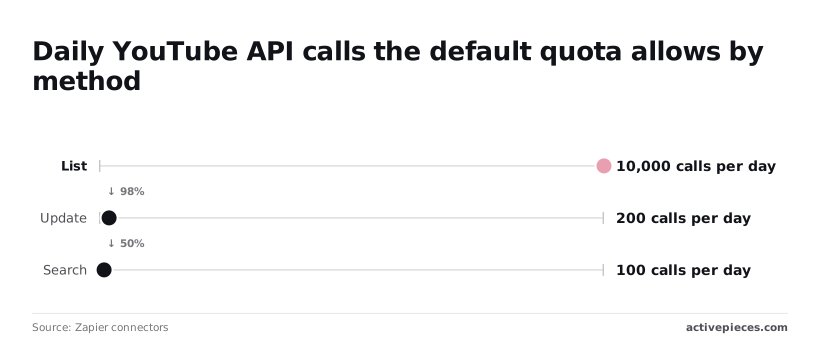
Endpoint costs compared: list, search, insert, update
The takeaway is that the same key which makes reads cheap can't make the expensive writes.
| Method | Quota cost per call (units, docs checked Oct 22 2026) | Key or OAuth | Quota bucket |
|---|---|---|---|
| videos.list | 1 | API key | Project daily quota |
| search.list | 100 | API key | Project daily quota |
| videos.insert | 1 | OAuth | Project daily quota |
| videos.update | 50 | OAuth | Project daily quota |
All four draw from one shared pool, so a spike in one starves the others. At 100 units, search allows only 100 calls a day. A dashboard that runs a search per page view is out of quota after 100 visitors.
Insert at 1 unit per call has its own default limit of 100 uploads a day, so it leaves the rest of the quota free for other calls.
Check YouTube API quota usage in Cloud Console
Open the Cloud Console, go to APIs & Services, choose YouTube Data API v3, and open the Quotas tab. The "Queries per day" row shows units consumed against the 10,000 limit.
Check it after your first curl: it should have moved by 1. If it moved by more, something else is spending quota under the same project.
Video uploads with OAuth and videos.insert
Uploading requires OAuth, because an API key can't write to anyone's channel, and the call is where your quota baseline gets tested. The sequence runs from setup to a confirmed private video.
- Configure the OAuth consent screen.
- Create an OAuth client ID.
- Obtain tokens with the
youtube.uploadscope. - Start a resumable upload with
title,categoryIdandprivacyStatus. - Send the video bytes.
- Confirm the video exists and is private.
Configure the consent screen in your Google Cloud project, then create a client ID of the type matching your app, such as desktop or web.
Request only youtube.upload. A narrow scope means the consent prompt asks for less, and a leaked token can publish but not read or delete the channel's other data.
The resumable upload request
Start a resumable YouTube video upload session
Start with a POST to videos.insert using uploadType=resumable. The metadata must include snippet.title, snippet.categoryId and status.privacyStatus. Google returns a session URL, and you send the bytes to it. If the connection drops, you resume that session instead of restarting, which matters for large files.
What an upload costs now
Cost has moved sharply. Sume reports that before December 2025 an upload cost 1,600 quota units per call, so each upload consumed a large share of a day's allowance.

On December 4, 2025 the cost dropped to 100 units, which is 16 times more uploads for the same quota. On June 1, 2026 it fell to 1 unit, 100 times cheaper again and 1,600 times cheaper than the old price.
Check the current documentation before you plan around these numbers, but quota is no longer the main limit on upload volume.
The audit rule and private uploads
API projects that haven't passed YouTube's compliance audit have their uploads locked to private, whatever privacyStatus you send.
Your upload will succeed and return a video ID, but nobody else can watch it. Test with that ID and confirm the video shows as private in YouTube Studio. Submit the audit before you promise anyone public publishing.
You can follow the rest of this with the builder open. Start free, no card.
Handle quota and auth errors
Six errors cause most production failures, and each has a specific fix. The fixes are to spend less quota, renew credentials before they lapse, retry transient failures with backoff, and request more quota only last.
| Error | What triggers it | The fix |
|---|---|---|
| quotaExceeded | The project has used its daily quota | Cut spend, or wait for the daily reset |
| forbidden | The credential lacks permission for the call, such as a missing scope | Check scopes and channel ownership, then re-authorize |
| rateLimitExceeded | Too many requests in a short window | Retry with exponential backoff |
| invalid credentials | The access token is expired, malformed or from the wrong project | Refresh the token or reissue the key |
| refresh token expired (7 days in Testing) | The consent screen is in Testing mode | Publish the app, or re-authorize weekly |
| uploadLimitExceeded | The channel hit its upload limit | Wait and retry later |
QuotaExceeded and how to spend less
Where the quota goes
Against the usual default of 10,000 units a day, a single (source). That's about 100 uploads a day before the project hits the videos.insert limit. search.list costs 100 units per call, so a hundred searches drain the same budget.
Replace search with playlistItems wherever you already know the channel, since it's far cheaper. Cache responses that rarely change, and use the fields parameter to trim payloads. Batch uploads across days rather than bursts.
OAuth token expiry and quota error retries
While your OAuth consent screen is in Testing, refresh tokens expire after 7 days. A job that worked all week then fails with invalid credentials the following Monday.
Publish the app before you rely on unattended runs.
rateLimitExceeded is the one error worth retrying automatically. Wait a short interval, double it on each failure, add random jitter and cap the attempts. Don't retry quotaExceeded this way: it won't clear until the daily reset, so retries only burn time.
Asking for more quota
Once caching and cheaper endpoints are in place, apply for more quota. Bring usage numbers showing what each call costs and why your workload needs the extra units.
What Activepieces does about this
Activepieces doesn't change the quota. The YouTube integration calls the same endpoints you would call yourself, so every unit is charged to the Google Cloud project behind the credentials, and the audit rule still locks unaudited uploads to private.
What it removes is the plumbing around the OAuth flow: you build a scheduled or triggered workflow, such as a nightly upload or a poll of a known channel, without writing the consent and token-handling code that the earlier sections walk through.
That makes the quota decisions easier to see, because each one is a step in a workflow you can read. Use a lookup by ID where you would otherwise search. Space uploads across days with a schedule rather than firing them in a burst.

Put your own retry and backoff steps around the calls that return rateLimitExceeded, and leave quotaExceeded to wait for the Pacific Time reset. None of that is automatic.
It is a design you put in the flow, and the quota table above tells you what each step costs.
The integration is one of 744 in the MIT-licensed core, in the packages/pieces/community directory of the open source repository. You can read how it calls the API and self-host it, so the project, the key and the refresh token stay under your control.
On a self-hosted instance, the enterprise governance features let you point at an external secret manager, so the refresh token that publishes to your channel isn't stored in the Activepieces database. Those features sit alongside SCIM, custom RBAC, SSO/SAML and audit logs.
Before you rely on it, run the same checks as with hand-written code. Publish the consent screen so the 7-day refresh-token expiry doesn't break an unattended job. Confirm your first upload shows as private in YouTube Studio until the audit passes.
Watch the Quotas tab for a day to see what the workflow actually spends.
Frequently asked questions
Once an extension request is filed, these are the questions that tend to remain.
Is the YouTube API free?
Yes, there's no per-call charge, but it's metered in quota units, not dollars. Every request deducts units from a daily allocation, and different methods cost different amounts. Reads are cheap and uploads are expensive.
Your real cost is how much of the day's allocation a workflow burns, and what happens when it runs out: requests fail until the quota resets, or until Google approves an increase.
Can I upload videos with just an API key?
No. An API key identifies your project and is enough for public reads, such as searching or fetching video metadata.
Because an upload writes to a specific channel, it needs OAuth 2.0 consent from the channel owner. A key-only request will be rejected with an authorization error, and retrying it won't change that.
Build the OAuth flow first, including refresh-token storage, before you estimate anything about upload volume.
How many videos can I upload per day with the default quota?
Divide your project's daily allocation by the quota cost of one upload call, and that's your ceiling.
Both values are shown in your Google Cloud console and in the API's quota documentation, so check them there instead of trusting a number copied from an old blog post. Costs have changed over time.
Remember that every other call your app makes, such as listing, updating or polling, draws from the same pool, so the practical upload count is lower than the arithmetic suggests.
Does the quota reset at midnight in my time zone? No. The daily quota resets at midnight Pacific Time, whatever your location or your server's clock.
If your scheduler assumes midnight UTC or local midnight, it'll either retry too early and keep failing or sit idle while quota is available. Pin your retry and batch logic to Pacific Time, and daylight saving shifts are handled for you.

Do I need to verify my app to use the YouTube API?
For testing with your own account, usually not. For anything public-facing, yes, in two senses. Google's OAuth verification applies when your app requests sensitive scopes from users outside your project.
Separately, YouTube runs a compliance audit for API Services. Unaudited projects can have uploaded videos locked to private visibility, and the audit is generally part of getting a quota extension approved.
So treat verification as a production prerequisite, and start it before launch, not after the first rejected upload.
Related reading
References
Build it
Set this up in minutes.
No code required. Connect your accounts, and Activepieces runs it from there.
Start free Talk to sales