Activepieces Docker Setup: 6 Mistakes to Avoid (2026)

Oct 24, 202614 min read
Docker Compose runs the MIT-licensed Community Edition as three containers:
- the Activepieces app
- Postgres
- Redis
Activepieces Docker setup: what it is and what you get
Within minutes the default install works, but it only stays reliable once you replace the defaults it ships with.
What the Docker install runs
Because the MIT text grants permission "free of charge, to any person obtaining a copy of this software", the Community Edition carries no per-seat fee.
Postgres holds flows, connections and run history. Redis holds the job queue. If either container loses its volume, you lose that data, which is why persistence comes before real workflows.
You can check each stage by its end state.
- Install Docker, until
docker --versionanddocker compose versionboth print a version. - Download the compose file and the example environment file from the project repository, and copy the example to
.env. - Set secrets by replacing the example
AP_ENCRYPTION_KEYandAP_JWT_SECRETvalues in your.envfile with your own random ones. Stored connection credentials are then encrypted with a key only you hold. - Set the public HTTPS URL by pointing
AP_FRONTEND_URLat your real domain behind HTTPS. Webhook addresses and OAuth callbacks then show that domain, notlocalhost. - Run a test webhook by building a flow that starts with a webhook trigger, send it a request with
curl, and see the run in the flow's history.
Stages 3 and 4 are the ones people skip. Changing the encryption key after connections exist leaves those saved connections unreadable.
Where the facts come from and when checked
According to Activepieces community and GitHub trackers, the repository passed 5,000 stars, then 10,000, then 12,000, then 21,481, then 25,000.
**Changing the encryption key after connections exist leaves those saved connections unreadable.
Roughly 9,500 stars arrived between the 12,000 and 21,481 marks, nearly as many as the 10,000 milestone alone.
Stars don't audit anything. They tell you the project is widely used, not that your instance is backed up, and the rest of this article covers what to configure so that it's.

Everything below works on Activepieces' free plan. Start without code or a credit card.
What Community Edition includes versus paid features
If you run it yourself, the Community Edition is free under the MIT licence. SSO beyond the Team plan, audit logs and embedding sit behind paid or sales-led arrangements.
MIT-licensed Community Edition
In its own words, the MIT licence grants permission to use, copy, modify, merge, publish, distribute, sublicense and sell the software, "without restriction." It also says the software is provided "as is," without warranty of any kind.
For you, that means the code is yours to run and change, but nobody is contractually obliged to keep your instance up, patch it or answer when it fails.
Paid plans and sales-led features
Read the infrastructure column first: it determines who is paged when something breaks. The table shows who holds the infrastructure and which capabilities change hands at each tier.
| Licence | Who runs infrastructure | SSO | Audit logs | Embedding | Support route | |
|---|---|---|---|---|---|---|
| Community Edition self-hosted | MIT | You | Not included | Not included | Not included | Community channels |
| Cloud plans | Commercial subscription | Activepieces | Beyond Team, by arrangement with sales | Sales-led | Sales-led | Per plan, see the pricing page |
| Enterprise self-hosted | Commercial agreement | You, on your own infrastructure | Included by agreement | Included by agreement | Included by agreement | Contracted with sales |
If you need SSO beyond the Team plan, audit logs or embedding, Community Edition isn't the route.
The sales form is the way to scope self-hosted enterprise, and what it scopes is not a cut-down build: the fully air-gapped edition carries the same access control, audit trail, release management and secret-manager hooks as the managed cloud, and MoneyGram, Moneypenny, Alan and FundingSocieties run Activepieces in production.
Don't write "SOC 2 compliant" in your own vendor review. SOC 2 is a programme Activepieces has in progress, not a certification it holds. Name the control you need, such as access logging or centralised authentication, and check the plan against that.
When cloud beats self-hosting
When nobody on your team wants to own uptime, cloud is the better choice. If the vendor's cloud goes down, their team restores it; if your self-hosted instance goes down, you're the incident response, the backup restore and the certificate renewal.
Choose cloud for a small team, a first workflow or a pilot where an outage costs little and your time costs more than a subscription.
When data must stay on infrastructure you control, self-hosting wins.
Otherwise, build before committing: the free plan at https://cloud.activepieces.com/sign-up costs $0 and gives you 1,000 credits a month, unlimited flows and up to 5 users, which means you can test before upgrading to a paid plan.

Compare plans at https://www.activepieces.com/pricing, and use https://www.activepieces.com/sales for self-hosted enterprise, SSO beyond Team, audit logs or embedding.
Stages 1 to 3: install Docker and start Activepieces
If you chose self-hosting over the free cloud tier, the install is three stages. Check the server and install Docker, fetch the compose file and generate secrets, then start the stack and create the admin account.
Stage 1: Check the server and install Docker
Check RAM before price, because only two of three common small servers meet the memory line.
The minimum is 2 vCPU, 4 GB of RAM and 30 GB of disk, and the table shows how the three measure against it, so you'll be able to verify whether your infrastructure qualifies.
| Server | Price per month | Disk | Against the minimum |
|---|---|---|---|
| Hetzner CX22 | €3.79 | 40 GB | Disk clears 30 GB |
| DigitalOcean 4GB | $24 | 80 GB | Disk clears 30 GB, with room for run history |
| Lightsail 2GB | $11.77 | Under spec | Half the required RAM |
With half the required memory, the Lightsail plan is the one most likely to have containers killed under load, even though it costs less than the DigitalOcean one.
Install Docker Engine and the Compose plugin from Docker's own repository rather than your distribution's older package. Then confirm that docker compose version prints a version. If it doesn't, the stack won't start.
Stage 2: Fetch the compose file and generate secrets
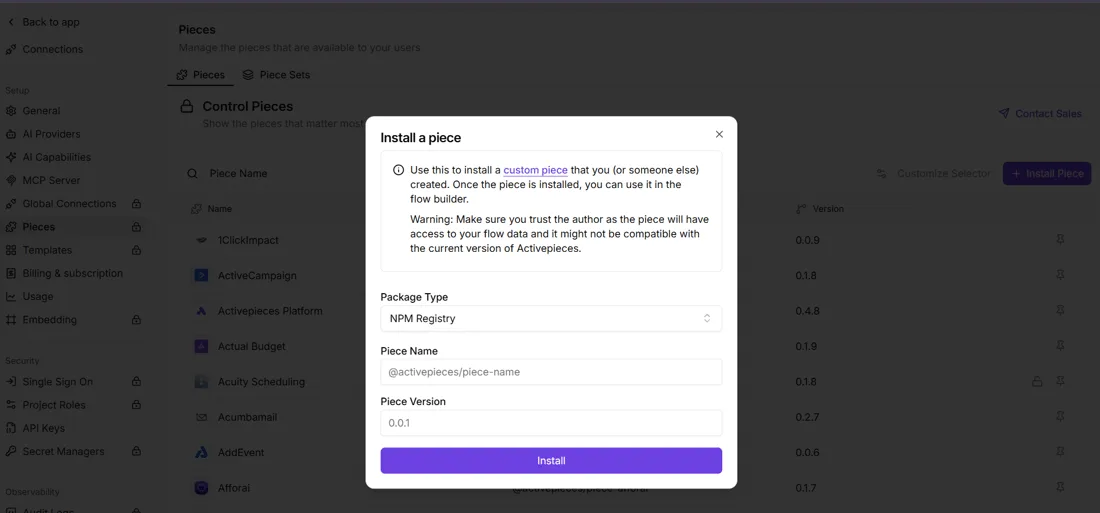
Download the compose file and the example environment file from the project repository into an empty directory, and copy the example to .env.
Everything that makes the instance yours lives in that file, so treat it like a credentials store and keep it out of version control.
Replace every placeholder secret before the first start. Generate each value with openssl rand -hex, using at least the length the example file asks for, and give each variable its own value.
The encryption key matters most. It protects the credentials your flows store for other services, and the instance can't recover them if you lose it. Copy it into a password manager now, not after the first outage.
Set the database password in the same pass.
Stage 3: Start the stack and create the admin account
From the directory holding both files, run:
docker compose up -dThen run docker compose ps. Every service should show as running, not restarting. A service stuck restarting usually means a missing or malformed value in .env, and docker compose logs names the variable.
Open port 8080 on the server's address in a browser. The first account you register becomes the admin, so do this immediately and not after the address has been shared.
Easier to see it running than to read about it: set it up free, no card.
Set public HTTPS URL and test workflow
Set the public address first, because every webhook URL the instance hands out is built from it, and a wrong value makes those URLs unreachable.
Set AP_FRONTEND_URL to the full HTTPS address your users will type, for example https://flows.example.com, then restart the containers. Left at its default, the instance builds links around an internal address.
Put a reverse proxy in front of the app container to terminate TLS. Caddy obtains and renews certificates by itself, and nginx with Certbot does the same with more manual wiring.
Check one thing before moving on: open the address in a browser and confirm the padlock. If the certificate is self-signed, many senders will refuse to deliver, so you'll find out at the worst moment.

Stage 5: Build and test a webhook workflow
Create a flow, choose the webhook trigger, and keep a second step simple, such as a row append or a message.
In the canvas below, a flow named "Test Flow" has a weekly schedule trigger, a Google Sheets step that reads the next rows (outlined in red), and a loop.
The panel on the right belongs to the selected step and holds its connection, spreadsheet, sheet and start row, which is where every step's inputs are set.
You build the same shape, with a webhook trigger where the schedule sits. Copy the address the trigger displays, check that it begins with your public hostname, and send a request from a machine outside your network:
curl -X POST "$WEBHOOK_URL" \
 -H "Content-Type: application/json" \
 -d '{"invoice": "test", "status": "unpaid"}'
Then return to the trigger and load the sample data. The JSON you sent should appear as the trigger's output, and later steps can reference its fields.
If it doesn't, read the failure literally. A connection error points at DNS, the proxy or the firewall. A certificate error points at TLS. A response from the proxy that never reaches the app points at the forwarding rule.
Run the test once more after restarting the containers. A flow that only works until the first restart isn't reliable, and this is the cheapest moment to learn that.
Self-hosting mistakes that break Activepieces instances
Because you own uptime and patching, nobody else will catch the six setup choices behind most self-hosted failures. The table pairs each failure with the symptom you'll see and the fix.
| Failure | Symptom | Fix |
|---|---|---|
| Changed encryption key | Saved connections stop decrypting; flows fail on authentication | Restore the original key from your secrets store |
| No persistent volumes or backups | A container rebuild leaves an empty instance | Mount volumes for the database and scheduled dumps, and test a restore |
| Wrong frontend URL | Webhook triggers never fire; links in emails point nowhere | Set the public URL to the address outsiders reach |
| Undersized server | Runs time out, the container is killed for memory, the UI crawls | Add memory and CPU, then watch usage under real load |
| Upgrade without changelog | Flows or settings break after a version bump | Read release notes and back up before every upgrade |
| Exposed ports | Database or Redis reachable from the internet | Publish only the web port behind a proxy; firewall the rest |
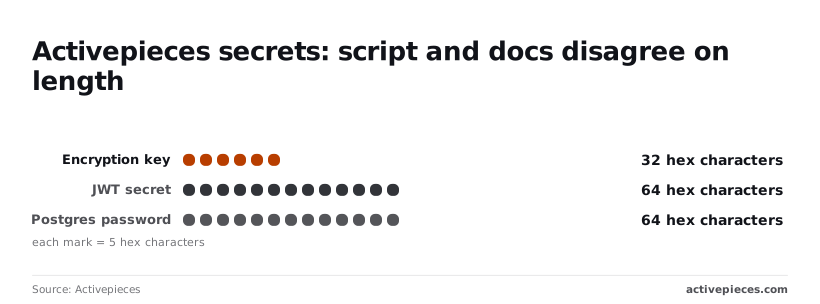
One row, exposed ports, deserves the bluntest warning. Censys tracks Redis services left open with no password, and one such service is enough, because anyone who finds it can read and alter whatever your queue holds.
Losing or changing the encryption key
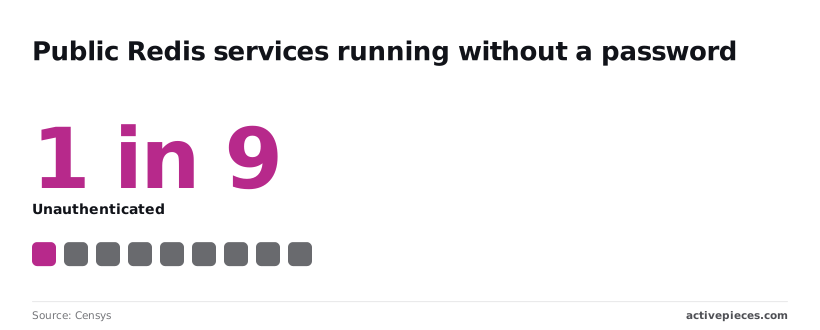
Every credential stored in your connections is protected by this key. The docker-compose guide specifies 32 hex characters for it, 64 for the JWT secret and 64 for the Postgres password.
The helper script and the docs disagree on length, so check what yours generated. A key you regenerate "to tidy up" can't decrypt the old connections, and you'll re-enter every credential by hand.
Ask what happens when the host is rebuilt. Without mounted volumes, the answer is that your flows vanish with the container. A backup you've never restored is a hope, not a control, so run one restore into a scratch instance before you trust it.

If the frontend URL still says localhost, external services post to an address that doesn't exist. Set the public address before you register any webhook with a third party.
Pulling the newest image is a change to production, not housekeeping. Read the release notes, take a database dump, then upgrade. If the upgrade fails, the dump is your rollback.
Fix these six before building anything you can't afford to rebuild, then size the server against your busiest flow rather than your average one.
What to do Monday and frequently asked questions
Start the week by proving the workflow idea on the hosted product, and only then commit server time to it. The checklist below puts the cheap decisions first and the one that protects you from data loss last:
- Prototype for free on a cloud sign-up at https://cloud.activepieces.com/sign-up, where the free plan has no card requirement and allows unlimited flows, so you learn whether the flow is worth running before you operate a server for it.
- Compare plans on the pricing page at https://www.activepieces.com/pricing, where Team is $200 a month flat and includes SSO and standard roles, letting you budget predictably for a team with access controls.
- Contact sales at https://www.activepieces.com/sales if you need SSO beyond the Team plan, audit logs or embedding.
- Test a restore before real workflows go live.
The order of work
Read that list as the order of work: the first three tell you what you're buying, and the fourth tells you whether your backups are real.
What follows answers the questions that most often decide whether a self-hosted install goes ahead.
Is it free to self-host?
Yes, it is free to self-host. The Community Edition is MIT-licensed, so you can run it on your own server without a license fee. What you pay for is the server, your time and the backups.
Features gated to paid plans aren't unlocked by self-hosting.
Do you need Kubernetes?
You don't need Kubernetes to run Activepieces. A single Docker Compose install of three containers, on a server with 2 vCPU, 4 GB of RAM and 30 GB of disk, is enough to start, so you won't need to over-invest in hardware upfront.
Kubernetes becomes a question only when you need to scale beyond one machine, and at that point you're taking on operational work that the hosted product would otherwise carry for you.
Do you get SSO and audit logs?
You will get neither SSO nor audit logs from the Community Edition. SSO beyond the Team plan, audit logs and embedding need a paid arrangement, and the sales form is the route for self-hosted enterprise use.
If your security review requires one of these controls by name, settle it before you build, not after.
How do you upgrade?
To upgrade a Docker install, back up the database first, then pull the newer image and recreate the containers. Check that your secrets and persistent volumes are unchanged, and open a few existing flows to confirm they still run.
If the upgrade fails, the backup you restore-tested is your way back.
Is it SOC 2 certified?
Not SOC 2 certified: that is where self-hosted Activepieces stands. The SOC 2 programme is in progress, so it's not a certification you can cite.
Self-hosting also moves the infrastructure controls, such as access, patching and backups, onto you, so your auditor will ask about your environment, not the vendor's.