
Self Host Nemotron 3.5 Bolt: Setup Guide (2026)

Oct 18, 202613 min read
NVIDIA released Nemotron 3.5 Bolt 74B-A9B on October 15, 2026, and its 24GB edge variant targets the local, self-hosted use this article covers, including setups where the model sits behind workflow tools such as Activepieces on a home server.
NVIDIA's Nemotron 3.5 Bolt release date
Whether you may run it on your own hardware depends on the license and weight-access terms on NVIDIA's pages, so read those before anyone downloads anything. Anything those pages don't state is left out below, except where a third party is named.
What Nemotron 3.5 Bolt is
Start with what the name says: Nemotron 3.5 Bolt 74B-A9B is a mixture-of-experts language model from NVIDIA, with 74 billion total parameters and 9 billion active per token. Plan storage around the 74B, since that's what has to be held.
Per Orcarouter, expect per-token compute closer to a 9B model, since that's the part that runs.
You will also meet a second set of numbers: Research notes that NVIDIA also names a parent model of 120B total and 12B active, but that is the parent; Bolt itself activates only 9B per token.
Keep the two sets of numbers apart when you read its pages, or you'll size hardware against the wrong model.
| Fact | Value | NVIDIA page it came from |
|---|---|---|
| Maker | NVIDIA | NVIDIA research page and blog |
| Total parameters | 74B | NVIDIA research page and blog |
| Active parameters | 9B | NVIDIA research page and blog |
| Parent model | 120B total / 12B active | NVIDIA research page and blog |
| Release date | October 15, 2026 | NVIDIA research page and blog |
Prices and plan limits checked against research.nvidia.com and blogs.nvidia.com on October 18, 2026.
Treat that table as the whole confirmed fact sheet, and check everything after it, including hardware sizing and licensing, against the same pages.
NVIDIA's claims for Nemotron 3.5 Bolt
NVIDIA does claim leaderboard placements: #1 on PinchBench, plus #2 on WebArena and BrowseComp, versus models with similar memory footprint. The core claim is about memory efficiency on local machines.
NVIDIA's blog post describes the 24GB version as "optimized to balance intelligence and speed per GB for local agentic workloads." NVIDIA's pages give ranking claims and speed figures such as 83.99 TPS on AIPerf SPEED-Bench-Coding, which are the maker's own claims.
When a model calls tools and takes steps in sequence, for example as one stage in a workflow, that is an agentic workload. Name the account that owns that connection before the first test run.
As they stood on 2026-10-18, three days after release, NVIDIA's own research page and blog are the source of the NVIDIA facts above. Pages this new get edited, so re-open them before you commit hardware or sign off on a license.
This takes minutes, not a project: automate it in Activepieces free.
Downloading Nemotron 3.5 Bolt weights from Hugging Face
For the weights, go to NVIDIA's own model page on Hugging Face, the site that hosts the files. That page, not a mirror or a blog summary, is the record to work from.
Check anything you read elsewhere against it, because the page can change after you read it.
Where to download or call Nemotron 3.5 Bolt
Decide who owns the download before you start. If the page gates the files behind a login, use a read-only access token scoped to that one repository, created under a team or service account rather than a personal login. Then the connection survives someone leaving.

Follow the steps below in order and you end up with a recorded checkpoint choice, a license you have read, and a price noted or marked absent.
- Open NVIDIA's Hugging Face model page for Nemotron 3.5 Bolt and confirm the publisher is NVIDIA's own organization.
- Pick the checkpoint: the full-precision BF16 files, or the quantized GGUF variant, which is the smaller option for constrained hardware. Check the file sizes the page lists against your disk and memory before choosing.
- Read the license text on the page, not a summary of it.
- Record any price the page states. If it states none, write "none stated" and the date you looked.
- Download the files into a new, empty directory and keep any scripts elsewhere.
Once the files are local, you have what the next stage needs: a known checkpoint, a known license, and a dated note on cost.
Copy the license name and the link exactly as the page gives them. Read what it says about commercial use, redistribution, and fine-tuned derivatives, and have whoever signs off on legal terms read it too.
If the page points to a separate agreement, that document governs, so read it as well.
Nemotron 3.5 Bolt pricing and cost
A model page can state plainly one part of this: downloading the weights.
Whether the page quotes a price for hosted calls is something to confirm by reading it. If it quotes none, treat cost as unknown and don't borrow a figure from a third-party host.
Your real cost is then the hardware you run it on, and only you can measure that.
Serving Nemotron 3.5 Bolt on your own hardware
Run Bolt with the serving route NVIDIA's model card names, exposed as an OpenAI-compatible endpoint, and treat any hardware the card doesn't cover as unverified.
Choosing a Nemotron 3.5 Bolt serving method
Because forum posts often contain outdated parameters, take the launch command, flags and model identifier from NVIDIA's Bolt page instead. NVIDIA describes Bolt as a Mixture-of-Experts hybrid Mamba-Transformer model built to run everyday agentic tasks locally on RTX and DGX Spark machines.
In "74B-A9B", 74B is the total parameter count and A9B the roughly 9B active per token. Every expert still has to sit in memory.
What memory and GPU speed to expect
For the 2-bit build, quantized.uk lists 23.1 GB at 4K context, 24.1 GB at 128K and 25.2 GB at 256K. Context adds only about 2 GB across that whole range, so the weights set your budget.

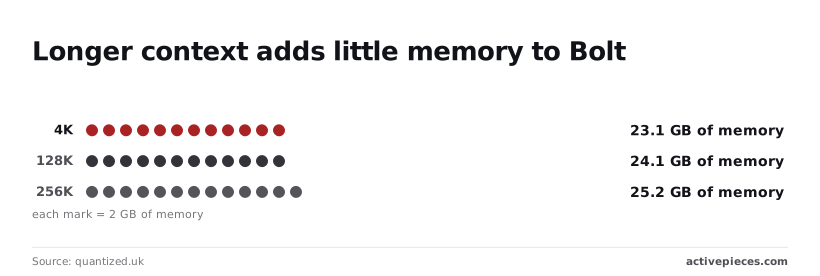
For speed, llm-speed.com reports 154.7 tokens per second on an RTX 5090, 107.3 on an RTX 4090 and 87.8 on an RTX 3090. All three clear NVIDIA's 80 tokens-a-second target.
These are third-party measurements; rerun them on your own machine.
Send one short chat completion to your server's /v1/chat/completions path, using the host, port and model name the server reports at startup. A reply with generated text confirms the endpoint works.
Note the time to completion so you can compare it with the figures above.
If the request fails, check these first:
- The model name in your request differs from the one the server registered.
- The card runs out of memory because the context length is set above what fits.
- The endpoint is bound to localhost only, so a workflow on another machine can't reach it.
- The endpoint has no authentication, so anyone on your network can use it.
- Your GPU is not in NVIDIA's listed hardware. Check the model card before relying on it.

Once one request returns cleanly, the endpoint is ready to be called from a workflow step.
You can follow the rest of this with the builder open. Start free, no card.
Nemotron 3.5 Bolt strengths versus other open models
Treat Bolt as a candidate to verify, not a default to adopt.
Weigh the "independent evidence" column most, because the other columns are descriptions rather than results. The table sets Bolt beside the NVIDIA models closest to it and the one non-NVIDIA model in the independent comparison.
| Model | License | Total / active params | Serving effort | Independent evidence |
|---|---|---|---|---|
| Bolt 74B-A9B | Confirm on NVIDIA's model card | 74B / 9B | Mid-size; all 74B weights must fit in memory | — |
| Nemotron 3.5 Super VL | Confirm on NVIDIA's model card | 120B / 12B | Heavier; more memory than Bolt | None in the figures used here |
| Nemotron 3 Nano 30B | Confirm on NVIDIA's model card | 30B total | Lightest of the four | None in the figures used here |
| gpt-oss-120b | Apache 2.0 | 120B-class | Heavy; comparable to Super | AA index 12 |
Where a license cell says "confirm," the terms are NVIDIA's to state, not ours.
On NVIDIA's own account, Bolt is a sparse model: 74B parameters in total, roughly 9B active per token. The consequence is that compute per request should resemble a much smaller model, while memory must still hold the full 74B.
Read NVIDIA's own model page for the specific claims, and record the date you read them.
Unproven Nemotron 3.5 Bolt benchmark results
On Artificial Analysis, Bolt gets 21 index points. Qwen3.5 27B scores 23, at a smaller size. Gemma 4 26B A4B scores 17.
Below Bolt sit Gemma 4 E4B at 19, Gemma 4 31B at 15 and gpt-oss-120b at 12. Bolt therefore beats some larger models but trails two smaller ones, and parameter count alone won't predict your results.
Before starting, name one owner for the test set and for the endpoint's credentials. Then:
- Collect 20 to 30 real inputs from the workflow step that will call Bolt.
- Write the acceptable output for each before running anything.
- Run Bolt and one of the higher-scoring models above on the same inputs.
- Count failures by type, not just totals.
If Bolt fails on your inputs, the index score has told you why. If it passes, you have evidence that's yours.
Connecting a self-hosted model to an Activepieces workflow
Because Activepieces has no native Nemotron 3.5 Bolt support, you connect your self-hosted copy through one of three routes, and the plainest of them is an HTTP request step.
Evidence of your own is only useful if the model sits inside a flow you control. The first question for each route is who owns the connection: which account holds the endpoint URL and the API key it checks.
Hosting the weights yourself is a decision about control, and the platform around them shouldn't quietly give it back. Most vendors monetise control by shipping a stripped self-hosted build, but Activepieces doesn't hold anything back from the buyers who need it most.
Hosting the weights yourself is a decision about control, and the platform around them shouldn't quietly give it back.
SSO, SCIM, custom RBAC, audit logs, release management and secret manager integration all run in the air-gapped edition as they do in the managed cloud.
MoneyGram and Moneypenny run Activepieces in production, and you can confirm the match by laying the enterprise feature list in the air-gapped docs beside the cloud's.
We haven't run the model ourselves, so treat what follows as a wiring plan to test, not a report of results.
Aim for the shape in the screenshot below.
It's a four-step flow named "Test Flow" in which a schedule trigger starts a code step, an HTTP request fetches data, and an agent step, currently selected with its configuration panel open, writes from a long prompt that references the earlier steps by variable.

Notice that the agent's prompt pulls in outputs from the steps before it, which is exactly how your model's reply will be passed on to later steps. The next three options differ only in which kind of step stands where the model call sits.
Option 1: HTTP request step
Start here. If your serving software exposes an OpenAI-style chat endpoint, which is a setting to confirm in its own documentation, the HTTP request step can post a JSON body containing the model name and one message to it.
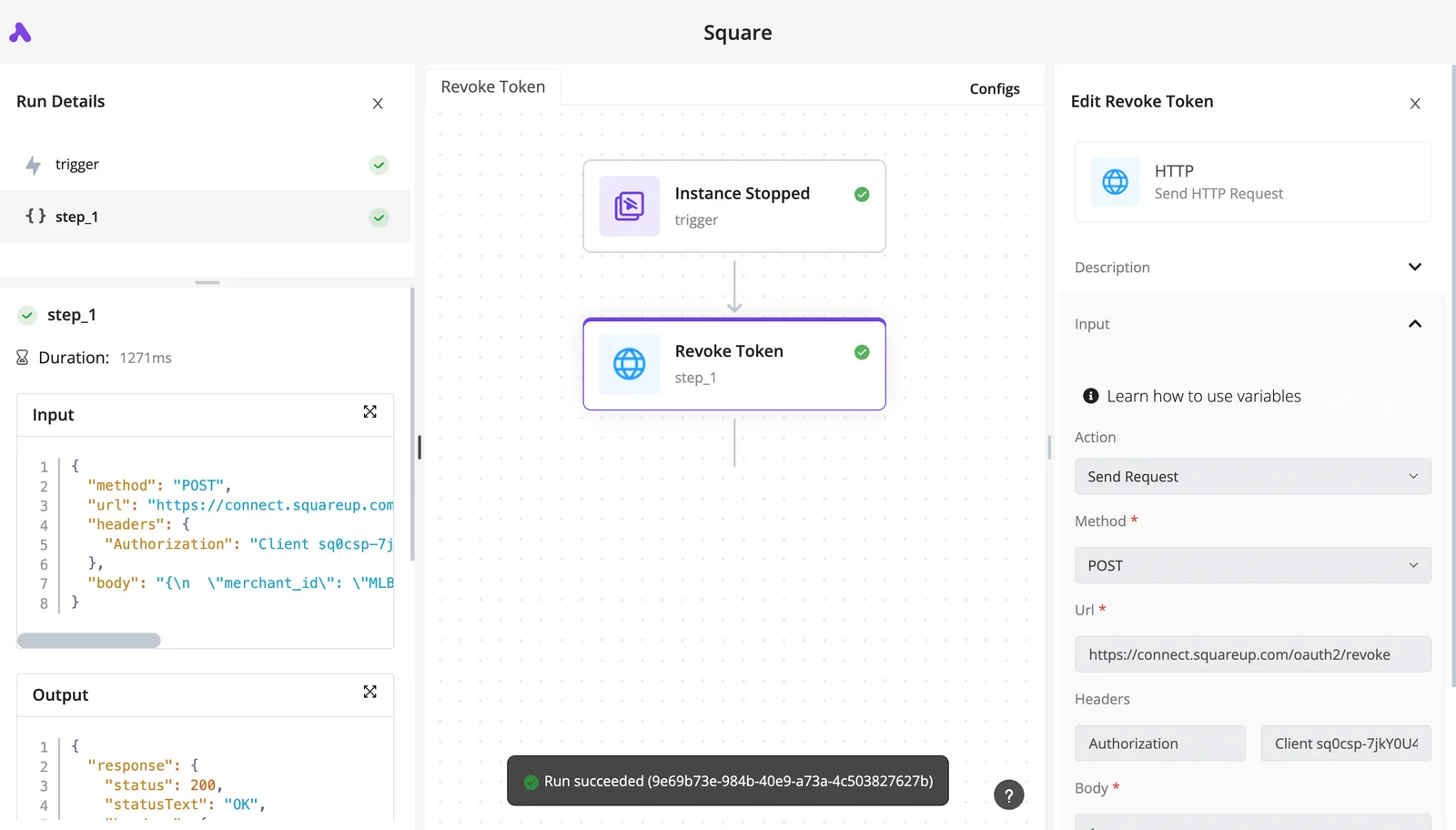
Put the key in an Authorization header as a bearer token, and store it in an Activepieces connection rather than pasting it into the step, so the credential has one named owner.
The reply comes back as JSON, and a later step reads the message text from its path in that response.
Option 2: AI step with an OpenAI-compatible provider
If your Activepieces version lets you register a custom provider with a base URL and key, the AI step can call your server and spare you hand-built requests. Check that the setting exists in your edition before you plan around it.
You see the output, not the raw request, and that makes debugging harder on a new model. That is the trade-off.
Option 3: an MCP server
This is the most work. An MCP server would wrap the model as a tool that an agent step calls on its own.
Use it only once the first two routes work, because it adds a second service to maintain and a second set of credentials to assign an owner to.
Finish with the smallest useful flow, whichever route you pick. It has one trigger, one prompt sent to the model, and one step that uses the reply, such as writing it to a document.
When that runs end to end, you have a baseline for everything else.
Frequently asked questions
Is Nemotron 3.5 Bolt free to use commercially?
Not confirmed here: the license on NVIDIA's own model page decides, and you should read it before any production use. Check three things: whether commercial use is permitted, whether the weights carry use restrictions, and whether those terms pass to anything you build on top.
Because someone else will inherit the question, record the license name and the date you read it in your handover notes.
Can I run Nemotron 3.5 Bolt on a single GPU?
Possibly, but NVIDIA's pages don't state official hardware minimums, so treat any claim of a single-card fit as unverified. Memory requirements depend on the precision you load the weights in and the context you ask for.
Test on the card you own with a short prompt, then a long one, and watch memory use at each step. Write down what you observed as your own measurement, not as a vendor figure.
Who should own the HTTP connection?
NVIDIA's pages don't say, so assume no native support until you see it documented. The plain route is an HTTP request step pointed at an endpoint you host.
Decide first who owns that connection: a named person or service account, holding a key scoped to this one endpoint and nothing else. Then the flow depends on a credential someone is accountable for.
Should I self-host it or use a hosted API?
Self-host if you can name who will patch, monitor and pay for the machine; use a hosted API if you can't. Self-hosting keeps your data on infrastructure you control and lets you pin the exact weights.
It also makes you the owner of uptime, access control and updates.
A hosted API shifts those duties to the provider, but NVIDIA's pages don't state a price or context length limit, so confirm both before relying on one.
For a model this new, start self-hosted on a small, low-risk flow. Widen its use only after your own tests and NVIDIA's pages agree on what it can do.
Related reading
References
Build it
Set this up in minutes.
No code required. Connect your accounts, and Activepieces runs it from there.
Start free Talk to sales