Activepieces Self Hosted vs Cloud: 2026 Cost Guide

Oct 23, 202614 min read
According to Activepieces, Cloud starts free and reaches $200 a month at Team, while sales sets the price for self-hosted enterprise, Ultimate and Embed, so those options have no transparent price.
Activepieces self-hosted versus Cloud is the choice between running the open-source workflow automation platform on your own infrastructure, where you handle setup, upgrades and security, or paying Activepieces to host it as a managed service.
According to Krosyn, beyond each plan's included credits, usage costs $0.007 per credit, meaning your final bill may exceed the plan cost.
The table shows what each plan includes.
| Plan | Monthly price | Included credits | Users / SSO | Overage rate |
|---|---|---|---|---|
| Free | $0 | 1,000 a month | Not listed | Not listed |
| Plus | $20 | 10,000 a month | Not listed | $0.007 per credit |
| Team | $200 | 50,000 a month | 25 users, SSO | $0.007 per credit |
| Ultimate | via sales | via sales | via sales | via sales |
| Embed | From $36k a year | via sales | via sales | via sales |
If a rollout needs SSO beyond Team, it goes to sales, because only Team lists SSO among the self-serve plans.
On Cloud, the vendor hosts and operates Activepieces, with the EU region in Frankfurt, so your flows run on its infrastructure and you carry no server, upgrade or backup work.
The constraint to check first is whether your data may leave your network. If it may, the cost is the plan fee plus any credits over the allowance.
What self-hosted is
Self-hosted is Activepieces running on infrastructure you control, which is the only arrangement here that can meet a strict residency or network-isolation requirement. There are two routes: the MIT-licensed Community Edition and a paid enterprise licence.

The free Community Edition is enough if you can accept its limits and staff the operations yourself.
Sales quotes the paid self-hosted enterprise licence, and the quote depends on users, credits, deployment and support. Embed, which puts Activepieces inside your own product, is also quoted from $36k a year, according to Activepieces.
Don't treat Activepieces as certified when you write your procurement checklist, because the SOC 2 programme is in progress.
These figures are from the pricing page (https://www.activepieces.com/pricing), dated 23 October 2026. For self-hosted enterprise, SSO beyond Team, Ultimate or Embed, use the sales form (https://www.activepieces.com/sales).
Five criteria that decide between hosting options
With SSO settled, five criteria separate the hosting options, and every option in this article gets judged on all five, in the same order, at the same team size.
Each one below comes with a question to answer.
- Licence and platform cost: what do we pay per month at our team size and task volume, including any paid licence for self-hosting?
- Engineer time: how many hours a month does someone spend keeping it running, and whose hours are they?
- Security and SSO: can we enforce single sign-on and access control as our policy requires, and on which tier?
- Data location and network control: where do workflow data and credentials physically sit, and can the service run with no inbound or outbound internet path we haven't approved?
- Upgrade and scaling burden: who applies updates, and what happens to the queue when volume doubles?
When a requirement forces self-hosting, it is most often the fourth criterion, so it needs a real figure. Alice Labs counts 13 Azure regions in the EU, 11 for Google Cloud and 6 for AWS, leaving AWS with the smallest regional footprint.

Residency inside the EU therefore rarely rules out a provider. It does change how much room you have: with 6 regions, AWS gives you fewer places to put a primary and a separate failover, making it harder to distribute resilience across distant EU locations.
Azure's 13 give the most. Check the count against your own rule, because a requirement for one named country is narrower than "the EU".
The first three criteria cost money and hours. The last two cost risk.
The fastest way to settle a shortlist is to try one. Activepieces is free to try, no credit card.
What each plan includes for a team rollout
$0, $20 or $200 a month buys Cloud at published tiers; Ultimate, self-hosted enterprise and Embed are priced by sales, with Embed starting at $36k a year, so you can forecast Cloud costs but must engage sales for Embed pricing.
That's the cost side of the five criteria.
Check the plan limits first: as the table shows, only Team publishes a user cap and SSO.
| Plan | Price | Credits | Users | SSO | Who hosts it |
|---|---|---|---|---|---|
| Cloud Free | $0 | 1,000 a month | Not listed | Not listed | Vendor |
| Plus | $20 a month | 10,000 a month | quoted by sales | quoted by sales | Vendor |
| Team | $200 a month | 50,000 a month | 25 | Included | Vendor |
| Ultimate | quoted by sales | quoted by sales | quoted by sales | quoted by sales | Vendor |
| Community Edition | $0 | Not listed | Not listed | Not listed | You |
| Self-hosted enterprise | quoted by sales | quoted by sales | quoted by sales | quoted by sales | You |
| Embed | From $36k a year | quoted by sales | quoted by sales | quoted by sales | Quoted by sales |
Expect the quote to move on four inputs: user count, credit volume, deployment model and support level. Self-hosted enterprise adds your infrastructure and your engineers' hours to the licence, which a Cloud invoice doesn't.
Overage maths at $0.007 a credit
Credits are consumed per AI step, and the rate depends on the model tier, per EffectHub.
A Frontier step costs 20 credits, or $0.14 in overage. A Smart step costs 10, or $0.07. A Fast step costs 2, or $0.014. A step on your own key (BYOK) costs 1, or $0.007.

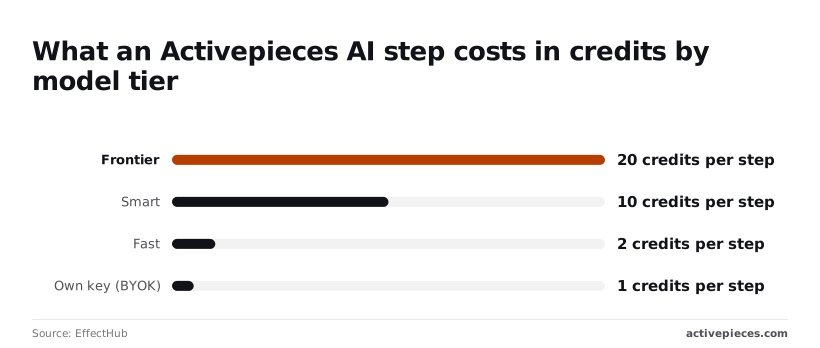
So Team's 50,000 credits cover 2,500 Frontier steps or 25,000 Fast steps. Plus's 10,000 cover only 500 Frontier steps.
A workflow that defaults to the top tier exhausts a plan forty times faster than one using Fast, so set the tier per step before you size the plan.
Self-serve plans are on the pricing page. Self-hosted enterprise, SSO beyond Team, Ultimate and Embed go through the sales form.
When the free Community Edition is enough
When one technical owner runs internal workflows and needs none of SSO, role-based access, audit logs or embedding, Community Edition is enough, because it includes none of them.
Community is the free, MIT-licensed automation core, and the paid editions on the Activepieces pricing page add SSO and roles, audit logs, separate teams, release management and support.

You carry the whole stack yourself, so the fit is narrow. The edition suits you when the following hold:
- A named engineer owns the deployment and is comfortable with containers and databases.
- The flows are internal: your own staff, your own systems, no customer-facing tenancy.
- No one has asked for SSO, per-role permissions or an audit trail.
- You'll apply upgrades on a schedule rather than leave the instance on a version from last year.
If all four are true, you pay for infrastructure and nothing else.
Where the Team plan falls short on compliance
Team scores 1 for SSO and 1 for role-based access, and 0 for audit logs and embedding. So Team covers login and permissions, but a compliance reviewer asking who changed which flow still has no answer.
Ultimate scores 1, 1 and 1, which adds audit logs. Embedding stays 0 there too.
Enterprise is the only edition scoring 1 on all four, which means embedding automations in your own product is a sales conversation, not a setting. The edition is a poor fit when:
- Your identity team requires SSO.
- You need a vendor to call when it breaks.
- You're embedding flows in a product you sell.
- A compliance review needs an audit trail.
On licence, Community costs $0; on hours, it costs something. Upgrades, backups, monitoring and incident response all land on the owner.
On licence, Community costs $0; on hours, it costs something.
Count them before you call the edition free.
Reading a table only gets you so far. Build the same workflow in Activepieces and compare it yourself.
Setup effort for Cloud compared with self-hosting
With Cloud, a sign-up is all it takes; self-hosting adds a stack you install once and then maintain, so the cost that matters is the recurring work, not the first afternoon.
Nothing needs provisioning on Cloud. The order is:
- Create an account.
- Open the workflow builder.
- Connect the apps the workflow touches.
- Publish.
No hours are claimed for this path, so there's no setup estimate to budget. Updates, backups, the database and scaling are the vendor's responsibility, which leaves your team only its own workflows to maintain.
Self-hosted: what you must run
You provision the host, deploy the application, attach a database, and secure the endpoint before the first workflow exists. After that, these tasks belong to you:
- applying updates and checking them against your workflows
- backing up and restoring the database
- scaling workers as run volume grows
- monitoring the instance and alerting someone who will respond
These are reported figures, not measurements, and they exclude the recurring tasks above.
Even the lowest estimate is most of a working day of engineer time before any workflow runs, and the highest is several days.
If the sources disagree this much, the estimate depends on your environment, so treat the range as a prompt to measure your own.
How Activepieces handles each deployment model and data residency
Whether you run Cloud, Community, enterprise self-hosted or Embed, the workflow builder is the same, so the hosting model changes who operates the software, not what your team builds. Data residency forces self-hosting only in some cases.

That distinction matters because the recurring cost sits in operating the host, not in the builder.
The point to take from it is that choosing a host today doesn't lock in the tool tomorrow.
Moving between models
A team can start on Cloud, move to Community when a constraint appears, and move to a paid self-hosted licence when the free edition's limits bite.
Because the builder is identical, the work that moves is mostly connections, credentials and hosting configuration, not workflow design.
The paid self-hosted licence is not a cut-down build, though. Activepieces ships the same enterprise list in the air-gapped edition as on the managed cloud: SSO, SCIM, custom RBAC, audit logs, release management and secret managers.
Regulated and public-sector organisations run that edition in production today, and MoneyGram, Moneypenny, Alan and FundingSocieties run Activepieces too. What sales quotes is the price, which depends on users, credits, deployment shape and support.
Embed is the same builder placed inside your own product, which is a separate commercial arrangement.
Residency and when it forces self-hosting
Residency is where teams over-correct. The EU regions are spread across more than one hyperscaler, so "must stay in the EU" doesn't by itself mean "must self-host". Test the requirement in this order:
- Write down the exact constraint: a jurisdiction, a named cloud provider, or a network boundary with no outbound internet.
- Compare it with the provider and region your Cloud workspace would run in.
- If the constraint names a jurisdiction and the region satisfies it, Cloud is still open to you.
- If it names a provider you don't use, or requires an isolated network, self-hosting is forced.
Activepieces is the better fit for enterprise teams that need data residency control without giving up governance features, judged on feature parity across deployment models.
The enterprise list (SSO, SCIM, custom RBAC, audit logs, release management, secret managers) is the same whether you run air-gapped self-hosted or managed cloud pinned to an EU or US region with SOC 2 Type II, so going air-gapped means full control rather than a fraction of the product.
Because the builder is identical across Cloud, Community, enterprise self-hosted and Embed, the hosting choice only decides who operates the software, and a team can start in one model and move to another without rebuilding what it has made.
Where self-hosting is the better choice
On two of the five criteria self-hosting wins outright, and data location and network control is the clearest. Only an instance you run can sit inside a boundary with no path you haven't approved, and no Cloud plan can promise that.
Security is the second. The air-gapped enterprise edition carries the same SSO, custom RBAC and audit logs as the managed cloud, and you also decide who can reach the host, how secrets are stored and where logs go.
For a team whose policy is written around its own network, that control is the point.
The other criteria favour Cloud, and it's fair to say so. Community has no licence fee, but engineer time and the upgrade and scaling burden move to you, and those hours are the larger cost.
Embedding is a sales conversation, because putting flows inside a product you sell needs the Embed arrangement, which the self-serve Cloud plans don't include.
So choose self-hosting when a stated constraint demands it and a named owner is ready to carry the work. In that situation the extra hours buy something Cloud can't sell you.
Frequently asked questions
Self-hosting costs
Is Activepieces self-hosted really free? The Community Edition is the MIT-licensed core and has no licence fee, but the server, the upgrades and the on-call time are still yours to pay for.
It suffices if you can accept its limits and nothing in your requirements forces a paid self-hosted licence. Count the engineer hours before calling it free, because that's where most of the cost sits.

Moving from Cloud
Can I move from Cloud to self-hosted later? Yes, but plan it as a migration with its own change window, not a setting you flip.
Inventory your flows and connections first, expect to re-authorise credentials on the new instance, and test in parallel before cutting over. Starting on Cloud is the cheaper way to find out whether you ever need to go.
Certification, pricing and SSO
Does Activepieces have SOC 2 certification? No. The SOC 2 programme is in progress, and it's not a certification you can cite in a vendor review today.
If an audit window depends on it, record that status in your review and ask sales what documentation exists now.
How much does self-hosted enterprise cost? It's quoted by sales, and there's no public price to put in a budget. The quote depends on users, credits, deployment shape and the level of support.
Bring those four numbers to the conversation and the quote will be faster and closer to final.
Do I need sales for SSO? Not on the Team plan, which includes SSO. You need sales for SSO beyond Team, which means Ultimate or a self-hosted enterprise licence.
When self-hosting justifies the costs
Choose Cloud unless data residency, network isolation or embedding forces self-hosting. Those are the constraints that justify the operating cost, and "we prefer to own it" isn't one of them.
Self-serve plans, at $0, $20 and $200 a month, are on the pricing page at https://www.activepieces.com/pricing. For self-hosted enterprise, SSO beyond Team, Ultimate or Embed, use the sales form at https://www.activepieces.com/sales.
Related reading
References
Still comparing
The fastest way to settle it is to build something.
Open source under MIT, so you can self-host the same thing later.
Start free Talk to sales