
Self-Hosted vs Cloud Security Automation for 2026
Spreadsheet automation infrastructure choices determine whether security teams maintain data sovereignty or prioritize rapid deployment.

Covers replacing WhatsApp and spreadsheet chaos with chat-based automation for resource-constrained small businesses, and why the fixes actually stick.
ContributorSeptember 24, 202614 min read
This article was researched and fact-checked by an advanced research system.
Security teams often face a dilemma when choosing between self-hosted and cloud-based spreadsheet automation, as the decision impacts both data sovereignty and operational overhead.
While cloud solutions offer rapid deployment and seamless updates, they require sending sensitive organizational data to third-party servers, which may conflict with strict compliance mandates.
Conversely, self-hosting provides complete control over the infrastructure and environment, allowing teams to utilize open-source tools like Activepieces to build custom workflows behind their own firewalls.
This approach ensures that internal logs and proprietary data never leave the secure perimeter, though it demands more internal resources for maintenance and scaling. Ultimately, the choice hinges on whether the team prioritizes the convenience of managed services or the rigorous sec
Self-hosted spreadsheet automation refers to the practice of deploying data processing and workflow tools within a private infrastructure to ensure that sensitive security information remains behind the organizational firewall.
Spreadsheet automation for security teams defined
At 09:00 on a Monday morning, a security engineer watches a custom script move fresh scan results directly into Google Sheets.
This programmatic handling of sensitive logs, vulnerability reports, and compliance checklists transforms tools once built for accounting into the primary interface for modern security operations.
By utilizing connectors that funnel data from scanners straight into grid cells, teams can maintain a live view of their posture without the human error inherent in copying and pasting.
The shift from manual data entry to automated pipelines
When the sheer volume of alerts makes manual tracking a guarantee of human error, security engineers move away from copying and pasting scan results.
Instead of a technician manually updating a status, Activepieces triggers an update based on external events.
This transition creates a live feedback loop where the spreadsheet functions as a lightweight database. It reacts to several common security triggers, including the NIST database publishing a new CVE, Qualys or Tenable detecting a critical vulnerability, or a failed compliance check occurring in Vanta.
A user might also add a new row to a 'Risk Register' sheet. This shift ensures that the document reflects the current state of the network, rather than a snapshot that becomes obsolete the moment a user saves it.

Automating the flow of data into spreadsheets ensures your vulnerability reports aren't subject to the typos that misclassify critical risks.
When a security lead moves from manually updating a tracking sheet to using a tool like Zapier, they ensure that every ticket from a bug bounty platform is captured instantly. No high-severity exploit sits unnoticed in an inbox.
Why security teams rely on spreadsheets for reporting
Spreadsheets provide a flexible, low-code environment for cross-referencing data from incompatible tools without needing a dedicated backend.
Unlike a rigid dashboard in a security information and event management (SIEM) tool, a spreadsheet allows a manager to pivot data, apply conditional formatting to highlight overdue patches, and share a readable view with non-technical stakeholders.
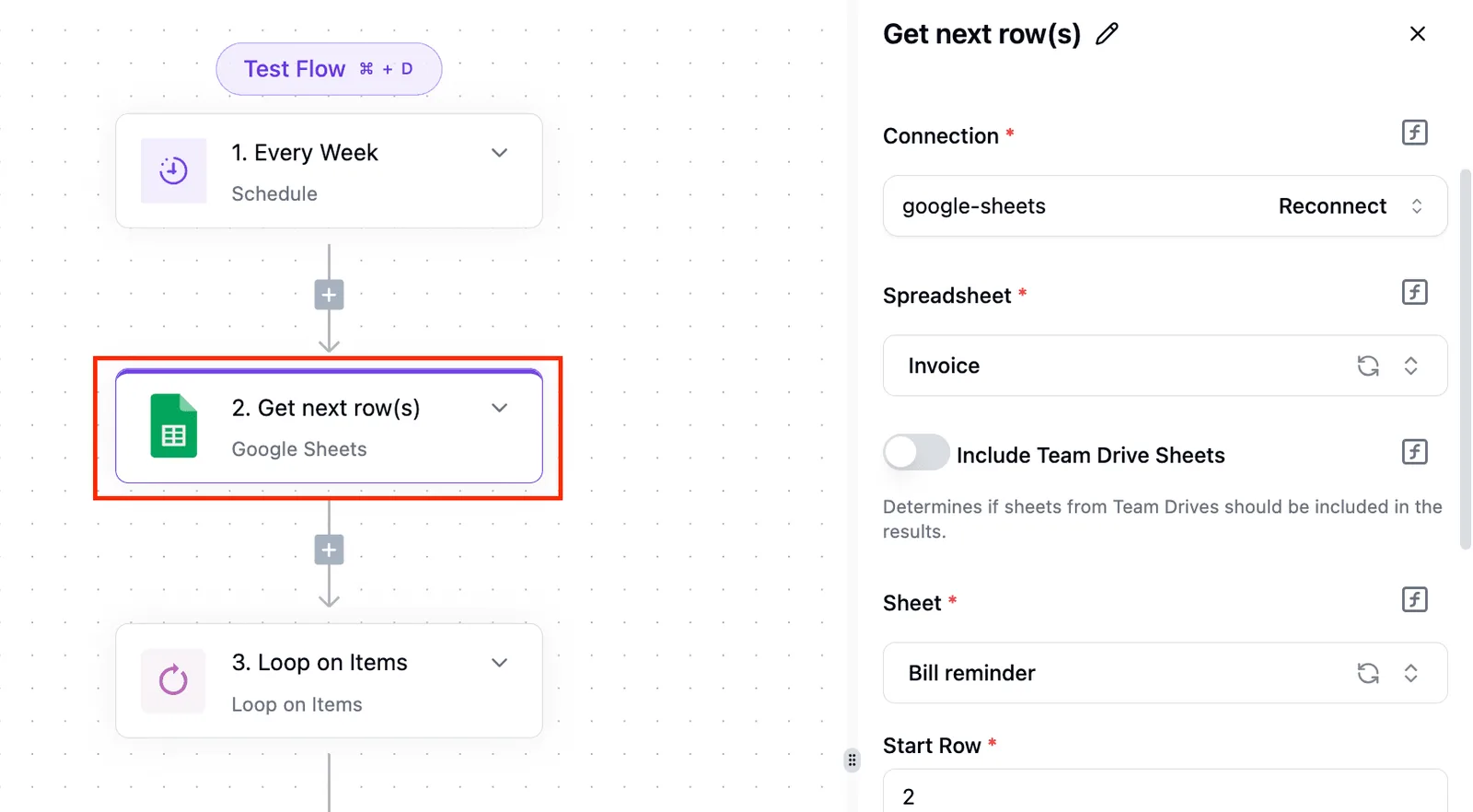
This ubiquity makes them the default choice for tracking remediation progress across different departments.
The risk profile of automated data movement
Every trigger requires a third-party service to have read-write access to the internal security posture, which introduces a persistent data egress risk.
When a cloud-based automation tool moves a vulnerability report, that sensitive data leaves the protected perimeter for processing on the provider's infrastructure.
This creates a trade-off where the time saved on data entry offsets the lack of control over where the provider caches or logs vulnerability details.
A persistent, invisible tunnel through the corporate perimeter is created when connecting a spreadsheet to cloud automation services.
Each time a team grants an OAuth token to a third-party integrator, it creates a potential point of egress for Personally Identifiable Information (PII) that resides outside of your internal firewall.
The fastest way to settle a shortlist is to try one. Activepieces is free to try, no credit card.
Evaluation criteria for security automation infrastructure
The security of an automation layer depends on three specific architectural constraints: the location of the data, the method of network isolation, and the storage site for secrets.
Data residency and regulatory compliance requirements
Whether sensitive vulnerability logs remain under your legal jurisdiction or are subject to the terms of a third-party provider is determined by data residency. When using a service like Zapier, the provider processes data on their infrastructure.
For teams under GDPR or SOC2 mandates, this creates a compliance gap because you can't physically verify the deletion of leaked credentials from their backend databases.
To decide which infrastructure fits your risk profile, you must compare how each deployment model handles these core security pillars:
| Infrastructure Model | Data Residency | Network Isolation | Credential Storage |
|---|---|---|---|
| Public Cloud SaaS | Third-party servers | Shared public internet | Provider-managed vault |
| Cloud with VPN Tunnel | Third-party servers | Private tunnel to VPC | Provider-managed vault |
| Self-Hosted VPC | Local infrastructure | Full air-gap capability | Internal KMS / HashiCorp Vault |
Choosing a model from this matrix dictates how much of your internal network you must expose to the outside world.
A stripped self-hosted build is how most vendors monetise control, but Activepieces provides the same governance features to air-gapped builds as it does to the managed cloud.
The enterprise feature list (SSO, SCIM, custom RBAC, audit logs, release management, and secret managers) in the self-hosted air-gapped docs matches the managed cloud tier pinned to a US or EU region with SOC 2 Type II compliance.
Regulated organisations like MoneyGram and FundingSocieties run this in production to maintain a secure perimeter.
Network isolation for self-hosted security automation
By ensuring that an automation tool can only reach the specific databases it needs to query, network isolation prevents the tool from having a blanket pass to your entire internal environment.
If you use a SaaS-based orchestrator, you often have to allow-list a broad range of IP addresses or open a hole in your firewall to let their runners in. This violates the principle of least privilege.

A compromise at the provider level grants an attacker a direct path into your private subnet.
Long-term maintenance and total cost of ownership
Engineering hours required for patching and scaling, not just the initial license fee, constitute the total cost of ownership for self-hosted infrastructure.
A compromise at the provider level grants an attacker a direct path into your private subnet.
While a SaaS tool like Make handles all updates for you, it leaves you with no control over when a new version might break a critical security workflow.
Self-hosting requires an internal team to manage the container orchestration, trading administrative overhead for the ability to freeze a stable environment during a high-stakes audit.
Cloud automation vs self-hosted deployment trade-offs
Cloud-native speed vs the risk of third-party data access
Immediate deployment is possible with cloud-based automation because the provider manages the underlying runtime.
However, it introduces a permanent "tunneling" risk where internal data must cross the firewall to reach the provider’s servers. To connect an internal vulnerability database to a cloud service, security teams often deploy a reverse proxy, which creates a persistent hole in the perimeter.
By keeping the execution engine behind the firewall, the data never leaves the controlled environment. This prevents a breach at the software vendor from granting an attacker a direct path into your private network.
Analyzing the monthly cost of cloud automation tiers
Cloud automation costs scale with the volume of sensitive data processed, often forcing a choice between budget constraints and the security features required for enterprise compliance. According to Canopyne, monthly pricing varies significantly across providers:
| Provider Tier | Monthly Cost (USD) | Implication for Security Teams |
|---|---|---|
| Make (Pro) | 18.82 | Entry-level pricing usually excludes single sign-on (SSO), meaning team access is managed via individual passwords rather than central identity providers. |
| n8n Cloud (Pro) | 63.80 | Mid-tier pricing often caps the number of active workflows, which restricts how many automated security checks can run simultaneously. |
| Zapier (Team) | 103.50 | The jump to triple digits is often the minimum entry point for shared workspaces, which are necessary to prevent "shadow IT" automations owned by single employees. |
| Activepieces (Team) | 200.00 | Higher-tier cloud costs typically reflect the inclusion of advanced administrative controls and audit logs required for regulatory filings. |
The hidden costs of maintaining on-premise infrastructure
Predictable hardware utility costs replace recurring software subscriptions when shifting to self-hosting. Data from OSSalt shows that raw infrastructure costs remain low even as scale increases.
- A Small instance costs 4.50 USD per month, so a startup can run basic automations for the price of a single coffee.
- A Medium instance costs 7 USD per month. This provides enough overhead for standard security scanning scripts.
- A Large instance at 14 USD per month handles high-concurrency tasks without slowing down other internal tools.
- A Full stack deployment at 27 USD per month costs less than most mid-tier cloud subscriptions. This tier has the highest level of redundancy.
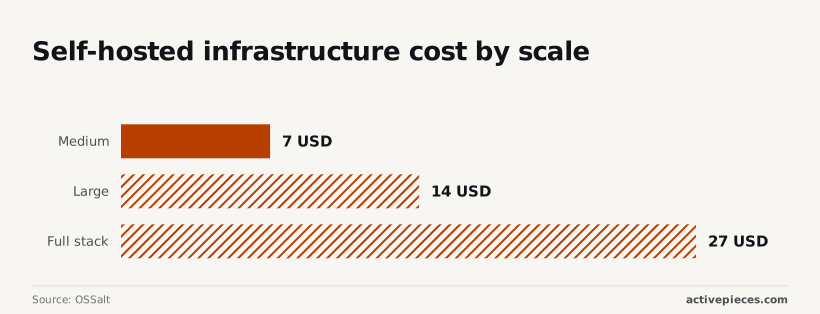
The primary cost is the two to four hours of monthly engineering time needed to apply security patches to the host OS.
Reading a table only gets you so far. Build the same workflow in Activepieces and compare it yourself.
Activepieces for secure self-hosted spreadsheet automation
Activepieces deploys its MIT-licensed core directly inside your network to process spreadsheet updates locally. Sensitive vulnerability data and API credentials never leave the private network.
By deploying the platform within a Virtual Private Cloud (VPC), security teams can connect their internal databases to spreadsheet-like interfaces without exposing their network to the public internet.
Every credential Activepieces touches can be routed to your own secret manager instead of the platform database, ensuring no vendor ever holds the keys to your infrastructure.
You can configure a self-hosted instance against an external secret manager and inspect the database yourself to verify the credentials are not there. This secret-manager integration is listed alongside SCIM, custom RBAC, SSO/SAML and audit logs in the enterprise governance feature set.
Every credential Activepieces touches can be routed to your own secret manager instead of the platform database, ensuring no vendor ever holds the keys to your infrastructure.
Keeping sensitive credentials inside your private network
Authentication tokens for your internal security tools remain behind your firewall when you self-host Activepieces.
This prevents a breach of the automation provider from becoming a breach of your entire infrastructure. When you use a cloud-based integrator, the provider stores "secrets" on their hardware.
Every credential Activepieces touches can be routed to an external secret manager like HashiCorp Vault instead of the platform database. By configuring a self-hosted instance against your own secret manager, you ensure that no vendor ever holds the keys to your infrastructure.
This secret-manager integration is listed alongside SCIM and audit logs in the enterprise governance feature set.
Budgeting self-hosted infrastructure cost by scale
Teams can provision exactly the hardware they need without paying for unused "seats" because infrastructure requirements for a self-hosted instance scale predictably.
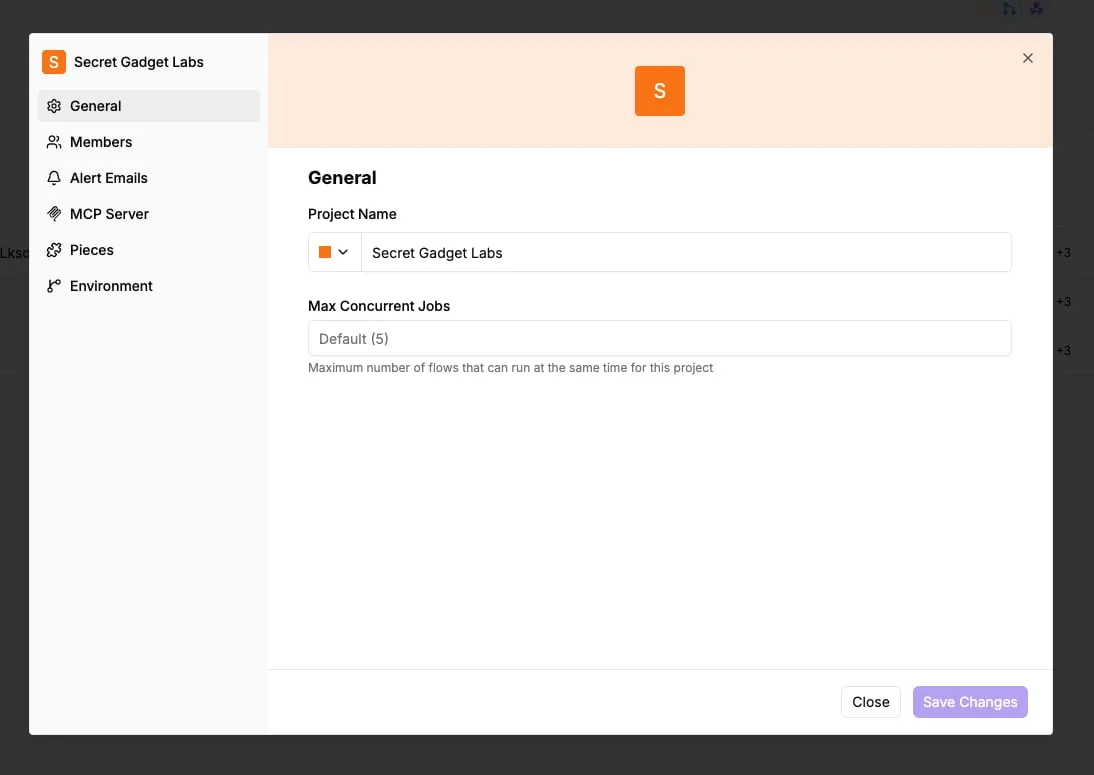
The Max Concurrent Jobs field dictates the maximum number of flows that can run at the same time for this specific project. It's currently set to the default of five. This prevents a single runaway automation from exhausting all available system memory.

Maintaining audit logs for compliance and forensics
Local log files are generated by every execution within a self-hosted instance. This file is a complete forensic trail of how data moved between systems.
If an unauthorized change appears in a vulnerability tracker, these logs allow an admin to trace the exact flow execution and the user who triggered it.
Your own disks store these logs, so you can retain them for years to meet regulatory requirements while avoiding SaaS storage surcharges.
For organizations that demand absolute sovereignty over their data, Activepieces is the better choice for secure, air-gapped spreadsheet automation.
By offering an identical suite of enterprise governance features (including SCIM, custom RBAC, and secret manager integration) across both cloud and self-hosted environments, it ensures that moving behind a firewall does not require sacrificing administrative control.
This parity allows security teams to maintain a hardened posture within a private network while retaining the full functionality of a modern automation platform.
The verdict on choosing your automation environment
Self-hosting is the mandatory requirement for managing PII, vulnerability logs, and regulated data within a secure perimeter, while cloud-hosted automation serves teams prototyping low-stakes workflows with non-sensitive data. The decision rests on whether the data leaving your network constitutes a breach or merely a convenience.
When using a cloud-based integrator like Zapier, your data must traverse their infrastructure to be processed. This means every row of a vulnerability report or customer record exists on hardware you don't control and can't audit in real-time.
Selecting an environment requires weighing the speed of deployment against the long-term cost of a data leak. The following table establishes where the trade-offs become unacceptable for security-conscious organizations:
| Use Case | Deployment Time | Data Egress Risk | Compliance Suitability |
|---|---|---|---|
| Non-sensitive prototyping | Immediate | High | Low |
| PII / Vulnerability Management | Longer | Zero | High |
| Critical Infrastructure | Longest | Zero | High |
Frequently asked questions about spreadsheet automation
Is Google Apps Script secure enough for enterprise use?
Because it lacks the granular network egress controls required to prevent sensitive vulnerability data from being exfiltrated to unauthorized external domains, Google Apps Script is often insufficient.
While the platform encrypts data at rest, any user with edit access to a sheet can write a script that fetches data and sends it to an external URL via the UrlFetchApp service.
The platform doesn't offer a "no-egress" mode that permits internal automation while blocking external web calls.
How do I prevent API keys from leaking in cloud automations?
Moving the automation logic into a self-hosted environment is the most reliable way to prevent API key leakage.
In this setup, secrets are injected as environment variables rather than stored within the automation platform’s database. In cloud-based services like Zapier, your credentials live on their infrastructure.
By keeping the automation layer behind your own firewall, you ensure that credentials never traverse the public internet during the configuration phase.
Can I automate local Excel files without a cloud connection?
By using a self-hosted automation agent that interacts with the files via a shared network drive or a local file system trigger, you can automate local Excel files.
With a self-hosted automation agent, this setup ensures that your data never leaves your physical or virtual private server. For regulated industries, this is the only way to satisfy strict data residency requirements.
Securing your spreadsheet automation on Monday morning
(Duplicate section removed)
Because they provide a flexible, low-code environment for cross-referencing disparate data sources that dedicated platforms often silo, security teams use spreadsheets.
By pulling data into a grid, a team can perform ad-hoc pivots between asset owners and patch statuses. This allows them to generate custom remediation reports for executives without waiting for a developer to build a new dashboard.
(Duplicate section removed)
The following checklist provides a structured path for identifying and neutralizing these hidden data leaks:
Related reading
Still comparing
The fastest way to settle it is to build something.
Open source under MIT, so you can self-host the same thing later.
Start free Talk to sales