
Shadow Spreadsheet Automation Risks and Security in 2026

Sep 16, 202613 min read
Modern API exhaustion is rarely the result of a deliberate DDoS attack; it is usually the consequence of a single, unmonitored spreadsheet cell triggering an infinite execution loop, a scenario often encountered when users connect Activepieces to legacy databases without setting proper rate limits.
Spreadsheet automation refers to the practice of using scripts or external connectors to programmatically update cells, a process that creates significant security risks when credentials and data flows bypass central IT governance.

When a marketing specialist uploads a malformed CSV at 2:14 AM, they aren’t thinking about rate limits, yet their local error can paralyze the entire company’s operational backbone before the sun rises.
The 2:00 AM API quota collapse
The recursive trigger loop
When a change in a row triggers an automation that, in its final step, updates that same row, a self-sustaining cycle of API calls begins.
In this specific incident, a malformed data string in a Google Sheets cell caused the automation logic to fail to find a "stop" condition, resulting in a vertical spike from 0 to 50,000 tasks per minute within seconds.

Because these sheets often sit outside the purview of IT, there is no circuit breaker to stop the loop until the account reaches its hard limit.
This total saturation ensures that no other employee, regardless of their department, can execute a single automated command.
The silent exhaustion of task credits
Most teams operate on tiered plans where the margin for error is razor-thin, leaving them vulnerable to instant service blackouts.
100 Tasks is the ceiling on a Zapier Free plan, which means a simple looping error will kill your workflow in less than one second of execution time.
Even moving to Make Free, which offers 1,000 Tasks, only buys you a few additional seconds of uptime during a recursive event.
2,500 Tasks are provided as a minimum by enterprise-grade entry points like Workato Pro, so users have significantly more buffer room for complex, high-volume workflows.
In the context of a 50,000-task-per-minute spike, the system exhausts this higher limit so quickly that IT teams have no window to intervene before the credits are gone.
Collateral damage to mission-critical workflows
The marketing sheet’s failure is not isolated, as it consumes the shared resource pool used by every other department. When the sales team burns the monthly quota in 90 minutes, their lead routing (often built on tools like Activepieces) stops dead.
High-intent prospects sit in a queue for days while the team waits for a billing cycle reset. This creates a state of "Automation Debt" where a single user's Shadow IT mistake costs the organization lost revenue and broken customer trust.

Everything below works on Activepieces' free plan. Start without code or a credit card.
What spreadsheet automation means for IT governance
Spreadsheet automation is the process of using formulas, third-party connectors, or custom scripts to bridge the gap between a grid-based interface and external software systems.
While a static sheet is a silo, an automated sheet is a live node in the corporate network. It can pull from a CRM or push to an ERP, often without the oversight of a security team.
Bridging the gap with triggers
Automation tools use triggers or watchers to monitor specific cells for changes. When a user edits a row, the watcher detects the update and immediately pushes that data to an external API.
This bridge allows a simple cell change to act as a remote command, often without the user realizing they have initiated a network request.
These watchers operate silently in the background, checking the spreadsheet at set intervals or responding to instant webhooks. Because the connection is persistent, a single typo can launch thousands of requests before the user closes their browser tab.
A single compromised cell can now trigger a cascade of unauthorized data exports across the entire SaaS stack.
Native sheet-to-sheet functions
Native functions like IMPORTRANGE or VLOOKUP across workbooks allow users to sync data between disparate files without writing code. Because these functions rely on the permissions of the individual user, they bypass traditional database access logs.
**A single compromised cell can now trigger a cascade of unauthorized data exports across the entire SaaS stack.
Nobody can audit who saw what data and when. This creates a sprawl of "ghost references" where a sensitive HR spreadsheet might be feeding a public-facing project tracker.
Manual circuit breakers for formulas
To prevent recursive loops in native environments, users must implement logical checks that act as internal circuit breakers.
By wrapping data-writing formulas in an IF statement that checks for an existing value or a "Processed" flag, the sheet can refuse to execute if the target cell is already populated.
This simple validation ensures that a formula only runs once per row, effectively killing a potential infinite loop at the source.
Third-party no-code connectors
No-code connectors, such as the automation platform Zapier or the integration tool Make, use OAuth tokens to act as a permanent bridge between a spreadsheet and external APIs.
According to research by NHI Management, the average enterprise now manages 15,000 non-human identities (NHIs) compared to just 1,000 human accounts.
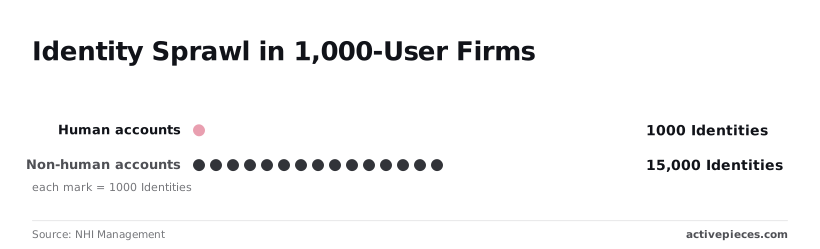
15:1 is the ratio of machine-to-human identities, meaning that for every employee an IT manager offboards, fifteen automated bots or connectors may still have active, unmonitored access to the company's most sensitive data stores.
| Automation Type | Setup Complexity | Security Risk |
|---|---|---|
| Native Functions (e.g., VLOOKUP) | Low | Low (Localized) |
| No-Code Connectors (e.g., Zapier) | Medium | High (Third-party access) |
| Custom Scripts (e.g., Apps Script) | High | Critical (Full API control) |

As complexity increases, the ability for standard IT monitoring tools to "see" the data flow decreases.
Custom scripts and hidden macros
Custom scripts, such as Google Apps Script or Excel VBA, provide a Turing-complete environment inside the document that can execute arbitrary web requests.
When a user shares a template that contains a hidden macro designed to scrape data and send it to a private server, the script runs with the authority of the user who opens the file.
This represents a "Living off the Land" (LotL) threat where legitimate spreadsheet features are weaponized to bypass firewalls and endpoint detection.
Scripted execution limits and safeguards
Developers can mitigate script-based exhaustion by hard-coding execution time limits and iteration caps directly into the code. In Google Apps Script, using a global property to track the number of executions within a specific window allows the script to self-terminate before hitting platform quotas.
Implementing a "last run" timestamp check prevents the script from firing multiple times in response to a single rapid-fire event.
Why standard no-code tools fail the security audit
Standard no-code platforms fail security audits because they prioritize immediate connectivity over the granular administrative controls required to contain a credential leak or a recursive execution loop.
The lack of global circuit breakers
Most no-code environments operate on a per-user or per-workflow basis. This prevents IT departments from implementing a global "kill switch" to stop all outbound data flows during an active breach.
Security teams are forced to choose between blocking the entire service at the firewall level or playing "whack-a-mole" with individual user accounts while data continues to leak.
| Feature | Zapier | Make | Google Apps Script |
|---|---|---|---|
| Auto-replay on failure | Available on premium tiers | Configurable per-scenario | None |
| Global execution caps | Limited to account-wide task limits | Set at the organization level | Defined by Google’s daily quotas |
| Credential rotation alerts | None | None | None |
| Activepieces | — | — | — |
Credential persistence in personal accounts
No-code tools typically bind API connections to the individual user who created the automation. This ensures that sensitive access tokens live in personal vaults rather than managed enterprise key stores.
When an employee leaves the company, their automated spreadsheets often continue to run using cached credentials, creating a "ghost" infrastructure that operates outside of standard offboarding procedures.
Activepieces resolves this by allowing every credential (from OAuth tokens to API keys) to be routed to your own external secret manager rather than a vendor database.
Configure a self-hosted instance against an external vault and inspect the Activepieces database yourself to confirm the credentials are not there; this capability is listed alongside SCIM and audit logs in the enterprise governance feature set.
By ensuring no vendor holds the secrets your business runs on, IT can revoke access globally the moment a threat is detected.
Zero visibility into data egress points
IT teams lack a unified dashboard to see exactly which spreadsheets are sending data to which external endpoints.
Because these tools use standard HTTPS ports, traditional network monitoring cannot distinguish between a legitimate sync to a CRM and a malicious export to a personal database.
Security audits remain reactive: they rely on discovery after the data has already left the perimeter.
Easier to see it running than to read about it: set it up free, no card.
How Activepieces secures the spreadsheet data layer
Activepieces transforms the spreadsheet from a volatile execution engine into a governed interface by offering an MIT-licensed core that IT can self-host to keep automation logic and data movement entirely within their own infrastructure.
Setting hard execution limits per department
IT administrators use Activepieces to define granular resource quotas, a control that allows organizations like MoneyGram and FundingSocieties to run production automations without a single malfunctioning script in Marketing consuming the entire organization’s API bandwidth.
When a department hits its pre-defined threshold, the platform halts all further actions for that specific workspace.
"Flow Limit Reached" appears as a status badge alongside a global "Stop All" button in the execution log.
Activepieces further secures these environments by syncing flows to git and promoting them through Release Management, ensuring that logic is versioned and reviewed like software rather than saved in a private in-app history.
Check the Activepieces documentation for Git Sync to see how separate projects make promotion a deliberate, audited step.
Centralizing API credentials in a secure vault
The platform moves sensitive keys out of spreadsheet cells and into a managed credential vault. This prevents users from accidentally sharing live authentication tokens when they email a file to a vendor.
In this model, the user only sees a named reference, such as "Corporate Salesforce Connection."
By abstracting the identity layer, IT can rotate credentials or revoke access for a specific department without needing to hunt down and edit every individual spreadsheet that relies on that connection.
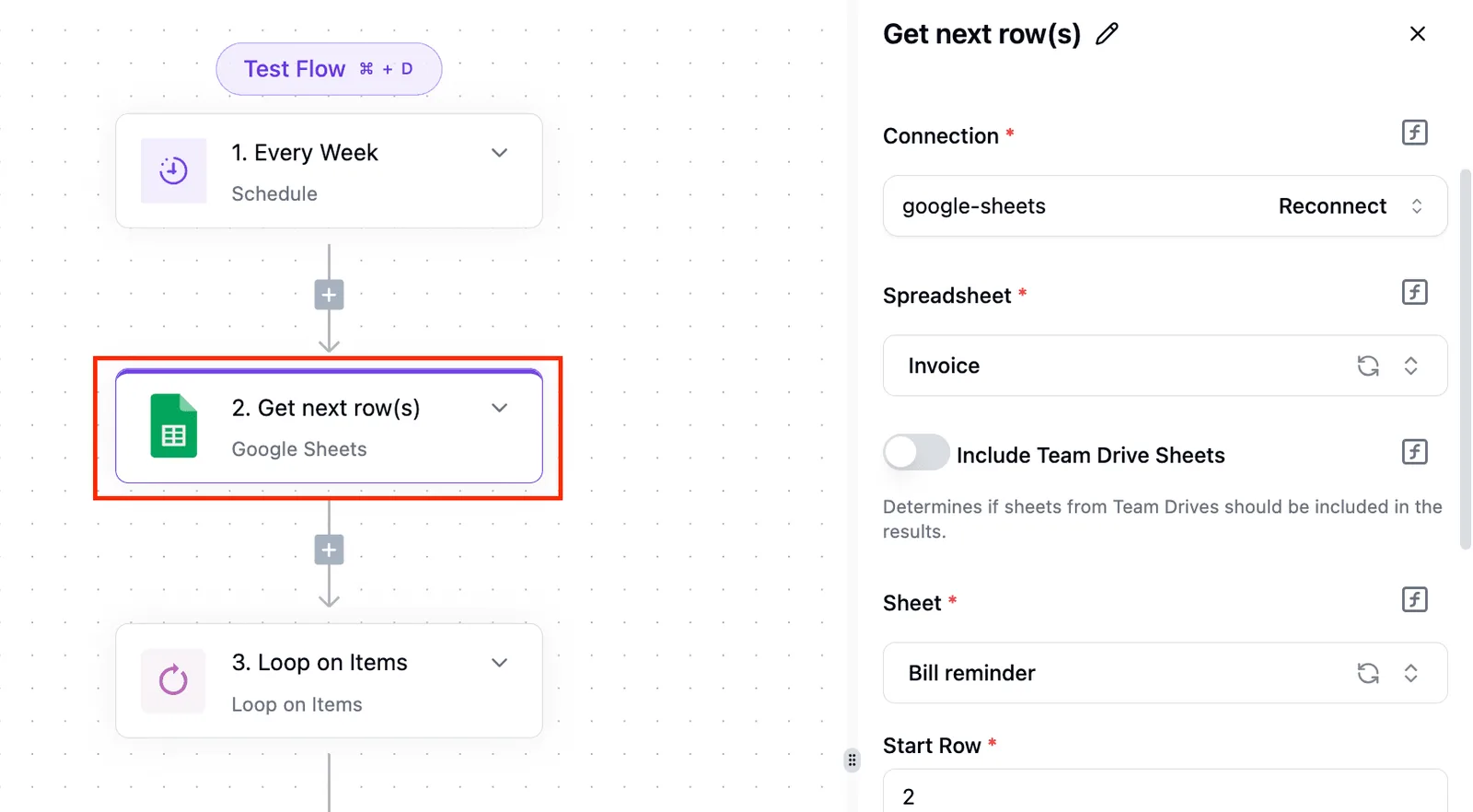
Auditing data movement with full execution logs
Activepieces maintains a non-repudiable record of every data payload across its 735+ integrations, providing the forensic trail that native spreadsheet macros lack.
Every time a row is sent to an external service, the platform logs the specific identity of the user, the timestamp, destination IP, and the full JSON payload.
You can use these logs to verify that no PII was included in the transfer.
The checklist for migrating to governed automation
Governing the automated spreadsheet landscape requires a shift from reactive blocking to the systematic migration of existing workflows into a managed environment.
Auditing existing 'Shadow' webhooks
For a company’s data exposure, identifying every active endpoint is the only way to map the true surface area.
Audit all active webhooks to identify which external services are receiving internal data streams. Rotate personal API keys to service accounts so that automation does not break when an employee leaves the company.

Set project-level task quotas to prevent a single looping script from exhausting the entire department’s API budget.
Insert 'Human-in-the-loop' approval steps for bulk operations to ensure that mass data deletions or exports require a manual sign-off.
Transitioning to service account authentication
Moving credentials from individual user profiles to dedicated service accounts eliminates the risk of "zombie" automations tied to deactivated identities.
Service accounts function as non-human identities with scoped permissions. You ensure that the automation has exactly the access it needs and nothing more.
Implementing mandatory error-handling blocks
Building "Human-in-the-loop" checkpoints into high-volume workflows prevents automated errors from scaling into catastrophic data loss.
By mandating a pause for manual review whenever a workflow exceeds a specific volume threshold, IT introduces a circuit breaker into the system.
The machine handles the repetitive movement of data, but a human remains responsible for the integrity of the bulk changes.
Frequently asked questions about spreadsheet security?
Will locking down sheets slow down the marketing team?
Governance actually accelerates marketing workflows because it replaces manual credential management with standardized access. This means teams no longer wait for IT tickets to reset shared passwords or fix broken authentication tokens.
What is the difference between RPA and API-based sheet automation?
The primary distinction lies in how the automation interacts with the software. Robotic Process Automation (RPA) mimics human actions by clicking buttons and reading the screen, which makes it fragile because a single UI change can break the entire workflow.
API-based automation communicates directly with the application’s underlying code. This results in a significantly more stable connection that ignores visual layout changes.
How do we handle legacy Excel macros in a cloud environment?
Legacy macros should be migrated into cloud-native scripts or dedicated automation layers because Excel’s VBA (Visual Basic for Applications) lacks the granular permission controls required to prevent unauthorized data exfiltration.
Can we restrict automation to specific IP ranges?
Most enterprise-grade cloud platforms allow for IP whitelisting, which ensures that automation scripts only execute from trusted corporate data centers or specific virtual private clouds.
Static IP addresses allow security teams to create "allow lists" in their firewalls, so any request coming from an unknown home network is automatically blocked.
VPC Peering creates a private tunnel between the spreadsheet tool and the internal database, so the data never traverses the public internet where it could be intercepted.