Freepik Pricing 2026: Plans, Credits and What You Pay

Nov 9, 202613 min read
Real Freepik pricing and monthly credits
Which Freepik plan fits, as of 2026
Skip the monthly price on Freepik's pricing page, because it is the least useful number there. The AI credits inside each plan decide which one fits, so match the plan to how much you make in a month.

Every time you generate an image or a video, the AI tools spend credits from your allowance.
Pick by the sticker price alone and one of two things happens. You run out partway through the month and stall or pay extra, or you pay every month for an allowance you never touch.
How to read a pricing page
Read what each pricing page counts as its unit: Activepieces bills 1 credit per flow run however many steps it holds, so a ten-step flow costs what its two-step workaround did, while Zapier's per-task and Make's per-module billing charge more as you split the work up.

What Freepik is and where the figures come from
Freepik is a stock and AI image platform. It began as a library of vector graphics, photos and templates you download for design work, and it now also generates images and video from a text description.
That's why its plans bundle two different things: access to the stock library, and a credit allowance for the AI tools. Most buyers are really choosing the second.
Most prices in this article come from Freepik's own pricing page, freepik.com/pricing, read on the date above. I don't use reseller listings or screenshots from other sites, because they go stale.
If you are running this arithmetic for your own team, see what the same workload costs on Activepieces.
Every Freepik plan with price, credits and limits
The table below holds only what I could confirm: Premium's annual price is the one firm figure, and everything else reads "not stated" until you check freepik.com/pricing.
| Plan | Monthly price | Annual (per month, total) | AI credits | Download limits | Seats | Licence | Gates |
|---|---|---|---|---|---|---|---|
| Free | not stated | not stated | not stated | not stated | not stated | not stated | not stated |
| Essential | not stated | not stated | not stated | not stated | not stated | not stated | not stated |
| Premium | not stated | $14.50, $174 a year | not stated | not stated | not stated | not stated | not stated |
| Premium+ | not stated | not stated | not stated | not stated | not stated | not stated | not stated |
| Pro | not stated | not stated | not stated | not stated | not stated | not stated | not stated |
| Add-ons | not stated | not stated | not stated | not stated | not stated | not stated | not stated |
Don't buy off this table. Copy the credits and download columns from the live page before you pick anything.
Downloads cover stock files you take as they are; credits are spent each time you generate something with AI.
Monthly versus annual billing
Commit up front and Premium works out to roughly $14.50 a month, since SpendHound lists it at $174 a year. Commit before you know your credit use and you've prepaid for a guess.
Add teammates and the bill climbs fast: the same source lists a Business seat at $660 a year, nearly four times Premium, so each new teammate costs $660 annually.
Small and mid-sized businesses actually spend an average of $393 a year, which means roughly $33 per month.
What Freepik plans cost at realistic monthly usage
Count your output first, then read the price. The right plan is the cheapest one whose credits, or download allowance, cover your busiest normal month, because the monthly price only matters once that fit is settled.
Count your output first, then read the price.
Freepik credits for solo social media images
When you make social images on your own, every generation spends credits, including the ones thrown away.
Count the images you publish in a month, then add the retries it takes to get one you like. That total is your real usage, and it's usually well above the published count.
Start on the entry-level plan that carries AI credits, and watch how much of the allowance is gone by mid-month.
AI video clips for a small team
Treat video like image work and you hit the cap early and stall mid-project. A single clip costs far more credits than a single image, which is why short AI video is where plans run dry fastest.
Before picking a plan, check the credit cost per clip on Freepik's own pricing page, multiply by the clips you need and the retries you expect, and compare that with each plan's allowance.
If the team shares one account, the allowance is shared too, so one person's experiments come out of everyone's month.
If you mostly download stock, you barely touch credits, so a plan sold on its AI allowance is partly money for something unused. Look at the download limit instead.
Pick the plan that covers your heaviest download month, and treat any AI credits as a bonus rather than the reason to pay more.
Move up a plan when you keep running out of credits and buying top-ups, or when the gap between plans costs less than those top-ups.
Calculating monthly Freepik credit usage against your plan
Here is the sum to run, with placeholder numbers that are mine, not Freepik's. Say a plan gave 1,000 credits a month, an image cost 10 credits and a short clip cost 40.
Publish 20 images and 6 clips, with two retries each, and you generate 60 images and 18 clips. That is 600 credits for images plus 720 for clips, 1,320 in all, so the plan falls 320 credits short in your busiest month.

Swap in the real allowance and per-output costs from freepik.com/pricing, then take the cheapest plan whose allowance clears your total. If none does, the answer is fewer clips or a higher tier, not a cheaper sticker price.
Hidden costs and limits Freepik users hit
In five places, Freepik's bill and your expectations part ways, and each one makes credits disappear faster than the plan's headline suggests:
- Credits are valid for 1 year, with no monthly resets.
- Costlier models and video clips use far more credits per output.
- Some edits spend credits too.
- "Unlimited" models come with conditions.
- Free-tier work carries attribution, and annual plans lock you in with limited refunds.
Credits that expire or run out early
On a monthly plan, a credit you don't spend this month is gone next month, so a quiet month is money you paid for nothing.
Per output, the cost swings widely. AI Creative OS puts a Kling 720p clip at $0.051 and a Nano Banana Pro image at $0.054, so those two cost about the same.

One Veo habit can drain a month's allowance that would have covered dozens of Kling clips.
Read the conditions on any "unlimited" model before you build a workflow on it, because the limit often sits in the fine print. Edits such as upscaling or retouching can also spend credits, so count them as outputs when you estimate your month.
If you deliver free-tier work to a client, it needs an attribution credit: either the credit line goes on it or you upgrade first.
Pay for a year and you're committed for twelve months, with limited refunds, so treat the payment as final. That's why the credits should prove themselves monthly before you pay for a year.
Worth checking against a plan that does not meter every step: one credit covers a whole run on Activepieces.
Freepik compared with the closest alternatives
When AI credits and stock files both matter, Freepik is the better fit, and the alternatives win when only one of them does. The comparison is about what you spend the allowance on, not the entry price.
Take from the table that only Freepik and Envato put the stock library at the centre of the subscription; Canva, Adobe Firefly and Shutterstock lead with something else.
| Platform | How the AI allowance is counted | Where the stock comes from |
|---|---|---|
| Freepik | Monthly credits | Its own library, in the same plan |
| Canva | Usage limits by plan | Library inside the design editor |
| Adobe Firefly | Generative credits | Adobe Stock, bought separately |
| Shutterstock | Secondary to the stock plan | Its own library, the main product |
| Envato | AI tools alongside downloads | Its own library, the main product |
AI video cost per second
At $0.10 per second of AI video, Freepik makes a 10-second clip about a dollar, according to UniqAI.
Luma Ray 3.2 is $0.24 and Runway Gen-4.5 is $0.12, so Freepik undercuts both. Kling 3.0 is $0.075 and Veo Omni Flash is $0.03, so if video is nearly all you make, those two are cheaper.

Choose Freepik when you need stock and AI images from one monthly allowance, with video as an occasional extra at $0.10 a second, so longer videos will quickly become costly.
Choose Canva if you mostly lay out designs, Firefly if you already work in Adobe's tools, and Kling or Veo Omni Flash if video is the bulk of your output.
Activepieces for automating Freepik image generation
Set it on a timer and Activepieces, the open-source AI automation platform with an MIT-licensed core that runs repetitive steps for you, can generate Freepik images in scheduled batches. Whichever tool you land on, only people producing in volume will get their setup time back.
When automating Freepik generation is worth it
If you make a handful of images a week, skip this. Typing prompts by hand costs you minutes, while building a workflow costs you an afternoon plus upkeep when something breaks.
It starts paying off when the same batch recurs: a set of product shots every Monday, or social images for a content calendar. Then the hand-clicking is the real cost, and it grows with your output.
Activepieces adds nothing to your Freepik bill: it spends the credits your Freepik plan already gives you, and spends them faster if you set it loose carelessly.
Its own free plan costs $0 and comes with 1,000 credits a month and unlimited flows, which means the monthly credit limit is your real constraint, not the number of flows you can create.
Freepik's API, the doorway that lets other software place requests, may also be billed separately from your subscription. Check Freepik's API pricing and your plan's terms before you build anything.
What a Freepik generation workflow looks like
If Freepik isn't in the catalogue of 747 integrations, roughly 60% of which are community-contributed, you can generate the integration with AI and add it privately to your own instance.
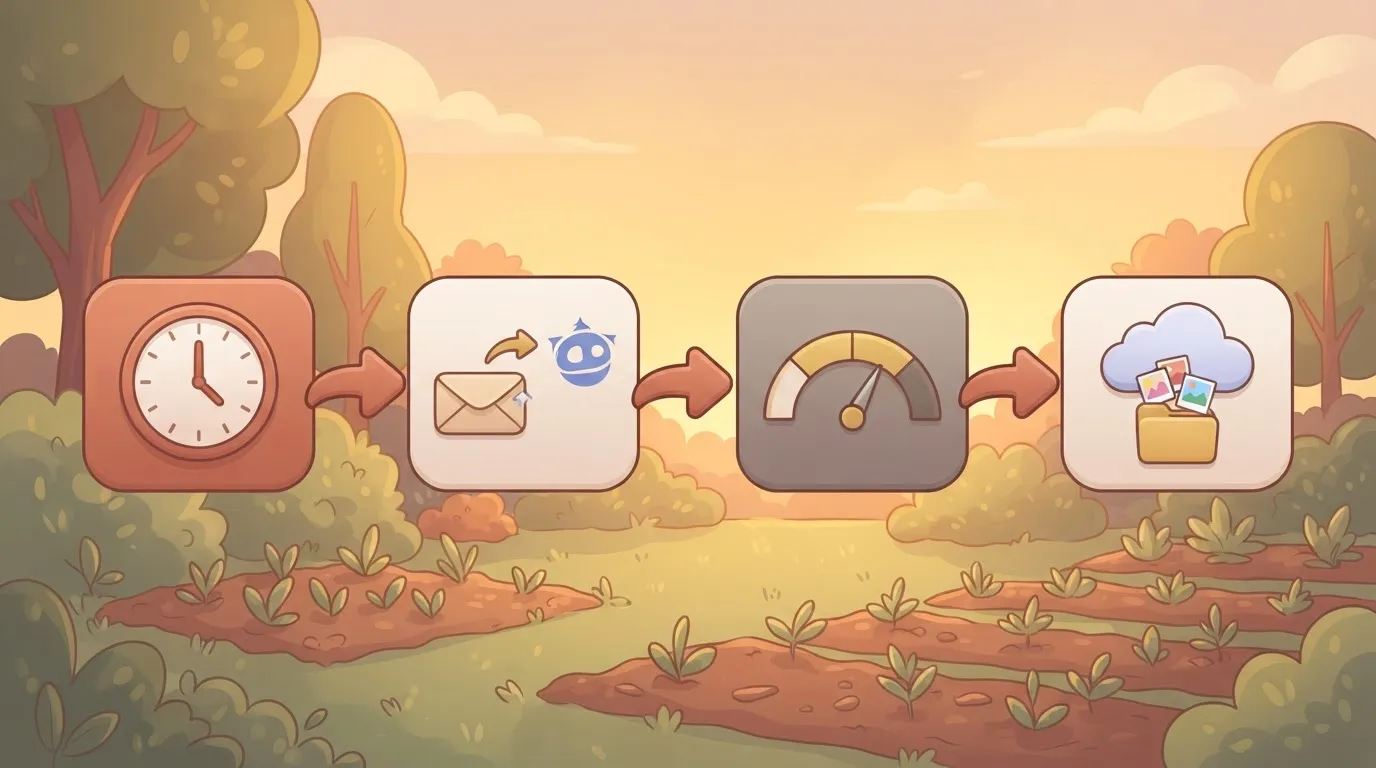
The flow below shows four steps in a row: a schedule starts the run, an HTTP step asks Freepik to generate, a check reads your remaining credits, and a final step saves the results to a cloud folder.
Activepieces' pricing page bills that as 1 credit, because the run is the meter and not the steps inside it.
Split the flow into ten smaller steps, each doing one job, and the bill stays at 1 credit, where Zapier's pricing page bills per task and Make's per module, so more steps means a bigger bill there.

The credit check is the one to take seriously, because it stops a batch before it drains the allowance you were counting on.
Nothing here runs itself without care. Start with a small batch, watch what it spends, and only then widen it. Once you know your real monthly output, you're also better placed to judge whether a bigger plan or an annual commitment makes sense.
Monday checklist for choosing a Freepik plan
Start on the free tier or the cheapest monthly plan, measure your credit use for a week, and go annual only after a few months of steady use. This was checked on 9 November 2026, so confirm it against the live page before you pay.
Skipping the trial and paying for a year up front costs you the most if your habits turn out smaller than you guessed. The steps run in this order:
- Count last month's images, videos and downloads from your own files or Freepik history. That's your real output.
- Look up what each kind of generation costs in credits on the pricing page.
- Start on the free tier or the cheapest monthly plan.
- Check your credit use after a week, and compare it with your count from step 1.
- Go annual only once several months of use show you rarely run short or waste credits.
- Set a calendar reminder before the renewal date, so a plan you've outgrown or stopped using doesn't roll over quietly.
A number copied into an article goes stale, and a stale one could steer you into the wrong plan. Read the page the same day you subscribe, then do your sums against your own count.
Frequently asked questions
Free tier and licensing
Is Freepik free to use? Yes, there's a free tier, but it's limited and comes with conditions.
Free downloads generally require you to credit Freepik, and the AI credits that decide your plan are far tighter than on paid tiers. Treat it as a way to test your workflow, not to run it.
Can I use Freepik images commercially? On a paid plan, generally yes, within Freepik's licence terms.
On the free tier, commercial use is the part I haven't confirmed, and the attribution requirement is the catch. Skip the guesswork and read the licence for the specific asset before it goes on anything you sell.
Credits, cancellation and refunds
Do unused Freepik credits roll over? Unconfirmed. Don't assume credits carry past the billing period, and certainly don't assume it on an annual plan. That's why you use them for a few months before committing.
Can I cancel Freepik and get a refund? You can cancel, and cancelling stops the next charge. Whether you get money back for the current period is unconfirmed, and annual plans are where that gap costs you most.
Freepik versus Canva
Is Freepik cheaper than Canva? It depends on what you make.
Freepik is built around stock assets and AI image generation, while Canva is a layout and design tool, so you're often buying different things. Compare by your own monthly output, not by the sticker price.
Questions to put to support
Before you pay, ask Freepik support about four items in writing:
- Refund window: unconfirmed.
- Annual credit rollover: unconfirmed.
- Commercial use on the free tier: unconfirmed beyond the attribution requirement.
- API billing: unconfirmed, including whether it draws on subscription credits or is billed separately.
Get those four answers saved, and the plan choice becomes arithmetic.
Related reading
References
Running the numbers
See what the same workload costs here.
Free forever plan, and every paid plan self-hosts at no extra cost.
See pricing Talk to sales