
Genspark Automation: Features, Limits, Pricing 2026

Nov 17, 202614 min read
Genspark automates what its Help Center, pricing page and changelog document, within the limits of your plan, and nothing beyond that. When a run fails at 2am on a Tuesday, whoever gets paged can't fix a behaviour nobody wrote down.
What documentation defines Genspark automation
What Genspark can automate today
Three pages decide what counts. The Help Center describes features, the pricing page sets what each plan allows, and the changelog records what changed.
When a run fails at 2am on a Tuesday, whoever gets paged can't fix a behaviour nobody wrote down.
A capability counts only if you can point to one of those three pages for it.
When a task needs something outside that boundary, such as a fixed trigger schedule or a record of each run, that part goes to Activepieces, whose flows start from schedules, webhooks or app events and keep a run trace of each execution.
Unlimited flows are included on every plan, the free one too, so testing the scheduled version costs nothing but time.
The one task this walkthrough follows
The task is a weekly competitor pricing check. Genspark gathers the current pages, summarises what changed since last time, and the summary goes to a shared team inbox.
It has a trigger, a source list, an output and a named owner. Those are the four things any repeatable task needs, and each one is a place where a failure can occur.
Genspark automation sources and when we checked them
All three sources were checked on 17 November 2026. The table shows what each page contributes to the question of automation, so you can see which page to trust for which claim.
| Source | What it says about automation | Date checked |
|---|---|---|
| Help Center | Documents which features exist and how they are meant to be used | 17 November 2026 |
| Pricing page | Sets the limits each plan places on those features | 17 November 2026 |
| Changelog | Records what has been added or altered, and so what may have shifted since you last tested | 17 November 2026 |
Read the dates as when the pages were checked, not when they were last edited.
If you are running this arithmetic for your own team, see what the same workload costs on Activepieces.
Setting up your first automated task
Seven steps get a task from nothing to a scheduled run, and the first three decide whether it can be automated at all, so half your work is gatekeeping. Before you start, write down who gets paged when it fails at 2am on a Tuesday.
Genspark won't answer that for you.
Step 1 to 3: account, plan and the right feature
Choose the plan first, because it is a budget decision. According to Activepieces, Free costs $0 a month, so a trial costs nothing but time.
Per Activepieces, Plus costs $24.99 monthly or $19.99 on annual billing, a $60 yearly difference that only pays off once the task has survived testing, which means you won't see the savings until your subscription hits the 12-month mark.

You shouldn't take Pro, which Activepieces puts at $249.99 monthly or $199.99 annually, before a Plus-level run has shown where the limits bite, or you'll spend money on features you haven't needed, so every misjudged month costs dearly.
- Confirm whether the account is on Free or Plus, and note who holds the login.
- Choose Super Agent as the feature, since it's the one that takes a written instruction and acts on it.
- Decide the task's owner by name, because a scheduled run with no owner has no one to notice when it stops.
Whatever you write in the instruction is all the agent gets, so it has to state its own finish line.
- Write the instruction with the exact output you expect, such as a summary of a fixed length in a named destination, and a stop condition, such as "stop and report if the source is empty." Without the stop condition, a failure looks like silence.
- Connect only the apps the task touches. Each connection widens what a mistaken run can change.
- Set the schedule or trigger. Start with a frequency slow enough that you can review every output by hand.
Checking your first Genspark task run
Run the task once, manually, and compare the output against the instruction line by line.
Check three things. First, whether the output matches the format you specified; second, whether the stop condition fires when you feed it bad input.
Third, whether the run's cost against your plan limits is something you can live with multiplied by every scheduled repeat.
The first failed run's limits
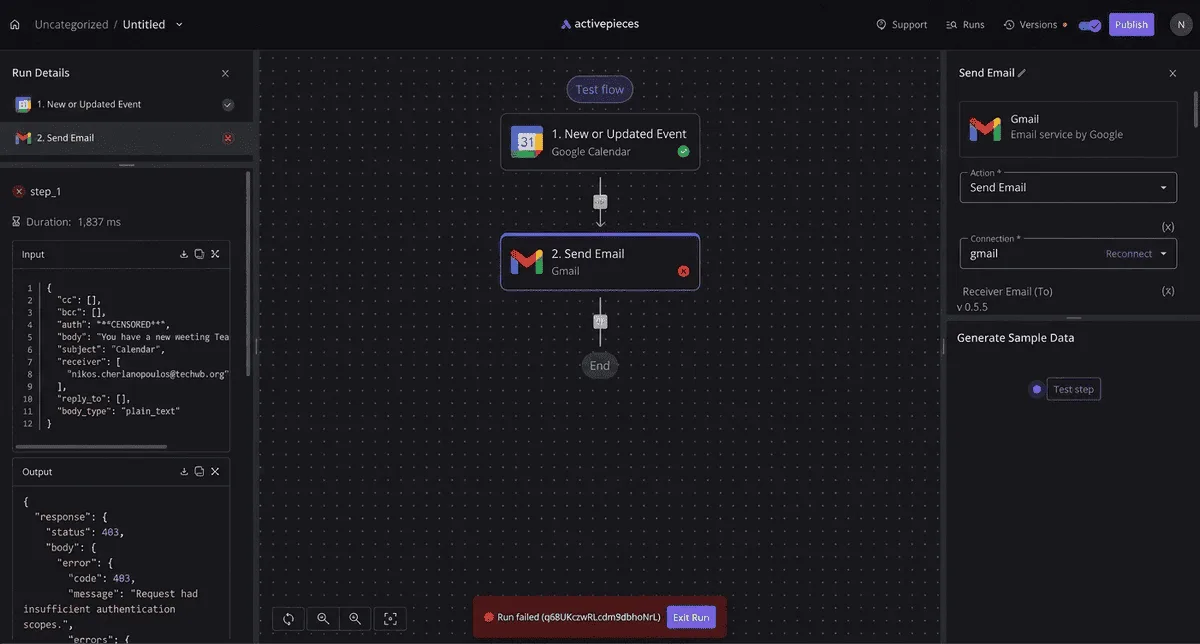
On the first repeat, a calendar-to-email flow failed, and the error names a run, not a cause. At 2am on a Tuesday, whoever gets paged receives only "Run failed" and an ID string.

The screenshot shows the three-step flow: a calendar trigger, a send-email action and an end node. Run details sit on the left with step timings and input/output JSON, and the failure banner with its "Edit Run" button sits at the bottom.
The JSON is the only diagnostic, so someone has to own reading it.
Credit and usage limits
You can predict this failure, because the plan pages write the caps down. Each plan page states what's capped and what happens at the cap, whether the task stops, queues or bills extra.
When a repeating job stops silently at month-end, that is an ownership problem before it's a technical one. Someone must watch the meter, since nothing in the run output will say the cap caused the stop.
If a token expires or a permission is revoked, the email step fails while the trigger keeps firing, because that step depends on an authorized account.
Each run then fails again, and the person who authorized the account may no longer be the person on call. Record who holds each connection before the flow goes live.
Output that looks finished but is wrong
Even a run that succeeds can be wrong. On the GAIA benchmark of multi-step assistant tasks, Genspark's reported success rate falls with difficulty: 87.8% at Level 1, 72.7% at Level 2 and 58.8% at Level 3, meaning the tool becomes unreliable for harder tasks.
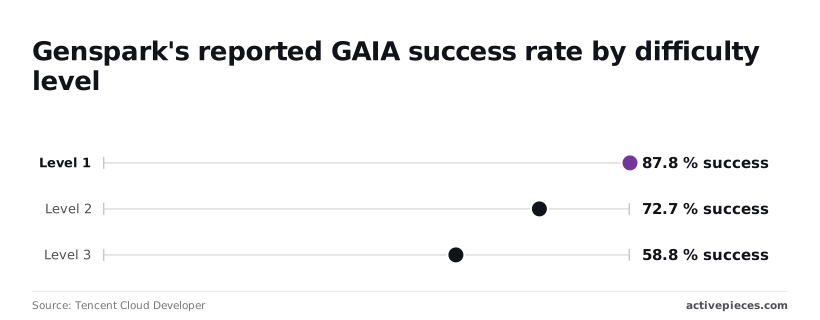
Put practically, a simple, single-purpose task is mostly safe, while anything with several dependent steps fails about four times in ten at the hardest level. Those failures often arrive as plausible output, not as an error banner.
So any step that sends something to a customer needs a human check or a deterministic validation before it fires.
Worth checking against a plan that does not meter every step: one credit covers a whole run on Activepieces.
What the failure cost in credits and hours
Less went on credits than on the human time spent finding and undoing the failure.
Genspark credits spent per run
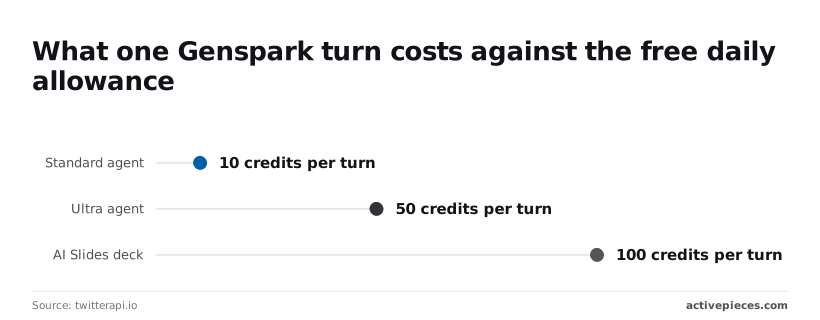
10 credits is what a standard Super Agent turn costs, according to twitterapi.io. That's one tenth of the free daily allowance, so a free account can afford roughly ten standard turns before the day's credits run out.
When a retry loop hammers a failing step, the allowance drains quickly, and nothing in the plan stops it from retrying the same mistake.
50 credits per turn is where the Ultra agent starts, per twitterapi.io. Two Ultra turns consume the whole free day. Choosing the stronger agent to fix a failure therefore costs five times as much per attempt, and it doesn't guarantee the second attempt is right.
100 credits per turn buys one AI Slides deck, which uses the entire free allowance.
A recurring deck-building task on the free plan has no room for a rerun the same day. If the first output is wrong, the redo waits until tomorrow's refresh or moves to a paid plan.
Hours spent checking and redoing Genspark tasks
The meter counts turns. It does not count the checking. Every run that touches something customer-facing needs a person to read the output before it goes out, and a failed run needs that person to find what went wrong, correct it and rerun.

A deterministic workflow tool changes this arithmetic. Its steps either match a rule or stop, so the check can be automated and the owner is paged with a specific failed step.
With an agent, the owner reads the whole output to find the fault. The credit cost of a failure is bounded and visible; the review cost grows with every run you can't validate by rule.
The Fixes That Got the Task Running Again
Five fixes restored the task, applied cheapest first because review cost is what grows, and whoever gets paged at 2am on a Tuesday should know which of them they own.
- Rewrite the instruction. The setting's the task's instruction text. State the output format, the stop condition and what to do on missing input. This fixed drift, where the output changed shape between runs. Check the Help Center page that documents how tasks are described.
- Narrow the scope. Cut the task to one source and one output. A broad task fails in ways you can't attribute, and a narrow one fails in ways you can. The same instruction-and-task pages cover this.
- Reconnect permissions. Re-authorize the connected account in the integration settings. Expired or reduced access looks like a content failure but is an access failure. The Help Center page on connected apps describes the authorization flow. Name a human owner for that account, because the token belongs to a person.
- Change the plan or schedule. Move the run to a time or plan tier whose documented limits cover it. If a run fails because it exceeds a limit, no rewording helps. Read the pricing and usage-limit pages before upgrading, so you pay for a limit you actually hit.
- Add a human check. Put a named reviewer between the output and anything that acts on it. This is a process change, not a Genspark setting, and it's the only fix that addresses wrong output you can't validate by rule.
Problems Genspark's docs do not solve
Not every failure has a fix on these pages. If the task needs the same steps in the same order every run, with a logged record of each step, no instruction rewrite supplies that.
The documentation describes an agent that interprets a request, not a workflow engine that executes a fixed graph.
If you need an alert when a run silently produces a plausible but wrong result, nothing I found in the documented settings does that. Both belong in a deterministic workflow tool.
When a Deterministic Workflow Tool Fits Better
Use a deterministic workflow tool when the task must start on its own, run the same way every time, and leave a log someone can read at 2am when it fails. Genspark alone suffices when a person starts the run and reads the result.
In the Activepieces flow builder, an Agent step sits beside ordinary deterministic steps in the same flow, and the run trace that results is one execution logged from trigger to final step, not two systems bridged by a callback.
A failed judgment step then appears as one failed row in that trace, with the steps around it visible. MoneyGram, Moneypenny, Alan and FundingSocieties run Activepieces in production.
The table shows how the four tools differ on the properties that decide who gets paged. Take from it that only the workflow tools are built around unattended starts and per-run records.
| Tool | Trigger type | Repeatability | Failure handling and run logs | Cost per run |
|---|---|---|---|---|
| Genspark | A person starts it in a chat | Same prompt, variable output | Review the result yourself | $0.025-$0.15 per Standard turn |
| Zapier | App events, schedules, webhooks | Same steps each run | Per-task history and error status | About $0.04 per task |
| n8n | Webhooks, schedules, app events | Same steps each run | Execution history per run | Set by your plan or hosting |
| Activepieces | Webhooks, schedules, app events | Same steps each run | Run history per flow | Set by your plan or hosting |
Build a budget on the low end of the Genspark range, a fourfold-plus spread, and it is wrong whenever a task needs longer turns. Zapier's flat per-task figure is the easier one to forecast, which matters when finance asks what a month of runs costs.
Genspark suffices for work a named person triggers, reads and owns: a research brief, a draft, a one-off comparison. If a bad result costs a re-run, nobody needs a pager.
When nobody is watching, a workflow tool is safer: a scheduled report, a webhook that fires on a customer event, a step that writes to another system.
Fixed steps and a per-run log tell the on-call person which step broke, and a reviewer can't get that from a variable chat output.
Frequently asked questions
Does Genspark have a free plan that can run automations?
Although Genspark lists a free plan, its allowance is the ceiling on how much of a repeatable task you can test, so read what Free includes before building on it. Treat the free tier as a trial of one run, not a production host.
Check the pricing page, as read on 17 November 2026, for what each plan covers. If the plan changes, the task changes with it, and whoever owns the flow finds out when it fails.
Can Genspark run a task on a schedule without me?
Only as far as the scheduling and background-run features documented for your plan reach. Genspark's help pages, read on 17 November 2026, describe work continuing after a tab closes, but only for a bounded window. That's not a clock.
If the task must fire every Tuesday at 2am, put a deterministic scheduler in front of it and let Genspark handle the one step that needs judgement. Then a missed run is a failed trigger with a named owner, not a silent gap.
Is Genspark a replacement for Zapier or n8n?
No. Zapier is a hosted tool that connects apps through fixed triggers and actions, and n8n is a workflow builder you can self-host. Both run the same steps the same way each time.
Genspark is an agent that interprets the request on each run, so its output can vary. Use it for the steps that need reading, drafting or research. Use the workflow tool for routing, retries, schedules and audit trails.
What happens to my task when I run out of credits?
Assume the run stops where the credits stop, and plan for a half-finished job. Genspark's pricing and credits documentation, read on 17 November 2026, is the authority on exact behaviour, and it can differ by plan.
Build the flow so the surrounding tool records each step's status, alerts a named person when a Genspark step doesn't return, and can resume without repeating completed work. A credit shortfall then becomes one visible failed step rather than a mystery.
Related reading
References
Running the numbers
See what the same workload costs here.
Free forever plan, and every paid plan self-hosts at no extra cost.
See pricing Talk to sales