
Xai Workflow (2026 Guide)

Nov 15, 202614 min read
An xAI workflow is one authenticated API call to Grok placed between an event that starts it and a step that uses the answer.
Connect workflows with Grok API calls
The fastest route is a key, one chat completions call, then the trigger and action, which you can wire up in a builder such as Activepieces or in your own code. Docs checked 15 November 2026.
What you'll have working by the end
You'll have a workflow that reacts to an event, sends its text to Grok, and writes the reply somewhere useful.
- Trigger: an email arriving, a form submission or a webhook request
- One Grok chat completions call
- Action: write a row or send a message
- Needed for the call: an API key, a model name and the endpoint
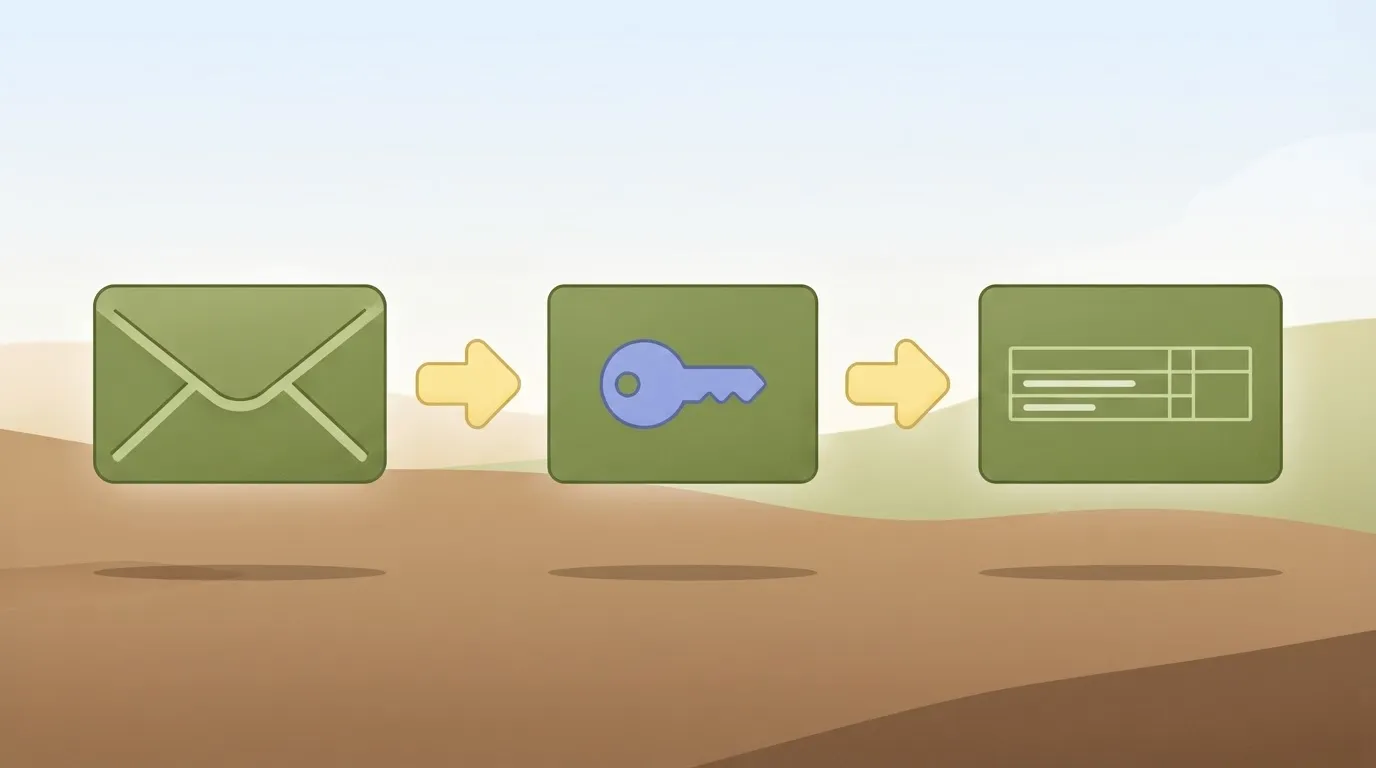
Three ways to build it: code, no-code platform, or xAI's own tools
With code, a short script receives the trigger and posts to the endpoint. A no-code platform wires the same three parts with blocks instead. xAI's own tools suit you if you want to stay inside its console.
All three make the same HTTP request, so a call that works in one will work in the others.
Prerequisites for a Grok API workflow
Have an xAI API key, an endpoint and a model name copied from the models page. Most early failures are a wrong key or a mistyped model name, so copy them.
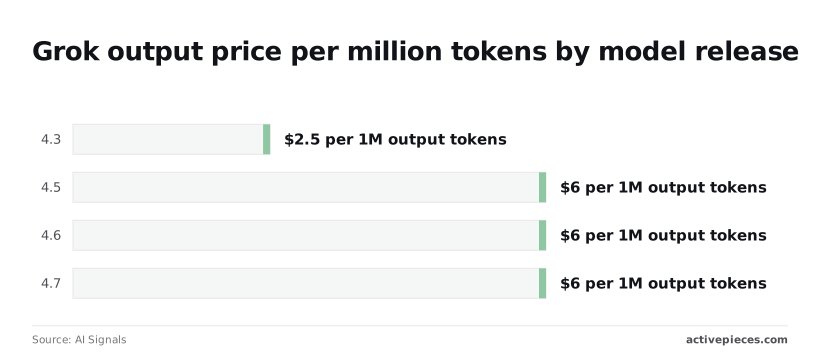
Whichever model you pick sets your cost. Output price per million tokens, per AI Signals, is $0.5 for 4.1 Fast, $2.5 for 4.3, and $6 for each of 4.5, 4.6 and 4.7, making the premium models 12 times more expensive per token.
This takes minutes, not a project: automate it in Activepieces free.
Get your API key and Make one call
To make a working first call you need three things: a key from the xAI console, the base URL https://api.x.ai/v1, and an Authorization: Bearer header. Send those with a model name copied from the docs and a chat completions request returns JSON.
Create the key in the xAI console
Sign in to the xAI console, open the API keys page, and create a key. The full secret's shown once, at creation, so copy it straight into an environment variable.
Name each key for the workflow that uses it. When one leaks you can then revoke exactly that key and leave the others running.
Set it in your shell:
export XAI_API_KEY="paste-the-key-here"
export XAI_MODEL="paste-the-model-id-from-the-xAI-docs"
Copy the model id from the docs exactly. A display name such as "Grok 4.7" isn't necessarily the string the API accepts.
curl https://api.x.ai/v1/chat/completions \
 -H "Content-Type: application/json" \
 -H "Authorization: Bearer $XAI_API_KEY" \
 -d '{
 "model": "'"$XAI_MODEL"'",
 "messages": [
 {"role": "user", "content": "Reply with the single word: ready"}
 ]
 }'
Once it runs, it takes one of three branches:
- A 200 response with JSON means the key, URL and model name are all correct.
- A 401 means the key's missing, mistyped or revoked, so check the header first.
- A 404 or a model error means the id doesn't match the docs. A 429 means you hit a rate limit, so wait and retry.
Don't add anything to the workflow until this returns a 200.
When the call succeeds, the body carries the fields your later steps will read:
choices[0].message.contentis the model's text, and it's what the action step will consume.choices[0].finish_reasonsays why generation stopped. A value other than a normal stop means the text may be cut off, so branch on it before acting.usagereports prompt and completion tokens, which is what you log to see what each run costs.
Wire Grok between trigger and action
Three steps in fixed order make up the flow, so debugging means examining at most three stages. A trigger captures the input, one HTTP POST asks Grok to process it, and an action writes the reply into a row.
The table compares the three ways to build it.
| Build route | Setup time | Control | Where errors surface |
|---|---|---|---|
| Custom code | Longest, since you write the request, parsing and retries | Full: you decide every branch | Your own logs and exceptions |
| No-code platform (Zapier, Make, n8n) | Short, because trigger and action connectors already exist | Moderate: limited to what the HTTP module exposes | The platform's run history, per step |
| xAI built-in tools | Shortest for tasks the tools cover | Lowest: the tool runs inside the API call | The API response itself |
| Activepieces (open source, 750 integrations) | — | MIT-licensed core, can run on Activepieces Cloud or on-prem | — |
Prices and plan limits checked against docs.claude.com and claude.com and openai.com and gemini.google on November 15, 2026.
The rest of this stage assumes the platform route.
Pick one trigger: an incoming email, a form submission or a webhook. Fire it once with real input and keep that sample, because every later field mapping depends on it.
Configure the xAI request step
Add an HTTP step with method POST to https://api.x.ai/v1/chat/completions. Set two headers: Authorization: Bearer <your key> and Content-Type: application/json. Store the key in the platform's credential store, not in the step text. Use this body:
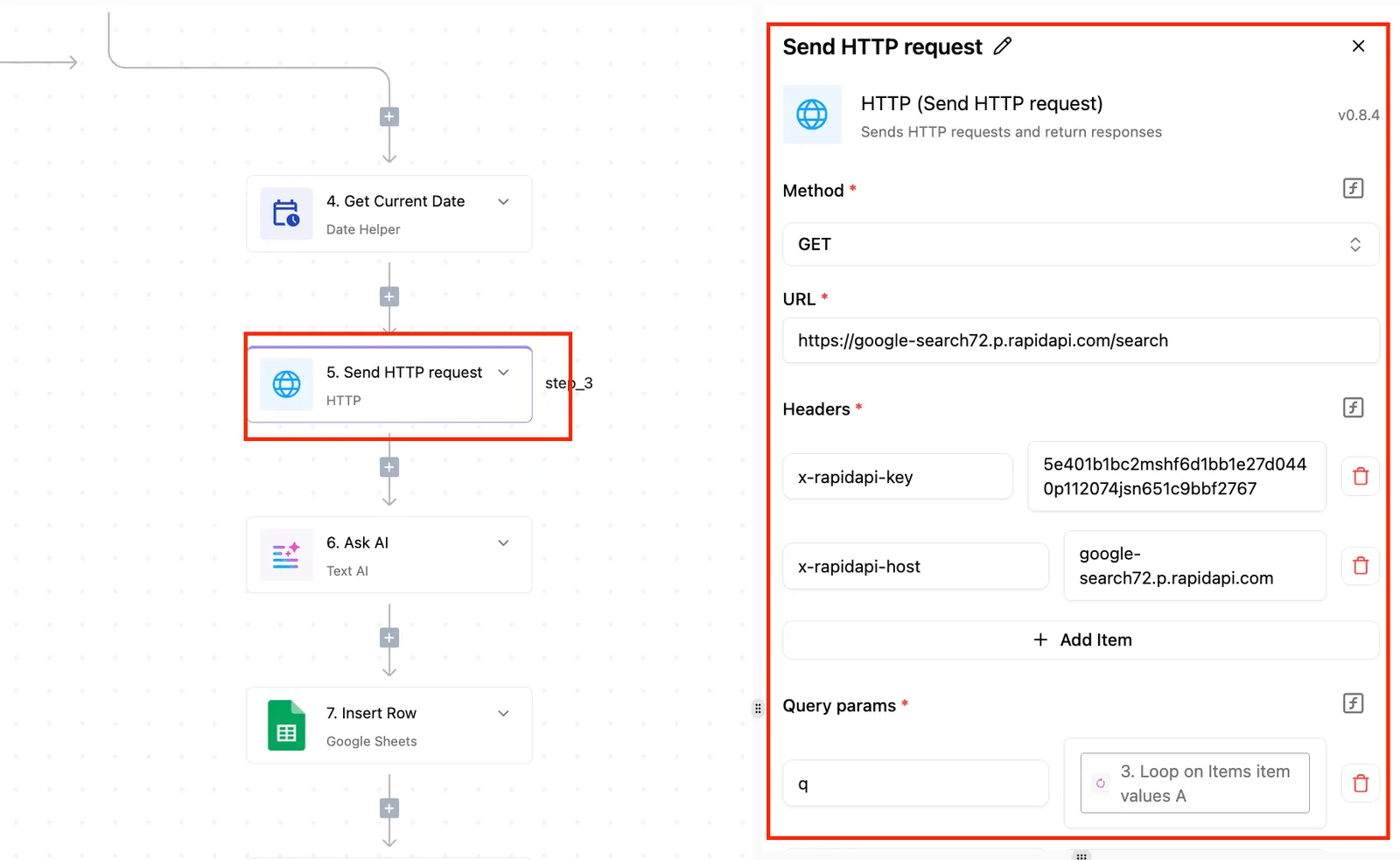
{
 "model": "<Grok 4.7 model name as your console lists it>",
 "messages": [
 {"role": "system", "content": "Reply with JSON only."},
 {"role": "user", "content": "<mapped field from the trigger>"}
 ],
 "stream": false
}
A wrong key gives an authorization error, and a wrong model name returns model-not-found. Configure the step to halt on any non-success status instead of passing an error body downstream.
Activepieces takes exactly this HTTP step after a form or email trigger, with the key held in its credential store and the reply read from choices[0].message.content as above.
Once the step is connected, an agent can call it as well: every connected integration is also a tool on the project's MCP server, so Claude, ChatGPT, Cursor or an agent you wrote yourself can run the same Grok call your flow runs.
The mechanism is in packages/pieces of the open source repo, which counts 750 integrations under an MIT-licensed core, and the action that runs in a flow is the one exposed as the tool.
Map the Grok API response to actions
Read Grok's answer at choices[0].message.content, where it arrives as a string. If you asked for JSON, parse that string before mapping its fields into the row columns.
When parsing fails, branch to a holding row or an alert, never a half-filled record.
You can follow the rest of this with the builder open. Start free, no card.
Make output reliable and keep costs low
To turn Grok's free text into output a downstream step can parse, use a system prompt, a JSON schema, and function calling or search tools. Cheaper model and token settings keep that call affordable.
The table shows what each mechanism guarantees. Choose the weakest one that your next step can safely consume.
| Mechanism | What it guarantees | When to use it | Effect on parsing |
|---|---|---|---|
| System prompt only | Nothing enforced; tone and intent only | Drafts a human will read | Free text; parsing breaks on any wording change |
| Structured outputs with JSON schema | Reply matches the schema you supply | Any step that writes to a field or row | Parse directly; validate once |
| Function calling | A named call with typed arguments, which your code executes | Grok must trigger an action | Read the arguments, not the prose |
| Search tools | Answer grounded in retrieved sources | Facts newer than the model's training | Output varies; add a schema on top |
| Streaming | Tokens arrive early; completeness only at the end | Interactive display | Buffer until the final chunk, then parse |
To force JSON output, define the schema, send it with the request, and parse the reply as JSON. If validation still fails, the branch's explicit: retry once, then route to an error path and write nothing.
With function calling, Grok returns a call and arguments; your workflow runs it and sends the result back. The loop ends when Grok returns a final answer. Cap the iterations, or a bad tool result can cycle indefinitely.
Choose Grok model and token settings
Check both input rates, because input tokens are priced twice, and xAI's pricing page lists both rates per 1M tokens. Grok 4.7 and Grok 4.6 cost $2 standard and $0.50 cached, so a repeated prompt prefix costs 75% less.
At $2 and $0.30, Grok 4.5 gets an 85% cut. Grok 4.3 costs $1.25 and $0.20, about 84% less. Grok Build 0.1 costs $1 and $0.20, 80% less.
Put the fixed system prompt and schema first and the variable record last, so the cached prefix stays identical on every run. Then set a maximum output length that fits your schema, so a runaway reply gets cut off rather than billed in full.
Debug xAI workflow limits and errors
Log the HTTP status code on every Grok call before you debug anything else, because most failures in an xAI workflow are rate limits, timeouts, bad keys or drifting output.
40% of failures were rate limits, according to a developer who monitored 10,000 AI API calls, so retry logic with backoff is the first thing to build. Timeouts accounted for 15%, so every call needs an explicit time limit and a defined next state.
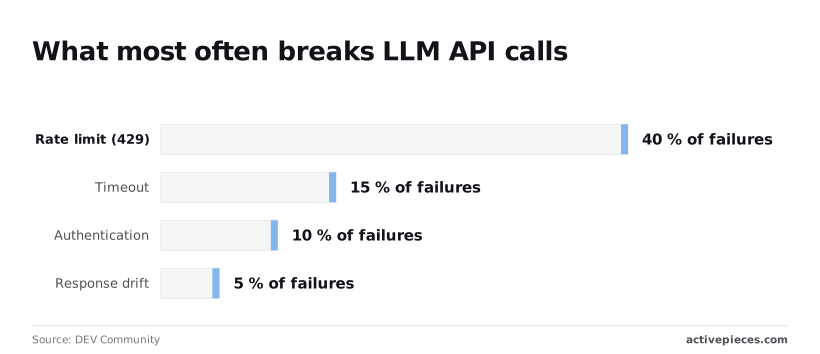
Authentication was 10%, a bad or expired key that no retry will fix.
Response drift, where the output stops matching the expected format, was 5%. Together that's 70% of failures in a general sample, not xAI-specific data, and the cheapest fixes come first.
| Code | Typical cause | Fix |
|---|---|---|
| 401 | Missing, mistyped or revoked API key | Regenerate the key, then check the Authorization header |
| 403 | Valid key without permission for that model or action | Check the key's access in your xAI console |
| 404 | Wrong model name, such as a retired or misspelled ID | Copy the exact ID from the console, for example grok-4.7 |
| 429 | Rate limit exceeded | Retry with exponential backoff and a retry cap |
| 5xx | Server-side fault | Retry a few times, then route to the failure branch |
Only 429 and 5xx are worth retrying. A 401, 403 or 404 will fail identically every time, so send it straight to an alert.
Grok API rate limits, context window and cost
Read the figures for Grok 4.7 and any cheaper model you route to from your xAI console rather than from a copied table, because rate limits, context windows and prices differ by model and by account tier, and they change.
Only 429 and 5xx are worth retrying. A 401, 403 or 404 will fail identically every time, so send it straight to an alert.
Treat each Grok call as a small state machine:
- Send the request with a fixed timeout.
- On a 429, a 5xx or a timeout, wait, double the delay, and retry up to a set count.
- On success, validate the output against your schema. If it fails, retry once with the format restated, since this is the drift case.
- When retries run out, or on any 401, 403 or 404, stop and send an alert that carries the status code and the request ID.
Without step 4 the workflow fails silently.
What Activepieces does about this
Most of what goes wrong in an xAI workflow is a key, a model name, a rate limit or an output format, and Activepieces is built so each of those has one place to live.
The key sits in the credential store rather than in the step text. The HTTP step posts to https://api.x.ai/v1/chat/completions, and you can run it on its own with a test input before anything else is attached.
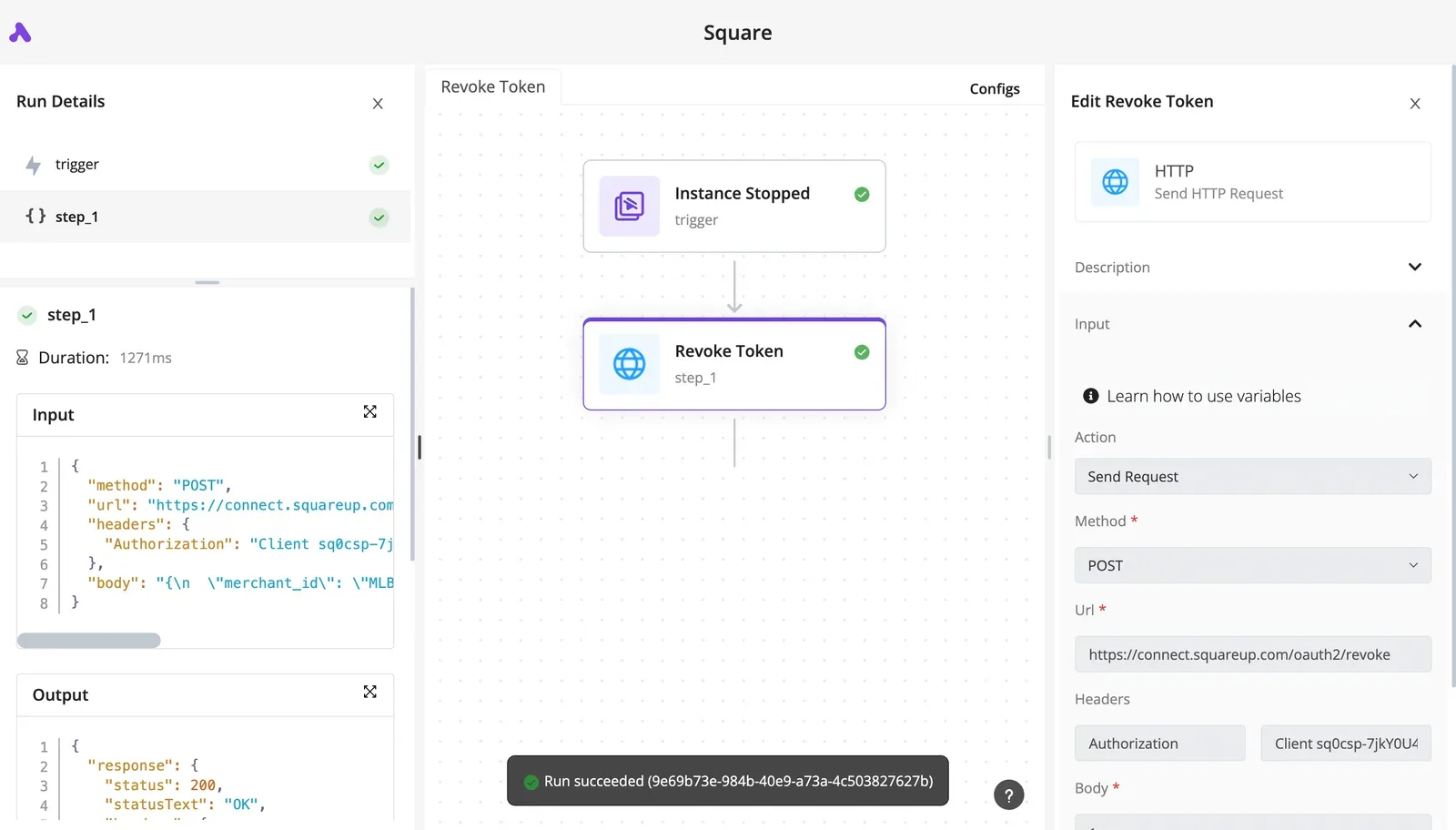
That is the "one authenticated call first" order the rest of this article argues for, and it is the order the builder lets you work in.
Structure and error handling are then ordinary steps rather than code you write from scratch.
A failed status can halt the flow or send it down a branch, a retry with backoff covers 429 and 5xx, and a parse step sits between the reply at choices[0].message.content and the row it feeds.
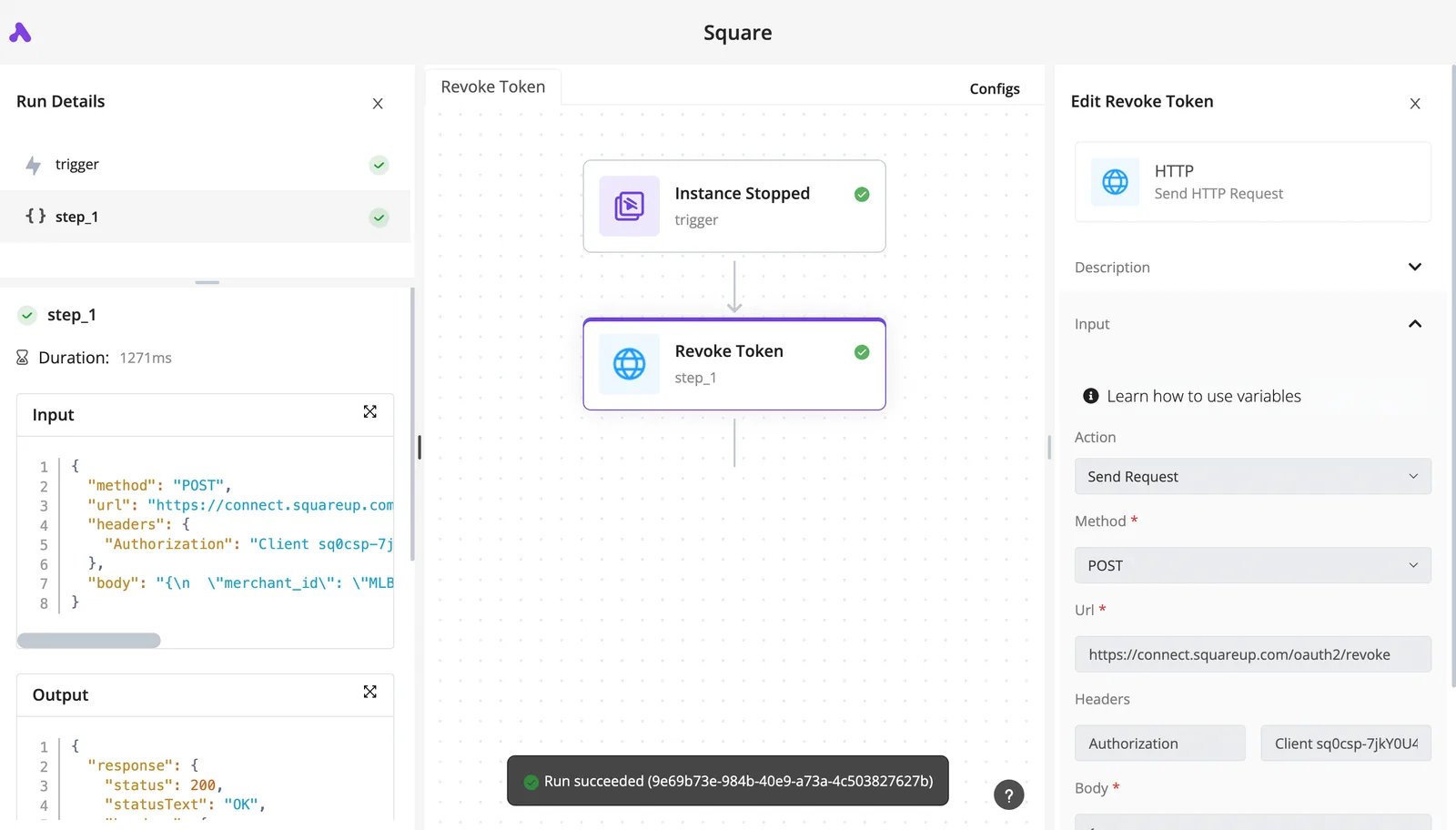
Each step shows its own input and output in the run history, so a 401 or a malformed JSON string is visible at the step where it happened.
You can check what you are adopting. The core is MIT-licensed and open source, the repo holds 750 integrations, and you can read the code for the trigger and actions your flow uses.
The same integrations are exposed as tools on the project's MCP server, so an agent can call the Grok flow you tested by hand without a second integration to maintain.
I have no named customer to cite for xAI workflows specifically, so I will not invent one. The claim here is narrower: the structure this article describes is what the product gives you, and the repo is where you can confirm it.
Frequently asked questions
Is the xAI API free to use?
No: API calls are billed against usage on your console account, and any free credits or promotional balance depend on what xAI offers when you sign up. Treat credits as a bonus, not a plan.
A workflow that assumes free calls will fail the moment the balance reaches zero, and that failure looks like an authentication or quota error. It's another silent one unless step 4 catches it and alerts you.
Can I use the OpenAI SDK with xAI?
Yes. The xAI API accepts OpenAI-style requests, so you can keep the OpenAI SDK, point its base URL at xAI's endpoint, and supply an xAI key and a Grok model name.
The consequence's that a workflow built on OpenAI's request shape needs only three changes: base URL, key, model string. If the call fails after the swap, check those three first. A leftover OpenAI model name's the most common cause.
Does a Grok subscription include API access?
No. A subscription to Grok as a chat product and an API account are separate billing relationships. Paying for one doesn't authenticate calls made with the other.
If your workflow returns an authorization error even though you pay for Grok, the key was probably created under an account with no API balance, or you're using no key at all.
Which Grok model should I pick for a workflow?
Start with Grok 4.7, xAI's flagship for code, chat and agentic tool calling. It's the model to use while you prove one authenticated call end to end, because a failure then points to your setup, not to a weak model.
Once the flow works, test whether a cheaper or faster option from xAI's current list holds up on your real inputs. Change the model name in one place, and rerun the same test input, so a difference in output has one explanation.
Can xAI workflows run on a schedule without code?
Yes. The shape is: a schedule trigger fires, an HTTP request step sends the prompt to xAI with the key in an authorization header, and a final step writes or sends the result.
Zapier and Make can both do this through their generic HTTP or webhook modules, so no custom connector is required.
Keep the key in the tool's stored credentials or secrets feature. Don't paste it into the request body or a shared prompt, so anyone who can view the flow can't copy it.
Add a failure branch that retries once after a pause on a rate-limit response, then alerts you if the second attempt fails. Without that branch, a scheduled run that breaks overnight leaves no record until someone notices missing output.
Related reading
References
Build it
Set this up in minutes.
No code required. Connect your accounts, and Activepieces runs it from there.
Start free Talk to sales