Gusto Pricing 2026 for 5, 15, and 50 Employees

Nov 1, 202614 min read
Gusto charges a flat monthly base fee plus, on some plans, a fee for each person you pay.
Your cost remains unknown until you specify your headcount, because the entry plan, Simple, is $49 a month plus $6 per person, according to Gusto's pricing page, which is worth checking before you wire payroll into any workflow tools such as Activepieces.
Gusto's pricing is a tiered subscription for its payroll and HR software, made up of a monthly base fee set by plan, a per-person fee for each employee or contractor you pay, and extra charges for add-ons and for filing in additional states.
Run the arithmetic at 10 people: $49 plus $60 is $109, or $10.90 per head, meaning you actually pay $4.90 more per person than the advertised rate.
At 25 people it's $49 plus $150, or $199, which is $7.96 per head, still forcing you to pay nearly $2 above the advertised $6.
Gusto plans and their costs
Per Acciyo, the headline "$6" is never the number you pay, which means companies cannot rely on the headline for cost planning.
You get federal and state payroll tax filing, payment of employees and contractors, and benefits administration from Gusto. It only makes sense if your people are paid in the US. If you have staff elsewhere, the plan price is the smaller problem.
Payroll is rarely the only system you run, and Activepieces, which counts 746 integrations in its MIT-licensed repository, can sit beside it, so you aren't locked into a single vendor, but that's a separate cost question.
Plan table: price, inclusions and limits
Read the base fee and the per-person fee together, never one alone. The table lists every plan on the page.
| Plan | Base price | Per-person fee | Status and limits |
|---|---|---|---|
| Simple | $49/mo | $6/mo per person | Open to new customers |
| Plus | $80/mo | $12/mo per person | Open to new customers |
| Premium | $180/mo | $22/mo per person | Open to new customers |
| Contractor Only | $35/mo | $6/mo per contractor | Closed to new customers (closed October 1, 2026) |
Prices and plan limits checked against gusto.com on November 1, 2026.
As of November 2026, Gusto no longer offers Contractor Only to new signups; the plan closed on October 1, 2026, and contractors are paid on any current plan. A team that only pays contractors can still buy it instead of pricing one of the other plans.
What the per-person fee does and does not cover
On Simple, Gusto reports, 50 people adds $300 a month on top of the $49 base, and here the advertised per-person rate finally starts to match reality.
Don't assume the Plus and Premium per-person rates match Simple's $6; Plus is $12 and Premium is $22. Before you compare, get the exact rate for your headcount in writing, because a plan that looks cheaper at 5 people can cost more at 40.
If you are running this arithmetic for your own team, see what the same workload costs on Activepieces.
Gusto costs by employee count
At 5, 15 and 50 employees, Gusto's listed prices come to $79–$140, $139–$260 and $349–$680 a month, Simple to Plus, so you cannot determine your cost from employee count alone.

Based on Gusto's published rates ($49 base plus $6 per person on Simple, $80 plus $12 on Plus), these are calculations, not quotes, and your actual bill could differ from these estimates.
Divide the bill by headcount and the reason shows. A solo founder pays $55 on Simple, or $92 on Plus, so the base fee dominates.
By 50 people, Simple averages about $7 per head, which is the number the headline rate hides, meaning anyone budgeting at $6 will underestimate their costs by $1 per employee.
On the chart, both plans run from 1 to 60 people, and the two lines never cross: Plus costs more at every size, and the space between them widens.
At 30 people it's $229 against $440, a $211 gap, and at 60 it's $409 against $800, a $391 gap, so your monthly savings from choosing Simple grow as you hire. Pay for Plus only if you'll use what it adds.
Gusto pricing for 5 employees and one contractor
Five people cost $79 on Simple and $140 on Plus, a $61 difference, or $732 a year, meaning the plan choice has real financial weight. That's small enough that a feature you'd otherwise buy separately can justify Plus.
Check the fine print on the contractor. U.S. contractors are billed at the per-person cost of the plan you select, only in months you pay them.
Gusto pricing for 15 employees in two states
Fifteen people cost $139 on Simple and $260 on Plus. The $121 gap comes to $1,452 a year, so you should be able to name what the extra money buys.
If you run two states, that means two sets of registrations and filings, and I've no confirmed figure for how Gusto prices that. Ask whether multi-state support is in the plan or an add-on before you pick.
Gusto pricing for 50 employees with benefits administration
Fifty people cost $349 on Simple and $680 on Plus, which is $4,188 and $8,160 a year, making this a consequential decision for your personnel systems budget.
The $331 monthly gap is about $3,972 a year, and that's before benefits administration. I've no confirmed price for it, so treat these totals as the floor.
At this size the sales-call-only items decide the true bill, and you should get them itemized before signing.
Hidden Gusto costs and limits buyers hit
Five charges sit outside the headline per-person rate, and each one moves the monthly bill at a different headcount, so price them before you sign.
Gusto bills contractors per contractor, so a team that leans on freelancers pays more than its employee count suggests. Extra-state filing costs $85 per state per month, so a team with employees in three additional states adds $255 a month.
Because Gusto charges benefits and add-ons per person, they grow with every hire. Gusto may bundle year-end filings or bill them separately depending on plan, which can put a lump on your December invoice.
Support tiers and plan-gated features decide whether you pay for an upgrade just to get a tool you assumed was included.
Contractors and multi-state payroll
At $85 a month, the state fee is a recurring cost, which is $1,020 per state per year.
Bought separately, registration is a one-time purchase, and Fiscorra lists ReVerify at $150 per state, Regcrest at $180, Middesk at $199 and Aureus Advisory at $499.
viz type=stackrank title="What standalone state payroll registration costs per state" unit="$ per state" source="Fiscorra - https://fiscorra.com/usa/state-tax-id-registration/" target="85" benchmark="Gusto Compliance $85"50 at ReVerify to $499 at Aureus Advisory per state." ReVerify: 150 Regcrest: 180 Middesk: 199 Aureus Advisory: 499
Buying registration separately is a one-time cost while Gusto's add-on recurs, so compare the totals before choosing. Count your contractors too, since each one is a line item.
Ask for the all-in figure at your exact headcount. Benefits administration and similar add-ons are quoted per person, and a small per-person fee multiplied by thirty people is a different number than the one on the pricing page.
A tool you need may be available only on higher tiers. Before comparing prices, list the features you need and check which plan holds each one. The cheapest plan that lacks a needed feature isn't the cheapest option.
Gusto support and onboarding limits
When a deposit goes wrong, thin support matters most. The IRS charges 2% of the unpaid deposit when it's 1-5 days late, 5% at 6-15 days, and 10% at 16 or more days.

After an IRS notice the rate rises to 15%.
On a $10,000 deposit, that means $200 for a short delay and $1,500 once a notice arrives. One setup error that goes unresolved for two weeks can cost more than a year of upgraded support, so weigh the support tier against that risk.

Worth checking against a plan that does not meter every step: one credit covers a whole run on Activepieces.
Gusto against Rippling, ADP RunPowered and OnPay
Among these four, Gusto and OnPay publish prices you can model before talking to anyone.
The pages were checked in November 2026, and I've left out dollar figures I couldn't confirm.
Side-by-side cost table
Set the four vendors against the same six questions in the table below and the takeaway is structural: every vendor builds its price from a base plus a per-person layer, but only some show you the layer.
| Vendor | Entry price | Per-person fee | Included features | Contractor handling | Plan limits | Best suited to |
|---|---|---|---|---|---|---|
| Gusto | Published, set by tier | Added to the base, differs by tier | Higher tiers add HR tools and support | Contractor payments supported, priced apart from employees | Features gated by tier | Small teams wanting visible pricing |
| Rippling | Quoted, built from modules | Per user, per module | Payroll plus HR and IT modules | Handled inside the platform, scoped by module | Modules gate features | Teams that'll use the wider platform |
| ADP RunPowered | Quoted | Set in the quote | Payroll with ADP's HR and compliance options | Confirm terms in the quote | Set by contract | Firms that want ADP's service model |
| OnPay | Published, single plan | Added to the base | Payroll, benefits and HR tools together | Contractor payments supported | Little tier gating | Teams that want one price |
Read across a row and the all-in cost shows up only where every cell is filled.
Where Gusto is cheaper or dearer
When you can stay on a lower tier and your contractor and state filing needs are simple, Gusto is cheaper, because the cost is knowable up front.
Once you need features that sit on a higher tier, Gusto gets dearer, since the upgrade raises the base and the per-person layer together. That compounds with headcount, so the gap against a flat single-plan vendor widens as you hire.

When an alternative is the better fit
If you want one plan and no tier arithmetic, OnPay is the natural fit, and the saving is predictability, not necessarily a lower bill.
Rippling earns its quote when payroll is only the first module you'll adopt, because then the platform fee is shared across work you'd otherwise buy separately.
If you value an established provider's service model enough to accept a quote-based price, ADP RunPowered fits. If you can't get a written all-in number at your headcount from a vendor, treat that as a cost in its own right.
Connecting Gusto to your other tools with Activepieces
Treat Activepieces as a way to avoid paying for extra software or extra hours, not as a discount.
It is an open-source workflow automation tool, with Plus at $20 a month flat for 10,000 credits, that can shave off the manual work around Gusto, but it can't change what Gusto charges you.
In the visual flow builder, you pick a trigger, such as a schedule, add steps that call other apps, and chain them together. Each app connection is called a "piece," and you find one by searching a catalog.
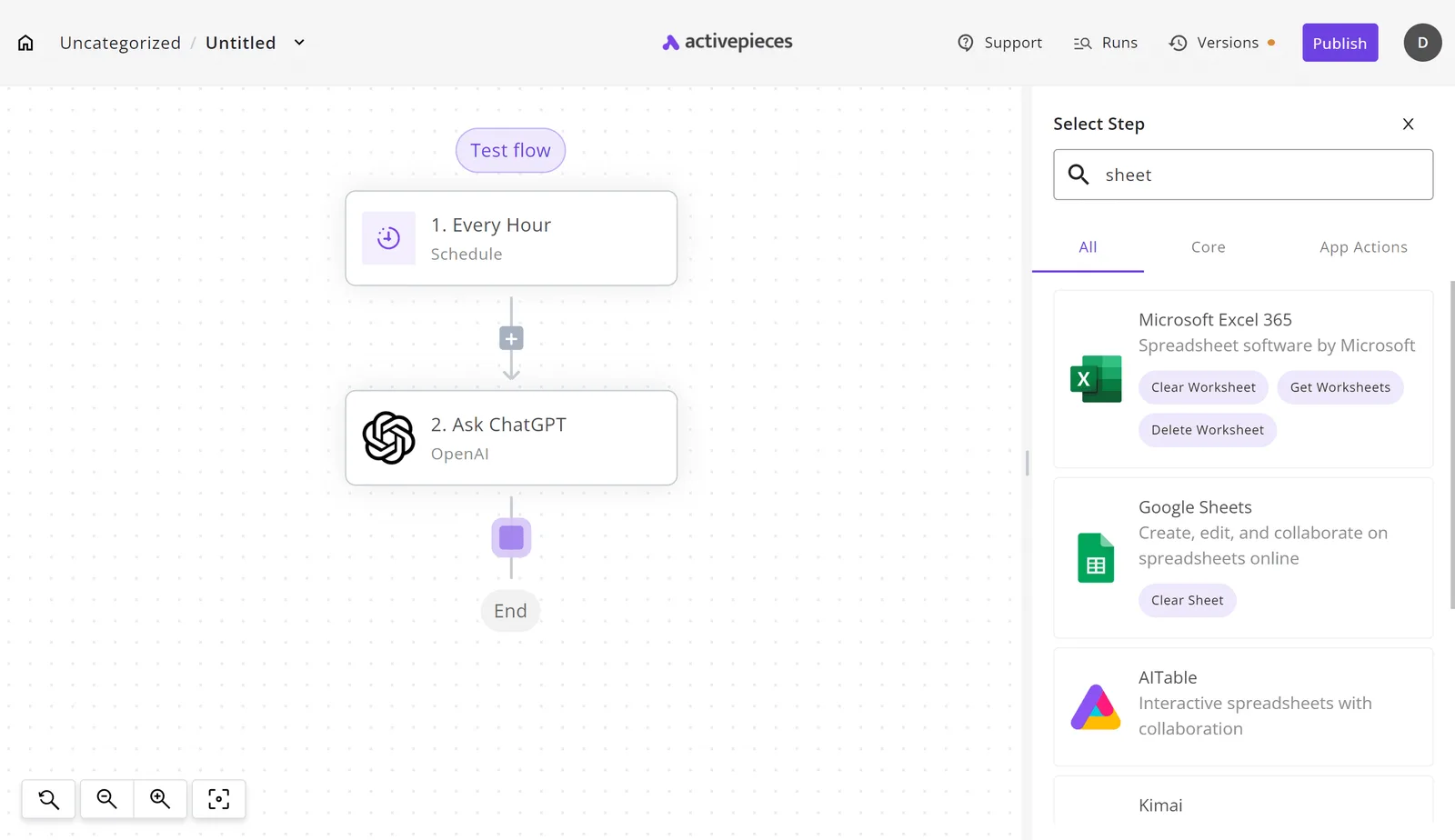
In the screenshot below, the builder shows a three-step flow on the canvas, an hourly trigger feeding a ChatGPT step, and the step selector open with "sheet" typed in.
The list that comes back, with Google Sheets and Microsoft Excel 365 among the results, is the point. You search for the app you already use and add it as a step, with no code required.
The catalog is MIT-licensed and stands at 746 integrations, each of them usable as a tool by an AI step.
Search it for Gusto before you plan around it, and if an app you need is missing, you can generate a integration with AI and add it privately.

With that confirmed, the next question is whether any of it is worth your time.
Where automation genuinely helps a Gusto setup
Payroll itself is not where automation pays off. The handoffs around it are.
Think of the repeated chores: copying new-hire details into a spreadsheet, posting a notice to your team chat when something changes, or pushing records to the tool your bookkeeper uses.
Payroll itself is not where automation pays off. The handoffs around it are.
Each chore is small, but they recur every pay cycle, and an hour of someone's time spent re-keying data is a cost that never shows on Gusto's invoice.
Activepieces' pricing page lists 1 credit per flow run, however many steps the flow has, so a ten-step new-hire handoff costs the same as a two-step one. Unlimited flows are included on every plan, the free one with 1,000 credits a month among them.
Be careful about the limit. A flow that moves data between apps doesn't replace a state filing, a contractor payment, or an add-on you need. If your real cost driver is headcount or state registrations, a workflow won't touch it.

Judge each flow by the manual task it removes, and skip any that you'd have to babysit.
Run these in order, and write the answers down before you talk to anyone.
- Count your headcount today and what you expect over the next year, employees and contractors separately.
- List every state where you have employees, since each may add filing needs.
- Note how many contractors you pay and whether you need them handled in the same tool.
- List the add-ons you'd actually use, not the ones in the demo.
- Request a written quote at that exact headcount, covering the all-in monthly figure.
If the quote comes back vague, you already know what that costs.
Frequently asked questions
The quote is the one number worth getting in writing, and these five questions are where it most often goes soft.
Free trials
Does Gusto offer a free trial? Treat a trial as unconfirmed until the signup page or your written quote says otherwise.
This article hasn't verified trial terms, and a trial that hides the post-trial price is no help when you're comparing all-in monthly cost. Ask what the first paid invoice will be, with add-ons included.
Contractor charges
Does Gusto charge extra for contractors? Plan for contractors as a separate line item.
The per-person rate you see on the pricing page is built around employees, so contractors, and any contractor-specific features, can change the total.
Count them in your headcount before you compare, because a team that is half contractors prices differently from one that is all W-2.
Switching plans
Can I switch Gusto plans mid-year? You can generally ask for a plan change.
Confirm two things before you rely on it: when the new price takes effect, and whether any features or filings you already use carry over. The cost of a switch is rarely the price difference. It's the month where you pay for the wrong tier.
Gusto versus ADP
Is Gusto cheaper than ADP for a small business? I can't give you a verdict, and anyone who does without your numbers is guessing.
ADP typically prices by quote, which makes a clean comparison hard. Get both vendors to price the same scenario: your headcount, your contractors, your states, your add-ons. Whichever one won't put that in writing has answered the question for you.
Does Gusto price change as headcount grows?
Yes, and that's the whole argument of this article. A per-person rate multiplies with every hire, while a base fee stays put, so your effective cost per head shifts as you grow.
Add a second state or a new add-on and the curve bends again. Rerun the all-in math at each headcount you expect to hit in the next year, not just the one you have today.
Related reading
Running the numbers
See what the same workload costs here.
Free forever plan, and every paid plan self-hosts at no extra cost.
See pricing Talk to sales