
Meta Llama API Pricing: Cost per Million Tokens 2026

Oct 27, 202614 min read
Read Meta's published Llama API price as a starting point, not your invoice. What you pay depends on the model you pick, whether your access is paid or preview, and the limits attached, which matters even more if you're wiring calls into a workflow tool like Activepieces where one trigger can fire many requests.
- the model you pick
- whether your access is paid or preview
- the limits attached
Meta Llama API pricing is the per-token rate Meta charges to run its Llama models through its hosted API, set separately for each model and applied to input and output tokens under the access tier and rate limits of your account.
Four facts frame everything below:
Meta Llama API pricing today: the direct answer
- The Llama API is Meta's hosted service for its Llama models.
- Limits and tiers come from Meta's own pricing page and docs, while per-token rates come from a third-party aggregator, both read on a stated date.
- Access is paid, free or preview, and the tier decides what you can bill a client for.
- Preview access carries caps: on requests per minute, tokens per minute and context length.
What the Llama API is
If you want to run Llama models without hosting the weights yourself, Meta's own hosted endpoint does it for you. Because the weights are open, other hosts sell the same models too, so Meta's price is one quote among several.
When Llama API prices were last checked
As of 27 October 2026, the tier and limit guidance in this article comes from Meta's pricing page and developer docs, and the rates come from the aggregator named below. Treat that date as part of the claim.
Preview programs change terms without much notice, and a free tier that ends quietly turns a shared account into a subsidy for whichever client runs the most volume.
Before you quote anyone, reopen the pricing page and confirm that your account's status, paid or preview, matches what you're about to charge for.
If you are running this arithmetic for your own team, see what the same workload costs on Activepieces.
Llama API model pricing and limits
Quote the prices, context windows and limits that sit on Meta's pricing page the day you invoice. The rates in the worked examples below are a dated snapshot, not a substitute for that check.
Copy them into your own sheet with the date beside each, so a client can see which version of the list your quote came from.
Model-by-model price table
To see which model suits which job, read the table below. It also lists what to read off the pricing page for each row, so you fill in dated figures instead of trusting a stale number.
| Model | Suits | Confirm before quoting |
|---|---|---|
| Llama 4 Scout | High-volume, lighter jobs, including image input | Input and output price, context, tier, rate limit, free-tier terms |
| Llama 4 Maverick | Harder reasoning and drafting, including image input | Same five items |
| Llama 3.3 70B | Text-only work where the older model already passes your test | Same five items |
If the page leaves any cell blank, treat it as unpublished and don't infer it from a neighbouring row. A guessed limit becomes a missed deadline you absorb.
Run your real prompts through the smallest model first and move up only when output fails your review, because the cheapest model is the cheapest one that passes. Classification, extraction and tagging usually belong at the small end.
Check whether your account sits in preview or paid, since preview models can carry tighter limits and no guarantee of staying available.
Free-tier usage on a shared account is the quiet subsidy here: one client's testing can consume allowance that another client's production run needed, so split accounts or keys per client before billing.

Hidden Llama API fees and limits
You will meet the free-tier leak as one of four places the invoice drifts from the list price. The four are discounts you may not qualify for, caps that make retries cost money, preview terms that can change, and output and long-context billing.
Llama API batch and caching discounts
Overnight jobs can wait, and a system prompt repeated across calls can be cached. Whether a batch or prompt-caching discount actually reaches the invoice still depends on the workload.
Check Meta's pricing page for whether Llama API has either before you build them into a quote. If it doesn't, bill clients at the list rate, because a discount you assumed becomes a margin you absorb.
When a cap is hit, a retry bills like the original call. The sequence runs like this:
a discount you assumed becomes a margin you absorb
- Each request is counted against the requests-per-minute limit.
- Its tokens are counted against the tokens-per-minute limit.
- When either limit is hit, the API returns an error.
- The client backs off and retries.
- The retried tokens bill again.
Treat retries as a budget line, not an anomaly. Give each client its own key so one client's retry storm doesn't eat another's allowance.
Quote preview work with a margin, because a model in preview can carry tighter caps and terms that change without much notice. Put a re-pricing clause in the retainer so a mid-month change doesn't land on you.
Llama API output token and long-context billing
Check Llama's two rates separately, because output tokens are generally priced above input tokens across the major vendors. Verbose answers are the expensive part, and a length limit on responses is the cheapest control you have.
A scanned-document job costs more than its page count suggests, because an image is counted in tokens and long prompts inflate input counts too. Price those jobs from a sample run, not from word counts.
Three Llama workload cost examples
Under $20 a month on Llama 4 Scout is what each of the three jobs below costs, and picking Llama 4 Maverick instead roughly doubles the bill.

The table assumes the token counts shown, which are my stand-ins for your sample run. Prices come from llmapiprices, a third-party aggregator rather than Meta's own page, as of 27 October 2026.
The rates behind the examples

| Model | Input, $ per 1M tokens | Output, $ per 1M tokens |
|---|---|---|
| Llama 4 Scout | 0.10 | 0.30 |
| Llama 4 Maverick | 0.1875 | 0.6525 |
| Llama 3.3 70B | 0.10 | 0.32 |
Cost is tokens in millions multiplied by the rate, done separately for input and output, then added. For the classifier on Scout, 50M input tokens × $0.10 is $5.00, 10M output tokens × $0.30 is $3.00, and the month is $8.00.
Set each job's monthly cost on the cheapest suitable model beside its cost on the wrong one, and the swing is what a mismatch adds to the invoice. Multiply it by every client sharing the account.
| Job | Tokens in / out | Cheapest suitable model | Monthly cost | Wrong-model cost | Swing |
|---|---|---|---|---|---|
| Ticket classifier (50,000 requests) | 50M / 10M | Scout | $8.00 | $15.90 | $7.90 |
| Summarisation (10,000 documents) | 40M / 5M | Scout | $5.50 | $10.76 | $5.26 |
| Chatbot (200 users) | 60M / 12M | Scout | $9.60 | $19.08 | $9.48 |
None of these is a large bill, so the risk is a default model quietly applied to every job on a shared key.
Reselling you a model amounts to choosing your default for you, and the price comes attached before you've opened the product.
Activepieces takes the opposite route: it uses your own provider key, so on Plus at $20 a month each AI step costs 1 credit and the per-token charge stays on your provider account, at your rate.
For the ticket classifier, at about 1,000 tokens in and 200 out per ticket, Scout costs $5 for input plus $3 for output, or $8.
According to llmapiprices, Llama 3.3 70B comes to $5 plus $3.20, so $8.20, which buys nothing over Scout here. Maverick costs $9.375 plus $6.525, or $15.90.
For the summaries, long inputs with short outputs favour Scout, whose input rate is low. Maverick's higher output rate adds $5.26 for summaries a classifier-grade model already writes adequately.
For the internal chatbot, chat history resent on every turn inflates input. That's why this job swings most, by $9.48. Move to Maverick only if testing shows Scout's answers fail, and charge that team for the difference.
Worth checking against a plan that does not meter every step: one credit covers a whole run on Activepieces.
Hidden costs people hit with the Llama API
Even with the right model chosen, a Llama API bill runs above the estimate in five places, and each lands on whoever owns the account unless you assign it. Budget a line for each before quoting a client:
- Retries and verbose outputs inflating output tokens
- A system prompt resent on every call
- Engineering built around rate limits
- Migration work if the terms change
- Engineering time compared with self-hosting
Llama API token creep and retry costs
When a failed call gets retried, it is billed twice, and a model that writes three paragraphs where one would do inflates the output side, which is the more expensive side.
Because the system prompt rides along on every request, a long one is a fixed surcharge on each call. Cap output length and measure real billed tokens per task, not the sample you tested with.
Someone has to build and watch the queues, backoff logic and fallback routing that limits, and preview status on some models, force on you. That's billable time, so a shared account is quietly subsidizing the heaviest client unless you price it in.
Self-hosting the open weights instead
If self-hosting looks like the escape from all five, the GPU rent is still the smaller part of the bill. Galactic lists one H100 at $12.29 an hour on Azure and $11.06 on Google Cloud. AWS is $6.88, and RunPod and Lambda are both $3.99.
viz type=stackrank title="What renting one H100 costs by cloud, per hour" unit="$ per hour" source="Galactic - https://galactic.inc/analytics/compute-markets/"2.29 at Azure." Azure: 12.29 Google Cloud: 11.06 AWS: 6.88 RunPod: 3.99 Lambda: 3.99
Over a 730-hour month, the cheapest of those is about $2,913 per GPU, and Azure is about $8,972 for the same card.
Whether or not anyone calls it, a rented GPU buys capacity, plus the engineer who keeps it running. Self-hosting only wins at steady, high volume. Weights you can move do cap your migration risk, though.
Llama API against the closest alternatives on price
Move the same Llama weights to another host and the bill can drop sharply. Llama 3.3 70B costs more than three times as much on the dearest host as on the cheapest.

Same Llama models on other hosts
For Llama 3.3 70B, the table below, from LLM Price, lists what each host charges per 1M tokens. Read it as the spread you could pocket by switching, not as a ranking of quality.
| Host | $ per 1M tokens |
|---|---|
| DeepInfra | 0.10 – 0.32 |
| Groq | 0.59 – 0.79 |
| Azure | 0.71 |
| Bedrock | 0.72 |
| Fireworks | 0.90 |
| Together | 1.04 |
1.04 at Together is above three times DeepInfra's top figure of 0.32. If a client's invoice assumes one flat rate, pricing it off the dearest host means you overcharge. Pricing it off the cheapest means you absorb the gap whenever traffic lands elsewhere.

Small models from OpenAI and others
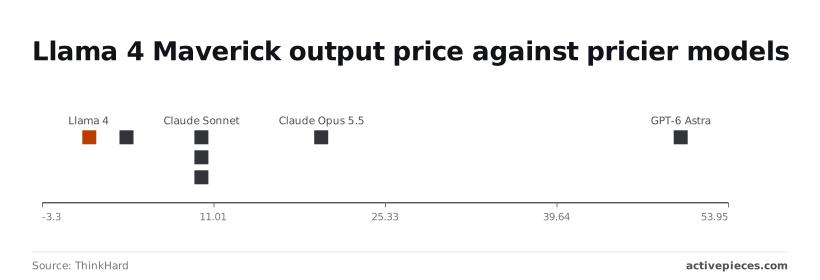
On output price, closed models pull away. On ThinkHard, Llama 4 Maverick is 0.65 per 1M output tokens. Gemini 3.8 Flash is 3.75, nearly six times that.
Claude Sonnet 5.5, GPT-6.1 Sol and Gemini 4 Argon are each 10, about fifteen times Maverick. Claude Opus 5.5 is 20, roughly thirty times. For long generated reports, that multiple is the margin you either keep or hand back.
When you want the first-party model catalog and one vendor relationship, and the extra cost over the cheapest host is small against your volume, Meta's API is the right buy.
When a job is bulk and steady, DeepInfra or Groq will usually beat it on price. When you need the strongest reasoning, the dearer closed models earn their rate.
Run a Llama API job on a schedule with Activepieces
Meta's charges stay exactly where they were when you run a recurring Llama API job from Activepieces, the open-source AI automation platform, as a scheduled flow whose AI step runs on your own provider key.
What it gives you is a place to enforce the limits you already decided on, so a retainer-style job doesn't quietly cost more than you billed.
Scheduled Llama API summarisation workflow example
Take a weekly job that summarises a client's support tickets. The flow starts with a schedule trigger, pulls the tickets, and sends them to the model with an HTTP Send Request action.
That action points at Meta's endpoint or at any third-party host serving the same open weights, since both are just a URL, a key and a request body.
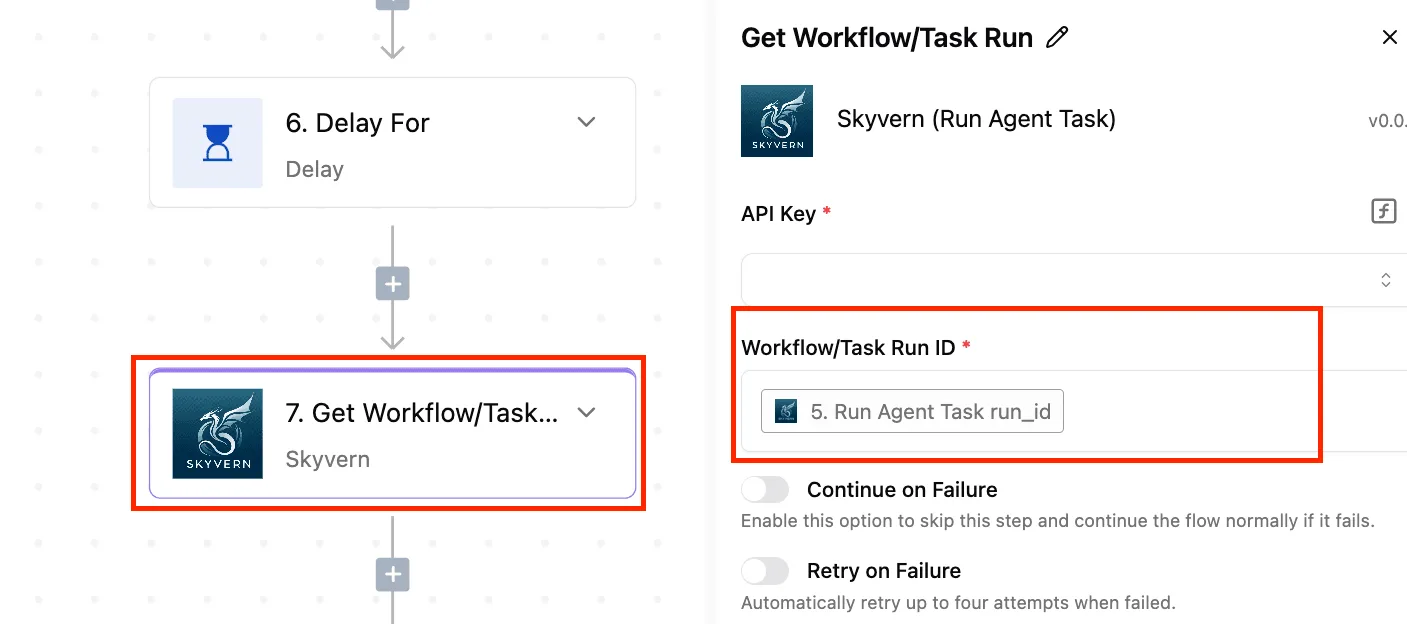
After the job, the same HTTP step can do housekeeping. The run below fired when an instance stopped and made a single POST to Square's API to revoke a token.
Both the trigger and that one step finished with green checks, the step's input and output are recorded, and the response came back 200 "OK".
(The screenshot sits here.)
Keeping spend visible and the model swappable
Put a per-run cap in the flow itself: limit how many tickets go into one request and stop the run if the input exceeds that count.
Without it, a client with a busy week gets a bigger job at the same fee, and the shared account absorbs the difference.
Log the token counts the API returns for every run, with the client's name beside them. That turns one pooled bill into per-client costs, so you can see who is being cross-subsidised.
Keep the model name and base URL in one field at the top of the flow. Swapping to a cheaper model, or to another host of the same weights, becomes a one-field edit, and the logged tokens show whether the switch saved anything.
Frequently asked questions
Is the Meta Llama API free? Not reliably. Access has been offered under preview terms, and preview terms can change, so a free allowance should never sit in a client quote as a permanent line.
Budget at list price and treat anything free as a temporary discount. Check Meta's pricing page before each invoice cycle.
Is the Llama API cheaper than running Llama myself?
Usually yes at low or uneven volume, and only sometimes at steady, heavy volume.
A rented GPU bills whether or not anyone is calling it, so idle hours become a cost you either absorb or spread across clients. Per-token billing charges each client for what they used.
Only when utilization stays high enough to fill those hours does self-hosting start to win, and you must also count engineering time for upgrades, scaling, and outages.
Does Meta charge for fine-tuning on the Llama API?
Treat it as billable unless the current terms say otherwise. Fine-tuning has been offered as a preview feature, which makes its pricing the least settled item on the list.
Ask two questions before promising a client a tuned model: what training costs, and whether serving the tuned version carries a different rate than the base model. Without those answers, a shared account quietly subsidizes the one client who asked for customization.
Can I switch Llama hosts without rewriting my code?
Mostly. Many hosts of Llama weights accept the same chat-completion request shape, so a switch often means changing the base URL, the API key, and the model name.
Test the parts that differ between hosts: rate limits, context limits, tool-calling behavior, and any quantization the host applies, which can shift output quality. Run a sample of real client prompts through the new host and compare logged token counts before you move production traffic.
Related reading
References
Running the numbers
See what the same workload costs here.
Free forever plan, and every paid plan self-hosts at no extra cost.
See pricing Talk to sales