
Deepgram Pricing 2026: Per-Minute Rates and Add-Ons

Oct 20, 202614 min read
Deepgram bills by usage.
You pay a per-minute rate set by the model you call and by how the audio arrives, so the same hour of speech can cost different amounts depending on setup, whether you send files by hand or pipe them in through an automation tool like Activepieces.
Deepgram Pricing Today: Every Plan and Model Rate
The rates below are from Deepgram's pricing page, read 2026-10-20.
Deepgram pricing is the usage-based fee structure for Deepgram's speech-to-text and voice APIs, in which a per-minute rate set by the chosen model, the audio delivery method, any add-on features, and the plan tier determines what an account is billed.
Deepgram plan limits and concurrency by plan
The plan you're on changes what you can run at once, not just what you pay. Pay As You Go allows 5 concurrent Whisper Cloud requests and the paid plan allows the same 5, so Whisper Cloud headroom does not grow with the paid plan.
Per Deepgram's documentation, a sixth simultaneous Whisper request on pay-as-you-go has nowhere to go.
Nova-3, Deepgram's flagship speech-to-text model, has four pay-as-you-go rates:
- Batch mono, meaning recorded single-language audio, costs $0.0043 per minute, so an hour runs about 26 cents.
- Streaming mono costs $0.0048 per minute, so live transcription adds roughly 12% over recorded files.
- Batch multilingual costs $0.0052 per minute.
- Streaming multilingual costs $0.0058 per minute, so real-time multilingual translation costs more per minute than batch.

The practical result is that the dearest Nova-3 rate is about 35% above the cheapest, so Nova-3 rate selection substantially affects costs.
I'm not quoting figures for text-to-speech or voice agents here, because I haven't confirmed their numbers for them. Treat them as separate line items from transcription.
Deepgram has a starting credit, but I haven't confirmed its size, so read the amount on the pricing page. Use it to measure your real minutes, not to judge the cost.

Retries count as audio too, and the work around them shouldn't be taxed for being broken into careful steps: Activepieces meters the run, at 1 credit per flow run, so a transcription flow split into ten small steps costs what a two-step workaround does, whereas Zapier bills per task and Make per module.
If you are running this arithmetic for your own team, see what the same workload costs on Activepieces.
The 20,000-minute Invoice That Landed at 09:12
Even with no retries, a 20,000-minute month on Nova-3 pay-as-you-go costs $86 at the base rate and $192 once diarization, keyterm prompting and redaction are switched on. The scenario below is a hypothetical team, not a real customer.
The team plans to transcribe 20,000 minutes of recorded calls, about 333 hours. At $0.0043 a minute, the base Nova-3 charge is $86 a month. That's the number on the pricing page, and it's the one that went into the budget.
The invoice arrived at 09:12 and was well above $86, because three features had been enabled during testing and never switched off.
- Diarization, which labels who is speaking, adds $40. That's nearly half the base charge for a feature that was a checkbox.
- Keyterm prompting, which nudges the model toward words you supply such as product names, adds $26.
- Redaction, which masks card numbers and similar details in the transcript, adds $40.

Together the add-ons come to $106, so the real bill is $192. That's more than double the budget, and every line is accurate. The estimate was just incomplete.
Deepgram pricing for 20,000 minutes on each plan
On the committed Growth plan, the base rate is $0.0035 to $0.0036 a minute. Across 20,000 minutes that's $70 to $72, which is $14 to $16 under the pay-as-you-go base.
The plan switch trims the base by a few dollars, while the add-ons in this scenario account for $106 of the $192. Choosing a plan on the per-minute rate alone looks at the smaller lever.

Hidden Costs and Limits Behind the First Invoice
Five separate charges and limits pull the first invoice away from the headline rate, which is why those features matter:
- Model tier
- Add-ons: diarization at $0.0020, keyterm at $0.0013 and redaction at $0.0020 per minute
- Streaming versus pre-recorded rates
- Concurrency limits
- Plan gating
Switch on diarization (labeling who spoke), keyterm (boosting words you name) and redaction (blanking sensitive details), and you add $0.0053 per minute.
Add-ons are billed per minute on top of the model's rate. Across 100,000 minutes, that's $530 you never saw in the headline number.
Concurrency and rate limits
Concurrency is how many requests can run at the same moment, and it caps you even when your budget doesn't.
If a batch job fires 80 files at once, 30 of them will be refused or made to wait, because pre-recorded REST allows 50 concurrent requests on both plans.
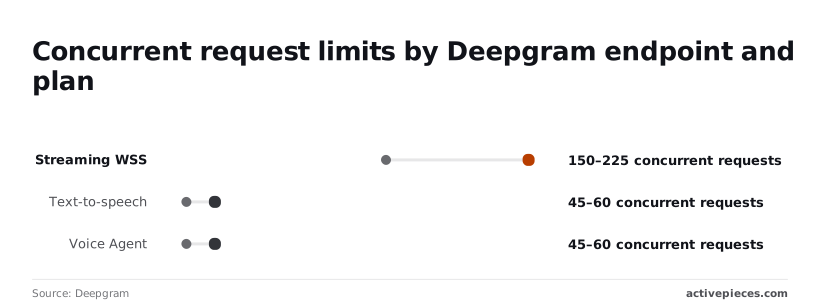
Streaming WSS allows 150 to 225 depending on plan, which matters for live calls, since each open call holds a slot.
Text-to-speech and Voice Agent each run 45 to 60. Audio Intelligence holds at 10, and Whisper Cloud at 5 on both plans. Five jobs at once is all a pay-as-you-go pipeline built around Whisper Cloud can run, and upgrading to a paid plan keeps that at 5.
Live and recorded audio are priced separately, so a month's minutes should be split between them before you multiply. Price everything at one rate and your estimate is wrong from the start, in whichever direction the mix runs.
Some features and higher limits sit behind plan tiers, and the cheaper plan may not offer what your pipeline needs. Check that before launch, not after.
Deepgram Against Its Closest Alternatives on Price
Deepgram isn't automatically the cheapest of the four. Which vendor costs least at 20,000 minutes depends on the model you pick and how each one rounds your audio.
No vendor has one rate, so compare like for like: the same kind of audio, on the model you would run in production.
| Vendor | List per-minute rate | Free credit | Billing increment | Concurrency limit | Cost for 20,000 minutes |
|---|---|---|---|---|---|
| Deepgram | Set by the model and plan tier | Granted on signup, amount on its pricing page | Stated in its billing terms | Rises with plan tier | Your model's rate × 20,000, plus add-ons |
| AssemblyAI | Set by the model chosen | Granted on signup, amount on its pricing page | Stated in its billing terms | Set by account tier | Your model's rate × 20,000, plus add-ons |
| OpenAI | Set by the transcription model (GPT-4o Transcribe, GPT-4o Mini Transcribe) | Depends on your account | Stated in its billing terms | Set by your account's usage limits | Your model's rate × 20,000 |
| Google Cloud STT | Set by the model and features enabled | Depends on your account | Stated in its billing terms | Set by project quotas | Your model's rate × 20,000, plus features |
Prices and plan limits checked against developers.deepgram.com on October 20, 2026.
What the price gap means at 20,000 minutes
A difference you would shrug off per minute becomes a line item on the invoice once you multiply by 20,000. A vendor that looks slightly cheaper per minute can still lose once you add the extras you need, such as speaker labels or redaction.
When a cheaper rate costs more
A low rate costs more in three cases. The first is rounding: if a vendor bills in large increments, many short clips pay for time they never used.
The second is a concurrency ceiling: if your jobs queue behind it, you either wait or upgrade a tier.
The third is a free credit that runs out in week one, after which the list rate applies. Check all three before you trust a headline number.
Worth checking against a plan that does not meter every step: one credit covers a whole run on Activepieces.
Budget alerts and spending caps
Before launch, set a monthly budget, have something warn you as usage approaches it, and agree on which model and how many simultaneous connections the work actually needs. That way the next invoice can't surprise you quietly.
Controls inside Deepgram
Start with what the account itself offers. Look in the console for any usage limits or billing notifications on your plan, and turn on whatever exists.
Then make two decisions in writing. First, a model rule: which model handles which job, so nobody switches to a pricier one "just to test" and leaves it running.
Second, a concurrency check: compare how many streams your busiest hour needs against your plan's limit. Too low and calls get refused. Too high and you may be paying for a tier you don't use.
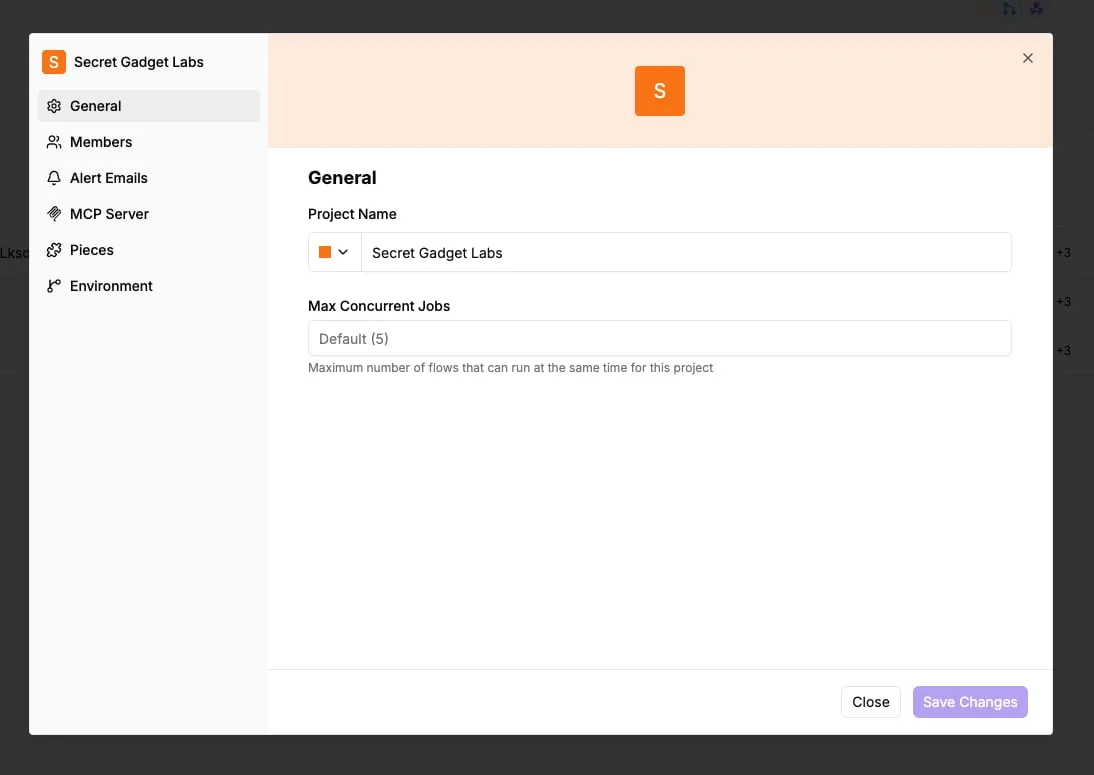
Monitor usage against your budget
Where the account's own alerts are thin or missing, a small scheduled workflow can fill the gap by reading your usage, comparing it with your budget, and messaging your team.
A timer starts the check, usage is read, the total is compared with the budget, and a message goes to a team chat channel at three points: half the budget, most of it, and all of it.

Put the channel where the person who can change the model or the plan will actually see it, not in an inbox nobody opens.
Limits of Deepgram budget alerts
An alert tells you that spend is climbing. It doesn't tell you why, and it doesn't stop anything. A runaway process can burn through a month's budget between two scheduled checks, so a slow timer buys you less protection than it seems to.
If you never priced a month of real usage, you'll be picking thresholds from a guess, because an alert doesn't fix a bad estimate. And if the only person who reads the channel is on leave, the alert goes unanswered.
A Monday Checklist for Pricing Your Deepgram Usage
An alert only tells you the fire has started, so the real protection is working out the bill before you sign up. These steps do that in the order you should take them.
An alert only tells you the fire has started, so the real protection is working out the bill before you sign up.
- Export last month's minutes from whatever you use now, split by type of audio (calls, recordings, live streams).
- Pick a model for each type. The most capable model for everything is the easy choice, and it's usually the costliest one.
- Multiply each type's minutes by that model's per-minute rate, then add any extras you plan to switch on, such as speaker labels or summaries.
- Compare your busiest hour against the plan's concurrency limit, meaning how many audio streams can run at once. Your monthly total can look fine while one busy afternoon hits the ceiling.
- Set a spend alert at a level that would make you stop and look, not at the level that would hurt.
- Put your next billing date in the calendar and review the invoice against your estimate.
In the first week
Real traffic will disagree with your estimate somewhere, and the first days are when that disagreement is cheapest to fix.
Check the usage dashboard daily. Look for a workload that runs longer than you assumed, an add-on you left on by default, or requests being turned away at peak.
If the alert fires early, don't raise the threshold to quiet it. Find out why it fired.
At the first invoice
Line up the invoice against your step-three estimate, one workload at a time. A gap in a single line tells you which model choice or add-on to change.
A gap everywhere means your minutes were off, and you should rebuild the estimate from this month's export.
Then check whether your plan tier still fits what you actually used. Once the estimate and the invoice agree, you can set the review as a recurring reminder.
What Activepieces does about this
The problem in this article is a gap between the rate you budgeted and the invoice that arrived. Activepieces closes it with two small flows. The first prices a month before you commit. The second watches spend once you're live.
Both are ordinary workflows: a schedule trigger, an HTTP call to Deepgram's API, a bit of arithmetic, and a message to Slack or email.
For the pre-launch pricing step, build a flow that takes a sample of last month's recordings and sends each one to Deepgram twice, once on the bare model and once with diarization, keyterm prompting and redaction switched on.

The output is the pair of totals the $86 versus $192 example turns on, built from your own audio.
You can run it against the starting credit and never pay a list rate to find out.
For the spend alert, a scheduled flow reads usage through the HTTP integration, compares it with the monthly budget you wrote down, and posts to a channel at half, most and all of it.
Run the schedule more often than daily if your traffic is bursty, because the weakness named earlier is the gap between checks. Metering is simple here: a flow run costs 1 credit, however many steps it has.
A check with a dozen steps costs the same as one with two, so you don't have to cut corners on it.
Activepieces is open source under the MIT licence, so you can self-host the community edition and keep the usage and billing data in your own infrastructure. You can read the code of every step in your alert before you trust it.
It won't cap Deepgram spend or fix a bad estimate, but it moves the surprise from the invoice to a Tuesday message.
Frequently asked questions
These are the questions left over once your estimate is built, and the answers come from Deepgram's own pages as checked in October 2026.
Is Deepgram free to use?
Not indefinitely, but you can start without paying. New accounts get a starting credit, so you can run real audio through the models you plan to use and price a month of usage from your own results instead of guesses.
When the credit runs out, usage moves to billed rates.
Does Deepgram free credit expire?
No, the starting credit has no expiry date. A slow test phase won't cost you the balance, but nothing else protects you either.
Once it's spent, the account bills at the rates for your plan, so set your spend alert before that happens rather than after.
Can I switch Deepgram plans mid-month?
Check the billing terms for your account before you try it. A change partway through the month can leave you with a mix of rates on one invoice, and that's the kind of surprise your review is meant to catch.
If you expect to outgrow pay-as-you-go, plan the move for a billing boundary and compare the next invoice against your estimate.
Does Deepgram bill per second or per minute?
Rates are quoted per minute, but the quoted unit isn't always the billing unit. Confirm how Deepgram rounds on its pricing page, then run a batch of short clips through your estimate.
If your audio is mostly short calls or voice commands, rounding can add up over a month in a way a long-recording test never shows.
Is there a discount for high volume?
Yes, but it comes with a commitment. Deepgram's higher plans, such as Growth, lower the rate in exchange for a minimum spend.
That's a good trade if your usage is steady and a bad one if it's seasonal, because you pay the minimum in the slow months too. Price your quietest month against the minimum before you sign.
Related reading
References
Running the numbers
See what the same workload costs here.
Free forever plan, and every paid plan self-hosts at no extra cost.
See pricing Talk to sales