How Does Storyblok Pricing Work in 2026? Seats Decide

Nov 19, 202615 min read
According to ActiveSet, which tracks pricing across Activepieces and other tools, Storyblok's price is set by how many people log in. The steps are $0 for one seat, $99 a month for five and $349 for fifteen, which means solo users never pay.
Page views don't move you between those steps. The headcount does.
Divide it out. Growth works out to $19.80 per seat. Growth Plus is $23.27 per seat, and the sixth person alone costs $250 more, because it pushes you off Growth.
If your team is a developer, an editor and a marketer, you're already past the free plan. If automation touches your content, count the people who edit, not the integrations.
Storyblok Plans, Monthly Prices and Included Seats
I could confirm only three plans, with their monthly price and included seats, so other tiers or custom deals might exist. The table below lists them.
Read it as a staircase: each step up is triggered by one more person, not by one more visitor. Figures were checked on 2026-11-19 against Storyblok's pricing.
| Plan | Monthly price | Included seats |
|---|---|---|
| Starter | $0 | 1 |
| Growth | $99 | 5 |
| Growth Plus | $349 | 15 |
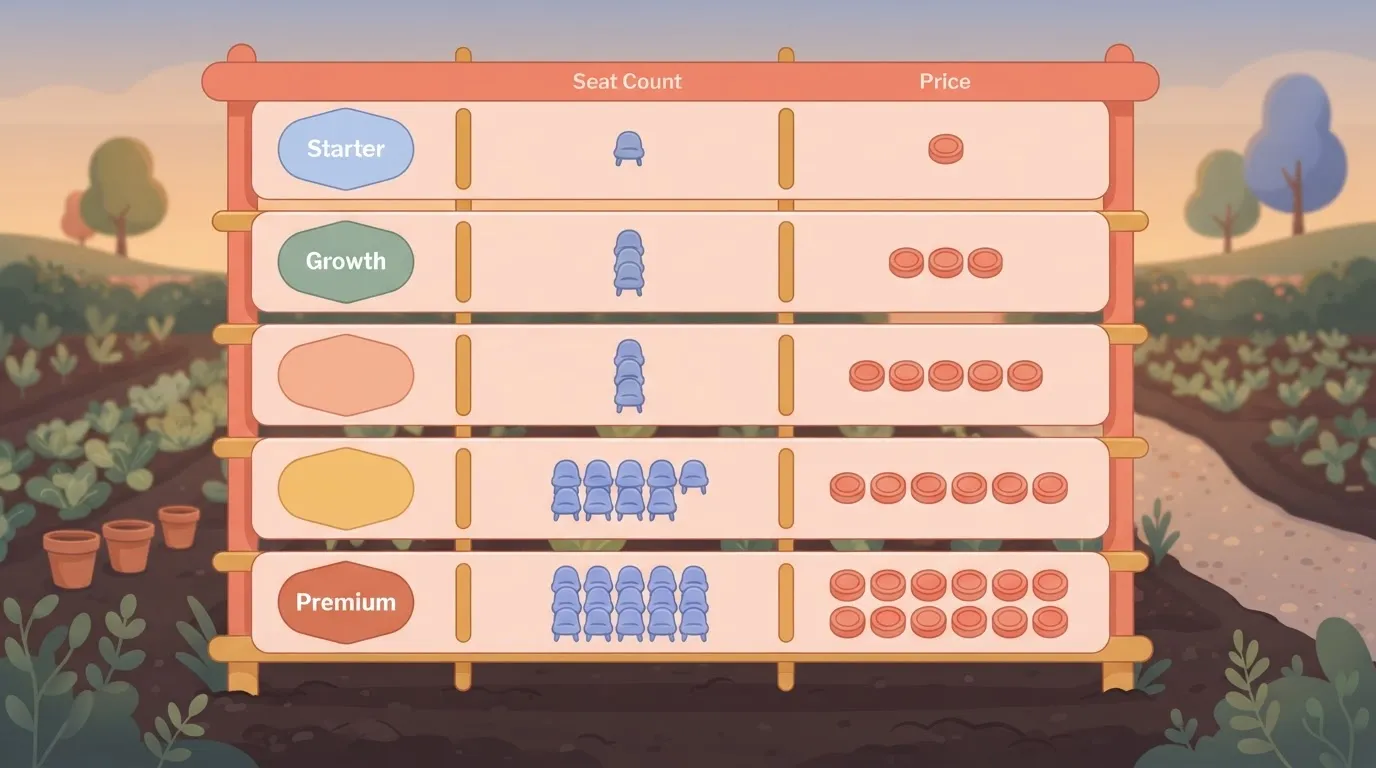
Past fifteen seats, you're shopping in the range of Premium and Elite, which sit above Growth Plus, and the seat arithmetic matters even more there.
For everyone below it, Programcode notes, the jump to price is the one from $99 to $349, a $250 increase for the sixth seat. Once you need more than five users, you jump to the $349/month pricing.
That's the number to put in front of whoever approves the budget.
What the free tier cannot do
At $0, Starter buys one seat, so it works for a solo builder and for nobody else. Storyblok's pricing shows that the moment a second person needs to edit content, the next plan is Growth at $99 a month, because there's no in-between price.
Going from one seat to two therefore costs $99 a month, or $1,188 a year, for a single extra login, Storyblok indicates. Treat Starter as a place to prototype alone, not as a plan a team can start on and grow out of gradually.

What Storyblok Costs at Three Team Sizes
Storyblok pricing by team size:
- Three editors cost $99 a month
- Ten editors cost $174 a month
- 25 editors cost $499 a month
- The moment a second person needs a login you're on a paid plan
- The cost per editor swings with team structure rather than traffic
| Team | Stated assumptions | Total monthly bill |
|---|---|---|
| Solo site | 3 editors, one site, one locale | $99 |
| Two-locale mid-size team | 10 editors, one site, two locales | $174 |
| Multi-site team | 25 editors, several sites | $499 |
Seats only. These totals leave out overage and add-ons, which come on top, and the last subsection covers them.
At $99 for three editors, each seat costs $33. That's the most expensive per-head rate of the three sizes, because you're paying for the plan's floor rather than for use. If you're one person, you're subsidising seats you never fill.

Mid-size team with two locales
$17.40 each is what ten editors at $174 works out to, roughly half the small-team rate. Seven more editors add only $75 to the bill, about $10.70 apiece.
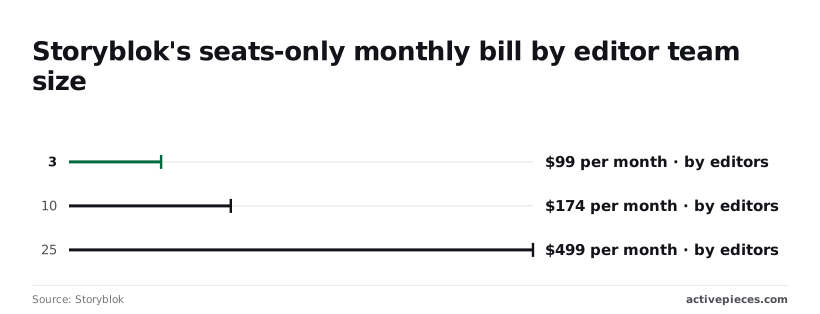
This is the cheapest point per head, so a team of this size gets the best return from the plan.
Adding a second locale didn't push this team into a higher bracket in my assumptions, but confirm that against your own content model before you commit.
Multi-site team with governance needs
At 25 editors the bill is $499, or $19.96 per editor. Going from ten editors to 25 adds $325 for 15 people, about $21.70 per added seat, which is more than double the marginal rate of the previous step.
When the bill jumps like this, you've moved to a higher tier, and the tier brings the roles and controls a multi-site team tends to want. Price that tier on its own terms, not as ten-editor pricing scaled up.
Surprise charges: seats, overage, add-ons
Treat the totals above as floors. Anything beyond them, including traffic overage, add-ons and extra spaces for additional sites, is billed on top, and none of it is in the table.
A team that adds sites rather than editors can therefore pay more than its seat count suggests.
Before signing, ask for every one of those charges in writing, and check whether the price you were quoted assumes annual or monthly billing. A tier you can only understand through a sales call is a tier you should price conservatively.
If you are running this arithmetic for your own team, see what the same workload costs on Activepieces.
The Strongest Case That Storyblok Pricing Is Fair
For a small team that uses the visual editor and stays inside the free tier's shape, Storyblok's pricing is defensible. The objection deserves its full weight before it gets an answer.
The Case That Storyblok Saves Labour Costs
Start with the labour. The visual editor lets marketers change a page and see the result in place, without filing a ticket for a developer. That's a cost you avoid every week, and an accountant should count it against the subscription line.
When a plan removes a recurring handoff, it can pay for itself without anyone noticing.
Spend nothing and you can still build a working proof of concept with real content models on the free tier, which is more than many vendors in this category allow without a call.
When a plan removes a recurring handoff, it can pay for itself without anyone noticing.
Whatever its limits, it shows you the product rather than a slide deck.
Finally, gating is the norm. Rivals also reserve environments, advanced roles and extra locales for higher tiers.
A vendor has to draw its lines somewhere, and drawing them around team structure is at least a line you can see from the outside. Traffic-based billing has its own unpredictability.
Why Storyblok Seat Limits Force Plan Upgrades
As far as it goes, the objection is sound, but it prices the product at the size you tried it. What forces a plan change is the shape of your team.
You can be pushed across a plan boundary by an extra editor seat, a second role with restricted permissions, a staging environment for safe testing or a new locale. None of them is a traffic event.
Even with modest visitors, a site can land on an expensive step, because the ladder from Growth to Growth Plus to Premium is climbed by seats, locales and environments.
The cost arrives as a step
So the cost comes as a step rather than a gradual one. You pay for the next tier's whole bundle to unlock one feature you wanted.
Developer hours saved are real, but they're a fixed benefit, while the jump grows with every structural need you add.
So the verdict depends on one thing: whether your team's seats, roles, environments and locales stay inside a single tier's limits as you grow.
Storyblok Versus Contentful, Sanity and Strapi Costs
Storyblok isn't the cheapest of the four:
- Sanity undercuts Storyblok at all three team sizes: ActiveSet priced
- Contentful's Lite plan costs more than both
- The table shows each platform's monthly bill as the editor team grows
- Read across the rows to see where the gap opens and closes
| Platform | Monthly bill, small / mid / large team | What moves you between tiers |
|---|---|---|
| Storyblok Growth | $99 / $99 / $174 | Seats, roles, environments, locales |
| Sanity Growth | $45 / $75 / $150 | Seats and usage on the plan |
| Contentful Lite | $300 / $300 / $300 | A flat plan, so team size does not move the bill |
| Strapi, cloud | Not in the ActiveSet comparison | Hosting plan chosen |
| Strapi, self-hosted | No license fee; you pay for servers and upkeep | Your own infrastructure |

You can add editors without a price change, which is what Storyblok's flat $99 across the first two sizes allows, until the jump to $174 at the largest size. That jump is the plan boundary this article keeps returning to.
Where Sanity and Strapi Cost Less Than Storyblok
At every size, Sanity's $45, $75 and $150 undercut Storyblok's $99, $99 and $174. At the smallest team you save $54 a month, and at the largest $24, so the saving shrinks as you grow.

Though Sanity's bill rises with each step, Storyblok's is flat for a stretch, so a team that stays at mid size pays only $24 more for Storyblok.
Contentful and Self-Hosted Strapi Costs Compared
At $300 a month across all three sizes, Contentful's bill is the most predictable and the highest, so size selection doesn't affect the price.
Against Storyblok's $174 at the large size, you pay $126 more every month for a bill that never changes, which amounts to $1,512 each year.
If your finance team hates variance, a flat figure suits it, but it overcharges any small team.
On paper, self-hosted Strapi is cheapest, since it has no license fee. Servers, upgrades and an engineer's attention are the real cost, and none of that appears on an invoice, so price those hours before you count it as free.
Where Storyblok earns its price
Storyblok wins in the middle. Its $99 plan holds steady across the first two sizes, so a growing team keeps a fixed bill for longer than on Sanity, whose price climbs at each step.
At the largest size Storyblok also costs $126 less than Contentful, meaning Storyblok at scale still undercuts Contentful's unchanging rate.
Choose Storyblok if your team will sit inside one tier for a year or more. If you will cross the $174 boundary soon, price that tier before you commit.
Worth checking against a plan that does not meter every step: one credit covers a whole run on Activepieces.
Automating Storyblok Publishing Chores with Activepieces
If the $174 boundary is coming, the automation won't move it in either direction. Activepieces can take over the manual steps that follow a Storyblok publish, across 750 integrations, and it has no effect on which Storyblok plan you pay for.
Do the arithmetic, though, because the chores are real. Every publish tends to carry a small tail of manual work: someone tells the channel, someone kicks off a rebuild, someone updates the record the sales team reads. Each is a minute or two.
Multiplied by every editor and every publish, that's paid hours of copy-and-paste, and it's the one cost in this article that you can cut without negotiating with Storyblok.
What a Storyblok Publish Webhook Can Trigger
When content is published, Storyblok can send a webhook. Activepieces receives it as the trigger of a workflow, and a run counts as 1 credit however many steps it has, so the three jobs below cost one credit per publish.
From that single event the workflow can branch to three jobs: post a message to Slack, start a rebuild of the site, and sync the entry to a CRM.
Think of a CRM as the customer-records system the sales or support team works from. An editor publishes once and all three follow, so nobody has to remember them.
Take from it that the automation sits beside your Storyblok subscription and doesn't alter what that subscription includes.
Because the trigger is a webhook and the HTTP step reaches anything with an API, a missing connector never stalls you.
Activepieces can generate an integration with AI and add it privately to your own instance, so no vendor release or ticket queue stands between you and the action.
About 60% of its 750 integrations were contributed by the community, a count you can take straight from the open-source monorepo on GitHub, so a fourth or fifth action such as a cache purge or a translation request never touches your seat, role, environment or locale setup.
What it does not replace
Don't expect Activepieces to change Storyblok's price or unlock plan features. It won't add seats or roles, and it won't create extra environments or locales.
If your team structure pushes you from the $99 plan to the $349 one, a workflow can't move you back down.
It also isn't a substitute for a Storyblok feature you lack. A webhook only reports that something was published.
Approval steps, role permissions and separate environments are Storyblok plan capabilities, and a Slack message saying "ready for review" isn't the same as an enforced review stage.
So treat Activepieces as a way to recover editor time, and keep pricing the plan by your team's structure first.
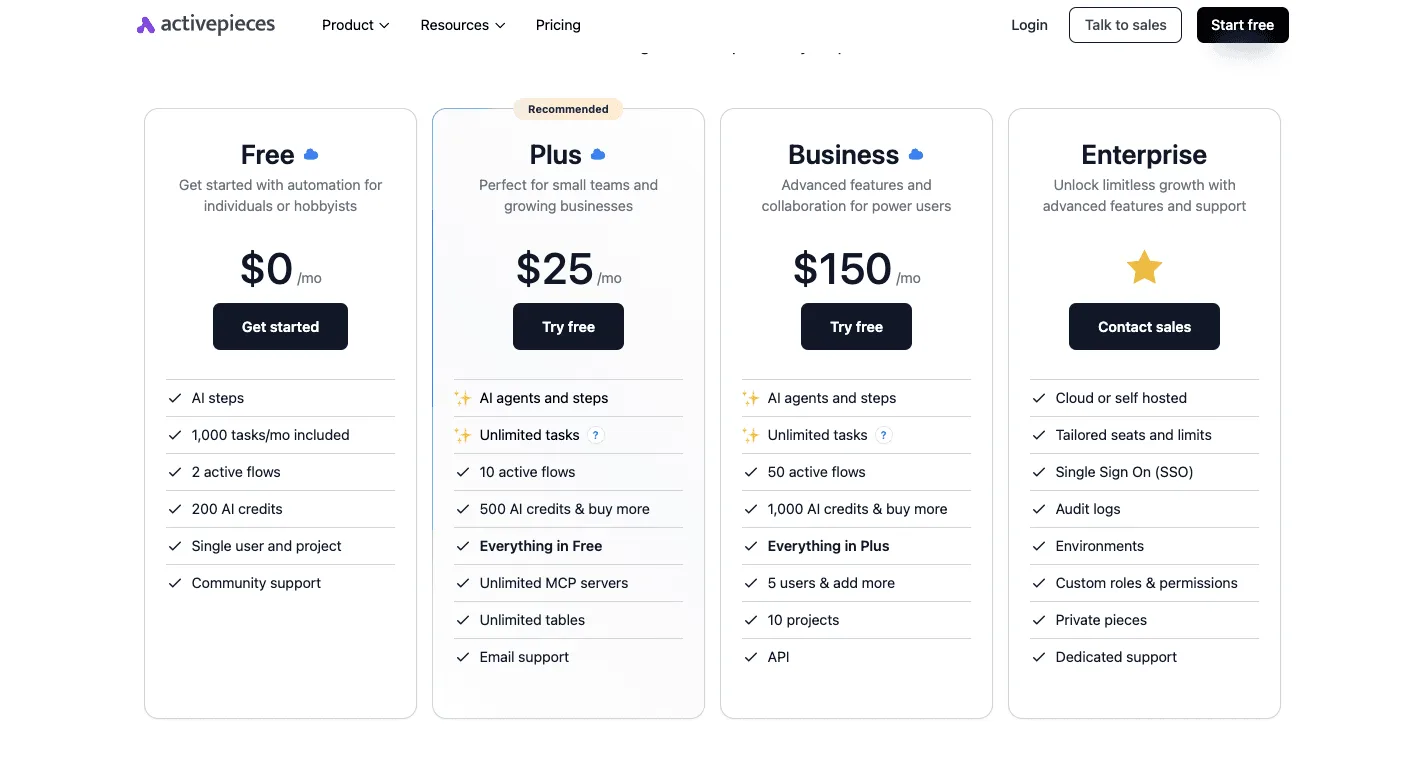
It is a second bill, but a small one: the free plan is $0 with 1,000 credits a month and unlimited flows, and Plus is $20 a month for 10,000 credits.
What to Do Before Buying a Storyblok Plan
Price Storyblok in this order: team structure first, traffic second, and a written quote as the final number. The first two steps decide your tier, and the later ones only confirm it.
- Count editors and roles.
- List locales and environments.
- Estimate API requests and traffic.
- Test on the free tier.
- Get a written quote if you sit near a tier boundary.
- Re-verify every figure on the pricing page.
Of these, steps one and two set the tier, and steps three to six test whether it holds. The subsections below take them in that grouping.
Count seats, roles, locales and environments
Write down everyone who touches content: writers, reviewers, developers and contractors. Then mark who needs more than basic editing rights. Custom roles and permissions are where a small team gets pushed up a tier.
Add every locale you publish in and every environment you want, such as a staging space. Each of these is a structural requirement, so a team that needs a separate sandbox for a contractor has made a plan decision before a single visitor arrives.
Estimate traffic and API requests
Only now estimate requests. Count page views, multiply by the API calls each page makes, and add builds and previews, which editors trigger without any visitors.
Caching and static generation can cut that total sharply, so treat the result as a range rather than a point. Use it to check the tier your structure already chose, not to choose one.
Test on the free tier, then get a quote
Build a representative slice on the free tier: a couple of content types, two locales and a real editor workflow. Note which feature stops you first, because that limit marks the tier you need.
If your count lands near a boundary, ask for the price in writing, with seats, locales and environments itemised. Finally, compare the quote against the live pricing page, since tiers and limits change and an old quote, or this article, may be out of date.
Frequently asked questions
Check each answer against Storyblok's live pricing page before relying on it, since these are the ones most likely to have changed since this was written.
Is Storyblok free to use?
Yes, there's a free entry plan, but it's built for personal projects and evaluation, and its limits on seats, roles and locales are tight.
If your team has more than a couple of people, or needs separate environments, you'll outgrow it on structure well before traffic matters.
Read the plan's terms on commercial use before you ship a client site on it.
In the sense that seats are part of the plan price, Storyblok charges per user, and paid plans include a set number of them. Going past that allowance means paying for extra seats or moving up a tier.
That's the main reason to count your editors, developers and contractors before you compare plans, because each of them can push you into a different bill.
Can I switch Storyblok plans or cancel mid-year?
Since the vendor wants you on a larger plan, moving up is generally straightforward. Moving down or cancelling mid-term depends on whether you signed monthly or annual billing, and on the contract wording.
If the terms aren't stated on the pricing page, get the answer in writing before you sign. A refund policy you learn about after the fact isn't one you can budget around.
I couldn't confirm a standing public discount for nonprofits or startups, so don't assume one exists. If you qualify, ask for the terms in an email and keep the reply.
Any discount that exists only as a verbal promise from a sales call is a discount you can't put in a budget.
If you exceed your traffic limit, overage handling is set by your plan and contract, not by a single universal rule. The practical question is whether you're billed for the excess, throttled, or asked to upgrade.
Find that answer before launch, because a traffic spike is the one moment you won't want to be reading the terms for the first time.
Related reading
Running the numbers
See what the same workload costs here.
Free forever plan, and every paid plan self-hosts at no extra cost.
See pricing Talk to sales