
How to Evaluate Telemetry.dev LLM Observability

Oct 31, 202613 min read
Treat every claim about Telemetry.dev as unverified until you test it.
It's a new tool that records what happens inside applications that call large language models, so you can inspect each request afterwards, and it's too new for anyone but its maker to have a track record.
Telemetry.dev LLM observability and its maker
Telemetry.dev maker and announcement date
Take the maker and the announcement date from the maker's own page, not from a reseller's summary or a comparison site. That page is the only primary source for what the product is meant to do.
What LLM observability means for a non-developer
After a failure, you want a record of what the system did, kept in enough detail that you can reconstruct it. That is observability. For LLM work, that record is one entry per request, called a trace.

Activepieces runs flows that send text to a model and act on the answer, and a trace is how you find out which step went wrong and why.
Open a useful trace and you should find four kinds of information. Each one answers a different question when something breaks:
- The prompt and response text, word for word
- Token counts and the cost of the request
- Time taken at each step
- Errors and tool calls
If a trace lacks any of these, you can't answer the matching question: what you asked, what it cost, where it stalled, or what failed. A dashboard that shows averages without letting you open a single trace is a summary, not observability.
Sources for Telemetry.dev facts in this evaluation
The facts are current to 31 October 2026, so anything the maker has changed since then isn't reflected here. Statements about what the product is and claims to do come from the maker's published material.
Statements about how it behaves are things you confirm by sending a request through it and reading the result. Where I couldn't confirm something from the maker's material, I left it out. Missing detail here means unconfirmed, and you should check it yourself.
This takes minutes, not a project: automate it in Activepieces free.
Sending your first Telemetry.dev trace in six steps
Six steps take you from nothing to one visible trace, according to the maker's docs, and that list is all this section treats as confirmed. I mark everything outside it as not stated, so you know where to check for yourself.
- Sign up.
- Create a project.
- Create an API key.
- Set the endpoint and key in the SDK.
- Send one request.
- Open the trace.
Skip ahead and the failure lands at the step that depends on the one you skipped, because the key belongs to the project and the SDK needs the key.
Stage 1 is creating an account or requesting access, which is step 1: sign-up. The docs don't state, as of 31 October 2026, whether it's self-serve or gated behind a waitlist or approval. They give no sign-in methods.
Stage 2: Create a project and key
Steps 2 and 3 create the project and then its API key. The docs don't state, as of 31 October 2026, what the key covers, whether a project can hold several keys, or whether you can revoke a key.
Copy the key when the page shows it. The docs don't say whether the page shows it again, and a lost key means generating another.
Stage 3: Send one test call
Step 4 is where you set the endpoint and key in the SDK, and step 5 is one request through it.
The endpoint value, the supported languages and the exact configuration names aren't stated as of 31 October 2026, so take them from the docs page itself rather than from a third-party example.
Send a single request, not a loop.
Stage 4: Find it in the dashboard
Step 6 is opening the trace. Read what's actually recorded for that one call: the input, the output, the timing, and any parent and child spans.
Take a screenshot of the raw trace, not the summary view, since a summary can look complete while hiding what was left out. How quickly a trace appears after the request isn't stated as of 31 October 2026, so record that yourself.
Telemetry.dev pricing, strengths and gaps so far
Competitive at the paid tier and smaller at the free one: that is Telemetry.dev's published pricing. We haven't run the product, so everything below is the maker's pricing page as read on 2026-10-31.
What the Telemetry.dev pricing page says
Three plans are listed on the Telemetry.dev pricing page: Free, Pro and Team.
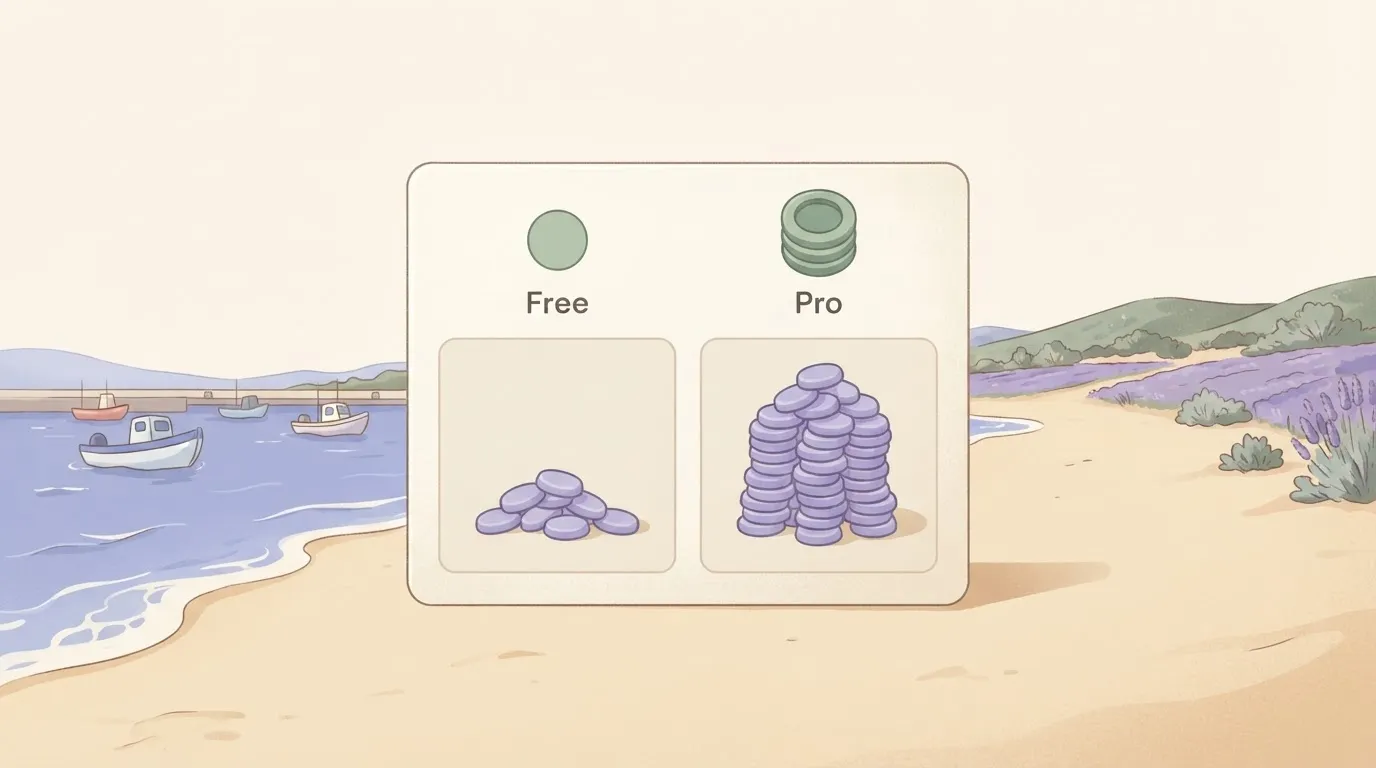
Before you commit, answer every "not stated".
Set beside the same page's figures for Langfuse Hobby at 50,000 units and Langfuse Core at 100,000, Telemetry.dev's free allowance is the smallest of the three. Your test trace will fit easily, but a real workload may not.
Because LangSmith charges per seat, that gap widens with every added teammate.
Missing or unproven Telemetry.dev details
Four things are absent from the page as we read it: retention, licence, data location and overage. Without a licence you can't tell whether self-hosting is an option. Without a data location you can't answer a compliance question.
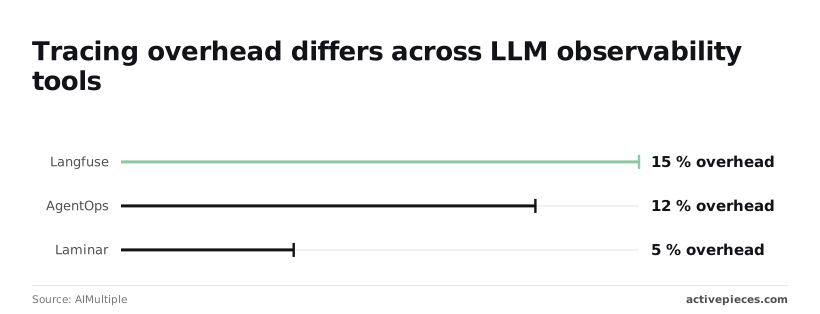
We also have no overhead figure for it. AIMultiple reports tracing overhead of 15% for Langfuse, 12% for AgentOps and 5% for Laminar. Those numbers show the cost of instrumentation varies threefold between tools, so Telemetry.dev's own overhead is worth measuring rather than assuming.
Telemetry.dev compared with established LLM observability tools
Telemetry.dev can be scored only where its maker has published something, and on most of the columns below it hasn't. Set against Langfuse, LangSmith, Helicone and Arize Phoenix, those cells read "not stated" rather than a guess.
Telemetry.dev vs established LLM observability tools table
The table shows what each vendor's own pages say, in the same six columns. Read the telemetry.dev row as a list of questions still open, and the other four rows as the baseline those questions get measured against, so you can see the gap.
| Tool | Tracing | Evaluation | Self-hosting | Pricing model | Framework support | Maturity |
|---|---|---|---|---|---|---|
| Langfuse | Yes | Yes | Open source, self-hostable | Hosted tiers plus self-host | SDKs and OpenTelemetry | Public repository and changelog |
| LangSmith | Yes | Yes | Offered on a separate plan | Hosted, per seat and usage | Strongest with LangChain and LangGraph | Vendor-backed, widely documented |
| Helicone | Yes, via a proxy or SDK | Yes | Open source, self-hostable | Hosted tiers plus self-host | Works at the provider-call layer | Public repository |
| Arize Phoenix | Yes | Yes | Open source, self-hostable | Free to run, paid hosted sibling | OpenTelemetry-based instrumentation | Public repository and docs |
| Activepieces | — | — | MIT-licensed core, free self-hosted Community Edition | Free plan at $0 with unlimited flows; paid plans from $20 a month flat | — | 25,301 GitHub stars |
Prices and plan limits checked against docs.claude.com and claude.com and openai.com and gemini.google on October 30, 2026.
None of the four established vendors publishes a comparable overhead figure for telemetry.dev's case, and telemetry.dev publishes none at all. So you can't yet say what it costs you in latency per call. That's the first thing to measure.
When an established LLM observability tool is safer
Pick an established tool when the trace data is customer-facing, regulated, or needed for an incident you'll have to explain afterwards. Four tools with public repositories, documented self-hosting and stated pricing give you something to check.
When a trace goes missing at 03:00, you can read the issue tracker, the changelog and other people's postmortems. For a newcomer, that history doesn't exist yet.
If you already run LangChain or LangGraph, LangSmith is the safer pick. Helicone suits a team that wants capture at the provider call with minimal code change. Langfuse and Phoenix are the lower-risk choices if you need to hold the data yourself.
When trialling Telemetry.dev is worth it
Keep it small and a trial costs little. Send one real trace from a non-critical path to telemetry.dev and to one established tool, then open both raw.
Whether the spans nest correctly, whether prompts, outputs and token counts are all present, and whether you can find that one trace without relying on a dashboard summary: those are the checks.
If telemetry.dev matches on those questions, it's earned a second look at the cells still marked "not stated."
You can follow the rest of this with the builder open. Start free, no card.
Connecting telemetry.dev to an Activepieces workflow today
It's an open-source automation tool that chains a trigger to a series of steps, so the simplest route is its generic HTTP request step.
The connection is a general one, not a purpose-built one: a flow can reach telemetry.dev through an HTTP request step, an AI step with a custom or OpenAI-compatible provider, or an MCP server, in that order of simplicity.
If you'd rather not assemble the first of those by hand, describe it in Activepieces' built-in chat, something like "POST this payload to this URL with this header", and it builds and publishes the same flow a person would have put together by hand, under the same RBAC, audit logs and run traces as any other flow, so every run leaves a trace you can read.
MoneyGram, Moneypenny, Alan and FundingSocieties run Activepieces in production.

Option 1: HTTP request step
The step needs a method, a URL, headers and a body, which is all a trace submission should take.
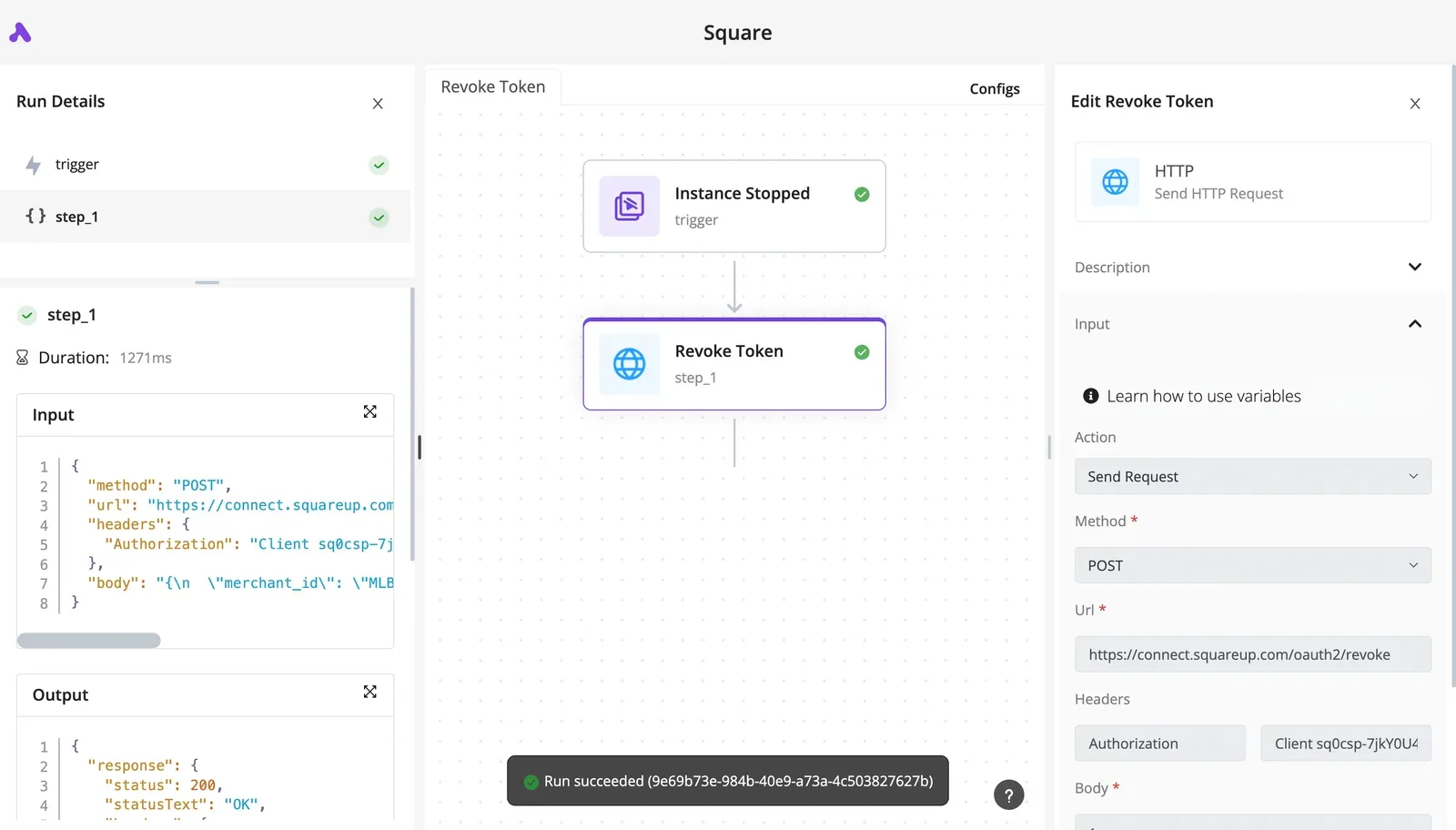
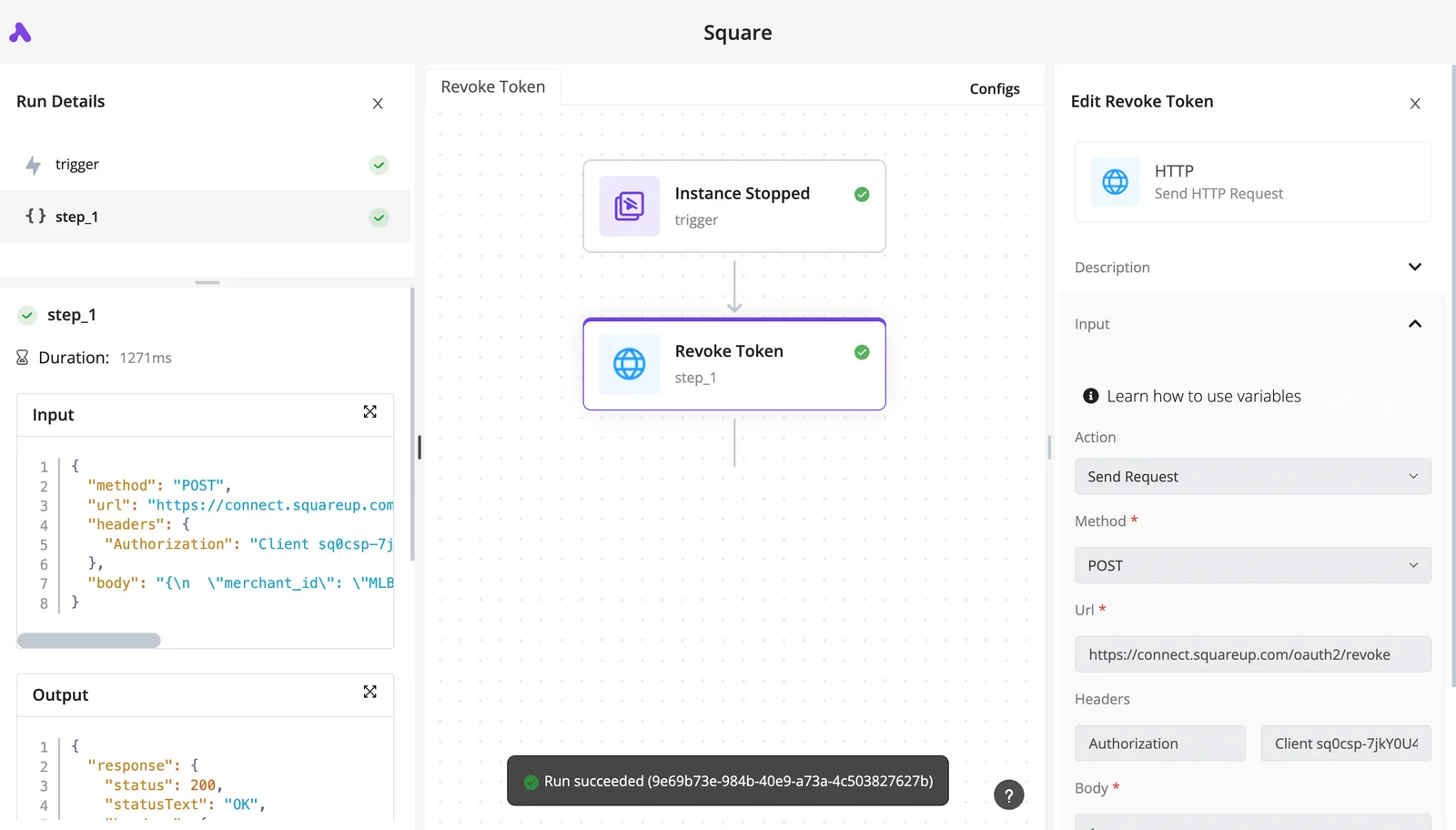
The screenshot below shows the shape from an unrelated flow. An "Instance Stopped" trigger feeds a "Revoke Token" step that POSTs to Square's OAuth revoke endpoint (Square being the payments provider whose token the flow cancels).
What the run details show
On the left, the run details hold the raw JSON input and output, and the Authorization header sits in the configuration on the right.
Take from it that you can read exactly what the step sent and what came back, which is what you need when the receiving service is unproven.
Pointing the step at telemetry.dev
Swap in telemetry.dev's endpoint and credential from its own documentation. If you can't find an ingestion endpoint there, you've learned something before spending any time on setup.
Once you send one trace, the run details panel doubles as your first-run check.
Compare three things: the payload in the run's input, the response status in its output, and the trace as it appears inside telemetry.dev. A mismatch in any of them is a finding, not a configuration chore.
Option 2: an AI step with a custom provider
Option 2 is an AI step with a custom provider. This only applies if telemetry.dev publishes an OpenAI-compatible endpoint, and I found no statement that it does.
If it does, point an AI step's custom provider at that base URL and see whether the calls show up as traces without further code. Without that endpoint documented, skip this option rather than guess at paths.
Option 3: an MCP server
If the maker publishes an MCP server, which is option 3, you can attach it as a tool and let a flow query traces back out.
That would help the comparison later, but I have nothing published to point at, so treat it as a question to put to the maker.
A one-week Telemetry.dev trial plan
A one-week trial plan, starting Monday:
- Monday: build the HTTP step and send one trace. Run the first-run check above.
- Tuesday: send the same trace to an established tool you already use, and put both views side by side.
- Wednesday: ask the same few questions of each, such as which step was slow and what failed.
- Thursday: break something deliberately and see which tool shows the failure fastest.
- Friday: write down what telemetry.dev showed that its maker didn't claim, and what it failed to show that they did.
Frequently asked questions
Where the maker's pages give no answer, the questions below get the same treatment: I write "not stated" and stop, because a guess from me would be one more unverified claim.
Is telemetry.dev open source? Licence: not stated. I have no published licence to quote, and there's nothing I can point to that names one.
Until the maker names a licence, assume you have no right to modify or redistribute the code. Ask for the licence text in writing before you build anything on it.
Is telemetry.dev free to use?
Retention is the question that matters. If Free keeps traces for only a short period, a bug you notice on Monday may have no trace left to inspect.
Whether the waitlist exists is also not stated: I can't tell you whether access is open or gated. Test both before you plan around them. Sign up, send one trace, then check whether it's still there the next day and the day after.
Can telemetry.dev be self-hosted?
Not stated. Self-hosting decides where your prompts and responses are stored, so the missing answer is a blocker for anyone with data-handling rules.
Data location is also not stated, meaning I can't say which region holds your traces. If your prompts contain customer data, ask the maker for the region and the self-hosting position before you send a single real request. Until then, send only synthetic prompts.

Does telemetry.dev work with OpenAI-compatible APIs?
Nothing I can cite says so. "OpenAI-compatible" covers many providers, and each handles streaming, tool calls and token counts a little differently. A tool can accept the format and still drop a field you need.
Verify it with the trace test: send one request through the endpoint you use, then open the raw trace and check that the model name, the full prompt, the response, the token counts and the latency are all present.
A dashboard summary that shows only a request count tells you nothing about this.
Is telemetry.dev ready for production use?
Not stated, and the maker is the only source who can state it. Nothing I've seen gives an uptime commitment, a support channel or a data-retention guarantee, and without those a production outage leaves you no recourse.
Run telemetry.dev beside your established tool first. If the two traces disagree on the same request, trust the established one until the maker explains the difference.
Related reading
References
Build it
Set this up in minutes.
No code required. Connect your accounts, and Activepieces runs it from there.
Start free Talk to sales