
telemetry.dev: Features, Pricing and Setup (2026)

Oct 31, 202614 min read
According to PyPI, telemetry.dev is a Python package whose first release reached PyPI on 2026-07-31. Product Hunt featured it on 2026-10-31, and its maker's own page, which sits alongside workflow tools like Activepieces in the wider automation ecosystem, names who shipped it.
Treat it as a young 0.x release and a building block you might connect from a flow tool, not as a settled standard.
What the maker released
Pin the version, or your first upgrade breaks a task. From 0.1.0 to 0.2.9 in under three months: that is a package whose interface has been open to change the whole time.

The table shows what the maker published and where each fact comes from, and the version rows are the part to act on.
| Fact | Source, checked 2026-10-31 |
|---|---|
| Maker: named on the telemetry.dev page itself | telemetry.dev |
| What it is: a Python package distributed through PyPI | PyPI listing |
| First release, 0.1.0, on 2026-07-31 | PyPI release history |
| Latest release, 0.2.9, on 2026-10-14 | PyPI release history |
| Product Hunt feature on 2026-10-31 | Product Hunt listing |
Because the Product Hunt date matches the day of our check, the listing is brand new and has no track record behind it.
If you are running this arithmetic for your own team, see what the same workload costs on Activepieces.
What sources we verified for telemetry.dev
We checked all of it on 2026-10-31, so any release after that date isn't reflected here. You can trace every release number and date to the PyPI record, the launch listing to Product Hunt, and the maker's identity to the maker's own page.
If the maker says something about performance or savings, it stays the vendor's claim until you measure it on your own tasks.
What telemetry.dev changes for AI automation
It matters only where the maker's own published facts show it changing what you can see, spend or wait for. You still have to confirm each of those on your own tasks.
What problem telemetry.dev targets in LLM workflows
Look at what the page points at: tracing, meaning seeing what each step of an automated workflow actually did. Grafana Labs' survey gives general context for why that's hard.
38% of respondents named complexity, diginomica reports, so the biggest group struggles to understand its tooling before reading a single trace. Per diginomica, signal-to-noise came next at 34%, which means collecting more data without filtering just moves the mess.
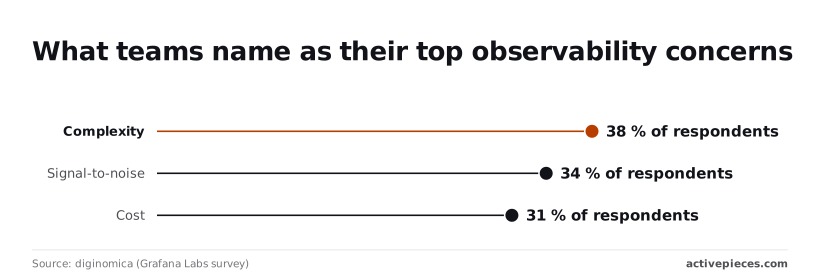
Another 31% named cost, so every trace you send is something you pay to store. None of this is evidence about telemetry.dev.
In the drawing below, a four-box workflow (trigger, AI step, app step, result) has a line from each box into a separate telemetry box.
Take from it that traces leave every step, so a bad AI output can be read without opening the app step that acted on it.
Count the lines: each is volume you'll filter and pay for, and that is where the three percentages bite.
Who should use telemetry.dev for LLM observability
If you run AI steps in production, pay attention, because a wrong output surfaces downstream days later. The same goes for teams where more than one person debugs the same workflow and needs a shared record.
If you have a few low-volume workflows whose built-in run history already answers "what happened?", skip it for now. Connecting telemetry.dev is a general building block, not a fix, so wait until you have a question your current logs can't answer.
What telemetry.dev measurably adds, per its maker
Per its maker, telemetry.dev adds a metered allowance of ingestion units at three price points, and little else that comes with a number attached.
As checked on 31 October 2026, the pricing page ties each plan to an ingestion-unit allowance. Claims about better visibility into automation runs carry no figure there, so treat them as unquantified until you test them.

What telemetry.dev pricing and limits the maker publishes
For $0, the Free plan gives you 30k units, so you can trial one workflow before anyone approves a budget line.
The Pro plan costs $25 a month for 500k units, about 17 times the free allowance.
The Team plan costs $50 a month for 2M units: double Pro's price for four times the volume, which halves the per-unit cost.
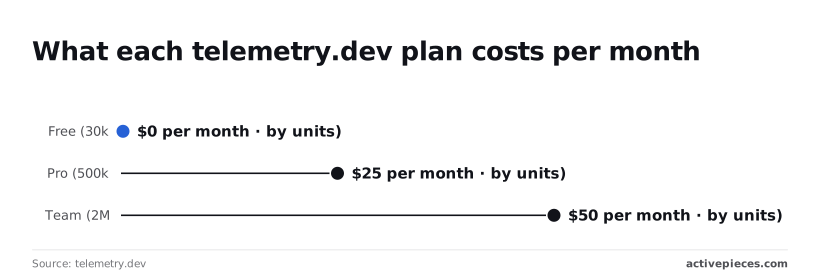
Below, the table shows what the maker publishes for each plan. Read the "not published" cells as the open questions to settle before you rely on a plan.
| Plan | Price per month | Ingestion units | Retention | Seats | Overage rule |
|---|---|---|---|---|---|
| Free | $0 | 30k | not published | not published | not published |
| Pro | $25 | 500k | not published | not published | not published |
| Team | $50 | 2M | not published | not published | not published |
Plan around price and volume today, because they are the only columns you can rely on.
Retention, seat counts and overage rules appear nowhere in the figures above. Retention decides how far back you can inspect a failed run. An overage rule decides whether you can cap your spend. Ask for all three in writing before you wire in production tasks.

What you need to connect telemetry.dev to workflows
Start with a plain HTTP request step, and move to an AI step or an MCP server only if the maker's docs give you a reason.
We haven't run telemetry.dev ourselves, and we assume no connector built for it, so everything below is a general building block.
Option 1: an HTTP request step
Point the step at the documented endpoint, send the credentials the docs name, and map the JSON response into later steps. This is the simplest option because the failure point is visible: the response either matches your mapping or it doesn't.
The schema assumption that breaks first is pagination or a nested field you flattened, so test with a large result, not a sample of one.
If telemetry.dev exposes a model-style API, Option 2 applies: an AI step with a custom or OpenAI-compatible provider. Your platform's AI step can then treat it as a provider by changing the base URL and key.
If it doesn't, you are forcing an analytics product into a chat shape and moving the mess elsewhere. Skip it.
To let an agent call telemetry.dev's tools directly, use Option 3, an MCP server. It costs the most to set up, because you now host or trust another process.
Use it only when an agent needs to choose queries itself; a fixed query belongs in Option 1.
Once an agent chooses its own queries, the open question is where its choices get recorded.
Activepieces has no telemetry.dev integration (checked 2026-10-31), but a workflow there can reach it through an HTTP request step or an MCP server, and the run already traces each agent tool call, the data it acted on and the order of its decisions beside the fixed steps.

That trace exports as audit logs and event streams into the SIEM your security team already runs, so an agent's decisions get reviewed like any workflow step, and MoneyGram, Moneypenny, Alan and FundingSocieties run Activepieces.
Before choosing, check these in the maker's docs:
- Whether a public HTTP endpoint is documented, and how it authenticates.
- Whether responses are paginated, and how errors and rate limits are reported.
- Whether an OpenAI-compatible endpoint exists at all.
- Whether an MCP server is published, and who maintains it.
Worth checking against a plan that does not meter every step: one credit covers a whole run on Activepieces.
How telemetry.dev cost and speed compare
Choosing between those options comes down to cost and speed, and no dated vendor-published figure here lets you call telemetry.dev cheaper or faster than what you already run.
telemetry.dev cost per unit, as published
In the table below, every option appears with its cost unit, price, speed figure and source. Every cell is "not published" because this article holds no dated figure it can stand behind, so take from it the shape of the comparison, not a ranking.
| Option | Cost unit | Figure | Speed figure | Source and date |
|---|---|---|---|---|
| telemetry.dev | not published | not published | not published | not published |
| Datadog | not published | not published | not published | not published |
| New Relic | not published | not published | not published | not published |
| Grafana Cloud | not published | not published | not published | not published |
| Langfuse | not published | not published | not published | not published |
| LangSmith | not published | not published | not published | not published |
| Current provider | your invoice's billing unit | not published | not published | your own contract |
| Doing nothing | engineer hours spent debugging blind | not published | not published | your own incident log |
Fill the last two rows from your own records first, so you have your source data established before pulling external records. They are the baseline every vendor figure must beat.
Without a published latency or rate-limit figure, a speed claim is untestable. Each vendor's number will also describe its own workload, so a figure measured on someone else's traces says little about your agent's queries.
By volume ingested, by trace, by seat: each vendor may bill a different way, so each cost unit may differ.
Until you convert them to cost per completed task on your own runs, any ranking moves the mess into a spreadsheet rather than removing it. Measure first, then compare.
Until you convert them to cost per completed task on your own runs, any ranking moves the mess into a spreadsheet rather than removing it.
What to watch next after the telemetry.dev launch
Watch the maker's own pages for changes that alter what you can see, spend or wait for, and run your own tasks before believing any of them. Everything else is the vendor's claim until you've measured it.
Which telemetry.dev pages to check regularly
Check these on a schedule, because each one can change your numbers without telling you.
- Changelog entries after 0.2.9, since new releases are where behavior changes first.
- Plan limits and retention on the pricing page, since a lower cap or a shorter window changes what you can see and what you pay.
- Any published latency figure, because it's the only claim about waiting that you can later test.
- The MCP and OpenAI-compatible docs, because they tell you whether connecting it's a small adapter or a rewrite.
Check the changelog on every release and the pricing page before each billing cycle. The docs only need a look when you plan an integration.
A quiet changelog isn't proof of stability, so keep a dated copy of the limits you built against. If a limit moves, you can then find the break in minutes instead of guessing.
How to test telemetry.dev on your tasks
Run it on a sample of your real tasks, not a demo, and record three things: accuracy, speed and cost per task.
If a fast, cheap tool misses the events you care about, it moves the mess into your review queue instead of removing it, so accuracy comes first.
Define a correct result before you start, such as the right trace attached to the right failed run, and score against that.
Speed is the wait you actually see, from the moment a task finishes to the moment its telemetry is usable. A vendor's latency figure measures its own path, not yours.
Divide total spend by completed tasks, retries and retention included, and you have cost per task. Plan prices aren't that number.
Once you have all three, set them beside the vendor's claims. Where they agree, you have evidence. Where they differ, trust your own measure.
What Activepieces does about this
Activepieces does not ship a telemetry.dev integration, and we checked that on 2026-10-31. What it offers is a place to run the measurement this article keeps asking for.
An HTTP request step can send a task's events to whatever endpoint the maker documents, and an MCP server can be connected where an agent needs to choose its own queries. Both are the general building blocks described above. Neither is a tested connector.

The reason to do it there is that the run already records what you would compare against. Each run keeps what every step received and returned, and for agent steps it traces each tool call, the data it acted on and the order of decisions.
That is your baseline for the accuracy check: whether the right trace is attached to the right failed run.
Put telemetry.dev beside it on a sample of real tasks, and the vendor's claims about what you can see meet your own record instead of a demo.
Where the trace has to leave the tool, audit logs and event streams export into the SIEM your security team already runs. An agent's decisions can then be reviewed like any other workflow step, without a new destination to approve first.
The community edition is MIT-licensed, so a team that wants the whole path inside its own infrastructure can self-host it and read the code. MoneyGram, Moneypenny, Alan and FundingSocieties run Activepieces. That says nothing about telemetry.dev, and it is not evidence that this pairing works.
What we cannot give you is a number for how telemetry.dev behaves once it is connected, because we haven't run it. The Free plan's 30k units is enough to trial one workflow, so start there.
Pin the version, record accuracy, speed and cost per task, and decide on those results.
Frequently asked questions
What is telemetry.dev?
telemetry.dev is a product whose maker claims it changes what automation teams can see, spend or wait for. Those claims are the vendor's until a team measures them on its own tasks, and connecting it is a general building block, not a result.
Does Activepieces support telemetry.dev?
We have no maker-published fact confirming a dedicated integration, and we haven't tested one. Treat support as unconfirmed until the maker's own documentation says otherwise. The dedicated section on that tool covers the detail.
Can I use telemetry.dev in a workflow today?
Possibly, but we haven't verified it, so any workflow you build is your own test. If the service accepts ordinary web requests, a generic HTTP step is the obvious route. Check the maker's documentation for that before relying on it.
Whatever route you pick, fix the schema first. Decide which fields each task emits and what they are called, because renaming them after data has landed moves the mess downstream instead of removing it.
Then run it against a handful of your real tasks and compare what you can see, what it costs and how long you wait against your current setup.
Is telemetry.dev free?
That holds as of the checked date, 2026-10-31.
Read the maker's pricing page yourself. Look for what a free tier includes and for what happens once you pass the included units: whether usage is throttled, billed or cut off.
Until you know that, don't build a workflow that would silently start costing money or dropping data under load.
Related reading
References
Running the numbers
See what the same workload costs here.
Free forever plan, and every paid plan self-hosts at no extra cost.
See pricing Talk to sales