
How to Get an X (Twitter) API Key, Limits and Errors

Nov 1, 202614 min read
Sign up in the X developer console, create an app and key, and pay under whichever plan is current (if you'd rather wire the results into other tools afterward, a workflow builder like Activepieces can take the output from there): that is the X API v2, formerly the Twitter API.
Every request counts against that plan, and nothing's free by default.
The Twitter API is X's paid developer interface
X API v2 endpoint groups
The v2 endpoints fall into four groups, each limited by your plan and permissions.
You can read public posts and users that anyone can see, with no user login needed. You can search recent posts, but only a recent window and not the full archive.
You can post on behalf of a user, but only after that user has authorized your app through OAuth. And you can read your own data: the posts and profile of the account that owns the app.
Use X API v2 instead of v1.1
Start new work on v2. Tutorials written for legacy v1.1 point you at endpoints, tiers and sign-up steps that no longer match the console.
Nobody has to be hired to write the HTTP calls behind a metered API: describe the process to the built-in chat in Activepieces, the platform used by teams at MoneyGram, Moneypenny, Alan and FundingSocieties, and it publishes a live flow in your account, the same kind of flow a builder would put together manually, governed by the same RBAC and audit logs as every other flow, with a run trace for each call that spends your quota that anyone can read without knowing how to code.
Check the date on every limit
This guide takes its pricing and limits from third-party sources, checked on 2026-11-01. If the docs and this page disagree, the docs are right, so compare them before you build anything that depends on a limit.
This takes minutes, not a project: automate it in Activepieces free.
Getting X API access and a developer key
You can hold a valid key and still get refused, because until a plan or credits sit behind it, X can turn away valid credentials. Access starts in X's developer console, which enforces this order:
You can hold a valid key and still get refused, because until a plan or credits sit behind it, X can turn away valid credentials.
- Sign in to the developer console with the X account that will own the app.
- Accept the developer terms, the contract that governs how X measures your usage.
- State your use case in plain words. Make the written statement match what you will build.
- Create a project, the container that groups your apps.
- Create an app inside the project.
- Generate the API key, the secret, and the Bearer Token.
- Buy credits or pick a plan.
X meters the product, so the choice is a budget decision: pick the smallest arrangement that lets you make one real request, then watch what that request consumes before committing further.
Copy the secret and Bearer Token into a secrets manager or environment variable, because the console shows them only when you generate them.
If one leaks, regenerate it in the console, which invalidates the old one, and update every place that used it.
X API authentication methods by endpoint
Pick the method by what the call does: public reads take a Bearer Token, and anything done on a user's behalf takes one of the two user-context methods, which means the wrong choice returns an authentication error.
| Method | Can do | How the token is obtained | Refresh | Scopes |
|---|---|---|---|---|
| App-only Bearer Token | Public reads only; cannot act for a user | Generated in the developer console for your app | None; regenerate to replace | None; access follows the app's plan |
| OAuth 2.0 Authorization Code with PKCE | Acting for a user, plus reads of that user's data | User approves your app, and you exchange the returned code | Refresh token, if you request offline access | Requested at authorization; the user sees them |
| OAuth 1.0a user context | Acting for a user | Signed request flow that yields a user token and secret | Tokens do not expire on a schedule | None in the OAuth 2.0 sense |
You already have the Bearer Token from the console. It identifies your app, not a person, so it can fetch public posts and profiles but can't post, like, or read anything private.
Use OAuth 2.0 with PKCE when the call must happen as a user. Request only the scopes the feature needs; a missing scope surfaces as a forbidden error, not a quiet empty result.
If you skip the offline-access scope, you get no refresh token, and the user must re-authorize when the access token lapses.
For some endpoints you may need OAuth 1.0a, because they still list it. It's the older method, and it signs every request with your keys and the user's token.
It has no scopes to tune, so the grant is broad. Prefer PKCE wherever the endpoint accepts both.
X API access and action pricing
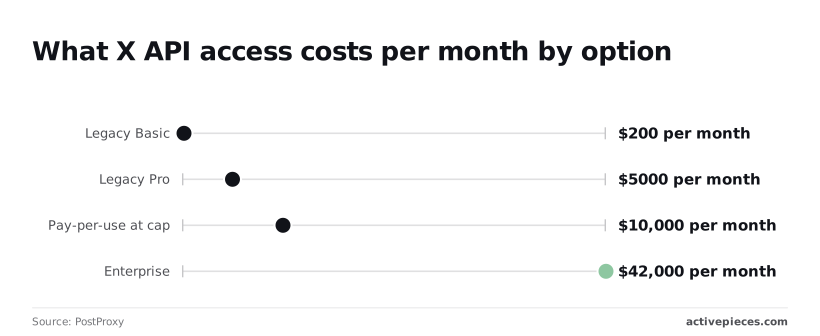
$200 a month on legacy Basic, up to $42,000 on Enterprise, and a $10,000 monthly cap on pay-per-use, which bills each action: those are the figures. None of them come from X's own pricing page, so confirm them there before you commit.
X API monthly cost by access option
Send a million requests or none, and legacy Basic is still $200 a month. Legacy Pro is $5,000 a month.
If you go pay-per-use, your worst case is $10,000 a month, where it tops out.
Enterprise comes to $42,000 a month in the figures above, and X publishes no public rate card for it, so treat that number as a starting point for a sales call.
Per-unit costs under pay-per-use
At $0.001, an owned read is the cheap one, and a public post read costs $0.005, so reading other people's posts is five times dearer than reading your own.
A user lookup is $0.01, which means lookups won't be a significant cost factor. A post create and a direct message are each $0.015, so pricing won't drive you toward either feature.
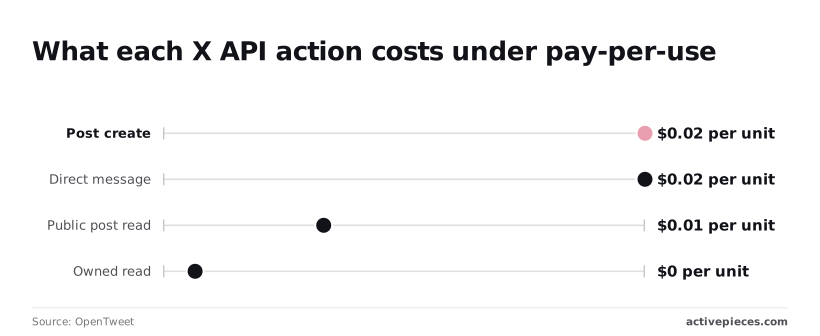
Put a URL in a post and it costs $0.20, thirteen times a plain post, thereby making URLs your largest per-request cost.
| Option | Price | Unit | Cap | Source | Check date |
|---|---|---|---|---|---|
| Pay-per-use credits | Unpublished | Prepaid credits | Unpublished | PostProxy | 2026-11-01 |
| Owned read | $0.001 | Per read | Unpublished | OpenTweet | 2026-11-01 |
| Post read | $0.005 | Per post | Unpublished | OpenTweet | 2026-11-01 |
| Post create | $0.015 | Per post | Unpublished | OpenTweet | 2026-11-01 |
| Link post | $0.200 | Per post | Unpublished | OpenTweet | 2026-11-01 |
| Legacy Basic | $200 | Per month | Unpublished | PostProxy | 2026-11-01 |
Rate limits per app and per user
Plan around the per-endpoint windows, since the per-action caps below come from third-party sources rather than X. X counts those per 15 minutes, once for your app and once for each user token. You must respect both limits simultaneously.
App versus user limits
According to RedReplier, post lookup allows 3,500 requests per 15 minutes at one level and 5,000 at the other.
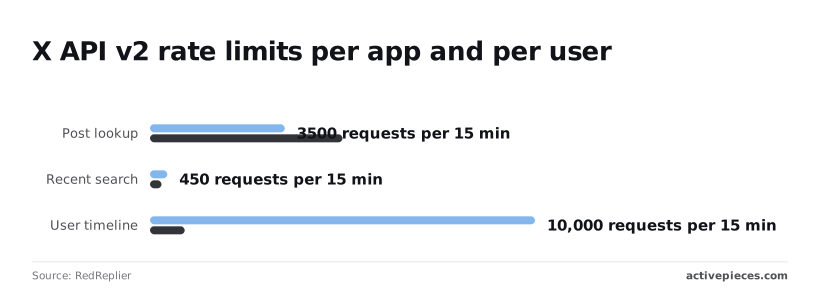
On recent search it runs the other way: 450 requests per 15 minutes against 300. The ceiling on search is the lowest of the three.
A dashboard that polls search for every customer from one app key spends the app's 450 quickly.
10,000 requests per 15 minutes at one level and 900 at the other: user timeline is the widest gap. One user token tops out at 900, so a monitoring tool that reads many accounts' timelines should run on the app-level allowance.
Finding your actual X API rate limits
Read the rate limits page in X's developer docs before you size anything, because a table copied into your code won't update when X changes it. The figures above come from a third-party summary.
Your real limit is whatever the response headers report, so read them on each call and slow down when the remaining count nears zero. A 429 means you've already spent the window, and the retry should wait for the reset time the response gives.
You can follow the rest of this with the builder open. Start free, no card.
A minimal working request, step by step
Run one curl call with a Bearer Token, fetching one post by its ID, before you write any application code. It's the smallest request that proves your key, your plan and your quota all work.
Reading a post with curl
Export your token and a post ID as environment variables, so the token never lands in your shell history.
curl "https://api.x.com/2/tweets/$POST_ID" \
 -H "Authorization: Bearer $BEARER_TOKEN"
You get JSON back, with a data object holding the post's id and text.
A 401 here means the token is wrong or missing. A 403 means your plan or app permissions don't cover this endpoint.
Request extra fields and expansions
By default you get almost nothing back. Ask for more with the tweet.fields parameter, and use expansions to pull in related objects such as the author.
curl "https://api.x.com/2/tweets/$POST_ID?tweet.fields=created_at,public_metrics&expansions=author_id&user.fields=username" \
 -H "Authorization: Bearer $BEARER_TOKEN"
Match expanded objects to the post by author_id, because they arrive in a separate includes block.
Writing is where a Bearer Token stops: it is app-only and can't write. Posting needs a user-context token from OAuth 2.0 authorization with write scope.
curl -X POST "https://api.x.com/2/tweets" \
 -H "Authorization: Bearer $USER_ACCESS_TOKEN" \
 -H "Content-Type: application/json" \
 -d '{"text":"Hello from the API"}'
On success you get the new post's ID back. Run it twice with the same text and X rejects the second as duplicate content, which shows why error handling comes before anything larger.

Common X API errors and solutions
The duplicate rejection is one of four failure families, and each tells you whether to change credentials, slow down, stop spending, or edit the post.
X API 401 and 403 errors
When you get a 401, X didn't accept who you are: a wrong, expired or revoked token, or the wrong authentication type for that endpoint.
Get a 403 and X knows who you are but refuses the action. The usual causes are an app lacking write permission, a token issued before you changed scopes, or an endpoint your plan doesn't include.
Regenerate the token after any permission change, then check the endpoint against the access listed for your plan in X's developer docs.
429: rate limits and backoff
Hit a 429 and you've exceeded a window limit. The response headers report your limit, remaining requests and reset time, so read them instead of guessing. Wait until the reset time, then retry with increasing delays.
Cache anything you fetch repeatedly and follow pagination tokens rather than re-querying from the start.
X API usage caps and unexpected bills
When the window resets, a rate limit clears. A monthly usage cap doesn't, so retrying only burns time.
The scheduled workflow below runs a trigger, a call using your own developer credentials, and a raw HTTP fallback for gaps, and all three draw down one monthly cap. A schedule set too tight can exhaust it long before the month ends.

Send identical text twice and X refuses it as duplicate content; retrying never succeeds. Vary the text, or check whether the first attempt already went through. Treat 5xx responses differently: they're X's fault, so retry them with backoff.
Calling the X API without code using Activepieces
From a workflow, Activepieces makes the same X calls using your own developer credentials, so the quota and 5xx rules above still apply to every run. It suits scheduled posts and mention alerts; it's a poor fit for bulk collection.
Take this from the table below: the four questions people ask before wiring this up are settled by X's docs, not by Activepieces, and its free plan of 1,000 credits a month and unlimited flows doesn't change a single row.
The table also shows where to verify each answer.
| Short answer | What to check | Docs source | |
|---|---|---|---|
| Free access | Do not assume it | Whether your plan includes the endpoint you call | X developer portal, pricing page |
| Scraping | Not a substitute for the API | X's terms on automated collection | X developer terms |
| Approval | Your app needs developer access first | What your plan requires before a key works | X developer portal, getting started |
| Twitter vs X naming | Both names appear | The host in the endpoint reference | X API reference |
Check each row before you build the workflow, because a flow that fails on plan limits fails at run time, not at setup.
Create the connection in Activepieces with the keys or OAuth app from your own X developer project.
The workflow then spends your quota, not a shared one, and on the Activepieces side a run costs 1 credit however many steps it has, so the two meters stay separate.

Check which permissions the app was granted; a post step against a read-only app will fail on its first run.
When the X integration lacks an action you need, add an HTTP step and call the endpoint from X's reference with your credentials. Then handle the response yourself: branch on 429 and 5xx, and wait before retrying.
Frequently asked questions
Is the Twitter API still free?
Not in any form you should build on. X sells API access as a metered product, and any free tier it offers is limited to light testing, so a project that depends on it can stall the day it outgrows the allowance.
Read the current tiers and limits on X's developer pricing page before you write code, because they change and a blog post, including this one, will be out of date.
Then design for the quota: a free allowance that runs out returns errors, and your code has to handle those instead of assuming every call succeeds.
Can I scrape instead of using the API?
You can write a scraper, but you'd be trading a priced, documented limit for an unpriced, undocumented one.
X's terms restrict automated collection outside the API, and the site can block or change its pages without notice, so a scraper tends to fail silently, at the moment you most need the data.
If the cost of the API is the reason you're tempted, price the requests you actually need first. That number is often smaller than the cost of maintaining a scraper that keeps breaking.

Do I need approval before I can post?
You need a developer account and an app with credentials before you can post, and the app must have write permission enabled.
Posting also requires user-context authentication, so an app-only token that reads data will be refused when it tries to write.
Whether your plan includes posting, and how much, is stated in X's docs. Check it there before you design a workflow around automated posts.
Is the API called Twitter or X now?
Both names are in use. The company and the product are now X, and the developer documentation and portal use that branding.
Plenty of tutorials, libraries and search results still say Twitter, and older endpoints and code samples often carry the old name.
Treat them as the same service, but trust the current X developer docs over anything labeled Twitter, since the older material may describe access rules that no longer apply.
Related reading
References
Build it
Set this up in minutes.
No code required. Connect your accounts, and Activepieces runs it from there.
Start free Talk to sales