
How to Install WordPress on a Self-Hosted Server (2026)

Oct 2, 202614 min read
Deploying a self-hosted WordPress instance in 2026 demands a sophisticated approach to infrastructure, beginning with the selection of a high-performance Linux distribution and a containerized environment.
Once the core stack is stabilized, developers often implement automated workflows, perhaps using a tool like Activepieces to sync system logs, to ensure that the server remains responsive under heavy traffic loads.
This setup requires meticulous configuration of Nginx or LiteSpeed as a reverse proxy, coupled with a robust MariaDB database optimization strategy. Security remains paramount, necessitating the implementation of hardware-level firewalls and automated SSL certificate renewals to protect sensitive user data.
A WordPress self-hosted setup is the practice of deploying the WordPress content management system on privately managed infrastructure to achieve granular control over server configurations, security protocols, and resource allocation.
The 2026 requirements for self-hosted WordPress
Maintaining a dedicated environment where you own the entire stack (from the operating system up to the application layer) is the core requirement of self-hosting.
This approach eliminates the restrictive licensing and plugin-blocking policies found on shared platforms, but it shifts the burden of security and uptime entirely onto you.
To launch a viable production site today, you'll need to secure a domain name for identity. You also need a Virtual Private Server (VPS) for compute resources, a web server to handle requests, and a database to store content.
The following sequence establishes the foundational environment before you create content:
- Point A-records to VPS IP
- Provision SSL via Let's Encrypt
- Create MySQL database and user
- Download and extract WordPress core
- Run the 5-minute web installer
By following this linear progression, you ensure that the site is encrypted and reachable before you expose the database to the open web. Once you complete these steps, the server is ready to handle content delivery.
Hardware specifications for modern performance
High-speed storage and sufficient memory are the pillars of modern performance, preventing the operating system from swapping data to the disk. A VPS equipped with NVMe drives is the baseline for 2026, as standard SSDs introduce latency that slows down administrative tasks.
Memory allocation must be large enough to hold the operating system, the database engine, and the PHP processor simultaneously without contention.
**A VPS equipped with NVMe drives is the baseline for 2026, as standard SSDs introduce latency that slows down administrative tasks.
While compute cores matter for heavy processing, the bottleneck for most sites remains the speed at which the database can read and write to the physical disk.
Choosing between a LEMP stack and containers
Choosing a stack involves balancing the raw speed of a manual installation against the portability of containerized environments. The LEMP stack (consisting of Linux, Nginx, MySQL, and PHP) is the standard for performance because it places the fewest layers between the hardware and the code.
Conversely, using Docker allows for easier migrations and environment parity, though it requires more overhead to manage networking.
While many vendors gate governance behind a cloud subscription, Activepieces provides the same SSO, SCIM, custom RBAC, and secret manager integration in its air-gapped build as it does in the managed cloud.
Regulated entities like MoneyGram and FundingSocieties run this in production because air-gapped means full control, not a fraction of the feature set.
Frontier models like Gemini 3.8 Flash or GPT-6 Astra provide site-level analysis and automated code audits. These tools require external hooks to prevent the WordPress process from stalling during high-intensity reasoning tasks.
This takes minutes, not a project: automate it in Activepieces free.
Step-by-step installation for a production environment
Production-grade self-hosting requires a hardened foundation where every configuration choice prioritizes long-term stability. While local environments allow for loose permissions, you must tune a live 2026 stack to handle high-concurrency requests and agentic workflows.
Setting up your Linux server for WordPress
Begin by deploying a clean instance of Ubuntu LTS to ensure access to long-term security patches. Once the instance is live, update the package manager and install the core stack components.
| Component | Minimum | Production Recommended |
|---|---|---|
| PHP | 7.4 | 8.3+ |
| MySQL | 5.6 | 8.0 |
| MariaDB | 10.1 | 10.11 |
| Web Server | Apache | Nginx/OpenLiteSpeed |
The discrepancy between these tiers shows that while legacy versions might technically run the software, they lack the JIT compilation and query optimizations necessary for modern performance.
Following the OS update, configure a non-root user with sudo privileges to prevent accidental system-wide corruption.
Configuring Nginx, PHP, and MySQL for WordPress
When you edit the Nginx server block to define the root directory and index files, the fastcgi_pass directive must point to the PHP-FPM socket.
Within the php.ini file, increase the memory_limit and max_execution_time to prevent script timeouts when WordPress triggers heavy background tasks.
Before you open the site to traffic, run the initial security script to remove anonymous users and disable remote root logins. Create a dedicated database and a unique user account, granting only the specific privileges required for WordPress to function.
Restricting these permissions ensures that a compromised application can't gain control over the entire database server.
Once the latest WordPress core files are downloaded and moved to the web root, the web server user must own this directory.
Once DNS points to your server's IP address, go to the domain to complete the setup through the web interface. This final step links the configuration files to the database, activating the site for public traffic.
Critical server limits and configuration values
Establishing specific server-level variables prevents the "White Screen of Death" by giving the PHP process sufficient headroom to execute complex database queries. Misconfigured limits are the primary cause of silent site failures during plugin updates or high-traffic spikes.
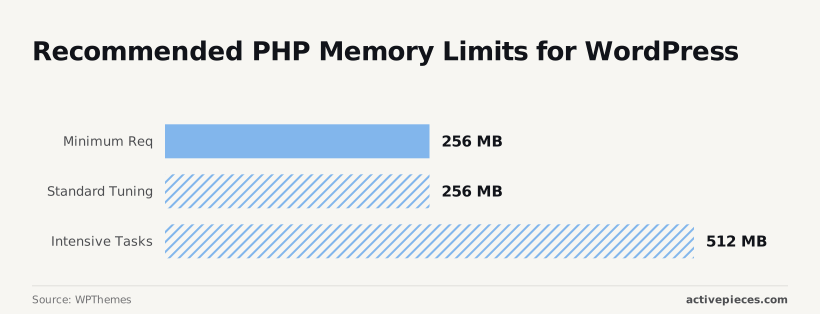
Recommended PHP memory limits for WordPress
256 MB is the baseline for a self-hosted environment's Minimum Requirement, which means users must ensure their server configuration provides sufficient memory to avoid performance bottlenecks.
WPThemes states that a self-hosted environment requires a baseline of 256 MB for its Minimum Requirement, so failing to meet this threshold will likely result in site instability or installation errors.
When your stack involves Intensive Tasks, such as generating dynamic PDFs or processing large WooCommerce inventories, you must increase this to 512 MB. This prevents the server from terminating the script mid-process, which would leave your database in an inconsistent state.

Setting PHP execution time and upload limits
Beyond memory, your php.ini file must define how long a script can run and how large a POST request can be to avoid timeout errors during media imports.
- Set max_execution_time to 300 seconds so that long-running database migrations have five minutes to complete before the server kills the process.
- Set upload_max_filesize to 128 MB to allow for high-resolution video assets or large plugin installers that exceed the default 2 MB limit, ensuring that media-heavy sites can be managed without restriction, which means users will no longer encounter errors when attempting to upload substantial content.
- Match post_max_size to 128 MB or higher so the server accepts the entire form data package, including attachments.

Responsiveness is dictated by the choice of web server software. The following data compares how different engines handle the initial request:
Nginx responds in 142ms, OpenLiteSpeed takes 860ms, and Apache lags at 5,030ms. An Apache user waits nearly five seconds just for the server to acknowledge their click.
This latency bottleneck makes Nginx the only viable choice for high-concurrency environments where every millisecond of delay correlates to a drop in conversion rates.
You can follow the rest of this with the builder open. Start free, no card.
Automating maintenance and lead workflow
Offloading intensive automation tasks to external workflow engines prevents background processes from competing with the web server for critical CPU cycles.
When a self-hosted environment attempts to handle both high-traffic user requests and complex API orchestrations, the resulting resource contention often leads to dropped packets and sluggish response times.
External orchestration and secret management
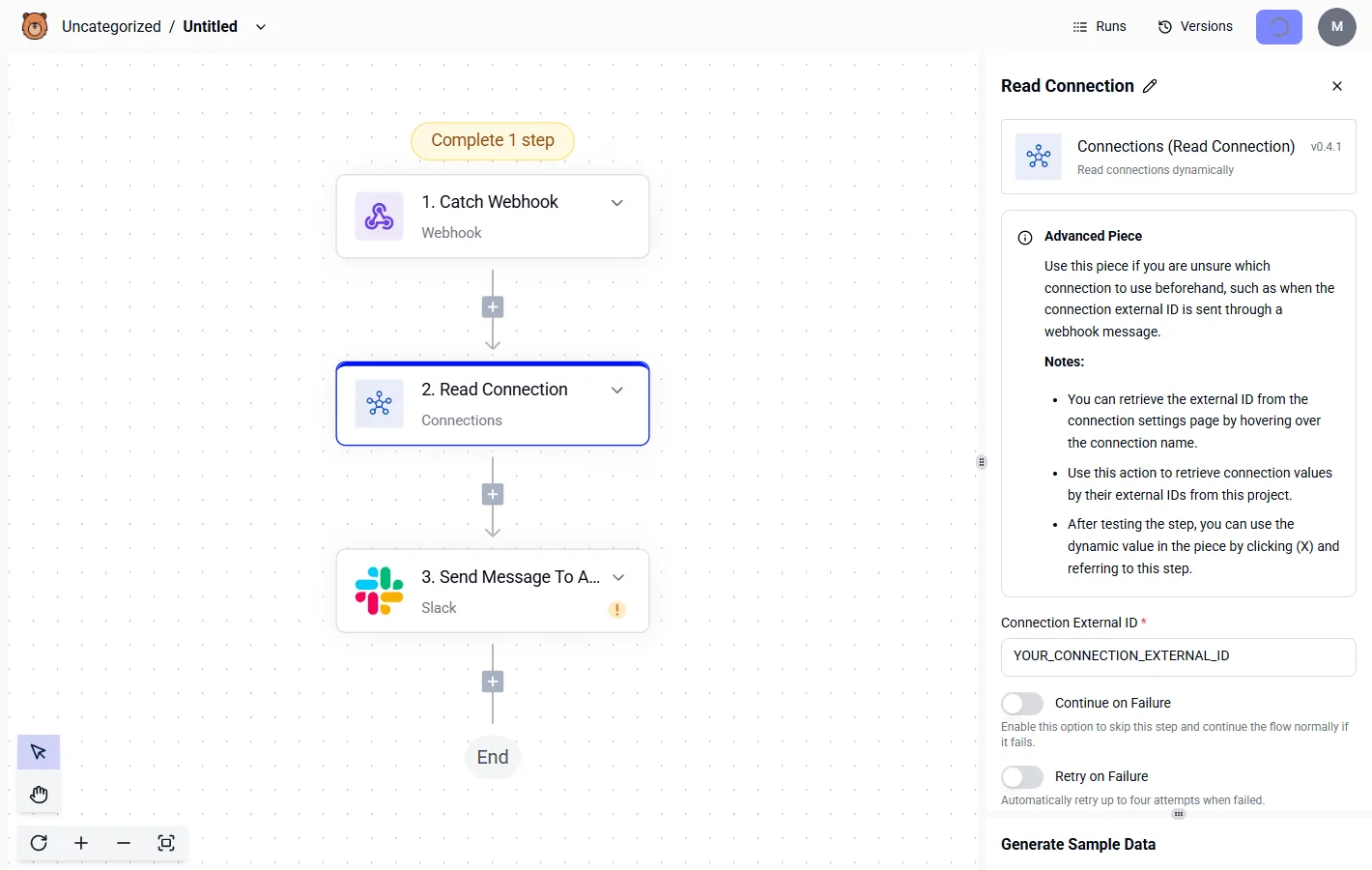
To offload these tasks, you must deploy a secondary service that communicates with WordPress via the REST API or webhooks. This engine acts as a buffer, receiving data from your site and processing it in an isolated environment where it cannot exhaust the PHP-FPM pool.
Every credential the system touches can be routed to your own secret manager instead of an external database, ensuring your API keys and OAuth tokens are never ours to hold.
You can verify this by inspecting the database of a self-hosted instance configured with an external secret manager; the credentials simply aren't there.
Complexity and required response time determine the right intelligence for these workflows.
| Task Category | Recommended Model | Primary Benefit |
|---|---|---|
| High-throughput lead processing | Gemini 3.5 Flash-Lite | Lowest cost for massive scale |
| Complex agentic coding tasks | Claude Opus 5.5 | Reliable long-horizon reasoning |
| Real-time voice lead follow-up | GPT-Live 1 | Natural, expressive conversation |
| Advanced technical research | Gemini Deep Research | Exhaustive multi-step verification |
Maintaining these integrations requires a disciplined approach to API management. Instead of hard-coding calls into the site core, utilizing an orchestration layer allows for centralized logging and error handling.
This separation of concerns means a failure in an external service like GitHub or a CRM won't crash the public-facing site.
Troubleshooting common self-hosted deployment errors
Self-hosted deployment failures typically stem from misaligned environment variables or restrictive file system permissions that prevent the application from communicating with its core resources.
Fixing the WordPress database connection error
When application credentials don't match the user privileges defined in the database management system, connection failures occur.
To resolve this, you must verify that the database host, name, username, and password in your configuration file align perfectly with the backend settings.
If you are using an external reasoning engine like Gemini 3.1 Pro to audit your connection strings, ensure the model is checking for trailing spaces or hidden characters that frequently break localized authentication.
Fixing WordPress permalink 404 errors
Persistent 404 errors on subpages indicate that the web server is failing to redirect requests to the primary index file. The solution depends on your web server software:
Apache servers require you to enable the mod_rewrite module so the server can process instructions within the .htaccess file.
Nginx servers require a specific try_files directive. This must be placed within the site configuration block to ensure that URI requests are passed to the application rather than looking for a physical directory.
OpenLiteSpeed servers necessitate a graceful restart of the listener service after any rewrite rule change so the new routing table is loaded into active memory.
Once these configurations are applied, the server can correctly interpret pretty permalinks, preventing broken links that frustrate visitors.
The post-launch security and optimization checklist
A stable production environment requires immediate hardening of the server’s internal task handling and external defenses to prevent resource exhaustion.
The first day of operation is the most critical period for identifying configuration gaps that allow unauthorized file access or cause background processes to stall.
This sequence of checks ensures that the infrastructure remains performant and isolated from common exploit vectors:
- Verify UptimeRobot monitoring, which provides external validation of site availability so that silent server failures are detected before customers report them.
- Disable WP-Cron in favor of a system crontab, moving task scheduling to the operating system level so that heavy automation jobs don't delay page load times for visitors.
- Set automated off-site backups to a secondary storage provider. This protects against permanent data loss if the server is compromised.
- Audit file permissions to 644 for files and 755 for directories, which restricts write access to the web server user so that malicious scripts can't modify core application files.
- Enable Cloudflare WAF, the web application firewall that filters malicious traffic at the edge, so that SQL injection attempts are blocked before they ever reach the origin server.
By completing these steps, you transform a raw installation into a resilient production asset capable of sustaining high-concurrency workloads.
What Activepieces does about this
To prevent the performance degradation that occurs when WordPress handles its own background logic, Activepieces provides a decoupled automation engine that runs alongside your stack.
By offloading resource-intensive tasks like lead routing, data synchronization, and AI-driven content audits to a dedicated worker, you ensure the PHP-FPM process remains available for user requests.
This architecture directly addresses the 2026 requirement for high-concurrency stability by moving the "heavy lifting" out of the WordPress database and into a specialized execution environment.
The platform is built on an MIT-licensed core, offering the transparency required for self-hosted environments where data sovereignty is paramount. Unlike proprietary tools that force you into a cloud-only model, Activepieces allows you to maintain a completely air-gapped installation.
This ensures that your automation logic and sensitive API keys never leave your infrastructure, fulfilling the promise of full control that motivates self-hosting in the first place.
For organizations requiring enterprise-grade governance, Activepieces integrates SSO, SCIM, and custom RBAC directly into the self-hosted build. These features allow teams to scale their automation efforts without compromising the security of the underlying VPS.
By centralizing these workflows outside of the WordPress admin dashboard, you eliminate the risk of plugin bloat and the security vulnerabilities associated with granting broad administrative access to third-party automation scripts.

Regulated entities like MoneyGram and FundingSocieties utilize this decoupled approach to maintain high-performance environments while meeting strict compliance standards. By using Activepieces to manage the orchestration layer, they keep their primary web servers lean and responsive.
This separation of concerns is the final piece of a modern self-hosted strategy, ensuring that as your automation complexity grows, your site speed does not suffer.
Frequently asked questions
Is self-hosting WordPress cheaper than managed hosting?
Because you avoid the markup charged by providers for automated environment maintenance and support staff, self-hosting is generally cheaper than managed hosting. When you pay for a managed service, you're paying a premium for a pre-configured stack.
By contrast, a Virtual Private Server (VPS) from a provider like DigitalOcean or Linode allows you to pay only for the raw compute resources.
However, this lower monthly invoice assumes you possess the technical proficiency to manage your own backups and security patches, as hiring a developer to perform these manual tasks can quickly negate any infrastructure savings.
How do I update WordPress on a self-hosted server?
Using the built-in dashboard updater or the WP-CLI command-line tool is how you update WordPress on a self-hosted server. This works provided your file permissions are correctly configured to allow the web server to write to the core directories.
Relying solely on the dashboard is risky if your server has restrictive ownership settings, as the update may fail and leave the site in an unusable state.
For more robust deployments, developers use Git (the version control system) to pull updates into a staging environment first, which ensures that a plugin conflict won't crash the live production site during the transition.
Can I host multiple sites on one VPS?
You can host multiple sites on a single VPS. This is done by configuring virtual hosts in your web server software, such as Nginx or Apache, to route incoming traffic to different directory paths based on the domain name.
By taking this approach, you maximize your hardware utilization. You avoid paying for idle CPU cycles on several different small servers.
While this is efficient, it creates a single point of failure where a resource spike or a security breach on one site can potentially impact the performance or safety of every other site sharing that specific server environment.
Related reading
References
Build it
Set this up in minutes.
No code required. Connect your accounts, and Activepieces runs it from there.
Start free Talk to sales