
How to Use the Resend API Without Hitting Rate Limits

Nov 19, 202617 min read
Resend API access and what it can send
Using the Resend API within rate limits
The Resend API is a REST API for sending email over HTTPS, and it can be called from your own code or from a workflow tool such as Activepieces.
You get access by creating an API key in your Resend dashboard and passing it as a bearer token. Everything below was checked against Resend's own documentation on 19 November 2026.
The Resend API is the set of HTTPS endpoints, authenticated with an account-issued API key, that a developer calls to send, schedule and manage email through Resend, subject to the rate limits, plan quotas and error responses the service enforces.
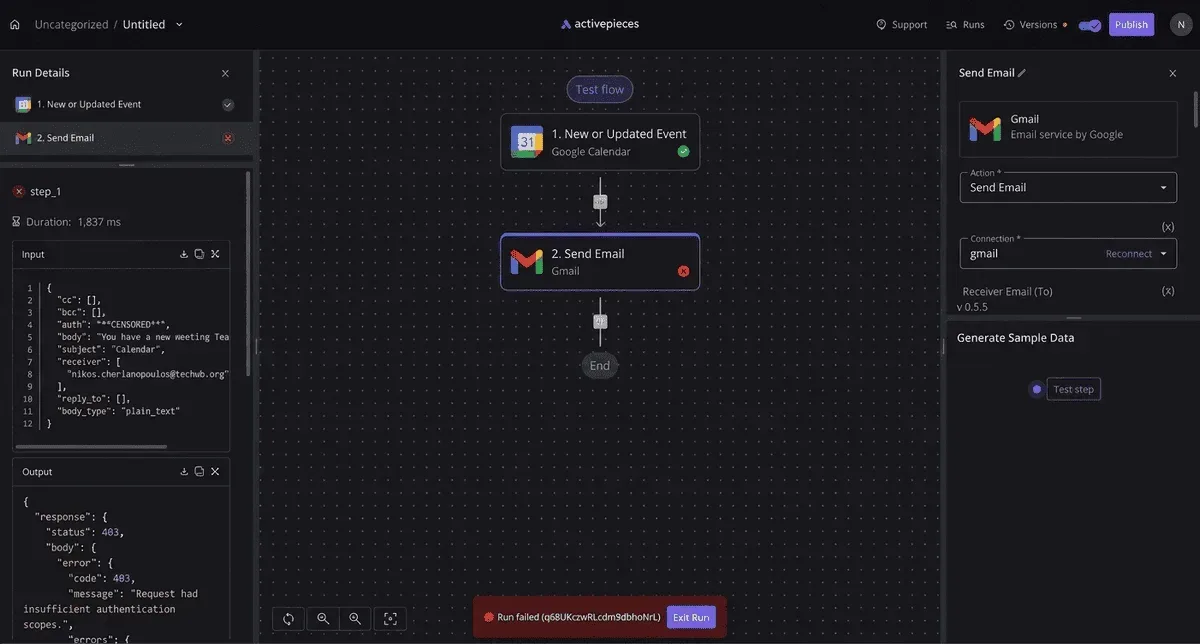
For the rest of this integration, the scenario is a sign-up confirmation sender. A user submits a form, your server sends one message with a link, and the user waits on it.
The first test of that flow will pass. The problems come later, when real traffic arrives and the failure modes in the docs stop being theoretical.
I've left out the plan question deliberately: check which plan your account is on before you rely on any quota. I'm not going to state a plan boundary I can't cite from the docs.
Endpoints Resend documents
Read the list below as a map of what a sign-up sender touches, since the API reference groups its endpoints into families. Only the first item is on the critical path for a confirmation email.

- Emails sends a single message, which is the call your confirmation flow makes.
- Batch sends several messages in one request, useful if you queue confirmations and flush them together.
- Domains registers and verifies the sending domain, without which your sender address will not be accepted.
- API keys creates and revokes the credentials your server uses, so a leaked key is a revocation rather than a rebuild.
- Audiences and contacts stores recipient lists, which a pure transactional sender can ignore at first.
- Broadcasts sends one message to an audience, which is marketing mail and a different risk profile from a confirmation.
That's six families, and your sign-up flow needs only three of them to work: emails, domains and API keys. The rest are worth knowing exist before someone adds a newsletter to the same account.
If you'd rather not hand-write HTTP requests, Resend's docs list official client libraries for a range of languages. If your language isn't covered, the REST interface works from any HTTP client.
If you'd rather skip code entirely, Activepieces, whose MIT-licensed core ships 750 integrations, has a Resend integration that calls the send-email endpoint from a workflow, a route the closing section returns to.
This takes minutes, not a project: automate it in Activepieces free.
Day one: key, domain and first request
When the domain step is skipped or still pending, the request fails, which is why the order below matters. The first send is a key, a verified domain and one authenticated request, and only the last of those is code.
Two of the five steps are waiting on DNS, not on you, and that is the point to take from the sequence:
- Create an API key, choosing sending-only access and, if offered, restricting it to one domain.
- Add the sending domain in the dashboard.
- Publish the DNS records Resend gives you at your DNS host.
- Wait for the domain to show as verified.
- Send the first request with curl and a Bearer header.
Each step is covered below, starting with the one that is easiest to get wrong by being generous.
Choose sending-only access, not full access. A sending-only key can send mail and nothing else, so a leaked one lets someone spam from your domain but can't read or delete your configuration.

If you can restrict the key to a single domain, do that as well, so a staging key can't send as production.
Add the domain, then copy the records Resend displays into your DNS provider exactly as shown. Verification isn't instant, because it depends on your DNS host publishing them.
Until the dashboard says verified, sends from that domain are rejected, so a failing first request usually means a pending record, not a broken key.
To authenticate, send a single header: Authorization: Bearer followed by your key.
curl -X POST 'https://api.resend.com/emails' \
 -H "Authorization: Bearer $RESEND_API_KEY" \
 -H 'Content-Type: application/json' \
 -d '{"from":"[email protected]","to":["[email protected]"],"subject":"First send","html":"<p>It works.</p>"}'
Put the from address on the domain you verified. A successful response returns an id for the message, which is what you search for when something later goes missing.
Keep the key in an environment variable or your host's secret store, never in source control or client-side code. The variable in the example above is the pattern to copy.
A key committed to a repository is public the moment the repository is, and the next section covers what the limits do when someone else is using it.
Pricing per email and limits by plan
Once someone else is using your key, the plan sets the ceiling.
Resend's pricing page puts Scale at $90 a month for 100,000 emails and $1,150 for 2.5 million, and each step up costs less per email, making a strong economic case for consolidating your sending volume. Figures checked 19 November 2026.
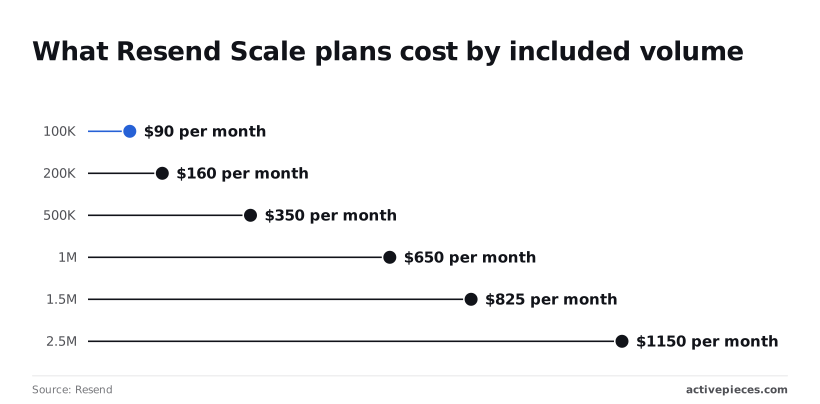
Price per 1,000 emails by tier
Where the pricing page is silent, the cell says so, which means you can't budget around that number until you've confirmed it. Everything else in the table is what the page states for each plan.
| Plan | Monthly quota | Daily limit | Domains | Requests per second | Retention | Overage per 1,000 emails |
|---|---|---|---|---|---|---|
| Free | not stated | not stated | not stated | not stated | not stated | not stated |
| Pro 50K ($20) | 50,000 | not stated | not stated | not stated | not stated | not stated |
| Pro 100K ($35) | 100,000 | not stated | not stated | not stated | not stated | not stated |
| Scale | 100,000 to 2.5M | not stated | not stated | not stated | not stated | not stated |
| Enterprise | not stated | not stated | not stated | not stated | not stated | not stated |
You can budget only against the Scale steps, because they alone have confirmed prices.
The 100K tier is $90 a month, which is $0.90 per 1,000 emails. At 200K it's $160 ($0.80 per 1,000), at 500K it's $350 ($0.70), and at 1M it's $650 ($0.65), so customers buying larger volumes pay substantially less per message.
At 1.5M it's $825 ($0.55), and at 2.5M it's $1,150 (about $0.46), meaning the savings from scale never plateau even at the highest volumes.
Going from 1M to 1.5M adds 500,000 emails for $175, which means you can expand your volume at almost no marginal cost. The extra volume costs about $0.35 per 1,000, so buying incremental volume undercuts any tier's per-thousand cost.

Sending more is cheaper per email, but only if you commit to the larger tier.
If you plan a burst, such as a password-reset wave after an outage, you have no number to size a queue against, because the table has no requests-per-second figure for any plan.
Send a load test through your own key before launch, and treat the first rejected request as your real limit.
Resend daily and monthly email quotas
Plan around the monthly quotas. They are 50,000 on Pro at $20 and 100,000 on Pro at $35, so at higher volumes your per-email cost declines. The same 100,000 costs $90 on Scale.
Send a load test through your own key before launch, and treat the first rejected request as your real limit.
Scale buys no extra volume at that size, so the difference must be in what else the plan includes.
However comfortable a monthly quota looks, a single heavy day can still hit a cap you were never shown, because the daily limit isn't stated for any plan.
Resend API rate limit 429s at launch
You can sit well inside a daily quota and still run into a limit that resets every second, and at launch the second is the one that bites.
In a modelled scenario (not a vendor figure), 1,000 sign-up emails arrive in one minute. At the default 10 requests per second, documented on Resend's rate-limit page, only 600 of them are accepted, so you cannot exceed this throughput.
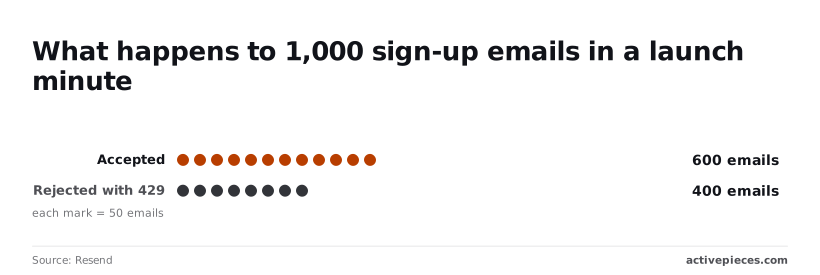
400 of them come back as 429s. That's 40 percent of the people who just signed up, staring at a screen waiting for a code that was never sent.
Read the 400 as users, not requests, which means each is a real person. Each one is someone who typed an address, pressed the button and got nothing.
Chart: Where 1,000 launch-minute sign-up emails end up
Unless your code retries, those 400 are lost. The API doesn't queue them for you, and nothing in your dashboard will look broken, because the 600 that went through look healthy.
What a Resend 429 response contains
When a request is rejected, it returns HTTP status 429, which means too many requests. In this scenario that status arrives 400 times in one minute, so your error handling isn't an edge case; it carries 40 percent of your traffic.
Per the same rate-limit page, the response carries headers that report your limit and how much of it remains. Another header tells you how long to wait before trying again.
Log those headers. They tell you how far over the limit you were and how long to back off, which is the difference between a retry that works and one that adds to the pile.
If you retry immediately and without delay, you spend the next second's allowance on the same emails and push newer sign-ups into the rejected group.
Not everyone sending these emails is a developer, and the low-volume case doesn't need any of the retry code above.
Describe the notification to the built-in chat in Activepieces, say a form submission that emails the new user through Resend, and it builds and publishes the flow in your account, with a run trace you can open for every execution to see what happened.
It runs under the same RBAC and audit logs as a flow built by hand, and MoneyGram, Moneypenny, Alan and FundingSocieties run Activepieces in production. It doesn't replace the API for the launch-minute burst above, which stays in code where you control the backoff.
Daily quota versus per-second limit
Treat them as two limits, because they measure different things. A quota counts total sends over a day or a month; the per-second limit counts how many requests arrive in the same moment.
The scenario above could sit well inside any quota and still lose 400 emails.
1,000 requests in 60 seconds is an average of about 17 per second, and real bursts are rarely even.
A monthly allowance only tells you how much you may send. The per-second limit tells you how quickly you may ask, so check both before launch.
You can follow the rest of this with the builder open. Start free, no card.
Common Resend API errors and documented fixes
14 named errors across 400, 401, 403, 404, 422 and 429, plus 5xx server failures, are documented in Resend's error reference. Each pairs a cause with a fix you can read before launch.
Only the last row is out of your hands; the rest you can correct, and the table below shows the cause and fix per status.
| Status | Error name | Cause | Documented fix | Docs link |
|---|---|---|---|---|
| 400 | invalid_idempotency_key, validation_error | Malformed idempotency key, or a field that fails validation | Correct the key or the field the message names | Errors |
| 401 | 2 documented names | Key missing or not accepted | Send a valid key in the Authorization header | Errors |
| 403 | 4 documented names | Key or sender not permitted for this action | Read the name, then fix the permission it points to | Errors |
| 422 | 4 documented names | Request understood, parameter unacceptable | Fix the parameter in the message | Errors |
| 429 | 1 documented name | Requests arrive faster than the limit | Slow down, then retry | Errors |
| 5xx | Server error | Fault on Resend's side | Retry later; contact support if it persists | Errors |

If the status sits above 429 in the table, the request is yours to repair. Only the 5xx row is not.
Branch on the error name, not the number. Per the same reference, a 401 has 2 documented names and a 403 has 4, so a 403 has the most distinct causes of any status.
A 404 has one name, so a missing resource is never ambiguous.
Both 400 and 422 mean the request was rejected before sending, and they have 2 names and 4 respectively. Retrying the identical payload only repeats the failure. Log the response body and fix the field.
There is one cause and one response for a 429, since it has exactly 1 documented name: back off. A 5xx is the only class where an unchanged retry can succeed.
Attach an idempotency key to sends you may retry. invalid_idempotency_key sits under 400, so a malformed key fails the request outright rather than being ignored. Generate the key once per intended email, not once per attempt, or each retry becomes a second send.
Sending Resend emails without code in Activepieces
Activepieces, an open source workflow builder with an MIT-licensed core and 750 integrations, has a Resend integration.
Its actions call the send-email endpoint from a workflow step, so an ops owner can wire a form or a CRM event to an email without writing a line of code.
A retry made there is still a retry against Resend, which is why the idempotency rule above carries over.
What the Resend integration does
Give the integration your Resend API key once, as a connection, and it exposes the send action as a step. You fill in sender, recipient, subject and body from earlier steps: a form submission supplies the address, a new CRM record supplies the name.

Because the step makes the same call you would make from code, it's governed by the same account limits and returns the same errors.
Flows are unlimited on every plan, including free, but that counts flows, not requests at Resend: the ceiling is still the default 10 requests per second, and Activepieces doesn't smooth traffic on your behalf.
Resend workflow example with a retry path
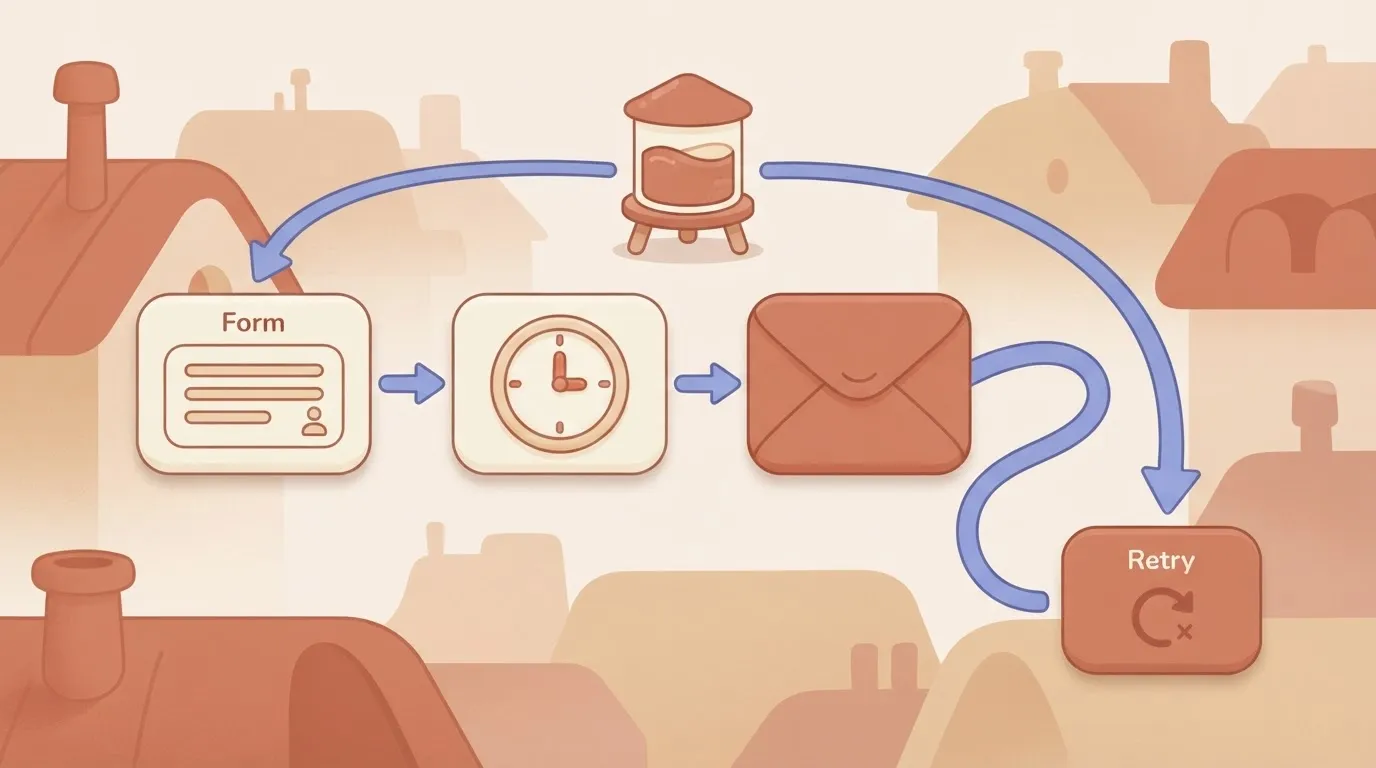
Picture the usual build: a form-submission trigger, a delay step, then the Resend send-email action, with a loop from the action back to a retry step.
In the drawing below, the caption is the point: the retry path draws on the same team-wide request limit as the first attempt, so a burst of submissions and a burst of retries compete for one budget.
(illustration)
Avoiding Resend rate limit spikes and duplicates
Put the delay step ahead of the send so a spike in triggers is spread out rather than fired at once. Cap the retries, and wait between them, so a rate-limit error doesn't turn into a queue of repeats that keeps you rate-limited.
Check whether the integration lets you set an idempotency key on the send action. If it doesn't, a retry after an ambiguous failure can deliver a second email, and you should treat the retry step as a risk rather than a safety net.
When to use code instead
Keep high-volume transactional sending in code. Password resets, receipts and verification codes need control a workflow step doesn't give you: a key generated once per intended email, backoff that reads the response, and logging you can query when a customer says the message never came.
In a visual workflow, a failed run is something you find by opening the run history.
Use Activepieces for low-volume, human-triggered mail where an ops owner needs to change the wiring without a deploy: a run costs 1 credit however many steps it has, and the free plan includes 1,000 credits a month.
Use the API directly for anything where a duplicate or a dropped message is an incident. Whichever you choose, read the limits in Resend's own documentation before launch, not after.
Frequently asked questions
Cost and client libraries
Before launch you can confirm the answers below yourself: five questions the earlier sections left open, each checked against Resend's documentation on 19 November 2026.
Is the Resend API free to use? Resend has a free plan, but its sending allowances are set by the plan, not by the API.
Read the current limits on the pricing page (checked 19 Nov 2026), because a free allowance you haven't read is the one you hit on launch day.
Does Resend offer an official SDK for my language? Probably, yes. Resend publishes official SDKs for several languages, including Node.js and Python, and the documentation lists the full set (checked 19 Nov 2026).
If yours is missing, the REST API works from any HTTP client. You then write the retry and error handling the SDK would otherwise have given you.
Limits and inbound email
How do I get higher rate limits on Resend? The docs treat higher limits as a request to Resend's support, not a setting you change in your account. The documentation describes the process (checked 19 Nov 2026).
Ask before launch, because an increase that depends on a human reply won't arrive during an incident.
Can I receive inbound email through the Resend API? Yes. Resend documents receiving email as well as sending it, and delivers inbound messages to you through webhooks. The documentation covers the setup (checked 19 Nov 2026).
Your endpoint therefore has to be reachable and quick to acknowledge, or inbound mail will go unprocessed.
How do I check that a webhook really came from Resend?
Verify the signature. Resend signs its webhook requests and gives you a signing secret to check them against, and the documentation explains the headers and the verification step (checked 19 Nov 2026).
Verify against the raw request body, because a body your framework has already parsed and re-serialised can fail the check. Skipping verification leaves your endpoint open to anyone who finds its URL.
Related reading
Build it
Set this up in minutes.
No code required. Connect your accounts, and Activepieces runs it from there.
Start free Talk to sales