
Is Workato Free? Pricing and Alternatives for 2026

Nov 23, 202614 min read
Yes, as of 23 November 2026 Workato's docs list a self-service Workato Free plan, although its pricing page shows no price.
It sends you to a demo request, so the first thing you can't do is build anything without talking to sales, which is a real difference from tools like Activepieces where you can sign up and start building right away.
If you haven't met it, Workato's an enterprise integration and automation platform. It connects business systems through "recipes", its term for an automated workflow, and it's sold to companies with IT teams.
Workato pricing and whether any plan is free
Is there a free Workato plan or trial
The docs list a self-service Workato Free plan, a 50,000-credit one-time grant. We also found no self-serve sign-up that gives you a workspace the same day.
The call to action's a demo request. If Workato offers evaluation access, it's arranged through that sales conversation, and its length and limits are unpublished. Treat any trial terms you hear as something to get in writing.
How Workato prices: quote, recipes, tasks and connectors
When Workato's materials describe cost, they do it in recipes, tasks (each action a recipe executes) and connectors. Workato does not publish the amounts attached to them.
Your price is a quote shaped by how many workflows you run, how much volume passes through them, and which systems you connect.
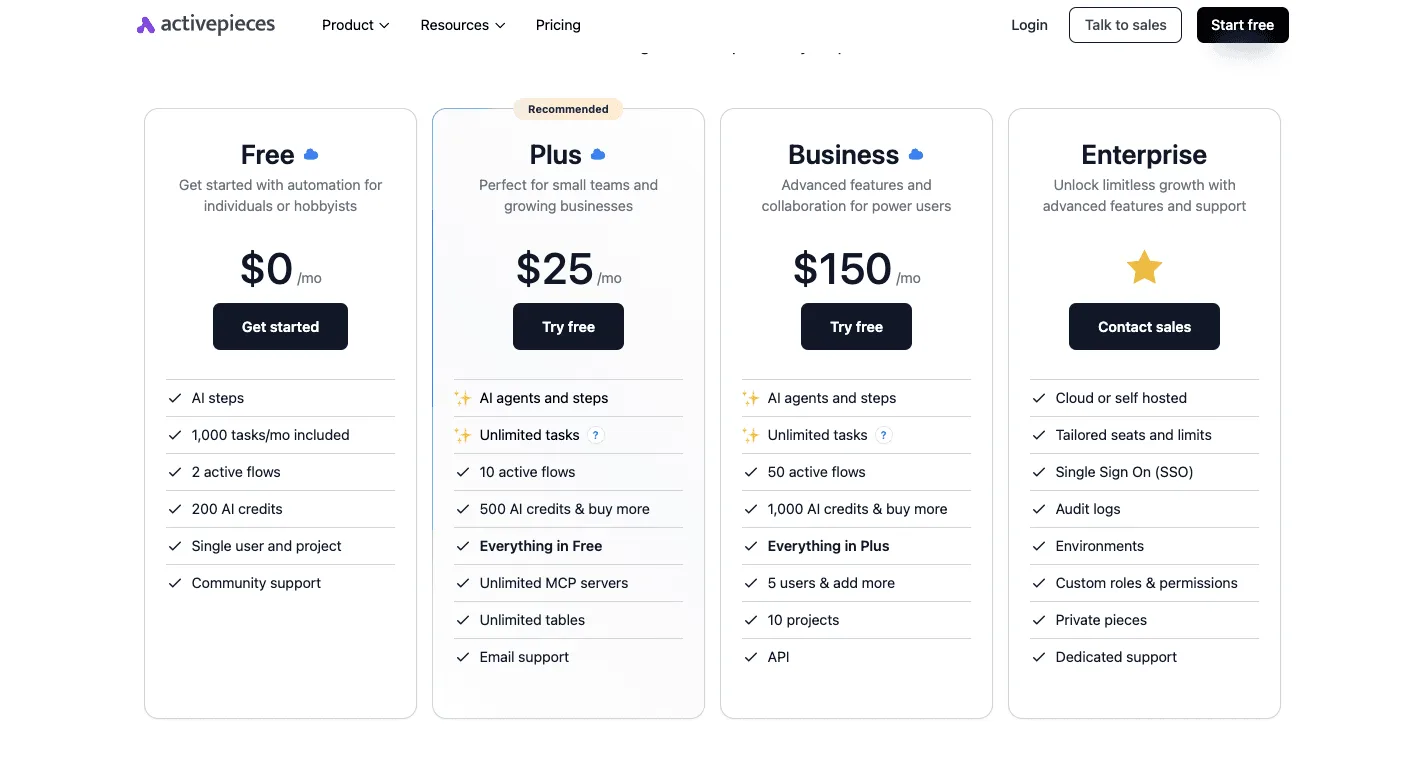
To see the contrast with a quote, look at Activepieces, which publishes its tiers on a page anyone can read.
The pricing page below shows four tiers, from a free one to a contact-sales one, with each tier's limits stated before you speak to anyone, meaning you can assess fit without sales pressure.
Workato's sales process limits free access
Before you hit a task cap or a connector restriction, you hit the sales process: a demo, a scoping call, a quote. The first limit is access, not volume.
Before you hit a task cap or a connector restriction, you hit the sales process: a demo, a scoping call, a quote.
After that come task volume and connector scope, but they are negotiated per contract. We can't give you a figure for them because Workato doesn't publish one.
If you are running this arithmetic for your own team, see what the same workload costs on Activepieces.
Why teams leave Workato
Teams leave Workato mostly because a quote-only price and an enterprise-sized product are more than a small team needs, not because the integration fails. That leaves three options: stay and negotiate, move to a lighter paid tool, or move to a free one.
Cost and quote-only pricing for a small team
Look for a price on Workato's pricing page and you get a route to a sales conversation instead of a number. You can't compare it with a tool that lists its plans, and you can't budget before you've spent time on calls.

Workato's average contract's close to MuleSoft's and well above Boomi's, and buyers still negotiate a meaningful share off, so the first quote is an opening position.
If you run a handful of automations, you're paying for an enterprise buyer's average.
Workato enterprise features small teams don't need
Open Workato's documentation and it's organised around governance, environments, on-premise connectivity and large-scale orchestration. A team syncing form submissions to a spreadsheet and a chat channel uses none of that.
Before you accept a quote, list the automations you actually run today. If every one's a trigger followed by a few actions, you're buying capacity you won't use.
Lock-in to Workato's recipe model and connector catalogue
Build in Workato and the unit of work's the recipe, which runs only on Workato. Moving away means rebuilding each recipe's logic step by step in the new tool, not importing it.

The connector catalogue's the same problem: when an app you use isn't covered or the action you need's missing, you're waiting on the vendor.
When staying on Workato is the right call
Stay if you have many systems, several teams building automations, and a need for audit trails and controlled environments. Rebuilding that on a lighter tool costs more than the licence, and the negotiated discount in the chart is worth pursuing.
If that doesn't describe you, run your three most important automations on a lighter tool for two weeks before renewing.
Workato alternatives compared in one table
Seven tools are worth that two-week test, and the table below shows what each offers for free, what it costs next, and where it stops.
Read the "Main limit" column first. It shows where each tool starts costing you or slowing you down. Cells come from each vendor's own pricing and product pages, checked November 2026.
| Tool | Free plan and limit | Next plan price | Self-hostable | Strength | Main limit | Suits |
|---|---|---|---|---|---|---|
| Workato | Self-serve Workato Free and Workato Pro plans; larger editions sales-led | Quote-based, no public list | No | Governance and deep enterprise connectors | Cost and procurement effort | IT-led teams with compliance needs |
| Zapier | Free plan, capped monthly tasks | Tiered by task volume | No | Largest app catalog, fast setup | Cost rises with task volume | Non-technical teams, short chains |
| Make | Free plan, capped monthly credits | Tiered by credits | No | Visual branching and data handling | Every step consumes credits | Ops teams with branching logic |
| n8n | Free self-hosted Community edition; cloud's paid | Cloud tiers by executions | Yes | Flexible, code-friendly | You run and patch it yourself | Developer-led teams |
| Power Automate | Standard connectors included with many Microsoft 365 plans | Per-user or per-flow licences for premium connectors | No | Native Microsoft integration | Premium connectors need extra licences | Microsoft 365 shops |
| Pipedream | Free tier with usage caps | Usage-based paid tiers | No | Code steps with prebuilt triggers | Assumes you can read code | Developers wiring APIs |
| IFTTT | Free tier, limited applets | Paid Pro tier | No | Simple triggers, consumer devices | Shallow multi-step logic | Individuals, small setups |
| Activepieces | Free forever plan: $0, 1,000 credits a month, unlimited flows, up to 5 users | Plus: $20 a month flat, 10,000 credits a month | Yes (MIT-licensed core; enterprise directories under a separate commercial licence) | Open source with 750 integrations, 25,683 GitHub stars | Credits cap runs, and AI steps cost more credits (2, 10 or 20 per step without your own keys) | Teams that want open source and self-hosting, from a single team to every department |
Which alternative suits which team
Pick Zapier if nobody on the team writes code and your automations are short chains between common apps. Pick Make if a flow needs branches, loops or reshaped data and someone's willing to learn a visual canvas.
Pick n8n if you have a developer and want to avoid per-task billing. Self-hosting removes the usage meter but adds server upkeep, so the saving only holds if someone owns that work.
Pipedream fits the same developer but prefers writing steps in code over dragging nodes.
Pick Power Automate if your data already lives in Microsoft 365. Check which connectors you need before assuming it's free, because premium ones change the bill.
If your use is personal or very light, IFTTT suits. It's the wrong test for your three most important automations if they have more than a trigger and an action.
Stay on Workato if governance, audit trails and enterprise connectors are the reason you bought it.
A connector can list an action as supported and still fail on your field mapping, which the table can't show. Run your three real workflows and read the error output yourself.
Worth checking against a plan that does not meter every step: one credit covers a whole run on Activepieces.
Where Activepieces fits as a Workato alternative
You can test a lighter tool without a purchase order, and Activepieces gives you a free hosted account and lets you run the same MIT-licensed core on your own server.
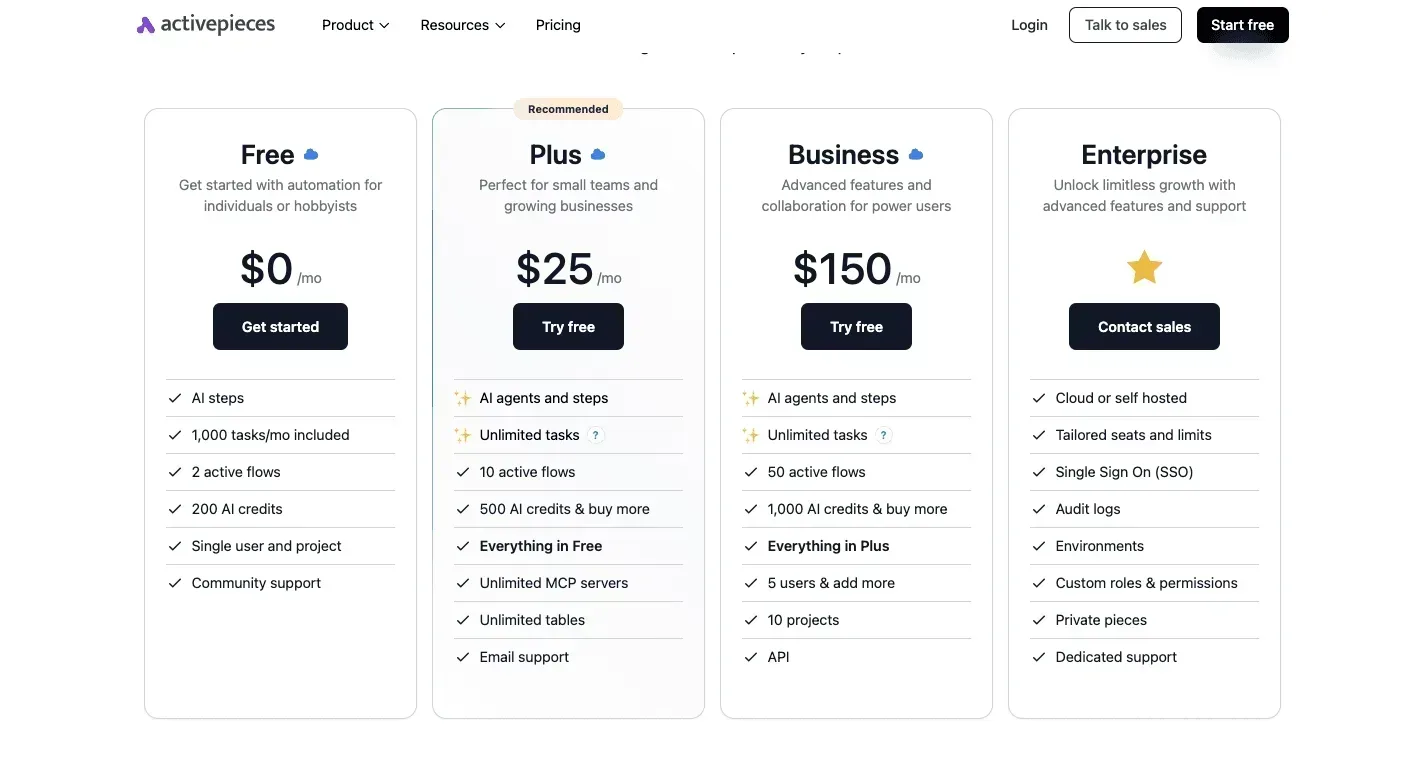
Its free cloud plan is $0 with 1,000 credits a month, unlimited flows and up to 5 users, as listed on its pricing page, so anyone consuming more than 1,000 credits monthly or adding a 6th user has exhausted the free tier.
The core is MIT-licensed, with the licence file in the GitHub repository, and the 750 integrations can be counted in that repository's community integrations directory, so you can connect to most platforms without custom development.
Alan and FundingSocieties run it in production, so it's both deployed and open.
In the illustration below, a hosted cloud workspace with a flow of connected steps sits beside a team's own server running the same open-source flow. A shelf of integration blocks feeds each.

What to take from it is that the flow's the same either way. Only who runs the machine changes.
What the free tier and self-hosting include
In Activepieces' terms, a flow's an automation: a trigger followed by steps. Each step uses an integration, which is a connector to an app or a built-in utility. The cloud free tier lets you build flows in a hosted workspace without installing anything.

If you self-host, you run the open-source edition from the project's repository and docs, on infrastructure you control. That costs you server time and maintenance, and it removes the vendor's task cap from the picture.
If a connector's missing, you or a contractor can write one in TypeScript and add it to your own instance, because the integrations are open source too. That's a path Workato's closed connector model doesn't offer.
Where the Activepieces free tier falls short
Governance is the first gap. Workato's built around controlled promotion between environments, detailed audit trails and role-based access for large teams.
At that depth, Activepieces' free and community offerings don't match. If an auditor will ask who changed a recipe and when, you'll be asking your own team to build that answer.
The connector catalogue's smaller. Before you commit, open the integration list and look for the exact action you need, not just the app's name. An app listed with a trigger but no "update record" action's a common way a migration stalls.
When a flow fails at month end, nobody's contractually obliged to answer. Support is the third gap. Self-hosting means you're the on-call team, and community channels aren't a service agreement.
Which Workato workloads it suits and which it does not
It suits simple, linear work: moving a form submission into a spreadsheet, posting a notification when a deal changes stage, or syncing a small number of records on a schedule. These are the flows that a two-week trial can prove or disprove.
It doesn't suit heavy enterprise integration. That means long-running transactions across several core systems, strict separation of development and production, or compliance rules that demand vendor-backed support.
If your Workato use looks like that, a free tier's the wrong test, and the honest answer to "do I need Workato?" may be yes.
Two-week Workato replacement test
If your recipes don't look like the enterprise cases above, you can find out in two weeks, in four stages, without signing anything.
- List every live recipe (Workato's name for one automated workflow) with its monthly volume.
- Shortlist two tools from the comparison table.
- Rebuild one workflow on a free plan until it writes a test record.
- Compare your volume to the free limit and decide.
Export the recipe list from your Workato workspace and add one column: jobs run last month, taken from each recipe's job history.
Mark every recipe that depends on a feature a lighter tool may not have, such as on-premise agents or custom connectors. You end with one sheet, and the marked rows are your honest risk.
Pick the two tools whose free limits are counted in the same unit your sheet uses. Comparing a per-task limit to a per-run limit is how people convince themselves a plan will fit when it won't.
If any marked recipe needs self-hosting, make one of the two a self-hostable tool.
Stage 3: Rebuild one workflow on a free plan
Choose your simplest recipe that writes data somewhere, and rebuild it on each shortlisted tool. Don't stop at "connected." Stop when the run log shows a test record in the destination, and screenshot that log.
If a connector claims to support the action you need but the field you map isn't offered, or the run fails on it, screenshot the error. That error is your result for that tool, and it costs you an afternoon rather than a contract.
Set your Stage 1 monthly volume against each tool's free limit, revealing which tools fit without upgrade. Three outcomes follow:
- Volume fits with room to spare: stay on the free plan.
- Volume exceeds the limit but the rebuild worked: price the next paid plan against what you pay now.
- The rebuild failed on something the marked recipes rely on: that's your evidence for keeping Workato.
Frequently asked questions
Does Workato offer a free trial or a free developer account?
Treat any trial as a time-boxed evaluation. Check Workato's pricing and signup pages for what's on offer today, because the terms are set by sales rather than published as a fixed free tier.
If you only want to learn whether your workflow's automatable, a free plan on a lighter tool answers that faster.
Can Workato be self-hosted?
No, Workato's a hosted platform, and the whole product runs in its cloud.
What it does offer is an on-premise agent, which lets a recipe in the cloud reach systems that sit behind your firewall. That's a connection method, not a self-hosted install: the recipes, the runs and the logs stay on Workato's side.
If you need the entire workflow engine on your own server, n8n's self-hosted edition's the example to look at.
What is the cheapest way to replace Workato for a small team?
Start with the free plan of Zapier or Make, and add n8n self-hosted if someone on the team can run a server.
Count your actual workflows first. Most small teams find that a handful of trigger-and-action flows cover what they use, and those fit a lighter tool without trouble.
The cost to watch is your own time: self-hosting's free in licence terms but not in maintenance.
Is there a free Workato alternative with no task limits?
For no task limits, self-hosted n8n's the closest answer, since you run it yourself and the limits come from your own hardware rather than a vendor's meter. That's a claim about n8n's self-hosted edition only.
On the hosted side, the free plans from Zapier and Make all cap usage in some unit, whether tasks or credits.
How hard is it to migrate recipes out of Workato?
Expect to rebuild, not export. For recipes written for Workato's own connectors and logic, no other tool imports them as they are.
Practically, you list each recipe, note its trigger, its actions and its error handling, then recreate the simple ones first. Recipes that rely on custom connectors, heavy data mapping or on-premise agents take the longest.
Running one rebuilt flow in parallel with the original for a while shows you where the behaviour differs before you switch anything off.
Running the numbers
See what the same workload costs here.
Free forever plan, and every paid plan self-hosts at no extra cost.
See pricing Talk to sales