
Real Estate Automation Examples: 5 Workflows to Build

Oct 19, 202616 min read
Real estate automation is trigger-based software, of the kind you can build in tools like Activepieces, that moves data and sends messages the moment something happens, without a person doing it.
This article builds five runnable workflows: instant lead response, document intake, showing confirmations, rent and renewal reminders, and listing updates. Start with the first and add one at a time.
Understand real estate automation
What counts as real estate automation
When your marketing team has several versions of the lead tracker, the one the agent checks is the stalest. Automation fixes that by writing every new lead to one place and replying while the buyer is still holding the phone.

It's not AI chat. A chatbot answers when someone asks it something, and an automation runs when an event occurs, whether or not anyone is watching.
It's also not a CRM. The CRM is where records live, and the automation is what carries information into it and out of it. You keep the CRM you already pay for, and the automation connects it to your inbox, your forms and your texting.
How real estate automation workflows are structured
Strip any workflow down and it has the same shape. A trigger is the event that starts it: a portal inquiry lands, a form is submitted, a PDF arrives in a shared folder.
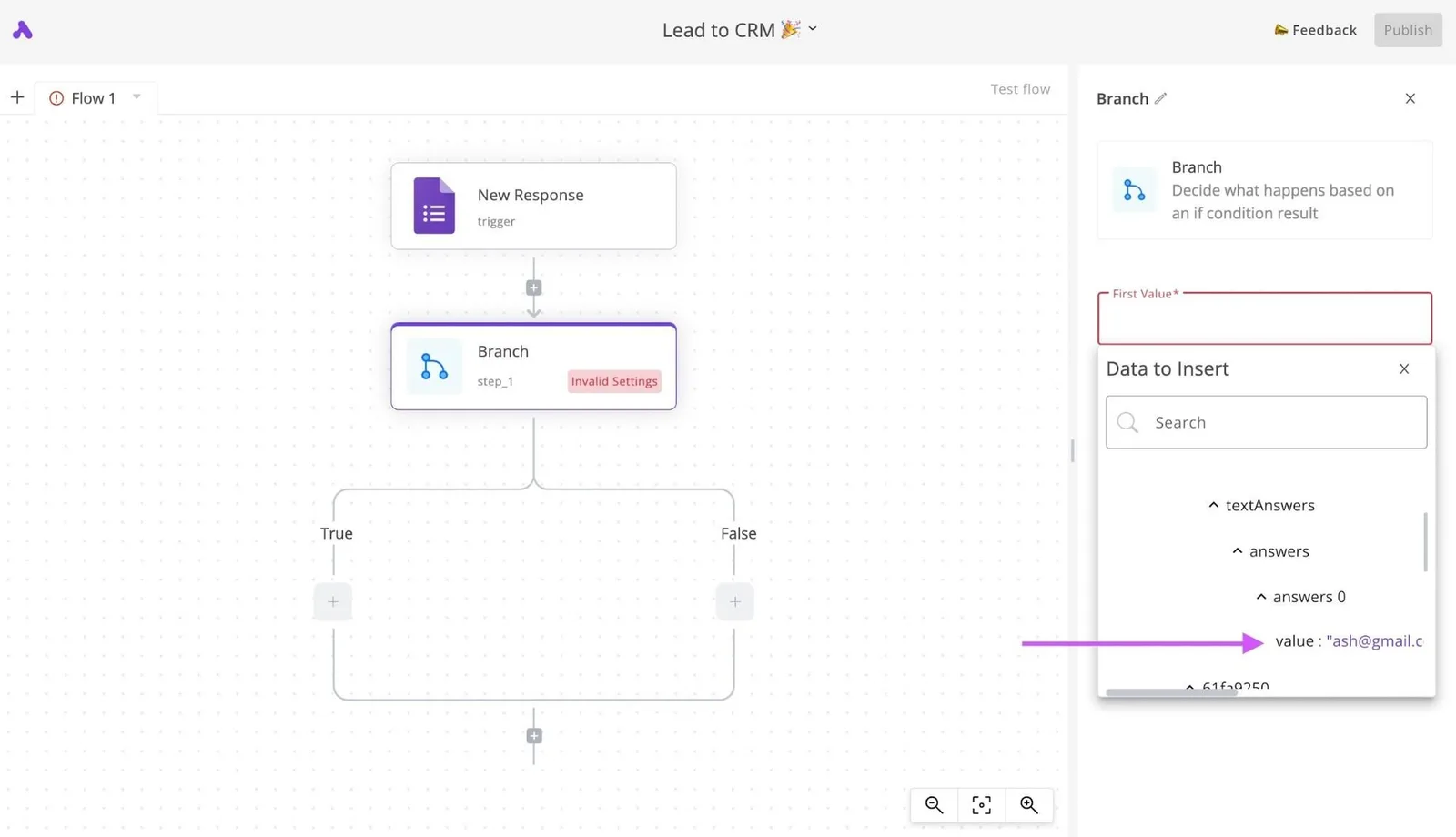
The steps are what happens next: check whether the contact already exists, pick the agent on duty, fill in a template. The action is the visible result, usually a text, an email or a task assigned to a named person.
The gap between them is the reason to automate the first reply before anything else, because a trigger fires in seconds and a person on a showing can't.
A workflow tool that runs this chain on top of the forms, sheets and inboxes you already use means none of the systems you run has to be replaced.
Once the first reply is automatic, the same trigger-step-action pattern carries over to every other flow.
Across the business, only the trigger changes:
- Sales: a new inquiry gets an immediate reply and a task for the agent.
- Listings: a status or price change updates your site and notifies interested buyers.
- Leasing: an application or showing request gets a confirmation and a reminder.
- Property management: a maintenance request or a lease date triggers a message to the tenant and a ticket for the vendor.
You do not need a large platform for any of these. Each one is a short chain you can read in a minute, own outright and fix yourself when it breaks, which, at 2am with a vendor ticket open, is the property that matters most.
Everything below works on Activepieces' free plan. Start without code or a credit card.
What real estate automation costs and requires
Before you can own a flow, you need three prerequisites, and the monthly bill is modest:
- a lead source that sends webhooks
- one record system
- a named person responsible for each flow, so there's someone to fix it at 2am
Requirements before you build
Whether it is a portal, an ad form or your website, your lead source must be able to push a webhook, a message sent the moment a lead arrives.
If it only emails you a notification, you can still parse that, but the flow is more fragile.
Pick one record system where every lead lands, even if it's a CRM (customer relationship manager) or a plain spreadsheet. Two systems means two versions of the truth.
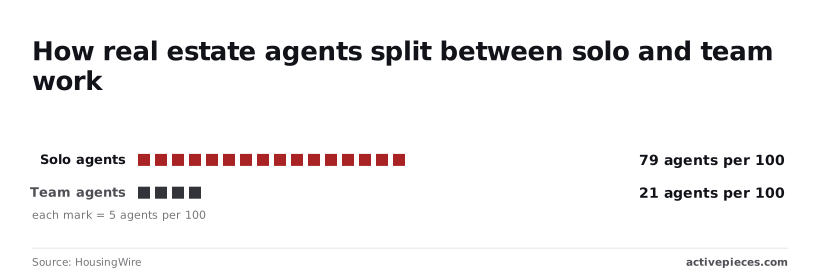
Then name the owner. HousingWire reports that 79 of every 100 agents work solo, and 21 work on a team. For most readers, then, the owner is you, so every flow must be small enough to debug without a colleague or an IT department.
Two systems means two versions of the truth.
Real estate automation cost by approach
Read the table below for the trade-off: the more you own, the less you pay in fees and the more you carry in upkeep. It compares three routes on setup time, how the monthly fee is structured, and who maintains the flow.
| Approach | Setup time | Monthly fee (checked October 2026) | Maintenance owner and effort |
|---|---|---|---|
| CRM-native (Follow Up Boss) | An afternoon to configure | Per-seat subscription | Vendor maintains the engine; you adjust rules occasionally |
| No-code (Zapier Professional) | One to two hours per flow | Subscription scaled by task volume | You, a few minutes when an app connection expires |
| Custom build | Days to weeks | No license fee; hosting and any API usage only | You or a contractor, ongoing and the heaviest |
I'm not printing plan prices for the first two rows because they change with tier and seat count. Read the current figure from each vendor's pricing page on the day you buy.
What follows is that the custom build is rarely the right first move for a solo agent.
For document tools, the figures are easier to pin down. Stack Catch lists PandaDoc at $19 per user per month, SkySlope and DocuSign at $25 each, and dotloop at $31.99.
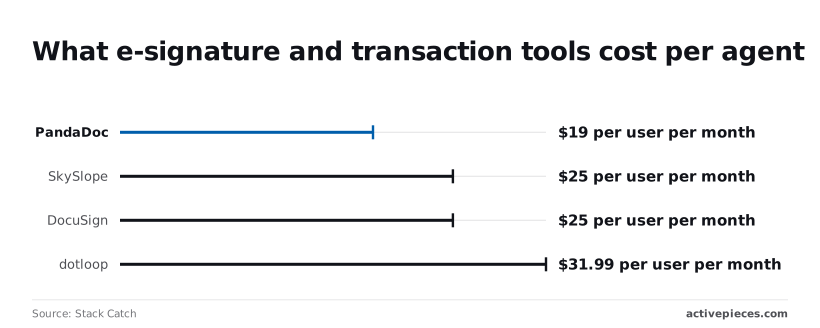
The spread between cheapest and dearest is under $13 a month, so choose on whether it fits your workflow, not on price.
Lead response time research for agencies
I'm not quoting a single response-time statistic here, because I can't tie one to a publisher and year I have verified. Treat any figure you see without both with suspicion.
A better benchmark is your own: for two weeks, record the gap between each lead arriving and your first reply. That number tells you what the first flow is worth.
Build five real estate workflows, trigger to action
To cover the first minutes of a real estate day, you need five flows: lead reply, showing booking, signature chasers, maintenance routing and listing syndication, each one a trigger plus a few steps.
Read a four-step lead flow top to bottom and it goes like this. A new HubSpot lead fires the trigger, an AI step qualifies it, a condition splits qualified from unqualified, and qualified leads go to Salesforce and Slack.
The rest enter a nurture loop that ends in a Gmail email.
You need only the top and bottom of that for now, and the first flow below builds exactly that.
1. Automate lead capture and instant reply
Trigger on your web form or portal enquiry. Step one adds a row in Google Sheets with name, phone, email, property of interest and source. Step two sends a Gmail reply that names the property and offers two viewing windows.

Third, a post goes to Slack with the phone number, so an agent can call while the lead is still holding their phone. Without the sheet row, you lose track of which portal pays for itself.
For flow 2, a showing request becomes a calendar event: trigger on a form submission that includes a preferred date and time.
Check Google Calendar for a clash, then create the event with the address in the location field and the client's phone in the description.
Finish with a Gmail confirmation. If the slot clashes, send a message with alternatives instead, so nobody turns up to a locked door.
3. Automate document and signature reminders
Trigger on a daily schedule. Read your tracking sheet, filter rows where the status is "sent" and the sent date is older than your chosen wait, then email the signer a plain reminder with the signing link.
Add a Slack note to the agent for anything still unsigned after the second reminder, since a person should take over from there.
4. Automate maintenance request routing to vendors
Trigger on a tenant form with unit, issue type, urgency and a photo link. Look up the vendor for that issue type in a sheet, email them the details, and log the request with a status column.
Without a property management suite, landlords often run this from a shared WhatsApp group, where requests vanish. The sheet gives you a record.
For flow 5, a new listing gets pushed to every channel: trigger when you add a row marked "ready" in your listings sheet. Post the title, price, description and photo link to your website through WordPress, then announce it in Slack for the team.
Each channel you add later is one more step, not a new flow.
Five small flows are easier to maintain than one sprawling one, but on a metered tool each extra step can show up on the bill.
Zapier bills a task for every action and Make bills a credit for every module, so a longer flow costs more every time it runs.
Activepieces lists "unlimited flows" on every plan from Free through Ultimate, and the Free plan's 1,000 credits a month are spent on runs, never on how many flows exist. MoneyGram, Moneypenny, Alan and FundingSocieties run it in production.
Easier to see it running than to read about it: set it up free, no card.
Mistakes that make real estate automation backfire
Before the first flow goes live, you can build in a fix for each of five predictable ways automation backfires. Use the set below as a pre-launch checklist rather than a post-mortem, since it pairs every failure with its repair.
- Automating a process nobody wrote down copies one agent's habits and hides the gaps, so write the steps on one page first and automate only what the page says.
- Texting leads without written consent violates the Telephone Consumer Protection Act (TCPA), which allows $500 per message and up to $1,500 if the violation is willful, so store proof of consent on the lead record and send nothing without it.
- Duplicate records split one buyer into three contacts and three follow-ups, so search by phone and email before every create step.
- Silent failures let a broken flow look like a quiet week, so send every error to a channel a person actually reads.
- Automating personal relationships turns a referral into a form letter, so keep the flow for the routine and hand the conversation to a human.
Cheapest to fix is the first of those, a missing process. The next three are where money and reputation leak, so they get more detail below.
Automated texts and emails without consent
Do not assume a form fill is permission to text. The TCPA is the federal law behind most of the exposure, and the Federal Communications Commission (FCC) enforces its rules on automated texts.
Email falls under CAN-SPAM, which the Federal Trade Commission (FTC) enforces. It requires a working opt-out and an honest sender identity.
According to Hallestill, at $500 per message, a flow that texts a few hundred leads without consent creates a liability bigger than most small brokerages' monthly marketing budget, so the compliance cost from one flow exceeds your monthly acquisition spend.

Add a consent checkbox with plain wording to every form, save the timestamp and the form's page address, and make the send step check that field first. Honor "STOP" the moment it arrives.
Duplicate leads and silent automation failures
When leads arrive from a portal, a Facebook form and a sign-in sheet someone typed up on Monday, and there is no lookup step, the same person lands in your CRM (the system where you track contacts) three times and gets three different greetings.

Always look up first, then update or create.
Quieter still, an expired login or a changed form field stops a flow without a sound, and you find out when a seller asks why nobody called. Route errors to a text or chat message to one named person, and check the run history weekly.
Last is automating the relationship instead of the routine. Automate the acknowledgment, the document request and the reminder. Don't automate the condolence, the negotiation or the "I've been thinking about your listing" note.
A past client who gets a scripted check-in knows it. Let the flow notify you, then write that message yourself.
Run these workflows with Activepieces
If your work is the glue between forms, sheets, email, Slack, calendars and webhooks, Activepieces connects those tools across 768 integrations, about 60% of them built by the community, and its core is MIT-licensed.
That glue is where most of the five-minute delays live, since a lead lands in one place and the person who should answer it only learns about it hours later.
When triggers cascade across multiple systems
What it suits
It fits when your problem is "this thing happened here, so something should happen over there." A web form submission becomes a row in a sheet, a Slack message to the agent on duty, and a drafted reply for you to finish.
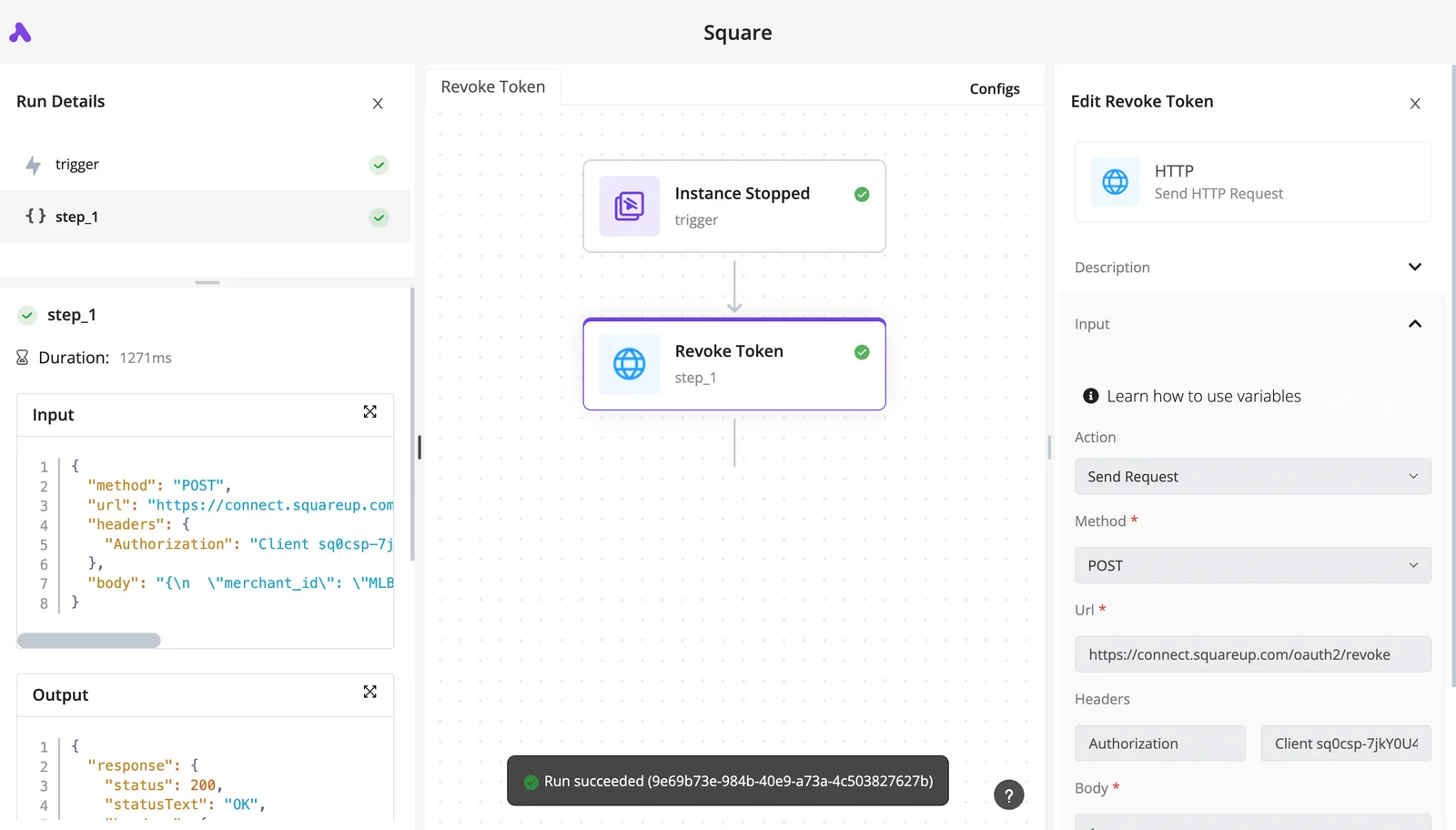
When a flow breaks at 2am, you can see which step failed and what data it received, rather than guessing, because each step in that flow is one you can open, read and rerun.
What it does not replace
It doesn't replace your CRM, and it's not an e-signature provider. It won't hold your contact history, manage a pipeline or collect signatures on a tenancy agreement. Keep those jobs in the systems built for them and let Activepieces move information between them.

If you're weighing it on cost, check the current limits and pricing on the Activepieces pricing page before you commit. Plans change and I'd rather you read the live numbers than trust a figure printed here.
What debugging looks like
In the screenshot, you can see what that debugging looks like in practice. It's a three-step flow with a Google Calendar event as the trigger, a Gmail send as the action, and an end node.
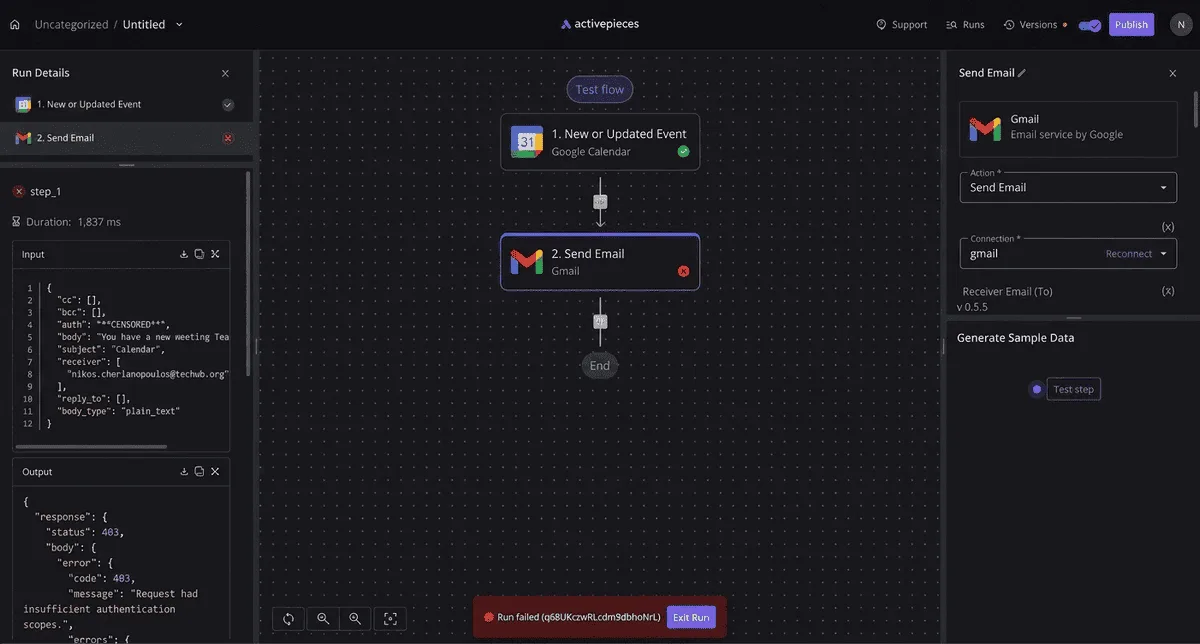
The run details on the left list each step's input and output.
Look at the failed run at the bottom, with its "Edit Run" button. That is the useful part. It takes you straight to the step that broke instead of leaving you to hunt through a mailbox.
Once you can read a failure like that, you can trust the flow enough to leave it running.
Start with the lead-response workflow
Build the first flow around the lead that arrives through your enquiry form, and keep it to four steps:
- Trigger: a new form response or webhook call from your website.
- Add the lead's name, phone, property of interest and time received as a row in your tracking sheet.
- Send a Slack message to the agent on duty with those details and a link to the row.
- Create a Gmail draft addressed to the lead, so you write the reply yourself and send it.
Run it with a test enquiry, break it on purpose once, and open the failed run so you know what a failure looks like before a real lead hits one.
Then add one flow a week. Week two can be a document arriving by email and being filed to a folder with a notice to you.
Week three can be a viewing booked in your calendar that triggers a confirmation. Stop adding when you can no longer explain every flow from memory.
To build the first one, sign up for the free plan, no card needed.
Frequently asked questions
Can a solo agent use real estate automation without a CRM?
Yes: a shared inbox, a form, and a spreadsheet are enough to run a lead-response flow. The trigger is a new form submission or email, and the steps reply to the lead and add a row to your sheet.
That row replaces the CRM until you have enough volume to miss one.
If you already pay for a CRM, use its contact list as the destination instead of a second tracker. A solo agent has no one to reconcile two versions of the truth with at 11pm.
Is automated lead follow-up legal?
Legal, yes, but texting carries the stricter rules, so get consent before you automate it. In the US, automated marketing texts generally require the lead's clear, documented permission, and every message needs a working way to opt out.
Store the consent alongside the lead record, and have the flow stop the moment someone replies to stop. Email has its own opt-out requirements.
Because rules differ by state and by country, and your brokerage may add policies on top, ask your broker or a compliance lawyer to review the exact wording before it goes live, because "the tool sent it" won't be accepted as a defense.
How long does the first workflow take to build?
Short enough to finish in one sitting if you keep it to a trigger and a few steps. The slow part is rarely the building. It's deciding who gets the lead, what the first reply says, and where the record lives.
Write those three answers down before you open any tool, and the build mostly becomes connecting accounts.
Test with your own phone number and email first, so the first real lead isn't your test. Then leave it alone for a while before adding a second flow. Changing two things at once makes it impossible to tell which one broke.
Do I need AI for real estate automation?
No. A fixed reply that names the property, the lead's question, and your next available time covers most first responses, and it behaves the same way every time.
In narrower jobs, AI earns its place: pulling the key fields out of a messy inquiry, drafting a reply for you to approve, or sorting documents by type.
Add it where the input is unpredictable text, and keep a person looking at anything that goes to a client unreviewed.
If a plain rule can do the job, use the rule. It's cheaper, faster, and easier to debug when something goes wrong.