
Best Linear Alternatives in 2026 (7 Picks Tested)

Oct 11, 202613 min read
When the speed of a streamlined UI no longer offsets the operational tax of a rigid architecture, teams begin to migrate away from Linear.
While the tool excels at managing individual developer velocity, it often creates data silos that require manual synchronization across the broader engineering lifecycle.
Why teams seek Linear alternatives
When the speed of a streamlined UI no longer offsets the operational tax of a rigid architecture, teams begin to migrate away from Linear.
The friction of opinionated workflows
Rigidity becomes a bottleneck for organizations that need to map project states to external triggers, such as an automated deployment failure or a security vulnerability alert. By prioritizing a clean, keyboard-driven interface over custom logic, Linear enforces a specific methodology for issue tracking.
When a team's internal process deviates from the standard Linear cycle, they are forced to either change their culture to fit the software or maintain brittle, manual workarounds.
Engineers often use Activepieces to bridge these gaps, syncing Linear issues with external data so the task board reflects the actual state of the production environment.
Activepieces allows teams to treat these automations as software by using Git Sync and Release Management to move flows from test to production.
This ensures that a logic change is a versioned, reviewed event rather than a private edit in a vendor's UI, a capability documented for both its self-hosted and cloud versions.
Linear pricing for larger teams
Bringing non-engineering stakeholders into the workflow creates a financial overhead that serves as a primary driver for seeking alternatives.
According to ClickUp, Linear carries an annual cost of $7,200 for a 50-user team, which means each seat costs the organization only $144 per year.
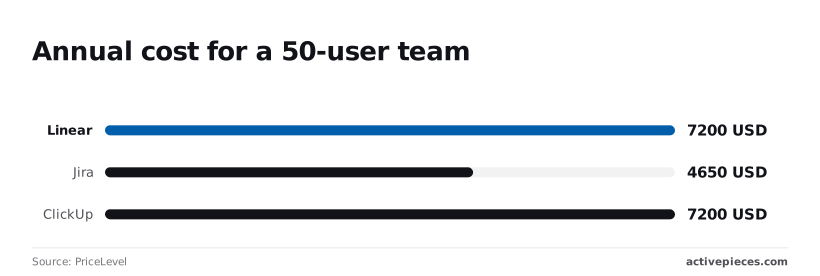
This matches the $7,200 required for ClickUp but is higher than the $4,650 charged by Jira for the same seat count.
Teams often pay full price for users who only need to monitor progress because Linear does not offer a low-cost "read-only" or "guest" tier for stakeholders like Product Marketing or Legal. This effectively doubles the per-seat cost for passive observers.
Linear's roadmap and reporting limitations
Leadership often struggles to track multi-team initiatives because Linear’s focus on current tasks results in a lack of native portfolio-level roadmapping.
Taskfolk notes that the platform’s free tier imposes a 250-issue limit, which means a small startup can hit a hard ceiling within a single quarter of active development.
Growing teams are forced by these limitations to look toward platforms that allow for more complex data relationships and broader organizational visibility.
Primary drivers for migration include rigid workflows, the high cost of guest access, a lack of native roadmapping, and the 250-issue limit on the free tier.
The fastest way to settle a shortlist is to try one. Activepieces is free to try, no credit card.
Reasons to keep using Linear
Before migrating, teams must weigh the cost of complexity against the benefits of a specialized tool. Linear remains the benchmark for developer experience because it eliminates the latency and visual noise that plague enterprise platforms.
Why developers prefer Linear's speed
The platform is built on a local-first architecture that ensures the interface responds instantly to every keystroke. For a developer who spends eight hours a day in their task manager, the absence of loading spinners translates directly into sustained flow state and higher daily output.
Opinionated workflows as a productivity feature
Linear's rigid structure is often its greatest asset for teams that want to avoid the "configuration trap" of larger tools.
By enforcing a standard way to handle cycles and backlogs, it removes the need for a dedicated project administrator, allowing engineers to focus on shipping code rather than designing ticket workflows.
Jira for enterprise-grade customisation and scale
Jira remains the industry standard for organizations that require granular control over issue hierarchies and cross-departmental visibility.
While Linear optimizes for the individual contributor's velocity, Jira is the infrastructure to enforce global governance across thousands of users, so the latter is better suited for managing complex corporate compliance.
Shipping code fast is no longer the primary bottleneck for many teams. It matters when they must accurately audit the path that code took from a requirement to a production environment.
The cheaper tool often depends entirely on the headcount and depth of the required hierarchy.
For teams exceeding a specific headcount, Jira's tiered pricing model often results in a lower cost per user than Linear's flat rate. The enterprise choice becomes the more economical option as the engineering department expands.

Jira's permissions and security controls
Security levels can be defined down to the individual issue by administrators using Jira, which ensures that external contractors or different departments only see the specific data relevant to their role.
This granular control is essential for teams operating under SOC2 or HIPAA requirements where over-provisioning access is a compliance failure.
In contrast to tools that rely on workspace-wide visibility, Jira uses permission schemes that map specific actions to project roles.
It also employs issue security levels that hide sensitive tickets within a public project and field security configurations that restrict who can edit critical metadata like release dates or budget estimates.
The complexity tax of total flexibility
By customizing every workflow transition in Jira, a team can mirror any physical business process, but this flexibility requires dedicated headcount to maintain.
When a workflow involves multiple automated transitions triggered by external systems, the logic resides in Jira's proprietary automation engine rather than the codebase.
Searching deep administrative menus becomes necessary when debugging a stuck ticket, creating a significant lack of visibility. The speed gained by automation is often offset by the time spent troubleshooting the configuration itself.
When a required integration is missing from a vendor's catalogue, Activepieces allows teams to generate the connector with AI and add it to their instance immediately.
Roughly 60% of the 739+ integrations in the open-source monorepo are community-contributed, ensuring that the platform's utility is not limited by a single vendor's release schedule, which means users benefit from a more rapid and diverse pace of innovation.
Companies like MoneyGram and FundingSocieties use this extensibility to bridge the gap between their chosen project UI and the rest of their technical stack.
Height as a Linear alternative for speed
Height is a high-velocity project management platform that prioritizes rapid data entry and automated maintenance to keep engineering backlogs from becoming stale.
By treating tasks as rows in a flexible grid rather than static cards, it addresses the friction of bulk updates that typically slows down sprint planning.
Spreadsheet-like flexibility for fast editing
Engineers can modify priority, status, and assignees across dozens of tickets without opening individual modals because the interface operates as a high-performance spreadsheet.
This structural choice means a lead can re-triage an entire milestone in seconds, so the team always works from a current priority list rather than an outdated one.
Developers can update their progress without leaving the home row because the platform supports inline keyboard shortcuts for every field, which preserves their focus during deep work sessions.
Height's AI task breakdown and Slack sync
To reduce the cognitive load of project scoping, Height uses autonomous agents to decompose high-level requirements into actionable technical steps. By integrating with Slack, the platform converts conversational threads into structured tasks, so context trapped in chat is preserved within the engineering record.

Decisions made during an incident are automatically reflected in the tracker, preventing the misalignment that occurs when documentation lags behind verbal agreements.
The system visualizes these handoffs through a clear logic flow where a new lead in a CRM like HubSpot triggers a chain of qualifying events that culminate in a synchronized task in Salesforce.
Reading a table only gets you so far. Build the same workflow in Activepieces and compare it yourself.
ClickUp as a Linear alternative for teams
ClickUp is a centralized operational hub for teams that require visibility across non-engineering functions like marketing, legal, and product design.
While Linear focuses on the speed of the individual contributor, ClickUp prioritizes the breadth of the project lifecycle by hosting every artifact within a single database.
ClickUp for consolidating your tool stack
Eliminating the context switching tax caused by jumping between specialized point solutions is the typical goal of moving a technical roadmap into ClickUp.
By housing different media types in one location, the platform ensures that the creative brief, the technical task, and the billing record share the same metadata and permission structures.
Designers can map user flows directly next to the task list using integrated whiteboards, so engineers can view visual requirements without leaving the ticket.
Native time tracking captures billable hours against specific tasks, which means project managers can generate client invoices without manual data entry from third-party timers.
Documentation remains discoverable during the sprint because the document editor functions as an internal wiki where technical specifications live alongside the task.
Custom dashboard widgets aggregate data from multiple folders into a single view, so executives can monitor high-level progress without searching through individual engineering backlogs.
Feature bloat and the learning curve for new users
Significant increases in interface complexity serve as the primary trade-off for this consolidation, which can overwhelm new hires during onboarding.
Because the platform attempts to be everything to everyone, the UI includes dense menus and nested configurations that require strict workspace governance to prevent a disorganized view.
Teams often find themselves clicking through features like goals or chat that they do not use unless a dedicated administrator disables unused modules.
This is a distraction during the daily ritual of updating task statuses. This friction in the UI often forces teams to look toward external logic to keep the workspace clean.
Build custom syncs with Activepieces
Activepieces provides an MIT-licensed AI automation platform for engineering teams to automate the synchronization of tasks between project management tools and version control systems without manual data entry.
By treating the engineering lifecycle as a series of programmable events, you can replicate Linear's automated state changes across fragmented toolsets.
When a product manager moves a card in Trello, this specific automation ensures the corresponding issue is created in GitHub to alert the engineering team.
- Select the 'New Card' trigger in Trello.
- Add a 'Create Issue' action for GitHub.
- Map the Trello Card Title to the GitHub Issue Title.
This flow eliminates the need for developers to monitor non-technical boards for new requirements. Activepieces provides unlimited flows on every plan, including free, so teams can scale these cross-tool syncs without hitting the task-based pricing ceilings common in other automation vendors.

For engineering teams that prioritize rigorous oversight and version control, Activepieces is the better choice. By enabling Git Sync and formal release management, it ensures that automation logic is treated as code rather than hidden configurations.
This approach allows every workflow to be properly reviewed and audited within existing development lifecycles, bridging the gap between visual automation and professional engineering standards.
How to migrate from Linear
A successful transition requires a staged cutover that preserves historical context while validating new automation logic against live production data.
Moving from a specialized tool like Linear to a broader ecosystem involves more than a data dump. It requires reconciling how disparate entities like GitHub pull requests and Slack threads map to a new schema.
Audit your existing Linear integrations
Inventory every service that pushes data into your current workspace to prevent silent failures in the engineering pipeline.
If a deployment script triggers a status change via the Linear API, that webhook must be recreated in the new environment so that the release dashboard remains accurate.
Migrate your historical Linear data
Translate legacy fields into the new system’s format to ensure that historical velocity and decision-making trails remain searchable.
Exporting issues as a CSV often strips out nested comments and file attachments. A custom script using a model like Gemini 3.8 Flash for field mapping is necessary to maintain the relationship between a bug report and its resolution notes.
Run a parallel pilot before switching
Identify gaps in the new workflow without risking data loss by operating both systems simultaneously for a set duration. This period allows the team to verify that the new notification logic doesn't distract developers, so the migration improves focus.
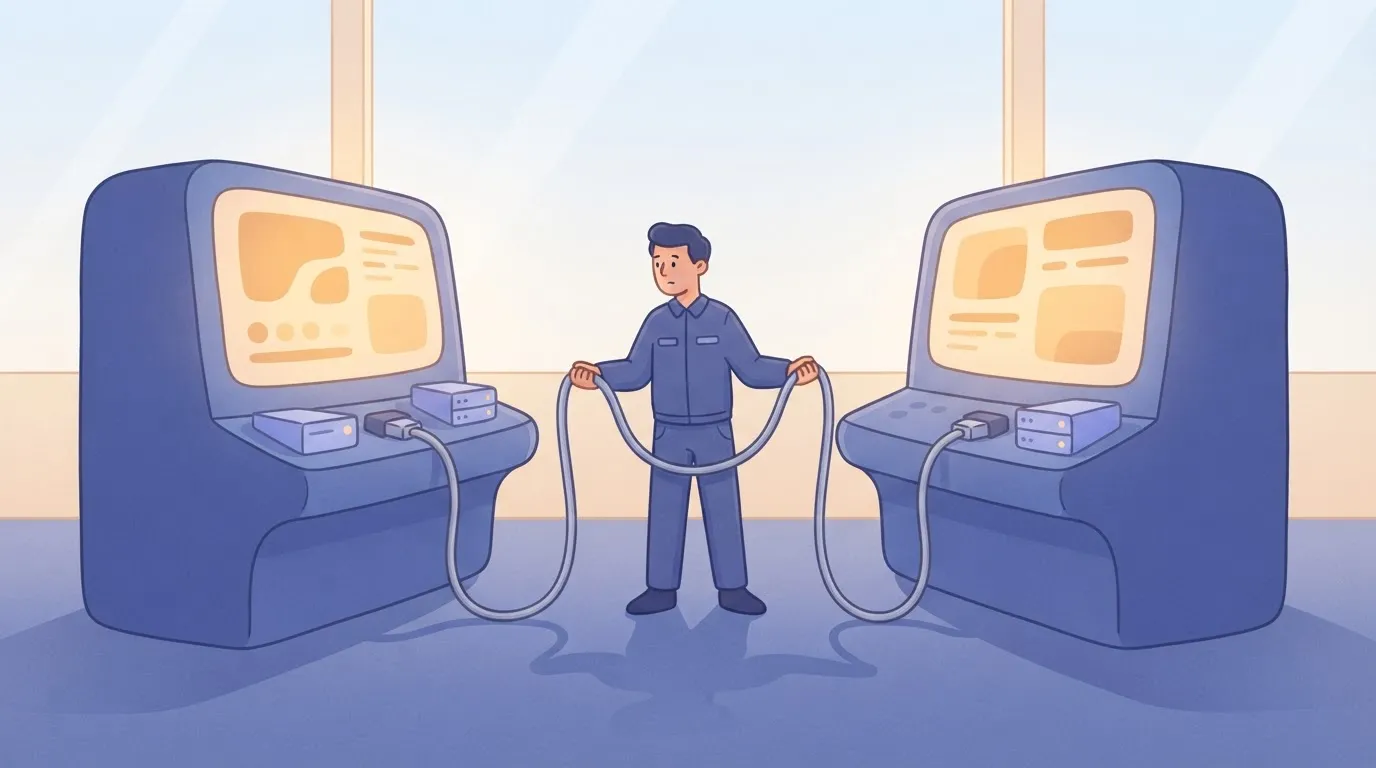
The following checklist outlines the necessary steps and ownership required to move from a planning phase to a live environment.
| Task | Owner | Estimated Time |
|---|---|---|
| CSV Export & Media Backup | PM | Hours |
| API Schema Mapping | Dev | Hours |
| Webhook Reconfiguration | Dev | Hours |
| Pilot Workspace Setup | PM | Hours |
| Team Onboarding & Feedback | PM | Hours |
What to ask about alternatives?
Which alternative has the best offline mode?
Linear is a local-first application that syncs when a connection is restored. Plane, an open-source project management platform, is a self-hosted version that ensures total availability without an internet connection.
By hosting the instance on a private server, teams maintain access to their entire issue database even if the vendor’s cloud or the local ISP experiences an outage.
This setup places the responsibility of data backup on the user, whereas the managed SaaS version handles redundancy automatically.
Can I import Linear issues directly into Jira?
Teams must use CSV exports to move data because Jira does not provide a native one-click importer specifically for Linear’s proprietary format. This manual process requires mapping Linear’s UUIDs and custom states to Jira’s issue types and workflows to prevent data loss during the transition.
Metadata like velocity history often requires post-import adjustment to remain accurate for reporting because Linear’s cycle logic differs from Jira’s sprint structure.
Are there any open-source Linear alternatives?
Plane and AppFlowy are the primary open-source alternatives that allow teams to inspect the source code and manage their own database instances. Plane focuses on a similar aesthetic to Linear but allows for self-hosting via Docker, which keeps data within a company's own firewall.
AppFlowy is a collaborative workspace that provides more flexibility for document-heavy workflows while maintaining a local-first architecture for privacy. Using these tools means the engineering team, rather than the vendor, controls the data residency and the timing of software updates.
Related reading
References
Still comparing
The fastest way to settle it is to build something.
Open source under MIT, so you can self-host the same thing later.
Start free Talk to sales