Kimi K3.1 Pro API Pricing: Token Costs in 2026

Oct 25, 202614 min read
As of 25 October 2026, Kimi K3.1 Pro's API costs $2 per million input tokens and $10 per million output tokens, according to BenchLM. Every other price in the plan table below isn't published, so it can't go into a cost model yet.

Kimi K3.1 Pro API pricing per plan
What Kimi K3.1 Pro is and who sells it
Kimi K3.1 Pro is Moonshot AI's current flagship language model, sold through Moonshot's own API and through its membership plans. The metered unit is the token, billed separately for input and output.
If your workload writes long answers, the $10 output rate sets the price, not the $2 input rate, according to BenchLM. That also holds when Activepieces calls the model in a workflow, because Moonshot still bills the call in tokens.
The full plan table, checked against Moonshot's pricing page
Only the API row carries confirmed rates. The table lists every plan in the brief, but the memberships and Highspeed variant stay blank until Moonshot publishes figures. Until then, you can't compare a subscription against pay-as-you-go on cost.
| Plan | Monthly price | Annual-equivalent price | Input / cached / output per MTok | Limits |
|---|---|---|---|---|
| API K3.1 Pro | Pay per token | Not applicable | $2 / not published / $10 | Not published |
| K3.1 Pro Highspeed | Pay per token | Not applicable | $4 / not published / $20 | Not published |
| Plus membership | Not published | Not published | Not published | Not published |
| Pro membership | Not published | Not published | Not published | Not published |
| Max membership | Not published | Not published | Not published | Not published |
If your prompts repeat a long prefix, the cached price decides your bill, and you can't calculate it from the list price.
Pay-as-you-go API versus subscription plans
Because the API bills by tokens consumed, cost scales linearly with usage. Per BenchLM, at 100 million output tokens a month, the $10 rate means $1,000 on output alone, before input.

Swap the API for a subscription and the bill becomes a flat fee with usage limits. Moonshot has published no fee or limit for Plus, Pro or Max, so the break-even point can't be computed.
How output pricing has moved across versions
Output prices rose sharply, then fell back a little. Apicostcheck reports that K2 charged $2.50 per million output tokens, and K2.6 raised that to $4, about 1.6 times higher.
K3 jumped to $15, nearly four times K2.6. K3.1 Pro cut it to $10, a third below K3 but still four times K2.
According to Ki-ai, on input, the range runs from $0.60 for K2 to $0.95 for K2.6, then $3 for K3 and $2 for K3.1 Pro. Upgrading from K2 to K3.1 Pro therefore quadruples your output cost at the same volume.
If you are running this arithmetic for your own team, see what the same workload costs on Activepieces.
What Kimi K3.1 Pro costs at realistic usage
On a chatbot-style workload, K3.1 Pro spends $500 a month on output against $300 on input, according to LLMLearner. Output is therefore 62.5% of an $800 bill even though it's the smaller share of tokens.


Three workloads priced per month
Read the three workloads below as estimates. The metered unit is the request, and per Sandbase, the support triage row is built to match those two figures, which imply roughly $1 per million input tokens and $5 per million output tokens.
| Workload | Requests per month | Input / output tokens per request | Cache-hit share | Estimated monthly cost |
|---|---|---|---|---|
| Support triage | 200,000 | 1,500 / 500 | 30% | $800 (estimate) |
| Daily summaries | 30,000 | 6,000 / 600 | 20% | $270 (estimate) |
| Long-context coding assistant | 60,000 | 40,000 / 1,500 | 60% | $2,850 (estimate) |
Those figures use the lower assumed rate of $1 input and $5 output, which is half the $2 and $10 list price quoted at the top of this article.
I kept it because the Sandbase and LLMLearner figures only reconcile at that rate, and I could not confirm why they differ from the list price. Treat it as a floor, not a quote.
At the published $2 and $10, each estimate roughly doubles. Support triage becomes 200,000 × (1,500 × $2 + 500 × $10) ÷ 1,000,000, about $1,600. Daily summaries come to about $540, and the coding assistant to about $5,700.
Because costs here price every input token at the uncached rate, any cache discount lowers the input line.
The coding assistant's $2,400 of input is a ceiling at the lower rate, or $4,800 at the list price, and its cache-hit share decides how far below it you land.
Output and reasoning tokens that inflate the bill
At these rates output costs about five times input per token, so every extra token the model writes costs more than a token you send. If the model bills its reasoning as output, a short visible answer can still carry a long invisible one.
Measure output tokens per request from real traffic, not from the length of the replies you see.
If the model bills its reasoning as output, a short visible answer can still carry a long invisible one.
Kimi K3.1 Pro retries, failures and context costs
When a request fails and gets retried, Moonshot bills the retry as a fresh request. A 5% retry rate on the support row adds 10,000 requests, or about $40 a month at that row's $0.004 per request, making it $480 a year.
That per-request figure also assumes the lower rate. At $2 and $10 it is $0.008, so the same retries cost about $80 a month, or $960 a year.
Worse is context bloat: if each coding-assistant turn resends a history that grows by 2,000 tokens, input per request climbs steadily while the cache-hit share may fall.
Kimi K3.1 Pro against its closest alternatives
Of the three flagships with a published benchmark cost, Kimi K3.1 Pro is the cheapest, and the table below shows by how much.
Side-by-side price table
Copy list prices from each vendor's pricing page on the day you decide. The meter on every row is the token, billed separately for input, output and cached input, and those prices, plus context window, rate limits and free tier, change often.

Instead, the table holds the figure that already folds in how many tokens each model burns: the cost of running the Artificial Analysis Intelligence Index.
| Model | Closest tier | Cost to run the index |
|---|---|---|
| Kimi K3.1 Pro | Kimi's top model | $3,117 |
| GPT-6 Astra | OpenAI flagship for complex reasoning and coding | $5,324 |
| Claude Opus 5.5 | Anthropic's long-running agentic coding model | $8,708 |
These figures come from Artificial Analysis. DeepSeek has no row here because I have no index cost for it that I can confirm. Its nearest tier, deepseek-v4-pro, belongs in your own sheet with the others.
Where Kimi wins and where the gap closes
Running the index on Kimi K3.1 Pro costs $3,117. The same run on GPT-6 Astra costs $5,324, about 71% more, so Astra adds $2,207 for identical work.
Claude Opus 5.5 costs $8,708, roughly 2.8 times Kimi's bill, a $5,591 difference. If your workload resembles the benchmark, Kimi's lead is large.

When caching carries your traffic, the gap narrows. A deployment that resends a long system prompt on every call pays the cached-input rate on most of its input. The cheaper that rate is on a rival, the less Kimi's input price matters.
What price tables leave out
Tiers don't map one-to-one. Anthropic also sells Claude Sonnet 5.5 and Claude Haiku 5.5, and OpenAI sells GPT-6.1 Sol and GPT-6 Luna, all cheaper than the flagships in the table.
If your task doesn't need a flagship, comparing Kimi against Opus overstates the saving. Compare against the tier you would actually buy.
Your token count is not the benchmark's, because benchmark cost reflects one workload's. A model that writes longer answers costs more on output tokens, which usually cost more than input. Rerun your own volumes through it before you trust the ranking.
Worth checking against a plan that does not meter every step: one credit covers a whole run on Activepieces.
Running Kimi K3.1 Pro in workflows with Activepieces
Making Kimi K3.1 Pro cheaper is not something Activepieces does. It can control how often your business processes call the model, how many times a failure is retried, and where it keeps the evidence of each call.

Moonshot still bills you separately at its own rates, and nothing in the tool changes them.
Calling the Kimi API from a workflow
In the screenshot below, a "Lead Nurturing" flow sits in the Activepieces builder, and it's a useful picture of where a model call sits in a real process.
A schedule trigger, "Every Day", fires at 11 am New York time, with a toggle for whether it runs on weekends.
Code and Google Sheets steps then pick a lead and pull its details, an "Ask AI" step does the model work, and a delay step follows. The model call is one step among several, and the trigger decides how many times it happens.
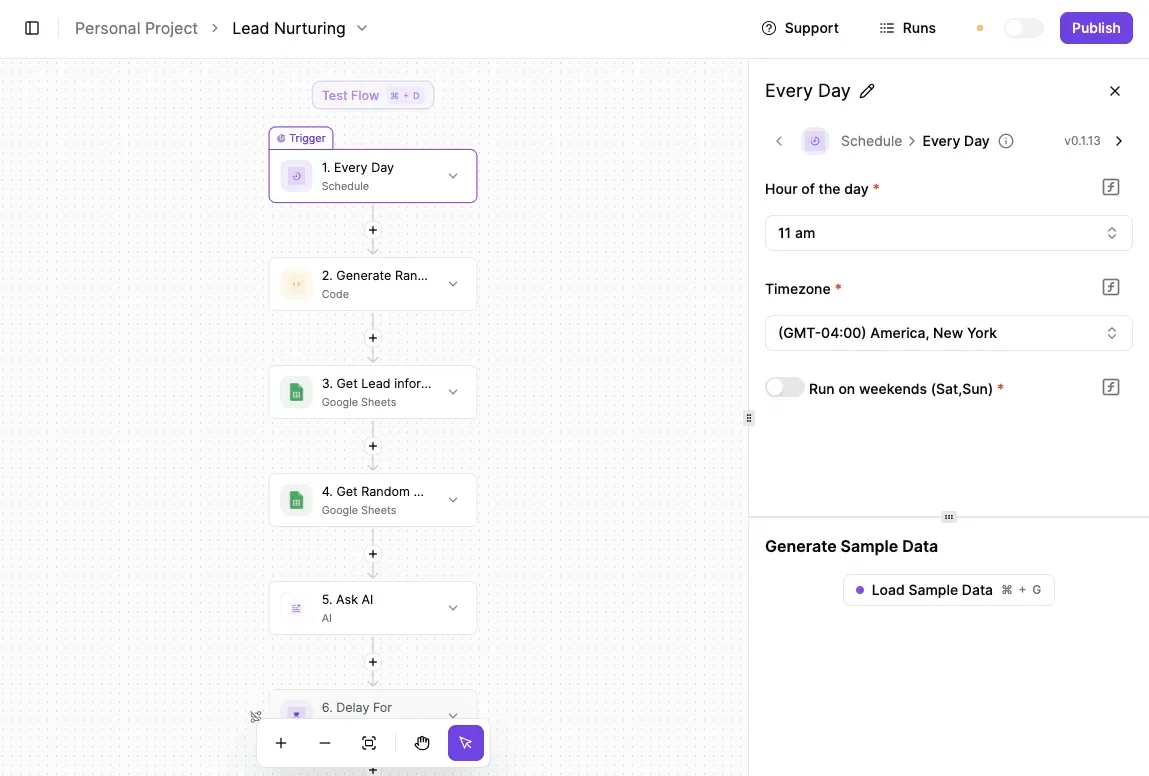
That trigger is your volume dial. A daily schedule that handles one lead is a different bill from a trigger that fires on every new row in a sheet.
Each step that feeds the model also decides how much context you send, which is the figure Moonshot meters.
For Kimi specifically, you would point an AI or HTTP step at Moonshot's API with your own key. I wouldn't assume a ready-made Kimi K3.1 Pro option exists in the step list, so check the integration catalogue before you plan around one.
Three controls matter for cost, and each is something you configure rather than something the tool does for you:
- A cap on how many times the flow may call the model in a given period, so a runaway trigger stops instead of billing you.
- Retry settings on the call step, so a failing request retries a set number of times and not indefinitely. Moonshot meters every retry of a long prompt again.
- Run logs, which show what ran, what failed and how often, so you can set those caps against evidence and not guesses.
Add Activepieces' own pricing to the model bill when you price the workload, since it is a separate meter from Moonshot's.
That meter is the run: the Activepieces pricing page lists 1 credit per flow run with no limit on steps, so the Lead Nurturing flow above costs the same 1 credit at four steps or ten.
Zapier's pricing page bills per task, and Make's bills per module, so on both of those every step you add to the flow raises the count.
When you don't need a workflow tool
If one service calls Kimi from code you already maintain, a workflow tool adds a second system to pay for and watch. A small script or your existing backend can hold a counter, back off on errors and write its own log.
Where several apps feed the model, or people who don't write code need to adjust the schedule and the caps themselves, Activepieces earns its place.
Kimi K3.1 Pro six-step workload pricing
- Save the pricing page with today's date.
- Run 50 sample requests and record input and output tokens for each, so you'll have the data to calculate token costs per request type.
- Estimate what share of your input tokens repeat across requests and could be served from cache.
- Set spend alerts and a hard monthly cap.
- Test rate limits with a burst at your expected peak.
- Re-check the pricing page every month.
The three groups below explain what each step protects you from.
Measuring Kimi K3.1 Pro costs before committing
When next month's bill moves, the dated copy of the pricing page is what lets you tell a price change from a usage change instead of guessing. It is your baseline.
The 50 sample requests should be real traffic, not tidy test prompts, because the gap between your average and your longest request is what the list price hides. Record input and output separately, since they're metered at different rates.
Then look at how much of each prompt is the same system text or document every time. That repeated share is your cache-hit estimate, and it decides whether the cached rate applies to most of your input or almost none of it.
Kimi K3.1 Pro spend caps and alerts
You need both an alert and a hard cap: the alert tells you spend is climbing, and the cap stops it. Set the alert well below the cap so you have time to act before the cap cuts off service.
Then send a burst at your expected peak and watch what your tier allows. Count the rejections and how your code retries them.
If a retry resends the full prompt, every rejected call can add input tokens to the bill without producing an answer.
Re-checking Kimi K3.1 Pro pricing monthly
Put a monthly reminder in your calendar. Compare the live pricing page with your saved copy, rerun the sample requests, and see whether your token counts and cache share have drifted.
A workload priced once is wrong within a few months, because prompts grow and features get added.
Frequently asked questions
Is there a free tier for the Kimi K3.1 Pro API?
This article hasn't confirmed one, so read the pricing page on the day you plan your budget rather than assuming a free allowance exists.
What the rate-limit tiers do show is that access scales with cumulative recharge. Even if a trial credit exists, your first real throughput limits are set by how much you have paid in, so a free allowance tells you little about production capacity.
Does Kimi K3.1 Pro charge differently for cached tokens?
Before any comparison means anything, you need the cached rate and your own hit rate, because cached input is metered on its own line, separate from uncached input.
A prompt that repeats a long system message or document on every call is billed very differently from one that changes each time. Read both input lines on the pricing page and apply them to a sample of your real traffic.
Is the Kimi API compatible with OpenAI's SDK?
Moonshot's API follows the OpenAI request format, so most teams can point an existing OpenAI client at Moonshot's base URL and swap the model name. That makes the integration cost low, but it doesn't make the bill identical.
Test the parameters you depend on, such as tool calls and streaming, before you treat the switch as a drop-in change. Check Moonshot's documentation for anything that behaves differently.
How often does Moonshot change its API prices?
This article has no confirmed cadence, so assume the price you read today can move and record the date you read it.
Keep that date next to your cost estimate. When you rerun the estimate, the date tells you whether a change in the bill came from your usage or from the rate card.
Can I get a volume discount on Kimi K3.1 Pro?
No public volume discount is confirmed here. The recharge tiers raise concurrency and request and token limits. They're not documented as lowering the per-token price.
If your spend is large and steady, ask Moonshot's sales contact whether committed-spend pricing exists. Bring your measured monthly token counts, split by cached and uncached input, so the conversation starts from your workload rather than the list price.
Related reading
References
Running the numbers
See what the same workload costs here.
Free forever plan, and every paid plan self-hosts at no extra cost.
See pricing Talk to sales