Langfuse Pricing Plans and What You Pay in 2026

Oct 29, 202614 min read
Depending on plan, Langfuse costs $0, $29, $199 or $2,499 a month, according to Langfuse, but your bill follows billable units, not the tier name. Price per included unit is the number to watch, and it's not flat across plans.

Direct answer and what Langfuse is
Your application sends a prompt to a model and gets something back. Langfuse, an open-source observability platform for LLM applications, records both, then lets you score and debug it.
Per Langfuse, Hobby is $0 a month, so you can test without a card. Core is $29, Pro is $199 and Enterprise is $2,499.
Activepieces meters differently: a flow run is 1 credit however many steps it has, whereas Langfuse bills every observation inside a trace, so a ten-step flow costs what its two-step workaround did.

The plan table: Hobby, Core, Pro, Teams, Enterprise, self-hosted
Only one column can I state for every plan: base price. It shows how steep the steps are.
| Plan | Monthly price |
|---|---|
| Hobby | $0 |
| Core | $29 |
| Pro | $199 |
| Enterprise | $2,499 |
Divide each price by its allowance and the gap shows. Langfuse's Hobby includes 50k units, and Core and Pro each include 100k.
Core therefore works out to about $0.00029 per included unit and Pro to about $0.00199. Pro is roughly 6.9 times the price of Core for the same unit allowance, so you're paying for what else the tier unlocks, not for volume.
12.6 times Pro is what Enterprise costs at $2,499, so the monthly cost difference is approximately $2,300. Unless a requirement forces that jump, the middle tiers are where the arithmetic gets decided.
What each tier includes beyond units
Here is what the extra money buys, as recorded from the Langfuse pricing page on 2026-10-29. On paid plans, every unit past the included amount is billed at $8 per 100k, which is the rate the examples below use.
| Plan | Included units | Retention | Users | Support |
|---|---|---|---|---|
| Hobby | 50k | 30 days | 2 | Community |
| Core | 100k | 90 days | Unlimited | In-app and email |
| Pro | 100k | 3 years | Unlimited | Priority |
| Enterprise | 100k | Custom | Unlimited | Dedicated, with an SLA |

Retention is the real gap between Core and Pro: 90 days against three years, at the same unit allowance. If nobody debugs data older than a quarter, Core covers you, and Pro's extra $170 buys support and compliance features more than capacity.
Rate limits rise with the tier too, but I did not record per-tier numbers, and I could not confirm per-tier project caps, so read both off the page before you buy.
What counts as a billable unit
One user request that triggers a retrieval step, two model calls and a quality score is five units, because each trace, each observation inside a trace and each score is one billable unit.

That multiplier is why, per Langfuse, 100k included units can disappear faster than 100k requests suggests.
Count the events one real request generates, then multiply by your monthly request volume. That product, not the plan name, tells you whether Core's allowance is enough.
On 2026-10-29 the prices here were read from the Langfuse pricing page. Pricing pages change, so rerun your own volume against the live page before committing to a tier.
What Each Plan Costs at Realistic Usage
Before you sign up, you can do the overage multiplication in a spreadsheet, because your bill is the base fee plus overage.
For a prototype, take a team running 1,000 agent traces a month at 50 observations each, which generates 50,000 units.
The Langfuse pricing page lists a free allowance of 50,000 units per month on Hobby, so this team uses all of it and pays no overage, with no headroom left.
For a production app, take 20,000 agent traces a month. Follow the steps:
- Count traces: 20,000.
- Multiply by 50 observations per trace: 1,000,000 units.
- Add scores, if you log them. Each one counts as a unit.
- Subtract the 100,000 included units, leaving 900,000 billed.
- Price the remainder at $8 per 100k: 9 × $8 = $72.
- Add the base fee.

Only 10% of this volume is free, so the allowance barely registers once agents are involved.
For high-volume agents, at 200,000 traces you generate 10 million units. Subtract the allowance and 9.9 million are billed, which is $792 in overage.
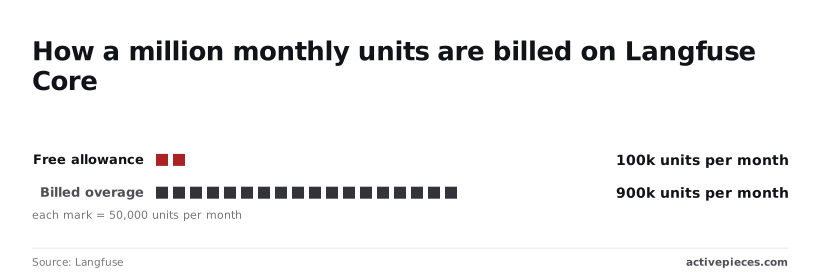
Overage grows linearly with volume, so Core and Pro bills rise in parallel and the gap between them stays constant. Moving up a tier never fixes a volume problem; trimming observations per trace does.
Hidden costs and limits people hit
When data ages out of your plan's window, it is unavailable for debugging a regression from last quarter. That is the first surprise: retention. Check also the user caps, because a third team member on Hobby can force an upgrade without any extra traffic.
**Moving up a tier never fixes a volume problem; trimming observations per trace does.
The LLM spend that Langfuse observes is usually larger than the observability bill itself, so budget the two together.
Self-hosting: free licence, not free to run
Self-host and the per-unit charge disappears, but infrastructure takes its place.
Simplifai's breakdown puts ClickHouse at $45 per month, PostgreSQL at $28 and the app server at $22. That totals $95 a month for the main AWS parts, which is more than the $72 overage in the production example.

Only at higher volume does self-hosting win, and only if you value the upgrades, backups and on-call time you now own at something close to zero.
If you are running this arithmetic for your own team, see what the same workload costs on Activepieces.
Langfuse Against LangSmith, Helicone and Braintrust Pricing
Once self-hosting is priced honestly, the comparison that matters is what each vendor meters, because the metered unit, not the entry price, sets your bill.
Where LangSmith, Helicone, Braintrust and Arize Phoenix differ is the billing unit; they do the same job.
The table below shows what each vendor meters and whether you can self-host.
I haven't confirmed free-tier sizes, entry prices or retention against the vendor pages, so those cells say so. Treat them as questions to answer from each pricing page, not as data.
| Vendor | Free tier size | Paid entry price | What is metered | Retention | Self-hosting |
|---|---|---|---|---|---|
| Langfuse | Unconfirmed at 2026-10-29 | Unconfirmed at 2026-10-29 | Billable units, plus seats on some plans | Unconfirmed at 2026-10-29 | Yes, open source |
| LangSmith | Unconfirmed at 2026-10-29 | Unconfirmed at 2026-10-29 | Traces | Unconfirmed at 2026-10-29 | Unconfirmed at 2026-10-29 |
| Helicone | Unconfirmed at 2026-10-29 | Unconfirmed at 2026-10-29 | Requests | Unconfirmed at 2026-10-29 | Unconfirmed at 2026-10-29 |
| Braintrust | Unconfirmed at 2026-10-29 | Unconfirmed at 2026-10-29 | Unconfirmed at 2026-10-29 | Unconfirmed at 2026-10-29 | Unconfirmed at 2026-10-29 |
| Arize Phoenix | Not applicable to the open-source tool | Unconfirmed at 2026-10-29 | Unconfirmed at 2026-10-29 | Set by your own storage | Yes, open source |
Read the gaps; they are the useful part. A vendor whose pricing page leaves a column blank, or sends you to sales for it, is asking you to commit before you can model the cost. Fill each blank from the page itself before you shortlist.
Do not treat a trace, a request and a unit of ingested data as interchangeable. One user action that triggers a retrieval step, two model calls and a scoring pass is one trace in one vendor's accounting and several billable events in another's.
So the same workload produces different invoices depending on the unit.
Count your own events per user action first, then multiply by the vendor's definition. Seats and retention then adjust that figure, and they matter most for teams that keep data for audits.
No confirmed vendor figures went into this comparison, which was drafted on 2026-10-29. Each "unconfirmed" cell marks a number to be read from the vendor's own pricing page, with the date you read it written beside it.
Watching Langfuse Usage with Activepieces
Set up a daily check that compares your monthly event count with what your plan includes. That way you hear about an overage while you can still change something.
Activepieces, a workflow automation tool, can do this in four steps: a schedule, an HTTP call to Langfuse's API, a condition, and a message.
A run is 1 credit however many steps it has, so a daily check costs about 30 credits a month, against the 1,000 credits on the free plan.
Nothing here replaces Langfuse or its billing page. Activepieces reads your usage and tells you when the gap between used and included is closing, which is the question the pricing page can't answer for you.
Its core is MIT-licensed and can be self-hosted, so the check can sit next to a self-hosted Langfuse as easily as a cloud one.
Check first whether Langfuse offers a native integration, or whether one of the 746 integrations in the Activepieces open source monorepo already covers usage monitoring. If one exists, use it and skip the HTTP step. If not, the generic HTTP step does the job.
The example workflow and stage 1
In the screenshot, the same shape of flow appears with a different trigger: a Stripe "Payment Failed" event feeding a Slack "Send Message To A Channel" action. The run details show the first step completed and a "Run succeeded" notice at the bottom.
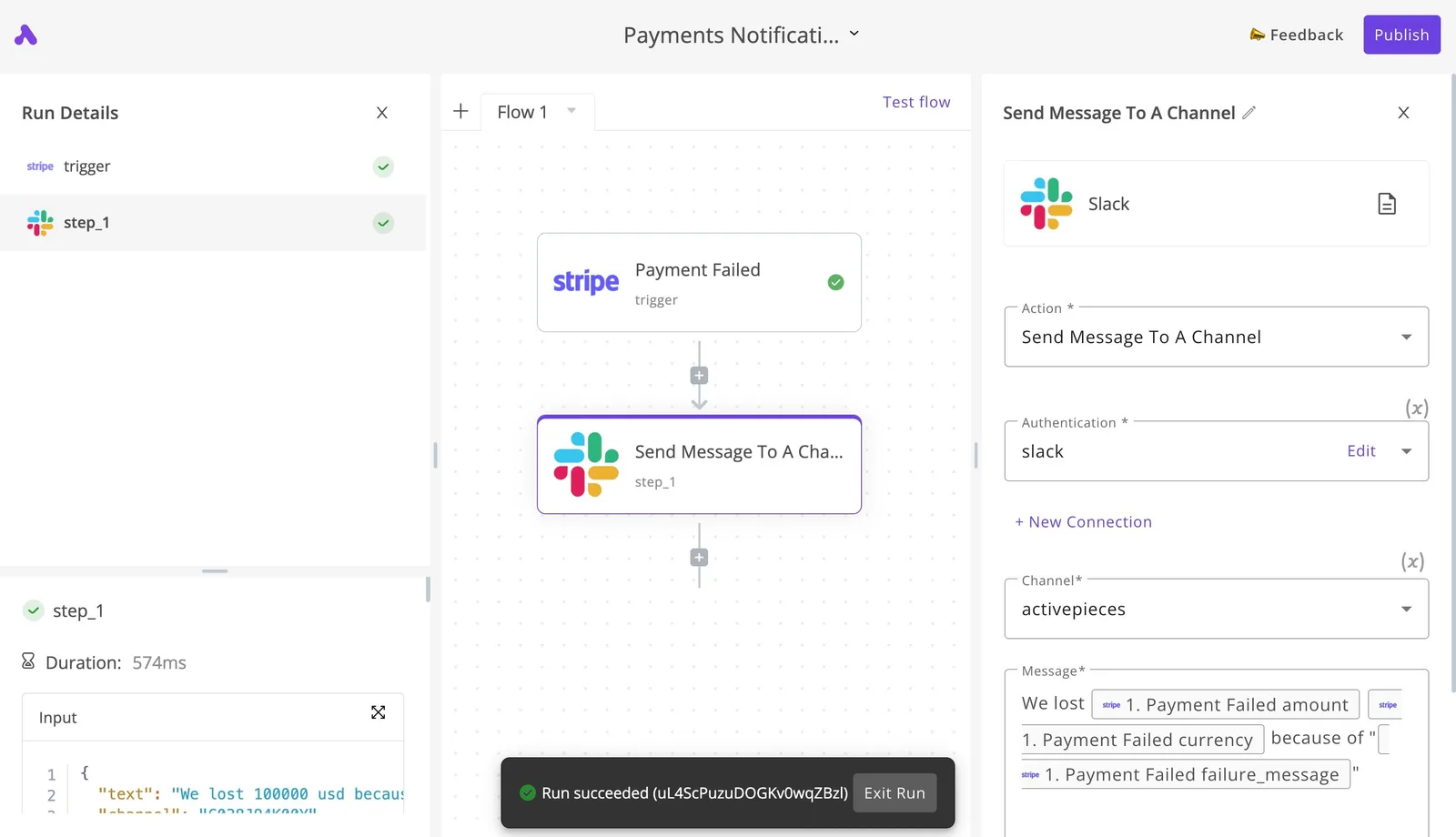
Take from it the structure and the run log, not the Stripe part. Swap the trigger for a schedule and the Slack step stays as it is, and the run log tells you whether each day's check actually executed.
For stage 1, a scheduled trigger that runs daily, use the schedule trigger and set it to run once a day.
A daily cadence is enough because usage accrues across a billing period, not in minutes, and a check that fires more often only adds runs for you to count.
Pick a time after your busiest traffic window so the figure you read reflects most of the day.
Stage 2: pull usage from the Langfuse API
Add an HTTP step that calls Langfuse's API with your project keys as credentials. Keep the keys in a central Activepieces connection rather than pasting them into each step, so credentials live in one place and rotating them updates every flow that uses them.
On the Ultimate and enterprise-control tiers, secret managers are part of the feature set, so the keys can live in your own manager rather than in Activepieces' database.
Request the usage or event count for the current billing period, and confirm in Langfuse's API reference which endpoint and fields return billable units. Don't assume a metrics endpoint counts the same thing your invoice does.
Compare one day's output against the usage page in the Langfuse dashboard before you trust the workflow.
Stage 3: alert at 80 percent of included units
Add a condition that divides units used by units included in your plan and continues only when the result reaches eighty percent. Enter the included amount from your plan's pricing page as a fixed value in the step.
If you change plans, update it, or the alert will measure against the wrong ceiling.
On the true branch, add a Slack or email step that states the units used, the units included, and the date. Eighty percent leaves time to prune noisy traces, lower sampling, or move plans before the bill reflects it.
Monday Checklist for Choosing a Langfuse Plan
Choose the plan by working through six steps in order, with your own counts as the input. An alert is only as good as the volume you measured to set it.
First, export the last 30 days of trace and observation counts from your project, broken out by day rather than as one total.
Daily figures expose the peaks, and a single heavy day can push you past your included units even when the monthly average looks safe.
Second, apply your growth rate. Multiply those counts forward across the period you would be committed to the plan. A plan that fits today's volume but not next quarter's means a forced upgrade partway through, usually at the worst moment.
Use the unit the pricing page actually bills on, because observations typically outnumber traces, and the larger count is the one that drives overage.
Choosing Langfuse retention and seats separately
Fourth, decide retention and seats separately from volume. For retention, ask how far back anyone really looks when debugging, and pay for no more than that.
For seats, count the people who log in weekly, not the people who might someday. Each extra seat is a recurring charge that never shows up in your event counts.
Fifth, set the usage alert at the eighty percent mark, using the projected figure from step two. An alert tied to a measured number gives you the time to prune or sample before the invoice does it for you.
Sixth, re-check the pricing page on the day you buy. The table in this article is a snapshot, and included units and limits can change. If any tier's terms only make sense after a sales call, ask for them in writing before you commit.
Frequently asked questions
Reconciling your first invoice leaves a handful of questions that only the vendors' own pages can settle. Several I couldn't verify, so I have marked them rather than guess.
- Helicone overage rate (Helicone is a competing observability tool): unverified here; read Helicone's pricing page before comparing it with Langfuse.
- Self-hosting license terms: see Langfuse's self-hosting documentation for which features sit outside the open-source core.
- Annual discounts: unverified; the Langfuse pricing page is the place to check.
- Enterprise price: the pricing page lists $2,499 a month as of 2026-10-29, but retention, support and other terms are custom, so expect a sales call and discount the headline figure accordingly in your budget.
- Startup discounts: unverified; confirm on the pricing page or by asking support.
Is Langfuse free to use? Yes, up to a limit: the cloud product has a free tier with capped usage, and exceeding it means moving to a paid plan.
Can I self-host Langfuse without paying? Generally yes for the open-source core, but you pay in infrastructure and engineering time instead of invoices.
Seats, overage and discounts
Does Langfuse charge per user? Seats are a lever on some plans, not the main one, and the rules differ by tier.
Check the user limits for your tier on the pricing page. Hobby caps users at two, so a growing team may be pushed to pay before its event volume would have forced it.
What happens if I exceed my included units? On paid cloud plans, usage beyond the included amount is billed as overage at $8 per 100k units, so the invoice rises with volume rather than stopping you.
Does Langfuse offer discounts for startups or nonprofits? I couldn't verify a standing program. Ask Langfuse directly, and compare any quoted discount against your own projected invoice, not the headline price.
Running the numbers
See what the same workload costs here.
Free forever plan, and every paid plan self-hosts at no extra cost.
See pricing Talk to sales