Together AI Pricing 2026: Serverless & Dedicated GPUs

Oct 29, 202616 min read
Together AI bills by the unit each product meters: tokens for serverless, GPU hours for dedicated endpoints and clusters, and training tokens for fine-tuning. The list rates are clear, but several meters keep running when no one is sending requests.
Together AI is a hosted platform for running open-weight models, either through a shared API or on GPUs you rent. Teams that call it from Activepieces, an MIT-licensed automation platform with 746 integrations, pay on the same meters as everyone else.
In the table below, each plan appears with its price unit, what's included and where the limits sit. Read the unit column first, because it tells you what to forecast.
Cells marked "not published" are ones I couldn't confirm on the pricing page, so you should ask sales or check your dashboard before budgeting on them.
Check Together AI pricing by plan
| Plan | Price unit | Included | Limits |
|---|---|---|---|
| Serverless | Per million tokens | Shared API access to hosted models | Rate limits set by account tier |
| Build Tiers 1-3 | Usage-based, tier set by account history | not published | not published |
| Dedicated Endpoints | Per GPU hour | Reserved GPUs for one model | not published |
| GPU Clusters | Per GPU hour, reserved | Dedicated cluster capacity | not published |
| Fine-tuning | Per training token | Training runs on your data | not published |
| Batch | Per token | Asynchronous processing | not published |
Per-token rows such as serverless stop charging when your traffic stops. The GPU rows keep billing while you hold the hardware, so they're the first place to set a spend alert.
**Per-token rows such as serverless stop charging when your traffic stops.
How each meter behaves
On serverless, you pay for input and output tokens, so cost scales with prompt length as much as with request count. Long system prompts repeated on every call are the usual surprise.
On a dedicated endpoint the meter runs while the endpoint is up, not while it's busy. An idle endpoint left running over a weekend costs the same as a busy one.

You give up flexibility for a committed period when you reserve capacity. Together AI publishes the price unit but not the contract terms, so confirm them before signing.
Rerun a fine-tune after a data fix and it counts as a new run. Cost grows with dataset size multiplied by the number of passes over it.
Before launch, check both tiers and credits: tiers decide how fast you can send requests, and credits decide how long you can keep sending. A limit hit mid-campaign looks like an outage.
If you are running this arithmetic for your own team, see what the same workload costs on Activepieces.
Together AI dedicated endpoint billing alert example
At 02:10 on a Tuesday the alert fires, because a dedicated endpoint kept metering by the hour long after the chatbot's traffic stopped. That's the kind of meter the budget never listed.

No real company is involved: the team here is a MODELED five-person team. It runs a customer chatbot billed per token, one always-on H100 endpoint at $5.49 an hour, and one fine-tune run.
Its only assumption is that someone would switch the endpoint off when launch traffic ended.
The estimate the team signed off
When the team signed off, the estimate priced the chatbot from expected conversations and treated the endpoint as a launch-hours cost. It also treated the fine-tune as a single event. Storage was left as a rounding error.
Taken alone, each assumption is reasonable, but together they price the endpoint by use when Together AI bills it by uptime. That difference decides the rest of this section.
Together AI invoice versus cost estimate
Almost all the gap comes from one row, and it isn't the chatbot. The table below shows where the estimate and the invoice part ways.
| MODELED line | Estimate | Invoice | Difference (dollars and hours) |
|---|---|---|---|
| Chatbot tokens | Scaled from expected conversations | Scaled from actual conversations | Small, since usage tracks traffic either way |
| Always-on H100 endpoint | Billed for launch hours only | $5.49 for every hour up, $131.76 for each full day | $131.76 for every day it stays on, plus an engineer's hours to find it |
| One fine-tune | One run, one charge | Each rerun is a new charge | One extra charge per rerun, plus the hours spent rerunning |
| Storage | Treated as negligible | Accrues while files sit unused | Small, but it never stops on its own |
| Total | Sum of expected use | Sum of everything left running | Mostly the endpoint line |
It's the endpoint that keeps running. At $131.76 a day, it costs the same on a quiet Monday as on launch night, so a forgotten endpoint turns into a weekly figure before anyone opens the dashboard.

Together AI overspend cost in dollars and hours
Multiply the endpoint's daily rate by every day nobody shut it down and you have the dollar loss. The hours are harder to see.
Someone has to wake up or drop other work, trace the charge to a single deployment, and then rebuild the budget. For a five-person team, that hour comes out of launch work.
Set before launch, a spend alert would have fired on the first idle day, not at 02:10.
Why the Together AI Bill Beat the Estimate
Because a per-token estimate ignores meters that keep running when nobody is sending requests, the bill beat the estimate.
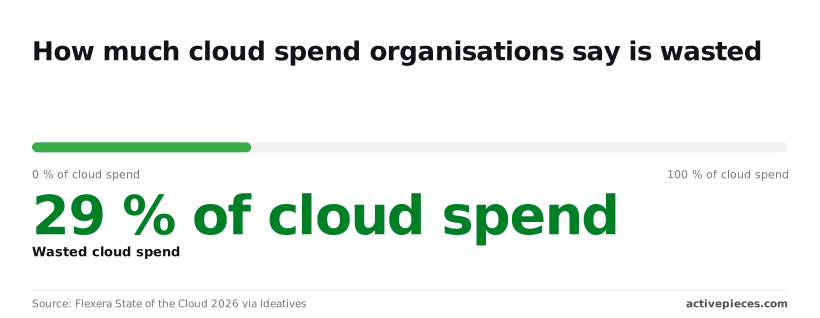
Flexera's State of the Cloud 2026, via Ideatives, puts wasted spend at 29% of cloud spend. That's general cloud context, not a Together AI figure, but it means a plan assuming zero waste starts roughly three dollars in ten wrong.
- Idle endpoint hours add cost for every hour a GPU is reserved, and show up as GPU-hours on the invoice with few requests behind them.
- Fine-tune and storage charges add cost per training run and per stored artifact, and show up as line items with no inference traffic.
- Output priced above input inflates long answers, and shows up when completion tokens outgrow prompt tokens.
- Tier RPM limits cause retries that resend tokens, and show up as many more requests than users.
- Model rate jumps raise the same traffic's cost after a swap, and show up as cost per request rising while volume stays flat.
The list tells you what to watch. The paragraphs below carry the largest dollar amounts.
Together AI GPU hourly pricing and idle costs

According to Together AI, reserved terms cut the rate to $3.69 for 7-30 days, $3.45 for 31-90 and $3.19 for 91-180, about 42% below on-demand at the longest term. You pay for the entire period regardless of whether you use all the reserved capacity.
At $1.99, preemptible is far below the $3.99 on-demand rate, but it only suits work that tolerates interruption, so you can't run critical services on it.
When a tier's requests-per-minute limit rejects calls, clients resend them. If a retry resends a long prompt, the same input counts again, so retry counts belong in the estimate.
Training, then storage, then serving: a fine-tune bills for all three. Budget for all three, not just the run.
Swap models and the rate changes on every token, and cached input has a different price from uncached. Estimate with the rate of the model you'll actually ship, and the cache hit rate you can really expect.
Worth checking against a plan that does not meter every step: one credit covers a whole run on Activepieces.
Compare Together AI against competitors
Against Fireworks AI, Replicate or Groq, Together AI is not the cheapest on every line. Its clearest advantage is cached input, which only pays off if your traffic actually repeats prompts. That's why the hit rate you assumed matters more than the headline rate.
The meter is input tokens served from cache. Together AI's model pricing page, as compiled by oceanlab.in, shows how far that discount runs on three open models:
| Model | Cached input vs. standard input |
|---|---|
| DeepSeek V4 Flash | 96% off |
| Kimi K3 | 90% off |
| GLM-5.3 | 81% off |
At 96% off on DeepSeek V4 Flash, a cached input token costs one twenty-fifth of a standard one. A support bot that resends a long system prompt on every call pays almost nothing for that prompt after the first request.

At 90% off, Kimi K3 puts a cached token at a tenth of the standard price, enabling economical handling of repeated queries.
GLM-5.3 at 81% off is the weakest of the three, but a cached token still costs under a fifth of a standard one, making even this option valuable for caching.
Every one of these discounts applies only to the cached portion. If your prompts change on every call, such as a different document pasted in each time, the hit rate falls and you pay the standard rate on most of the input.
Where a competitor has a lower standard rate and a smaller cache discount, it can win for that workload. Run your own request log through each vendor's page before assuming Together AI is cheaper.
What to compare on Together AI pricing pages
Compare the same four things on each page. They're the token rate for the model you'll ship, the hourly rate for a dedicated GPU, how the rate limit is set, and whether you pay while traffic is zero. The last one decides the self-hosting question.
Whether it serves a million requests or none, a dedicated GPU bills by the hour, so it only beats per-token pricing when the card stays busy.
If your traffic is spiky or still unproven, per-token billing costs you nothing on quiet days. Self-hosting fits when the load is steady enough that the GPU is rarely idle.
Fix Surprise AI Bills with Activepieces Spend Alerts
Run a scheduled check on your usage, compare it to a budget you wrote down, and let Activepieces tell you in Slack or email when you're over.
A daily check is one run, so 1 credit a day, about 30 of the 1,000 credits the free plan includes each month. That matters most on a self-hosted GPU that keeps billing while nobody uses it.

It doesn't change how Together AI bills you, and it can't set a hard cap. Nothing in the workflow stops spend by itself; it shortens the time between a meter running and a person noticing.
Activepieces has an MIT-licensed core, as the LICENSE file in its GitHub repository states, and can be self-hosted, so the checker can run on infrastructure you already pay for rather than adding another per-task subscription to the bill you are trying to shrink.
On Activepieces Cloud, the pricing page publishes 1 credit per flow run however many steps it has, where Zapier's pricing page bills per task and Make's bills per module, so a ten-step checker costs the same as a two-step one, and the free plan includes 1,000 credits a month.
What the workflow checks and when
On the builder canvas, the workflow below is a three-step flow. It starts with a Schedule trigger labeled "Every Day," passes to a Code action that picks what to check, and ends in an HTTP action that makes the outbound call.
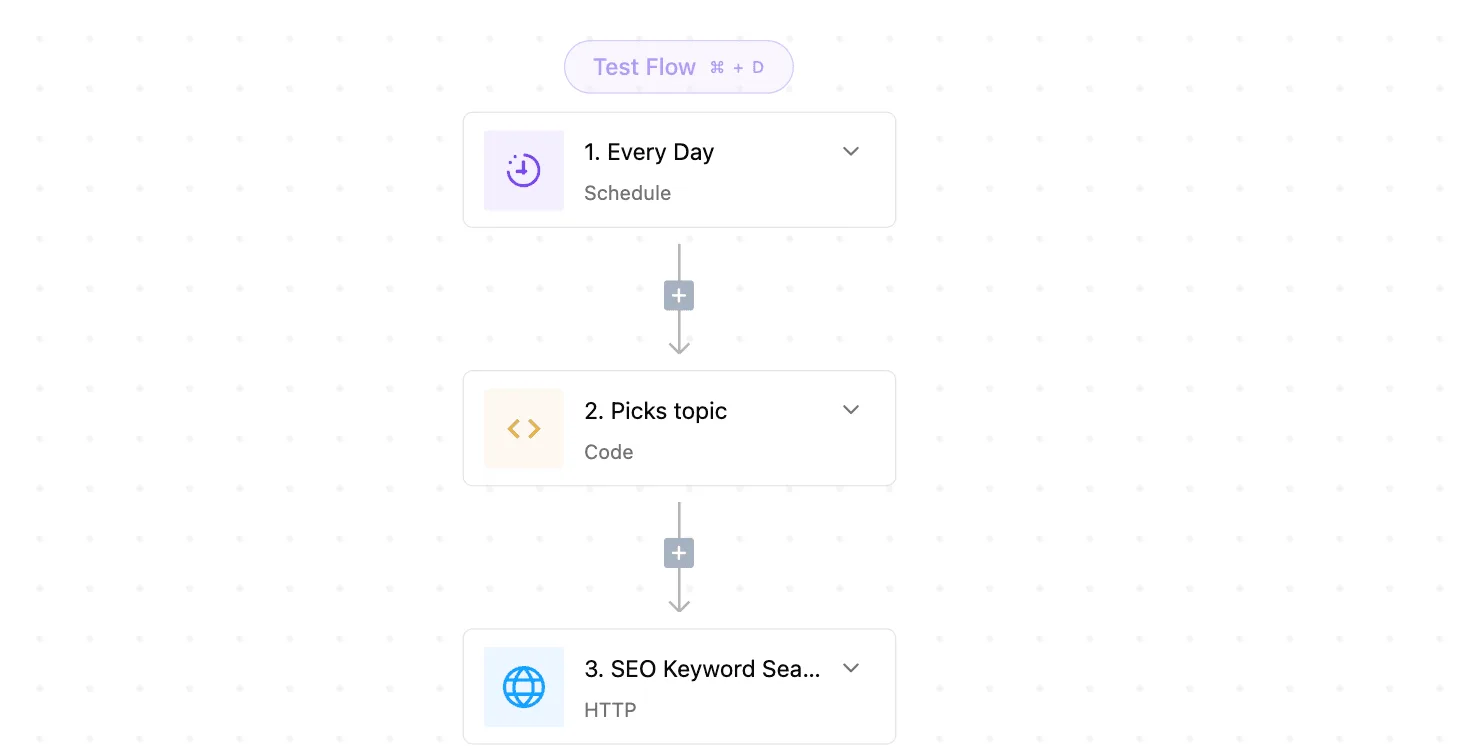
Read it as the skeleton: a clock, a bit of logic, and a request. Your version swaps the last step for a call to whatever usage source you have access to.

Metered here is a run of the flow, one per day in this setup. A daily schedule means an overspend can go up to a day before anyone hears about it, so a team with an expensive dedicated endpoint may want a tighter interval.
Before you pick a tighter interval, check how your plan or your own server counts runs, since a tighter interval means more of them.
Look to the Code step for the budget. It takes the usage figure, compares it to the number you set before launch, and decides whether to notify.
Keeping that comparison in one visible step means anyone on the team can read the threshold and change it, instead of finding it buried in a vendor dashboard.
Once the comparison fails, the next step posts to Slack or sends an email, with the endpoint name and the amount over budget in the message. A vague alert gets ignored; one that names the endpoint can be acted on.
Approval step before shutting down Together AI endpoints
For idle dedicated endpoints, the flow can pause and ask a person before it shuts anything down. The approval step sends a message with the endpoint and its idle time, and the shutdown call runs only if someone approves.
That pause is deliberate. An automatic shutdown can take down an endpoint a teammate is about to use, and a surprise outage costs a different kind of money.
A human decision keeps the savings and removes the risk of a script making the wrong call at night.
Monday Checklist for Together AI Costs
Turning that human decision into routine takes six rules, each with a named owner: price every feature, cap the month, and look at idle dedicated GPUs before the invoice does.
Run down the list in the order you'll need it. It shows who answers for each meter, so none of them belongs to nobody.
- Estimate cost per feature. Owner: the engineer who builds it. Multiply expected requests by tokens per request, then add GPU-hours for any dedicated endpoint and any fine-tune run.
- Set a monthly cap, with alerts at 50% and 80%, so you're warned before spending reaches your budget limit. Owner: the finance lead. The first alert tells you the month's pace is wrong while there's still time to change it. The second leaves room to act before the cap does it for you.
- Review every dedicated endpoint weekly. Owner: the platform engineer. A dedicated endpoint bills for the time it's running, not the time it's used.
- Cap retries. Owner: the backend developer. An uncapped retry loop turns one failing call into many billed ones.
- Log tokens per request. Owner: the service owner. Without it, a bill rises and nobody can say which feature caused it.
- Re-check pricing quarterly. Owner: the engineering manager. Your estimate is only as current as the rate card it was built from.
Steps one, two, four and five happen before launch. The estimate gives the cap its basis, and the cap and alerts mean an overrun reaches a person's inbox, not the next statement.
Retry limits and per-request token logs are code, so they're cheapest to add before traffic arrives.
Step three, the weekly review, is the only recurring check that touches live infrastructure. Spend ten minutes listing each dedicated endpoint, who requested it, and whether traffic justifies it.
If nobody can name the requester, stop it. Restarting costs a few minutes, while an unnoticed idle GPU keeps billing all week.
Step six, the quarterly re-check, keeps the estimate honest. Compare the per-request token logs against your original figures, then update the estimate and the cap together. Changing one without the other leaves alerts that fire at the wrong moments.
Frequently asked questions
Only when you know which meters sit behind them do alerts fire at the right moments, and these five questions are where teams most often guess wrong.
Answers reflect Together AI's public pages as of 2026-10-29; confirm against the live pricing page before you set thresholds.
Does Together AI have a free tier or free credits?
Not reliably, and you shouldn't plan a launch around it. Promotional credits for new accounts have changed over time, so the billing page in your own account is the only source that matters.
Budget as if every token is paid, and treat any credit as a cushion that delays the first invoice.
Is Together AI cheaper than OpenAI?
It depends on the model, because the meter is price per million tokens, split into input and output. Together's catalog is mostly open-weight models, so the fair comparison is the same task on both platforms, measured in tokens in and tokens out.
A lower list price on one side of that split can be wiped out by a model that writes longer answers.
Can I set a hard spending limit on Together AI?
Treat it as no. What the pricing pages document are usage tiers that raise rate limits as lifetime spend grows, and those throttle speed rather than stop a bill.
Build your own ceiling: a dated estimate, an alert at a fraction of it, and a person who owns the response. Dedicated GPUs are the exception to worry about, since they keep billing while idle.
How much does it cost to fine-tune a model on Together AI?
Because training tokens are the meter, cost scales with dataset size, the number of passes over it, and the size of the base model. Count tokens, multiply by epochs, and price that against the model you chose.
Then add the second meter: serving the tuned model, which can mean a dedicated endpoint that bills by the hour whether or not traffic arrives.
Does Together AI charge for failed requests?
A request that errors before generating output shouldn't carry a token charge, since serverless usage is billed on tokens actually processed.
Don't extend that to dedicated endpoints, where the meter is GPU time and a failing application still pays for the hours. Check your usage dashboard against your own logs during the first week to confirm how errors are counted.
Related reading
Running the numbers
See what the same workload costs here.
Free forever plan, and every paid plan self-hosts at no extra cost.
See pricing Talk to sales