LiteLLM 1.107.0 Compromised? What to Rotate and Pin

Oct 21, 202613 min read
As of 2026-10-21, those two primary sources decide what counts as confirmed. Everything else, including reposts and social media threads, is a pointer to them.
Teams that run LiteLLM inside automated pipelines, such as workflows built in Activepieces, should pin to a known-good version and check those sources before upgrading.
A compromised LiteLLM release is a version of the LiteLLM Python package published to PyPI containing malicious code that was not part of the maintainers' intended source, so any environment that installed and ran it should be treated as exposed to that code.
LiteLLM 1.107.0 compromised: the short answer and definition
What LiteLLM is, per its maker
When a team wants billing, keys and routing in one place, LiteLLM is what it reaches for: a Python library and proxy from BerriAI that puts one interface in front of many model providers.

That's also why a bad release matters: a package like this usually holds every provider key you pay for, so one compromised install can touch the whole bill.
When a version published to PyPI, the public Python package index, contains code its maintainers didn't intend, that is a malicious release. It might come from a hijacked maintainer account or a stolen publishing token.
Anyone whose build pulls the new version without a pin installs it automatically, and the code runs with the same access as your application.
What you can confirm about LiteLLM 1.107.0
Confirm the version number, the publisher and the dates from the advisory and the PyPI page, not from a summary. What no public page can tell you is whether your environments ran it.
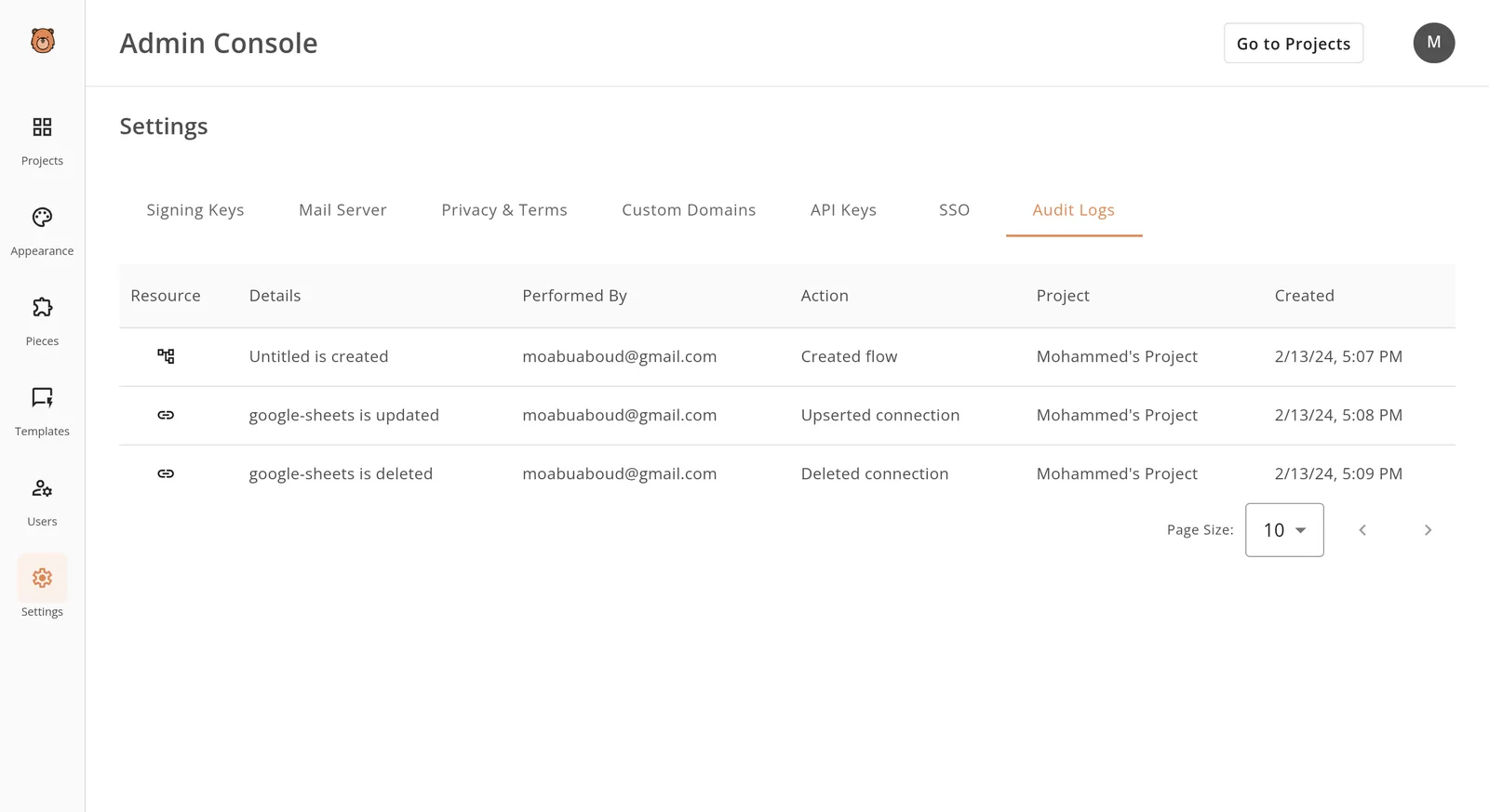
Your own records answer that, and an audit log is the quickest way to see who created, updated or deleted a connection and when.
Whether you are exposed depends on your systems, not the package, which is why that record matters. The next sections check where the affected release ran and what it could reach.
Everything below works on Activepieces' free plan. Start without code or a credit card.
What LiteLLM 1.107.0 malicious release does
The moment you install or import it, a malicious release on PyPI, Python's public package index, runs with your user's permissions, before anyone has read a line of it.
Depending on the point in the installation, code can execute at different stages:
- Install-time code runs inside the package's build or setup step, so
pip installalone triggers it, even in a throwaway terminal. - Import-time code sits in the package's modules and runs when your application first imports it, which means a service restart is enough.
- The illustration below shows the install path: the package unpacks, its setup script runs, and that script reaches three places on one machine, your environment variables, API key files and cloud credential files.
- Nothing sandboxes them from each other, so the install step gets whatever the logged-in user has.

Not only production: every machine that ran the version can leak secrets.
If a host runs LiteLLM, a gateway library that routes requests to many model providers, it holds keys for all of them, usually in environment variables.
A single compromised install can therefore leak the whole bill: every provider account, billed to every client sharing that gateway.
Rarely is PyPI itself broken. Attackers steal a maintainer's publishing token, hijack the automated build that publishes releases, or register a near-identical package name. The release then looks legitimate to anything that installs unpinned.
Treat campaign details as claims until a named advisory states them. The chart that follows places LiteLLM's affected artifacts alongside the other targets attributed to TeamPCP, including Trivy and KICS (two security scanners) and the npm JavaScript registry.
Where LiteLLM runs and who's at risk
Which of LiteLLM's four forms holds your provider keys, and who picks its version, decides your exposure. In Akamai's tally, LiteLLM lost only 2 versions, against 76 for Trivy Action and 66 for npm.

Small as that count is, it says nothing about reach, because one bad release pulled by an unpinned install lands everywhere that install runs.
| Deployment | What holds secrets | How version is chosen | How fast an update reaches production |
|---|---|---|---|
| Python library | The host app's environment | The app's requirements file | Next build or deploy |
| Proxy server | The proxy's config and environment | Image tag or install command | Next container pull or restart |
| DigitalOcean litellm-os | The deployment's config | Whoever deploys it | Next redeploy |
| OpenAI-compatible use | The gateway, not the caller | The gateway's operator | When the operator updates, with no change on the caller's side |
Plan names checked against litellm.ai and docs.litellm.ai and github.com and docs.litellm.ai and docs.litellm.ai on October 21, 2026.
Look at speed first: the further a deployment sits from a human approving a version, the faster a bad release arrives.
If the requirements file has no pins, the next build installs the newest release without anyone reviewing it. Whatever secrets the app already has, the library inherits.
Lose the proxy and you lose the most, since it concentrates keys for many providers in one place. A floating image tag means a restart can pull a compromised version.
Check what they pinned, because whoever deploys DigitalOcean's litellm-os repository owns the version. The repository packages LiteLLM, which it describes as an open source AI Gateway for 100+ LLM providers. Callers using the OpenAI format only inherit the gateway's risk.
Five costly mistakes after compromise
Inheriting a gateway's risk isn't the same as having dealt with it, and teams repeat five mistakes that leave the compromise in place:
- Unpinned versions: the next install pulls whatever was published last, bad or not.
- Upgrading without rotating keys: every secret the bad version could read stays exposed.
- Trusting a container rebuild: the image can rebuild from the same cached, poisoned layer.
- Ignoring lockfiles and CI caches: the compromised version keeps being restored on each build.
- Trusting rumor over the advisory: you rotate the wrong things, or stop too early.
At $4.96m, supply chain sits about $0.33m below the costliest route, according to Data Breach Cost, which puts voice/SMS phishing at $5.29m, social engineering at $5.23m and valid accounts at $5.07m.

A poisoned release therefore belongs in the same budget line as phishing, not under routine maintenance.
Once you move to the clean version, the code is gone but what it already took is not. Anything in its environment, such as API keys and tokens, should be treated as read and replaced.
Once you move to the clean version, the code is gone but what it already took is not.
With a range like "latest", the next build can pull a bad release unreviewed. A rebuild only helps if the lockfile pins the version and the CI cache is cleared first.
In chat threads, affected versions and dates are guesses. The advisory names them, so scope your rotation from that and from your own logs of where the version ran.
Easier to see it running than to read about it: set it up free, no card.
What LiteLLM costs and requires, as of 2026-10-21
Ask who runs it before you ask what it costs. Whoever runs it controls when a new release lands, and that decides how much of a bad version you must rotate.
LiteLLM is a gateway that routes your requests to AI model providers, and the product's new, so its pricing and packaging may change.
I haven't confirmed any dollar figure on litellm.ai/pricing, where the plans are the vendor's own statement of what it sells, so this section quotes none.
Where a price isn't stated in the table, read it from that page before you budget, and invoice nothing from this article's numbers, because it has none.
If you self-host the open-source version, you provision the server, hold the provider keys, and choose when to upgrade. Your cost is your own infrastructure and the hours to maintain it.
That's the setup where a bad release reaches you only if you pull it, so pinning works best here.
Comparison table
Take one thing from the table, which compares the three routes on who runs the gateway and who decides when upgrades happen: price and upgrade control are separate questions. A route can be cheap and still hand someone else your release schedule.
| Route | Price as published | Who runs it | Who controls upgrades |
|---|---|---|---|
| Open-source self-hosting | Your own infrastructure cost | You | You |
| Plans on litellm.ai/pricing | As listed on that page | Confirm on the plan description | Confirm on the plan description |
| DigitalOcean packaging | Billed through DigitalOcean, the cloud host | Depends on the package | Depends on the package |
Wherever the table sends you to a plan page, ask the vendor in writing who approves upgrades before you sign. That answer sets how much pinning you must do yourself.
Run this in Activepieces: a version check and gateway call
Before an unreviewed release reaches a build, this flow puts it in front of a person: it checks PyPI on a schedule and tells you when the latest release differs from the version you pinned.
I haven't tested it. The gateway step goes through generic steps rather than a dedicated LiteLLM one.
- Set a schedule trigger at an interval you can defend as a routine check.
- Send an HTTP request to the package's PyPI JSON endpoint. Compare the latest version in the response with your pinned version, and stop the run if they match.
- Add an AI step on a custom OpenAI-compatible provider pointed at your own proxy, such as LiteLLM, an open-source gateway. It drafts the alert. An HTTP request or an MCP server can do this job instead. Because the call goes through your proxy, the cost lands on your gateway key and not on a shared account.
- Send the alert to the channel your on-call person reads.

Nothing here replaces the verification, scoping and rotation steps above; the alert only prompts a human to run them.
The gateway key in step 3 is the kind of secret a poisoned package reads, so where the automation stores it matters as much as the pin.
Activepieces can route every credential it touches, API keys, OAuth tokens and the connection secrets behind each app, to your own secret manager, in the self-hosted edition and the enterprise cloud tier.
Configure that on a self-hosted instance and the Activepieces database holds none of them; the integration sits in the enterprise governance set beside SCIM, custom RBAC, SSO/SAML and audit logs. MoneyGram, Moneypenny, Alan and FundingSocieties run Activepieces, and your credentials are never ours to hold.
Immediate response checklist
Work it in order: find every affected install in the first hour, rotate what it could reach in the first day, and pin and monitor across the month.
Why timing matters after a LiteLLM compromise
Speed matters. IBM's Cost of a Data Breach 2026 data puts supply-chain breaches at 194 days to identify and 64 more to contain.

A compromise nobody looks for can therefore sit in your systems for more than eight months.
Your exposure isn't a fixed 258 days, so you can't use that figure to anchor your planning. It's however long ago the affected release first landed, and the log review below is how you find that out.
The First hour
In the first hour, search lockfiles, container images and CI caches for the affected version. A cached layer will quietly reinstall it, so a clean lockfile alone proves nothing.
Then isolate every host that ran it. Cut its network access before you wipe it, so you keep the evidence.
The First day
In the first day, rotate every provider and cloud key those hosts could read, including keys in environment variables and CI secrets.
A key you skip is a standing invitation to the attacker, and the 194-day identification figure shows how long such access can go unnoticed.
The First month
In the first month, pin the safe version the advisory names, with hash checking on. A swapped artifact then fails the install instead of arriving unreviewed.
Review egress logs back to the first install date for destinations you don't recognize. Go as far back as your retention allows, since the 64-day containment figure assumes you already know where to look.
Follow the advisory feed for this package, so the next bad release reaches you as a notice rather than a surprise.
Frequently asked questions
Is LiteLLM safe to use now? Only on a release the maintainers' advisory names as clean, installed on purpose.
LiteLLM's the library and proxy that routes your calls to model providers. Until you've read the advisory, "latest" isn't evidence of safety, because a latest tag is how the bad release reached people.
How do I check whether I installed 1.107.0?
Check the lockfile and its history, not only the machine in front of you. A developer laptop, a CI runner and a container image can each hold a different version.
Run pip freeze inside each environment, then search build logs and image layers for the version string.
Even after an upgrade, a box still ran the bad code once, so a clean version today doesn't clear it.
Do I need to rotate API keys if I only installed it?
Yes, if it was imported or run anywhere that could see credentials. When installed code runs, it has the same environment variables and files as your own process. Rotate every key that environment could reach, including provider keys and database passwords.
Check shared accounts first. One key serving several clients means one leak bills all of them, and the client who pays least ends up funding the cleanup for the rest. Reissue per client while you're at it.
Does pinning versions prevent supply-chain attacks?
No. Pinning stops a new release from arriving unreviewed, but it does nothing if you pinned the bad one. Pair exact versions with hash checking and a written review step before any bump, so every upgrade is a decision with a name on it.
Where do I find the official advisory?
Go to the project's own repository, under its security advisories, and to the package registry's page for the release. Take the affected and fixed versions from those two primary sources, not from a summary, this article included.