
Microsoft Dynamics 365 Business Central Pricing: 2026

Oct 22, 202615 min read
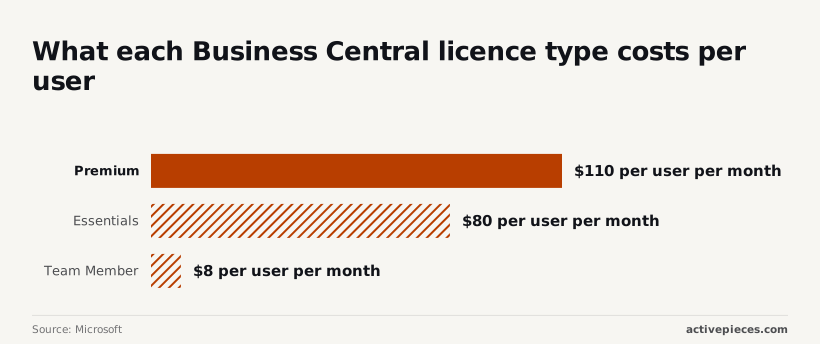
Per Microsoft's pricing page, Business Central costs $80 per user per month on Essentials, $110 on Premium and $8 for a Team Member. The tier you need matters more than any of those numbers.
That spread is the first thing to price. Put 20 people on Premium when 12 of them only approve and look things up, and you pay for 12 seats you didn't need, every month, for as long as the contract runs.
What Business Central is
Business Central is Microsoft's cloud ERP for small and mid-size firms. ERP means one system holding your accounts, orders, stock and purchasing, so the numbers agree with each other. It replaces the spreadsheet and the accounting package that no longer talk to each other.

When you connect it to your other systems and pay a partner to set it up, those are separate line items.
If you automate the sync yourself, Activepieces bills one credit per flow run however many steps the flow has, so a ten-step sync costs the same as the two-step workaround it replaced.
They're often larger than the licence in year one. The licence is only the entry fee.
If you are running this arithmetic for your own team, see what the same workload costs on Activepieces.
Business Central plan prices per user
Read the table for what each tier costs and what it covers. Essentials and Premium differ by function, not by size, while Team Member is a different kind of seat altogether.
| Plan | Price per user per month | What it includes |
|---|---|---|
| Team Member | $8 | Read access, approvals and light entries such as time and expenses |
| Essentials | $80 | Finance, sales, purchasing, inventory and basic warehousing |
| Premium | $110 | Everything in Essentials, plus service management and manufacturing |
Source: Microsoft Business Central pricing, https://www.microsoft.com/en-us/dynamics-365/products/business-central/pricing, checked 2026-10-22.
At $30 more per user than Essentials, Premium is not worth paying for unless you manufacture or run service jobs inside the system. If you don't, it's a 37.5% surcharge for features you'll never open.

User types: full, Team Member and Device
Full users are the Essentials and Premium seats: the people who post invoices, manage stock and close the books. Team Member seats at $8 are for everyone else who needs to look something up or sign something off.
That's one-tenth of the Essentials price. Take a firm with 10 full users and 30 occasional ones: it pays about $1,040 a month with Team Member seats, against $3,200 if everyone gets Essentials.

The gap is $2,160 a month, or about $26,000 a year, from sorting people correctly.
If a warehouse scanner is used by several shifts, a Device licence covers it. They're billed per device rather than per person, so they can undercut named seats when many people share one workstation.
Plan costs at different user counts
$6,700–$7,700 a year on Essentials and $9,600–$10,600 on Premium: that is what a ten-person firm pays, counting only the full users. The gap grows with every seat.
Multiply the figures from TD SYNNEX by twelve and you get the table. It puts Essentials at $70–$80 and Premium at $100–$110 per user per month. Team Member seats aren't priced here, so add them on top.

| Users (full / Team Member) | Essentials, full users per year | Premium, full users per year | What Essentials gives up |
|---|---|---|---|
| 10 (8 / 2) | $6,720–$7,680 | $9,600–$10,560 | Manufacturing and service management |
| 30 (20 / 10) | $16,800–$19,200 | $24,000–$26,400 | The same, across more people |
| 100 (60 / 40) | $50,400–$57,600 | $72,000–$79,200 | The same, plus any shortfall in headroom |
At either end of the range, Premium costs $30 more per full user per month. The real question is whether you need what that $30 buys.
Eight full seats on Essentials cost at most $7,680 a year. Premium adds about $2,900 to that, so unless you build products or dispatch service technicians, it's money spent on features nobody opens.
With ten Team Member seats, only twenty users carry the full rate. The $30 gap now costs $7,200 a year, which is a real line in the budget and not a rounding error.
At sixty full users, choosing Premium over Essentials adds $21,600 a year. If several legal entities share the system, confirm in writing which tier each one needs, because buying Premium everywhere is the expensive default.
Because these rates are monthly, a twelve-month commitment is the figure in the table. Ask your partner what happens if you drop seats mid-term, since you may keep paying for them.
List prices also move, as the 2025 rise showed, so a quote is only good for the date it carries.
Hidden Costs and Limits Businesses Hit After Signing
Even a quote that's good for its date leaves out the charges that arrive later: storage past what each license includes, extra environments, throttled connections, partner hours, add-on apps, training and integrations.
Each one is cheap to ask about before signing and expensive to discover afterward.
The list below is what to get answered in writing:
Each one is cheap to ask about before signing and expensive to discover afterward.
- Storage beyond the allowance each user license brings, which you pay for monthly once you pass it
- Extra environments, such as a separate sandbox for testing, each billed on top of what the plan includes
- API rate limits, which slow or reject connections when another system calls too often
- Partner hourly fees for setup, changes and support
- Add-on apps from outside vendors, usually priced per user or per company
- Training for staff, which gets cut first and costs most when skipped
- Integrations with the other systems you already run
Storage, environments and API limits
Documents, attachments and years of transactions pile up, and the included amount is calculated from your user count, not your history. That makes storage the slow leak. A company with few users and a heavy paper trail pays for the gap.
Until the first update breaks something live, a testing copy is optional, and then it's the cheapest insurance you didn't buy. Environments work the same way. API limits may not carry a separate line item on paper, but a busy web shop syncing orders can hit the ceiling and stall.
Every custom report, data cleanup and "can it also do this" adds time, and the hours your partner bills follow your decisions, not their estimate. Ask for a fixed scope with a named change process, because an open-ended arrangement is where budgets quietly double.
Business Central is deliberately lean, and industry features such as advanced warehousing, payment processing or specialty reporting often come from outside vendors. Each carries its own subscription. Total them before you compare plan tiers, since they can outweigh the difference between tiers.
Business Central integration costs and connectors
You can connect Business Central to your shop, payroll or CRM through a partner's connector, Microsoft's Power Automate, or a custom build. Connectors are quick but add a recurring fee.
Avoiding the subscription with a custom build means someone has to maintain it when either side updates. Pick on who will fix it at 8 a.m. on a Monday, not on the setup price.
Worth checking against a plan that does not meter every step: one credit covers a whole run on Activepieces.
Business Central and competitor pricing
Business Central and Odoo publish a per-user price you can read today, while NetSuite and Sage Intacct generally give you a number only after a sales conversation. The comparison below turns on what each vendor will put in writing.
A published price is a starting point, and the limits and implementation columns are where the totals diverge. The table shows how each product charges and where the cost hides.
| Pricing model | Published starting price | Base inclusions | Limits | Implementation burden | Check date | |
|---|---|---|---|---|---|---|
| Business Central | Per user, by plan tier and user type | Published per user | Finance, sales, purchasing and inventory in the lower tier | Manufacturing and service depth need the higher tier | Partner-led, scales with customization | Checked 2026-10-22 |
| NetSuite | Quoted bundle of edition, modules and users | None published | Core ERP, with modules added to the quote | Price moves with each module and user count | Heavy, partner-led | Unconfirmed; recheck vendor page |
| Odoo | Per user, with apps chosen individually | Published per user | Only the apps you pick | Cost and fit depend on which apps and custom work you add | Light for simple setups, heavier with customization | Unconfirmed; recheck vendor page |
| Sage Intacct | Quoted subscription with modules | None published | Strong financials, with other modules added | Usually thinner outside accounting, so you may pay for add-ons | Partner-led, centered on finance | Unconfirmed; recheck vendor page |
Because vendors change plans and page wording, the check-date column says "recheck". A table you cannot date is a table you should verify before relying on it.
Where Business Central is cheaper or dearer
You can price Business Central yourself before anyone calls you, so it tends to cost less to evaluate than NetSuite or Sage Intacct. It can cost more than Odoo once you need the higher tier, since Odoo lets you buy only the apps you use.

When Odoo needs heavy customization, the gap closes or reverses, because that work lands on the implementation line, not the license line.
"None published" doesn't mean expensive. It means you can't compare until you hold a written quote. Ask NetSuite and Sage Intacct to itemize editions, modules, user counts and implementation separately, so their quotes line up against the Business Central figures you already have.
Which Business Central plan fits your company size
If you run a small company with simple accounting and inventory, Business Central or Odoo will usually serve you best, because the price is visible.
viz type=groupedbars title="Business Central list prices before and after the 2025 rise" unit="$ per user per month" source="TD SYNNEX - https://connect.tdsynnex.be/blog/media-library/dynamics-365-business-central-price-hike-coming-this-october/" cols="2018–Oct 2025,From Nov 2025"00 to A growing company with several entities or complex reporting should get quotes from all four. The doing-nothing cost is the one that bites: picking on list price alone and finding the real bill in add-ons and consulting hours.
Steps for your defensible Business Central quote
Five steps, taken in this order, give you a defensible budget. Each one narrows what the next can cost, and skipping ahead to a partner's quote leaves you paying for their guesses.
- Count your users by type, not by headcount.: 2. Match the plan to the limits you will actually hit.
- List every add-on and integration you expect to run.
- Request like-for-like quotes from implementation partners.
- Ask each vendor and partner about renewal terms and price changes.
Steps 3 and 5 are short enough to do in an afternoon, so the detail below goes to the steps where budgets most often go wrong.
Count users by what they actually do
Walk the office with a list of names and write next to each one what that person does in the system: posts entries, approves, or only looks at reports. Each answer maps to a different license type, and they're not priced alike.
License everyone at the fullest type "to be safe" and you pay for access most people never use, every month, for as long as the contract runs.
Undercount the full users and you find out during implementation, when adding them costs more than it would have at signing.
Match your Business Central plan to your limits
Put your user counts and your needs beside the plan comparison from earlier and mark where you sit against each limit. A business that fits comfortably inside the lower tier has no reason to pay for the higher one.
If you're already pressing against a limit on day one, you will be forced to upgrade within the first year, and that upgrade arrives mid-contract, when you have the least leverage.
Buy for where you'll be in a year, not for where you are the day you sign.
Get like-for-like Business Central partner quotes
Give every partner the same written brief: your user counts by type, the plan, the add-ons, the integrations, and the systems you're moving data from.
Without a shared brief, one quote includes data migration and training while another leaves them out. The cheaper-looking number turns out to be the more expensive project once the missing integrations show up as change orders.
Ask each partner to itemize the work so you can line the quotes up side by side.
Then ask the question most buyers forget: what happens at renewal?
Get in writing how and when prices can change, and who bears the cost if Microsoft adjusts its list price during your term. A quote that's firm for year one but silent on year two is only half a quote.
What Activepieces does about this
Activepieces works on the add-on and integration lines, which this article says decide the real bill after the tier and user types are settled. It is an automation tool that connects Business Central to the shop, payroll system or CRM you already run.
It does that without a recurring connector fee for each link, and without a custom build that only one contractor understands.
The pricing is easy to put in a budget. Activepieces bills one credit per flow run, however many steps the flow has.
A ten-step order sync therefore costs the same as the two-step workaround it replaced, and you can estimate the line from how many times a flow runs, not from how clever the flow is.
Compare that with a partner connector priced per company or per user, where the fee grows as your headcount does.
The core is open source under the MIT licence, so you can read the code, self-host it and leave without asking anyone's permission. That bears on the question of who fixes it at 8 a.m. on a Monday.
A flow is a visible sequence of steps that your own staff can open and edit, not a build that needs the person who wrote it. If Business Central has no ready-made step for what you need, a flow can still call its API directly.

None of this lowers the licence price. Premium costs $30 more per full user whatever you automate, so settle the tier and the Team Member count first, as the steps above say.
Then take your integration list, the one from step 3, and price each item twice: once as a partner connector, and once as a flow at one credit per run. The difference is usually larger than the gap between plan tiers.
Frequently asked questions
Is there a free trial of Business Central?
Yes, Microsoft offers a time-limited trial you can start from its own site, and it's worth using to learn the screens.
Treat it as a look at the product, not a rehearsal of your setup. It runs on sample data, so you learn nothing about how your items, customers and bank feeds will behave.
However well a trial goes, it says little about what implementation will cost.
Can I mix Business Central plans in one company?
Not freely. Essentials and Premium can't be mixed within one environment, so one person who needs Premium features moves everyone onto Premium pricing.
Lighter user types, such as Team Members, can sit alongside either plan, and that's where the savings are. Before you price the whole team at the top rate, count how many people only approve, view or enter time.
Does Business Central pricing include Microsoft 365 or Power Platform?
No. Microsoft 365 (Outlook, Excel, Teams) is a separate subscription, and Business Central works with it but doesn't bundle it. Power Platform is partly covered: your licence lets you build apps and automations that extend Business Central itself.
When something reaches into other systems or other data, it usually needs its own Power Platform licence. If your plan depends on automation, ask your partner in writing which side of that line each integration falls on.
How often does Microsoft change Business Central prices?
There's no fixed schedule. Microsoft announces changes ahead of time, and the most recent increase raised both per-user plans. That's why a quote needs an end date and a statement of what happens at renewal.
Billing terms matter here too. Whether you pay monthly or commit annually changes how exposed you are to a rise, so confirm which one your quote assumes.
Ask for storage allowances and limits on connecting other software in writing, rather than assuming they're the same on every plan: they also vary by how you license.
Can I buy Business Central without a partner?
Yes. Microsoft sells licences directly, and you can buy and assign them yourself.
The licence is only the easy part, though. Setting up your chart of accounts, moving your old data and training staff is where most of the money goes, and a self-service purchase leaves all of it to you.
For a very small business with simple books and someone patient enough to learn the system, buying direct can make sense. For anyone else, skipping the partner moves the cost to a later and less predictable place, usually in lost staff time and corrections.
Related reading
Running the numbers
See what the same workload costs here.
Free forever plan, and every paid plan self-hosts at no extra cost.
See pricing Talk to sales