
NaturalReader Pricing 2026: Plans, Costs & Comparison

Nov 18, 202614 min read
Look past the dollar figure first. The voice tier and usage rights each plan unlocks matter more.
NaturalReader, the text-to-speech app, sells several plans: Free, Lite, Plus, Pro, Starter, Team, Creator and pay-as-you-go, so customers, whether they are just listening to documents or feeding audio into automated workflows built with tools like Activepieces, must choose which plan suits their needs.
NaturalReader pricing today: every plan in one table
Plan-by-plan table: monthly, annual, voices, limits
To compare what each plan meters rather than only what it charges, the table lists the plans I could verify against the same columns.
A dash means I couldn't verify the figure, so I left it unstated rather than guess.
I dropped the voice-tier and usage-limit columns entirely, because I couldn't confirm either for any plan, and I dropped the Lite, Plus and Pro rows because I couldn't confirm a price for any of them.
| Plan | Type | Monthly price | Annual price (per month) | Cost per million characters |
|---|---|---|---|---|
| Free | Personal | $0 | $0 | Not metered |
| Starter | Commercial | $29 | $16.50 | $33 |
| Creator | Commercial | $49 | $24.75 | $12.38 |
| Team | Commercial | — | — | $8 |
| Pay-as-you-go | Commercial | — | — | $24.75 |
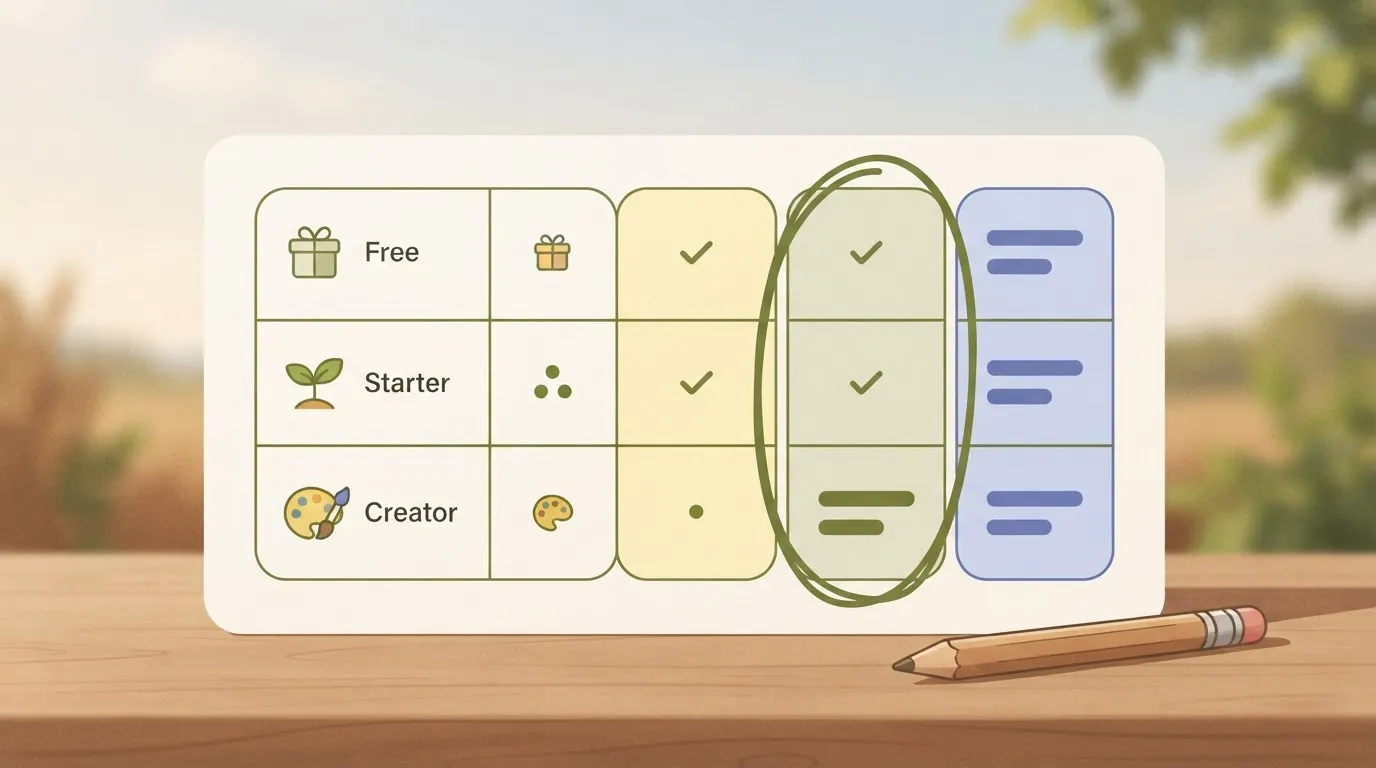
The plans page lists Starter and Creator under its commercial plans, and I've placed Team and pay-as-you-go beside them because they meter characters at a per-million rate. Free is the personal entry point.
Throughout this article, "Free" means that entry tier; I couldn't confirm whether the Lite, Plus and Pro names are separate priced personal plans or older labels for the same tiers.
The pattern in the table supports the argument of this article. The monthly price tells you little, while the per-million rate and the commercial label tell you what the plan will do for published work.
Start with the cheapest row that covers your voice and rights, and look at the next one only when a named limit blocks real work.
Personal, commercial and education plans: who each is for
Whatever audience the plan name suggests, a name isn't a licence. Check each plan's terms for the one question that can sink a purchase: does it allow commercial use of the audio you generate?
If you only listen to documents, the cheapest plan with a voice you can stand for an hour is the right one. If you publish narration, the usage-rights line outranks the voice line, because a better voice you can't legally publish wastes your money.
If you pay as you go, you're billed by the amount you generate instead of a flat monthly fee. That suits irregular work and gets expensive under steady volume.
**If you publish narration, the usage-rights line outranks the voice line, because a better voice you can't legally publish wastes your money.
The same applies if you later feed NaturalReader audio through automation: with Activepieces, a run costs 1 credit however many steps it has, but every extra run is still more metered usage on the NaturalReader side.
If you are running this arithmetic for your own team, see what the same workload costs on Activepieces.
Which NaturalReader plan fits three everyday uses
Pay for the cheapest plan that covers your voice and rights. That means free for a student, a personal tier for proofing, and a commercial tier only once published audio meters your characters. The table shows where each use sits.
| Use | Cheapest enough plan | Limit that matters | Annual cost | Next plan up pays off when |
|---|---|---|---|---|
| Student | Free | Daily listening cap | $0 | The cap stops a reading session |
| Professional proofing by ear | Cheapest personal tier with the voices you can tolerate | Voice quality over long sessions | Not metered by character | Daily limits block a real draft |
| Video creator | Commercial plan matched to volume | Characters voiced, plus commercial rights | Scales with characters at the per-million rate | Volume makes a lower rate worth it |
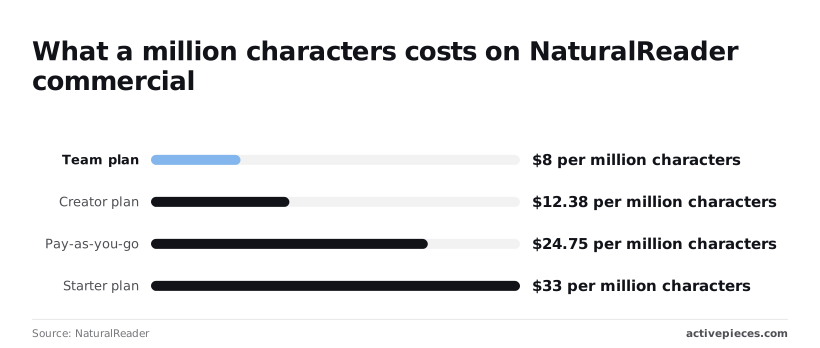
Start free if you're a student. At 136,200 characters, a 60-page PDF is the document most likely to hit a daily cap before you finish a long reading. Upgrade only after that cap interrupts coursework you actually had to complete.
Because proofing is personal listening, commercial rights add nothing. The voice tier is what you're buying: a flat voice over a 5,000-word draft hides errors you'd catch in a better one. Move up when voice quality or limits block a real draft, not before.
Voiceover for published content
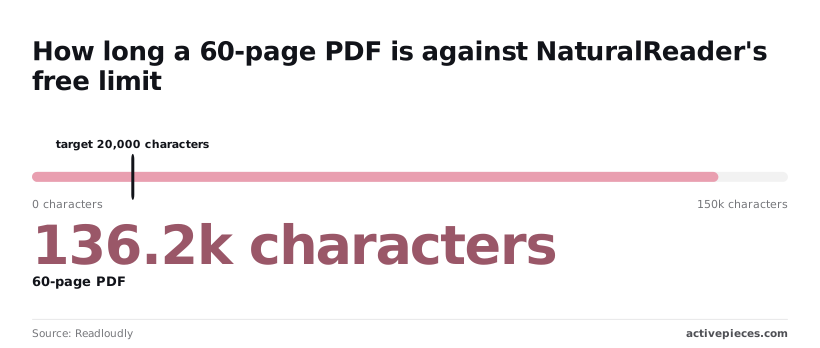
When you publish, the maths changes, because commercial plans meter characters. On NaturalReader's commercial plans, a million characters costs $33 on Starter, $24.75 on Pay-as-you-go, $12.38 on Creator and $8 on Team, which means your plan choice materially affects your per-character cost.

That puts Creator's rate about 62% below Starter's, and Team's about 76% below. A creator voicing one million characters a year saves roughly $20.62 by choosing Creator over Starter, so the move pays once your volume covers the higher plan's own fee.
Hidden costs and limits NaturalReader users hit
If the fine print blocks your work, the savings from moving up a plan vanish. Five limits can: commercial rights, MP3 export allowance, tier-gated voices, the annual commitment, and renewal and refund terms. I confirmed only the prices; I flagged each other item.
I couldn't verify commercial-use rights beyond the plan names, so read the licence text before publishing paid work. I found no confirmed MP3 export cap, and I couldn't confirm which voices sit on Starter versus Creator.
If you publish audio for clients or monetised channels, personal-tier pricing is the wrong comparison. The plans page lists Starter and Creator under its commercial plans. I couldn't verify the licence wording, so confirm it covers your use before you pay.
If you batch-export audiobook chapters or course narration, ask support for the monthly allowance before relying on a plan.
If those chapters arrive as documents someone has to feed into a TTS step by hand, Activepieces, which has 750 integrations, can take over that routing, and that is all it speaks to: it doesn't tell you which NaturalReader plan to buy.
Describe the process in its built-in chat (a new article arrives, its text goes to your TTS service, the audio lands in a folder) and what comes back is a live flow in your account, with a run trace showing what happened at each step.
Flows are unlimited on every plan, including free, so testing the build costs nothing.
NaturalReader annual billing versus monthly pricing
If you take Starter, it's $29 a month, or $16.50 a month billed annually. Over twelve months that's $348 against $198, so annual saves $150 but commits you for the year.
On Creator it's $49 monthly or $24.75 annually. That's $588 against $297, so annual saves $291. If NaturalReader charges the annual price as one payment, which I couldn't verify, you'd put $297 down on Creator before testing it on real work.
So annual billing is worth it only once you've confirmed your voice and licence needs on a monthly month.
Before paying annually, check whether the plan auto-renews and whether unused months are refundable.
Worth checking against a plan that does not meter every step: one credit covers a whole run on Activepieces.
The strongest case against paying for NaturalReader
If you only listen to your own documents and never publish the audio, a free reader already does the job. A refund policy never becomes relevant because you never pay.
Why free readers are a serious alternative
On Windows, macOS, iOS and Android, built-in screen readers cost nothing and read most text on screen. Their voices are flatter than a paid neural voice, but for proofreading or skimming a long email, that gap may not be worth a subscription.
NaturalReader against closest rivals on price, limits and rights
Beside NaturalReader's free tier and the free built-in option, the table puts two developer services that bill per character synthesized rather than per month. That difference means the cloud services cost nothing until you generate audio, and then cost in proportion to volume.
| Monthly price | Voice quality | Limits | Commercial rights | File support | |
|---|---|---|---|---|---|
| NaturalReader Free | Free | Basic voices | Capped premium voice access | Personal listening; check terms before publishing | Pasted text and common document types |
| Built-in screen reader | Free with the device | Functional, robotic | None that matter for personal use | Not meant for producing audio to distribute | Whatever the host app can display |
| Amazon Polly Standard | No monthly fee; billed per character | Clear, less natural than neural | Metered by characters | Generally permitted under AWS terms | Text or SSML only; you build the file handling |
| Google Cloud TTS | No monthly fee; billed per character | Wide range, including natural voices | Metered by characters | Generally permitted under Google Cloud terms | Text or SSML only; you build the file handling |
Unless you can write the code that feeds them documents, Polly and Google only look cheaper. You're paying with your own time.
For listeners the objection wins: students, proofreaders and anyone reading for themselves should stay on the built-in reader or the free tier.
It fails once you need a natural voice tier together with clear rights to publish the audio, because that's exactly what the free options either withhold or leave you to assemble yourself.
Automate document-to-audio with Activepieces
Don't mistake Activepieces for a text-to-speech product: it's an MIT-licensed workflow automation tool. It doesn't replace NaturalReader or change what a NaturalReader plan costs; it fits only when new documents or submissions need to reach a TTS service without anyone pasting them in.
With the free options, you assemble voice quality and publishing rights yourself.
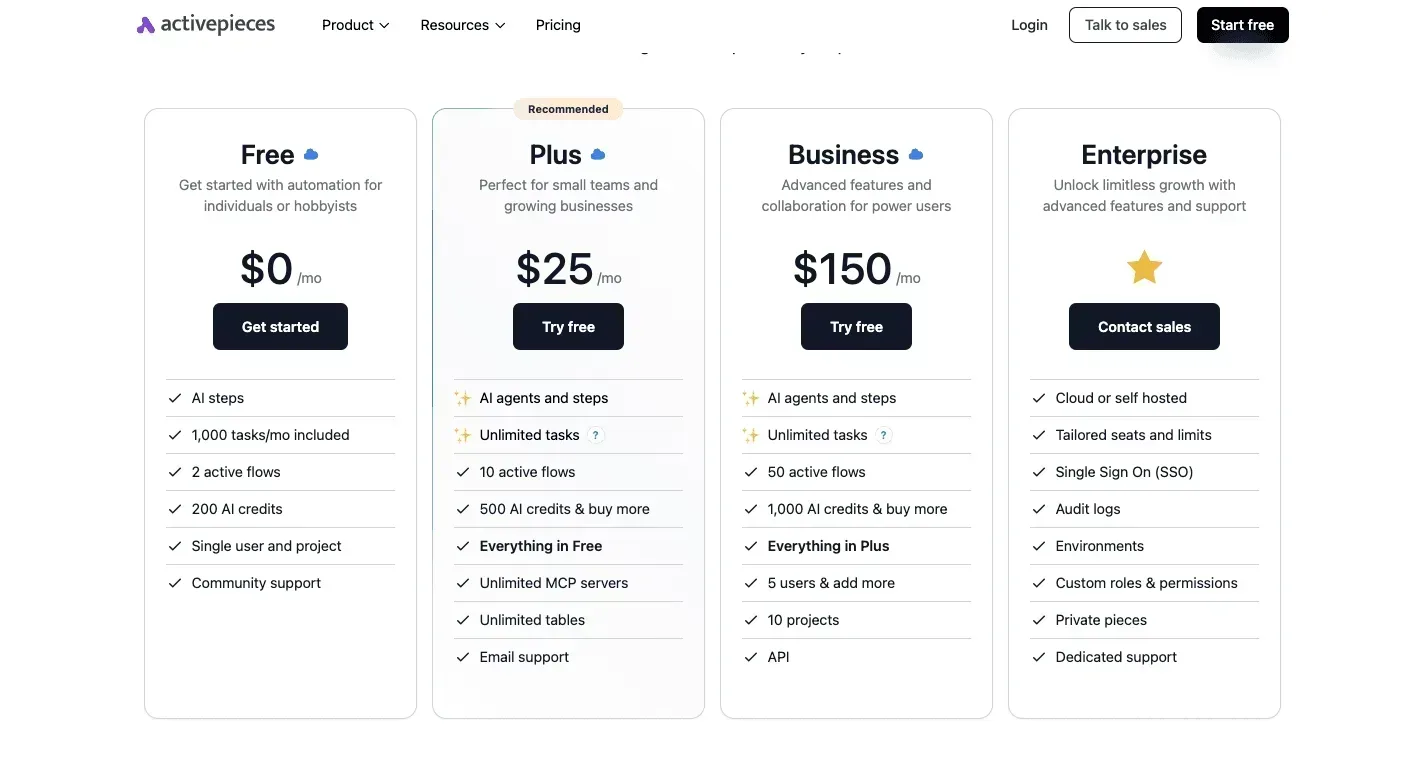
An automation inherits that same problem: the voice tier and usage rights come from whichever TTS service sits at the end of the flow, not from Activepieces, whose Free plan ($0, 1,000 credits a month) only moves the text, so you'll still need to pay the TTS provider separately.

When to automate text-to-speech with NaturalReader
When the input arrives on its own schedule and in volume you don't control, automation earns its place. That means a stream of articles, a folder that fills with documents, or a form that visitors submit.
If that describes your work, a flow removes the repeated copy-and-paste and the chance that something never gets converted.
If it doesn't, manual use is simpler. One person pasting text into NaturalReader a few times a week has nothing to route, so a flow only adds something to build, test and keep working.
Note also that a flow doesn't buy you a better voice or clearer commercial rights. Check those on the TTS service's own plan first, then decide whether the routing is worth building.
What such a workflow looks like
On one side of the illustration, new documents, articles and form submissions all feed a single Activepieces flow, which costs 1 credit per run however many steps it has, sends the text to a TTS service and saves the finished audio to a folder; on the other, one person pastes text into NaturalReader.
Take from it that the flow is a pipe with many inputs and no person in the middle, while NaturalReader is a tool with one person at the controls.
The flow has three parts:
- A trigger fires when a new document, article or form submission arrives.
- An action sends that text to the TTS service you've chosen.
- A final action saves the returned audio to a folder.
What follows from this is a decision about ownership. In a flow, you pick and connect the TTS service yourself, so the licence terms of that service govern what you can do with the audio.
If you only need a handful of recordings, stay with NaturalReader and the cheapest plan that covers your voice and commercial-use needs.
Steps to take before subscribing to NaturalReader
Before paying, prove on your own files that the cheapest plan covers the voice and commercial-use rights you need, and only then pick a billing period.
- Test the free tier on your own documents.
- Write down the voice, export and commercial-use needs you found.
- Start on a monthly plan.
- Move to annual only once your usage is proven.
- Put the renewal date in your calendar.
- Re-check the pricing page before that date.
Test the NaturalReader free tier on your documents
Run the free tier on the files you'll actually read aloud, not the sample text.
Then write down three things: which voices you'd use, which export formats you need, and whether the audio will be published or sold. That last note matters most, because commercial use is the right most likely to separate one plan from the next.
Choose monthly or annual NaturalReader billing
Start monthly. The annual rate only saves money if you keep using the plan for the whole term, and you don't know that yet.
If usage is steady and the plan covers your voice and rights, annual is simply the same plan at a lower yearly cost. If you keep hitting a limit that blocks real work, move up a tier instead.
Frequently asked questions
Read the answers below for what usually decides whether a renewal, switch or cancellation goes cleanly.
Does NaturalReader have a free plan?
Yes, NaturalReader offers a free tier, but it's limited in which voices and how much listening it unlocks. It's enough to judge whether the reading pace and interface suit you.
To hear the premium voices you'd pay for, audition them on a paid plan's trial terms, if any, before you commit; the free tier isn't a way to test them.
Can I cancel NaturalReader and get a refund?
You can cancel, but whether you get money back depends on NaturalReader's current refund terms, and I haven't confirmed them. Cancelling normally stops the next renewal; it doesn't necessarily return what you already paid.
Read the refund wording on the checkout or billing page before you buy an annual plan, because that's the purchase where a mistake costs the most.
Can I use NaturalReader audio on YouTube or in a podcast?
Only if your plan carries commercial-use rights, and a personal plan generally doesn't. Publishing audio on a monetised channel or in a podcast is commercial use even when you're a one-person operation.
Check the licence terms for your tier before publishing. If the plan you hold excludes it, the commercial tier is the first upgrade that pays for itself, because the alternative is publishing audio you may not be licensed to use.
Does NaturalReader work offline or on mobile?
Mobile is covered: NaturalReader has mobile apps and desktop software as well as the web reader.
Offline use is narrower: it depends on the voices installed locally rather than the cloud voices, so the premium voices you chose a plan for may need a connection. Confirm that before you rely on it for a flight or a commute.
Is NaturalReader's pricing the same for teams and schools?
No.
For a small team, compare the seat arrangement against buying individual plans, and check that commercial-use rights carry over to every person using the audio.
Related reading
References
Running the numbers
See what the same workload costs here.
Free forever plan, and every paid plan self-hosts at no extra cost.
See pricing Talk to sales