
NVIDIA NIM Alternatives: Top Options Compared (2026)

Nov 24, 202614 min read
A free, rate-limited prototyping endpoint was doing a production job, and that is why the pipeline broke. NVIDIA NIM itself worked as designed.
Account for NIM rate limits in production
The team had no cap, no fallback and no check in front of it, so the first busy morning exposed all three gaps, much as it would for any workflow built in a tool like Activepieces and left unguarded.
Vendor facts here were checked on 24 November 2026.
What NVIDIA NIM is and the two ways it is used
NVIDIA NIM is a set of packaged inference microservices: containers that serve AI models behind a standard API. You can use it in two ways.
The first is the hosted endpoints NVIDIA runs for developers to try models for free, with rate limits. The second is self-hosting the containers on GPUs you rent or own, under NVIDIA's enterprise licensing.
Most teams start on the first and stay there. That drift's the whole story, because the hosted route is built for experiments. It gives you no capacity guarantee, so your workload competes with everyone else's trial runs.
NIM free endpoint failure example and logs
Take a composite team, a small operations group assembled from several real patterns rather than one company.
The team built document triage as a single Activepieces flow: an Agent step sent each invoice or contract to a hosted NIM model for classification, and plain rule steps handled the routing to the right inbox.
Because the agent and the rules live in one flow definition, a rate-limited classification call sat in the same run trace as the routing steps after it, with no separate agent framework calling back through a webhook.
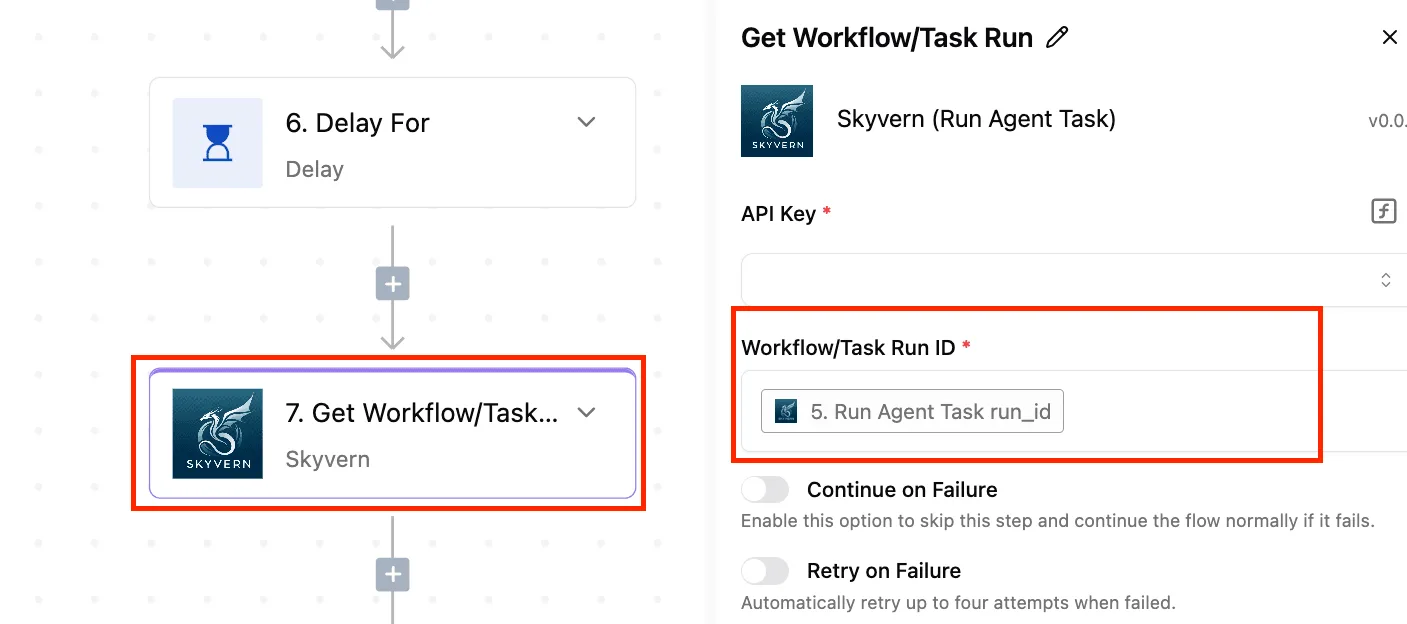
Teams at MoneyGram, Moneypenny, Alan and FundingSocieties use Activepieces.
In testing, it ran cleanly on a few dozen documents.
At 09:40 on a Monday, the overnight backlog landed all at once. The logs showed a run of rate-limit responses, then retries that fired immediately and failed again.
Nothing crashed. Documents simply stopped moving, and the workflow reported them as pending rather than failed, so no alert fired. The team found out when a colleague asked where a contract had gone.

The bootstrap fix costs almost nothing: add a cap on requests per minute, a second provider as a fallback, and a check that alerts when documents sit unprocessed too long. The sections that follow choose alternatives job by job.
The fastest way to settle a shortlist is to try one. Activepieces is free to try, no credit card.
Cost of NIM free tier failures
Once the free endpoint started throttling, the example team paid in four units: hours of backlog, documents left unprocessed, staff hours spent re-running work, and days customers waited.
NIM outage backlog and rework hours
The table below is a composite showing what to count and who absorbs each cost.
| Measure | Example team's figure | How counted | Who felt it |
|---|---|---|---|
| Backlog hours | Time from the first rejected call until the queue was empty again | Timestamps on the first 429 error and the last queued job | Operations, who watched the queue grow |
| Documents unprocessed | Files that sat in the queue or failed with no retry | Count of jobs without a success record at day end | Customers waiting on results |
| Staff re-run hours | Time staff spent resubmitting and checking failed jobs by hand | Self-reported hours on a shared sheet, per person | The two or three people who became the fallback |
| Customer delay | Gap between promised and actual turnaround | Upload time against delivery time, per customer | Customers, then account managers handling complaints |
Nobody budgets for the staff re-run row, yet it's the line that turns a rate limit into a morale problem, and most teams undercount it.
Customer delays from NIM rate limits
To customers, backlog means nothing. They see only that the result arrived late, with no explanation and no warning.
In practice, the cap, the fallback and the check each answer one of these four costs. A cap stops the backlog from growing without limit. A fallback keeps documents moving and spares staff the manual re-runs. A check tells you before the customer does.
Why teams abandon NIM after failure
Read NVIDIA's own pages and the reason is plain: they describe the free hosted endpoint as a development tool, and the route to production has costs and conditions most small teams never priced in.
Four statements on NVIDIA pages, all dated 24 Nov 2026, explain nearly every exit:
- Free hosted access is for development, capped at about 40 requests per minute.
- Self-hosting requires NVIDIA GPUs.
- The AI Enterprise price isn't published.
- Support terms depend on the paid tier.
Read together, they say the free tier can't carry customer traffic, and the paid path asks for hardware and a quote before you can budget.
About 40 requests per minute is enough for one developer testing prompts. It isn't enough once a few users, a retry loop and a background job share the same key, because the excess comes back as errors.
Self-hosting needs NVIDIA GPUs and a licence
Running the models yourself means NVIDIA GPUs, so you're buying or renting hardware from one vendor before serving a single request.
Production use then points toward AI Enterprise, and since NVIDIA doesn't publish that price, you can't compare it with an API bill until you've talked to sales.
The bootstrap version is a pay-per-token host for open-weight models, which gives you a number on day one.
Model choice and lock-in concerns
When an outage lands on the free tier, you have little recourse, and if you build around NIM's packaging, switching later costs engineering time.
Keep your prompts and calls behind one thin interface so a change of provider is a configuration edit, not a rewrite.
Rate-limit rejections, the 429 responses, make up most of the failures across providers. The limit follows you to any provider you pick without a cap, a fallback and a check.
Compare NIM alternatives on price and limits
Pick the alternative by the cost you can live with. Hosted APIs bill per token, self-hosted runtimes bill you in GPU hours, and free tiers cap you hard.
| Option | Price basis | Strength | Main limit |
|---|---|---|---|
| Together AI | Per token | Broad open-model catalog | Shared capacity |
| Fireworks AI | Per token | Fast serving | Narrower catalog |
| Groq | Free tier, then paid | Very low latency | Daily request cap |
| OpenRouter | Per token, free models | One key, many providers | 50 free requests a day |
| Hugging Face | Per token or hourly | Largest model library | Variable speed |
| Cerebras | Free trial, then paid | Fast generation | $5 in free credits, expiring after 30 days |
| Gemini API free tier | Free | Strong models at no cost | Rate limits |
| vLLM | Free software | Full control | You run it |
| Ollama | Free software | Simple local setup | Your hardware |
When the week is quiet, Together AI, Fireworks AI or Hugging Face cost almost nothing, because they charge per token. That suits a bootstrapped product whose traffic is unpredictable. Pick by catalog first, then speed.
Self-hosted runtimes you run yourself
You can install vLLM and Ollama for nothing, but the GPU's not free. On-demand H100 rates from ComputeTick run from Runpod at $2.69 per GPU-hour. Lambda is $4.59, CoreWeave $6.16, AWS $6.88 and Azure $11.06.

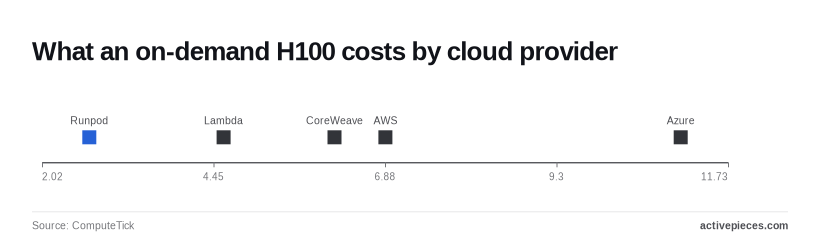
Run one GPU around the clock at Runpod and it comes to roughly $1,960 a month, while Azure costs about four times Runpod, roughly $7,840 monthly. Self-hosting only pays once usage is steady.
Until then, Ollama on a machine you already own is the bootstrap version.
Free inference options and their stated limits
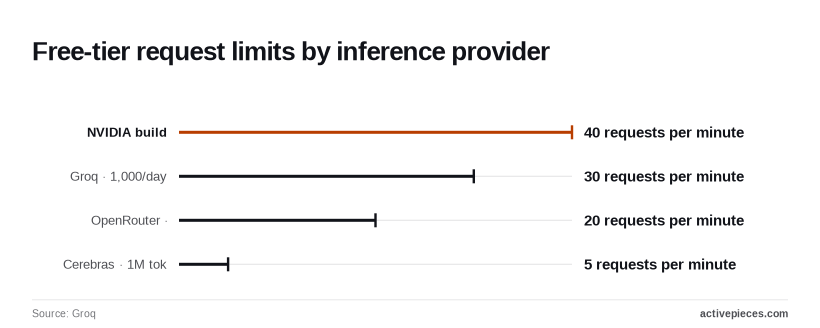
The daily caps below matter more than the per-minute numbers.
(chart)
At a steady 30 per minute, Groq runs out in under 34 minutes, because it allows only 1,000 a day. OpenRouter allows 20 per minute yet only 50 a day, which is a test harness, not a service.

Cerebras allows 5 per minute with a 1M-token allowance, enough for slow batch jobs.
Match the limit column to your traffic. Spiky or low volume: a per-token API. Steady, high volume: self-host. Prototyping only: any free tier, with a cap and a fallback in front.
Reading a table only gets you so far. Build the same workflow in Activepieces and compare it yourself.
Rules for NIM caps, fallbacks, and alerts
There are five rules. Run production on a paid hosted provider, keep the free tier for prototypes only, set a daily request cap, add a second-provider fallback on 429 or 5xx errors, and check vendor limits monthly.
Separate prototype and production endpoints
Paying is cheaper than it looks. Epoch AI tracks the cheapest GPT-3.5-level inference at $20 per 1M tokens in Nov 2022 and $2 in Mar 2023.
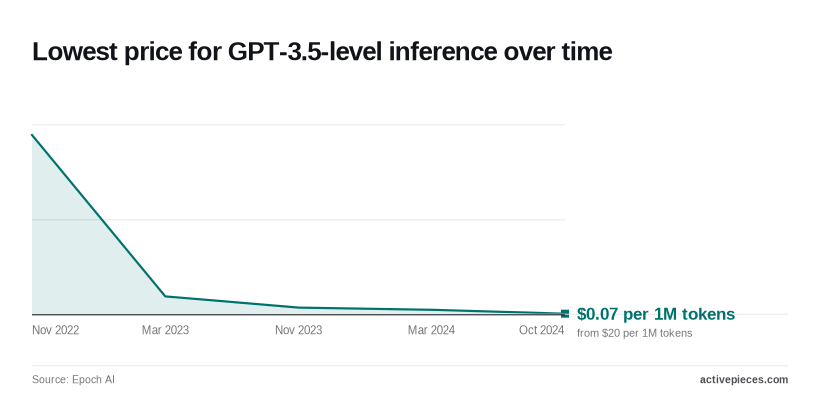
By Nov 2023 the price had reached $0.75, and $0.5 by Mar 2024, then $0.07 in Oct 2024. That's about 285 times cheaper in under two years, so a small team's production traffic costs pocket change, and a rate-limited free endpoint saves you almost nothing.
Set a daily cap below the provider's limit, so your own code stops first. Then alert on error rate, not only on outages: a rise in 429s means you're being throttled, which users feel as slowness before anything is "down".
Route to a second hosted provider when the first returns 429 or 5xx. The bootstrap version is a retry plus one alternate endpoint behind the same client function.
Re-check vendor limits each month
Expect free-tier limits to change without much notice. Put a monthly reminder in the calendar to reread the limits page and compare it with your cap, so a quiet change doesn't turn into a surprise outage.
The order below matters, because each step protects the one after it:
- Move production to a paid provider.
- Keep the free tier for prototypes only.
- Set a daily request cap.
- Add a fallback on 429 and 5xx responses.
- Set an error-rate alert.
- Schedule a monthly limit check.
Do the first two and you've removed the root cause. The other four stop the next, smaller version of the same failure.
Build inference fallback workflows with Activepieces
Do not expect Activepieces to host models or replace NIM. What it does is call a model API, notice when the call fails, retry on a second provider and tell you about it, all from an MIT-licensed core.
You can build the cap, fallback and check this article keeps returning to as one visual flow rather than glue code.
The free plan allows unlimited flows with 1,000 credits a month, and a run costs 1 credit however many steps it has, though AI steps cost more.
Where a workflow tool helps and where it does not
When the inference call is one step inside a larger job, Activepieces helps, and its 750 integrations cover the triggers: a scheduled batch, a form submission, a row appearing in a spreadsheet.
In those jobs a failed call shouldn't silently drop the item, and a workflow gives you a place to branch on the failure, retry, and log what happened.
For a bootstrapped team without a spare engineer, that's the cheap version of a reliability layer. The product is open source and can be self-hosted, so the bootstrap version costs you a small server and your own time.
When your application calls the model directly on every user request and needs the lowest possible latency, a workflow tool doesn't help. Putting a workflow engine in that path adds a hop and another thing that can fail.
There, a few lines of retry logic in your own code, or a gateway in front of your providers, is the better answer.
Retry, fallback and alert steps in one workflow
In the screenshot, the flow has a schedule trigger, a Google Sheets step that pulls open job offers, a highlighted Text AI step with provider, model and prompt fields, and an HTTP step after it.
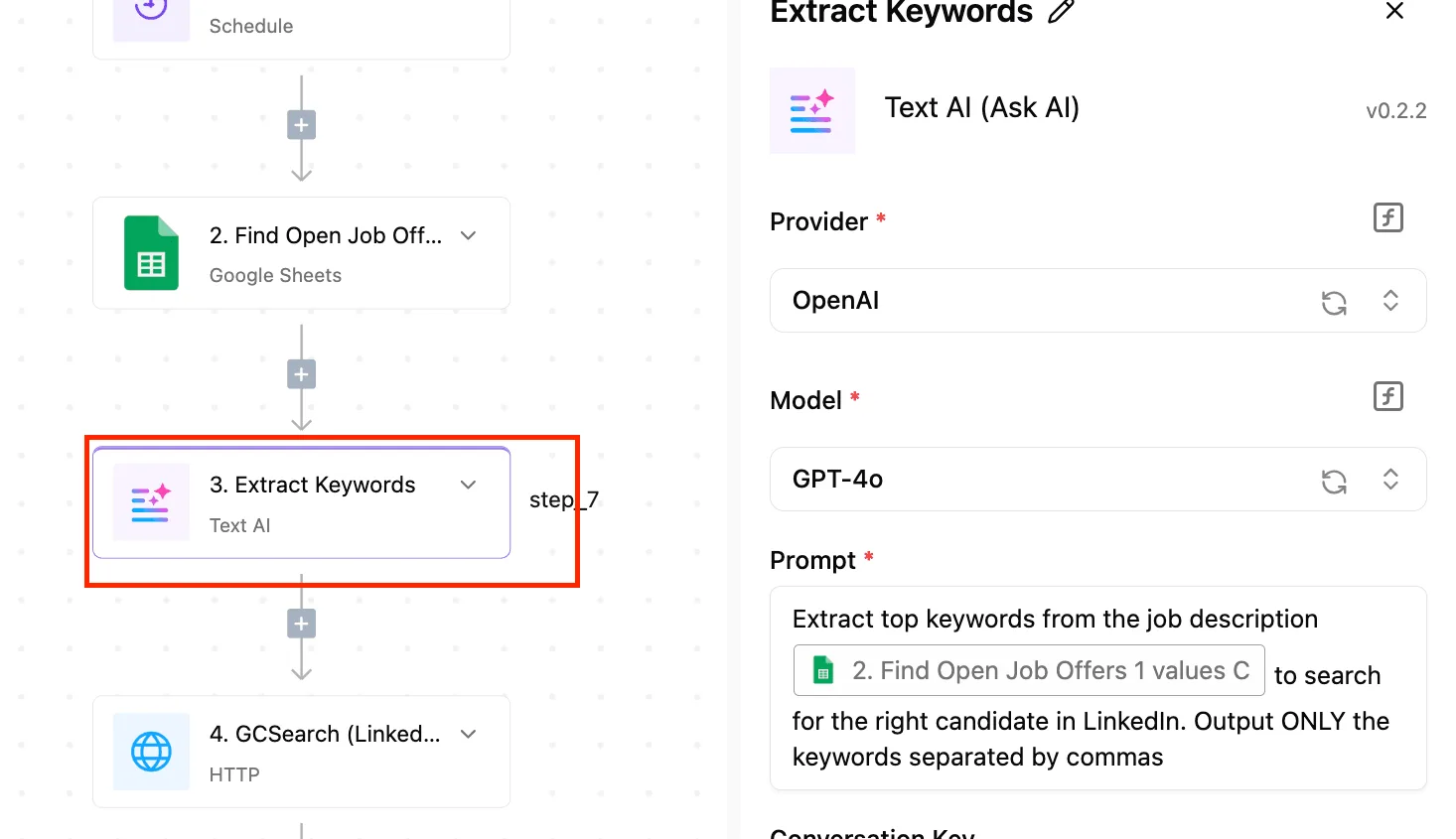
Swapping its provider is a settings change rather than a rewrite, because the model call is just one configurable step among others.
Build the failure path around that step in this order:
- Run the primary model call, whether that is NIM or another provider.
- Branch on whether it returned an error or an empty result.
- On failure, run the same prompt through a second provider's step.
- Post an alert to chat or email naming which provider failed and which one answered.
- Add a final check that rejects output that is empty or malformed before it moves downstream.
Frequently asked questions
Is NVIDIA NIM free to use in production? No. The free hosted endpoint is for prototyping, and its rate limits make that plain.
Retrying a 429 won't fix it: the SDKs already retry twice, so a third attempt only delays the failure. Put a cap and a paid or self-hosted fallback in front of it before real users arrive.
What is the best free alternative to NVIDIA NIM? There isn't one best option, because the right choice depends on the job.
For prototyping, use whichever provider's free tier fits your volume. For anything customer-facing, the bootstrap version is a low-cost paid model, such as Gemini 3.5 Flash-Lite or Ministral 3 8B.
A small, predictable bill costs less than the hours you lose debugging a throttled free endpoint.
Can I run NIM-style inference without NVIDIA GPUs?
Yes. NIM containers are built for NVIDIA hardware, but the models behind them often aren't tied to it.
You will find open-weight models such as Mistral Small 4, Mistral Large 4 and Z.ai GLM 5.3 at other hosted providers. You can also run them on your own hardware with a different serving runtime.
The trade-off is that you take over the tuning NIM would've done for you.
Is OpenRouter or a direct provider cheaper?
It depends on the model, so compare the per-token price on both pages for the exact model you plan to use. A direct provider removes one intermediary and usually gives you the first look at new models.
Switching is easy with OpenRouter, which gives you one account and one API across many providers, when one rate-limits you.
If a fallback is your main worry, the router can save more engineering time than it adds in cost. If you only use one model heavily, go direct.
How often do inference free tiers change their limits?
Often, and not always with notice. Treat any limit you read today as provisional. Keep it in a config value rather than hard-coding it.
Run a small scheduled check that sends one cheap request and alerts you on an unexpected 429 or a changed response. That way you find out about a change from your own monitor, not from your users.
Related reading
References
Still comparing
The fastest way to settle it is to build something.
Open source under MIT, so you can self-host the same thing later.
Start free Talk to sales