
Ideogram API Pricing in 2026 and Cost per Image

Nov 8, 202615 min read
What an image costs is not on the plan page. Ideogram's paid plans cost $15 to $60 a month per seat depending on tier and billing period, and Ideogram meters API usage per generation, so the plan price tells you little.

Ideogram API plans and pricing
What Ideogram is and how its API is billed
Start with the unit, because it differs by route. Ideogram is an AI image generator, and its API lets software request images the same way the web app does.
On a subscription plan you pay a flat monthly or annual fee for a seat. Through the API you pay per generation, and the rate depends on the model tier you call.
Until you know how many images you keep, a flat plan price and a metered API rate can't be compared.
Ideogram still bills a team that wires it into Activepieces on the API side, with 747 integrations available and unlimited flows on every plan, including free, so teams on Activepieces' free tier must still pay for Ideogram.
Until you know how many images you keep, a flat plan price and a metered API rate can't be compared.
Ideogram subscription prices, monthly versus annual billing
To see how much the billing period alone changes the number, read the table below, which shows what each subscription costs monthly and annually. Take from it that annual billing is the cheapest route on every paid tier.
| Plan | Monthly price | Annual price (per month) | Checked | Source |
|---|---|---|---|---|
| Free | $0 | $0 | 2026-11-08 | Ideogram plans |
| Plus | $20 | $15 | 2026-11-08 | Ideogram plans |
| Pro | $60 | $42 | 2026-11-08 | Ideogram plans |
| Team (per user) | $30 | $20 | 2026-11-08 | Ideogram plans |
Prices and plan limits checked against developer.ideogram.ai on November 8, 2026.
Plan pricing changed as follows:
- Plus drops from $20 to $15 a month on annual billing, a 25% cut, or $60 saved over a year.
- Pro falls from $60 to $42, a 30% cut worth $216 a year per seat.
- Team falls from $30 to $20 per user, a 33% cut, so a five-person team saves $600 a year.
- The catch is commitment: you pay for twelve months even if the team stops generating in month four.
Don't read a plan's monthly fee as an image price: this table covers plan prices only. Credit allowances, concurrency limits and per-image API rates aren't in it.
Test prompts on the Free plan first, since it costs nothing and shows how many attempts a usable image takes. It's a trial of the product, not a basis for a production budget.
What you learn there, the share of generations you discard, is the number you multiply every paid price by.
If you are running this arithmetic for your own team, see what the same workload costs on Activepieces.
Monthly cost of one named image workload
Divide a small shop's monthly Ideogram bill by the images it keeps and you have what an image really costs. The bill itself is the plan fee, or the per-image API price times generations.
Picture a small online shop that refreshes product listing images each month:
- Lifestyle backgrounds
- Banner variants
- Seasonal promo art
- Call the number of finished images the shop needs K
- Not every generation survives, so the shop keeps a share k of what it generates, and it must generate K ÷ k images to end up with K
- The metered unit differs by route: credits on the subscription plans, individual images on the API
- Treat K and k as your own numbers from the test batch in the previous section, not as figures from this page
Bill on each plan and on the API
On a plan, the fee is flat and buys a pool of credits, so your bill is fixed but the images the pool covers shrink as the shop picks costlier settings.
On the API, the bill moves with every reroll, because each image is billed at the model tier you call. The table puts all six routes on the same four columns, with G standing for the images generated.
| Route | Monthly bill | Images generated | Images kept | Cost per kept image |
|---|---|---|---|---|
| Plus monthly | Monthly fee | Credits included ÷ credits per image | G × k | Fee ÷ (G × k) |
| Plus annual | Annual fee ÷ 12 | Credits included ÷ credits per image | G × k | (Annual fee ÷ 12) ÷ (G × k) |
| Pro | Monthly fee | Credits included ÷ credits per image | G × k | Fee ÷ (G × k) |
| API at Turbo $0.03 | G × $0.03 | K ÷ k | K | $0.03 ÷ k |
| API at Default $0.06 | G × $0.06 | K ÷ k | K | $0.06 ÷ k |
| API at Quality $0.10 | G × $0.10 | K ÷ k | K | $0.10 ÷ k |
Read the plan rows and the API rows differently. On a plan, the bill stays flat however many images you throw away, so a poor keep rate leaves the fee unchanged but cuts the images you actually get.
On the API, the bill climbs with every discard, so a poor keep rate raises the bill itself.
Cost per usable image after rerolls
Budget on the last column. Every API row divides the sticker price by k, so a keep rate of one half doubles the effective price and a rate of one quarter quadruples it.

If a tier makes you discard noticeably more, its low sticker price doesn't make it the cheapest.
Compare tiers by price ÷ k, using the keep rate you measured on each, and compare plans by fee ÷ (G × k), where the credits you actually receive cap G.
Hidden Ideogram costs and limits
Outside the per-image price sit five costs, and only one of them, the default concurrency cap, appears outright in Ideogram's documentation. The pages checked don't settle the rest, so they are marked unclear. Treat each as a question to put to Ideogram before you commit.
- Default limit of 10 in-flight requests: stated in docs.
- Rerolls, which spend credits like any other generation: unclear.
- Edits and upscales billed separately from the base generation: unclear.
- Credit expiry at the end of a billing period: unclear.
- Image URL expiry, which forces you to run your own storage: unclear.
Since each of these changes either G or k in the formula above, the three subsections below take them in turn.
Ideogram API rate limits and credit rules
When you run a large batch, it queues behind itself: the Ideogram API overview sets a default of 10 in-flight requests and asks you to email [email protected] for more.
Ten concurrent calls means a large run takes more wall-clock time, and the fix is a sales conversation rather than a setting.
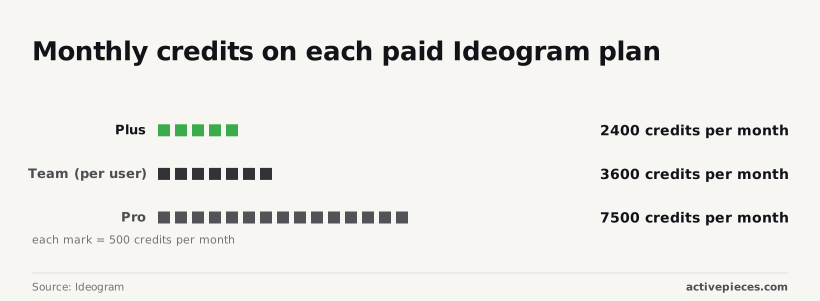
Then there is the credit cap. Per Ideogram's available plans, Plus includes 2,400 credits a month, Team includes 3,600 per user, and Pro includes 7,500.
viz type=groupedbars title="Ideogram subscription prices by billing period" unit="$ per month" source="Ideogram - https://docs.ideogram.ai/plans-and-billing/available-plans" cols="Billed monthly,Billed annually"5." Plus: 20, 15 Pro: 60, 42 Team (per user): 30, 20
Those numbers are your ceiling on G, so any month where you generate more than the allowance either costs a worse rate or gets blocked.
I couldn't confirm whether unused credits roll over, so assume they don't and budget to use what you pay for.
Ideogram credit costs of rerolls, edits and upscales
Because a reroll is a new generation, it draws the same credits as the first attempt. Your keep rate k already prices this in: if you keep one image in four, every kept image carries the cost of three discards.

If Ideogram bills edits and upscales separately, as I suspect but can't confirm, each keeper carries a second metered action.
The cost per usable image is then generation cost divided by k, plus the edit or upscale charge. Ask for those rates before you pick a plan.
Ideogram image storage, licensing and privacy terms
If the URLs the API returns expire, you must download every image at generation time and pay for your own storage, or lose the files you already paid for. I found no documented lifetime, so write the download into the pipeline from day one.
I didn't verify licensing or privacy terms for this piece, so read those before sending client work through any plan.
Worth checking against a plan that does not meter every step: one credit covers a whole run on Activepieces.
Ideogram against Midjourney, OpenAI and Google image pricing
Setting licensing aside, the rivals' list prices run from 3.9 cents to 5.3 cents per image, and that range is the bar Ideogram's effective price has to clear.
Each figure below is per generated image, the unit the vendor meters, and was checked in November 2026.
Ideogram versus rival image API prices compared
Read the table as a ceiling and floor for what a single generation costs elsewhere, not as a ranking, because a list price says nothing about how many generations you keep.
It shows the per-image list price for the three rivals where I confirmed a figure.
I didn't confirm subscription requirements, rate limits or free tiers to the same standard, so they are left out rather than guessed at.
| Model | List price per image | Checked |
|---|---|---|
| OpenAI GPT Image 2 (an earlier model; OpenAI's current image models are GPT-Image-2.6 Sunburst and Flare) | $0.053 | November 2026 |
| Recraft V4 | $0.04 | November 2026 |
| Google Nano Banana (the original; Google's current image models are Nano Banana 2.1, Nano Banana 2 and Nano Banana Pro) | $0.039 | November 2026 |
You will not find Ideogram 4.5 or Midjourney in these rows, because Ideogram's per-image cost depends on the plan or API route and the model tier you call, so no single number sits fairly beside these three.
The next subsection shows how to compare them anyway.
Where Ideogram is cheaper, and where it is not
At $0.053 per image, GPT Image 2 is the most expensive of the three. Recraft V4 lists at $0.04, and Google's Nano Banana at $0.039, so Nano Banana is the cheapest on paper.
1.4 cents separates the top from the bottom, which is $140 across 10,000 images, meaning small per-unit differences sum to material sums at scale. If you generate a few hundred a month, that difference is noise.
Past that gap, discards matter more. Divide the price by the share of images you keep. If you keep one image in two, GPT Image 2 costs about $0.106 per usable image.
If you keep only one in four from Nano Banana, it costs about $0.156 per usable image. The cheapest list price then becomes the most expensive result.
So Ideogram is cheaper than these three only when its effective per-image cost, after your discards, falls under theirs.
Where a rival's list price is lower and your keep rate with it is no worse, the rival is cheaper, and you shouldn't pay for Ideogram out of habit.
Measure your own keep rate on a batch of real prompts before trusting any headline number, mine included.
Automating repeat Ideogram image jobs with Activepieces
No template exists for a sheet that fires Ideogram calls at a chosen tier and logs each call's cost, and Activepieces, which MoneyGram, Moneypenny, Alan and FundingSocieties run in production, doesn't need one: describe that job in plain language to its built-in AI chat and it builds and publishes a runnable flow where a template library would return nothing.
It can't change what Ideogram charges. Measuring your own keep rate is what tells you whether the automation is worth building.
What the workflow does
In Activepieces, where a run costs 1 credit however many steps it has, a workflow starts with a trigger: a new row in a spreadsheet, a submitted form, or a timer.
It then calls the Ideogram API through an HTTP request step, using the model tier you chose in the row.
Once it comes back, the image is saved to a folder or storage bucket, and the result is written back next to the prompt.
What this changes is the discard problem. When prompts live in rows, you can add a "kept" column and mark each result yes or no.
That column is your keep rate, and it comes from your real prompts, not a headline figure. Divide what you spent by the images you kept, and you have cost per usable image.
What it doesn't change: Ideogram's prices, your plan, or the cost of a bad prompt.
Activepieces has its own meter too: the Free plan includes 1,000 credits a month and Plus is $20 a month for 10,000, so count one credit per row against that allowance before assuming the automation is free.
Setting an Ideogram spend cap and usage log
Put the cap in two places, because neither is enough alone. Set any spending limit your Ideogram plan or API account offers, so the vendor stops billing you.
Then add a check at the top of the workflow: read the running total from your log sheet, compare it with your monthly limit, and end the run if it's over.
Before a surprise reaches the invoice, the first cap stops it. The second keeps a loop or a bad schedule from burning the budget before you notice.
For the log, append one row per call: date, prompt, model tier, cost of that call, and the kept column.
Take the cost from the pricing you checked for that tier, not from memory. A per-call row means a month of spend can be summed and divided in seconds.
- Estimate your monthly image volume, then run a batch of real prompts and note what share you keep. Multiply volume by keep rate to see how many usable images you get per generation.
- Pick the plan or API route that fits that volume, and the lowest model tier whose output you actually keep.
- Set the spend cap in your Ideogram account, and add the budget check as the first step of the workflow.
- Log each call's cost in a sheet, with a kept column, and review cost per usable image at the end of the first month.
Frequently asked questions
Once spend is logged per call, the questions left are about the terms around those rows. Each answer below depends on the page it came from, so treat it as true on the date you read it.
We haven't confirmed a standing free API tier. The free plan is a web allowance of limited credits and limited concurrency, and that allowance is a different meter from API calls.
Budget the API from the first call, and treat any trial credit as a one-off that shouldn't appear in a monthly forecast.
Can I use Ideogram images commercially?
Whether you can use an image commercially depends on the terms of the plan you generated under, not on the image itself. Free-plan terms are the ones to read most closely, because they tend to be the most restrictive.
If the images will go into a product or an ad, generate them on a paid plan or through the API, and keep a copy of the terms as they stood on that date.
The practical consequence is that a team prototyping on the free plan may have to regenerate the final assets, which adds discards to the budget.
Is the Ideogram API billed separately from a subscription?
Plan on two meters. Subscription credits cover the web app, while API usage is charged on its own balance, so a paid plan doesn't make API calls free.
The cost is that a team using both pays twice for the same kind of image, and the monthly bill needs one line for each route.
Record which route produced each row in your per-call log, so the totals don't blend.
Do failed or blocked generations cost credits?
We haven't confirmed whether a failed or blocked request is refunded in every case, and the answer may differ between the web app and the API. Until you have tested it, assume a blocked prompt may still use up a call.
Run a small batch of deliberately rejected prompts, compare the balance before and after, and record the result. That tells you whether blocked requests belong in your discard count or outside it.
How often does Ideogram change its prices?
We found no published schedule, so assume prices can change without notice. Annual and monthly rates, model tiers and credit allowances are all separate levers that can move independently.
Date every price you copy into a budget sheet and recheck it before each billing cycle. A forecast built on an undated number can drift away from the invoice without anyone noticing.
Related reading
References
Running the numbers
See what the same workload costs here.
Free forever plan, and every paid plan self-hosts at no extra cost.
See pricing Talk to sales