
Stability AI API Pricing in 2026 and Cost Per Image

Nov 8, 202614 min read
Stability AI pricing per image
Stability AI API pricing table with check date
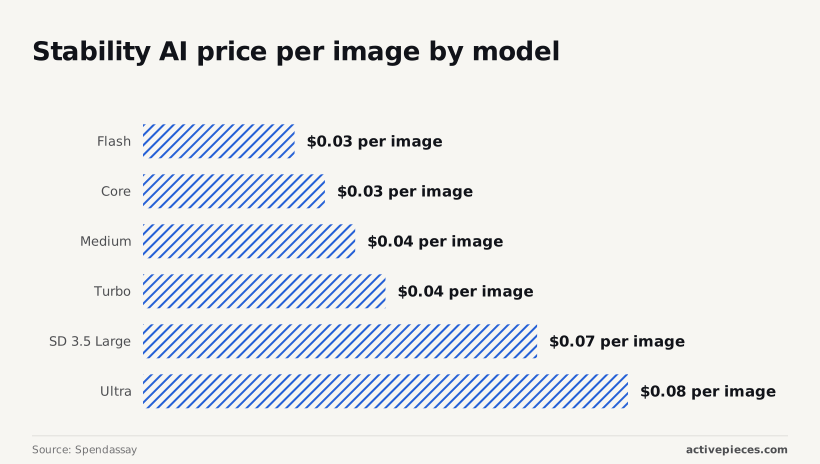
At $0.01 per credit, an image costs from $0.025 on Flash to $0.08 on Ultra, according to Spendassay, so your choice of model more than triples the bill, even when the generation calls are chained into a workflow through a tool like Activepieces.

Stability AI API pricing is credit-based pay as you go. The metered unit is one call to one model, not one image you keep.
Every current model, credits and dollars
Checked 2026-11-08, six models have confirmed prices, and the table covers all of them. The credit counts are the dollar prices divided by $0.01.
Read the spread first: Spendassay notes that Turbo sits exactly on the $0.04 market line, so only Flash, Core and Medium undercut it.
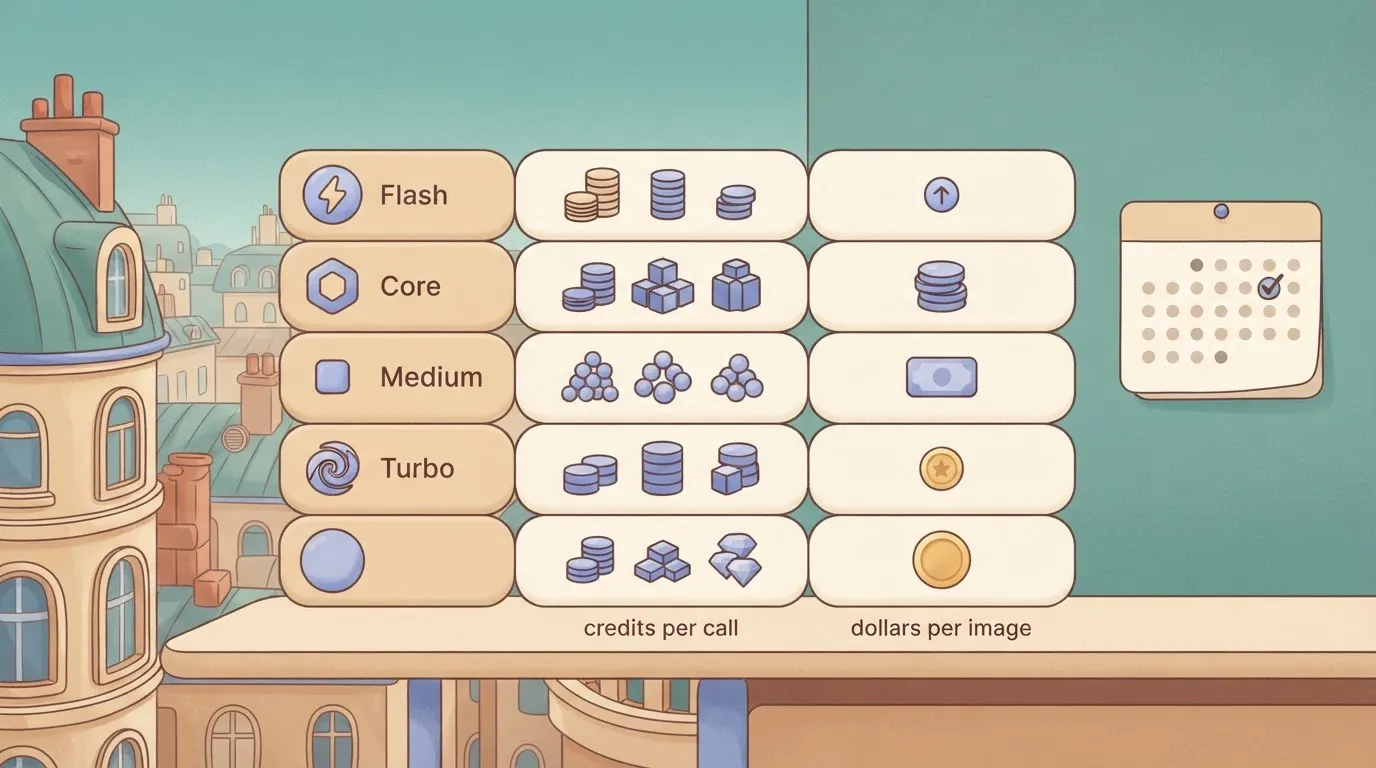
| Model | Credits per call | Dollars per image at $0.01/credit | Checked |
|---|---|---|---|
| Flash | 2.5 | $0.025 | 2026-11-08 |
| Core | 3 | $0.03 | 2026-11-08 |
| Medium | 3.5 | $0.035 | 2026-11-08 |
| Turbo | 4 | $0.04 | 2026-11-08 |
| SD 3.5 Large | 6.5 | $0.065 | 2026-11-08 |
| Ultra | 8 | $0.08 | 2026-11-08 |
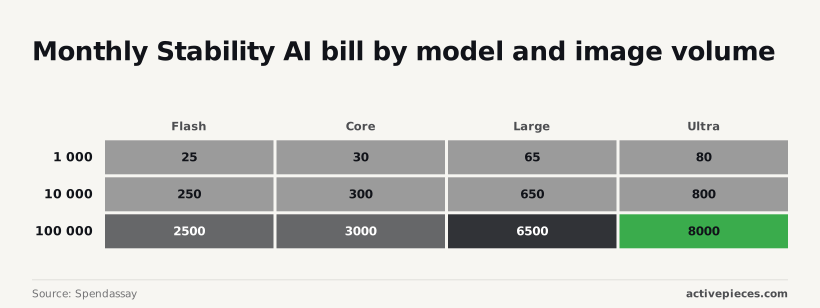
Ten thousand calls cost $250 on Flash and $800 on Ultra, according to Spendassay.
If a team defaults to SD 3.5 Large, it pays more than double Flash on every call; Spendassay identifies $0.065 as the second-highest step.
Stability AI free credits and account balance
New accounts get 25 free credits at signup. Check the balance on your account dashboard before you plan around it.
If you wire generation into a workflow tool, every automatic retry is a billed call.
A failed step that reruns three times costs three times the credits in the table.
If you are running this arithmetic for your own team, see what the same workload costs on Activepieces.
How Stability AI credits are bought and spent
You prepay for credits, and each API call deducts some. Credits are the meter. The dollar cost of a rerun is whatever that call's credit charge converts to at your top-up rate. That's why the retry count above matters in credits, not in images.
Credit price and top-ups
You buy credits in prepaid top-ups with a minimum purchase, at a flat rate per credit that Stability AI sets. New accounts get 25 free credits at signup.

Because the rate is flat, no volume discount shows up in the headline price.
Stability AI credit expiry, refunds and failed calls
Two rules decide how much of your prepaid balance becomes images: whether credits lapse, and whether a failed or content-filtered request still deducts credits. Both are set in Stability's documentation, and both can change, so read the current page before you size a top-up.
Until you have confirmed it, treat any request that reaches the model, including one the safety filter rejects, as potentially charged.
Then check your balance before and after a deliberately filtered call. That one test tells you whether filtered prompts in your workflow are free or part of the retry cost.
Only the hosted API runs on credits. Stability also publishes model weights under its own licence terms, with a separate commercial arrangement for larger organisations.
Running those weights yourself replaces per-call credit charges with GPU hosting, engineering time and licence compliance. That trade only makes sense once your steady monthly credit spend would exceed those fixed costs.
Monthly cost of Stability AI at realistic usage
Per 1,000 images, Stability AI costs $25 to $80 depending on the model, so the model you pick moves the bill more than volume does. These are Spendassay's six price points, cheapest to dearest, before any retries.
To price an ecommerce team at three volumes, the table below assumes 6.5 credits per finished image (generation plus upscale), two calls per image, and a 1.3 retry multiplier. All three are my assumptions, at $0.01 per credit.
| Images per month | Credits per image | Calls | Retry multiplier | Total credits | Monthly dollars |
|---|---|---|---|---|---|
| 3,000 | 6.5 | 6,000 | 1.3 | 25,350 | $253.50 |
| 30,000 | 6.5 | 60,000 | 1.3 | 253,500 | $2,535 |
Since dollars scale linearly with volume, the retry multiplier adds 30% at every level.
At 1,000 images the four models cost $25, $30, $65 and $80 a month, per Spendassay. So 500 images is about $12 to $40 before upscales and retries. Our assumed bill of $42.25 is small enough that model choice barely matters yet.
$253.50 a month is what the 3,000-image workload costs. That's about what 10,000 plain images cost on the cheapest model: Spendassay lists $250, $300, $650 and $800 at that volume.
At 30,000 images the bill reaches $2,535 a month. At 100,000 images Spendassay shows $2,500, $3,000, $6,500 and $8,000, so the spread between cheapest and dearest is $5,500 a month.
Rate limits and hidden costs
Past the per-image credit price, the bill grows through throttling, retried calls, multi-step pipelines and forced migrations, and none of these appear on the pricing page.
Stability AI API rate limits and throttling
150 requests per 10 seconds, about 15 a second, is all Stability AI's API allows. Go over and you get an HTTP 429 error, then a 60-second block.
A batch job that bursts past the limit stalls for a full minute, so you pay for idle workers and delayed deliveries. Add queueing or backoff to your pipeline, which is engineering time the credit price never shows.
Stability AI retries and chained call costs
When a client resends on failure without backoff, it can trigger another 60-second block and repeat the cost, because every retry is a metered call. Chaining is the larger multiplier. Per-operation credit costs, compared side by side, show how fast a pipeline compounds:
According to Open API Pricing, creative upscale costs 60 credits per operation and conservative upscale costs 40. A general edit costs 5 credits, and a fast upscale costs 2.

A creative upscale therefore costs 30 times a fast upscale, and a conservative one 20 times. A product shot that's generated, edited once, then upscaled creatively adds 65 credits of follow-on work on top of the generation charge.
Pick the upscale tier deliberately, because it can outweigh the model choice you just tested.
When a model or endpoint is retired, you re-test prompts, adjust parameters and re-check output quality before the old one goes away. Each migration costs engineering hours and fresh test generations. Budget for that when you hard-code a model name into a production workflow.
Worth checking against a plan that does not meter every step: one credit covers a whole run on Activepieces.
Stability AI versus rival pricing
Count retries and compare the same quality tier, and A headline per-image price from any of these four vendors hides which model produced it, which is why the first comparison is by unit.
Price per image side by side
The table names the billing unit each vendor uses, so you can see what has to be converted before any two prices are comparable. Stability AI and FLUX meter in credits, so you must convert credits to currency before comparing.
OpenAI and Google's Nano Banana 2.1 meter per image, with the price set by the model or tier you pick.
| Vendor | Price per standard 1024x1024 image | Free tier | Rate limit | Output licensing | Editing tools | Check date |
|---|---|---|---|---|---|---|
| Stability AI | Credits per call, set by model | Trial credits on signup | Per-account limits | Terms on its licence page | Inpaint, erase, upscale and more | Re-check on the vendor page before budgeting |
| OpenAI GPT Image | Per image, set by model and quality | Check account terms | Per-account tiers | Terms on its usage policy | Edits via the image models | Re-check on the vendor page before budgeting |
| Black Forest Labs FLUX | Credits per call, set by model | Check account terms | Per-account limits | Varies by model licence | Fill and Kontext editing models | Re-check on the vendor page before budgeting |
| Google Nano Banana 2.1 | Per image, set by tier | Check platform terms | Per-project quotas | Terms on Google's platform page | Image generation and editing | Re-check on the vendor page before budgeting |
Two vendors bill in credits and two bill per image, so no row is like-for-like until you convert it.
To test quality, free credits are enough; to load-test a workflow, they are not. Rate limits decide how many images per minute you can run, and so how much retry traffic your queue absorbs.
Read the licence line before you ship, because commercial use can depend on the model and your account.
If your prompts need many retries on Stability AI, a pricier model that lands the image first time can cost less per usable image. Price the usable image, not the call.
Automating Stability AI batch generation with Activepieces
Activepieces can call Stability AI's REST API from an HTTP step, keeps run history, and lets admins set per-project and per-person AI credit caps and see usage by team before the invoice.
If your prompts need many retries on Stability AI, a pricier model that lands the image first time can cost less per usable image. **Price the usable image, not the call.
That makes retries and model choice visible, but it changes no Stability AI prices.
Below, the canvas shows a flow of that shape.
It has a schedule trigger, a Google Sheets read, a loop, a date helper, an HTTP request, two AI steps, a Sheets insert, a router with a Branch 1 and an Otherwise path, and a Gmail send.
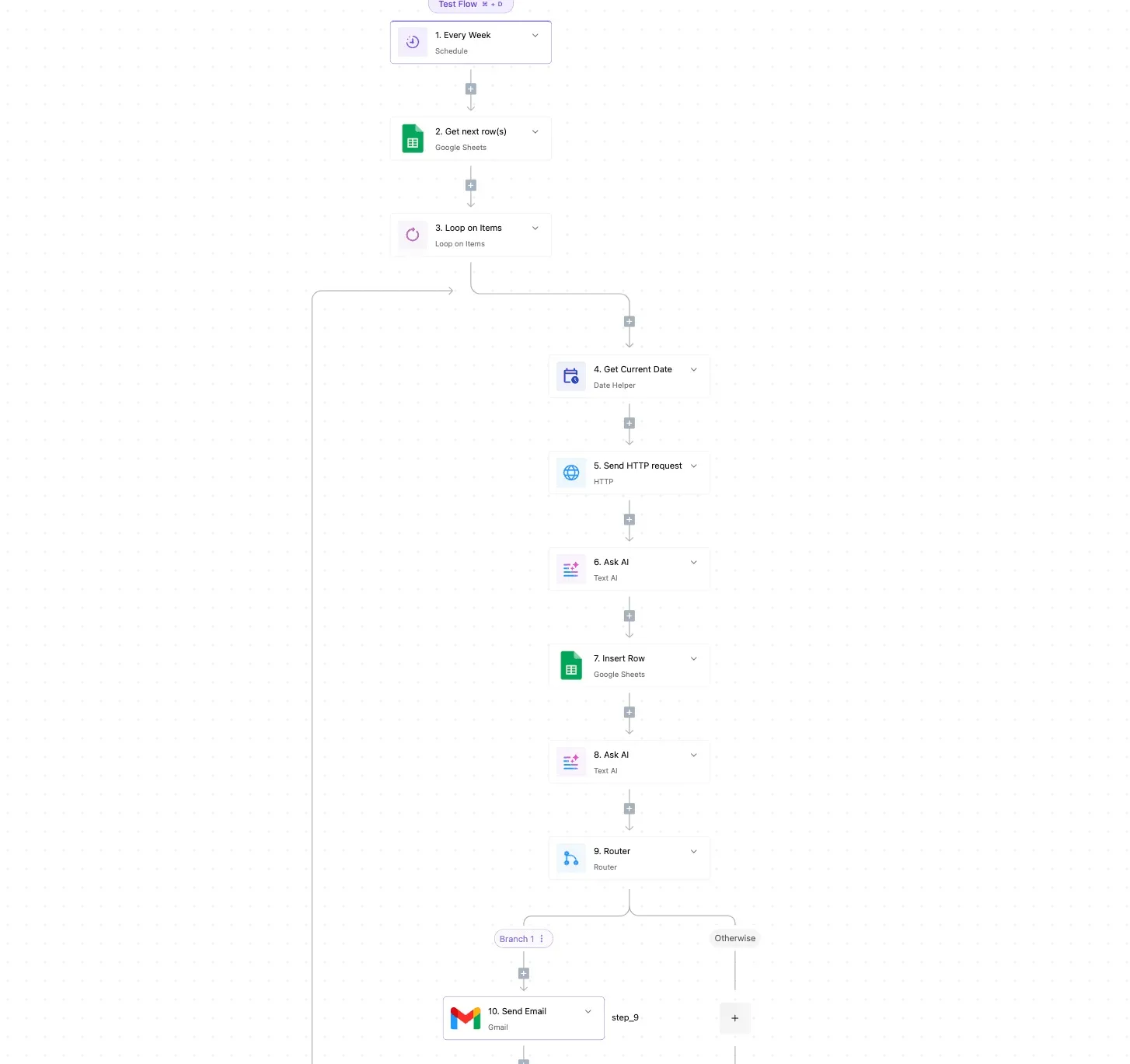
The HTTP request is where the Stability AI call sits, and the router is where the budget decision gets made.
Triggering Stability AI generation from a sheet
Each row is one job: a prompt, a model name and a status column. The loop walks the rows marked pending, and the HTTP step sends the request with your API key in the header and the model in the endpoint you call.
Because the model is a column, a cheaper model for drafts and a costlier one for finals is a spreadsheet edit, not a rebuild.
The same pattern works from a form submission or a product feed, as long as each item arrives as a row with a prompt in it.
Logging Stability AI credits and setting a cap
After each call, insert a row recording the model, the response status and the credits that call should have cost, using the rate you checked on Stability AI's pricing page.
Failed and retried calls get their own rows, so the sheet shows what the retries burned, not only what succeeded.
The router then compares the running total against your cap. Branch 1 continues the loop while the total is under it.
The Otherwise path stops the run and sends a Gmail alert, so a bad prompt batch ends at a figure you chose instead of at an empty balance.
The log is only as accurate as the rate you type in, so update it when Stability AI's pricing changes.
Activepieces meters the run, not the steps inside it: its published pricing page lists 1 credit per flow run, any number of steps, so the logging, the loop and the router add nothing to its meter, whereas Zapier's pricing page bills per task and Make's per module.
The AI steps are the exception: a fast model is 2 credits, a smart model 10 and a frontier model 20, unless you bring your own AI keys, which makes each one 1 credit.
Monday checklist for controlling Stability AI spend
Once your automation tool's own metering is accounted for, five steps taken in order turn Stability AI's credit price into a bill you can predict.
Steps before you buy Stability AI credits
The first two steps cost nothing and set the limits that every later test runs inside. A bad prompt loop then can't drain the balance while you're still learning what each model costs.
- Open Stability AI's live pricing page and note how many credits each model charges per image or per edit. Prices change, so a figure remembered from an old article or a forum post is a guess.
- Set a credit budget for the week and turn on a low-balance alert. The budget is the most you'll let testing burn, and the alert tells you before the balance hits zero mid-run.
The remaining steps measure what you actually pay per usable image, which is the number the credit price hides.
- Run each model you are considering on the same 20 prompts, taken from real work rather than demo prompts. Record the keeper rate: the share of outputs you would publish without a rerun. Twenty is small, but it's enough to expose a model that fails often.
- Divide each model's credit cost by its keeper rate to get the cost per keeper. Pick the cheapest model that passes your quality bar. A model with a low sticker price and a poor keeper rate can cost more than a pricier one that lands first time.
- Put a re-check date on the calendar. Credit prices, model lineups and rate limits can all move, and your measured keeper rates are only valid for the models you tested.
Frequently asked questions
Is the Stability AI API free to use?
No. New accounts have usually started with a small allotment of trial credits, but that's a trial, not an ongoing free tier.
Once those credits are spent, every call draws on credits you buy. Treat the trial as enough to compare models on your own prompts, and don't plan production volume around it.
Do Stability AI credits expire?
Check the current billing terms on your account before buying in bulk, because expiry is a policy the vendor can change.
Until you have confirmed it, don't assume unused credits roll over indefinitely. The safe approach is to buy in amounts you expect to spend soon, so a change in terms costs you little.
Can I use Stability AI images commercially?
Generally yes for output produced through the paid API, subject to Stability AI's terms of service and acceptable-use rules.
Self-hosting downloaded model weights is a different case. Those weights carry their own license, and its commercial conditions can depend on the size of your business.
Read the license that matches how you actually run the model, and keep a copy of the version you agreed to.
Is Stability AI cheaper than Midjourney or DALL·E?
It depends on the unit you are comparing. Stability AI meters credits per call, so cost follows the model you pick and the retries you burn.
Midjourney is sold mainly as a subscription, which makes a heavy month cheaper per image and a light month more expensive.
OpenAI has moved on from DALL·E to its GPT-Image models, which are metered differently again. To compare fairly, take one workload, count the generations you need including the discarded ones, and price that total under each vendor's own billing unit.
Related reading
References
Running the numbers
See what the same workload costs here.
Free forever plan, and every paid plan self-hosts at no extra cost.
See pricing Talk to sales