
AI Agents for Healthcare: Adoption and Use Cases
Learn how AI agents for healthcare work and explore common AI agent examples. Discover how Activepieces can help you automate your workflows.

Jan 13, 202612 min read
AI agents for healthcare can now handle work that once slowed clinics and hospitals on a daily basis. These systems connect with electronic health records (EHRs), read patient data, and act on rules with human oversight.
Adoption keeps rising as healthcare organizations face staff shortages and higher costs. Healthcare agents now help you focus on direct patient care, while software manages repetitive tasks.
In this article, you’ll learn how AI agents work, why adoption keeps growing, and where you can use them.
Connect AI agents to healthcare tools and keep people in the loop with Activepieces!
TL;DR
- AI agents for healthcare handle admin, clinical, and patient-facing work so teams can focus on care.
- Agents reduce burnout by managing scheduling, documentation, follow-ups, and routine questions.
- Different agents support tasks, decisions, engagement, and reporting inside one system.
- Activepieces lets you build and control these agents with approvals and access controls.
Everything below works on Activepieces' free plan. Start without code or a credit card.
Why AI Agents Are Being Adopted in the Healthcare Industry
Healthcare professionals now use AI agents from patient care to drug discovery and development, mainly to remove busywork that slows them down rather than to add new tools. Here are the common issues it solves:
Staff Shortages and Clinician Burnout
Staff shortages affect daily operations inside hospitals and clinics. Clinicians often spend many hours each week on forms and follow-ups, which reduces time spent on direct patient care.
Some AI agents can prepare visit notices and organize them inside records. Others can continuously monitor patient data and vital signs to proactively flag early signals of deterioration.
Healthcare organizations also face a basic numbers problem. Agentic AI helps manage this gap by handling planning and coordination work so you can support more people without rushing decisions.
Administrative Overload
Repetitive tasks, such as forms and billing steps, increase the administrative burden on your care teams.
AI agents can now prepare documentation, support prior authorizations, and keep updates moving without manual chasing.
Clinicians regain time for patient interactions that require judgment and empathy. That change enhances efficiency by restoring hours previously lost to paperwork to care work.
Fragmented Systems and Data Silos
Care data often sits in separate platforms that don’t connect well. Lab results, scans, and notes are kept separate, which slows decision-making.
AI agents can pull:
- Patients’ genetic information and diagnosis
- Treatment details from electronic medical records (EMR)
- Lab reports
- CT scans
- Findings from medical research and the latest clinical research sources
Health systems now formalize these tools into centralized agentic ecosystems, which let you see everything.
Types of AI Agents Used in Healthcare
Different agents serve different needs in healthcare settings.
Task-Based AI Agents
Task-based agents do a specific task and carry it through until completion. These agents do more than answer questions.
A task-based agent can log in to your electronic health records, collect required details, and submit updates where needed. It remembers where it is in a multi-step process, so it doesn’t forget a task if it’s waiting for lab reports or a response from another system.
Others even serve as clinical workflow agents, serving as digital co-pilots to reduce cognitive load for doctors and nurses.
Decision Support Agents
Decision support agents review records, current signs, and research to support decision-making. They compare findings with known patterns and highlight risks that deserve attention.
In imaging and heart monitoring, these agents can spot subtle changes that tired eyes often miss, which improves diagnostic accuracy.
Some agents further suggest treatment options based on a patient’s genomic profile and daily habits.
Multi-Agent Systems
Multi-agent systems bring several specialized agents together.
One agent can review scans, and another can check lab trends. A separate agent can check the latest pharmaceutical companies’ guidelines for drug-drug interactions, too.
When plans form, verification agents can audit the work produced by other agents before actions move forward.
The result is steadier care delivery and fewer missed details.
Common Use Cases for AI Agents in Healthcare
These are the different use cases of AI agents:
Administrative Use Cases
Many AI agents do healthcare administrative tasks, such as:
Appointment Scheduling
AI agents can accept requests through chat or voice at any hour, which removes long phone queues and missed calls.
When someone asks to schedule appointments for medication refills, the agent checks availability, confirms eligibility rules when required, and books the visit right away.
Predictive analytics help these agents notice patterns linked to missed visits. If a pattern suggests a higher chance of cancellation, the system sends reminders or proposes a better time before the slot goes unused.
Real-time alerts then notify staff when openings appear, so you spend fewer hours on calls, and patients gain faster access to care.
Insurance Verification and Prior Authorizations
Insurance verification and prior authorizations often slow care before it begins. AI agents can now check coverage details as soon as an order or visit enters the system. Even if you don’t log in to payer portals, the required notes and forms get collected.
In addition, agents can submit requests, monitor responses, and track deadlines. Your staff can only step in when a payer asks for clarification or a peer review becomes necessary.
Clinical Support Use Cases
Clinical support use cases help clinicians manage information and follow through.
Clinical Documentation Assistance
AI agents prepare visit notes as conversations happen, organize details into sections, and surface drafts for review. Your healthcare staff will adjust the wording, confirm the details, and sign.
Coding suggestions appear based on visit content, which reduces rework later. Charting finishes during the workday more often, and screen time no longer dominates visits.
Follow-Up Management
Follow-up management often breaks down after a patient leaves. AI agents can track next steps and maintain contact outside the clinic.
An agent can message a patient at home to provide medication reminders for prescription refills. The system also checks whether labs, imaging, or referrals return on time and notifies staff when delays appear.
Care plans move forward without phone tag, and fewer steps fall through the gaps.
Patient Engagement Use Cases
AI agents can focus on how people enter the system, get answers, and stay connected to care in ways that protect care quality and patient experience.
Intake and Patient Onboarding
Agents can guide patients through onboarding using conversation rather than static forms. Questions adjust based on earlier answers, which reduces confusion and shortens completion time.
These agents can also pull external data once consent is given. Previous visit summaries, medication lists, and test results arrive before the appointment starts.
On the clinic side, staff receive a short summary. The visit starts with context already in place, which lowers delays and missed details.
Fewer corrections happen later, and visits feel more focused from the first minute.
Automated Onboarding Powered by Activepieces
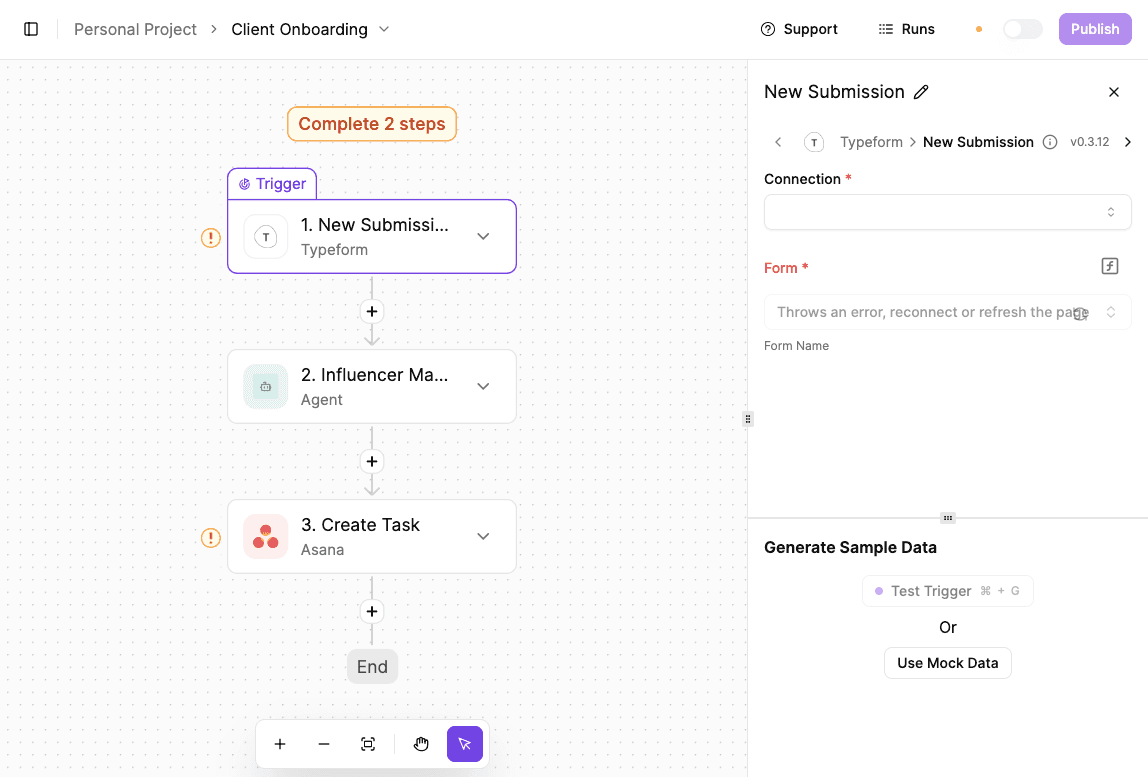
When someone submits an onboarding form, the system automatically emails them, adds them to your CRM, creates internal tasks, and notifies your team.
You can easily tweak the same flow for patient onboarding by changing the form, email language, and tools (e.g., EHR instead of CRM, care-team tasks rather than sales tasks).
- Create an account and log in.
- Click “New Flow” to create an automated workflow. A workflow defines what should happen automatically after a specific event.
- Select “Jotform → New Submission” as the trigger. This represents a client or patient completing an intake form. Connect the correct form and submit a test response so Activepieces can capture the data.
- Add “Gmail → Send Email” as the next action. Write a welcome email explaining the next steps, such as AI deployment, compliance review, or care instructions. Test the email to confirm it sends correctly.
- Add “Pipedrive → Add Person” or another system to store the record. Map form fields like:
- Name
- Organization
- Patient details
- Add “ClickUp → Create Task” to generate onboarding or follow-up tasks for your team.
- Add “Slack → Send Message to Channel” to notify the team about the new onboarding and assigned tasks.
- Test the full flow and publish it to activate automated onboarding.
Check out the template here: Onboarding template
Handling Routine Patient Queries
Routine questions take up more time than you realize:
- Messages about prep steps
- Refill status
- Visit timing
- Billing details
AI agents can take much of this flow, so healthcare providers don’t have to constantly check inboxes.
When a question comes in, the agent identifies who’s asking and why. It then retrieves relevant data from internal databases, such as visit details, prescriptions, and previously provided instructions.
That context allows the system to return accurate answers. For instance, a question about fasting pulls instructions tied to the specific test.
As a message hints at risk, the agent pauses and escalates it to a person.
Automated SMS Alerts for Website Inquiry Forms
Automated alerts send a text message when a website inquiry form is submitted. It helps your healthcare teams respond quickly by delivering a short, AI-generated summary of the inquiry via SMS, without forwarding long or unstructured messages.
- Create a new flow in Activepieces.
- Add a Webhook trigger. Copy the generated webhook URL and paste it into your website form builder so submissions are sent to Activepieces.
- Configure the form to send the following fields:
- Name
- Phone number
- Inquiry message
- Submit the form once to test the webhook, so it captures sample data for use in later steps.
- Add an OpenAI action to summarize the inquiry. Select a ChatGPT model and write a prompt requesting a single-sentence summary suitable for a text message.
- Add an SMS action using a provider like Contiguity. Build the message using the sender’s name from the webhook and the summarized inquiry from the OpenAI step.
- Test the SMS step and confirm the message is received.
- Submit the form again and review the “Runs” section in Activepieces to verify that the webhook triggered, the inquiry was summarized, and the SMS was sent successfully.
Data and Reporting Use Cases
Data and reporting agents ca:
Summarize Patient Medical Histories
Medical histories often span years, providers, and locations. AI agents can scan the full patient record and turn it into a summary before the visit begins.
The agent reads past test results and visits outcomes in sequence. Patterns form as trends emerge, such as slow changes in lab values or repeated symptoms tied to earlier visits.
Missing details get flagged early as well, so you get fewer diagnostic errors related to missing information.
Prepare Reports for Staff
Reporting used to mean checking spreadsheets and dashboards late in the day. AI agents can prepare reports automatically using predictive insights that surface issues before they grow.
Agents review activity from:
- Clinical systems
- Staffing tools
- Scheduling data
They look for changes in volume, delays, or risk patterns and package that information into readable summaries. A charge nurse, for example, can see staffing pressure for the next shift.
These reports arrive on a set schedule or when thresholds break. You can respond sooner, adjust plans earlier, and improve patient outcomes without extra meetings.
How Activepieces Supports Healthcare Compliance

Healthcare teams need automation that moves fast without losing control. Activepieces supports compliance by combining end-to-end automation with checkpoints that protect both operational efficiency and patient support.
You can automate entire workflows and still keep people involved at the right moments.
Access Controls
Activepieces gives organizations tight control over who can see and run automations.
You can decide who can view, edit, or trigger flows, down to the project level. Let’s say your billing team never sees clinical data used for care delivery, and a clinical team never accidentally touches financial.
Single sign-on (SSO) and multi-factor login connect access to existing identity systems. When someone leaves the organization, access ends immediately.
For sensitive environments, you can self-host Activepieces to keep data within your network.
Workflow-Level Approvals
Some steps should never run without review. Activepieces lets you pause automation and request approval before a high-impact action continues.
An agent can prepare data, then wait for human oversight before submitting it.
The setup is effective for complex workflows such as dosage adjustments or payer submissions.
Audit Logs and Traceability
Every action inside Activepieces leaves a record. Logs show who triggered a flow, what data moved, and when each step ran.
You can trace issues quickly, prove compliance during reviews, and trust the system during daily use.
Know where data moved and why it moved there. Build with Activepieces today!
Design Healthcare AI Agents With Activepieces

Activepieces supports healthcare automation by letting you build agents that connect directly to existing systems.
For instance, developers can set up flows, and administrative teams can run and adjust them through a simple interface.
Each automation uses small building blocks called pieces. These pre-built pieces, currently 594 of them, connect to payment systems (Stripe), forms and surveys (Typeform), and internal databases. Since the platform is open source, you can customize components or add new ones as workflows change.
Agents can further pause, ask for review, or collect approval before moving forward.
Over time, these agents take pressure off your team by saving your staff dozens of hours of administrative workload each month. You spend less time addressing handoffs and more time focusing on patients.
Design healthcare automations that pause for review and continue when approved. Use Activepieces!
FAQs About AI Agents for Healthcare
How do AI agents work in healthcare?
AI agents observe information, decide what needs to happen next, and then automate processes and perform tasks without waiting for constant input.
Some agents do scheduling or messaging, while others support complex clinical tasks such as diagnostic support or medical imaging review.
How are AI agents different from chatbots?
Chatbots respond to messages, while AI agents act. Conversational AI agents can hold a dialogue, but true agents also update systems, trigger workflows, and complete tasks end-to-end.
A chatbot answers a question, but an agent updates the record and confirms the next step.
Do AI agents need access to EHR systems?
Yes, agents need controlled access to EHR systems to do useful work. Without that access, agents cannot update records, track follow-ups, or support care decisions.
Safe access allows agents to reduce manual entry and keep information current.