Qodo Pricing: Every Plan, Price and Limit (2026)

Nov 4, 202613 min read
Qodo is an AI tool that reviews code changes and helps write code, and it has a free Developer plan.
Pro Team costs $30 a month for 2,500 credits or $60 for 5,000, which means the credit allowance, not the price per seat, decides your bill.
Qodo pricing today: every plan, price and limit
If your team already wires review steps into automations with something like Activepieces, it's worth estimating how many credits those runs will use before you pick a tier.
Qodo pricing is the set of plans, per-seat prices and monthly credit allowances that determine what it costs to use Qodo's AI code review and code generation tools, where the credit cap, not the seat price, sets the real bill.

Plan table checked against Qodo's pricing page
It shows what each plan costs and what stops you first.
| Plan Name | Price | IDE/CLI Credits | PR Reviews | Hard Limit/Upgrade Trigger |
|---|---|---|---|---|
| Developer (Free) | $0 | Not listed | Not listed | Not listed |
| Pro Team (2,500) | $30 a month | 2,500 | ~18 a month | Reviews keep running as overage at the same per-credit rate, up to your monthly cap |
| Pro Team (5,000) | $60 a month | 5,000 | Not listed | Credits run out; the next pack up is 20,000 |
Doubling your usage doubles your bill, because both paid packs cost 1.2 cents a credit. Moving up a pack buys you room, not a discount.
What counts toward the usage limits
If you work in your editor (the IDE) or the command line (the CLI), credits pay for it. Pull request reviews are listed as a separate column, and the pricing page gives about 18 a month for the 2,500-credit pack.
You can't tell whether 2,500 lasts a month or a week until you know how many credits one task burns. Run a real week of work on the free plan first, then multiply.

Teams that run review as one step inside a larger automation can meter it differently: Activepieces charges 1 credit per run however many steps the flow has, so a ten-step flow costs the same as the two-step workaround, whereas Zapier counts each task.
Plans that have no published price
There's also a larger pack, 20,000 credits at $240 a month, which keeps the same 1.2 cents a credit. Anyone who needs it is paying eight times the 2,500 price, so the cap is worth testing before you commit.
If you are running this arithmetic for your own team, see what the same workload costs on Activepieces.
Four criteria that decide what Qodo really costs
Judge every plan on four things:
- The price per seat
- The usage limit and its unit
- What happens when you reach it
- Which features sit behind a higher tier
Price per seat and the usage limit
The first is the price per seat per month. It's the number on the pricing page, and it tells you what the plan costs only if nobody ever runs out.
The second is the usage limit that forces an upgrade, and its unit. Units are where plans hide the difference. A limit counted in credits, in pull requests reviewed, or in messages sent each stretches differently.
In a shared pool, a developer who barely codes leaves credits for a colleague who reviews pull requests all day. In a per-seat silo, the unused allowance is wasted and the heavy user hits the wall alone.

What happens at the limit
There are three outcomes at the limit: the tool stops, it slows down, or it keeps going and bills you for the overage. Stopping halts work mid-task. Throttling quietly wastes hours. Overage keeps people moving, but you learn the cost on the invoice.
Features behind a higher tier
If your security team requires single sign-on (one company login for every tool) or self-hosting (running the product on your own servers), the cheaper plan was never an option, and its price is irrelevant to you.
A blank in a comparison is information: it tells you what to ask a sales rep before you commit.
Qodo shared credit pool versus per-seat allowances
In the illustration below, a shared team bucket of 2,500 credits is drawn on by developers working in the editor and by others running pull request reviews.
A traditional per-seat arrangement walls each person off with their own allowance.
The real monthly bill for a five-person team
A five-developer team merging 100 pull requests a month only gets every one reviewed on Qodo's $240 Pro 20,000 plan.
The workload and the assumptions
About 100 pull requests (PRs) a month get merged, and we assume each PR gets one automated review.
A review is the unit that uses up credits, so the plan's review count is the limit that matters, not the seat count. We also assume the reviews are spread across the month and none are saved up from earlier ones.
Bill on each plan
According to Qodo's pricing page, the Pro 2,500 plan at $30 covers 18 reviews a month. That leaves 82 of the 100 PRs with no review.
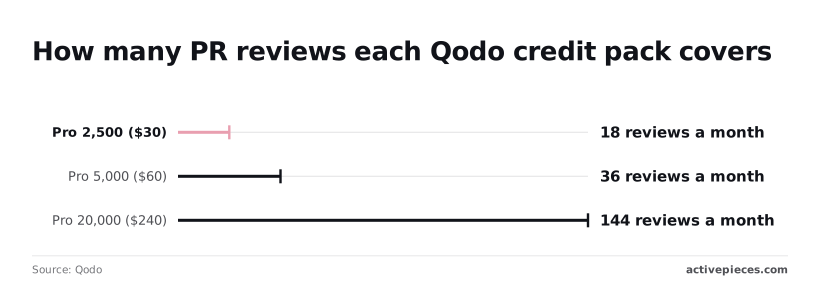
The Pro 5,000 plan at $60 covers 36, leaving 64 uncovered. Pro 20,000 at $240 covers 144, which is enough for all 100 with 44 to spare.
At 100 reviews that rate comes to roughly $167. The packs jump from 36 to 144, so you pay $240 anyway.
The month the free tier runs out
With 100 PRs, the free tier's allowance is gone early in the month, and it costs $0 only until then. After that, reviews either stop or turn into overage charges, so the free line on the chart isn't a real $0 bill.
A team merging closer to 36 PRs a month would fit the $60 plan, and one past 36 needs the $240 plan.
Hidden costs and limits Qodo users hit
Qodo credit limits and PR review caps
Credits come from a fixed pool, and a bigger model or a larger PR draws it down faster than a small one. So the 36-PR line is a best case.
viz type=waterfall title="How the Qodo Teams per-user price changed in 2025" unit="$ per user per month" source="AgentGid - https://agentgid.com/pricing/history/qodo/"9 to
Qodo Teams price history and billing terms
According to AgentGid, Teams started at $19 per user per month. In April 2025 it was cut by $4 to $15, and in June 2025 it rose by $15 to $30, leaving April's reprieve entirely undone by June's doubling.
If you budgeted $150 a month in spring for a ten-person team, you were looking at $300 two months later. That's why a monthly plan with no price lock is a different purchase from an annual one.
Watch the minimum seat count on annual discounts. If you have eight developers and the discount starts at ten, you pay for two seats nobody uses, and you may lose the saving you signed up for.

Some controls that a larger company treats as basic sit in a separate, quote-only tier. Before you commit, get an answer in writing on each of these:
- SSO/SAML integration, which lets staff sign in through your company login instead of separate passwords
- Self-hosting (on-prem), which means running the tool on your own servers, so you also carry the hardware and upkeep
- Custom LLM support, which lets you point the tool at a language model you choose, rather than the vendor's default
- Seat minimums for annual discounts, which set the smallest team that qualifies
If any of these is a requirement for your company, the Teams price isn't the price you will pay.
Worth checking against a plan that does not meter every step: one credit covers a whole run on Activepieces.
Qodo against GitHub Copilot, CodeRabbit and Cursor
Three of the four tools charge per person, so the price on the box is comparable only for those. What happens when you hit the limit isn't, and that's where the bills diverge.
The table lists each tool by what it charges for and what it does at the cap. I didn't confirm vendor prices for this article, so the price column says so rather than guessing.
Qodo pricing compared with rivals on four criteria
The table shows that "per seat" hides two different designs: a fixed allowance per person, and a shared pool the whole team draws from.
| Tool | Base Price | Unit (Seat vs Pool) | Limit Behavior (Throttle vs Overage) | Gated Features |
|---|---|---|---|---|
| Qodo | $30 a month | Credit pack | Reviews keep running as overage up to a monthly cap you set | Varies by tier; security and deployment options sit on the enterprise plan |
| GitHub Copilot (GitHub's own coding assistant) | Not confirmed here | Seat, with a monthly allowance of premium requests | Extra premium requests can be billed as overage | Access to more advanced models varies by plan |
| CodeRabbit (automated pull-request reviewer) | Not confirmed here | Seat | Review rate limits slow reviews down | Varies by tier |
| Cursor (code editor with AI built in) | Not confirmed here | Seat, with included usage | Usage beyond the included amount is billed or slowed, depending on plan settings | Varies by tier |
Check each vendor's pricing page on the day you buy, because these plans change often.
Where Qodo is cheaper and where it is not
Whether Qodo is cheaper depends on how hard your team leans on it, not on the seat price. A team that reviews a handful of changes a week may never touch the cap, and then the lowest seat price wins on paper and in practice.
A heavy team is another matter. Where a tool throttles, the cost is lost time: reviews queue and developers wait.
Where it bills overage, the cost is a bigger invoice that arrives after the work is done.
Before you compare plans, count how many reviews or requests your team runs in a normal month, then ask each vendor what happens on the day you pass that count.
Picking your Qodo plan
Take the plan whose limit you will hit last, not the one with the lowest price.
If you build solo, stay on the individual plan unless reviews pile up faster than its cap allows.
Take the plan whose limit you will hit last, not the one with the lowest price.
A small team should take the team plan unless one busy week would exhaust the shared allowance, and a regulated company should go straight to enterprise terms unless its data rules can be met some other way.
Check the table against the live pricing page before you rely on it, because vendors change caps without announcement.
If a cap is described in "credits" or "requests," find out what one review costs in those units. Otherwise you're comparing a number you can't convert.
Ask what spends the allowance: a review of a pull request (a proposed code change awaiting approval), a chat question, a test generation, an IDE suggestion. If they all draw from one pool, a team that chats a lot will run out of reviews.
Ask also whether a re-run after a small fix counts as a new review. It often does, and a cap that looks generous on paper gets used faster in practice.
Ask for the limit in writing, the overage rate, and what happens at the cap: throttling, a hard stop, or automatic billing. Regulated companies usually end up here, so get those answers before the security review, not after.
On Monday:
- Open your current usage page and note what you have consumed.
- Count last month's pull requests, including re-runs.
- Compare that count to each plan's cap, leaving room for a busy month.
- Re-check the pricing page before you renew, since the cap may have moved.

What Activepieces does about this
Activepieces can't change Qodo's credit cap, but it can change how much of the problem lands on your invoice.
If review is one step in a larger flow, such as a PR opens, a review runs, a summary goes to Slack and a ticket gets updated, the limit you hit first may be the automation platform's, not Qodo's.
Activepieces charges 1 credit per run however many steps the flow has, as noted above, so adding a step to that flow doesn't move the number you are budgeting against.
The second limit in this article is the feature gate: self-hosting sitting behind a quote-only tier. Activepieces' community edition is open source under the MIT licence, and you can run it on your own servers.
A team that needs its automation inside its own network doesn't have to take an enterprise quote just to get there. You carry the hosting and upkeep, as with any self-hosted tool, but the cost is one you can estimate before you sign.
Use it the way the Monday checklist suggests. Count last month's pull requests, then count how many of them trigger a flow, and put those two numbers beside each plan's cap.
Activepieces then adds one more line to your sums, and that line stays flat as the flows grow.
Frequently asked questions
Is Qodo free for open-source projects?
Qodo has a free individual tier, and its open-source PR-Agent project can be run on your own infrastructure. We haven't confirmed a separate free arrangement for open-source maintainers on the hosted product.
If you maintain a public repository, ask Qodo before assuming one exists. Otherwise you may find out when the free tier's usage limit runs out mid-month and the next plan is the one you're offered.
Does Qodo charge per pull request or per seat?
Qodo sells its paid plans by credit pack rather than per seat, but the pack price is only half the bill, because overage is billed on top of it. However few people you have, open many pull requests and a plan's cap can arrive before the month ends.
Count your pull requests per month and compare that number to the limit on each plan, not just the price per person.
If you cancel or downgrade mid-month, we haven't confirmed Qodo's exact terms, so read them before you commit.
Two questions decide the cost: does a downgrade take effect immediately or at the end of the billing period, and does unused usage carry over? If you cancel and the answer is "no refund, no carry-over," you've paid for days you can't use.
Don't budget on an annual discount, because we haven't confirmed one for Qodo.
If you plan to pay yearly, get the discount in writing first. Paying a year up front for a plan whose usage cap you outgrow in month three locks in the wrong tier.
Is the Qodo IDE plugin priced separately from code review?
We haven't confirmed whether Qodo prices its IDE plugin and its code review as separate line items, or counts both against one shared usage limit. The difference matters.
If both draw on one pool, a developer who leans on the plugin all week leaves less for review on Friday. Ask which activities count toward the same limit before you size a plan.
Related reading
References
Running the numbers
See what the same workload costs here.
Free forever plan, and every paid plan self-hosts at no extra cost.
See pricing Talk to sales