
Readwise Pricing: Plans and Costs (2026 Guide)

Nov 2, 202614 min read
Compare Readwise pricing, plans and limits
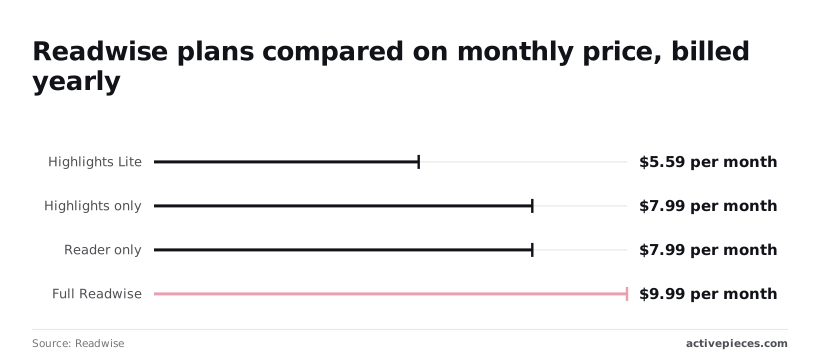
Readwise price per month on yearly billing
On yearly billing, Readwise costs $5.59 to $9.99 per month, depending on the plan, which means you must commit to annual billing to access these rates, a trade-off worth weighing if you'd rather test things first with a free Activepieces workflow before paying for a year upfront.
Readwise is a service that collects highlights from books and articles and resurfaces them for review, with a separate reading app called Reader.
If you want the cheapest entry point, Highlights Lite is $5.59 per month on Readwise's pricing page. Highlights only and Reader only are both $7.99, so you pay the same whether you review highlights or read inside the app.

Full Readwise is $9.99. That's the only plan covering both halves, so it's the one to check first if you use both.
Every Readwise plan, price and limit compared
Below are each plan's yearly-billed price, what it covers and what the page states as limits. A blank cell means the page gives no figure, so don't assume a cap exists or doesn't. Checked 2026-11-01.
| Plan | Monthly price | Annual price | Inclusions | Stated limits |
|---|---|---|---|---|
| Full | not stated | $9.99 per month, billed yearly | Highlights review and Reader | not stated |
| Highlights only | not stated | $7.99 per month, billed yearly | Highlights review | not stated |
| Reader only | not stated | $7.99 per month, billed yearly | Reader | not stated |
| Highlights Lite | not stated | $5.59 per month, billed yearly | not stated | not stated |
| Student discount | not stated | not stated | 50% discount for students and other members of academia | not stated |
Prices and plan limits checked against readwise.io on November 1, 2026.
Read down the monthly column and every cell says "not stated". The $5.59 to $9.99 range is therefore a yearly commitment, and a month-to-month price may be higher, so you save money by committing to annual billing.

You will not find a monthly-billing price or usage caps on the page, though it does state a 50% discount for students and other members of academia. Confirm each at checkout before you commit a year of billing.
What the tiers cover and what stays unknown
Full covers both halves: highlights review and the Reader app. Highlights only and Reader only each cover one half at the same $7.99, so choosing between them is a question of habit, not money.
Highlights Lite is the gap. The page lists no inclusions for it, so I can't tell you how it differs from Highlights only beyond the lower price. Treat it as a cut-down plan of unknown shape until checkout says what is removed.
If you are running this arithmetic for your own team, see what the same workload costs on Activepieces.
What Readwise costs at three realistic usage levels
At every usage level, paying annually is the cheapest route: Full drops from $155.88 to $119.88 a year and Lite from $83.88 to $67.08, according to Readless, so any subscriber on the monthly tier is paying a premium for convenience.
Those monthly totals do not come from Readwise's page, which states no monthly price. They come from Readless, a third-party blog, and I haven't confirmed them against the vendor, so read them as estimates.
To see how much of the gap between plans is money spent on features you may never open, read the table below, which shows what each reading habit pays on each billing cycle and what goes unused.
| Reader | Plan | Monthly-billed yearly cost | Annual-billed yearly cost | Wasted features |
|---|---|---|---|---|
| Light reader | Lite | $83.88 | $67.08 | Little; Full's extras stay shut |
| Heavy highlighter | Full | $155.88 | $119.88 | Few, if exports run weekly |
| Multi-device user | Full | $155.88 | $119.88 | None, if used daily |
$36 more per year is what monthly billing on Full costs you, a fee for keeping the option to cancel.
viz type=stackrank title="What a year of Readwise Full costs by way of paying" unit="$ per year" source="Readless - https://www.readless.app/blog/readwise-reader-pricing-2026"19.88 billed annually and For a light reader saving a few articles a week, Lite at $67.08 a year's the fit, since a few saved articles a week never touches Full's heavier tooling. Monthly billing adds $16.80 for the same product, so only choose it for a trial.
$36 more per year is what monthly billing on Full costs you, a fee for keeping the option to cancel.
For a heavy highlighter exporting to a notes app, Full at $119.88 a year (Readwise lists it as $9.99 a month billed yearly) is justified only if exports actually run; when they fail, you're paying for a broken feature.
Check your own export log: if you haven't sent highlights to your notes app in a month, you're paying for a pipeline you don't use.
Only with daily use across several devices and sources does Full earn its price outright, because every feature gets exercised daily.
viz type=groupedbars title="Readwise yearly cost for students and standard buyers" unit="$ per year" source="Readless - https://readless.app/blog/readwise-reader-pricing-2026" cols="Student annual,Standard annual"19.88." Lite: 33.54, 67.08 Full: 59.94, 119.88
Annual billing is the default, and the $155.88 monthly total only makes sense if you expect to quit before month twelve. The sensible next step is to price alternatives on this same yearly basis.
Hidden costs and limits Readwise users hit
You will rarely see five costs on the pricing page. They are a trial that converts to a paid plan, features reserved for the higher plan, import and integration limits, a mid-life price rise, and the effort of leaving.
The yearly figure you worked out earlier needs adjusting for these before you commit.
Readwise Reader trial end and renewal terms
When the Reader trial ends, it ends in a paid subscription, so the trial's a billing event, not a free tier. Put a reminder in your calendar before it lapses, and read the billing page for the renewal terms rather than assuming them.

The February 2024 monthly price rise shows that a rate you priced once can change, so re-check it at each renewal.
Before you pick a tier, know that the Full plan has Reader's features, so the cheaper option doesn't include the reading app you're comparing against. Open the plan comparison and list the features you need.
Judge a plan by whether it covers your habit, not by its entry price.
Nowhere does the documentation state a firm cap on imports or integrations. Silence isn't a guarantee of unlimited use.
If you plan to bring in a large backlog or connect several services, run a real import before you rely on it. A limit that only appears mid-migration costs you time, and the docs won't warn you in advance.
Exporting highlights and cancelling Readwise
If you worry your highlights are trapped, they aren't, because export is available. Readwise has export options for your highlights, and the export tools are the setting to use before you cancel, not after.
Run a full export, open the file, and confirm the highlights are all there.
Skip the export and cancel, and that is the failure mode here. Your library stays in a service you no longer pay for, and you can't be sure how long it remains accessible.
The vendor's help documentation is the authority on retention after cancellation, so read it first.
Export a full copy first, and open it in the tool you plan to move to before you cancel.
Worth checking against a plan that does not meter every step: one credit covers a whole run on Activepieces.
Readwise against Instapaper, Matter and Raindrop.io on price
If you only save and read, Instapaper and Raindrop.io undercut Readwise, and the export test you just ran shows quickly whether a cheaper tool actually holds your highlights.
Comparison table on price, free tier, export and highlights
Checked against each vendor's own pages in November 2026, the table below shows what each tool charges for and where it stops.
Dollar figures are left out because plans change and billing terms differ; compare them on the same terms (annual billing, one user) from each pricing page.
I also have no confirmed current price for the three alternatives. A table that shows what each plan gates is more reliable than one that mixes billing cycles.
| Tool | Yearly price | Free tier | Highlight export | Read-later | AI features |
|---|---|---|---|---|---|
| Readwise | Paid annual plan | Trial only | Broad: sync to note apps, Markdown, CSV | Yes, through its Reader app | Yes, built into Reader |
| Instapaper | Optional paid plan | Yes, with feature limits | Available, tied to the paid plan | Yes, its core function | Limited |
| Matter | Optional paid plan | Yes, with feature limits | Syncs to note apps | Yes | Yes |
| Raindrop.io | Optional paid plan | Yes, for basic bookmarking | Highlights sit behind the paid plan | Bookmarking first, reading second | Paid-plan suggestions |
Only Readwise has no standing free tier here, so its price is a flat entry fee, while the others charge only when you hit a limit.
If you save articles, read them, and rarely return to a highlight, a free tier will hold. Run it until a limit blocks you, then decide whether the paid plan is worth it. Raindrop.io suits people who collect links more than they read them.
Pay for Readwise when highlights are the product: you pull them into a note app, review them on a schedule, or import from several sources. A cheaper plan that can't export those highlights costs more at migration time than it saved.
Move Readwise highlights between apps with Activepieces
Check whether Readwise's own exports already do the job before you build anything; Activepieces can carry new Readwise highlights into another app, drawing on 746 integrations, and its free plan includes unlimited flows.
A workflow you maintain is a second system that can break quietly, so it has to earn its place.
What Readwise already exports natively
Open Readwise's integrations and export settings first. Readwise has its own connections to several note-taking tools and exports your highlights as a file.
If your destination is one of those tools, the native route is the better default. It's maintained by the vendor, and when it fails you have one place to look instead of two.
That also protects the exit route the previous section described, because a native export is the one you can count on when you leave.
Only when the destination isn't covered is Activepieces worth the extra layer. It's also worth it when you want a highlight to land somewhere specific, such as a row in a database you already use for reading notes.
If your destination isn't on Readwise's native list, you wait until the vendor decides it's worth adding, because a closed catalogue grows on its owner's priorities.
Activepieces lets you generate the missing integration with AI and add it privately to your own instance, with no vendor release in the way.
Its 746 integrations are counted straight from the packages/pieces/community directory of the MIT-licensed GitHub monorepo, and roughly 60% of them were contributed by the community, which means most integrations lack official maintenance.
One workflow worth building
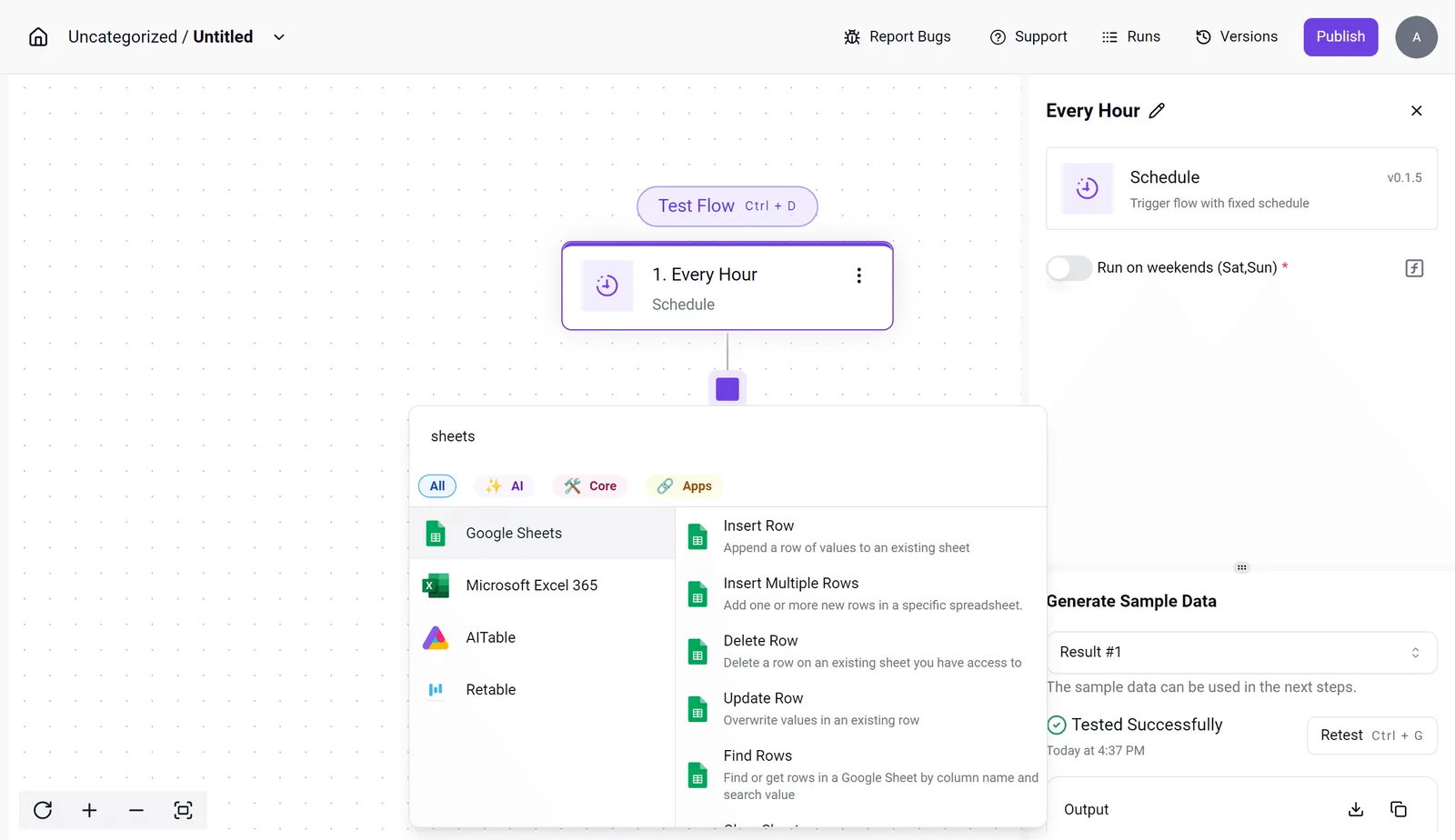
Build one flow: when a new highlight appears, add a row to a notes database. The screenshot shows the builder with a Schedule trigger set to "Every Hour" selected.
The integration selector's open on spreadsheet apps such as Google Sheets and Microsoft Excel 365, with Insert Row among the available actions. Read it as a pattern, not a recipe.
Because the flow polls on a schedule, highlights arrive in batches rather than instantly, which is fine for a reading habit that doesn't need real-time delivery.
The panel on the right also shows a "Generate Sample Data" test that succeeded, and that step is where you confirm the trigger returns real data before trusting the flow.
Before you commit, open the Readwise integration in the selector and confirm it exposes the trigger or action you need. If it doesn't, the flow can't be built the way described here, and the native export remains your answer.
A Monday checklist for choosing a Readwise plan
Either way, five steps in a fixed order settle the plan before any card number goes in, and the order matters because each step removes a choice from the next.
Do these three while nothing's billing you. Skip the first and you end up pricing features you can't name, which is how people pay for a reader app they open once a month.
- List what you read and highlight: books, articles, newsletters, PDFs, and where each one lives today. Mark each source as "needs the reader" or "just needs to sync," because a source outside the reader app matters only if it can reach Readwise another way.
- Decide reader app or highlight sync only. If most of your list is highlights from books and apps you already use, sync alone covers it, and a second reading surface buys you nothing. If you want articles and feeds in one queue, the reader's the part you're paying for.
- Test your export. Pull a real batch of highlights to the destination you use, then open the files. A clean export on day one is your evidence that you can leave later without retyping notes.
The remaining two protect you from the billing system.
Fourth, set a calendar reminder before the trial renews. Put it several days ahead, not on the last day, because a reminder that fires after the charge is a log entry, not a control.
Have it ask one question: did you open the reader app, or only use sync?
Fifth, pick monthly or annual. Take monthly if the answer at step four is unclear, since it lets you cancel with little lost.
Take annual only after a full trial of steady use, when the saving reflects a habit you have and not one you intend to build.
Frequently asked questions
Is Readwise free?
Not as an ongoing plan, as far as I can verify. Readwise is free for the first 30 days, and after the free trial it costs a small monthly fee, so check the pricing page before you sign up.
Treat any "free" claim in a third-party roundup as unverified until it matches that page. The practical consequence: use the trial to run your real reading habit through the product, not to click around the settings.
Does Readwise offer student or team discounts?
Students get a discount: Readwise's pricing page states a 50% discount for students and other members of academia. I have no vendor page that confirms a team plan, so I'm not going to assert one.
Look at the pricing page and the help center, and if neither mentions it, ask support directly. Until you have an answer in writing, budget at the standard individual rate.
Can I cancel Readwise and keep my highlights?
Yes, in practice, provided you export before the account lapses. The steps are in the cost-of-leaving section above: run a full export, open the file, and confirm the highlights are all there.
Is the annual plan cheaper than paying monthly?
Usually, a subscription's annual option comes in below twelve monthly payments. The only monthly figures in this article come from Readless, not from Readwise's page, so I haven't confirmed Readwise's current monthly price. Check both prices on the pricing page and do the arithmetic yourself.
Then ask whether you'll still use the features you're paying for after a few months. An annual discount only saves money if you keep the plan the whole year.
If you're unsure about your reading habit, pay monthly until you are not.
Does Readwise raise prices for existing subscribers?
I couldn't verify a policy either way. Don't assume your rate is locked. Check your billing settings and the terms of service for language on price changes and notice periods.
Look at your renewal date each cycle. If a change arrives, that notice is your cue to re-run the comparison from earlier in this article, since the plan you chose was a setting and can be changed.
Related reading
Running the numbers
See what the same workload costs here.
Free forever plan, and every paid plan self-hosts at no extra cost.
See pricing Talk to sales