Relay App Alternatives: Best Options for 2026

Oct 17, 202614 min read
Which alternative is best depends on why you're leaving Relay.app, and teams usually give one of four reasons, each with a different fix. Match your reason first and the shortlist shrinks to one or two tools.
Here are the four, each paired with the alternative that answers it, so you can find your own line and ignore the rest:
Relay App Alternatives: The Short Answer
- Pricing that counts every step or run gets heavy as workflows grow, so look at n8n, which meters whole workflow executions rather than each step inside them.
- App coverage that misses a tool you depend on points to Zapier, whose integration catalog is among the Its documented coverage means fewer custom API calls are needed to patch gaps.
- No self-hosting matters when data has to stay on your own servers, and open-source tools you run yourself remove that blocker, whether that's n8n or Activepieces, whose core is MIT-licensed.
- Approvals that outgrow the built-in steps call for a tool where you build the branching yourself, such as Make, so a multi-person sign-off isn't forced into one approve-or-reject box.
The rest of this article shows how to test your pairing by moving a single workflow before you commit anything else.
Start with what it is. Relay.app is a workflow automation tool built around two ideas: AI steps that draft, summarize or classify inside a workflow, and human-in-the-loop steps that pause the run until a person approves, edits or supplies input.
That pairing is why people pick it, and it's also why the reasons for leaving are so specific. Pricing, app coverage, hosting and approval depth are exactly where a tool aimed at that pairing can start to pinch.
I checked everything here on 17 October 2026, and every product fact comes from the vendor's own site, not from reviews, forum threads or memory.
The fastest way to settle a shortlist is to try one. Activepieces is free to try, no credit card.
Why Teams Leave Relay.app
Check any of the four reasons teams leave Relay.app against what Relay itself publishes:
- Plan limits that count steps or runs, which you can read on Relay's pricing page, so a longer workflow eats your allowance faster.
- Long-tail apps missing from Relay's integrations page, which stalls any workflow that needs a niche tool.
- No self-hosting option on Relay's pricing or security pages, which rules it out where data must stay on your own infrastructure.
- Approval needs beyond the built-in approval steps described in Relay's docs, such as multi-level sign-off.
Relay App Alternatives Pricing Compared by Billable Units
Skip "which platform is cheapest?" and instead "count billable units for one 4-step workflow." The answers differ by how each platform counts. According to Workflowmath:
- Zapier bills 4,000 tasks for that workflow
- A per-run platform bills 1,000 runs for that workflow

On Make, the same workflow can burn almost seven times the credits of a per-run plan's run count, though credits are not directly runs. On Zapier, every added step adds to the bill.
Check whether Relay's pricing page counts steps or runs for your plan before comparing prices.
On Zapier, every added step adds to the bill.
If your workflow needs an industry-specific billing system, an internal API, or an older database, you are in the long tail, which is where built-in integrations stop covering the popular tools.
The question is whether you can call a custom endpoint or must wait for a vendor to add it. Compare Relay's integrations page against your real app list, not a typical one.
If you have data residency rules or a security review that demands running on your own servers, that settles it regardless of price, because Relay's published plans don't include self-hosting.
If your workflows are short, your apps are all on Relay's list, and built-in approvals cover your sign-off, none of these four reasons applies. Then moving costs you rebuild time for no gain. Stay, and revisit only when a limit actually bites.

Relay App Alternatives Compared in One Table
Read first the column matching your reason for leaving Relay.app: pricing unit, app coverage, approval or self-hosting. Six alternatives fit in one table.
Relay App Alternatives Compared
Every cell comes from each vendor's own pages as checked on 17 Oct 2026. Treat "Not confirmed" as a question to put to the vendor.
| Entry price | Strength | Limit | Suits | App coverage | Approval before action | Self-hosting | Pricing unit | |
|---|---|---|---|---|---|---|---|---|
| Zapier | Not confirmed | Widest app catalogue | Long flows cost more | Non-technical ops teams | Very broad | Not confirmed | No | Task |
| Make | Not confirmed | Visual branching | Steeper learning curve | Builders who want branching | Broad | Not confirmed | No | Credits per operation |
| n8n | Not confirmed | Self-hosting plus code nodes | More setup work | Technical teams | Large, with a generic HTTP node for gaps | Not confirmed | Yes | Workflow execution |
| Activepieces | Not confirmed | MIT-licensed core, AI agent step | Smaller catalogue than Zapier's | Teams wanting control of hosting | 760+ integrations | Not confirmed | Yes | Task |
| Pipedream | Not confirmed | Code-first workflows | Assumes developers | Engineers | Large | Not confirmed | No | Credits |
| Lindy | Not confirmed | Agents described in plain language | Less suited to fixed pipelines | Assistant-style jobs | Not confirmed | Not confirmed | No | Credits |
Because no price was confirmed on the date, the entry-price column is empty of figures on purpose; any number here would be a guess you might budget around.
Reading it by your reason for leaving
If pricing per step drove you out, start with the pricing-unit column. A per-execution unit (n8n) charges for a whole run, while a per-task or per-operation unit charges for each step inside it, so long flows behave very differently.
If app coverage was the problem, Zapier's breadth is the obvious test, and n8n's HTTP node is the fallback when an app is missing.
If you need approval before the agent acts, every cell reads "Not confirmed". Ask each vendor for a demonstration on your own workflow before you shortlist anyone.
If hosting is the reason, only n8n and Activepieces say yes, which cuts the list to two, and Activepieces' core is MIT-licensed.
If self-hosting is the reason and a missing connector is what worries you, Activepieces has 760+ integrations it calls pieces, and a connector that doesn't exist yet can be generated with AI and added privately to your own instance, with no vendor release to wait for.
Zapier still leads if you need the largest possible catalog.
You can try it free on one workflow, which is the test the next section sets out.
Reading a table only gets you so far. Build the same workflow in Activepieces and compare it yourself.
Move One Relay Workflow in an Afternoon
Pick the workflow that annoys you most, not the simplest one, and move it in four stages that each leave something working; plan on two to three hours.
Stage 1: List the trigger, steps and approvals
Open the workflow in Relay and write down three things: what starts it, each step in order, and every place a person has to say yes before it continues. Take a screenshot of each step's settings, because the field mappings are what you'll forget.
Mark the step that made you leave, whether that's the per-step bill, a missing app, the approval handling or hosting. That mark is what you're testing for, so the rebuild has to prove it fixed that one thing.

Stage 2: Rebuild the trigger and one action
Recreate only the trigger and the first action in the new tool, then run one test. Expect the first run to fail or return something odd, such as an empty field or a date in the wrong format.
Fix it, run it again, and keep both results.
What you're learning is how the new tool names and passes data, which makes the later steps quicker. If the trigger or first action has no connector for the app you need, you've found your answer early and spent under an hour on it.
Stage 3: Add the human approval step
Insert the approval before the action that can't be undone, such as sending an email to a customer or writing to a record.
Send the request to the same person who approves in Relay, and check three behaviors: what the approver sees, what happens if they reject, and what happens if nobody answers.
Reject once on purpose. A workflow that only works when everyone says yes hasn't been tested.
Stage 4: Run both in parallel, then cut over
Leave the Relay version running and let the new one handle the same incoming events for a few days. Compare outputs side by side, and treat any mismatch as a bug in your rebuild until proven otherwise.
When the results match and the approver has used the new flow without help, turn Relay's version off rather than deleting it, so you can switch back if something surfaces later.
Once one workflow has made it through all four stages, you have evidence rather than a feature list, and that decides whether the rest follow.
Build the Same Workflow in Activepieces
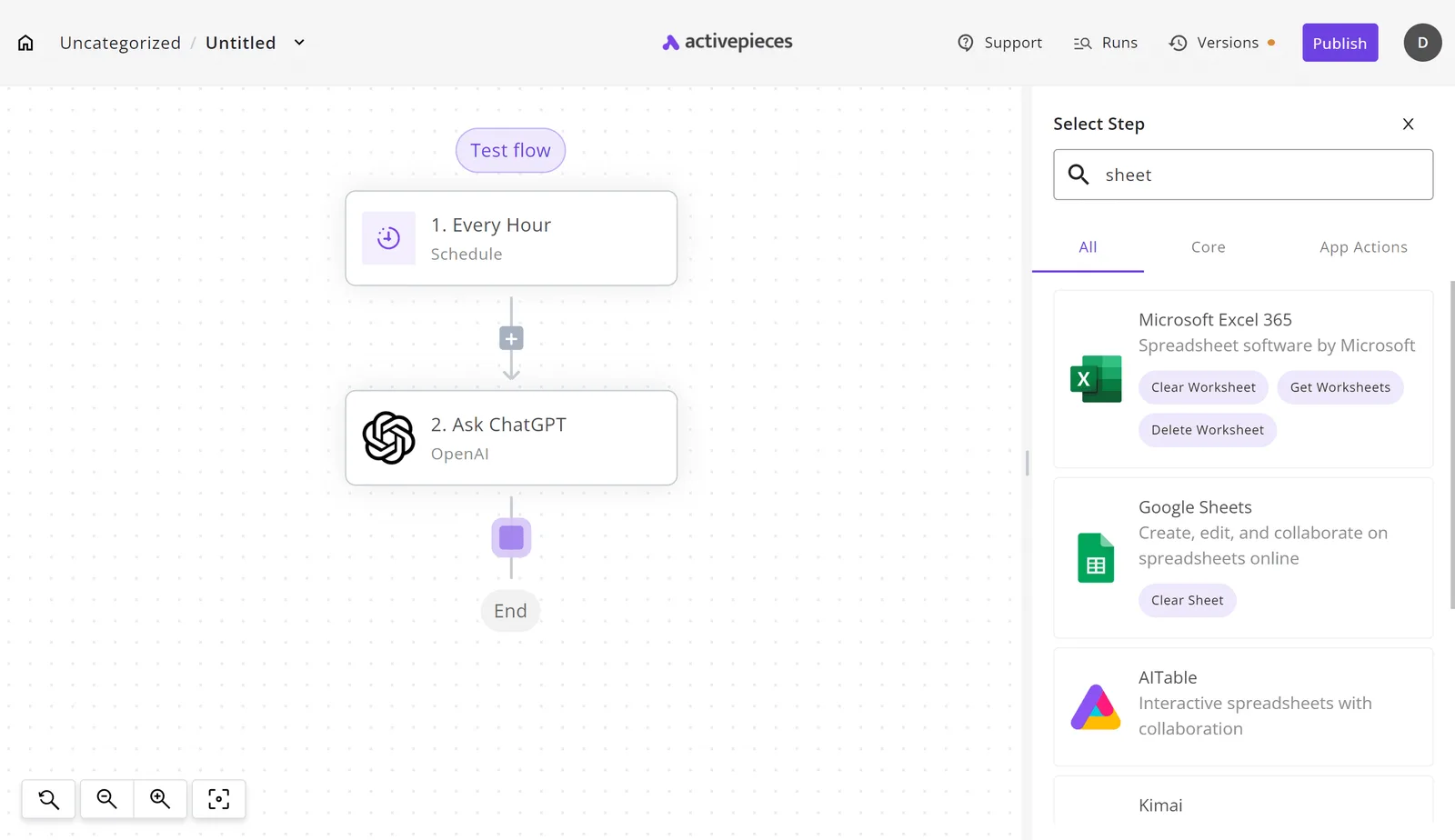
You can rebuild a Relay.app-style workflow in Activepieces with the same shape: a trigger, an AI step, a write to your tools.
It fits best if your reason for leaving is open source (the core is MIT-licensed), self-hosting, or wanting an AI step that works across many apps.
The test is the same one: move one workflow, not all of them.
Start with the plainest prompt, because it shows quickly whether the AI step is doing real work: "Pull the vendor, amount, date and category out of this expense submission."
In Activepieces that's a single step that returns named fields, not a paragraph you have to parse, and the free plan ($0, 1,000 credits a month) allows unlimited flows, so you can keep a separate flow for each prompt variation you try.
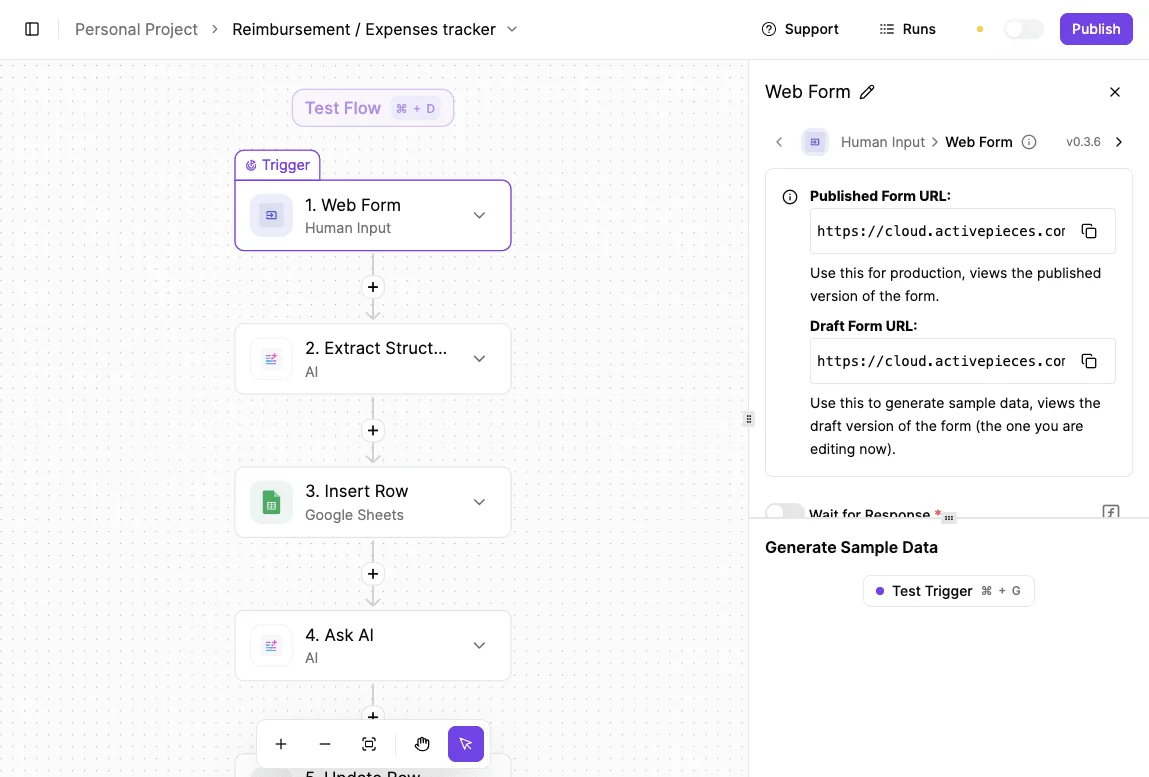
For a reimbursement tracker, the flow below does exactly that. A web form starts it, the second step (selected) extracts the structured fields, a Google Sheets step inserts the row, and an AI step follows.

On the right, the panel gives you a published form URL and a draft one, plus a test trigger that generates sample data. So you can check the extraction against a real submission before anything touches your spreadsheet.
Next to the screenshot is the part to check on your own account: whether each step runs against the apps you actually use.
What maps across from Relay
Everything maps across directly: triggers, app actions and AI steps. Each app connection is called a piece, so the first check is whether the apps your workflow touches appear in the piece list.
If one is missing, you'll find out in ten minutes, not after a migration. That matters most if app coverage was why you left.
Nothing confines the AI step to one app. It can read from a form, a spreadsheet or a message and hand the result to any later step, which is what makes the reimbursement flow above possible without glue code.
If you want to try it, you can sign up free and rebuild your chosen workflow there.
On pricing, I won't quote a number I can't point at. Open the pricing page and check how runs, steps and any usage limits are counted for your plan, then multiply by your workflow's real step count.
If per-step cost was your reason for leaving, that arithmetic is the whole test.
Approval and self-hosting
Because Activepieces' core is MIT-licensed, you can run it on your own infrastructure, which means workflow data stays in an environment you control. The enterprise directories (packages/ee/) sit under a separate commercial licence, so check which features you need.
That's the direct answer if hosting was your reason for leaving.
The trade is that you now maintain it: updates, backups and uptime become your job.
For approvals, the same web form trigger in the screenshot is a human input step, so a person can be put in front of an action before it happens.
Build that into your test workflow on purpose: route the extracted row to a reviewer first, and see whether the pause behaves the way your team needs.
Then check the pricing page for any limits on self-hosted versus cloud features before you commit.
Frequently asked questions
Is there a free alternative to Relay.app?
Yes, several tools offer a free way to run workflows, but "free" usually means either a limited cloud plan or software you host yourself and pay to run.
Activepieces has an MIT-licensed core and a cloud free plan at $0 with no card needed, which includes 1,000 credits a month and unlimited flows: https://cloud.activepieces.com/sign-up.
n8n can also be self-hosted, though under its own license rather than a standard open source one.
Run it yourself and the per-task bill goes away, replaced by a server and your own maintenance time. Whether that's cheaper depends on how many runs you have.
Can I import my Relay workflows into another tool?
Not in any way I could confirm, so plan on rebuilding. A chatbot is better used to write down the trigger, each action, and each approval point, then you rebuild those by hand.

That description is the portable part, and it doubles as your checklist when you compare old and new runs.
Which Relay alternative can I self-host?
If you want to run it on your own infrastructure, the two named in this article are Activepieces and n8n. Activepieces has an MIT-licensed core, and its AI agent step works across the 741 apps in its integration library.
Confirm that the specific apps your workflow touches are available in the self-hosted version, because a feature in the cloud product isn't automatically in the one you run.
Then confirm the pricing page doesn't reserve something you need, such as access controls, for a paid tier.
Do alternatives support human approval before an AI acts?
Many do, but the word "approval" covers two different behaviors. In one, the workflow pauses and nothing happens until a person says yes. In the other, it sends a notification and carries on. Only the first protects you if the AI drafts something wrong.

When you test a candidate, build a step that would be costly to get wrong, such as sending an email to a customer, and check that the run really stops until someone approves.
If it doesn't stop, it isn't the approval you were using in Relay.
How should I check pricing before I move?
Count the steps in one real workflow, estimate how often it runs in a month, and price that on each tool's own page. Don't rely on the headline plan price.
Tools differ in what they count: tasks, steps, or runs. A workflow with many steps can cost very different amounts depending on which unit applies.
Also check whether the AI step is billed separately from the platform, since that's often where the total drifts. Use your single test workflow as the sample, and compare the first full month's real bill against your estimate before you move anything else.
References
Still comparing
The fastest way to settle it is to build something.
Open source under MIT, so you can self-host the same thing later.
Start free Talk to sales