
SERP API Pricing: Plans and Costs (2026 Guide)

Oct 22, 202615 min read
SerpApi's a paid API that returns search-engine results as structured data, which you can then pipe into whatever workflow you like, including an automation built in Activepieces. You pay a monthly fee for a plan that bundles a search allowance with an hourly throughput limit.
The plan card shows only the fee. What you actually pay depends on how many searches succeed, how fast you send them, and what happens when you run past the allowance.
SerpApi pricing today: every plan in one table
What SerpApi charges for: one successful search
You are billed for a successful search, not for a request you sent. That matters the way a ticket count matters to a support team.
If you count every attempt, a retry storm looks like demand. If you count only resolved tickets, you see the real cost of the work.
When a call fails or comes back empty and isn't billed, it costs you nothing, but it still takes up your time and your throughput.
A repeated query that SerpApi serves from its cache is a separate question, and the later sections on cache rules deal with it.
The plan table, checked on the date shown
Pick any of SerpApi's six tiers (Free, Starter, Developer, Production, Big Data, and the Cloud plans) and it differs from the others on the same four points:
- the monthly price
- the number of searches included
- the hourly throughput cap
- the extras bundled in
, because a buyer who budgets from it finds out at the first invoice.
Read the current values on serpapi.com/pricing on the day you decide, and write the four numbers for your tier into your own notes. The rest of this article works from those four.
A plan with a generous monthly allowance can still choke a job that fires thousands of lookups in one burst, and the throughput cap is the number people skip.
What the free plan does and does not include
You can test the output format before you pay, and that is what the free plan is for. Use it to confirm that the fields you need come back for your queries.
If you call the API from Activepieces, the flow around that call costs you nothing extra to build out: Activepieces has unlimited flows on every plan, including free, and its credits meter AI usage, so a plain SerpApi call step is not billed per step.

Don't use it to forecast cost. A small allowance tells you nothing about how caching, retries, and burst limits behave at your real volume.
If you are running this arithmetic for your own team, see what the same workload costs on Activepieces.
Cost per 1,000 searches at realistic monthly volumes
$25.00 per 1,000 searches on the smallest plan, $5.50 on the largest: that is the range at full quota, so customers on the smallest tier effectively pay nearly 5 times more per search.
The same search costs more than four times as much depending on where you sit on the ladder.
Per-1,000 cost across the plan ladder
Divide each plan's monthly price by its search quota, both taken from SerpApi's pricing page, and you get the figures below. The arithmetic is ours, not a vendor claim.
Starter works out to $25.00 per 1,000, so a team that picks it for the low card price pays the most for every search.
Per SerpApi, Developer comes to $15.00, and Production to $10.00 ($150 for 15,000 searches), which means production deployments are more cost-effective. Per SerpApi, Big Data is $9.17, Searcher $7.25 and Infrastructure $5.50, making infrastructure the most affordable option.
Moving from Starter to Production cuts the unit cost by $15.00, while moving from Big Data to Infrastructure cuts it by only $3.67, so early-stage upgrades deliver substantially more cost savings.
Every figure assumes you use the whole quota. A plan that sits half empty costs twice what the chart says.
Three usage profiles and the plan each lands on
Check 500 keywords daily and you run 500 × 30 = 15,000 searches, which is exactly the Production quota. That's $10.00 per 1,000 with no headroom, so one rerun of failed checks goes straight to overage.

Treat Production as the minimum and check the next tier up before committing.
You can't place a 20-client agency from client count alone. Multiply each client's keywords by check frequency, add them up, and add the ad-hoc searches your account managers run when a client emails asking why a ranking dropped.
Hardest to place is the AI agent with unpredictable lookups. Size it to a typical busy month, not an average one. Too small means overage on the worst days, and too large means paying for quota nobody calls.
Where upgrading costs more than overage
For a one-off spike, such as a client audit or a backfill, absorbing it as overage is usually cheaper than fixing it by moving up a tier. The upgrade charges a full month for quota you won't use again.

When a spike repeats every month, the case is the opposite. Compare the overage rate on the pricing page with the next tier's per-1,000 figure from the ladder above. If overage is higher, the upgrade is the cheaper way to cover the extra searches.
Hidden costs and limits SerpApi users hit
Five limits change what a SerpApi plan costs per successful search, and overage is only one of them. The other four can bite before you ever reach it.
- Cached and failed searches
- The hourly cap
- No overage and no rollover
- Pagination and multi-engine calls counted separately
- Plan-gated features
Read this as a checklist to run against your own traffic before you pick a plan.
What counts as a billable search
According to SerpApi's docs, cached results and failed searches are not counted against your quota. That helps only if your workload repeats queries inside the cache window.
A rank tracker that checks the same keyword twice an hour gets a free second call, while a lead-enrichment job with unique queries gets none.
Pull five pages of one query and you use five searches, because each results page is its own search. The same goes for a query sent to two engines.
Throughput and hourly caps
Because hourly caps are far above what a monthly quota can use, they bind only on bursts. SerpApi's pricing page lists 200 searches per hour on Starter, against about 1.39 per hour if the quota is spread evenly.
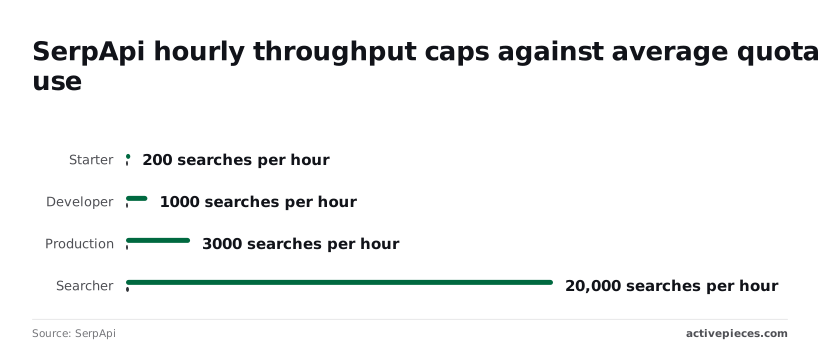
SerpApi's Developer allows 1,000 against 6.94, Production 3,000 against 20.83, and Searcher 20,000 against 138.89.
If a nightly batch fires everything at once, it can hit the ceiling while the month is barely started. The fix is to queue it instead of upgrading.
At the top, speed is different, with the following Cloud 1M pricing according to HoneyB's breakdown:
- Standard costs $3,750 a month.
- Ludicrous Speed costs $7,500 a month.
- Ludicrous Max costs $15,000 a month.
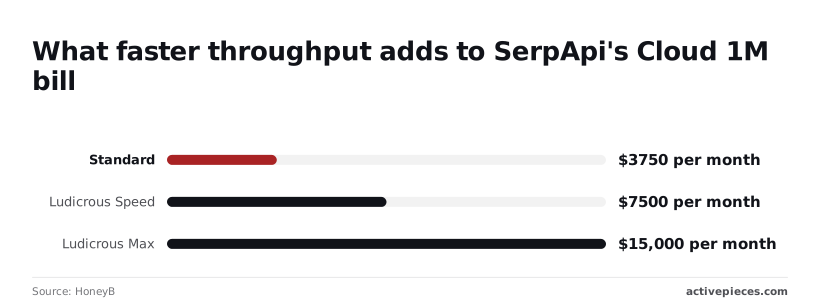
Doubling or quadrupling the price buys throughput, not more searches, so unless latency is the problem, paying for it raises your cost per 1,000 and nothing else.
Unused SerpApi searches don't roll over monthly
If searches go unused, they don't carry into the next month, so a plan sized for your busiest week wastes the rest of it.
Running out has its own cost: a stalled job at day twenty means an emergency upgrade. Size the plan to your typical month, then compare the upgrade price with overage as above.
Which of these limits you can work around at all comes down to the last item, plan-gated features.
Worth checking against a plan that does not meter every step: one credit covers a whole run on Activepieces.
SerpApi against Serper, DataForSEO, SearchApi and Bright Data
On the plan card, SerpApi is rarely the cheapest, and the cheaper vendors differ from it in how they bill as much as in how much. That matters because the gates above (throughput caps, plan-locked features) are where each vendor's pricing model shows up.
Price comparison table
I've left dollar figures out of the table because the cost per 1,000 depends on the exact tier you land in. That's the number you should work out yourself.
To see whether your own volume maps onto a cheap tier or an expensive one, look at the structure of each offer, which is what the table shows. Read the model column first: it tells you what a failed request costs you.
| Vendor | Entry price | Cost per 1,000 at 10k and 100k | Free allowance | Model | Engines | Rate limit |
|---|---|---|---|---|---|---|
| SerpApi | Monthly plan | Tier-dependent | Free tier | Monthly plan, successful searches | Many engines | Varies by plan |
| Serper | Prepaid credits | Tier-dependent | Trial credits | Prepaid credits | Mostly Google | Varies by plan |
| DataForSEO | Pay as you go | Task-dependent | Trial | Pay per task | Google, Bing and others | Varies by plan |
| SearchApi | Monthly plan | Tier-dependent | Trial | Monthly plan | Many engines | Varies by plan |
| Bright Data | Usage-based | Usage-dependent | Trial | Pay per request | Major search engines | Varies by plan |
Check each cell against the vendor's own pricing page before you commit. A cell that says "varies" means the number lives behind a tier choice, and you can't compare it until you pick one.
Where the cheaper options cost you something else
When the searches fail or return less, a cheaper per-search rate gets expensive. Prepaid credits and pay-per-task models mean you may be charged for a blocked or empty response, so retries come out of your budget.
The first time a customer asks for Bing or a maps result, a narrower engine list means a second vendor, a second invoice and a second parser.
When SerpApi is still the better value
When you count only successful searches, need several engines through one interface, and can't afford to babysit parsing, SerpApi earns its price. If your workload is steady, mostly Google, and tolerant of retries, a cheaper credit vendor will likely win.
If a wrong result reaches a customer, price the cleanup before you price the search. Next, the cache rules decide how much of your volume you pay for at all.
If a wrong result reaches a customer, price the cleanup before you price the search.
Cutting wasted SerpApi searches
You cut wasted searches by remembering what you already fetched and running the rest on a schedule instead of on demand. Every repeat search for an unchanged result is a charge that bought you nothing.
Cut SerpApi costs with caching and scheduling
Think of a support queue where three agents each answer the same "where is my order" ticket because nobody checked whether it was already handled. You pay for three answers and the customer gets one.

It takes two parts. First, store every result with the time you fetched it, and check that store before you call. If the keyword was fetched inside your freshness window, serve the stored copy.
Second, stop calling from user actions at all. Run fetches from a timer, so volume follows your schedule and not your colleagues' habits.
Be careful with the freshness window. Too long, and someone makes a decision on a ranking that moved days ago. Too short, and you pay for the same answer repeatedly.
Ask the people who read the data how stale they can tolerate, and set the window from that answer.
Checking the cache before calling SerpApi
What matters more than the tool is the order of the steps, because the cache check has to come before the paid call. The flow below shows that order; take from it that SerpApi is the last thing touched, never the first.
- A schedule trigger starts the run at fixed times.
- The workflow looks up each keyword in the stored list and sets aside any fetched within the cache window.
- It calls SerpApi only for the keywords that remain.
- It writes the new results back to storage with a fetch time.
- It compares usage so far with your quota and sends an alert when it crosses the percentage you chose.
Skip step 2 and this turns into an expensive timer. Skip step 5 and you learn about overage from the invoice instead of from a message.
That covers the mechanics. What remains is the order of work for your own account.
- Pull last month's search count from your SerpApi account and separate real needs from repeats and retries.
- Estimate the count after caching, then compare plans on cost per thousand successful searches, not the card price.
- Pick the plan that covers that reduced count with room for a bad week.
- Set the quota alert before the first scheduled run, so the warning exists from day one.
What Activepieces does about this
The cost problem in this article sits in the steps before the paid call, and that is where Activepieces helps. You build the schedule, the cache check and the quota alert as one flow, with SerpApi as the last step.
A schedule trigger replaces on-demand calls from colleagues. A storage lookup holds the fetch time for each keyword. A branch sends only the stale keywords on to SerpApi, which you can reach with an HTTP request step.
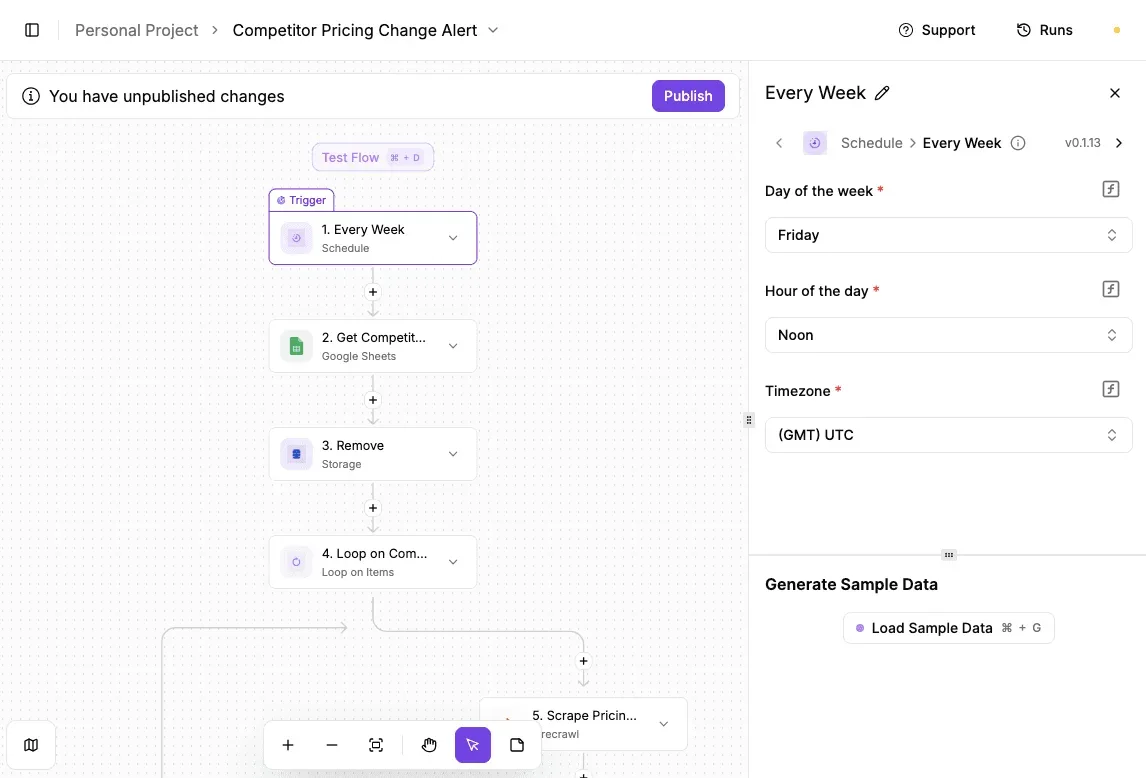
The flow also writes results back and counts what it has spent.
Doing this in a flow means the cost per 1,000 successful searches becomes something you can measure. Take the 500-keyword example from earlier: 15,000 searches a month on Production, at $10.00 per 1,000, with no headroom, leaving no margin for growth without triggering additional charges.
If the cache check skips even a fraction of those, the same plan covers a bad week. You can see that in the flow's run history before you commit to a bigger tier, instead of finding it on an invoice.
The pricing of the flow matters too. Activepieces has unlimited flows on every plan, including free, and its credits meter AI usage, so a plain SerpApi call step is not billed per step. The cache and alert steps add nothing to your search bill.

Activepieces is also open source under the MIT licence for its community edition, so you can self-host the same flow if a vendor's task pricing would otherwise recreate the problem one layer up.
I have not put a customer's savings figure beside any of this, because I have none I can point at. Build the flow, run it for one cycle, and compare the searches billed with the searches your schedule asked for.
Frequently asked questions
Is there a free SerpApi plan? SerpApi's pricing page lists a free tier, and it's meant for testing, not for running a product.
Treat its search allowance as a trial budget, and read the sign-up page to see whether a payment card is required before you give a contractor access. Source: SerpApi pricing page, checked 2026-10-22.
Do cached or failed searches count against my SerpApi quota?
According to SerpApi's documentation, repeated identical queries served from cache and searches that return an error aren't billed as successful searches. That helps your cost per 1,000 successful searches, but only if your queries match exactly.
Change a parameter and it is a new search, and a cached result can be out of date, so a ticket saying "the rankings look old" may trace back to the cache.
Test both cases on the free tier before you trust your usage estimate. Source: SerpApi pricing page and search API documentation, checked 2026-10-22.
Can I change SerpApi plans mid-month?
Changing plans is done from your account's billing settings, but the page doesn't tell you whether the switch is prorated or whether unused searches carry over. Assume nothing.
If you upgrade because you ran out of quota and the new quota starts a fresh cycle, you may pay twice for the same month. Ask support in writing and keep the reply. Source: SerpApi pricing page and account billing settings, checked 2026-10-22.
Is SerpApi cheaper than scraping Google myself?
Often not on the invoice alone, but usually yes once you count the whole bill. Self-scraping adds proxies, CAPTCHA handling, and an engineer on call when Google changes its markup.
Those costs rarely show up on a plan card, and a broken scraper at the wrong moment is the expensive mistake.
If your volume is low and your team already runs proxies, do the arithmetic with your own failure rate rather than a vendor's. Source: SerpApi pricing page, checked 2026-10-22.
How often does SerpApi change its prices? The pricing page shows no history, so I can't tell you how often plans change.
Check the page on the day you buy, save a copy of the plan you chose, and compare it against the invoice after the first cycle. If the two differ, you have your evidence before the dispute starts. Source: SerpApi pricing page, checked 2026-10-22.
Related reading
Running the numbers
See what the same workload costs here.
Free forever plan, and every paid plan self-hosts at no extra cost.
See pricing Talk to sales