
Stream LLM Response From Workflow: 2026 Platform Guide

Nov 23, 202615 min read
Streaming an LLM response from a workflow, whether it runs in a hand-built service or in an automation tool like Activepieces, means relaying tokens to a waiting caller while the run is still going, not returning the full answer when it finishes.
As of 2026-11-23, the platforms worth shortlisting are the ones whose own docs confirm a streamed HTTP or chat response.
Streaming an LLM Response From a Workflow, Defined
Best platforms for streaming LLM output
You cannot read an "AI step" count as evidence here, because most platforms run the model call and then hold the answer until the run ends. Pick by the doc page that names a streamed response, not by the catalogue.
If you need a chat window, you want a platform with a documented chat response. If you need a streamed API endpoint, you want a documented streamed HTTP reply.
If you only need the finished text, ignore all of this, and any platform will do. Activepieces, with 750 integrations and an MIT-licensed core, is judged by the same test as the rest, later in the comparison.
What streaming needs from a platform
Three things have to line up:
- the model step must emit partial output
- the trigger must keep the connection open
- the response step must write to that connection before the run completes
If any one is missing, the caller sees a spinner and then a wall of text.
What matters is the gap between first token and last.
If any one is missing, the caller sees a spinner and then a wall of text.
Look at the gap on both models: the first token arrives far sooner than the full answer, and that gap is everything streaming lets a caller use.
The larger model starts later and the wait before it finishes is long, so a buffered platform makes the slower model feel slower still.
Workflow state and dropped connections during streaming
When the caller drops, the run does not necessarily stop. A streamed reply is held by a live connection, and the workflow's saved state is a separate thing, so ask where each one lives.
If the platform keeps run state in its own database, the model may keep generating and billing for tokens nobody receives.
Check the docs for whether a closed connection cancels the run, lets it finish, or leaves it undefined. Also check whether a reconnecting caller can resume or must start over.
Timeouts, retries and self-hosting
Because a long generation holds one request open far longer than a typical webhook, streaming strains timeouts. Look for the gateway or proxy limit on open requests, which is often set apart from the workflow's own run limit.
Retries are harder still. A retry after a half-streamed reply can send the caller duplicate or contradictory text, so check whether the platform retries the model step on its own.
If you self-host, you own these limits. The reverse proxy in front of the platform is yours to configure, and a proxy that buffers responses will quietly defeat streaming. On a vendor's cloud, you inherit whatever the vendor set.
This takes minutes, not a project: automate it in Activepieces free.
Comparison Table of Platforms That Can Stream
Of these seven, n8n and Windmill have docs that confirm a response streamed to the caller; the rest return at run end. The table below judges all seven the same way, checked against vendor docs on 2026-11-23.
Read "Streams to Caller" first, because it rules a platform in or out before price or hosting matters. Where a cell says unconfirmed, I found no doc page that promises it, and you shouldn't budget on it.
| Platform | Streams to Caller | Method | Price | Self-Hostable | Best For |
|---|---|---|---|---|---|
| n8n | Yes | Streaming response mode on its webhook and chat triggers | Free self-hosted community edition; paid cloud and enterprise plans | Yes | Chat front ends that need tokens as they arrive |
| Zapier | No | Result returns when the Zap finishes | Free tier plus paid plans | No | Finished-answer automations across SaaS apps |
| Make | No | Webhook response returns when the scenario ends | Free tier plus paid plans | No | Visual multi-step flows with a final reply |
| Temporal | No | No built-in caller stream; you push tokens from an activity to your own channel | Open source free; Temporal Cloud is usage-based | Yes | Durable, retried LLM work behind your own streaming layer |
| Airflow | No | Batch scheduler; output lands when the task completes | Free, Apache open source; managed offerings priced by their vendors | Yes | Scheduled pipelines, not live replies |
| Windmill | Yes | Scripts in Python and TypeScript can stream results as a text stream, and AI agent steps can stream | Open source plus paid cloud and enterprise | Yes | Code-first teams who want streaming from scripts and agents |
| Activepieces | Unconfirmed | Not confirmed in docs checked | Not confirmed here | Yes | Open-source builders who test before committing |
It is easy to misread Temporal and Airflow. Both run an LLM step reliably, and neither hands the caller a token before the run is done, so "supports AI" tells you nothing here.
Zapier and Make are cloud-only, which matters for the same reason as the previous section: whatever timeout and response behavior they ship is the behavior you get.
That leaves one confirmed option and two you must test. The next step is to build the smallest possible streamed endpoint on n8n and see what the caller actually receives.
Platform-by-platform Verdicts for Streaming LLM Output
Because its docs describe a streamed chat response, n8n ranks first. Windmill and Activepieces are unconfirmed, and Temporal, Airflow, Zapier and Make run the LLM step but need something else to stream it to the caller.
n8n verdict
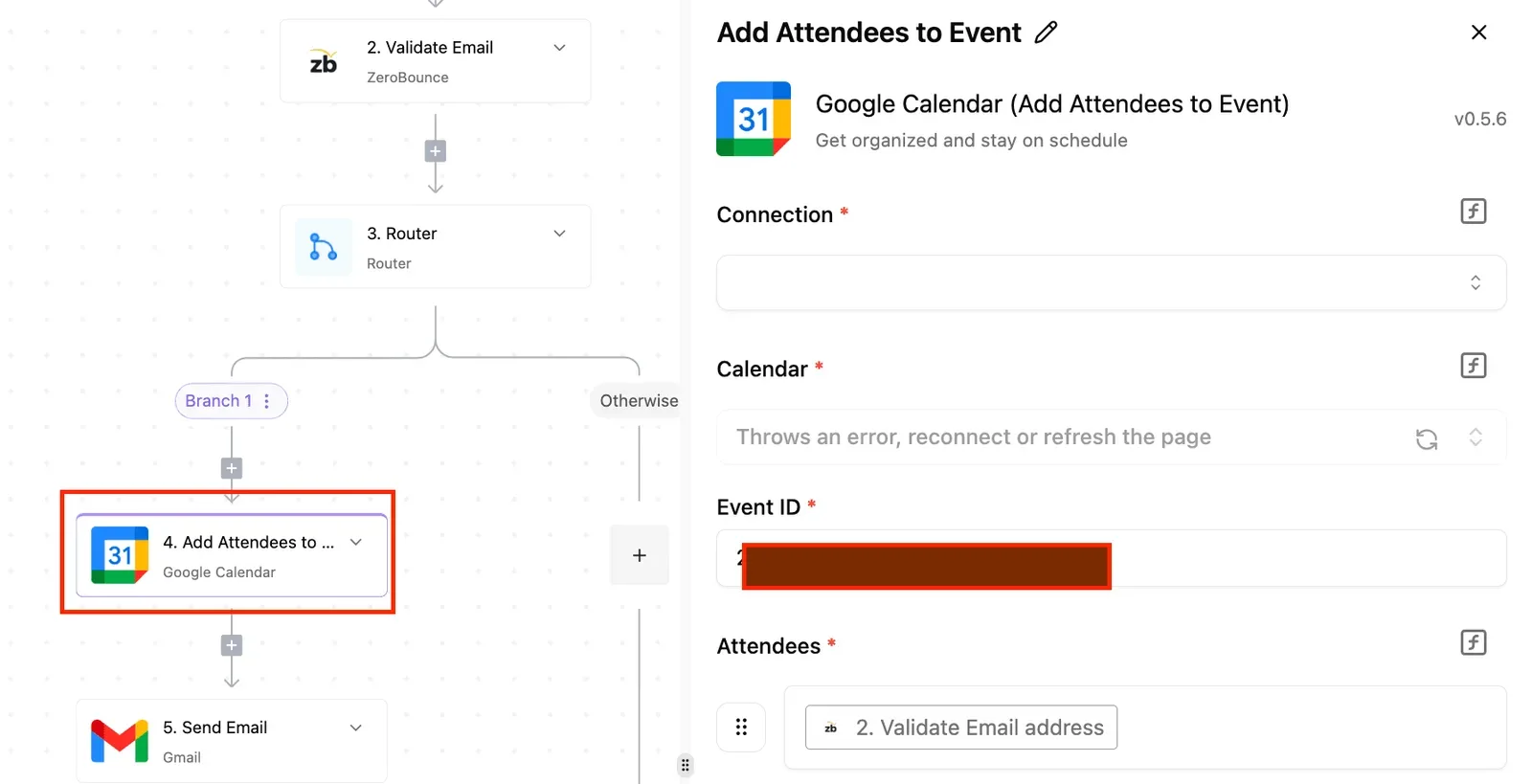
Only one pairing here has docs confirming that tokens reach the caller while the run is still going: n8n's Chat Trigger, which documents a streaming response mode, fed by the AI Agent node. The canvas below shows the shape of it, with a test conversation in the chat panel:
- a chat trigger
- an AI Agent node
- an OpenAI chat model
- a memory sub-node
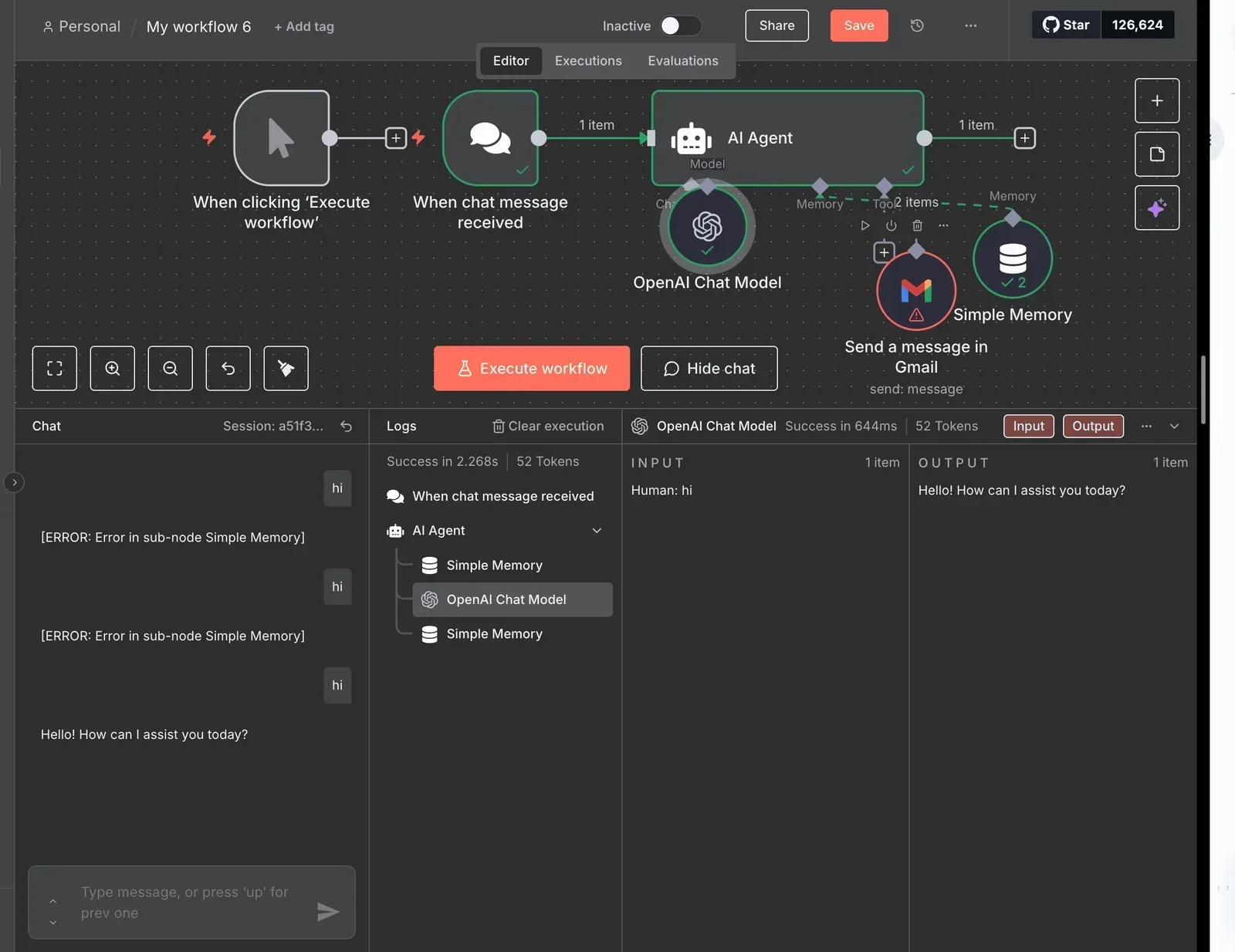
It also shows a failure in the Simple Memory sub-node, which is a reminder that memory is a separate dependency and can break while the model call works.
Pick n8n if the caller is a chat widget or a front end you control. Check that your own flow actually uses the trigger's streaming mode rather than waiting for the run to end, because the default doesn't stream.
Windmill verdict for streaming LLM output
If your steps are real scripts, you can write the LLM call yourself and return output incrementally, and that is the appeal of Windmill, a developer-first platform. Its docs cover streaming from scripts and an AI agent step in flows.

Treat the HTTP behavior as the thing to test before committing: confirm that the endpoint your caller hits relays the stream rather than returning a finished job result. Pick it if your team is happy writing code and wants self-hosting.
Temporal and Airflow verdict for LLM streaming
Neither tool documents token streaming to a caller, and Temporal runs durable workflows whose activities return when they finish. Airflow schedules batch tasks, and a task's output lands after the task completes.
Both are good at running the LLM call reliably, with retries and recorded state.
To stream, the activity or task must push tokens to a side channel you build, such as a message broker or a WebSocket service. Pick them when reliability matters more than the live feel, and accept that you own the streaming layer.
Activepieces avoids that second system for the work around the model, though not for the streaming itself.
Its flow builder takes an Agent step and a deterministic step in the same flow, and the run trace records both as a single execution, start to finish, rather than two engines bridged by a callback.
MoneyGram, Moneypenny, Alan and FundingSocieties run it, but its docs still don't confirm tokens reaching the caller, so that trace argues for background AI steps, not a live chat window.
Zapier and Make verdict
Run an AI step on either platform and the answer comes back when the run ends. Their webhook-response features return a result at the close of the scenario or Zap, not a token stream.
I found no documented streamed HTTP or chat response in either platform's docs, so a long catalogue of AI actions doesn't change the verdict.
Run the LLM step here if the rest of the automation lives there, and stream from a separate service in front of it.
You can follow the rest of this with the builder open. Start free, no card.
Streaming chat reply setup
Because n8n's docs confirm a streamed chat response, the setup runs there:
- a Chat Trigger
- an AI Agent node
- a response mode switched to streaming
Five steps cover it, and the stages below split them so each one leaves something working:
- Create Chat Trigger
- Toggle Response Mode to Streaming
- Connect AI Agent node
- Select Model (Claude/OpenAI)
- Publish and Test in Chat Window
On purpose, step 2 comes before the agent exists. The mode is a setting on the trigger, and it only pays off once something downstream produces tokens.
Stage 1: accept a prompt and return a fixed reply
Add the Chat Trigger (step 1) and leave the response mode on its default, which answers when the last node finishes. Put one node after it that returns a fixed string, then open the built-in chat window and send anything.
If the fixed reply comes back, the trigger, the input field and the return path all work, and any later failure belongs to the LLM step.
Stage 2: add the LLM step and return the full answer
Replace the fixed node with the AI Agent node (step 3) and attach a chat model to it (step 4). Claude Sonnet 5.5 or GPT-6.2 Sol both suit a chat test, and either needs a credential saved first. Send a long question.
After a visible wait, the reply arrives in one integration, and that wait is the baseline. A caller on this setup sees nothing until the whole run ends, which is exactly what most platforms do.
Stage 3: turn on streaming and watch chunks arrive
Go back to the Chat Trigger and set its response mode to streaming (step 2). Publish, then test in the chat window (step 5) with the same long question, and text should now appear progressively instead of landing at once.
Compare against Stage 2. If it still arrives in one block, check that the mode saved and that the agent is the final node, because the streamed output comes from that node.
Stage 4: break the connection and see what survives
Send the long question again and close the chat tab mid-reply. Then open the workflow's execution list and read the record. What you need to see is whether the run finished server-side and what output it stored. Don't assume the answer; the record tells you.
If the run completes without a listener, the tokens are simply lost to the caller. Anything that must survive a dropped client has to be written somewhere by a node, not left to the stream.
Where Activepieces Fits for LLM Streaming
For this task, Activepieces is unconfirmed on streaming, its 750 integrations notwithstanding, so streaming capability is what determines the ranking.
Its docs confirm a webhook that returns a response after an AI step runs, not tokens delivered to the caller while the model is still writing.
What Activepieces documents today
Three things are documented: a flow (Activepieces' name for a workflow) can start from a webhook trigger. An integration (one of the 750 counted in its open source monorepo) can call a language model.
A response step can send a result back to whoever hit the webhook. That's enough to build a working question-and-answer endpoint.
The webhook fires, the AI step runs, and the response only leaves after that step completes, so the caller's request sits open behind a blocked arrow.
What follows from that shape is a simple cost: the caller gets one finished answer, and the wait equals the model's full generation time.
What its docs do not confirm
At the check date, I found nothing in the Activepieces docs that describes streamed HTTP output or a chat response that arrives token by token.
Absence from the docs is not proof the feature is missing, and because the core is MIT-licensed and public on GitHub, the source is open to read, but you shouldn't plan around it.
If your front end needs words appearing as they are generated, you'd be building on an unconfirmed capability on Activepieces.
On the free plan, a proof-of-concept would be the only way to learn the answer, and the free plan's 1,000 credits a month with unlimited flows is enough to run one at no cost.
A long list of AI integrations tells you the platform can call models but not that the caller sees output before the run ends, so catalogue size doesn't settle this.
When it is still the right pick
Choose it when the caller can wait for a complete answer: a webhook that classifies a ticket, drafts a reply, or fills a field and returns once. In those cases streaming adds nothing, and the documented trigger and response step cover the job.
If your real need is a chat front end, compare it against Flowise Cloud, a separate LLM-app builder that meters by predictions.
According to Siftino, the Free tier at $0 includes 100 predictions a month, which is a few test sessions, not a pilot, so you'll hit the quota before meaningfully evaluating the platform.
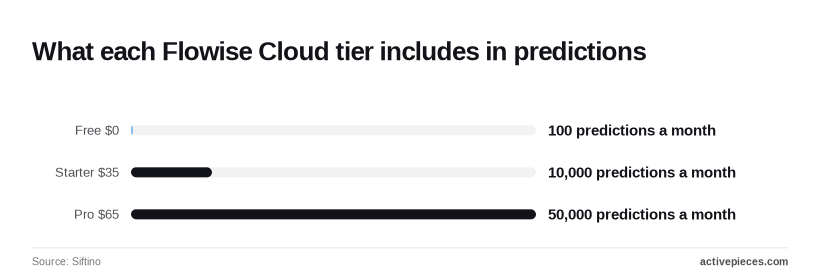
At $35, Starter includes 10,000, about 330 a day, enough for a small internal tool; by the time external users join, you'll need a higher tier. At $65, Pro includes 50,000, about 1,650 a day, which is where a customer-facing chat starts to fit.
These are Flowise figures, not Activepieces pricing, and the units differ, so check how each vendor counts a run before comparing bills.
Frequently asked questions
Can Zapier or Make stream an LLM response to a user?
Not as a streamed reply, unless the vendor's own docs say so. Both run an AI step and hand back the result when the run finishes.
Their model steps are built for completed outputs passed to the next action, not for tokens flowing to a caller.
Read the trigger and response documentation for a streamed HTTP or chat response. If it's not there, plan on the user waiting for the whole answer.
Is SSE or WebSocket better for streaming workflow output?
When tokens only flow from server to client, server-sent events (SSE) are the better default. SSE is plain HTTP, reconnects on its own, and passes through most proxies.
Pick WebSocket when the client must send input mid-stream, such as interrupting a reply or carrying voice. Either way, the platform has to expose the stream, so check that before you pick a transport.
Do I need a workflow tool or just the model API?
If the only job is a chat window that streams tokens, call the model API directly. A workflow tool earns its place in the steps around the model: retries, approvals, connector calls, scheduled runs, and state that survives a crash.
Let the workflow do the preparation and side effects, and let a thin service stream the final generation; that is a common split. A fast-first-token model such as Claude Haiku 5.5 suits the streamed half.
What happens to a streamed run if the client disconnects?
It depends on whether the platform cancels the upstream model call, and most docs say little about it. If it doesn't, the model keeps generating, you keep paying for tokens nobody reads, and any later steps still fire.

Test it: open a streamed run, kill the client, and watch the execution log. Then see whether the run is marked cancelled, finished, or failed, and if side effects follow the model step, make them idempotent.
Can I self-host a workflow platform and still stream LLM output?
Yes, if the engine supports streamed responses at all. Self-hosting doesn't add that capability.
It does give you control of the reverse proxy, which is where streams usually die: buffering on nginx or a load balancer holds tokens back until the response closes. The user sees nothing and then everything.
Turn off response buffering on the streaming route and raise idle timeouts. Confirm the platform's docs describe a streamed endpoint before you build around it.
Related reading
References
Build it
Set this up in minutes.
No code required. Connect your accounts, and Activepieces runs it from there.
Start free Talk to sales