
Vimeo Pricing: Plans, Monthly vs Annual Cost (2026)

Nov 2, 202614 min read
Vimeo is a video hosting and publishing platform sold in tiers: a free entry plan, paid plans that rise in price and limits, and a custom-quoted Enterprise tier.
Each paid plan has a monthly price and a lower per-month price if you commit annually, and teams that chain uploads into other tools through Activepieces or similar automation will want to check the limits before choosing a tier.

All current Vimeo pricing plans
The plan table, checked 2 November 2026
It lists every current plan against the five columns that decide the bill.
| Plan | Monthly price | Annual-billed price | Seats | Storage or video hours | Bandwidth or viewer limit |
|---|---|---|---|---|---|
| Free | No charge | No charge | Smallest allowance | Smallest allowance | Most restricted |
| Starter | Lowest paid price | Lower per-month rate | Few seats | Entry-level allowance | Entry-level allowance |
| Standard | Mid-range price | Lower per-month rate | More seats | Larger allowance | Larger allowance |
| Higher tiers | Highest listed prices | Lower per-month rate | Most seats on a listed plan | Largest listed allowance | Largest listed allowance |
| Enterprise | Custom quote | Custom contract | Negotiated | Negotiated | Negotiated |
Only Enterprise has no published price, and it is the only plan where the limits are a conversation with sales.
What changed from the old plans
When Vimeo reshuffles its tiers, old comparison posts still rank for the current name.
A plan called Standard in an article from a few years ago may not carry today's limits, which means a table copied from a stale source quietly describes a product you cannot buy.

Vimeo monthly vs annual billing compared
Pay annually and you get the lower per-month rate, charged as one payment up front.
If a limit proves too tight, monthly billing lets you leave, though it costs more per month. Annual billing locks you into the plan you guessed at. If you haven't yet measured your storage, seats and viewers, pay monthly until you have.
If you are running this arithmetic for your own team, see what the same workload costs on Activepieces.
What each Vimeo plan costs at realistic usage
You pay about 62% more on monthly billing than on annual for Vimeo Starter and Standard, so what you pay while you measure is a premium for not committing, and the premium grows with every seat.
Vimeo pricing for a solo creator
On Starter, one seat is $13 a month billed annually, $156 for the year, or $21 a month billed monthly, $252. That's $96 you hand over for flexibility.
Step up to Standard and it runs $26 annually ($312) or $42 monthly ($504), a $192 gap.
If you're one person and still guessing at storage, the monthly premium is cheap insurance. Once your numbers hold for a quarter, switch to annual and keep the difference.
Small marketing team
At five seats, the billing choice becomes a real decision. Starter costs $780 a year on annual billing and $1,260 monthly.
Move to Standard and the bill is $1,560 annually and $2,520 monthly, which's more than three times Starter's annual bill.
The point to take from these figures is that billing cycle moves a five-seat Standard bill by $960, more than the $780 that separates Starter from Standard on annual billing.
Company video library
Past a certain library size, there's no price on the page. Enterprise's quoted by bandwidth tier. Avanta Digital lists Tier II at $15,000 a year, Tier III at $25,000, Tier IV at $36,000 and Tier V at $50,000.

Treat those list prices as a starting position, not a verdict. Vendr reports a median Vimeo Enterprise contract of $11,438 a year, below even the $15,000 Tier II list price.

So buyers who negotiate typically sign for less than the lowest published tier, and anyone accepting list price is paying above what the typical customer does.
Rarely does the bill break on the sticker price. It breaks on the limit you didn't check:
- Storage caps, which stop uploads or force a plan change mid-project.
- Seats, which multiply the per-seat price, as the five-seat figures above show.
- Bandwidth, which on Enterprise's the tier you're contracted to.
- Feature gating, where a tool you assumed was included sits one plan higher.
- Renewal terms, where an annual plan renews at whatever the then-current price is unless you act first.
Rarely does the bill break on the sticker price. It breaks on the limit you didn't check:
Check each against your own usage before you sign.
Vimeo compared with the closest alternatives on price
For a five-seat team, Vimeo's the cheapest paid option here at $25 a month, against $129 on Wistia and $295 on Vidyard, with YouTube free but ad-supported.
The table below sets the four side by side, so you can see which limit would push you off each one.
| Platform | Entry and five-seat monthly cost | Storage / video limits | Ad-free playback | When it wins |
|---|---|---|---|---|
| Vimeo | $25 for five seats | Capped by plan tier | Yes, on paid plans | Small team, many seats, modest library |
| Wistia | $129 for five seats | Capped by plan tier | Yes | Marketing teams that need viewer analytics |
| YouTube | Free | No practical cap for ordinary uploads | No; ads and suggested videos can appear | Public reach matters more than control |
| Vidyard | $295 for five seats | Capped by plan tier | Yes | Sales teams that send video inside outreach |
Since price alone settles little here, the next three parts cover the head-to-head matchups.
Vimeo vs Wistia
At $129 a month for five seats, Wistia is just over five times Vimeo's $25. That gap is $104 a month, or about $1,250 a year, which has to buy you something you'll use.

If your team never opens the viewer-level analytics, you're paying that premium for a dashboard nobody checks.
Higher still is Vidyard at $295, more than eleven times Vimeo, so it only makes sense if the sales-outreach features replace another tool you already pay for.
Vimeo vs YouTube
YouTube costs nothing, and that's its whole case. The price you pay instead is control: ads and suggested videos can appear around your content, and a customer who finishes your demo can land on a competitor's.

If the video sits on a pricing page or inside a client portal, the $25 on Vimeo is what removes that risk. If the video exists to be found by strangers, YouTube's search reach beats anything on the paid platforms.
When Vimeo is still the cheaper choice
Whenever seats are your biggest limit, Vimeo stays cheaper. Adding people to a $25 plan costs far less than moving to a $129 one, so a growing team feels the difference every month.
It stops being cheaper when you hit the storage or video-hour cap on your tier and you're pushed up a plan.
Pull your usage numbers before you compare, because a $25 plan that forces an upgrade in month four is no longer the cheapest row.
Worth checking against a plan that does not meter every step: one credit covers a whole run on Activepieces.
Track Vimeo usage against plan limits with Activepieces
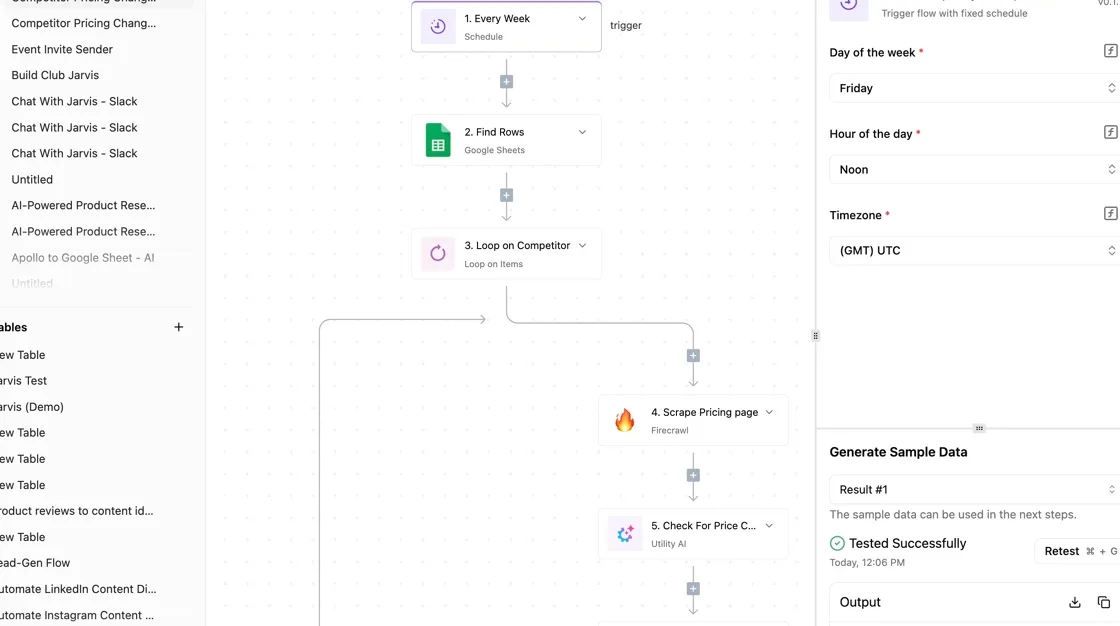
If you stay on Vimeo, a scheduled Activepieces workflow can read your usage and message you before a limit forces an upgrade you didn't budget for.
Activepieces lets you chain steps (triggers, API calls, code, notifications) in a visual editor, with unlimited flows on every plan, including free.
Its core is MIT-licensed, and the 746 integrations it ships with are counted straight from the public community directory in its GitHub monorepo, which has 25,329 stars. It reads your numbers and tells you; it doesn't change what Vimeo charges.
Four steps build it, and they show how little there's to maintain: one trigger, one read, one calculation, one message.
- A weekly Schedule trigger starts the flow.
- A Vimeo step or API call reads storage used and the quota.
- A Code step computes percent of limit.
- A Slack or email alert fires above 80%, which means you have time to respond before storage becomes critical.
Warn at 80% rather than 100% and you have time to trim old videos or compare plans while the choice is still yours, instead of after an upload fails.
Schedule a weekly Vimeo usage check trigger
Add the Schedule integration and set it to run weekly, on a day when someone'll actually read the result. A Monday morning run puts the message at the start of the week, before anyone uploads a batch.
Weekly is enough for storage, which grows in steps, not by the minute. If your team publishes in bursts around launches, shorten the interval for that period.
Stage 2: fetch usage from Vimeo
If your Activepieces version lists no Vimeo integration with a usage action, you don't wait on a vendor release: generate the connector with AI and add it privately to your own instance.
Roughly 60% of the catalogue was written by contributors outside the company, so gaps get filled by the people who need them. The quicker route is an HTTP step calling the Vimeo API's /me endpoint with an access token from your Vimeo developer settings.
The response includes an upload_quota object, and under it space holds the used and maximum values. Those two fields're what you need.
Check the response in the step's test output before you wire anything to it, because your account type determines which values come back populated. A blank field here would make every later calculation quietly wrong.
Send a Vimeo usage limit alert
Add a Code step that divides used by maximum and returns a percentage. Follow it with a Branch step that continues only when the result passes your threshold. On the true path, add a Slack message or an email step.
Put the percentage, the used amount and the quota in the message text, so whoever reads it can decide without opening Vimeo. Name the plan in the message too, so the alert points straight back to the comparison you already made.
Nothing in the workflow changes the bill. The limits and the upgrade price stay exactly as Vimeo sets them.
Monday checklist for choosing a Vimeo plan
Run seven steps in order, about twenty minutes in total, and finish with one number you can hand to whoever approves the budget. Vimeo sets the price, so what you control is the measurement. Each step produces a figure that the next one uses.
- Count your videos and total hours in the library, including drafts nobody has opened in a year. Those still count against storage.
- Count the people who upload, not the people who log in to watch. Seats are priced on the first group.
- Estimate monthly views from the analytics page, using your busiest month rather than your average one.
- Read the renewal terms on your own invoice: the billing period, the renewal date and the notice you must give.
- Decide: stay, switch to a close alternative, or downgrade.
- Write one line for the approver: the plan, the billing period, and the monthly cost.
Whichever limit you hit first decides the plan. Every other limit's spare room you're paying for.
Read the table across, not down. For each plan, put your hours, your uploaders and your views next to its limits, and mark the first one you exceed.
When a plan looks cheapest but fails on seats, it isn't the cheapest. It's the plan whose upgrade you haven't been billed for yet. Check the table against Vimeo's pricing page on the day you buy, because the page governs, not this article.
If your account predates the current lineup, the plan name on your invoice may not match any row in the table. Ignore the name and compare the limits.
On older terms, an account can carry different storage, seat or viewing allowances than a current plan with a similar name. That difference's exactly what step four needs to catch before you decide to stay.
Pay annually and you trade flexibility for a lower effective rate, and the trade only pays if your measurements hold for the whole term.
Before you choose, find three things on the invoice: whether it renews automatically, how much notice cancelling requires, and what happens to your content if you downgrade mid-term.
If your busiest month is still uncertain, pay monthly until it isn't. Then write the number in step seven.
Frequently asked questions
Does Vimeo still have a free plan?
Check the pricing page on the day you sign up, because Vimeo has changed what its entry tier includes more than once.
Where a free tier exists, it is built for testing, not for hosting a client library. Its storage and upload caps are the first limits you'll hit, so run your own measurements from the steps above against it before you move anything onto it.
Can I cancel Vimeo and keep my videos?
Cancel only after you've downloaded your originals. When an account drops to a lower tier or closes, the videos that exceed the new limits can become unavailable, and embeds on your site break the moment that happens.
Export every file you can't re-create, then check that each page embedding a Vimeo player still plays.
If a refund matters, read the cancellation terms for your billing period before you click anything. Terms differ between monthly and annual billing, and the cancel button doesn't show them.
Does Vimeo charge extra per team member?
It depends on the plan, and the answer sits in the seat limit, not in a separate line item.
Some plans include a set number of seats and charge for each one beyond it. Others cap the team and make you change tiers to add people.
Count everyone who uploads or manages videos, including the contractor you use twice a year. The seat count in your measurements is the figure to compare against the plan, not the size of your company.
Is Vimeo cheaper if I pay annually?
Usually the annual rate works out lower per month, but you're committing to a plan you may outgrow. If your storage, seats, or viewer numbers are still moving, pay monthly for a quarter first and let the real usage settle.
Once your measurements stop changing between months, switch to annual billing. Do it in that order, because an annual plan that turns out too small costs you the discount and an upgrade.
Will Vimeo prices change again in 2027?
Nobody outside Vimeo can promise either way, and the company's recent history of repackaging plans is a reason to plan for change. Protect yourself in three ways:
- Keep a copy of your current plan's limits and price, saved as a screenshot or PDF with the date on it.
- Read the renewal notice when it arrives instead of letting it auto-renew unseen.
- Keep your originals and a working export, so that moving to a close alternative takes a weekend and not a rebuild.
Related reading
References
Running the numbers
See what the same workload costs here.
Free forever plan, and every paid plan self-hosts at no extra cost.
See pricing Talk to sales