
10 Best NotebookLM Alternatives for AI Research (2026)

Oct 1, 202614 min read
NotebookLM is a source-grounded research environment that restricts its reasoning to a specific corpus of uploaded documents to minimize hallucinations.
What NotebookLM is and why users seek alternatives
How NotebookLM's RAG architecture grounds answers in sources
Thousands of pages of text can be queried without manual indexing because the platform utilizes a Retrieval-Augmented Generation (RAG) architecture. This approach shifts the AI's role from a creative writer to a focused librarian that synthesizes insights across disparate PDFs and Google Docs.
While generic chatbots often drift into fabricated data, the source-grounding model forces the LLM to cite its work, making it a viable tool for academic literature reviews and technical audits.
NotebookLM's Google-centric data privacy model
Professional users often pivot to alternatives because NotebookLM operates under a Google-centric privacy model where data resides within the consumer-facing ecosystem. Unlike enterprise-grade solutions that offer network isolation or local-first hosting, Google ties uploaded data to a user account.
Teams handling sensitive intellectual property or regulated patient data face a significant compliance hurdle here. The lack of local-first hosting means data is subject to the retention policies of the Google ecosystem rather than internal corporate controls.
NotebookLM's source upload limits and output formats
High-volume research faces significant friction in this tool due to rigid ingestion caps and a lack of automated connectivity.
While superlore.ai notes that NotebookLM supports up to 200MB per file, other tools like ResearchRabbit cap at 100MB, forcing users to split larger research documents into smaller segments.
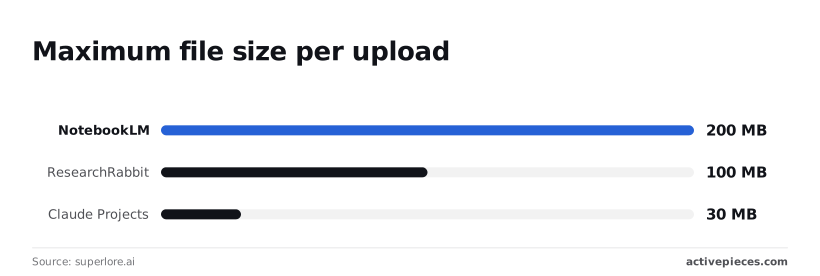
Claude Projects limits uploads to just 30MB, meaning it cannot handle high-resolution image-heavy documentation.
Despite the high individual file limit, NotebookLM lacks real-time web access and automated export workflows. When the system generates a summary, it lacks a native way to trigger an external action.
Instead, users must manually copy text or use a linked passing clause through Activepieces to bridge the gap between their research and their production databases.
The fastest way to settle a shortlist is to try one. Activepieces is free to try, no credit card.
Comparing the top NotebookLM alternatives for 2026
Professional users select research platforms based on whether the tool prioritizes massive context ingestion, real-time web discovery, or local data sovereignty. The following table illustrates how market leaders diverge in their fundamental architecture and cost to serve specific research workflows.
| Product | Primary Use Case | Privacy Level | Starting Price |
|---|---|---|---|
| NotebookLM | Source-grounded synthesis | Cloud (Google) | Free |
| Obsidian | Personal knowledge base | Local (Self-hosted) | Free / $8/mo Sync |
| Perplexity Pages | Web-first reporting | Cloud (Public-facing) | Free / $20/mo Pro |
| Affine | Collaborative workspace | Local-first / Cloud | Free / $7.90/mo |
| Activepieces | Automated research pipelines | Local / Cloud / VPC | Free / $15/mo |
While Google offers the highest entry-level context for free, it does not have the local-first privacy required for sensitive intellectual property.
Maximum file size per upload by platform
Researchers are prevented from uploading high-resolution technical PDFs or uncompressed dataset logs without prior splitting by NotebookLM's 100MB limit per file, forcing users to manually segment their research materials before analysis can begin, which adds a time-consuming administrative hurdle to the workflow.
In contrast, Perplexity Pages limits file uploads to 25MB for free users, effectively barring the ingestion of larger academic or technical documents, so researchers must seek alternative platforms for comprehensive data analysis.
A manual preprocessing step is forced by this 25MB cap for researchers who rely on large, data-heavy documentation.
Gemini context window size compared to competitors
2,000,000 tokens were available in the Gemini 1.5 Pro context window, so a user could query thousands of pages of documentation in a single session.

Aws-bedrock-explorer noted that Claude 3.5 Sonnet had a 200,000 token window, which restricted it to mid-sized codebases or single-book analysis. GPT-4o supported 128,000 tokens, necessitating more aggressive RAG strategies so the system did not drop older data during long conversations.
Team seat monthly pricing for enterprise research
Scaling a large team requires a significant recurring budget when using Perplexity Pro, which charges $20 per seat to enable private file uploads and unlimited search queries, making widespread deployment a substantial financial commitment that could strain departmental resources.

Affine has a Pro tier at $7.90 per month. This allows teams to synchronize local-first documents across devices without exposing raw data to a public LLM training set, so users can maintain strict privacy protocols while collaborating remotely.
Google ecosystem strengths for research
NotebookLM remains the benchmark for researchers who prioritize zero-cost entry and seamless integration with existing cloud storage. The platform excels at transforming static document collections into interactive audio and text summaries without requiring technical configuration.
Superior synthesis of large document sets
The primary advantage of this tool is its massive 50-source limit and the ability to process up to 25 million words per notebook. For a student or a solo researcher, this provides a level of depth that paid alternatives often gate behind expensive monthly subscriptions.
The system is particularly effective at generating "Audio Overviews," which use natural-sounding dialogue to explain complex topics.
This feature provides a unique way to consume research during a commute or while multitasking, a capability that local-first tools currently struggle to replicate with the same level of polish.
Google Drive integration and Workspace onboarding
Because the tool is built directly on the Google infrastructure, there is no need to manage API keys or set up external vector databases.
A researcher can pull documents directly from Google Drive, ensuring that the transition from a writing phase to a research phase happens within a single browser tab.
This convenience makes it the ideal choice for rapid prototyping or for users who do not have the technical expertise to manage local LLM installations. The zero-configuration nature of the platform ensures that the focus remains on the content rather than the underlying technology.
Keeping research data on your own hardware
Obsidian combined with the Smart Connections plugin is the most robust local-first alternative for users who refuse to store sensitive research on cloud servers.
Keeping research data on your own hardware
Maintaining a local vault ensures that intellectual property remains under the user’s direct physical control.
While enterprise search tools like Glean cost $75 per user according to Toolhunter, Microsoft 365 Copilot costs $30, and Notion AI costs $20, creating a wide spectrum of accessibility for organizations depending on their budget, as companies must weigh feature sets against their bottom line.
For a team of ten, paying $750 monthly for Glean represents a significant overhead. By contrast, Obsidian users pay $0 for the core application, meaning they can reallocate the budget from seat licenses to high-performance local hardware.
Semantic search across your Obsidian notes
Smart Connections generates embeddings for every file in a vault, allowing for semantic retrieval that identifies thematic links between disparate notes.
When using a model like Gemini 3.8 Flash for these tasks, the 1.0-million-token context window allows for massive retrieval sets. The local vector store makes sure only the relevant snippets are sent over the wire.
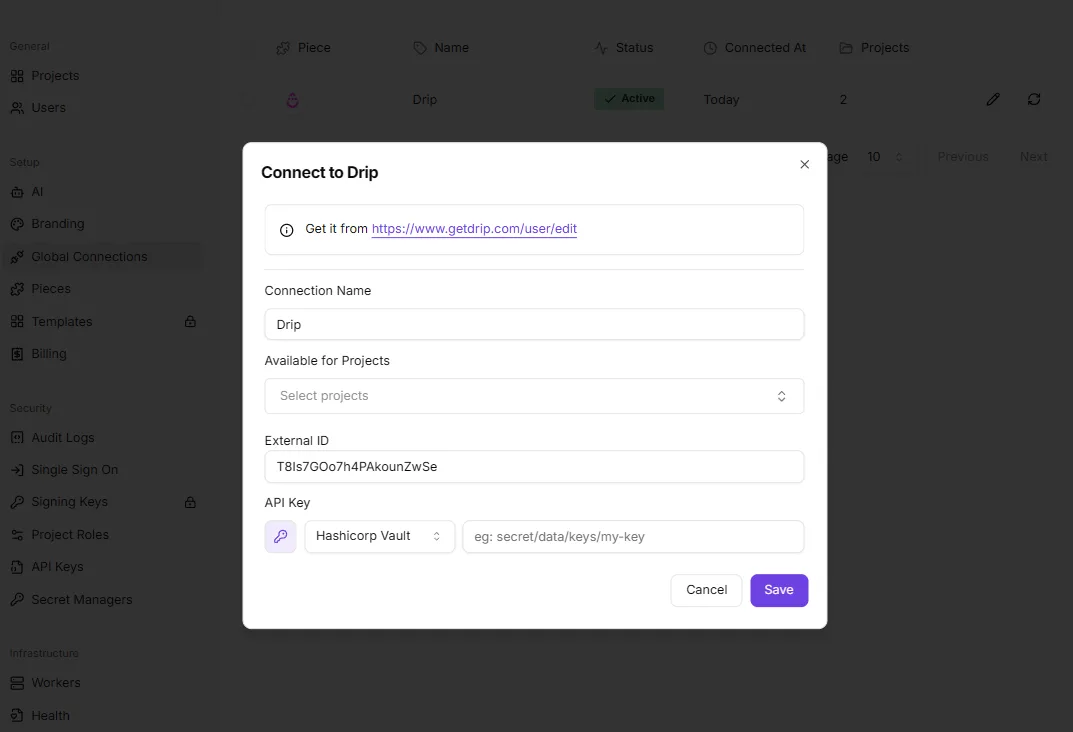
Using a Hashicorp Vault selector for the API key ensures that even when the local vault connects to external services, the secrets are never stored in plaintext.
The cost of managing your own API keys
Total privacy comes at the cost of the operational burden of managing individual API endpoints.

Unlike the flat $20 fee for Notion AI reported by Toolhunter, which covers all underlying compute, an Obsidian user must monitor their own usage of models like Claude Sonnet 5.5 or GPT-6 Astra, leaving them vulnerable to unpredictable costs based on their activity levels.
Total privacy comes at the cost of the operational burden of managing individual API endpoints.
Reading a table only gets you so far. Build the same workflow in Activepieces and compare it yourself.
Perplexity Pages for real-time web-integrated research
Perplexity Pages functions as a collaborative canvas that merges internal file uploads with live web indexing to generate structured, citable reports.
Perplexity Pages combining documents with live web search
The platform treats uploaded PDFs and text files as primary anchors, but it concurrently queries the live web to fill information gaps.
When a user initiates a report, the system utilizes models like Gemini 3.8 Flash to synthesize these disparate data streams into a single narrative. This hybrid approach ensures that a technical brief based on internal specifications also includes the most recent industry benchmarks.
Perplexity Pages automated report formatting
The primary output of this workflow is a structured webpage that organizes gathered data into sections with automatic citations, headers, and visual layouts.
The Project Settings dialog for a "Secret Gadget Labs" project shows how administrative controls, such as the Max Concurrent Jobs field, manage the throughput of these automated research flows.
Limitations in long-form document deep-dives
While the tool excels at synthesizing breadth, it lacks the specialized context window management required for analyzing massive, multi-hundred-page technical manuals in their entirety.
Professional users requiring exhaustive extraction of every clause in a legal contract will find the summary-first nature of the interface restrictive compared to dedicated long-context environments.
Affine for visual-spatial research and whiteboarding
Affine integrates a spatial canvas with document-grounded AI to allow researchers to map connections between sources that a linear text interface would obscure.
Transitioning from linear notes to a spatial canvas surfacing AI
Affine allows users to toggle between a structured document view and a "surface" mode where they can link AI-processed nodes with directional arrows.
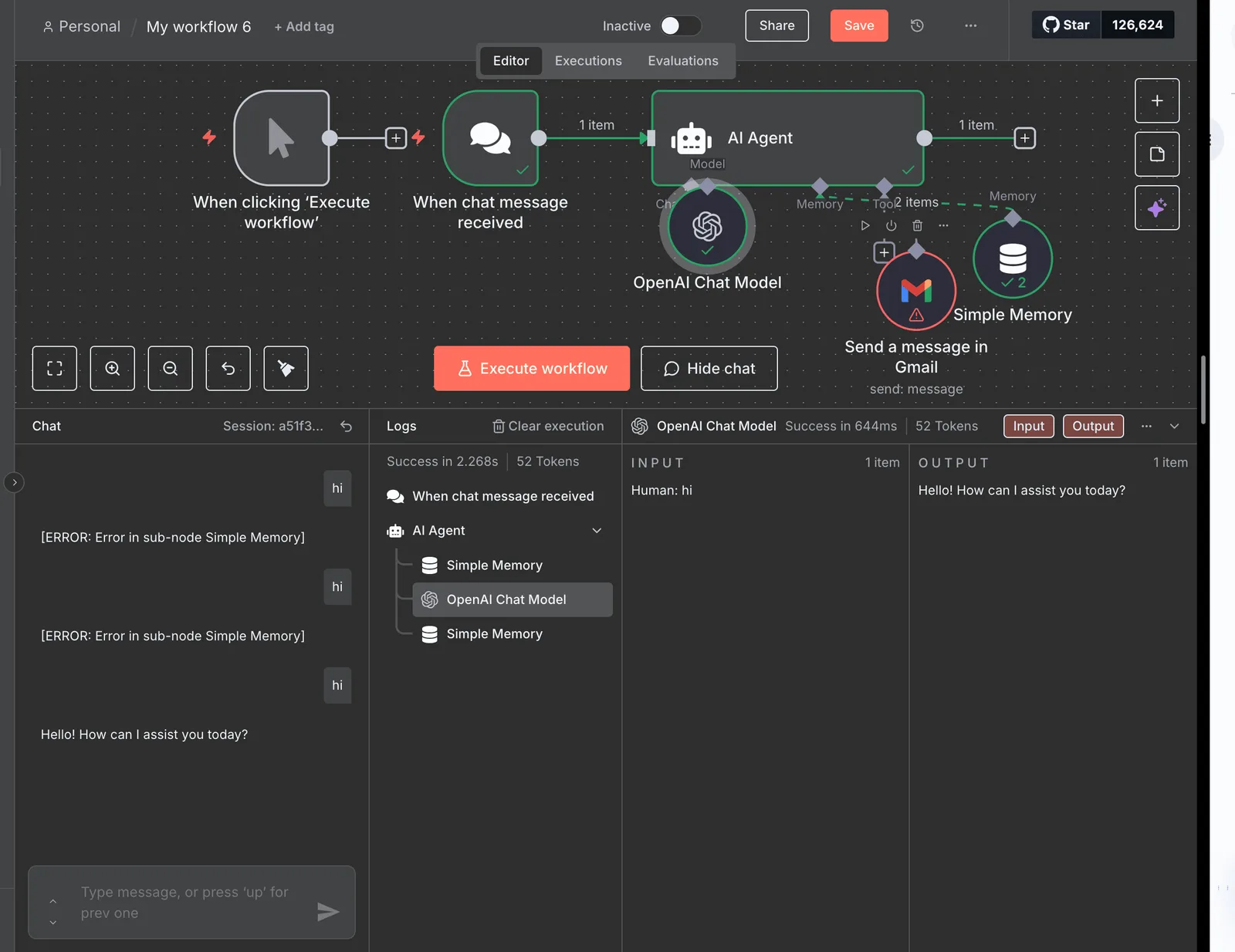
[Screenshot description: The workflow builder shows an "AI Agent" step connected to a "When chat message received" trigger.
The agent is configured with an OpenAI Chat Model and a Simple Memory node, which is currently throwing an error in the left sidebar, while the right panel confirms a successful "Hello!" response in the execution logs.]
By pinning an AI response next to the original source text on the canvas, a user can visually verify the model's output against the raw data without switching tabs.
Affine self-hosting for enterprise data control
Organizations that cannot upload proprietary research to Google’s cloud infrastructure utilize Affine’s self-hosting capabilities to maintain physical control.
Every document processed by models like Claude Sonnet 5.5 or GPT-6 Astra remains behind the corporate firewall under this deployment model.
Activepieces for custom AI research pipelines
Every other platform searches its templates. Activepieces writes yours. While most research tools limit you to a fixed catalog of connectors, Activepieces uses a built-in AI chat to generate and publish functional workflows from natural language descriptions.
If you need to ingest data from a source that has no existing template, you simply describe the logic (such as "when a new research paper is saved to Dropbox, summarize it with Claude and send the key findings to a specific Slack thread") and the system builds the runnable flow.
Automating data ingestion from Slack and Gmail to LLMs surfacing
The platform uses modular connectors for services like Slack and Gmail to monitor specific channels for incoming intelligence.
When a critical update arrives, Activepieces routes it through a formatting step before handing it to a model like Gemini 3.8 Flash for summarization. A push-based research environment is created here, where the model proactively flags insights based on incoming communication logs.
Building bespoke RAG workflows without a fixed UI
Unlike rigid interfaces, Activepieces allows for the construction of Retrieval-Augmented Generation (RAG) flows that output to any destination.
A researcher can configure a flow that queries a vector database, validates the findings with Claude Sonnet 5.5, and then posts the result directly into a Discord webhook or a Notion database.
Scaling research tasks beyond manual document uploads
By treating research as a series of repeatable tool-calls, Activepieces enables the processing of high-volume data streams.
Users can chain together logic gates to filter out noise. This architectural shift allows a single researcher to maintain oversight of hundreds of disparate data sources, as the system autonomously manages the ingestion and indexing of the entire corpus.

While other platforms rely on static libraries that may not cover every niche research requirement, Activepieces allows users to generate functional automation through natural language prompts.
Activepieces is the better choice for researchers who need to build custom data pipelines without being limited by a pre-existing template catalog. By transforming descriptions into runnable workflows, it ensures that unique logic and specific integrations are never out of reach.
How to transition your research platform
Transitioning your research requires a systematic extraction of the grounded data and a structured re-indexing phase to ensure that your existing knowledge base retains its logical integrity during the move.
Exporting sources and citations from Google NotebookLM
Google NotebookLM lacks a bulk "Export All" function for the underlying source files, so you must manually retrieve original documents.
To begin, locate the original PDF, Markdown, or Google Doc files. Copy the generated "Notebook Guide" and any saved notes into a text editor. Finally, download the generated audio summaries via the "three-dot" menu to retain synthesized insights.
Setting up a pilot project in your chosen alternative
A pilot project should use a constrained subset of your most complex data to test how the new system handles multi-step reasoning.
- Select a single folder containing no more than twenty related documents to serve as the initial corpus.
- Upload these documents to the new platform's ingestion engine and wait for the indexing status to show as complete.
- Run a series of "known-answer" queries, which are questions you have already answered in NotebookLM, to compare the accuracy of the new platform’s citation engine.
- Test the system's ability to integrate live data by providing a URL to a recent industry report, confirming that the tool can bridge static files with real-time web information.
Frequently asked questions about AI research tools
Can I use these alternatives without an internet connection?
Disconnected operation is possible with local-first alternatives that host weights on your own hardware rather than relying on a cloud-based inference endpoint.
While NotebookLM requires an active connection to Google’s servers to process queries, tools like AnythingLLM or GPT4All act as local orchestrators for models you download.
When you run a quantized version of Mistral Small 4 on a workstation, the data never leaves your local area network. A field researcher in a remote location can still query their documentation.
Which tool is best for academic vs. business research?
The distinction between these environments depends on whether the priority is citation integrity or integration with existing operational databases.
Academic researchers often require tools like Consensus or Elicit, which connect directly to the Semantic Scholar database to ensure every claim is backed by a peer-reviewed DOI.
Business users typically require tools that hook into a specific software stack, such as connecting Claude Sonnet 5.5 to a Slack workspace or a Jira instance to synthesize project requirements.
Do these alternatives train their models on my uploaded data?
Data retention policies vary significantly between managed services and self-hosted deployments, impacting your long-term intellectual property security.
Anthropic’s standard API terms for Claude Opus 5.5 state that data is not used for training by default. This protects proprietary enterprise code from leaking into the model's public weights.
In contrast, free tiers of consumer-facing research assistants often include a "help us improve" clause that grants the provider the right to use your prompts as training fodder.
References
Still comparing
The fastest way to settle it is to build something.
Open source under MIT, so you can self-host the same thing later.
Start free Talk to sales