
Active Directory integration options for hybrid teams

Oct 21, 202616 min read
When managing a hybrid workforce, IT administrators must carefully evaluate how to synchronize identities between on-premises Active Directory and cloud-based Okta environments.
The choice often hinges on whether to prioritize a lightweight agent-based approach or a more robust, full-scale synchronization engine that handles complex attribute mapping.
While some teams utilize custom scripts or workflow automation tools, such as when they use Activepieces to bridge specific data gaps, the primary decision usually revolves around the Okta AD Agent versus the Okta IWA Web Agent.
Each method offers distinct advantages for authentication flow and user provisioning, but the ultimate goal remains a seamless single sign-on experience that maintains security without hindering employee productivity across diverse geographic locations.
Risks of legacy directory integration
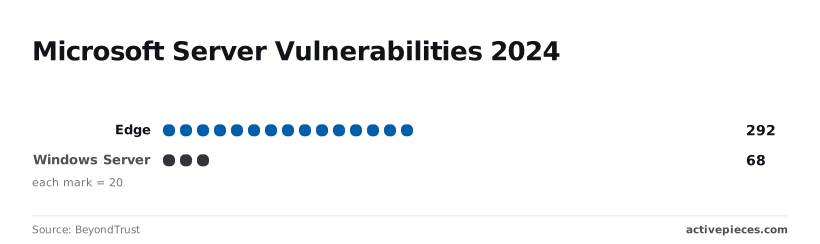
When BeyondTrust identified 684 vulnerabilities in Windows Server in 2024, the findings emphasized the inherent risk of maintaining open ports on legacy domain controllers.
You're now using Active Directory Okta integration to synchronize on-premises identity data with cloud-based access management without exposing the internal network to these threats.
By establishing this unified source of truth, you'll manage user permissions across the entire enterprise while keeping sensitive data behind the firewall.
The role of the Okta AD Agent
The Okta AD Agent acts as a lightweight Windows service. It polls the on-premises directory over port 443, eliminating the need for inbound firewall holes.
68 vulnerabilities were identified in Windows Server by BeyondTrust last year. This architecture is critical because every unnecessary open port increases the risk of a lateral movement exploit during a breach.
By using a polling mechanism rather than a listener, the agent ensures that identity data flows to the cloud without turning the domain controller into a public-facing target.
In enterprise environments, a single Okta tenant often is the hub for multiple distinct Active Directory forests.
The following structure illustrates how a central Okta tenant maintains bidirectional synchronization. It connects with corp.local, dev.internal, and emea.root forests simultaneously to ensure that a password change in any regional office propagates to cloud apps in seconds.
Because the agent's proprietary binary often hides this synchronization logic, troubleshooting a hung sync requires digging through obfuscated local logs rather than viewing the execution path in a transparent workflow engine.
How delegated authentication works
Delegated authentication passes credential validation requests directly to the on-premises domain controller in real-time. This method ensures that sensitive NTLM or Kerberos hashes never leave the local environment.
By using this process, you can enforce complex on-premises Group Policy Objects (GPOs) while providing a modern Single Sign-On (SSO) experience for cloud tools.
Reliance on the local stack introduces a dependency on the browser and OS security posture. With 292 vulnerabilities discovered in the Edge browser according to BeyondTrust, a compromised browser session could potentially intercept the handoff between the local machine and the Okta login interface.
AD attribute mapping and profile mastering
Profile mastering determines which system holds the "source of truth" for specific user fields, such as title, department, or manager, and pushes those values to downstream applications.
When using automation to augment these flows, you can inject custom logic (such as formatting a phone number specifically for a legacy VoIP system) that the standard Okta AD Agent can't handle natively.
- Local HR changes automatically update the Okta profile.
- The system revokes access to SaaS apps when a user is moved to a "Terminated" OU.
- The Okta dashboard manages cloud-first attributes, such as a temporary project role, which don't write back to the local schema.
- The user updates specific fields like
mobilePhonein a self-service portal, whilesecurityGroupsremain locked to the on-premises admin.
A single misconfigured attribute sync can result in a "sync loop" if there is no transparent way to audit these mappings. This occurs when two systems overwrite each other indefinitely, locking out the entire workforce until you manually kill the agent service.

Everything below works on Activepieces' free plan. Start without code or a credit card.
Native agent licensing costs for AD sync
Zero-cost licensing for basic sync
Native agents eliminate the immediate hurdle of budget approval because the core identity provider subscription bundles their licensing.
Once the procurement cycle is removed, you'll move from a project’s architectural approval to its technical implementation in a single afternoon. This makes the native agent the path of least resistance if you only need to mirror a flat directory structure without complex attribute transformations.
Native agent security and outbound-only access
The primary security advantage of a native agent is its outbound-only communication model. The agent functions behind a firewall without requiring any inbound ports to be opened to the public internet.
To maintain this secure posture, the host environment must meet specific baseline specifications to ensure the agent remains responsive under load.
| Component | Requirement | Consequence for Deployment |
|---|---|---|
| Operating System | Windows Server (2016+) | Prevents the use of legacy servers that lack modern security patches. |
| Memory | 8GB RAM (Recommended) | Ensures the agent can cache large group memberships without causing system-wide latency. |
| Processing Power | 2+ CPU Cores | Allows the agent to process concurrent delta syncs without bottlenecking other background services. |
| Service Port | Outbound Port 443 | Restricts identity traffic to standard encrypted channels, simplifying firewall audit logs. |
| Validation Port | Outbound Port 80 | Enables Certificate Revocation List (CRL) checks to ensure the connection remains trusted. |
Adhering to these requirements prevents the "ghost" disconnects that occur when under-provisioned hardware fails to keep up with directory changes.
Vendor support for the Okta AD Agent
Using a vendor-native agent provides a single point of accountability. This ensures that any breaking changes in the identity provider’s API are met with a corresponding agent update.
When you rely on the official Okta AD Agent, the responsibility for maintaining compatibility with Microsoft’s evolving schema shifts from your local sysadmin to the vendor’s engineering team.
The risk of a "version gap" where a cloud update suddenly renders a custom sync script obsolete is reduced by this alignment.
Native agent limits in multi-forest AD setups
When they encounter non-standard schema extensions or disparate identity sources, native directory agents fail to maintain data integrity, forcing you to bridge the gap with fragile, unmonitored scripts.
Merging LDAP and Azure AD attribute mapping
Native agents are hard-coded for direct attribute mirroring. They can't perform the conditional transformations necessary for complex organizational mergers.
If a user exists in both a legacy LDAP directory and a modern Azure AD tenant, the agent typically lacks the logic to determine which source holds the authoritative record for a specific attribute.
"Sync Debt" is the result of this rigidity, where the technical burden of maintaining an identity grows faster than the automation can resolve it.
- Reliance on PowerShell scripts for multi-domain joins, creating a hidden layer of logic that isn't visible in the primary UI.
- Persistent timeout errors on password resets indicate the agent can't traverse the network topology fast enough.
High latency in large-scale object syncs
Standard agents utilize polling intervals or basic change-tracking that collapses under the weight of large-scale object updates.
When you trigger a bulk update, such as a department-wide cost center change, the agent must queue thousands of operations. This results in a "sync lag" where downstream SaaS applications remain out of date for hours.
Employees are prevented from accessing the tools they need on their first day by this delay. The system also leaves revoked permissions active long after a user has been terminated.
Hidden costs of manual AD sync edge cases
The true expense of native agents is found in the labor required to handle "edge cases" that fall outside the vendor’s supported scenarios. Because the underlying code is proprietary, you can't extend the agent's functionality to account for unique business rules.
Auto-provisioning a specific license based on a combination of geographic location and job title is one such example.
Instead, you'll resort to "side-car" automations that lack centralized logging. Security reviews can't determine why a specific permission was granted or denied because of this lack of visibility.
Easier to see it running than to read about it: set it up free, no card.
Use automation for identity lifecycle management
Automation platforms provide the necessary abstraction layer to transform raw data from a source of truth into actionable commands for downstream applications.
While a native agent might only support a 1:1 mapping of "Job Title" to "Group Membership," an automation platform allows for conditional branching based on cost centers or geographic metadata.
Okta Workflows for internal logic
Okta Workflows functions as an embedded engine for managing events occurring within the Okta Identity Cloud.
It allows you to build logic without managing external API authentication. Because of this native placement, the platform can trigger flows instantly upon a user profile update, which reduces the window of time an orphaned account remains active after a termination event.
Confined to the identity provider’s ecosystem, this logic often hits a wall. If you need to trigger a workflow from a non-standard source like a custom SQL database, you may encounter integration gaps that require additional middleware.
Self-hosting AD sync for data security
Open-source automation platforms allow you to self-host your identity logic. This ensures that sensitive employee data never leaves the controlled corporate network.
A vendor's word on security maturity is rarely enough to clear a complex hybrid audit, which is why Activepieces publishes an MIT-licensed core.
You can clone the repository to inspect the queue and worker architecture yourself, then run it self-hosted or fully air-gapped to provide the technical evidence security teams require before go-live.
The following table compares how different tiers of automation tools handle the trade-offs between accessibility and overhead:
| Tool | Category | Cost Structure | Setup Complexity |
|---|---|---|---|
| Workato | Enterprise iPaaS | High platform fee | High: Requires dedicated workspace architecture |
| Activepieces | Open-source/Low-code | MIT-licensed core | Moderate: Requires container orchestration |
As the need for custom logic increases, the infrastructure requirements and cost models shift significantly.
Workato and Tray for enterprise-wide orchestration
Enterprise iPaaS solutions like Workato and Tray.io act as a universal translator across disparate business units, moving identity data beyond the IT department and into finance or legal systems.
Activepieces offers a similar orchestration capability without the enterprise lock-in, allowing teams to sync flows to git and promote them through Release Management from test to production.
This ensures that identity logic is versioned and reviewed as software, a process verified in the documentation for both its cloud and self-hosted versions.
Instead of silent failures, you'll gain a visual audit trail that proves exactly when and why a specific permission was modified.
The Monday morning directory integration audit checklist
Visibility into the logic of a sync prevents the "phantom deprovisioning" that occurs when a proprietary agent loses its connection without alerting you. When you rely on vendor-provided black boxes, you trade control for convenience.
Only after a terminated employee retains access to a sensitive repository for an entire weekend will you often discover a sync failure.
When you rely on vendor-provided black boxes, you trade control for convenience.
To regain this control, you must verify the integrity of the bridge between the identity provider (such as Okta) and the on-premises or cloud-based directory.
The Monday Morning Directory Audit provides a baseline for this verification.
- Verify agent status in Okta Admin Console.
- Check for 'Agent Timeout' errors in System Log.
- Review pending imports for 'stuck' users.
- Confirm outbound provisioning to downstream apps.
This sequence identifies where the handshake between systems has degraded before it impacts the ticket queue.
Mapping custom AD attributes for access control
Standardized directory syncs often fail to account for custom metadata. Fields such as cost center codes or specific project tags drive granular access in tools like Jira.
If these fields aren't explicitly mapped, downstream applications default to a generic profile. This forces you to manually adjust permissions for every new hire.
Calculating the true cost of AD syncs
The total cost of an integration is the sum of the subscription fee and the hours spent by engineers fixing "ghost" sync errors that the vendor’s native agent can't self-heal.
When you have to manually trigger a full import because a delta sync missed three users, the "free" native tool is actually consuming the salary hours of a senior systems administrator.
Step 3: Pilot a low-code sync for one department
Testing a transparent automation for a single department, such as the engineering team using GitHub, allows for a controlled comparison against the existing proprietary sync.
MoneyGram and Moneypenny run Activepieces in production to manage these complex environments where auditability is a requirement. By moving one group to a platform where every logic gate is visible, you can verify that specific triggers execute exactly as scripted.
What Activepieces does about this
Activepieces provides the open-source automation layer required to bridge the gap between rigid native agents and the complex logic of hybrid identity environments.
Because the platform is MIT-licensed, your security team can audit the source code to ensure that sensitive Active Directory attributes are handled according to internal compliance standards.
This transparency eliminates the "black box" problem inherent in proprietary binaries, allowing you to see exactly how data is transformed as it moves between your on-premises domain controllers and Okta.
The platform enables you to build custom synchronization logic that native agents cannot support, such as multi-step conditional branching based on specific LDAP metadata.
For example, you can design a workflow that automatically assigns a developer to a specific GitHub team and a Slack channel only if their Active Directory department attribute matches "Engineering" and their location is "Remote." By using the self-hosted version of Activepieces, you keep this entire execution path within your private cloud or on-premises infrastructure, ensuring that identity data never touches a third-party vendor's server during the transformation process.
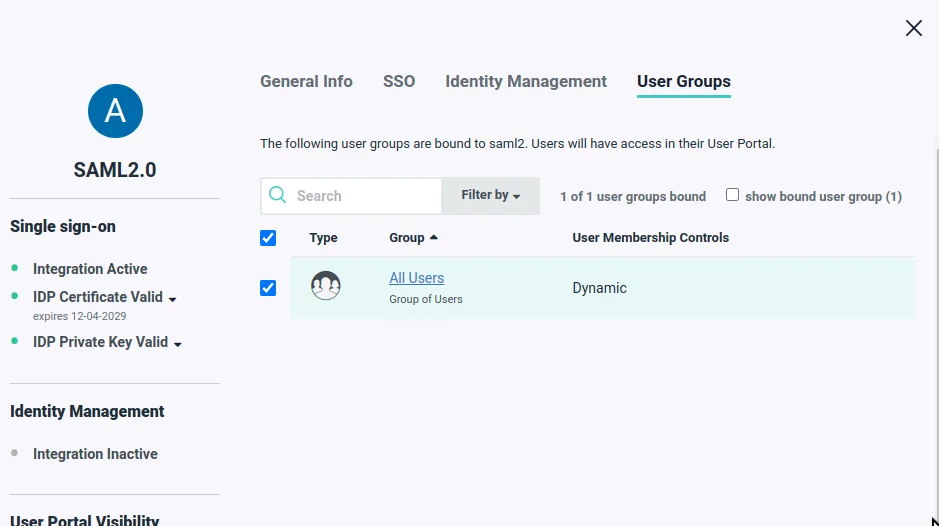
Enterprise users like MoneyGram and Moneypenny utilize Activepieces to manage these high-stakes environments where reliability and auditability are non-negotiable. The platform supports professional development practices by allowing you to sync your identity workflows to a Git repository.
This means every change to your synchronization logic is versioned, peer-reviewed, and tested before it ever touches your production directory, preventing the accidental mass-lockouts that often plague manual scripts or undocumented agent configurations.
Instead of relying on fragile PowerShell scripts that run silently in the background, Activepieces provides a visual execution log for every sync event.
If an attribute mapping fails due to a schema mismatch, you receive an immediate alert with a clear trace of the failure point.
This visibility allows your systems administrators to troubleshoot and resolve identity discrepancies in minutes rather than hours, maintaining the integrity of your source of truth without the overhead of proprietary middleware.
Frequently asked questions about Okta and AD syncs
How do I handle password resets in a hybrid setup?
Password resets must originate where the user’s authority resides. This typically means enabling "Password Sync" within the Okta AD Agent settings to ensure the local Active Directory remains the source of truth.
When a user updates their credentials via the Windows CTRL+ALT+DEL prompt, the agent captures the hash and pushes it to the cloud. This means the user maintains a single identity across legacy on-premise apps and modern SaaS portals.

Are my credential hashes stored in the cloud?
The security of your credentials depends on the specific synchronization feature you enable.
While delegated authentication sends only a validation request to your local server without moving hashes, the optional Password Sync feature does transmit a hashed version of the password to the cloud to enable SSO for non-federated apps.
This distinction is critical for compliance; you must choose between the zero-knowledge model of delegation and the convenience of cloud-mastered password synchronization.
If you instead allow Okta to master the password, you risk a "split-brain" scenario. In this case, the local workstation rejects the new cloud password because the write-back hasn't reached the domain controller.
Can I sync multiple AD forests to a single Okta tenant?
You can connect multiple independent Active Directory forests to one Okta organization. This is done by installing at least one instance of the Okta AD Agent on a member server in each distinct domain.

A parent company can use this architecture to consolidate identities from several acquired subsidiaries into one central dashboard, which simplifies the rollout of universal Multi-Factor Authentication.
Because each forest requires its own agent, the traffic is isolated to its respective network. A security breach or configuration error in one subsidiary’s forest doesn't automatically corrupt the identity data of the others.
What happens to Okta users if the AD Agent goes offline?
If the AD Agent loses connectivity, users with an existing session can keep working in Okta until it expires. No new metadata updates or password changes will synchronize until the heartbeat is restored.
This separation of the authentication layer from the sync layer prevents a local server crash from locking every employee out of their email and cloud tools.
However, because the "Delegated Authentication" request can't reach the domain controller during an outage, any user whose session has expired will be unable to start a new one. This creates a critical dependency on the stability of your outbound firewall rules.
How does JIT provisioning differ from scheduled imports?
Just-in-Time (JIT) provisioning creates or updates a user profile the exact moment a user attempts to log in.
Scheduled imports run on a fixed timer to pull the entire directory database. JIT Provisioning updates only the specific user logging in, which reduces unnecessary API calls to the domain controller.
Scheduled Imports capture changes for all users, including those who haven't logged in recently.
This ensures that terminated employees are deactivated even if they never attempt to access the system. Incremental Sync scans only for objects changed since the last successful run, which minimizes the processing load on the local agent during peak business hours.