Adobe Acrobat Pricing: 2026 Plans, Costs, and Options

Nov 3, 202614 min read
Before you pick a plan, know that Acrobat's price depends on the billing option as well as the plan:
- Month-to-month costs the most: - A year's commitment billed monthly costs less
- Paying the year upfront is usually cheapest

Acrobat is Adobe's subscription for editing, converting and signing PDFs.
If your team only fills in and signs forms, the cheapest tier is likely enough, and Activepieces can take the repetitive paperwork around those forms on a Free plan with unlimited flows for up to 5 users.
Adobe Acrobat pricing today in one table
Every current plan, price and limit
Read the billing columns first, because the same plan can cost noticeably different amounts depending on the commitment, and leaving a yearly plan early can trigger a fee. The table compares each plan on the three billing options, then on signing, AI and limits.
| Plan | Monthly price | Annual, billed monthly | Prepaid annual | E-signature | AI credits | Usage limits | Check date |
|---|---|---|---|---|---|---|---|
| Acrobat Standard | Highest rate for this plan | Lower than month-to-month; early exit may carry a fee | Paid upfront; usually the lowest effective rate | Basic signing included | Allowance set by Adobe, varies by tier | Narrowest feature set | Confirm on Adobe's page before buying |
| Acrobat Pro | Highest rate for this plan | Lower than month-to-month; early exit may carry a fee | Paid upfront; usually the lowest effective rate | Signing included, with more control than Standard | Allowance set by Adobe, varies by tier | Fuller editing and conversion | Confirm on Adobe's page before buying |
| Acrobat Studio | Highest rate for this plan | Lower than month-to-month; early exit may carry a fee | Paid upfront; usually the lowest effective rate | Signing included | Larger allowance than the entry tiers | Broadest feature set | Confirm on Adobe's page before buying |
| Teams/Business versions | Charged per seat | Charged per seat, annual terms | Charged per seat, paid upfront | Signing included, with admin controls | Allowance varies by plan | Seat count sets the total bill | Confirm on Adobe's page before buying |
Do not read live dollar amounts off this table. It describes how Adobe structures its plans, and Adobe changes the figures, which also differ by region.
If you are running this arithmetic for your own team, see what the same workload costs on Activepieces.
Which Acrobat plan fits which kind of user
Pick the cheapest plan that covers the one task you do most, because even heavy users spend their days on basic work.
In ILTA's survey of legal professionals, a group that handles more PDFs than most, 91% split and combine files, so a plan that merges pages already covers the most common job.

After that come 73% for OCR (turning scanned pages into searchable text), 69% for annotating and redacting, and 69% for converting files. Only 42% edit text directly, so paying for deep editing you won't use is the usual overspend.
The profiles below pair each user with the plan and the Adobe-listed feature that decides it.
Acrobat Reader for viewing and commenting
If you fill forms and merge a few files a month, start with the free tier and add a paid plan only when a task hits a wall.
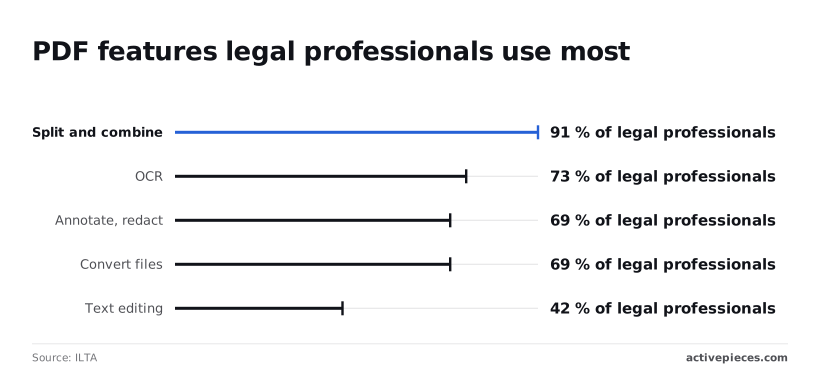
According to ILTA's survey, that wall is usually direct text editing, which only 42% of the legal professionals surveyed used, so more than half the profession gets by with alternatives.
Acrobat plans for daily editing and e-signature
Edit and collect signatures every day, and you need a paid plan with e-signature built in. That feature decides it. Compare the entry paid tier against the next one up, and move up only if you need something that tier lacks.
If you never black out sensitive text, the cheaper tier does the job.
Redaction, used by 69% in the survey, is the usual reason to move up, making it the primary driver of upgrades, so building the best redaction features is how vendors maximize upgrade conversions.
Teams and shared administration
For a small team, the deciding feature is admin control: one person assigning and removing seats. Without it, people buy their own licenses and you lose track of who is paying for what.
Because each seat is billed separately, a team of five pays five times the single-user price. So give the top tier only to the people who need OCR or redaction, and put everyone else on the cheapest plan that covers their task.
What Acrobat costs at realistic usage
Once you've picked the cheapest plan, the bill for one person is $239.88 a year if you commit to twelve months and $359.88 if you pay month to month.
At 1, 5 and 25 users the chart shows how that gap grows, and the lesson is that the commitment matters more than the headcount, which means simply hiring won't close the gap.
Per user, the individual annual plan is $19.99 a month, so annual users pay under $20 monthly. The monthly plan is $29.99. That's $10 a month for the freedom to cancel, which is a steep price for flexibility most people never use.

For one freelancer, month to month, three years costs $1,079.64 (that's $359.88 × 3). On the annual plan it's $719.64, translating to roughly $720.
You've paid $360 for the right to leave, which means mid-contract departure costs roughly half your annual investment.
A five-person team
On individual annual plans, five seats cost $1,199.40 a year, against $1,799.40 on monthly billing, revealing a $600 annual surcharge for billing flexibility.
Step up to the business-oriented Teams plan and it's $23.99 per user per month, or $287.88 a year per seat and $1,439.40 for five.
That's $240 more than individual plans for the same five people, so pay it only if you need the shared administration that comes with it.
Acrobat pricing for a 25-seat department
At this size, individual annual plans total $5,997 a year and monthly billing $8,997, a $3,000 difference. Teams annual comes to $7,197. Each seat added multiplies the cost of a bad term. Decide the term before you decide the seat count.
Hidden costs and limits that surprise Acrobat buyers
You will find most of the surprises in the fine print: a cancellation fee on annual plans, a renewal that happens on its own, usage caps and features reserved for higher tiers.
Billed monthly, an annual plan looks like a month-to-month deal, but cancelling after a short grace window can cost a share of the remaining contract.
Plans also renew by themselves, so put the renewal date in your calendar the day you buy.
Acrobat e-signature and AI assistant usage caps
E-signature means collecting legally valid signatures on a document electronically. Bulk send, which sends one document to many signers at once, is capped on Pro at a much lower level than on Studio.
Lean heavily on the AI assistant on Studio and a team can run dry before the month ends, because it runs on a monthly credit allowance. If you send contracts in batches, check the cap before you pick the plan.

Name the one task you need done every week, then buy the cheapest plan that does it.
Acrobat tax and per-seat cost multiplication
At checkout, tax lands on top of an advertised price that usually leaves it out. Licensing is also per person, so a price that looks fine for one user triples with three.
Work out the full yearly total, including tax, for every seat, before you compare plans.
Worth checking against a plan that does not meter every step: one credit covers a whole run on Activepieces.
Acrobat versus the closest PDF alternatives
Of the five, Acrobat is the most complete, and the others mostly compete by charging less for the editing and signing that small teams use daily.
The table shows how each product handles signatures, editing depth and billing terms, so you can see where paying more buys something you'll use.
I left out prices because they change often.
| Product | E-signature included | OCR and editing depth | Billing commitment | When Acrobat wins |
|---|---|---|---|---|
| Acrobat Pro | Yes | Deepest of the five, with full editing, OCR and form tools | Monthly or annual plans; the annual terms are where the commitment bites | Not applicable |
| Foxit PDF Editor | Check the plan; signing is often a separate tier | Solid editing and OCR for everyday documents | Subscription, with other licence options on some plans | Heavy compliance or shared-review workflows |
| Nitro PDF Pro | Signing sits with its wider document suite | Good editing and conversion | Subscription; confirm term length before buying | Teams whose clients all use Acrobat |
| PDFelement | Basic signing; confirm on the plan page | Capable editing, lighter on advanced forms | Subscription or one-time licence, depending on the plan | Complex forms and long-term archiving |
| Smallpdf | Yes, in the paid tier | Browser tools for quick jobs, not deep editing | Monthly or annual | Anything beyond occasional merging, compressing and signing |
If your one real task is signing and light edits, the cheaper rows already cover it, so check their billing terms before looking at Acrobat.
When a document has to survive other people's software, Acrobat earns its price.
Complex fillable forms, accessibility tagging, redaction you must trust and files that go to clients who open everything in Acrobat all reward the original.
Automate PDF handoffs around Acrobat with Activepieces
If manual handoffs are what's costing you, Activepieces earns a place: it's a workflow tool with 746 integrations in an MIT-licensed core, enough to take over the copying, filing and nagging that happens around your PDFs. It doesn't edit or sign anything.
If your real pain is that nobody can find the signed contract or the approver never saw the request, this is the cheaper fix. If your pain is editing text inside a PDF, skip it and keep the Acrobat plan that covers that.
Doing nothing here has a price too.
Someone on your team is saving a signed file, renaming it, dragging it into a shared folder and messaging a colleague. Every one of those steps is a chance for the file to land in the wrong place or sit unseen.
On an Adobe invoice that time never shows up, but you pay it in wages.
Activepieces doesn't multiply that cost by seat the way Acrobat does: its Free plan is $0 for up to 5 users, with unlimited flows and 1,000 credits a month, a run costs 1 credit however many steps it has, and Alan and Funding Societies run it in production, proving that the free plan works in real production environments, so you defer licensing costs until your team grows beyond five people.

Picture the canvas in the screenshot below, where each step is a box in a vertical line: a new lead arrives from HubSpot, an AI step qualifies it, and a yes-or-no check sends it down one path.
The later steps add it to Salesforce, post to Slack and send an email through Gmail.
It is a sales example, but the shape is what matters. You pick a trigger, then stack the actions that follow it, with no code involved.

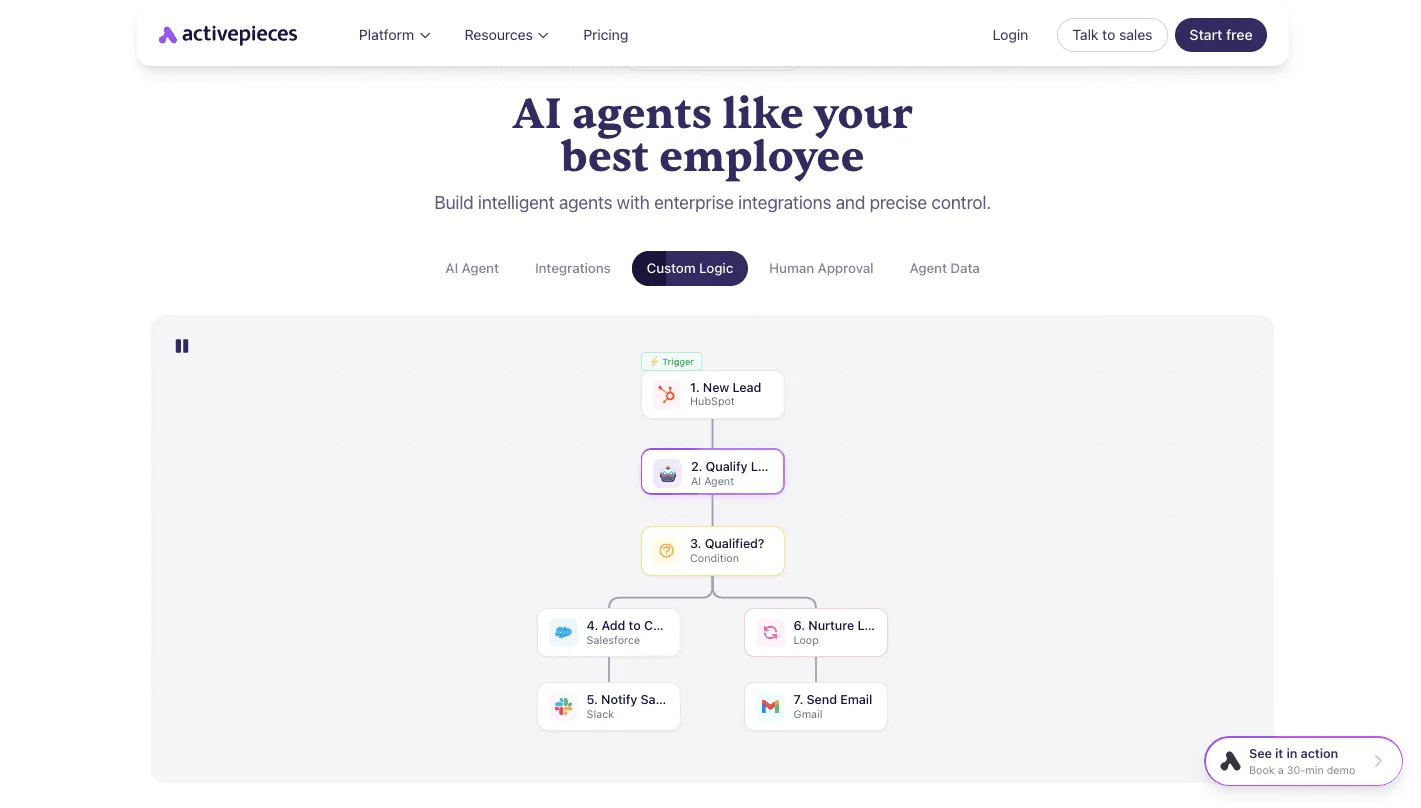
Swap the trigger for "signed PDF lands in a folder" and the same shape files the document, tells the approver and moves the file along.
For sign-off chains, the tool's "Human Approval" tab suggests a step that waits for a person to say yes before the flow continues. Start with one handoff, the one your team complains about most, and build only that.
Cut the Acrobat bill without losing features
Audit every seat first, then pay only for the cheapest tier each person actually uses. Doing nothing costs the most, because an unused seat renews on its own at full price, year after year.

Each of those four is a candidate for the free Acrobat Reader, which opens, comments on and fills in many ordinary documents.
If they sit on paid editing seats, you're renewing four licences for work that costs nothing. The steps below go from the cheapest fix to the most effort.
- List everyone who holds a seat, with their name and the plan they are on. Pull this from the admin console or the invoice.
- Remove seats nobody has opened in the last few months. Idle seats are the fastest saving because nobody loses anything.
- For each remaining person, ask whether they edit, or only view, comment and sign. Move the viewers to the cheapest tier, or to Reader.
- Check for duplicate e-signature subscriptions. If Acrobat's signing already covers you, cancel the separate signing service that someone on another team bought.
- Choose the billing term on purpose. An annual commitment is cheaper per month but locks you in, so a team whose headcount is still moving may do better paying monthly.
- Only now price a switch. Get a quote from one alternative for the one task you really do, and compare it with your trimmed Acrobat bill, not the original one.
Frequently asked questions
Is Adobe Acrobat free to use?
Only the Reader is free, and it covers viewing, printing, filling in forms and adding comments.
Editing text, combining files, converting formats and most signing workflows sit behind a paid plan, so if your team only reads and fills in documents, you may not need to pay at all.
Can I buy Adobe Acrobat once instead of subscribing?
In the past Adobe has sold one-time versions of Acrobat, but its main offering is a subscription, and availability changes. Check Adobe's current store before you plan around it.
With a one-time purchase you usually pay once and skip the monthly or yearly bill, but you give up ongoing updates and cloud features. If you rely on those, the subscription is the real price.
Does the Acrobat Pro price include e-signature features?
For sending a document to be signed, Pro includes basic tools, but the full signing product, Acrobat Sign, is sold separately and adds the features heavier users need.
If you send a handful of agreements a month, Pro's built-in tools may be enough. If signing is your team's main job, price Sign on its own and compare it with a Pro plan before you buy both.
Will Adobe raise Acrobat prices again?
Nobody outside Adobe can promise either way, but subscription software tends to get more expensive over time, and renewals are where increases land. Read your renewal notice rather than assuming last year's rate carries over. A multi-seat team feels any increase multiplied across every seat.
What should I check first on my current Acrobat bill?
Check three things in this order:
- Whether you're on an annual commitment, because cancelling early can still cost you.
- How many seats you're paying for, and whether everyone with one actually opens it.
- Whether your tier matches the one task you use it for.
Related reading
Running the numbers
See what the same workload costs here.
Free forever plan, and every paid plan self-hosts at no extra cost.
See pricing Talk to sales